@vacekrae
Rachel Vacek, Head of Web Services, University of Houston Libraries
OK-ACRL Conference | 11.6.2015 | slideshare.net/vacekrae
Assessing Your Library Website
Using User Research Methods and Other Tools
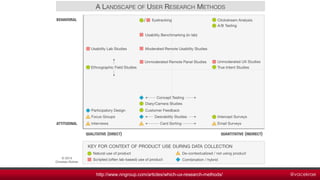
@vacekraehttp://www.nngroup.com/articles/which-ux-research-methods/
@vacekrae
Overview
Content Audit
Heat Map & Click Analytics
Literature Review
Focus Groups
Competitive Review
Contextual Inquiry
Usability Benchmark
@vacekrae
Content Audit
@vacekrae
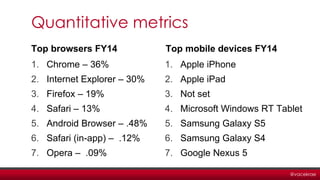
Quantitative metrics
Top browsers FY14
1. Chrome – 36%
2. Internet Explorer – 30%
3. Firefox – 19%
4. Safari – 13%
5. Android Browser – .48%
6. Safari (in-app) – .12%
7. Opera – .09%
Top mobile devices FY14
1. Apple iPhone
2. Apple iPad
3. Not set
4. Microsoft Windows RT Tablet
5. Samsung Galaxy S5
6. Samsung Galaxy S4
7. Google Nexus 5
@vacekrae
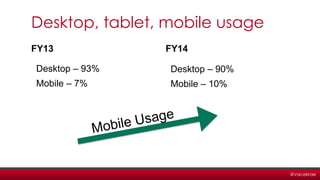
Desktop, tablet, mobile usage
FY13
Desktop – 93%
Mobile – 7%
FY14
Desktop – 90%
Mobile – 10%
@vacekrae
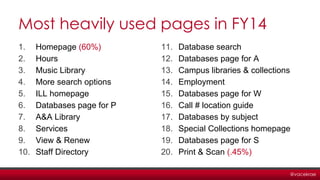
Most heavily used pages in FY14
1. Homepage (60%)
2. Hours
3. Music Library
4. More search options
5. ILL homepage
6. Databases page for P
7. A&A Library
8. Services
9. View & Renew
10. Staff Directory
11. Database search
12. Databases page for A
13. Campus libraries & collections
14. Employment
15. Databases page for W
16. Call # location guide
17. Databases by subject
18. Special Collections homepage
19. Databases page for S
20. Print & Scan (.45%)
@vacekrae
Qualitative metrics
Formats used
Primary purpose
Primary audience
Knowledge level
Usability
Findability
Actionability
Accuracy
@vacekrae
@vacekrae
Scorecard for content maintenance
• Capture quantitative metrics
• Capture qualitative metrics on a scale
• Usability, Findability, Actionability, Accuracy, Overall Quality
• Look at overall need for page and how it contextually fits
in with rest of site
• Determine how to prioritize content for future
maintenance
@vacekrae
Heat Map & Click Analytics
@vacekrae
@vacekrae
Literature Review
@vacekraehttp://libguides.williams.edu/envi-328/lit-review
@vacekrae
Focus Groups
@vacekrae
@vacekrae
…relying strictly on what students tell us in focus
groups is potentially incomplete … focus group
participants may share only what they think we
want to hear or they may fail to accurately
describe their library use. Listening is important,
but observation can yield unexpected revelations.
- Stephen Bell, From the Bell
Tower column, Library Journal
http://lj.libraryjournal.com/2015/06/opinion/steven-bell/not-liking-what-users-have-to-say-listen-anyway-from-the-bell-tower/
@vacekrae
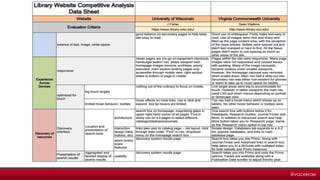
Competitive Review
@vacekrae
Choose library sites
@vacekrae
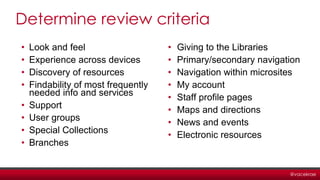
Determine review criteria
• Look and feel
• Experience across devices
• Discovery of resources
• Findability of most frequently
needed info and services
• Support
• User groups
• Special Collections
• Branches
• Giving to the Libraries
• Primary/secondary navigation
• Navigation within microsites
• My account
• Staff profile pages
• Maps and directions
• News and events
• Electronic resources
@vacekrae
@vacekrae
@vacekrae
Contextual Inquiry
@vacekrae
@vacekrae
Top Level: Theme
Second Level: Consolidated user
needs, often articulated in the voice of
the user
Third level: Individual user needs,
always in the voice of the user
Fourth Level: Ideas, insights, and
observations from the user interview
interpretation sessions
@vacekrae
@vacekrae
Usability Benchmark
@vacekrae
Setting it up
• Have users perform set of tasks
• Use counterbalancing
• Ensure tasks cover a broad range of core tasks on
the website
• Repeat the test after the website improvements are
implemented
@vacekrae
@vacekrae
@vacekrae
Recap
Content Audit
Heat Map & Click Analytics
Literature Review
Focus Groups
Competitive Review
Contextual Inquiry
Usability Benchmark
Most of these tools
can be used in any
environment, not just
the web world!
@vacekraehttp://www.nngroup.com/articles/which-ux-research-methods/
@vacekrae
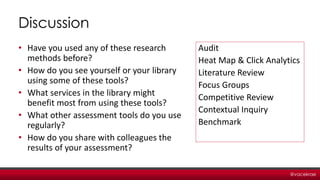
Discussion
• Have you used any of these research
methods before?
• How do you see yourself or your library
using some of these tools?
• What services in the library might
benefit most from using these tools?
• What other assessment tools do you use
regularly?
• How do you share with colleagues the
results of your assessment?
Audit
Heat Map & Click Analytics
Literature Review
Focus Groups
Competitive Review
Contextual Inquiry
Benchmark
@vacekrae
Thanks!
Rachel Vacek, Head of Web Services
University of Houston Libraries
http://rachelvacek.com
vacekrae@gmail.com
@vacekrae
Follow my department’s work:
http://sites.lib.uh.edu/wp/website-redesign/

Assessing Your Library Website: Using User Research Methods and Other Tools

Editor's Notes

  • #2 A bit about my department: We specialize in web and software development, user research, usability testing, interaction design, graphic design, system administration, system integration, content strategy, and project management. The catalog, discovery system, electronic resources, servers, computer hardware and software, digital library, institutional repository are ALL managed by other departments within the UH Libraries, but we work with all those departments to brand and integrate into a single user interface and try to improve the overall user experience.
  • #5 In website governance, a content audit is the process of evaluating content elements and information assets on some part or all of a website. Can be quantitative or qualitative.
  • #6 From Google Analytics for the 2014 fiscal year. Not only do we have to develop and design for different browsers, we also have to consider multiple versions of each of those browsers. So knowing what our users use is really helpful.
  • #7 Mobile is on the rise – up 3% over last year for our website. Mobile includes tablets and smartphones, but not laptops/desktops.
  • #8 This is the raw data – includes campus IP ranges, which is why you see A&A Library and Music Library so high – possibly default browser homepage on lab computers. Also, homepage =60%, and all the remaining pages total up to about 40%. Note that the 20th most used page has only .45% of the total website usage.
  • #9 We have about ~ 1000 pages – doesn’t include Library news (Wordpress) and other CMSs that are integrated like LibAnswers and LibGuides. Many have content that people can maintain, but about half this number are pages that people can’t edit because of API calls, embedded widgets, or complex styling/layout that doesn’t take advantage of the CMS. About 1/3 of the site was last edited over 3 years ago. About another 1/3 of the content hasn’t been edited since it migrated from the last website redesign in 2010. For the audit – looked at quantitative data (page usage, last edited, etc) and qualitative data, described here: Formats used Text, Video, Image, Audio, PDF, Word Doc Primary purpose Persuade, Inform, Validate, Instruct, Entertain, Assist, Portal Primary Audience Faculty, Undergrads, Grads, Alumni, Researchers, Donors, Users with disabilities Knowledge Level Beginner, Average, Expert Usability Terrible, Poor, Satisfactory, Good, Excellent Findability Terrible, Poor, Satisfactory, Good, Excellent Actionability Terrible, Poor, Satisfactory, Good, Excellent Accuracy Terrible, Poor, Satisfactory, Good, Excellent
  • #11 Is the content required for some reasons (legally, politically, capital campaign)? Which audience is the content likely to reach both today and in the future? How big are those audiences? How relevant is the content to users? How rich or unique are we able to make the content?
  • #12 In website governance, a content audit is the process of evaluating content elements and information assets on some part or all of a website. Can be quantitative or qualitative.
  • #13 From Crazy Egg, a really fun tool that monitors click analytics. The heatmap is a visualization of where your visitors are clicking. The brighter the area, the more popular it is. The darker the area, the less popular it is. As a specific area of your site gets more clicks, its color on the heatmap will change. We can learn from this because we can see where our design flaws lie, and what gets more heavily used.
  • #14 Not a user research method, but because we are academics, it makes sense to look at the lit available.
  • #15 Understanding what has be done and what needs to be done Understand different methodology used in earlier researches Helps in enhancing and acquiring the subject vocabulary understanding Exposes gaps in the Literature Helps in exhibit proficiency over the research area Credibility of the research paper increases Generates interest in readers to read complete work Helps in developing background of the research
  • #16 A focus group is a form of qualitative research in which a group of people are asked about their perceptions, opinions, beliefs, and attitudes towards a product, service, concept, advertisement, idea, or packaging. Questions are asked in an interactive group setting where participants are free to talk with other group members.
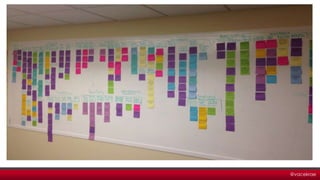
  • #17 14 focus groups with library staff Groups were people who oversee these specific areas of content: Special Collections, research support, help content, electronic resources, computers and technology, borrowing and delivery, about/news/events, giving We put the comments from each of the groups on sticky notes, and each group had a different color. The affinity diagram is a business tool used to organize ideas and data. The tool is commonly used within project management and allows large numbers of ideas stemming from brainstorming to be sorted into groups, based on their natural relationships, for review and analysis. It is also frequently used in contextual inquiry as a way to organize notes and insights from field interviews. It can also be used for organizing other freeform comments, such as open-ended survey responses, support call logs, or other qualitative data.
  • #18 Focus groups have their place. So do surveys. But to really learn more about how our users do research, we needed a more ethnographic approach to getting data.
  • #19 A competitive review in marketing and strategic management is an assessment of the strengths and weaknesses of current and potential competitors. We are in academia, so we aren’t really looking at our competitors, but rather what our peers are doing.
  • #20 The purpose of this competitive analysis is to evaluate how select peer and aspirational institutions’ websites address specific key design components and functionalities. The data collected will inform the information architecture, features and behavior, and visual design of the Libraries’ new website. Evaluation criteria include the look and feel of the site, the experience across devices, the discovery process, and access to archival collections as well as library support, services, and resources.
  • #21 This is the review criteria
  • #22 Here is just a small sampling to show how we gathered the info. We basically did a heuristic evaluation of the 6 sites, and gathered the notes in multiple spreadsheets. All the notes are collected on our blog.
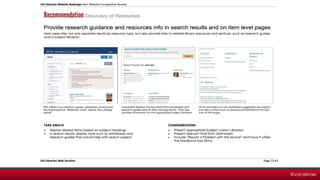
  • #23 Here is an example from the final report. It shows a particular recommendation, shows 3 examples that support that recommendation, offers key take-aways, and suggests a few things to consider when designing. The final report is on the blog.
  • #24 It’s a user-centered design (UCD) ethnographic research method It’s a series of structured, in-depth user interviews The interviewer asks the user to perform common tasks that he/she would normally do Users can show us what they do rather than tell us, and we can better understand why they do it You gather the research via interviews, interpret the data from each interview through small teams, put the interpretations (notes) on sticky notes. Then we categories those sticky notes till we have 4 levels and some major themes. Our interviews were 1 hour each with 12 users, each interview followed immediately by a 2-hour interpretation session. We went through IRB so we could present and publish our methodology and the results of our research.
  • #25 Super sticky is the way to go! Generated ~600 sticky notes and organized them into affinities.
  • #26 From the interpretation sessions, we generated ~600 yellow sticky notes and then proceeded over a couple weeks to organize them into affinities. We created blue, pink, and green notes as we organized them.
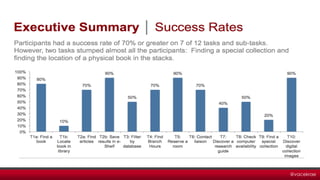
  • #28 The purpose of doing this is to establish a benchmark for general usability of the UH Libraries public website, including task success rates, total errors, time on task, and post-task and overall ease of use and satisfaction ratings. This test will be repeated after the homepage has been redesigned and the new IA is in place to see if the improvements we think we made were actually improvements to the user.
  • #29 Data collection: Audio, video and screen capture with Morae usability testing software Written notes during testing sessions All the tasks and sub tasks are on the Web Services blog. Finding a known book and then determining its physical location in the stacks Finding and saving item information for three recent peer-reviewed articles Discovering a class or subject research guide
  • #30 Explain this.
  • #31 And this. Important to note that we gathered POST TASK feedback as well as POST TEST feedback. (overall ease of use and satisfaction ratings)