Mobile web or native app?
Mike Takahashi
Associate Director, Digital
UCLA Marketing & Special Events
Twitter: @takadesigns
It depends
What’s the difference?
What is your product or service?
Who is your audience?
What are your resources and budget?
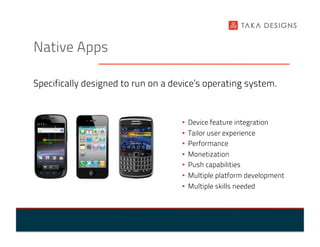
Native Apps

Specifically designed to run on a device’s operating system.


                                    •  Device feature integration
                                    •    Tailor user experience
                                    •    Performance
                                    •    Monetization
                                    •    Push capabilities
                                    •  Multiple platform development
                                    •  Multiple skills needed
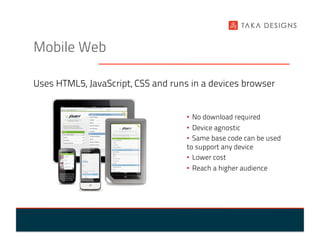
Mobile Web

Uses HTML5, JavaScript, CSS and runs in a devices browser


                                    •  No download required
                                    •  Device agnostic
                                    •  Same base code can be used
                                    to support any device
                                    •  Lower cost
                                    •  Reach a higher audience
Wait, there’s one more…
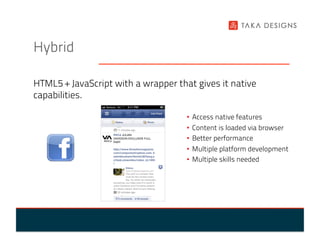
Hybrid

HTML5 + JavaScript with a wrapper that gives it native
capabilities.

                                     •  Access native features
                                     •  Content is loaded via browser
                                     •  Better performance
                                     •  Multiple platform development
                                     •  Multiple skills needed
PhoneGap

An open source framework that allows you to access native
APIs for iPhone, Android, BlackBerry, Windows Phone 7 + more

Capture photo:                                             •  Accelerometer
function capturePhoto() {                                  •  Camera
      navigator.camera.getPicture(onPhotoDataSuccess,
      onFail, { quality: 50 });                            •  Compass
}
                                                           •  Contacts
...                                                        •  Geolocation
<button onclick="capturePhoto();">Capture Photo</button>   •  Notifications
                                                           •  And much more…
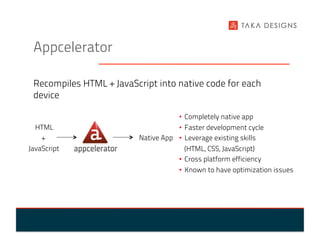
Appcelerator

 Recompiles HTML + JavaScript into native code for each
 device

                                      •  Completely native app
  HTML                               •  Faster development cycle
    +                     Native App •  Leverage existing skills
JavaScript                              (HTML, CSS, JavaScript)
                                     •  Cross platform efficiency
                                      •  Known to have optimization issues
What is your product or service?

Who is your target audience?


                               •  Functionality and feature set?
                               •  Device capability needs?
                               •  Online or offline?
                               •  Audience reach?
                               •  What content will you be
                               delivering?
Resources and budget

”When we update the Facebook product we have to update
about seven different versions… It's becoming a real
engineering challenge for us, as well as other technology
companies.

The end goal is that we'll be able to develop one version of
Facebook for mobile devices, that runs on all different kinds
of mobile phones. That's really where our focus is now.”

                                 -Bret Taylor, Facebook CTO
UCLA mobile

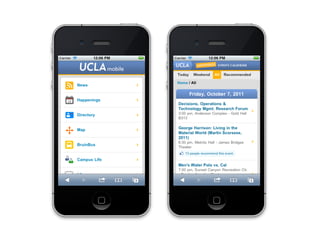
Based on the UCLA Mobile Web Framework.

•  Single set of base code
•  Progressive enhancement
•  Works with any language: PHP, .NET, Java, Python
•  Device agnostic
•  Implemented across University of California system:
 Berkeley, San Diego, San Francisco
UCLA mobile
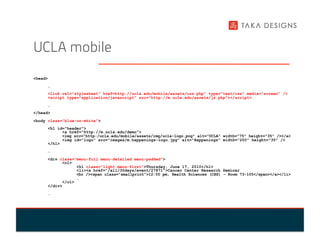
<head>
     …
     <link rel="stylesheet" href=http://ucla.edu/mobile/assets/css.php” type="text/css" media="screen" />
     <script type="application/javascript" src="http://m.ucla.edu/assets/js.php"></script>
     …
</head>
<body class="blue-on-white">
     <h1 id="header">
           <a href="http://m.ucla.edu/demo">
           <img src="http:/ucla.edu/mobile/assets/img/ucla-logo.png" alt="UCLA" width="75" height="35" /></a>
           <img id="logo" src="images/m.happenings-logo.jpg" alt="Happenings" width="200" height="35" />
     </h1>
     …
     <div class="menu-full menu-detailed menu-padded">
           <ol>
                 <h1 class="light menu-first">Thursday, June 17, 2010</h1>
                 <li><a href="/all/30days/event/27871">Cancer Center Research Seminar
                 <br /><span class="smallprint">12:00 pm, Health Sciences (CHS) - Room 73-105</span></a></li>
                 …
           </ol>
     </div>
     …
What’s next?
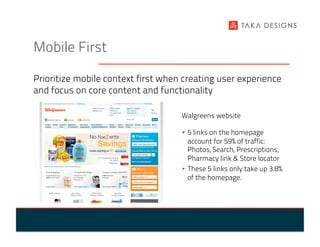
Mobile First

Prioritize mobile context first when creating user experience
and focus on core content and functionality

                                    Walgreens website

                                    •  5 links on the homepage
                                       account for 59% of traffic:
                                       Photos, Search, Prescriptions,
                                       Pharmacy link & Store locator
                                    •  These 5 links only take up 3.8%
                                       of the homepage.
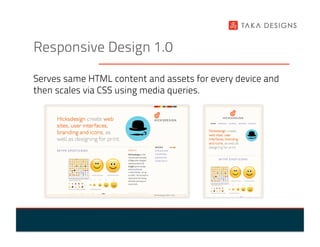
Responsive Design 1.0

Serves same HTML content and assets for every device and
then scales via CSS using media queries.
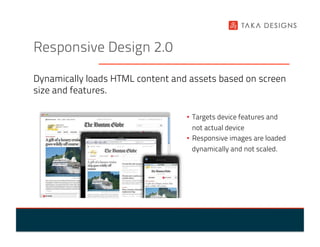
Responsive Design 2.0

Dynamically loads HTML content and assets based on screen
size and features.

                                  •  Targets device features and
                                     not actual device
                                  •  Responsive images are loaded
                                   dynamically and not scaled.
Questions?


Contact

Twitter: @takadesigns
Email: mike@takadesigns.com
http://takadesigns.com

Mobile web or native app

  • 1.
    Mobile web ornative app? Mike Takahashi Associate Director, Digital UCLA Marketing & Special Events Twitter: @takadesigns
  • 2.
  • 3.
    What’s the difference? Whatis your product or service? Who is your audience? What are your resources and budget?
  • 4.
    Native Apps Specifically designedto run on a device’s operating system. •  Device feature integration •  Tailor user experience •  Performance •  Monetization •  Push capabilities •  Multiple platform development •  Multiple skills needed
  • 5.
    Mobile Web Uses HTML5,JavaScript, CSS and runs in a devices browser •  No download required •  Device agnostic •  Same base code can be used to support any device •  Lower cost •  Reach a higher audience
  • 6.
  • 7.
    Hybrid HTML5 + JavaScriptwith a wrapper that gives it native capabilities. •  Access native features •  Content is loaded via browser •  Better performance •  Multiple platform development •  Multiple skills needed
  • 8.
    PhoneGap An open sourceframework that allows you to access native APIs for iPhone, Android, BlackBerry, Windows Phone 7 + more Capture photo: •  Accelerometer function capturePhoto() { •  Camera navigator.camera.getPicture(onPhotoDataSuccess, onFail, { quality: 50 }); •  Compass } •  Contacts ... •  Geolocation <button onclick="capturePhoto();">Capture Photo</button> •  Notifications •  And much more…
  • 9.
    Appcelerator Recompiles HTML+ JavaScript into native code for each device •  Completely native app HTML •  Faster development cycle + Native App •  Leverage existing skills JavaScript (HTML, CSS, JavaScript) •  Cross platform efficiency •  Known to have optimization issues
  • 10.
    What is yourproduct or service? Who is your target audience? •  Functionality and feature set? •  Device capability needs? •  Online or offline? •  Audience reach? •  What content will you be delivering?
  • 11.
    Resources and budget ”Whenwe update the Facebook product we have to update about seven different versions… It's becoming a real engineering challenge for us, as well as other technology companies. The end goal is that we'll be able to develop one version of Facebook for mobile devices, that runs on all different kinds of mobile phones. That's really where our focus is now.” -Bret Taylor, Facebook CTO
  • 12.
    UCLA mobile Based onthe UCLA Mobile Web Framework. •  Single set of base code •  Progressive enhancement •  Works with any language: PHP, .NET, Java, Python •  Device agnostic •  Implemented across University of California system: Berkeley, San Diego, San Francisco
  • 13.
    UCLA mobile <head> … <link rel="stylesheet" href=http://ucla.edu/mobile/assets/css.php” type="text/css" media="screen" /> <script type="application/javascript" src="http://m.ucla.edu/assets/js.php"></script> … </head> <body class="blue-on-white"> <h1 id="header"> <a href="http://m.ucla.edu/demo"> <img src="http:/ucla.edu/mobile/assets/img/ucla-logo.png" alt="UCLA" width="75" height="35" /></a> <img id="logo" src="images/m.happenings-logo.jpg" alt="Happenings" width="200" height="35" /> </h1> … <div class="menu-full menu-detailed menu-padded"> <ol> <h1 class="light menu-first">Thursday, June 17, 2010</h1> <li><a href="/all/30days/event/27871">Cancer Center Research Seminar <br /><span class="smallprint">12:00 pm, Health Sciences (CHS) - Room 73-105</span></a></li> … </ol> </div> …
  • 15.
  • 16.
    Mobile First Prioritize mobilecontext first when creating user experience and focus on core content and functionality Walgreens website •  5 links on the homepage account for 59% of traffic: Photos, Search, Prescriptions, Pharmacy link & Store locator •  These 5 links only take up 3.8% of the homepage.
  • 17.
    Responsive Design 1.0 Servessame HTML content and assets for every device and then scales via CSS using media queries.
  • 18.
    Responsive Design 2.0 Dynamicallyloads HTML content and assets based on screen size and features. •  Targets device features and not actual device •  Responsive images are loaded dynamically and not scaled.
  • 19.