Basics of making mobile
websites (with Drupal)
Drupalcamp New York 5 dec 2009


Tom Deryckere
Software Architect / Siruna
@twom
About Siruna
 open source company

 We think in small screens (Mobile Web)

 We develop solutions to help the development of
 mobile websites

 With a very strong focus on Drupal and Joomla!

 Mobile partner of several web agencies

                 2
Osmobi
A Free service to instantly mobilize your Drupal site
based on our transcoding engine
Focus on
 − Very simple and fast
 − Simple adaptations
 − High quality
Osmobi has a GUI to change the look ‘n feel of your site


                     3
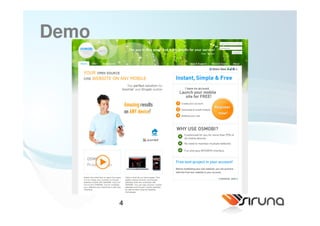
Demo


       4
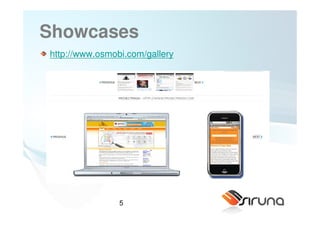
Showcases
http://www.osmobi.com/gallery


                5
Focus on Drupal and Joomla!
 http://drupal.org/project/mobile_tools
 http://drupal.org/project/wurfl
 http://www.osmobi.com

 Why Drupal?
 −   Open Source
 −   Big, well organized community
 −   Emerging
 −   No mobile


                       6
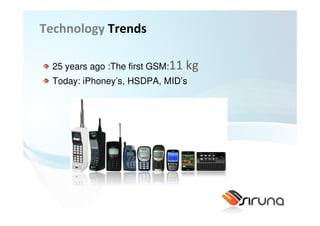
Technology Trends

  25 years ago :The first GSM:11   kg
  Today: iPhoney’s, HSDPA, MID’s
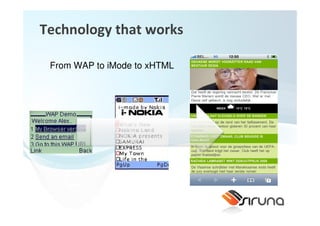
Technology that works

 From WAP to iMode to xHTML
Network side TECHNOLOGY
 From slow connections to fast connections
Current state
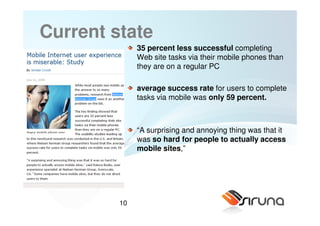
              35 percent less successful completing
              Web site tasks via their mobile phones than
              they are on a regular PC

              average success rate for users to complete
              tasks via mobile was only 59 percent.


              “A surprising and annoying thing was that it
              was so hard for people to actually access
              mobile sites,”


         10
Current state
 Web sites designed for PC compatibility will most
 likely render improperly on mobile phones and create
 a whole new set of additional obstacles for the mobile
 Internet user.

 However, there is still hope for mobile Web developers,
 publishers and marketers: User performance could be
 improved by 20 percent by creating mobile-optimized
 sites, according to Neilsen Norman Group


                 11
Reasons to go mobile
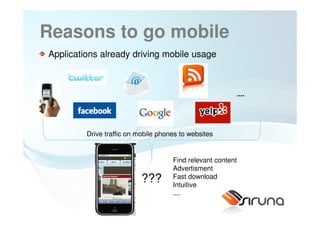
Applications already driving mobile usage


                                                             ....


         Drive traffic on mobile phones to websites


                                     Find relevant content
                                     Advertisment
                           ???       Fast download
                                     Intuitive
                                     ....
                   12
Reasons to go mobile
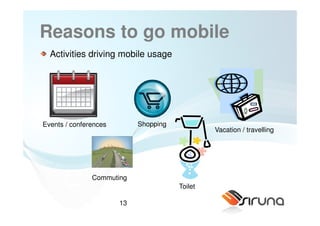
  Activities driving mobile usage


Events / conferences        Shopping
                                                Vacation / travelling


               Commuting
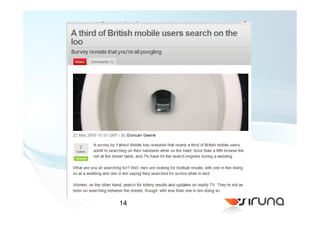
                                       Toilet

                       13
14
Mobile Web according google
   “We believe the web has won and over the next several
   years, the browser, for economic reasons almost, will
   become the platform that matters and certainly that’s
   where Google is investing.”
Src: http://blogs.ft.com/techblog/2009/07/app-stores-are-not-the-future-says-google/


                             15
Some random quotes from the web
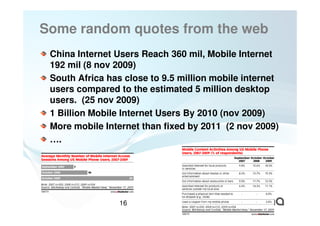
 China Internet Users Reach 360 mil, Mobile Internet
 192 mil (8 nov 2009)
 South Africa has close to 9.5 million mobile internet
 users compared to the estimated 5 million desktop
 users. (25 nov 2009)
 1 Billion Mobile Internet Users By 2010 (nov 2009)
 More mobile Internet than fixed by 2011 (2 nov 2009)
 ….


                 16
SOME EXAMPLES


       17
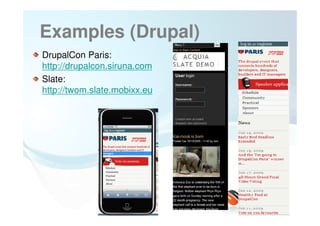
Examples (Drupal)
DrupalCon Paris:
http://drupalcon.siruna.com
Slate:
http://twom.slate.mobixx.eu


                  18
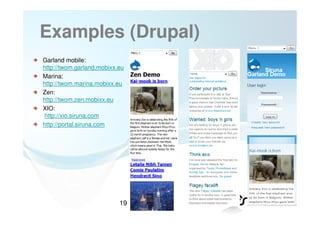
Examples (Drupal)
Garland mobile:
http://twom.garland.mobixx.eu
Marina:
http://twom.marina.mobixx.eu
Zen:
http://twom.zen.mobixx.eu
XIO:
http://xio.siruna.com
http://portal.siruna.com


                           19
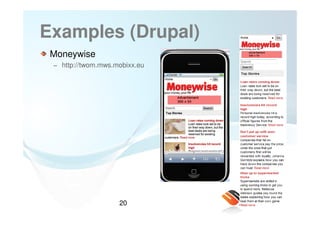
Examples (Drupal)
 Moneywise
 − http://twom.mws.mobixx.eu


                    20
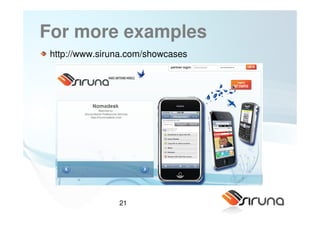
For more examples
 http://www.siruna.com/showcases


                21
WHERE IS THE COMPLEXITY


       22
Complexity
 Device fragmentation:
 − Millions of devices
 − Different Operating systems
 − Different capabilities
      • Ex: screen sizes, javascript support, CSS / xHTML support, video support
 − ...
 Usability: make a fun and easy experience
 −   Content has to be easy to find
 −   Reduce scrolling (no horizontal scrolling)
 −   Make links clickable (not too small)
 −   Easy navigation structure that is easy to find
 −   ...
 How to bring users to the mobile website
 − Two urls? Redirection?

                        23
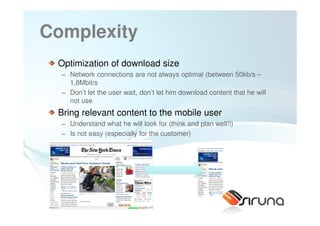
Complexity
 Optimization of download size
  − Network connections are not always optimal (between 50kb/s –
    1,8Mbit/s
  − Don’t let the user wait, don’t let him download content that he will
    not use
 Bring relevant content to the mobile user
  − Understand what he will look for (think and plan well!!)
  − Is not easy (especially for the customer)


                     24
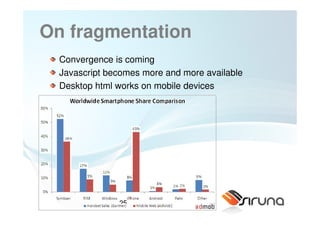
On fragmentation
  Convergence is coming
  Javascript becomes more and more available
  Desktop html works on mobile devices


               25
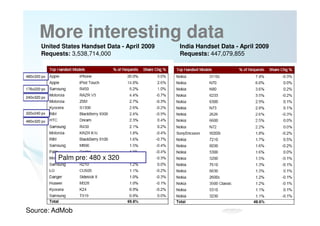
More interesting data
       United States Handset Data - April 2009   India Handset Data - April 2009
       Requests: 3,538,714,000                   Requests: 447,079,855


480x320 px


176x220 px

240x320 px


320x240 px

480x320 px


             Palm pre: 480 x 320


                                   26
Source: AdMob
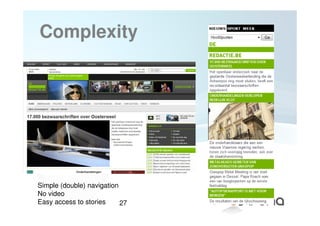
Complexity


Simple (double) navigation
No video
Easy access to stories     27
Understanding mobile dev
 Different viewpoints to explain / understand
 − Functional point of view:
     • What functionality will I present on the mobile device?
     • How can I make optimal usage of the mobile context?
     • What will the user do or need?
 − From a developer point of view:
     •   What are the possibilities ?
     •   How can my backend adapt?
     •   What device resources are available?
     •   How to handle device detection, redirection, theme switching
     •   How can I manage image resizing
 − (interaction) Designer
     • what are good interaction paradigms?
     • How to maintain a consistent feeling over different devices?


 Answers to these questions are more natural for desktop sites

                          28
WEBSITE VS APPLICATION


       29
Overview
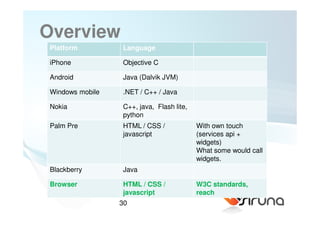
 Platform         Language

 iPhone           Objective C

 Android          Java (Dalvik JVM)

 Windows mobile   .NET / C++ / Java

 Nokia            C++, java, Flash lite,
                  python
 Palm Pre         HTML / CSS /             With own touch
                  javascript               (services api +
                                           widgets)
                                           What some would call
                                           widgets.
 Blackberry       Java

 Browser          HTML / CSS /             W3C standards,
                  javascript               reach
                  30
http://www.scribd.com/doc/1743125
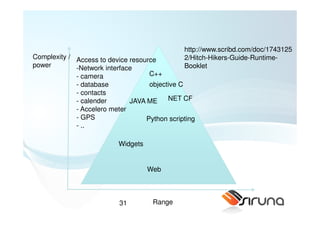
Complexity / Access to device resource         2/Hitch-Hikers-Guide-Runtime-
power        -Network interface                Booklet
             - camera               C++
             - database             objective C
             - contacts
             - calender       JAVA ME     NET CF
             - Accelero meter
             - GPS                 Python scripting
             - ..

                           Widgets


                                     Web


                           31         Range
Browser technology
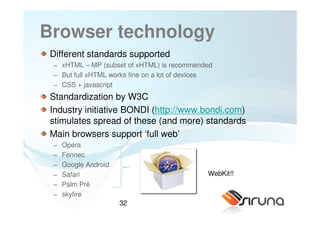
 Different standards supported
 − xHTML – MP (subset of xHTML) is recommended
 − But full xHTML works fine on a lot of devices
 − CSS + javascript
 Standardization by W3C
 Industry initiative BONDI (http://www.bondi.com)
 stimulates spread of these (and more) standards
 Main browsers support ‘full web’
 −   Opera
 −   Fennec
 −   Google Android
 −   Safari                                   WebKit!!
 −   Palm Pré
 −   skyfire
                      32
Good news
In practise, use your general web skills...
Just keep visuals under control
You will have some new api’s available in the future
(same counts for desktop)


                 33
SOME MORE EXAMPLES


       34
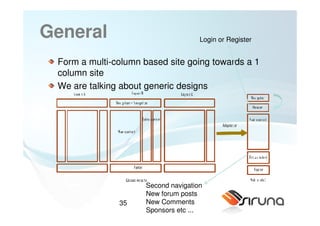
General                              Login or Register


 Form a multi-column based site going towards a 1
 column site
 We are talking about generic designs


                     Second navigation
                     New forum posts
               35    New Comments
                     Sponsors etc ...
Design
 Rules of thumb
  −   No fixed margins
  −   No floats
  −   Limit usage of fixed fonts
  −   Reduce the usage of tables (or reduce the number of columns)
  −   Replace the user login block by a link
  −   Navigation in a dropdown list works well
  −   No who is online, who is new kind of blogs (not relevant)
  −   You can make things sexy for iphone, android, ...
 Optional
  − Remove node content from frontpage
  − Overview blocks can be reduced to link pointing to a page view


                     36
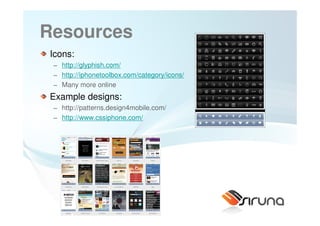
Resources
Icons:
 − http://glyphish.com/
 − http://iphonetoolbox.com/category/icons/
 − Many more online
Example designs:
 − http://patterns.design4mobile.com/
 − http://www.cssiphone.com/


                      37
Design patterns
 Study examples and design patterns can help
 http://wiki.forum.nokia.com/index.php/Category:Mobile_
 Web_Design_Patterns
 − Vertical list, Horizontal list, Tabbed List, Grid
 http://developer.apple.com/safari/library/documentation/I
 nternetWeb/Conceptual/iPhoneWebAppHIG/iPhoneUser
 Environment/iPhoneUserEnvironment.html#//apple_ref/d
 oc/uid/TP40007900-CH3-SW1
 − iPhone design patterns


                        38
Design like you make an app
 Create app like user interfaces (think iPhone)
 Use progressive enhancement
 Javascript mobile libs:
 − IUI
 − jQTouch
 − XUI


 New, largely unexplored domain


                  39
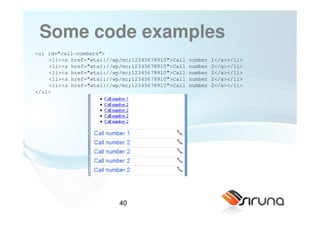
Some code examples
<ul id="call-numbers">
    <li><a href="wtai://wp/mc;12345678910">Call   number   1</a></li>
    <li><a href="wtai://wp/mc;12345678910">Call   number   2</a></li>
    <li><a href="wtai://wp/mc;12345678910">Call   number   2</a></li>
    <li><a href="wtai://wp/mc;12345678910">Call   number   2</a></li>
    <li><a href="wtai://wp/mc;12345678910">Call   number   2</a></li>
</ul>


                          40
Some code examples
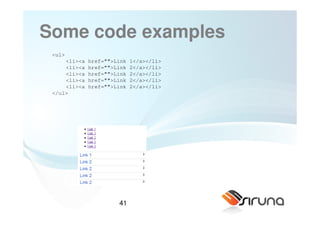
 <ul>
     <li><a   href="">Link   1</a></li>
     <li><a   href="">Link   2</a></li>
     <li><a   href="">Link   2</a></li>
     <li><a   href="">Link   2</a></li>
     <li><a   href="">Link   2</a></li>
 </ul>


                       41
Tab menus
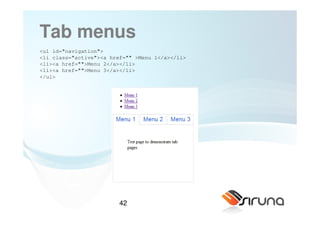
<ul id="navigation">
<li class="active"><a href="" >Menu 1</a></li>
<li><a href="">Menu 2</a></li>
<li><a href="">Menu 3</a></li>
</ul>


                         42
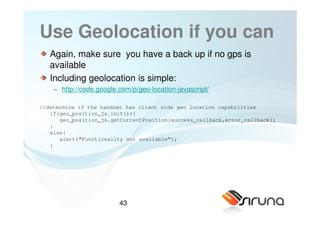
Use Geolocation if you can
   Again, make sure you have a back up if no gps is
   available
   Including geolocation is simple:
    − http://code.google.com/p/geo-location-javascript/

//determine if the handset has client side geo location capabilities
   if(geo_position_js.init()){
      geo_position_js.getCurrentPosition(success_callback,error_callback);
   }
   else{
      alert("Functionality not available");
   }


                         43
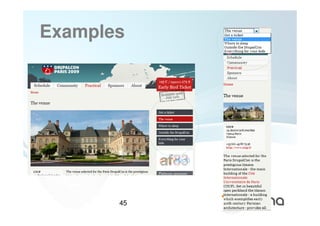
Examples


       44
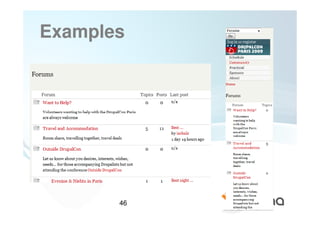
Examples


       45
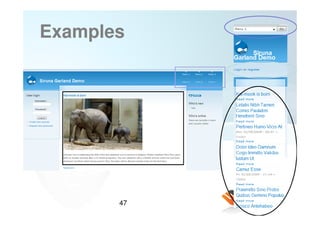
Examples


       46
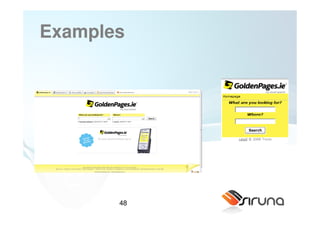
Examples


       47
Examples


       48
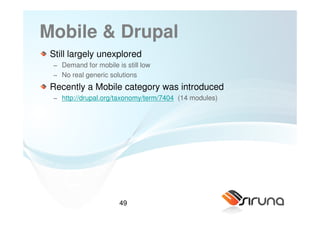
Mobile & Drupal
 Still largely unexplored
 − Demand for mobile is still low
 − No real generic solutions
 Recently a Mobile category was introduced
 − http://drupal.org/taxonomy/term/7404 (14 modules)


                      49
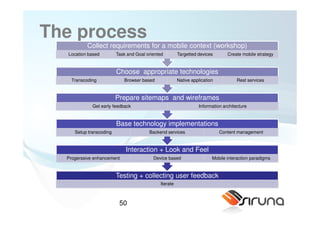
The process
          Collect requirements for a mobile context (workshop)
  Location based         Task and Goal oriented        Targetted devices       Create mobile strategy


                         Choose appropriate technologies
    Transcoding             Browser based              Native application           Rest services


                         Prepare sitemaps and wireframes
             Get early feedback                                  Information architecture


                         Base technology implementations
     Setup transcoding                  Backend services                    Content management


                             Interaction + Look and Feel
  Progerssive enhancement                 Device based                  Mobile interaction paradigms


                         Testing + collecting user feedback
                                             Iterate


                          50
Talk some Drupal

MOBILE TOOLS


                   51
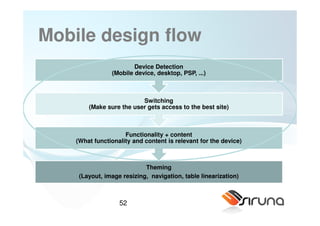
Mobile design flow
                        Device Detection
                (Mobile device, desktop, PSP, ...)


                          Switching
        (Make sure the user gets access to the best site)


                     Functionality + content
    (What functionality and content is relevant for the device)


                            Theming
     (Layout, image resizing, navigation, table linearization)


                   52
Goal of mobile tools
 Bundle some essential funcitonality to go mobile into one module

 Device detection

 User Notification: “I see you surf mobile... Check out our mobile site”

 Redirection

 Mobile permission

 Theme switching

 ....


                      53
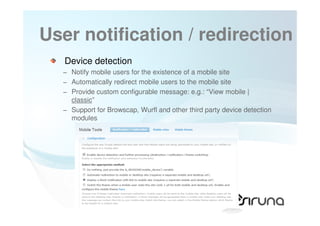
User notification / redirection
   Device detection
  − Notify mobile users for the existence of a mobile site
  − Automatically redirect mobile users to the mobile site
  − Provide custom configurable message: e.g.: “View mobile |
    classic”
  − Support for Browscap, Wurfl and other third party device detection
    modules


                    54
Redirection
  What we recomend:
   − 2 urls: mobile (m.domain.com) and desktop (www.domain.com)
   − Direct mobile user immediately to the mobile site
   − Have a link on the mobile site to return to the desktop site

   − Remember the last choice and for next visit of the domain.com site,
     redirect to mobile or stay on desktop
   − Provide link on desktop to mobile and remember this choice


⇒ No real need for mobile user to learn two urls!
⇒ Seamless transistions

   Eg. Facebook


                        55
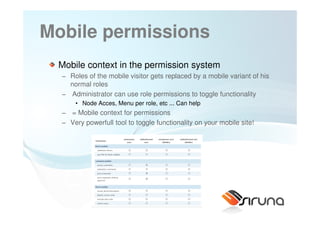
Mobile permissions
 Mobile context in the permission system
  − Roles of the mobile visitor gets replaced by a mobile variant of his
    normal roles
  − Administrator can use role permissions to toggle functionality
      • Node Acces, Menu per role, etc ... Can help
  − = Mobile context for permissions
  − Very powerfull tool to toggle functionality on your mobile site!


                     56
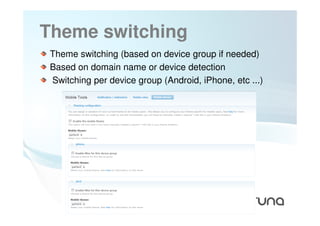
Theme switching
 Theme switching (based on device group if needed)
 Based on domain name or device detection
 Switching per device group (Android, iPhone, etc ...)


                  57
TRANSCODING YOUR SITE


       58
Creating the mobile site
  Create static content specific for mobile

  Create a seperate install for mobile

  Create you own themes and keep drupal install

  Use an adaptation service
  − Partly automation
  − Build in functionality to help creating different versions for different
    devices
  − Real multiplatform distribution
  − Fast prototyping
  − High Quality
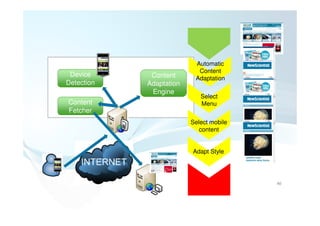
Automatic
                           Content
 Device      Content      Adaptation
Detection   Adaptation
             Engine
                            Select
Content                     Menu
Fetcher
                         Select mobile
                            content


                         Adapt Style


                                         60
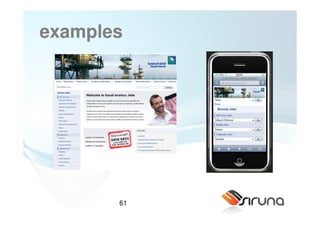
examples


       61
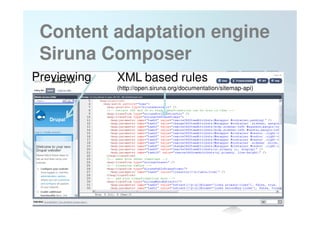
Content adaptation engine
 Siruna Composer
Previewing   XML based rules
             (http://open.siruna.org/documentation/sitemap-api)


             62
Demo
Mobilization of Garland
 − Create a dropdown menu
 − Remove blocks


                   63
XML scripting language:
syntax
 <map:transform />
 means you want to define a transformation on the content.

 <map:transform type=“sirunaElementTransformer” />
 means you want to use an “Element Transformer”
 (http://open.siruna.org/documentation/sitemap-api for more
 transformers.
 <map:transform type=“sirunaElementTransformer>
   <map:parameter name="task0"
 value="remove(//p:form[@id='comment-form']//p:fieldset)" />
 </map:transform>
 => Means you want to remove the fieldset of the form
Adaptations (some examples)
         Remove content (example remove content of nodes on
         frontpage)
     < <map:transform type="sirunaElementTransformer">
          <map:parameter name="task0" value="remove(//p:div[@class='views-field-teaser'])" />
     </map:transform>


         Make drupal forms mobile friendly:
<map:transform type="sirunaElementTransformer">
    <map:parameter name="task0" value="remove(//p:form[@id='comment-form']//p:fieldset)" />
    <map:parameter name="task1" value="removeAttribute(//p:textarea, cols)" />
    <map:parameter name="task2" value="removeAttribute(//p:input, size)" />
    <map:parameter name="task3" value="setAttribute(//p:textarea, rows, 3)" />
    <map:parameter name="task4" value="setAttribute(//p:textarea, style, width:90%)" />
    <map:parameter name="task5" value="setAttribute(//p:form[@id='comment-form']//p:input, style, width:90%)"
/>
</map:transform>


                                      65
Adaptations (examples)
     Extract several menu structures and collect as dropdown
<map:transform type="sirunaMenuExtractor">
 <map:parameter name="task0" value="extract(//p:ul[@class='links primary-links'], false, false, true)" />
 <map:parameter name="task1" value="extract(//p:ul[@class='links secondary-links'], false, false, true)" />
</map:transform>
 <map:transform type="sirunaMenuInserter">
 <map:parameter name="select_current_url" value="true" />
</map:transform>


     Change / remove CSS attributes

   <map:transform type="sirunaCSSTransformer">
      <map:parameter name="task0" value="addCSSItemAttribute(.front #block-block-13, background-position, center)" />
      <map:parameter name="task1" value="removeCSSItemAttribute(#block-block-13, height)" />
      <map:parameter name="task2" value="removeCSSItemAttribute(#block-block-13, margin-bottom)" />
      <map:parameter name="task3" value="removeCSSItemAttribute(#block-block-13, margin-top)" />
      <map:parameter name="task4" value="removeCSSItemAttribute(#block-block-13, padding-top)" />
      <map:parameter name="task5" value="addCSSItemAttribute(#block-block-13, background-position, center)" />
   </map:transform>


                                    66
Adaptations (examples)

     Different adaptations for different devices:
<map:select type="sirunaExpressionSelector">
<map:when test="width &lt; 160 || !imageSupported">
  <map:transform type="sirunaElementTransformer">
     <map:parameter name="task0" value="remove(//p:div[@id='contentsurround']//p:img)" />
  </map:transform>
</map:when>
</map:select>


     Analtyics inserter
   <map:transform type="sirunaGoogleAnalyticsInserter">
       <map:parameter name="identifier" value="UA-2883003-5"/>
     </map:transform>


                             67
Testing
 Firefox with user agent switcher
 Resize firefox to mobile screen sizes
 http://www.testiphone.com/
 SDK’s for different platforms (Android, Blackberry, Palm,
 etc ...)
 Real devices!!!


                  68
Thank you!
 Talk to us if you want to beta-test our new OSMOBI
 service!


                 69
Questions?


       70
Contact
Meet us for a free beer!

Mail : Tom.Deryckere@siruna.com
Blog: http://www.mobiledrupal.com
Twitter: http://twitter.com/twom
Siruna: http://www.siruna.com, http://open.siruna.com
Osmobi: http://www.osmobi.com


                    71

Drupalcamp New York 2009

  • 1.
    Basics of makingmobile websites (with Drupal) Drupalcamp New York 5 dec 2009 Tom Deryckere Software Architect / Siruna @twom
  • 2.
    About Siruna opensource company We think in small screens (Mobile Web) We develop solutions to help the development of mobile websites With a very strong focus on Drupal and Joomla! Mobile partner of several web agencies 2
  • 3.
    Osmobi A Free serviceto instantly mobilize your Drupal site based on our transcoding engine Focus on − Very simple and fast − Simple adaptations − High quality Osmobi has a GUI to change the look ‘n feel of your site 3
  • 4.
  • 5.
  • 6.
    Focus on Drupaland Joomla! http://drupal.org/project/mobile_tools http://drupal.org/project/wurfl http://www.osmobi.com Why Drupal? − Open Source − Big, well organized community − Emerging − No mobile 6
  • 7.
    Technology Trends 25 years ago :The first GSM:11 kg Today: iPhoney’s, HSDPA, MID’s
  • 8.
    Technology that works From WAP to iMode to xHTML
  • 9.
    Network side TECHNOLOGY From slow connections to fast connections
  • 10.
    Current state 35 percent less successful completing Web site tasks via their mobile phones than they are on a regular PC average success rate for users to complete tasks via mobile was only 59 percent. “A surprising and annoying thing was that it was so hard for people to actually access mobile sites,” 10
  • 11.
    Current state Websites designed for PC compatibility will most likely render improperly on mobile phones and create a whole new set of additional obstacles for the mobile Internet user. However, there is still hope for mobile Web developers, publishers and marketers: User performance could be improved by 20 percent by creating mobile-optimized sites, according to Neilsen Norman Group 11
  • 12.
    Reasons to gomobile Applications already driving mobile usage .... Drive traffic on mobile phones to websites Find relevant content Advertisment ??? Fast download Intuitive .... 12
  • 13.
    Reasons to gomobile Activities driving mobile usage Events / conferences Shopping Vacation / travelling Commuting Toilet 13
  • 14.
  • 15.
    Mobile Web accordinggoogle “We believe the web has won and over the next several years, the browser, for economic reasons almost, will become the platform that matters and certainly that’s where Google is investing.” Src: http://blogs.ft.com/techblog/2009/07/app-stores-are-not-the-future-says-google/ 15
  • 16.
    Some random quotesfrom the web China Internet Users Reach 360 mil, Mobile Internet 192 mil (8 nov 2009) South Africa has close to 9.5 million mobile internet users compared to the estimated 5 million desktop users. (25 nov 2009) 1 Billion Mobile Internet Users By 2010 (nov 2009) More mobile Internet than fixed by 2011 (2 nov 2009) …. 16
  • 17.
  • 18.
  • 19.
  • 20.
    Examples (Drupal) Moneywise − http://twom.mws.mobixx.eu 20
  • 21.
    For more examples http://www.siruna.com/showcases 21
  • 22.
    WHERE IS THECOMPLEXITY 22
  • 23.
    Complexity Device fragmentation: − Millions of devices − Different Operating systems − Different capabilities • Ex: screen sizes, javascript support, CSS / xHTML support, video support − ... Usability: make a fun and easy experience − Content has to be easy to find − Reduce scrolling (no horizontal scrolling) − Make links clickable (not too small) − Easy navigation structure that is easy to find − ... How to bring users to the mobile website − Two urls? Redirection? 23
  • 24.
    Complexity Optimization ofdownload size − Network connections are not always optimal (between 50kb/s – 1,8Mbit/s − Don’t let the user wait, don’t let him download content that he will not use Bring relevant content to the mobile user − Understand what he will look for (think and plan well!!) − Is not easy (especially for the customer) 24
  • 25.
    On fragmentation Convergence is coming Javascript becomes more and more available Desktop html works on mobile devices 25
  • 26.
    More interesting data United States Handset Data - April 2009 India Handset Data - April 2009 Requests: 3,538,714,000 Requests: 447,079,855 480x320 px 176x220 px 240x320 px 320x240 px 480x320 px Palm pre: 480 x 320 26 Source: AdMob
  • 27.
    Complexity Simple (double) navigation Novideo Easy access to stories 27
  • 28.
    Understanding mobile dev Different viewpoints to explain / understand − Functional point of view: • What functionality will I present on the mobile device? • How can I make optimal usage of the mobile context? • What will the user do or need? − From a developer point of view: • What are the possibilities ? • How can my backend adapt? • What device resources are available? • How to handle device detection, redirection, theme switching • How can I manage image resizing − (interaction) Designer • what are good interaction paradigms? • How to maintain a consistent feeling over different devices? Answers to these questions are more natural for desktop sites 28
  • 29.
  • 30.
    Overview Platform Language iPhone Objective C Android Java (Dalvik JVM) Windows mobile .NET / C++ / Java Nokia C++, java, Flash lite, python Palm Pre HTML / CSS / With own touch javascript (services api + widgets) What some would call widgets. Blackberry Java Browser HTML / CSS / W3C standards, javascript reach 30
  • 31.
    http://www.scribd.com/doc/1743125 Complexity / Accessto device resource 2/Hitch-Hikers-Guide-Runtime- power -Network interface Booklet - camera C++ - database objective C - contacts - calender JAVA ME NET CF - Accelero meter - GPS Python scripting - .. Widgets Web 31 Range
  • 32.
    Browser technology Differentstandards supported − xHTML – MP (subset of xHTML) is recommended − But full xHTML works fine on a lot of devices − CSS + javascript Standardization by W3C Industry initiative BONDI (http://www.bondi.com) stimulates spread of these (and more) standards Main browsers support ‘full web’ − Opera − Fennec − Google Android − Safari WebKit!! − Palm Pré − skyfire 32
  • 33.
    Good news In practise,use your general web skills... Just keep visuals under control You will have some new api’s available in the future (same counts for desktop) 33
  • 34.
  • 35.
    General Login or Register Form a multi-column based site going towards a 1 column site We are talking about generic designs Second navigation New forum posts 35 New Comments Sponsors etc ...
  • 36.
    Design Rules ofthumb − No fixed margins − No floats − Limit usage of fixed fonts − Reduce the usage of tables (or reduce the number of columns) − Replace the user login block by a link − Navigation in a dropdown list works well − No who is online, who is new kind of blogs (not relevant) − You can make things sexy for iphone, android, ... Optional − Remove node content from frontpage − Overview blocks can be reduced to link pointing to a page view 36
  • 37.
    Resources Icons: − http://glyphish.com/ − http://iphonetoolbox.com/category/icons/ − Many more online Example designs: − http://patterns.design4mobile.com/ − http://www.cssiphone.com/ 37
  • 38.
    Design patterns Studyexamples and design patterns can help http://wiki.forum.nokia.com/index.php/Category:Mobile_ Web_Design_Patterns − Vertical list, Horizontal list, Tabbed List, Grid http://developer.apple.com/safari/library/documentation/I nternetWeb/Conceptual/iPhoneWebAppHIG/iPhoneUser Environment/iPhoneUserEnvironment.html#//apple_ref/d oc/uid/TP40007900-CH3-SW1 − iPhone design patterns 38
  • 39.
    Design like youmake an app Create app like user interfaces (think iPhone) Use progressive enhancement Javascript mobile libs: − IUI − jQTouch − XUI New, largely unexplored domain 39
  • 40.
    Some code examples <ulid="call-numbers"> <li><a href="wtai://wp/mc;12345678910">Call number 1</a></li> <li><a href="wtai://wp/mc;12345678910">Call number 2</a></li> <li><a href="wtai://wp/mc;12345678910">Call number 2</a></li> <li><a href="wtai://wp/mc;12345678910">Call number 2</a></li> <li><a href="wtai://wp/mc;12345678910">Call number 2</a></li> </ul> 40
  • 41.
    Some code examples <ul> <li><a href="">Link 1</a></li> <li><a href="">Link 2</a></li> <li><a href="">Link 2</a></li> <li><a href="">Link 2</a></li> <li><a href="">Link 2</a></li> </ul> 41
  • 42.
    Tab menus <ul id="navigation"> <liclass="active"><a href="" >Menu 1</a></li> <li><a href="">Menu 2</a></li> <li><a href="">Menu 3</a></li> </ul> 42
  • 43.
    Use Geolocation ifyou can Again, make sure you have a back up if no gps is available Including geolocation is simple: − http://code.google.com/p/geo-location-javascript/ //determine if the handset has client side geo location capabilities if(geo_position_js.init()){ geo_position_js.getCurrentPosition(success_callback,error_callback); } else{ alert("Functionality not available"); } 43
  • 44.
  • 45.
  • 46.
  • 47.
  • 48.
  • 49.
    Mobile & Drupal Still largely unexplored − Demand for mobile is still low − No real generic solutions Recently a Mobile category was introduced − http://drupal.org/taxonomy/term/7404 (14 modules) 49
  • 50.
    The process Collect requirements for a mobile context (workshop) Location based Task and Goal oriented Targetted devices Create mobile strategy Choose appropriate technologies Transcoding Browser based Native application Rest services Prepare sitemaps and wireframes Get early feedback Information architecture Base technology implementations Setup transcoding Backend services Content management Interaction + Look and Feel Progerssive enhancement Device based Mobile interaction paradigms Testing + collecting user feedback Iterate 50
  • 51.
  • 52.
    Mobile design flow Device Detection (Mobile device, desktop, PSP, ...) Switching (Make sure the user gets access to the best site) Functionality + content (What functionality and content is relevant for the device) Theming (Layout, image resizing, navigation, table linearization) 52
  • 53.
    Goal of mobiletools Bundle some essential funcitonality to go mobile into one module Device detection User Notification: “I see you surf mobile... Check out our mobile site” Redirection Mobile permission Theme switching .... 53
  • 54.
    User notification /redirection Device detection − Notify mobile users for the existence of a mobile site − Automatically redirect mobile users to the mobile site − Provide custom configurable message: e.g.: “View mobile | classic” − Support for Browscap, Wurfl and other third party device detection modules 54
  • 55.
    Redirection Whatwe recomend: − 2 urls: mobile (m.domain.com) and desktop (www.domain.com) − Direct mobile user immediately to the mobile site − Have a link on the mobile site to return to the desktop site − Remember the last choice and for next visit of the domain.com site, redirect to mobile or stay on desktop − Provide link on desktop to mobile and remember this choice ⇒ No real need for mobile user to learn two urls! ⇒ Seamless transistions Eg. Facebook 55
  • 56.
    Mobile permissions Mobilecontext in the permission system − Roles of the mobile visitor gets replaced by a mobile variant of his normal roles − Administrator can use role permissions to toggle functionality • Node Acces, Menu per role, etc ... Can help − = Mobile context for permissions − Very powerfull tool to toggle functionality on your mobile site! 56
  • 57.
    Theme switching Themeswitching (based on device group if needed) Based on domain name or device detection Switching per device group (Android, iPhone, etc ...) 57
  • 58.
  • 59.
    Creating the mobilesite Create static content specific for mobile Create a seperate install for mobile Create you own themes and keep drupal install Use an adaptation service − Partly automation − Build in functionality to help creating different versions for different devices − Real multiplatform distribution − Fast prototyping − High Quality
  • 60.
    Automatic Content Device Content Adaptation Detection Adaptation Engine Select Content Menu Fetcher Select mobile content Adapt Style 60
  • 61.
  • 62.
    Content adaptation engine Siruna Composer Previewing XML based rules (http://open.siruna.org/documentation/sitemap-api) 62
  • 63.
    Demo Mobilization of Garland − Create a dropdown menu − Remove blocks 63
  • 64.
    XML scripting language: syntax <map:transform /> means you want to define a transformation on the content. <map:transform type=“sirunaElementTransformer” /> means you want to use an “Element Transformer” (http://open.siruna.org/documentation/sitemap-api for more transformers. <map:transform type=“sirunaElementTransformer> <map:parameter name="task0" value="remove(//p:form[@id='comment-form']//p:fieldset)" /> </map:transform> => Means you want to remove the fieldset of the form
  • 65.
    Adaptations (some examples) Remove content (example remove content of nodes on frontpage) < <map:transform type="sirunaElementTransformer"> <map:parameter name="task0" value="remove(//p:div[@class='views-field-teaser'])" /> </map:transform> Make drupal forms mobile friendly: <map:transform type="sirunaElementTransformer"> <map:parameter name="task0" value="remove(//p:form[@id='comment-form']//p:fieldset)" /> <map:parameter name="task1" value="removeAttribute(//p:textarea, cols)" /> <map:parameter name="task2" value="removeAttribute(//p:input, size)" /> <map:parameter name="task3" value="setAttribute(//p:textarea, rows, 3)" /> <map:parameter name="task4" value="setAttribute(//p:textarea, style, width:90%)" /> <map:parameter name="task5" value="setAttribute(//p:form[@id='comment-form']//p:input, style, width:90%)" /> </map:transform> 65
  • 66.
    Adaptations (examples) Extract several menu structures and collect as dropdown <map:transform type="sirunaMenuExtractor"> <map:parameter name="task0" value="extract(//p:ul[@class='links primary-links'], false, false, true)" /> <map:parameter name="task1" value="extract(//p:ul[@class='links secondary-links'], false, false, true)" /> </map:transform> <map:transform type="sirunaMenuInserter"> <map:parameter name="select_current_url" value="true" /> </map:transform> Change / remove CSS attributes <map:transform type="sirunaCSSTransformer"> <map:parameter name="task0" value="addCSSItemAttribute(.front #block-block-13, background-position, center)" /> <map:parameter name="task1" value="removeCSSItemAttribute(#block-block-13, height)" /> <map:parameter name="task2" value="removeCSSItemAttribute(#block-block-13, margin-bottom)" /> <map:parameter name="task3" value="removeCSSItemAttribute(#block-block-13, margin-top)" /> <map:parameter name="task4" value="removeCSSItemAttribute(#block-block-13, padding-top)" /> <map:parameter name="task5" value="addCSSItemAttribute(#block-block-13, background-position, center)" /> </map:transform> 66
  • 67.
    Adaptations (examples) Different adaptations for different devices: <map:select type="sirunaExpressionSelector"> <map:when test="width &lt; 160 || !imageSupported"> <map:transform type="sirunaElementTransformer"> <map:parameter name="task0" value="remove(//p:div[@id='contentsurround']//p:img)" /> </map:transform> </map:when> </map:select> Analtyics inserter <map:transform type="sirunaGoogleAnalyticsInserter"> <map:parameter name="identifier" value="UA-2883003-5"/> </map:transform> 67
  • 68.
    Testing Firefox withuser agent switcher Resize firefox to mobile screen sizes http://www.testiphone.com/ SDK’s for different platforms (Android, Blackberry, Palm, etc ...) Real devices!!! 68
  • 69.
    Thank you! Talkto us if you want to beta-test our new OSMOBI service! 69
  • 70.
  • 71.
    Contact Meet us fora free beer! Mail : Tom.Deryckere@siruna.com Blog: http://www.mobiledrupal.com Twitter: http://twitter.com/twom Siruna: http://www.siruna.com, http://open.siruna.com Osmobi: http://www.osmobi.com 71