Kentico Technical Learning
Responsive Design with Kentico CMS 7
 Thomas Robbins
 @trobbins
The rise of mobile..

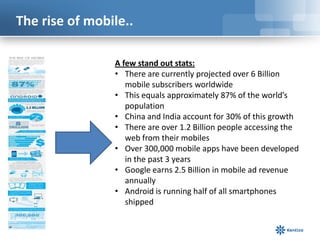
                A few stand out stats:
                • There are currently projected over 6 Billion
                   mobile subscribers worldwide
                • This equals approximately 87% of the world’s
                   population
                • China and India account for 30% of this growth
                • There are over 1.2 Billion people accessing the
                   web from their mobiles
                • Over 300,000 mobile apps have been developed
                   in the past 3 years
                • Google earns 2.5 Billion in mobile ad revenue
                   annually
                • Android is running half of all smartphones
                   shipped
Our agenda…


• Scenario: Getting Started with a mobile
  project
• Scenario: Mobile sub sites
• Scenario: jQuery mobile
• Scenario: Responsive design
• Scenario: Application stored
Scenario

GETTING STARTED WITH A MOBILE
PROJECT
Starter questions…

• What’s your current
  mobile statistics?
• What’s your timeline and
  budget?
• Who is your target
  audience?
• Is there a target platform?
• What are the application
  features and
  functionality?
• What are the developer
  skills?
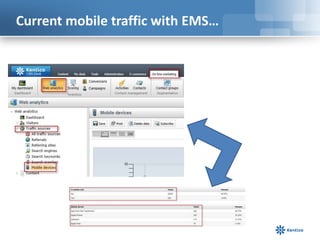
Current mobile traffic with EMS…
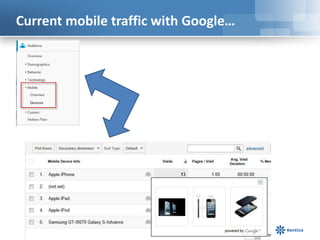
Current mobile traffic with Google…
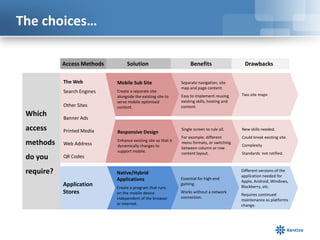
The choices…

            Access Methods        Solution                           Benefits                   Drawbacks

            The Web          Mobile Sub Site                    Separate navigation, site
                                                                map and page content.
            Search Engines   Create a separate site
                             alongside the existing site to     Easy to implement reusing      Two site maps
                             serve mobile optimised             existing skills, hosting and
            Other Sites      content.                           content.
 Which      Banner Ads

 access     Printed Media    Responsive Design
                                                                Single screen to rule all.     New skills needed.
                                                                For example; different         Could break existing site.
                             Enhance existing site so that it
 methods    Web Address      dynamically changes to
                                                                menu formats, or switching
                                                                                               Complexity
                                                                between column or row
                             support mobile.                    content layout.                Standards not ratified.
 do you     QR Codes

 require?                    Native/Hybrid                                                     Different versions of the
                                                                                               application needed for
                             Applications                       Essential for high end
                                                                                               Apple, Android, Windows,
            Application      Create a program that runs
                                                                gaming.
                                                                                               Blackberry, etc.
            Stores           on the mobile device               Works without a network
                                                                                               Requires continued
                             independent of the browser         connection.
                                                                                               maintenance as platforms
                             or internet.                                                      change.
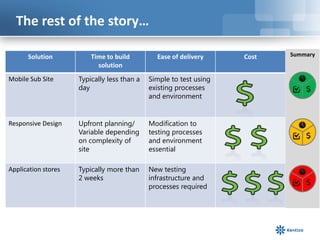
The rest of the story…

      Solution           Time to build         Ease of delivery     Cost   Summary
                           solution
Mobile Sub Site      Typically less than a   Simple to test using
                     day                     existing processes
                                             and environment


Responsive Design    Upfront planning/       Modification to
                     Variable depending      testing processes
                     on complexity of        and environment
                     site                    essential

Application stores   Typically more than     New testing
                     2 weeks                 infrastructure and
                                             processes required
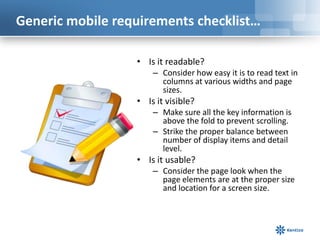
Generic mobile requirements checklist…

                  • Is it readable?
                      – Consider how easy it is to read text in
                        columns at various widths and page
                        sizes.
                  • Is it visible?
                      – Make sure all the key information is
                        above the fold to prevent scrolling.
                      – Strike the proper balance between
                        number of display items and detail
                        level.
                  • Is it usable?
                      – Consider the page look when the
                        page elements are at the proper size
                        and location for a screen size.
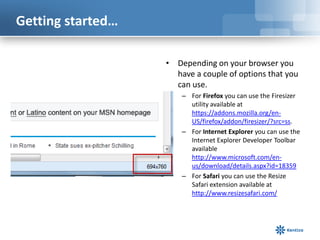
Getting started…

                   • Depending on your browser you
                     have a couple of options that you
                     can use.
                       – For Firefox you can use the Firesizer
                         utility available at
                         https://addons.mozilla.org/en-
                         US/firefox/addon/firesizer/?src=ss.
                       – For Internet Explorer you can use the
                         Internet Explorer Developer Toolbar
                         available
                         http://www.microsoft.com/en-
                         us/download/details.aspx?id=18359
                       – For Safari you can use the Resize
                         Safari extension available at
                         http://www.resizesafari.com/
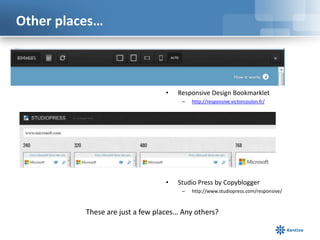
Other places…


                                  •   Responsive Design Bookmarklet
                                       –   http://responsive.victorcoulon.fr/


                                  •   Studio Press by Copyblogger
                                       –   http://www.studiopress.com/responsive/


          These are just a few places… Any others?
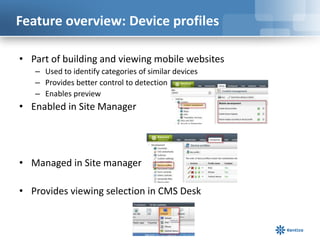
Feature overview: Device profiles

• Part of building and viewing mobile websites
   – Used to identify categories of similar devices
   – Provides better control to detection
   – Enables preview
• Enabled in Site Manager


• Managed in Site manager

• Provides viewing selection in CMS Desk
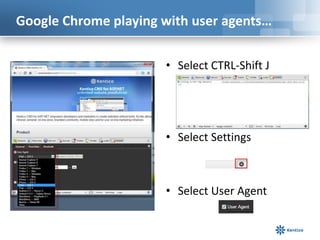
Google Chrome playing with user agents…

                      • Select CTRL-Shift J


                      • Select Settings


                      • Select User Agent
Scenario

MOBILE SUB SITES
The web part…

                Detection by user agent from client device
                Two ways to detect:
                • Kentico specified XML for user agents
                    • Out of the box solution
                • 51degrees.mobi provider
                    • Automatic updates
Scenario

JQUERY MOBILE
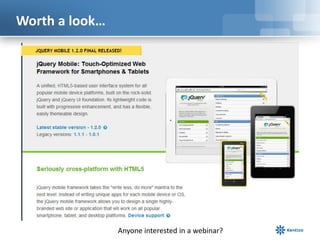
Worth a look…


                Anyone interested in a webinar?
Scenario

RESPONSIVE DESIGN
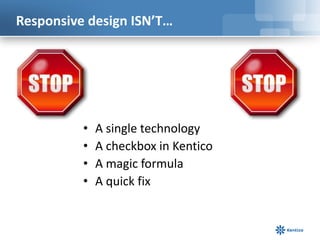
Responsive design ISN’T…


          •   A single technology
          •   A checkbox in Kentico
          •   A magic formula
          •   A quick fix
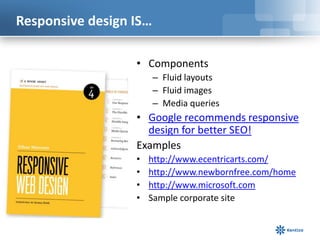
Responsive design IS…

                  • Components
                        – Fluid layouts
                        – Fluid images
                        – Media queries
                  • Google recommends responsive
                    design for better SEO!
                  Examples
                  •   http://www.ecentricarts.com/
                  •   http://www.newbornfree.com/home
                  •   http://www.microsoft.com
                  •   Sample corporate site
Fluid layouts/images…


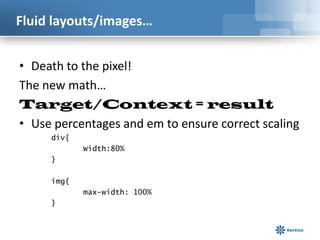
• Death to the pixel!
The new math…
Target/Context = result
• Use percentages and em to ensure correct scaling
     div{
            Width:80%
     }

     img{
            max-width: 100%
     }
CSS Media queries…

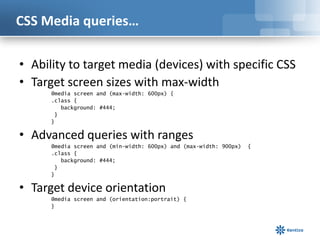
• Ability to target media (devices) with specific CSS
• Target screen sizes with max-width
      @media screen and (max-width: 600px) {
      .class {
         background: #444;
       }
      }

• Advanced queries with ranges
      @media screen and (min-width: 600px) and (max-width: 900px)   {
      .class {
         background: #444;
       }
      }

• Target device orientation
      @media screen and (orientation:portrait) {
      }
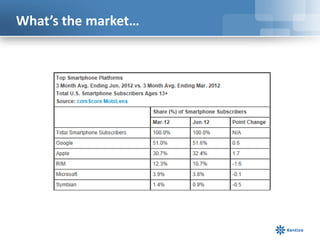
What’s the market…
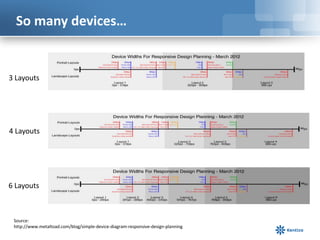
So many devices…


3 Layouts


4 Layouts


6 Layouts


 Source:
 http://www.metaltoad.com/blog/simple-device-diagram-responsive-design-planning
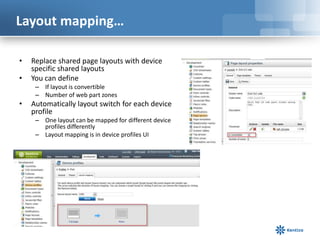
Layout mapping…

•   Replace shared page layouts with device
    specific shared layouts
•   You can define
     – If layout is convertible
     – Number of web part zones
•   Automatically layout switch for each device
    profile
     – One layout can be mapped for different device
       profiles differently
     – Layout mapping is in device profiles UI
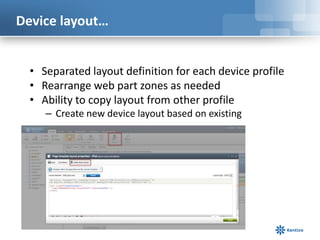
Device layout…


  • Separated layout definition for each device profile
  • Rearrange web part zones as needed
  • Ability to copy layout from other profile
     – Create new device layout based on existing
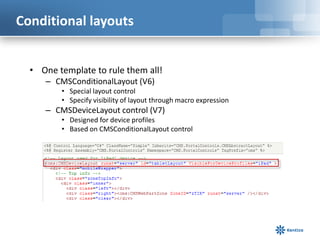
Conditional layouts


  • One template to rule them all!
     – CMSConditionalLayout (V6)
         • Special layout control
         • Specify visibility of layout through macro expression
     – CMSDeviceLayout control (V7)
         • Designed for device profiles
         • Based on CMSConditionalLayout control
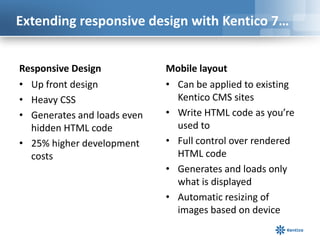
Extending responsive design with Kentico 7…


Responsive Design            Mobile layout
• Up front design            • Can be applied to existing
• Heavy CSS                    Kentico CMS sites
• Generates and loads even   • Write HTML code as you’re
  hidden HTML code             used to
• 25% higher development     • Full control over rendered
  costs                        HTML code
                             • Generates and loads only
                               what is displayed
                             • Automatic resizing of
                               images based on device
Scenario

APPLICATION STORES
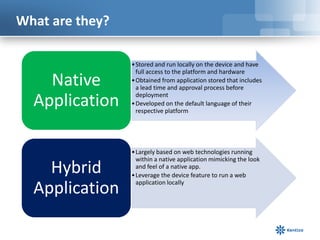
What are they?

                 • Stored and run locally on the device and have
                   full access to the platform and hardware
    Native       • Obtained from application stored that includes
                   a lead time and approval process before

  Application      deployment
                 • Developed on the default language of their
                   respective platform


                 • Largely based on web technologies running
                   within a native application mimicking the look
    Hybrid         and feel of a native app.
                 • Leverage the device feature to run a web

  Application      application locally
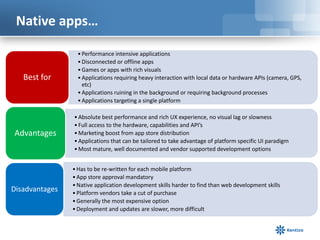
Native apps…

                  • Performance intensive applications
                  • Disconnected or offline apps
                  • Games or apps with rich visuals
   Best for       • Applications requiring heavy interaction with local data or hardware APIs (camera, GPS,
                    etc)
                  • Applications ruining in the background or requiring background processes
                  • Applications targeting a single platform

                • Absolute best performance and rich UX experience, no visual lag or slowness
                • Full access to the hardware, capabilities and API’s
Advantages      • Marketing boost from app store distribution
                • Applications that can be tailored to take advantage of platform specific UI paradigm
                • Most mature, well documented and vendor supported development options


                • Has to be re-written for each mobile platform
                • App store approval mandatory
                • Native application development skills harder to find than web development skills
Disadvantages   • Platform vendors take a cut of purchase
                • Generally the most expensive option
                • Deployment and updates are slower, more difficult
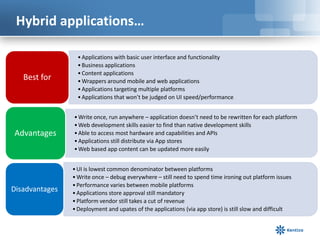
Hybrid applications…

                  • Applications with basic user interface and functionality
                  • Business applications
                  • Content applications
   Best for       • Wrappers around mobile and web applications
                  • Applications targeting multiple platforms
                  • Applications that won’t be judged on UI speed/performance


                • Write once, run anywhere – application doesn’t need to be rewritten for each platform
                • Web development skills easier to find than native development skills
Advantages      • Able to access most hardware and capabilities and APIs
                • Applications still distribute via App stores
                • Web based app content can be updated more easily


                • UI is lowest common denominator between platforms
                • Write once – debug everywhere – still need to spend time ironing out platform issues
                • Performance varies between mobile platforms
Disadvantages   • Applications store approval still mandatory
                • Platform vendor still takes a cut of revenue
                • Deployment and upates of the applications (via app store) is still slow and difficult
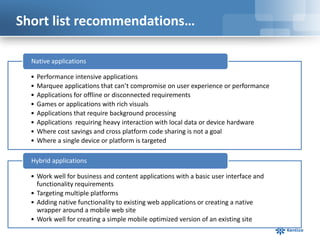
Short list recommendations…

  Native applications

  •   Performance intensive applications
  •   Marquee applications that can’t compromise on user experience or performance
  •   Applications for offline or disconnected requirements
  •   Games or applications with rich visuals
  •   Applications that require background processing
  •   Applications requiring heavy interaction with local data or device hardware
  •   Where cost savings and cross platform code sharing is not a goal
  •   Where a single device or platform is targeted

  Hybrid applications

  • Work well for business and content applications with a basic user interface and
    functionality requirements
  • Targeting multiple platforms
  • Adding native functionality to existing web applications or creating a native
    wrapper around a mobile web site
  • Work well for creating a simple mobile optimized version of an existing site
Questions


                  Thanks!
            Thomas Robbins, Chief Evangelist
                thomasr@kentico.com
                     @trobbins

Kentico Technical Learning - Responsive Design with Kentico CMS 7

  • 1.
    Kentico Technical Learning ResponsiveDesign with Kentico CMS 7 Thomas Robbins @trobbins
  • 2.
    The rise ofmobile.. A few stand out stats: • There are currently projected over 6 Billion mobile subscribers worldwide • This equals approximately 87% of the world’s population • China and India account for 30% of this growth • There are over 1.2 Billion people accessing the web from their mobiles • Over 300,000 mobile apps have been developed in the past 3 years • Google earns 2.5 Billion in mobile ad revenue annually • Android is running half of all smartphones shipped
  • 3.
    Our agenda… • Scenario:Getting Started with a mobile project • Scenario: Mobile sub sites • Scenario: jQuery mobile • Scenario: Responsive design • Scenario: Application stored
  • 4.
  • 5.
    Starter questions… • What’syour current mobile statistics? • What’s your timeline and budget? • Who is your target audience? • Is there a target platform? • What are the application features and functionality? • What are the developer skills?
  • 6.
    Current mobile trafficwith EMS…
  • 7.
    Current mobile trafficwith Google…
  • 8.
    The choices… Access Methods Solution Benefits Drawbacks The Web Mobile Sub Site Separate navigation, site map and page content. Search Engines Create a separate site alongside the existing site to Easy to implement reusing Two site maps serve mobile optimised existing skills, hosting and Other Sites content. content. Which Banner Ads access Printed Media Responsive Design Single screen to rule all. New skills needed. For example; different Could break existing site. Enhance existing site so that it methods Web Address dynamically changes to menu formats, or switching Complexity between column or row support mobile. content layout. Standards not ratified. do you QR Codes require? Native/Hybrid Different versions of the application needed for Applications Essential for high end Apple, Android, Windows, Application Create a program that runs gaming. Blackberry, etc. Stores on the mobile device Works without a network Requires continued independent of the browser connection. maintenance as platforms or internet. change.
  • 9.
    The rest ofthe story… Solution Time to build Ease of delivery Cost Summary solution Mobile Sub Site Typically less than a Simple to test using day existing processes and environment Responsive Design Upfront planning/ Modification to Variable depending testing processes on complexity of and environment site essential Application stores Typically more than New testing 2 weeks infrastructure and processes required
  • 10.
    Generic mobile requirementschecklist… • Is it readable? – Consider how easy it is to read text in columns at various widths and page sizes. • Is it visible? – Make sure all the key information is above the fold to prevent scrolling. – Strike the proper balance between number of display items and detail level. • Is it usable? – Consider the page look when the page elements are at the proper size and location for a screen size.
  • 11.
    Getting started… • Depending on your browser you have a couple of options that you can use. – For Firefox you can use the Firesizer utility available at https://addons.mozilla.org/en- US/firefox/addon/firesizer/?src=ss. – For Internet Explorer you can use the Internet Explorer Developer Toolbar available http://www.microsoft.com/en- us/download/details.aspx?id=18359 – For Safari you can use the Resize Safari extension available at http://www.resizesafari.com/
  • 12.
    Other places… • Responsive Design Bookmarklet – http://responsive.victorcoulon.fr/ • Studio Press by Copyblogger – http://www.studiopress.com/responsive/ These are just a few places… Any others?
  • 13.
    Feature overview: Deviceprofiles • Part of building and viewing mobile websites – Used to identify categories of similar devices – Provides better control to detection – Enables preview • Enabled in Site Manager • Managed in Site manager • Provides viewing selection in CMS Desk
  • 14.
    Google Chrome playingwith user agents… • Select CTRL-Shift J • Select Settings • Select User Agent
  • 15.
  • 16.
    The web part… Detection by user agent from client device Two ways to detect: • Kentico specified XML for user agents • Out of the box solution • 51degrees.mobi provider • Automatic updates
  • 17.
  • 18.
    Worth a look… Anyone interested in a webinar?
  • 19.
  • 20.
    Responsive design ISN’T… • A single technology • A checkbox in Kentico • A magic formula • A quick fix
  • 21.
    Responsive design IS… • Components – Fluid layouts – Fluid images – Media queries • Google recommends responsive design for better SEO! Examples • http://www.ecentricarts.com/ • http://www.newbornfree.com/home • http://www.microsoft.com • Sample corporate site
  • 22.
    Fluid layouts/images… • Deathto the pixel! The new math… Target/Context = result • Use percentages and em to ensure correct scaling div{ Width:80% } img{ max-width: 100% }
  • 23.
    CSS Media queries… •Ability to target media (devices) with specific CSS • Target screen sizes with max-width @media screen and (max-width: 600px) { .class { background: #444; } } • Advanced queries with ranges @media screen and (min-width: 600px) and (max-width: 900px) { .class { background: #444; } } • Target device orientation @media screen and (orientation:portrait) { }
  • 24.
  • 25.
    So many devices… 3Layouts 4 Layouts 6 Layouts Source: http://www.metaltoad.com/blog/simple-device-diagram-responsive-design-planning
  • 26.
    Layout mapping… • Replace shared page layouts with device specific shared layouts • You can define – If layout is convertible – Number of web part zones • Automatically layout switch for each device profile – One layout can be mapped for different device profiles differently – Layout mapping is in device profiles UI
  • 27.
    Device layout… • Separated layout definition for each device profile • Rearrange web part zones as needed • Ability to copy layout from other profile – Create new device layout based on existing
  • 28.
    Conditional layouts • One template to rule them all! – CMSConditionalLayout (V6) • Special layout control • Specify visibility of layout through macro expression – CMSDeviceLayout control (V7) • Designed for device profiles • Based on CMSConditionalLayout control
  • 29.
    Extending responsive designwith Kentico 7… Responsive Design Mobile layout • Up front design • Can be applied to existing • Heavy CSS Kentico CMS sites • Generates and loads even • Write HTML code as you’re hidden HTML code used to • 25% higher development • Full control over rendered costs HTML code • Generates and loads only what is displayed • Automatic resizing of images based on device
  • 30.
  • 31.
    What are they? • Stored and run locally on the device and have full access to the platform and hardware Native • Obtained from application stored that includes a lead time and approval process before Application deployment • Developed on the default language of their respective platform • Largely based on web technologies running within a native application mimicking the look Hybrid and feel of a native app. • Leverage the device feature to run a web Application application locally
  • 32.
    Native apps… • Performance intensive applications • Disconnected or offline apps • Games or apps with rich visuals Best for • Applications requiring heavy interaction with local data or hardware APIs (camera, GPS, etc) • Applications ruining in the background or requiring background processes • Applications targeting a single platform • Absolute best performance and rich UX experience, no visual lag or slowness • Full access to the hardware, capabilities and API’s Advantages • Marketing boost from app store distribution • Applications that can be tailored to take advantage of platform specific UI paradigm • Most mature, well documented and vendor supported development options • Has to be re-written for each mobile platform • App store approval mandatory • Native application development skills harder to find than web development skills Disadvantages • Platform vendors take a cut of purchase • Generally the most expensive option • Deployment and updates are slower, more difficult
  • 33.
    Hybrid applications… • Applications with basic user interface and functionality • Business applications • Content applications Best for • Wrappers around mobile and web applications • Applications targeting multiple platforms • Applications that won’t be judged on UI speed/performance • Write once, run anywhere – application doesn’t need to be rewritten for each platform • Web development skills easier to find than native development skills Advantages • Able to access most hardware and capabilities and APIs • Applications still distribute via App stores • Web based app content can be updated more easily • UI is lowest common denominator between platforms • Write once – debug everywhere – still need to spend time ironing out platform issues • Performance varies between mobile platforms Disadvantages • Applications store approval still mandatory • Platform vendor still takes a cut of revenue • Deployment and upates of the applications (via app store) is still slow and difficult
  • 34.
    Short list recommendations… Native applications • Performance intensive applications • Marquee applications that can’t compromise on user experience or performance • Applications for offline or disconnected requirements • Games or applications with rich visuals • Applications that require background processing • Applications requiring heavy interaction with local data or device hardware • Where cost savings and cross platform code sharing is not a goal • Where a single device or platform is targeted Hybrid applications • Work well for business and content applications with a basic user interface and functionality requirements • Targeting multiple platforms • Adding native functionality to existing web applications or creating a native wrapper around a mobile web site • Work well for creating a simple mobile optimized version of an existing site
  • 35.
    Questions Thanks! Thomas Robbins, Chief Evangelist thomasr@kentico.com @trobbins

Editor's Notes

  • #14 C:\\inetpub\\wwwroot\\KenticoCMS7\\App_Data\\CMSModules\\DeviceProfile