
Dheeraj Singh Negi 
dheerajnegi3@gmail.com 
10/7/2014 
Slide 1
10/7/2014 
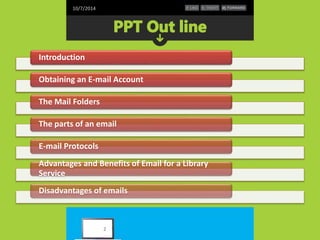
Introduction 
Obtaining an E-mail Account 
The Mail Folders 
The parts of an email 
E-mail Protocols 
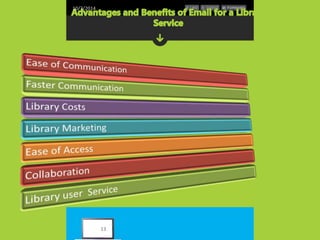
Advantages and Benefits of Email for a Library 
Service 
Disadvantages of emails 
2
10/7/2014 
 Email is a short word for electronic mail. 
You create texts and send them over a network 
of computers. The first emails go back to the 
1960s. The invention has influenced our lives 
and emails have become a popular means of 
communication. 
3
10/7/2014 
 Send mail electronically via the Internet 
 Requires an account on a mail server and 
supporting software on your PC 
 The username and password will allow you to 
access your account 
 All e-mail programs allow you to Send, 
Compose, Reply, and Forward mail 
4
10/7/2014 
 You will need an e-mail server (post office) in 
order to send and receive e-mail. 
 You can obtain an account in school 
 You can pay for an account through an ISP such as 
AOL 
 You can get free accounts: 
 www.hotmail.com 
 www.yahoo.com 
 www.gmail.com 
 www.rediffmail.com etc 
5
10/7/2014 
 E-mail is less private than US mail 
 If you need privacy, send a letter 
 Every mail server has terms that you must agree 
to 
 No copyright infringements 
 No harassing or stalking 
 No junk mail or spamming 
 No intentional sending of viruses 
6
10/7/2014 
 Inbox – new messages as well as messages that 
have been read 
 Outbox – messages not yet sent 
 Sent items – messages that have been sent 
(moved here from outbox) 
 Deleted items – messages deleted from any 
folder 
 Custom folders – additional folders created by 
the user 
7
10/7/2014 
 Every e-mail address is unique and consists of 
two parts, a user name and a host computer 
 The @ sign is required 
 The host computer can be omitted if you are 
logged onto the same network or host computer 
8
10/7/2014 
 POP Client – Post Office Protocol 
 Lets you work without being connected to mail server 
 Upload to send mail - Download to read mail 
 Allows almost any e-mail program to access e-mail from 
server 
 IMAP – Internet Message Access Protocol 
 Permits a "client" email program to access remote 
message stores as if they were local 
 Enables user to access messages from more than one 
computer 
9
10/7/2014 
 To : enter the exact email address of your 
recipient (remember: name@provider.domain) 
 For multiple recipients, separate each address 
with a comma 
 CC : carbon copy 
 BCC : BLIND carbon copy – is anonymous 
 Subject : the topic of your email – very important 
 Body : the message of your email 
 Attachments : the paperclip symbol - files or 
photos 
10
10/7/2014 
 Communication can be tough with written 
correspondence. No body language or facial 
cues to help. 
 Err on the side of too formal 
 Punctuation & spelling 
 Greeting & closing signature 
 ATTACH a file from a flash drive 
 Click on SEND to mail your letter 
 Message will now appear in your SENT folder 
11
10/7/2014 
 Alerting Services (online notice) 
 Circulation based services(over due reminder ) 
 Current awareness 
 Solve the requirement by faculty(article, online 
news etc.) 
 Ask librarian 
 Online chat 
 Fast and low cost 
12
10/7/2014 
13
10/7/2014 
Email has reached a high level of popularity due 
largely to the convenience of it. Messages move 
quickly and lots of information can be shared in the 
body of the email or through attachments. Emails 
are easily archived and searched. Emails offer the 
writer a chance to think through his thoughts and 
present a professional level of communication. 
Library use email to solicit new users , provide 
library service and keep library staff in the loop on 
developments. Email's versatility makes it an 
indispensable part of any modern Library. 
14
10/7/2014 
Email is a faster means of communication and 
correspondence. With email, Librarian are not held 
up by delays commonly experienced when sending 
correspondence in the mail. Additionally, emailing 
documents is faster than faxing. In just a click of a 
button, Library staff can send time-sensitive 
information to anyone in the world and the recipient 
gets the message almost instantaneously. This type 
of fast, effective exchange allows people to stay on 
top of projects, respond to communication requests 
with more efficiency and be more productive 
15
10/7/2014 
Library can keep costs down by using low cost or 
free web email services. Many documents that 
used to be sent through the mail at regular 
postage rates can be sent by email. These 
savings add up significantly over time. Money is 
also saved by the speed of email. Modifying a 
proposal and responding to users needs quickly 
might make the difference between a made sale 
and a lost sale. 
16
10/7/2014 
 Marketing is a major l use of email. A well-run 
email marketing campaign is effective, 
inexpensive and builds good will with users. 
 Library can be sell of library product and service 
by email. 
17
10/7/2014 
 Email can be sent to multiple people and groups for 
use as a collaboration or training tool. This may 
come in the form of a survey or request for feedback 
from customers. It can also be used for drafting 
business proposals with partners and keeping 
employees in the loop on new procedures or 
projects. Email allows the participants to work 
together at their own speed, rather than under the 
pressure of a conference call or in-person meeting. It 
also means that a good record of the work is 
maintained for future reference 
18
10/7/2014 
E-Marketing Journal states that email offers 
customers a quick and easy way to provide a 
company with feedback on products and 
services. Customers can even contact company 
customer service representatives by email, and 
often have their concerns addressed via email. 
Email provides customers and companies with 
documentation, which can be useful when 
certain issues need to be verified. 
19
10/7/2014 
 Emails may carry viruses. 
 These are small programs that harm your computer system. 
 They can read out your email address book and send 
themselves to a number of people around the world. 
 Many people send unwanted emails to others. These are 
called spam mails. 
 It takes a lot of time to filter out the unwanted emails from 
those that are really important. 
 Emails cannot really be used for official business documents. 
 They may be lost and you cannot sign them. 
 Your mailbox may get flooded with emails after a certain time 
so you have to empty it from time to time 
20
10/7/2014 
21

Library email services

  • 1.
    Dheeraj Singh Negi dheerajnegi3@gmail.com 10/7/2014 Slide 1
  • 2.
    10/7/2014 Introduction Obtainingan E-mail Account The Mail Folders The parts of an email E-mail Protocols Advantages and Benefits of Email for a Library Service Disadvantages of emails 2
  • 3.
    10/7/2014  Emailis a short word for electronic mail. You create texts and send them over a network of computers. The first emails go back to the 1960s. The invention has influenced our lives and emails have become a popular means of communication. 3
  • 4.
    10/7/2014  Sendmail electronically via the Internet  Requires an account on a mail server and supporting software on your PC  The username and password will allow you to access your account  All e-mail programs allow you to Send, Compose, Reply, and Forward mail 4
  • 5.
    10/7/2014  Youwill need an e-mail server (post office) in order to send and receive e-mail.  You can obtain an account in school  You can pay for an account through an ISP such as AOL  You can get free accounts:  www.hotmail.com  www.yahoo.com  www.gmail.com  www.rediffmail.com etc 5
  • 6.
    10/7/2014  E-mailis less private than US mail  If you need privacy, send a letter  Every mail server has terms that you must agree to  No copyright infringements  No harassing or stalking  No junk mail or spamming  No intentional sending of viruses 6
  • 7.
    10/7/2014  Inbox– new messages as well as messages that have been read  Outbox – messages not yet sent  Sent items – messages that have been sent (moved here from outbox)  Deleted items – messages deleted from any folder  Custom folders – additional folders created by the user 7
  • 8.
    10/7/2014  Everye-mail address is unique and consists of two parts, a user name and a host computer  The @ sign is required  The host computer can be omitted if you are logged onto the same network or host computer 8
  • 9.
    10/7/2014  POPClient – Post Office Protocol  Lets you work without being connected to mail server  Upload to send mail - Download to read mail  Allows almost any e-mail program to access e-mail from server  IMAP – Internet Message Access Protocol  Permits a "client" email program to access remote message stores as if they were local  Enables user to access messages from more than one computer 9
  • 10.
    10/7/2014  To: enter the exact email address of your recipient (remember: name@provider.domain)  For multiple recipients, separate each address with a comma  CC : carbon copy  BCC : BLIND carbon copy – is anonymous  Subject : the topic of your email – very important  Body : the message of your email  Attachments : the paperclip symbol - files or photos 10
  • 11.
    10/7/2014  Communicationcan be tough with written correspondence. No body language or facial cues to help.  Err on the side of too formal  Punctuation & spelling  Greeting & closing signature  ATTACH a file from a flash drive  Click on SEND to mail your letter  Message will now appear in your SENT folder 11
  • 12.
    10/7/2014  AlertingServices (online notice)  Circulation based services(over due reminder )  Current awareness  Solve the requirement by faculty(article, online news etc.)  Ask librarian  Online chat  Fast and low cost 12
  • 13.
  • 14.
    10/7/2014 Email hasreached a high level of popularity due largely to the convenience of it. Messages move quickly and lots of information can be shared in the body of the email or through attachments. Emails are easily archived and searched. Emails offer the writer a chance to think through his thoughts and present a professional level of communication. Library use email to solicit new users , provide library service and keep library staff in the loop on developments. Email's versatility makes it an indispensable part of any modern Library. 14
  • 15.
    10/7/2014 Email isa faster means of communication and correspondence. With email, Librarian are not held up by delays commonly experienced when sending correspondence in the mail. Additionally, emailing documents is faster than faxing. In just a click of a button, Library staff can send time-sensitive information to anyone in the world and the recipient gets the message almost instantaneously. This type of fast, effective exchange allows people to stay on top of projects, respond to communication requests with more efficiency and be more productive 15
  • 16.
    10/7/2014 Library cankeep costs down by using low cost or free web email services. Many documents that used to be sent through the mail at regular postage rates can be sent by email. These savings add up significantly over time. Money is also saved by the speed of email. Modifying a proposal and responding to users needs quickly might make the difference between a made sale and a lost sale. 16
  • 17.
    10/7/2014  Marketingis a major l use of email. A well-run email marketing campaign is effective, inexpensive and builds good will with users.  Library can be sell of library product and service by email. 17
  • 18.
    10/7/2014  Emailcan be sent to multiple people and groups for use as a collaboration or training tool. This may come in the form of a survey or request for feedback from customers. It can also be used for drafting business proposals with partners and keeping employees in the loop on new procedures or projects. Email allows the participants to work together at their own speed, rather than under the pressure of a conference call or in-person meeting. It also means that a good record of the work is maintained for future reference 18
  • 19.
    10/7/2014 E-Marketing Journalstates that email offers customers a quick and easy way to provide a company with feedback on products and services. Customers can even contact company customer service representatives by email, and often have their concerns addressed via email. Email provides customers and companies with documentation, which can be useful when certain issues need to be verified. 19
  • 20.
    10/7/2014  Emailsmay carry viruses.  These are small programs that harm your computer system.  They can read out your email address book and send themselves to a number of people around the world.  Many people send unwanted emails to others. These are called spam mails.  It takes a lot of time to filter out the unwanted emails from those that are really important.  Emails cannot really be used for official business documents.  They may be lost and you cannot sign them.  Your mailbox may get flooded with emails after a certain time so you have to empty it from time to time 20
  • 21.