

Presented by:
Surya Pratap Singh
Department of Library & Information Science,
AMU, Aligarh
INTRODUCTION
Software's now-a-days became the life line of
modern day organizations. Libraries also need
software if they want to create a parallel digital
library with features which we may not find in a
traditional library.
DIGITAL LIBRARY SOFTWARE
Digital libraries are defined in many ways. It is an
organised searchable collection in digital format.
There are quite a few digital library software
packages available in the market one has to select the
right kind of packages, depending on their specific
needs.
There are a few library automation software packages
which have a separate digital library module.
Cont.…
So, now we will be discussing four types of digital
library software:
 Dspace
 Greenstone
 Eprints
 Freoda
DSPACE
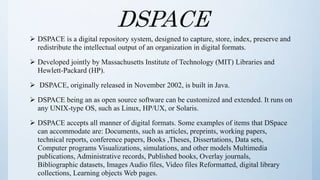
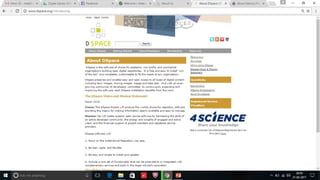
 DSPACE is a digital repository system, designed to capture, store, index, preserve and
redistribute the intellectual output of an organization in digital formats.
 Developed jointly by Massachusetts Institute of Technology (MIT) Libraries and
Hewlett-Packard (HP).
 DSPACE, originally released in November 2002, is built in Java.
 DSPACE being an as open source software can be customized and extended. It runs on
any UNIX-type OS, such as Linux, HP/UX, or Solaris.
 DSPACE accepts all manner of digital formats. Some examples of items that DSpace
can accommodate are: Documents, such as articles, preprints, working papers,
technical reports, conference papers, Books ,Theses, Dissertations, Data sets,
Computer programs Visualizations, simulations, and other models Multimedia
publications, Administrative records, Published books, Overlay journals,
Bibliographic datasets, Images Audio files, Video files Reformatted, digital library
collections, Learning objects Web pages.
GREENSTONE
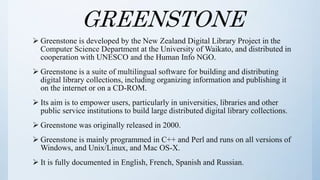
 Greenstone is developed by the New Zealand Digital Library Project in the
Computer Science Department at the University of Waikato, and distributed in
cooperation with UNESCO and the Human Info NGO.
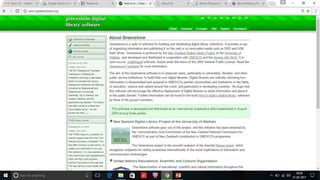
 Greenstone is a suite of multilingual software for building and distributing
digital library collections, including organizing information and publishing it
on the internet or on a CD-ROM.
 Its aim is to empower users, particularly in universities, libraries and other
public service institutions to build large distributed digital library collections.
 Greenstone was originally released in 2000.
 Greenstone is mainly programmed in C++ and Perl and runs on all versions of
Windows, and Unix/Linux, and Mac OS-X.
 It is fully documented in English, French, Spanish and Russian.
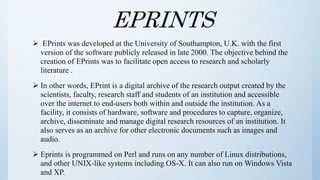
EPRINTS
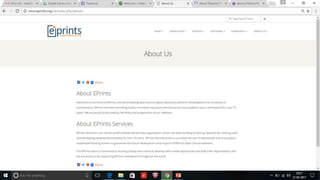
 EPrints was developed at the University of Southampton, U.K. with the first
version of the software publicly released in late 2000. The objective behind the
creation of EPrints was to facilitate open access to research and scholarly
literature .
 In other words, EPrint is a digital archive of the research output created by the
scientists, faculty, research staff and students of an institution and accessible
over the internet to end-users both within and outside the institution. As a
facility, it consists of hardware, software and procedures to capture, organize,
archive, disseminate and manage digital research resources of an institution. It
also serves as an archive for other electronic documents such as images and
audio.
 Eprints is programmed on Perl and runs on any number of Linux distributions,
and other UNIX-like systems including OS-X. It can also run on Windows Vista
and XP.
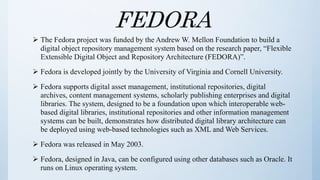
FEDORA
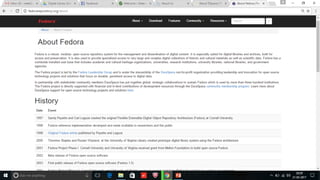
 The Fedora project was funded by the Andrew W. Mellon Foundation to build a
digital object repository management system based on the research paper, “Flexible
Extensible Digital Object and Repository Architecture (FEDORA)”.
 Fedora is developed jointly by the University of Virginia and Cornell University.
 Fedora supports digital asset management, institutional repositories, digital
archives, content management systems, scholarly publishing enterprises and digital
libraries. The system, designed to be a foundation upon which interoperable web-
based digital libraries, institutional repositories and other information management
systems can be built, demonstrates how distributed digital library architecture can
be deployed using web-based technologies such as XML and Web Services.
 Fedora was released in May 2003.
 Fedora, designed in Java, can be configured using other databases such as Oracle. It
runs on Linux operating system.
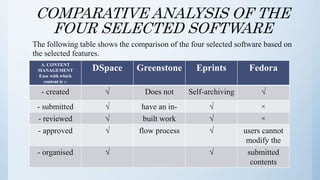
COMPARATIVE ANALYSIS OF THE
FOUR SELECTED SOFTWARE
The following table shows the comparison of the four selected software based on
the selected features.
A. CONTENT
MANAGEMENT
Ease with which
content is :-
DSpace Greenstone Eprints Fedora
- created √ Does not Self-archiving √
- submitted √ have an in- √ ×
- reviewed √ built work √ ×
- approved √ flow process √ users cannot
modify the
- organised √ √ submitted
contents
Cont.…
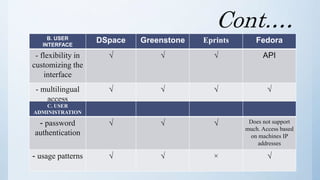
B. USER
INTERFACE
DSpace Greenstone Eprints Fedora
- flexibility in
customizing the
interface
√ √ √ API
- multilingual
access
√ √ √ √
C. USER
ADMINISTRATION
- password
authentication
√ √ √ Does not support
much. Access based
on machines IP
addresses
- usage patterns √ √ × √
Cont....
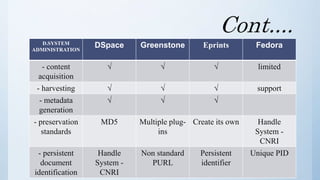
D.SYSTEM
ADMINISTRATION
DSpace Greenstone Eprints Fedora
- content
acquisition
√ √ √ limited
- harvesting √ √ √ support
- metadata
generation
√ √ √
- preservation
standards
MD5 Multiple plug-
ins
Create its own Handle
System -
CNRI
- persistent
document
identification
Handle
System -
CNRI
Non standard
PURL
Persistent
identifier
Unique PID
Cont....
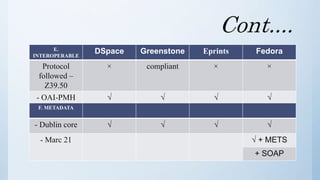
E.
INTEROPERABLE
DSpace Greenstone Eprints Fedora
Protocol
followed –
Z39.50
× compliant × ×
- OAI-PMH √ √ √ √
F. METADATA
- Dublin core √ √ √ √
- Marc 21 √ + METS
+ SOAP
Cont.…
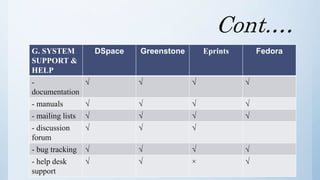
G. SYSTEM
SUPPORT &
HELP
DSpace Greenstone Eprints Fedora
-
documentation
√ √ √ √
- manuals √ √ √ √
- mailing lists √ √ √ √
- discussion
forum
√ √ √
- bug tracking √ √ √ √
- help desk
support
√ √ × √
Cont.…
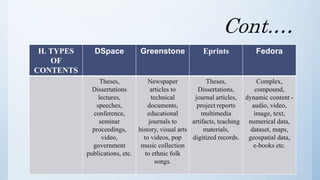
H. TYPES
OF
CONTENTS
DSpace Greenstone Eprints Fedora
Theses,
Dissertations
lectures,
speeches,
conference,
seminar
proceedings,
video,
government
publications, etc.
Newspaper
articles to
technical
documents,
educational
journals to
history, visual arts
to videos, pop
music collection
to ethnic folk
songs.
Theses,
Dissertations,
journal articles,
project reports
multimedia
artifacts, teaching
materials,
digitized records.
Complex,
compound,
dynamic content -
audio, video,
image, text,
numerical data,
dataset, maps,
geospatial data,
e-books etc.
Cont.…
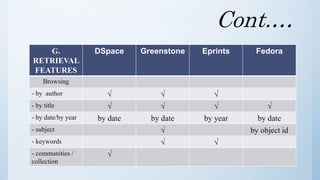
G.
RETRIEVAL
FEATURES
DSpace Greenstone Eprints Fedora
Browsing
- by author √ √ √
- by title √ √ √ √
- by date/by year by date by date by year by date
- subject √ by object id
- keywords √ √
- communities /
collection
√
Cont.…
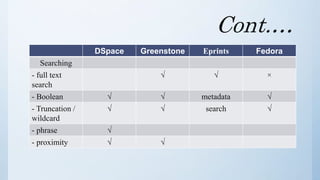
DSpace Greenstone Eprints Fedora
Searching
- full text
search
√ √ ×
- Boolean √ √ metadata √
- Truncation /
wildcard
√ √ search √
- phrase √
- proximity √ √
CONCLUSION
 Digital library can be created by using open source software available free of
cost.
 Free and open source software are a useful and significant tool for the
developing countries.
 Comparative study has been shown between the software, which should help
users to understand the differences and make an informed choice between the
software's.
Comparison concludes that-
 Greenstone and Dspace are appropriate software's for creating digital libraries.
 Dspace used for creating large and complicated digital libraries.
 Greenstone known for its simplicity.
Digital library software

Digital library software

  • 1.
    Presented by: Surya PratapSingh Department of Library & Information Science, AMU, Aligarh
  • 2.
    INTRODUCTION Software's now-a-days becamethe life line of modern day organizations. Libraries also need software if they want to create a parallel digital library with features which we may not find in a traditional library.
  • 3.
    DIGITAL LIBRARY SOFTWARE Digitallibraries are defined in many ways. It is an organised searchable collection in digital format. There are quite a few digital library software packages available in the market one has to select the right kind of packages, depending on their specific needs. There are a few library automation software packages which have a separate digital library module.
  • 4.
    Cont.… So, now wewill be discussing four types of digital library software:  Dspace  Greenstone  Eprints  Freoda
  • 5.
    DSPACE  DSPACE isa digital repository system, designed to capture, store, index, preserve and redistribute the intellectual output of an organization in digital formats.  Developed jointly by Massachusetts Institute of Technology (MIT) Libraries and Hewlett-Packard (HP).  DSPACE, originally released in November 2002, is built in Java.  DSPACE being an as open source software can be customized and extended. It runs on any UNIX-type OS, such as Linux, HP/UX, or Solaris.  DSPACE accepts all manner of digital formats. Some examples of items that DSpace can accommodate are: Documents, such as articles, preprints, working papers, technical reports, conference papers, Books ,Theses, Dissertations, Data sets, Computer programs Visualizations, simulations, and other models Multimedia publications, Administrative records, Published books, Overlay journals, Bibliographic datasets, Images Audio files, Video files Reformatted, digital library collections, Learning objects Web pages.
  • 7.
    GREENSTONE  Greenstone isdeveloped by the New Zealand Digital Library Project in the Computer Science Department at the University of Waikato, and distributed in cooperation with UNESCO and the Human Info NGO.  Greenstone is a suite of multilingual software for building and distributing digital library collections, including organizing information and publishing it on the internet or on a CD-ROM.  Its aim is to empower users, particularly in universities, libraries and other public service institutions to build large distributed digital library collections.  Greenstone was originally released in 2000.  Greenstone is mainly programmed in C++ and Perl and runs on all versions of Windows, and Unix/Linux, and Mac OS-X.  It is fully documented in English, French, Spanish and Russian.
  • 9.
    EPRINTS  EPrints wasdeveloped at the University of Southampton, U.K. with the first version of the software publicly released in late 2000. The objective behind the creation of EPrints was to facilitate open access to research and scholarly literature .  In other words, EPrint is a digital archive of the research output created by the scientists, faculty, research staff and students of an institution and accessible over the internet to end-users both within and outside the institution. As a facility, it consists of hardware, software and procedures to capture, organize, archive, disseminate and manage digital research resources of an institution. It also serves as an archive for other electronic documents such as images and audio.  Eprints is programmed on Perl and runs on any number of Linux distributions, and other UNIX-like systems including OS-X. It can also run on Windows Vista and XP.
  • 11.
    FEDORA  The Fedoraproject was funded by the Andrew W. Mellon Foundation to build a digital object repository management system based on the research paper, “Flexible Extensible Digital Object and Repository Architecture (FEDORA)”.  Fedora is developed jointly by the University of Virginia and Cornell University.  Fedora supports digital asset management, institutional repositories, digital archives, content management systems, scholarly publishing enterprises and digital libraries. The system, designed to be a foundation upon which interoperable web- based digital libraries, institutional repositories and other information management systems can be built, demonstrates how distributed digital library architecture can be deployed using web-based technologies such as XML and Web Services.  Fedora was released in May 2003.  Fedora, designed in Java, can be configured using other databases such as Oracle. It runs on Linux operating system.
  • 13.
    COMPARATIVE ANALYSIS OFTHE FOUR SELECTED SOFTWARE The following table shows the comparison of the four selected software based on the selected features. A. CONTENT MANAGEMENT Ease with which content is :- DSpace Greenstone Eprints Fedora - created √ Does not Self-archiving √ - submitted √ have an in- √ × - reviewed √ built work √ × - approved √ flow process √ users cannot modify the - organised √ √ submitted contents
  • 14.
    Cont.… B. USER INTERFACE DSpace GreenstoneEprints Fedora - flexibility in customizing the interface √ √ √ API - multilingual access √ √ √ √ C. USER ADMINISTRATION - password authentication √ √ √ Does not support much. Access based on machines IP addresses - usage patterns √ √ × √
  • 15.
    Cont.... D.SYSTEM ADMINISTRATION DSpace Greenstone EprintsFedora - content acquisition √ √ √ limited - harvesting √ √ √ support - metadata generation √ √ √ - preservation standards MD5 Multiple plug- ins Create its own Handle System - CNRI - persistent document identification Handle System - CNRI Non standard PURL Persistent identifier Unique PID
  • 16.
    Cont.... E. INTEROPERABLE DSpace Greenstone EprintsFedora Protocol followed – Z39.50 × compliant × × - OAI-PMH √ √ √ √ F. METADATA - Dublin core √ √ √ √ - Marc 21 √ + METS + SOAP
  • 17.
    Cont.… G. SYSTEM SUPPORT & HELP DSpaceGreenstone Eprints Fedora - documentation √ √ √ √ - manuals √ √ √ √ - mailing lists √ √ √ √ - discussion forum √ √ √ - bug tracking √ √ √ √ - help desk support √ √ × √
  • 18.
    Cont.… H. TYPES OF CONTENTS DSpace GreenstoneEprints Fedora Theses, Dissertations lectures, speeches, conference, seminar proceedings, video, government publications, etc. Newspaper articles to technical documents, educational journals to history, visual arts to videos, pop music collection to ethnic folk songs. Theses, Dissertations, journal articles, project reports multimedia artifacts, teaching materials, digitized records. Complex, compound, dynamic content - audio, video, image, text, numerical data, dataset, maps, geospatial data, e-books etc.
  • 19.
    Cont.… G. RETRIEVAL FEATURES DSpace Greenstone EprintsFedora Browsing - by author √ √ √ - by title √ √ √ √ - by date/by year by date by date by year by date - subject √ by object id - keywords √ √ - communities / collection √
  • 20.
    Cont.… DSpace Greenstone EprintsFedora Searching - full text search √ √ × - Boolean √ √ metadata √ - Truncation / wildcard √ √ search √ - phrase √ - proximity √ √
  • 21.
    CONCLUSION  Digital librarycan be created by using open source software available free of cost.  Free and open source software are a useful and significant tool for the developing countries.  Comparative study has been shown between the software, which should help users to understand the differences and make an informed choice between the software's. Comparison concludes that-  Greenstone and Dspace are appropriate software's for creating digital libraries.  Dspace used for creating large and complicated digital libraries.  Greenstone known for its simplicity.