Lesson 23
Getting Started with
Access Essentials
Computer Literacy
BASICS: A
Comprehensive Guide
to IC3, 4th Edition

1

Morrison / Wells
Objectives



Lesson 23






2

Identify the parts of the Access screen.
Identify and navigate objects in a database.
Create a database, then create a new table
and enter records in Datasheet view.
Change the column width in a table in
Datasheet view.
Add and delete fields in Design view.

Morrison / Wells

CLB: A Comp Guide to IC3 4E
Objectives (continued)


Lesson 23



3



Change field data types and field properties.
Add and edit records in a table in Datasheet
view.
Delete and copy records and fields in
Datasheet view.

Morrison / Wells

CLB: A Comp Guide to IC3 4E
Vocabulary



Lesson 23







4

data type
database
datasheet
entry
field
field name
field properties

Morrison / Wells





primary key
record
relational database

CLB: A Comp Guide to IC3 4E
Identifying the Parts of the Access
Screen
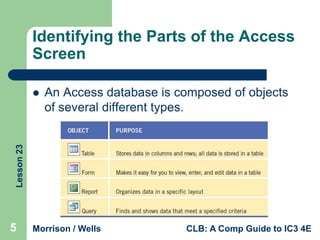
An Access database is composed of objects
of several different types.

Lesson 23



5

Morrison / Wells

CLB: A Comp Guide to IC3 4E
Lesson 23

Identifying the Parts of the Access
Screen (continued)

6

Morrison / Wells

CLB: A Comp Guide to IC3 4E
Creating a New Database


Lesson 23



7




Saving a Database File and Creating a
Table in Datasheet View
A table, often referred to as a datasheet, is
the primary object in the database.
A field is a single piece of database
information.
Fields are displayed as columns, and each
column has a field name.

Morrison / Wells

CLB: A Comp Guide to IC3 4E
Creating a New Database
(continued)


Lesson 23



8



A data type determines the type of data the
field can store, such as text or numbers.
A record is a group of related fields in a
database.
When you create a table in Access, the
default setting creates a primary key for each
record, which uniquely identifies each record
in the table.

Morrison / Wells

CLB: A Comp Guide to IC3 4E
Creating a New Database
(continued)

Lesson 23



9



Entering
Records in
Datasheet View
When you enter
data into a cell,
you are making
an entry.

Morrison / Wells

CLB: A Comp Guide to IC3 4E
Modifying a Database Table in
Design View


Lesson 23



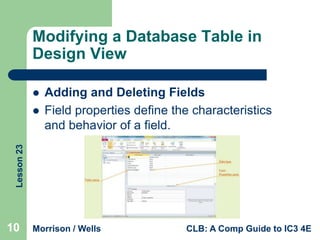
Adding and Deleting Fields
Field properties define the characteristics
and behavior of a field.

10

Morrison / Wells

CLB: A Comp Guide to IC3 4E
Modifying a Database Table in
Design View (continued)


Lesson 23



Changing Field Data Type and Field Properties
In Design view, you can specify the data type for
each field.

11

Morrison / Wells

CLB: A Comp Guide to IC3 4E
Adding and Editing Database
Records


Lesson 23



It is common for data to change after you
have entered it into your database.
Use the Navigation bar to access records.

12

Morrison / Wells

CLB: A Comp Guide to IC3 4E
Deleting and Copying Records and
Fields in Datasheet View


Lesson 23



13



After a record is selected, press the Delete
key to remove the data.
Once you have deleted a record, you cannot
use the Undo command to restore it.
The Cut, Copy, and Paste commands you
have used in other Office applications are
also available in Access.

Morrison / Wells

CLB: A Comp Guide to IC3 4E
Lesson 23

Summary

14

In this lesson, you learned:
 Many parts of the Access screen are similar to other Office
2010 applications. However, Access also has different
views to perform tasks unique to Access.
 The first step in creating a new database is to create a
table. Tables are the primary objects in a database. A
database can have multiple tables. All other objects are
based on data stored in tables.
 You can automatically adjust table column widths in
Datasheet view similar to how you adjust column widths in
Excel.
Morrison / Wells

CLB: A Comp Guide to IC3 4E
Summary

Lesson 23



15



A table can be modified after it is created, and
you can add or delete fields in the table even
after records have been entered. You can
modify a table in Datasheet view or in Design
view.
You can easily switch between Design view
and Datasheet view, but you must save
changes and close a table before switching
views.

Morrison / Wells

CLB: A Comp Guide to IC3 4E
Summary

Lesson 23



16



In Design view, you can specify the data type and
properties for each field. The field properties control
the characteristics and behavior of a database field,
such as the maximum number of characters.
If you make a mistake adding or editing data in a
record, you can choose the Undo command to
reverse your last action, but only if the changes have
not yet been updated. Once you navigate to another
record, the Undo command is no longer available.

Morrison / Wells

CLB: A Comp Guide to IC3 4E
Summary


Lesson 23





17

Deleting records is similar to deleting rows in
Excel. Once you have deleted a record, you
cannot use the Undo command to restore it.
Selected data can be copied or moved from one
location to another in an Access table, or to
another table, using the Cut, Copy, and Paste
commands.
To change the sequence of fields in a table, you
rearrange the sequence of columns.

Morrison / Wells

CLB: A Comp Guide to IC3 4E

Lesson 23

  • 1.
    Lesson 23 Getting Startedwith Access Essentials Computer Literacy BASICS: A Comprehensive Guide to IC3, 4th Edition 1 Morrison / Wells
  • 2.
    Objectives   Lesson 23    2 Identify theparts of the Access screen. Identify and navigate objects in a database. Create a database, then create a new table and enter records in Datasheet view. Change the column width in a table in Datasheet view. Add and delete fields in Design view. Morrison / Wells CLB: A Comp Guide to IC3 4E
  • 3.
    Objectives (continued)  Lesson 23  3  Changefield data types and field properties. Add and edit records in a table in Datasheet view. Delete and copy records and fields in Datasheet view. Morrison / Wells CLB: A Comp Guide to IC3 4E
  • 4.
    Vocabulary   Lesson 23      4 data type database datasheet entry field fieldname field properties Morrison / Wells    primary key record relational database CLB: A Comp Guide to IC3 4E
  • 5.
    Identifying the Partsof the Access Screen An Access database is composed of objects of several different types. Lesson 23  5 Morrison / Wells CLB: A Comp Guide to IC3 4E
  • 6.
    Lesson 23 Identifying theParts of the Access Screen (continued) 6 Morrison / Wells CLB: A Comp Guide to IC3 4E
  • 7.
    Creating a NewDatabase  Lesson 23  7   Saving a Database File and Creating a Table in Datasheet View A table, often referred to as a datasheet, is the primary object in the database. A field is a single piece of database information. Fields are displayed as columns, and each column has a field name. Morrison / Wells CLB: A Comp Guide to IC3 4E
  • 8.
    Creating a NewDatabase (continued)  Lesson 23  8  A data type determines the type of data the field can store, such as text or numbers. A record is a group of related fields in a database. When you create a table in Access, the default setting creates a primary key for each record, which uniquely identifies each record in the table. Morrison / Wells CLB: A Comp Guide to IC3 4E
  • 9.
    Creating a NewDatabase (continued) Lesson 23  9  Entering Records in Datasheet View When you enter data into a cell, you are making an entry. Morrison / Wells CLB: A Comp Guide to IC3 4E
  • 10.
    Modifying a DatabaseTable in Design View  Lesson 23  Adding and Deleting Fields Field properties define the characteristics and behavior of a field. 10 Morrison / Wells CLB: A Comp Guide to IC3 4E
  • 11.
    Modifying a DatabaseTable in Design View (continued)  Lesson 23  Changing Field Data Type and Field Properties In Design view, you can specify the data type for each field. 11 Morrison / Wells CLB: A Comp Guide to IC3 4E
  • 12.
    Adding and EditingDatabase Records  Lesson 23  It is common for data to change after you have entered it into your database. Use the Navigation bar to access records. 12 Morrison / Wells CLB: A Comp Guide to IC3 4E
  • 13.
    Deleting and CopyingRecords and Fields in Datasheet View  Lesson 23  13  After a record is selected, press the Delete key to remove the data. Once you have deleted a record, you cannot use the Undo command to restore it. The Cut, Copy, and Paste commands you have used in other Office applications are also available in Access. Morrison / Wells CLB: A Comp Guide to IC3 4E
  • 14.
    Lesson 23 Summary 14 In thislesson, you learned:  Many parts of the Access screen are similar to other Office 2010 applications. However, Access also has different views to perform tasks unique to Access.  The first step in creating a new database is to create a table. Tables are the primary objects in a database. A database can have multiple tables. All other objects are based on data stored in tables.  You can automatically adjust table column widths in Datasheet view similar to how you adjust column widths in Excel. Morrison / Wells CLB: A Comp Guide to IC3 4E
  • 15.
    Summary Lesson 23  15  A tablecan be modified after it is created, and you can add or delete fields in the table even after records have been entered. You can modify a table in Datasheet view or in Design view. You can easily switch between Design view and Datasheet view, but you must save changes and close a table before switching views. Morrison / Wells CLB: A Comp Guide to IC3 4E
  • 16.
    Summary Lesson 23  16  In Designview, you can specify the data type and properties for each field. The field properties control the characteristics and behavior of a database field, such as the maximum number of characters. If you make a mistake adding or editing data in a record, you can choose the Undo command to reverse your last action, but only if the changes have not yet been updated. Once you navigate to another record, the Undo command is no longer available. Morrison / Wells CLB: A Comp Guide to IC3 4E
  • 17.
    Summary  Lesson 23   17 Deleting recordsis similar to deleting rows in Excel. Once you have deleted a record, you cannot use the Undo command to restore it. Selected data can be copied or moved from one location to another in an Access table, or to another table, using the Cut, Copy, and Paste commands. To change the sequence of fields in a table, you rearrange the sequence of columns. Morrison / Wells CLB: A Comp Guide to IC3 4E