Database Systems: Design,
Implementation, and
Management
YourName
SubmittedTo:
2
Data as a Corporate Asset
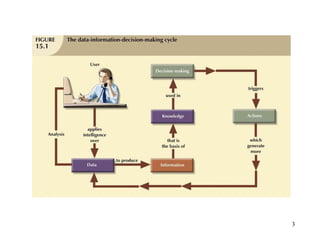
• Data are a valuable asset that require careful
management
• Data are a valuable resource that translate into
information
• Accurate, timely information triggers actions
that enhance company’s position and generate
wealth
3
4
The Need for and Role of Databases
in an Organization
• Database’s predominant role is to support
managerial decision making at all levels
• DBMS facilitates:
– Interpretation and presentation of data
– Distribution of data and information
– Preservation and monitoring of data
– Control over data duplication and use
• Three levels to organization management:
– Top, middle, operational
5
Introduction of a Database:
Special Considerations
• Introduction of a DBMS is likely to have a
profound impact
– Might be positive or negative, depending on how
it is administered
• Three aspects to DBMS introduction:
– Technological
– Managerial
– Cultural
• One role of DBA department is to educate end
users about system uses and benefits
6
The Evolution of the Database
Administration Function
• Data administration has its roots in the old,
decentralized world of the file system
• Advent of DBMS produced new level of data
management sophistication
– DP department evolved into information systems
(IS) department
• Data management became increasingly
complex
– Development of database administration
function
7
The Database Environment’s
Human Component
• Even most carefully crafted database system
cannot operate without human component
• Effective data administration requires both
technical and managerial skills
• DA must set data administration goals
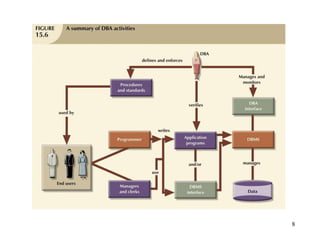
• DBA is focal point for data/user interaction
• Need for diverse mix of skills
8
9
Security
• Securing data entails securing overall
information system architecture
• Confidentiality: data protected against
unauthorized access
• Integrity: keep data consistent and free of
errors or anomalies
• Availability: accessibility of data by authorized
users for authorized purposes
10
Security Policies
• Database security officer secures the system
and the data
– Works with the database administrator
• Security policy: collection of standards,
policies, procedures to guarantee security
– Ensures auditing and compliance
• Security audit process identifies security
vulnerabilities
– Identifies measures to protect the system
11
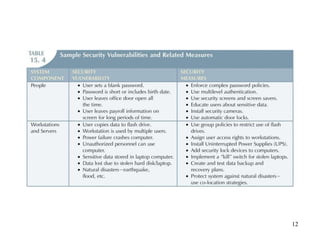
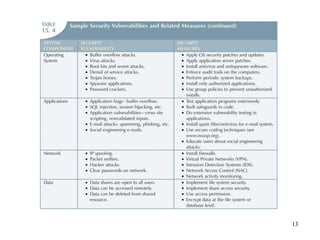
Security Vulnerabilities
• Security vulnerability: weakness in a system
component
– Could allow unauthorized access or cause
service disruptions
• Security threat: imminent security violation
– Could occur at any time
• Security breach yields a database whose
integrity is:
• Preserved
• Corrupted
12
13
14
Database Security
• Refers to the use of DBMS features and other
measures to comply with security requirements
• DBA secures DBMS from installation through
operation and maintenance
• Authorization management:
– User access management
– View definition
– DBMS access control
– DBMS usage monitoring
15
Database Administration Tools
• Two main types of data dictionaries:
– Integrated
– Standalone
• Active data dictionary automatically updated
by the DBMS with every database access
• Passive data dictionary requires running a
batch process
• Main function: store description of all objects
that interact with database
16
Database Administration Tools
(continued)
• Data dictionary that includes data external to
DBMS becomes flexible tool
– Enables use and allocation of all organization’s
information
• Metadata often the basis for monitoring
database use
– Also for assigning access rights to users
• DBA uses data dictionary to support data
analysis and design
17
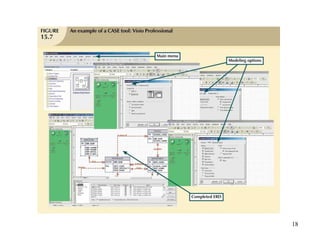
CASE Tools
• Computer-aided systems engineering
– Automated framework for SDLC
– Structured methodologies and powerful
graphical interfaces
• Front-end CASE tools provide support for
planning, analysis, and design phases
• Back-end CASE tools provide support for
coding and implementation phases
• Typical CASE tool has five components
18
19
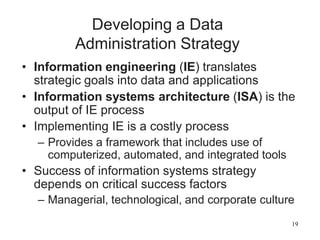
Developing a Data
Administration Strategy
• Information engineering (IE) translates
strategic goals into data and applications
• Information systems architecture (ISA) is the
output of IE process
• Implementing IE is a costly process
– Provides a framework that includes use of
computerized, automated, and integrated tools
• Success of information systems strategy
depends on critical success factors
– Managerial, technological, and corporate culture
20
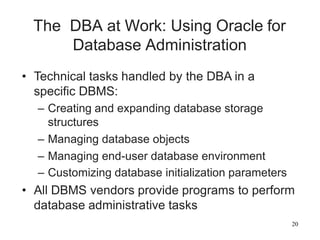
The DBA at Work: Using Oracle for
Database Administration
• Technical tasks handled by the DBA in a
specific DBMS:
– Creating and expanding database storage
structures
– Managing database objects
– Managing end-user database environment
– Customizing database initialization parameters
• All DBMS vendors provide programs to perform
database administrative tasks
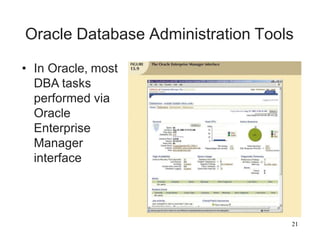
Oracle Database Administration Tools
• In Oracle, most
DBA tasks
performed via
Oracle
Enterprise
Manager
interface
21
22
The Default Login
• Must connect to the database to perform
administrative tasks
– Username with administrative privileges
• Oracle automatically creates SYSTEM and
SYS user IDs with administrative privileges
• Define preferred credentials by clicking on
Preferences link, then Preferred Credentials
• Username and passwords are database-
specific
23
Ensuring an Automatic RDBMS Start
• DBA ensures database access automatically
started when computer turned on
• Service is a Windows system name for a
special program that runs automatically
– Part of the operating system
• Database instance: separate location in
memory reserved to run the database
– May have several databases running in memory
at the same time
24
Creating Tablespaces and Datafiles
• Database composed of one or more
tablespaces
• Tablespace is a logical storage space
– Physically stored in one or more datafiles
• Datafile physically stores the database’s data
– Each datafile can reside in a different directory
on the hard disk
• Database has 1:M relationship with tablespaces
• Tablespace has 1:M relationship with datafiles
25
Managing the Database Objects:
Tables, Views, Triggers, and
Procedures
• Database object: any object created by end
users
• Schema: logical section of the database that
belongs to a given user
– Schema identified by a username
– Within the schema, users create their own tables
and other objects
• Normally, users authorized to access only the
objects that belong to their own schemas
26
Managing Users and
Establishing Security
• User: uniquely identifiable object
– Allows a given person to log on to the database
• Role: a named collection of database access
privileges
– Authorizes a user to connect to the database
and use system resources
• Profile: named collection of settings
– Controls how much of a resource a given user
can use
27
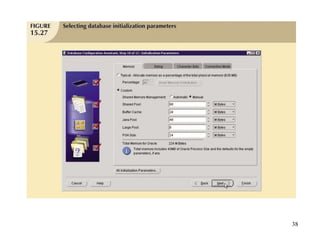
Customizing the Database
Initialization Parameters
• Fine-tuning requires modification of database
configuration parameters
– Some are changed in real time using SQL
– Some affect database instance
– Others affect entire RDBMS and all instances
• Initialization parameters reserve resources
used by the database at run time
• After modifying parameters, may need to restart
the database
28
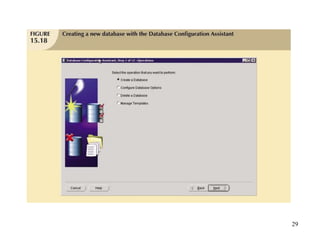
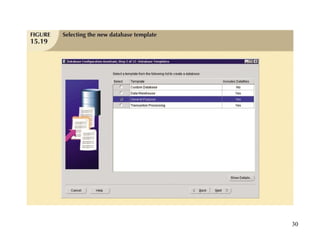
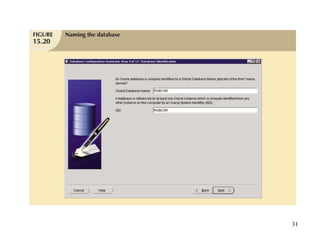
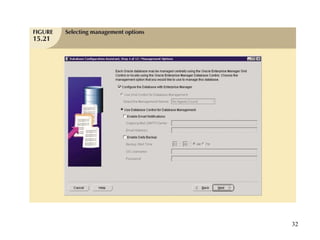
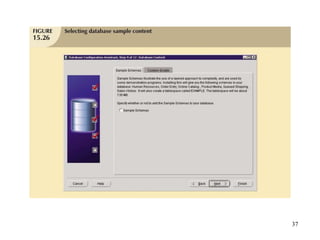
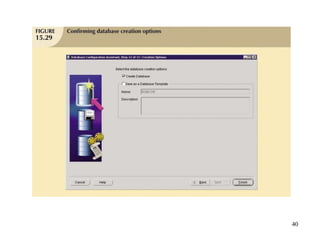
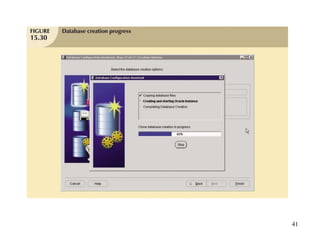
Creating a New Database
• General database creation format tends to be
generic
– Execution tends to be DBMS-specific
• Leading RDBMS vendors offer option to create
databases manually
– Use SQL commands or GUI-based process
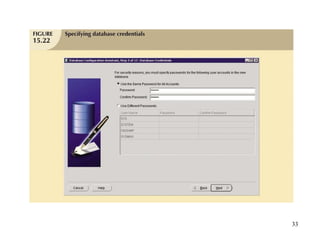
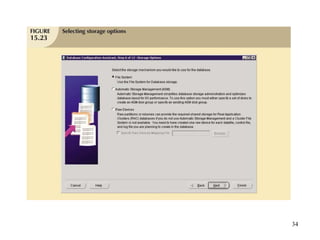
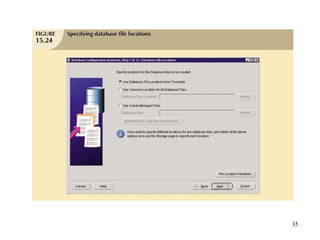
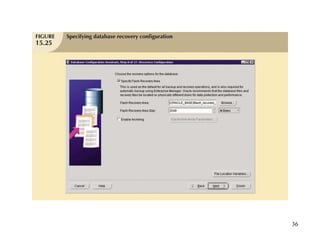
• Oracle Database Configuration Assistant uses
a wizard interface
29
30
31
32
33
34
35
36
37
38
39
40
41
42
Summary
• Data management is a critical activity for any
organization
– Data should be treated as a corporate asset
• DBMS is the most commonly used electronic
tool for corporate data management
• DBMS has impact on organization’s managerial,
technological, and cultural framework
• Data administration function evolved from
centralized electronic data processing
– Applications began to share common repository
43
Summary (continued)
• Database administrator (DBA) is responsible
for managing corporate database
• Broader data management activity is handled
by data administrator (DA)
• DA is more managerially oriented than more
technically oriented DBA
– DA function is DBMS-independent
– DBA function is more DBMS-dependent
• When there is no DA, DBA executes all DA
functions
44
Summary (continued)
• Security ensures confidentiality, integrity,
availability of information system and data
• Security policy is a collection of standards,
policies, and practices
• Security vulnerability is a weakness in system
component
• Information engineering guides development
of data administration strategy
• CASE tools and data dictionaries translate
strategic plans to operational plans

Database Administration, Management & Security.pptx

  • 1.
    Database Systems: Design, Implementation,and Management YourName SubmittedTo:
  • 2.
    2 Data as aCorporate Asset • Data are a valuable asset that require careful management • Data are a valuable resource that translate into information • Accurate, timely information triggers actions that enhance company’s position and generate wealth
  • 3.
  • 4.
    4 The Need forand Role of Databases in an Organization • Database’s predominant role is to support managerial decision making at all levels • DBMS facilitates: – Interpretation and presentation of data – Distribution of data and information – Preservation and monitoring of data – Control over data duplication and use • Three levels to organization management: – Top, middle, operational
  • 5.
    5 Introduction of aDatabase: Special Considerations • Introduction of a DBMS is likely to have a profound impact – Might be positive or negative, depending on how it is administered • Three aspects to DBMS introduction: – Technological – Managerial – Cultural • One role of DBA department is to educate end users about system uses and benefits
  • 6.
    6 The Evolution ofthe Database Administration Function • Data administration has its roots in the old, decentralized world of the file system • Advent of DBMS produced new level of data management sophistication – DP department evolved into information systems (IS) department • Data management became increasingly complex – Development of database administration function
  • 7.
    7 The Database Environment’s HumanComponent • Even most carefully crafted database system cannot operate without human component • Effective data administration requires both technical and managerial skills • DA must set data administration goals • DBA is focal point for data/user interaction • Need for diverse mix of skills
  • 8.
  • 9.
    9 Security • Securing dataentails securing overall information system architecture • Confidentiality: data protected against unauthorized access • Integrity: keep data consistent and free of errors or anomalies • Availability: accessibility of data by authorized users for authorized purposes
  • 10.
    10 Security Policies • Databasesecurity officer secures the system and the data – Works with the database administrator • Security policy: collection of standards, policies, procedures to guarantee security – Ensures auditing and compliance • Security audit process identifies security vulnerabilities – Identifies measures to protect the system
  • 11.
    11 Security Vulnerabilities • Securityvulnerability: weakness in a system component – Could allow unauthorized access or cause service disruptions • Security threat: imminent security violation – Could occur at any time • Security breach yields a database whose integrity is: • Preserved • Corrupted
  • 12.
  • 13.
  • 14.
    14 Database Security • Refersto the use of DBMS features and other measures to comply with security requirements • DBA secures DBMS from installation through operation and maintenance • Authorization management: – User access management – View definition – DBMS access control – DBMS usage monitoring
  • 15.
    15 Database Administration Tools •Two main types of data dictionaries: – Integrated – Standalone • Active data dictionary automatically updated by the DBMS with every database access • Passive data dictionary requires running a batch process • Main function: store description of all objects that interact with database
  • 16.
    16 Database Administration Tools (continued) •Data dictionary that includes data external to DBMS becomes flexible tool – Enables use and allocation of all organization’s information • Metadata often the basis for monitoring database use – Also for assigning access rights to users • DBA uses data dictionary to support data analysis and design
  • 17.
    17 CASE Tools • Computer-aidedsystems engineering – Automated framework for SDLC – Structured methodologies and powerful graphical interfaces • Front-end CASE tools provide support for planning, analysis, and design phases • Back-end CASE tools provide support for coding and implementation phases • Typical CASE tool has five components
  • 18.
  • 19.
    19 Developing a Data AdministrationStrategy • Information engineering (IE) translates strategic goals into data and applications • Information systems architecture (ISA) is the output of IE process • Implementing IE is a costly process – Provides a framework that includes use of computerized, automated, and integrated tools • Success of information systems strategy depends on critical success factors – Managerial, technological, and corporate culture
  • 20.
    20 The DBA atWork: Using Oracle for Database Administration • Technical tasks handled by the DBA in a specific DBMS: – Creating and expanding database storage structures – Managing database objects – Managing end-user database environment – Customizing database initialization parameters • All DBMS vendors provide programs to perform database administrative tasks
  • 21.
    Oracle Database AdministrationTools • In Oracle, most DBA tasks performed via Oracle Enterprise Manager interface 21
  • 22.
    22 The Default Login •Must connect to the database to perform administrative tasks – Username with administrative privileges • Oracle automatically creates SYSTEM and SYS user IDs with administrative privileges • Define preferred credentials by clicking on Preferences link, then Preferred Credentials • Username and passwords are database- specific
  • 23.
    23 Ensuring an AutomaticRDBMS Start • DBA ensures database access automatically started when computer turned on • Service is a Windows system name for a special program that runs automatically – Part of the operating system • Database instance: separate location in memory reserved to run the database – May have several databases running in memory at the same time
  • 24.
    24 Creating Tablespaces andDatafiles • Database composed of one or more tablespaces • Tablespace is a logical storage space – Physically stored in one or more datafiles • Datafile physically stores the database’s data – Each datafile can reside in a different directory on the hard disk • Database has 1:M relationship with tablespaces • Tablespace has 1:M relationship with datafiles
  • 25.
    25 Managing the DatabaseObjects: Tables, Views, Triggers, and Procedures • Database object: any object created by end users • Schema: logical section of the database that belongs to a given user – Schema identified by a username – Within the schema, users create their own tables and other objects • Normally, users authorized to access only the objects that belong to their own schemas
  • 26.
    26 Managing Users and EstablishingSecurity • User: uniquely identifiable object – Allows a given person to log on to the database • Role: a named collection of database access privileges – Authorizes a user to connect to the database and use system resources • Profile: named collection of settings – Controls how much of a resource a given user can use
  • 27.
    27 Customizing the Database InitializationParameters • Fine-tuning requires modification of database configuration parameters – Some are changed in real time using SQL – Some affect database instance – Others affect entire RDBMS and all instances • Initialization parameters reserve resources used by the database at run time • After modifying parameters, may need to restart the database
  • 28.
    28 Creating a NewDatabase • General database creation format tends to be generic – Execution tends to be DBMS-specific • Leading RDBMS vendors offer option to create databases manually – Use SQL commands or GUI-based process • Oracle Database Configuration Assistant uses a wizard interface
  • 29.
  • 30.
  • 31.
  • 32.
  • 33.
  • 34.
  • 35.
  • 36.
  • 37.
  • 38.
  • 39.
  • 40.
  • 41.
  • 42.
    42 Summary • Data managementis a critical activity for any organization – Data should be treated as a corporate asset • DBMS is the most commonly used electronic tool for corporate data management • DBMS has impact on organization’s managerial, technological, and cultural framework • Data administration function evolved from centralized electronic data processing – Applications began to share common repository
  • 43.
    43 Summary (continued) • Databaseadministrator (DBA) is responsible for managing corporate database • Broader data management activity is handled by data administrator (DA) • DA is more managerially oriented than more technically oriented DBA – DA function is DBMS-independent – DBA function is more DBMS-dependent • When there is no DA, DBA executes all DA functions
  • 44.
    44 Summary (continued) • Securityensures confidentiality, integrity, availability of information system and data • Security policy is a collection of standards, policies, and practices • Security vulnerability is a weakness in system component • Information engineering guides development of data administration strategy • CASE tools and data dictionaries translate strategic plans to operational plans