1
TOTAL STATION
Prepared by
Asst. Prof. Salar k Hussein
Asst. Lecturer. Kamal Yaseen
TOTAL STATION
2021-2022
Engineering- Surveying
Plane and Applied Surveying -2 Practical part 1
1- Report Number (4)
2-Report name
Setting up the Instrument total Station, Angle measurement & Distance
measurement.
APPARATUS
1-Total Station instrument 1 No.
2- Tripod 1 No.
3- Reflector 1 No.
4- Tape 1 No.
5- Pins 5 Nos.
OBJECT
.
Object: To Setup the total station instrument (Centering, Leveling,
Tilting) then perform different measurements.
Note: Always perform Levelling, Centering and Tilting when the
instrument is setup
Setting up the instrument
NOTE: Mount the battery in the instrument before performing this
operation because the instrument will tilt slightly if the battery is
mounted after levelling.
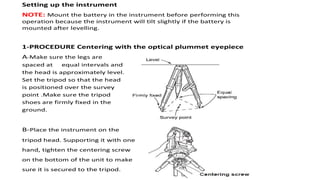
1-PROCEDURE Centering with the optical plummet eyepiece
A-Make sure the legs are
spaced at equal intervals and
the head is approximately level.
Set the tripod so that the head
is positioned over the survey
point .Make sure the tripod
shoes are firmly fixed in the
ground.
B-Place the instrument on the
tripod head. Supporting it with one
hand, tighten the centering screw
on the bottom of the unit to make
sure it is secured to the tripod.
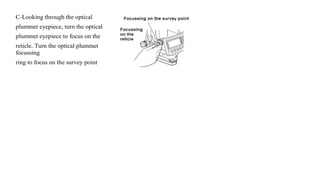
C-Looking through the optical
plummet eyepiece, turn the optical
plummet eyepiece to focus on the
reticle. Turn the optical plummet
focussing
ring to focus on the survey point
2-Leveling Procedure
1-Adjust the levelling foot screws to center the survey point in the optical plummet reticle.
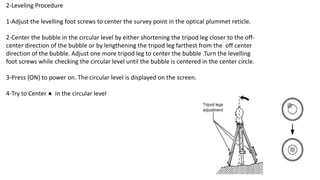
2-Center the bubble in the circular level by either shortening the tripod leg closer to the off-
center direction of the bubble or by lengthening the tripod leg farthest from the off center
direction of the bubble. Adjust one more tripod leg to center the bubble .Turn the levelling
foot screws while checking the circular level until the bubble is centered in the center circle.
3-Press {ON} to power on. The circular level is displayed on the screen.
4-Try to Center ● in the circular level
5- To level the instrument correctly and easily, Turn the instrument
until the telescope is parallel to a linebetween levelling foot screws
Aand B, then tighten the horizontal clamp.
6-Set the tilt angle to 0° using foot
screws A and B for the X direction and
levelling screw C for the Y direction.
7- Loosen the centering screw slightly.
Looking through the optical plummet
eyepiece, slide the instrument over the
tripod head until the survey point is
exactly centered in the reticle. Retighten the centering screw securely.
8-Finally, When levelling is completed, press [OK]changes to the OBS
mode.
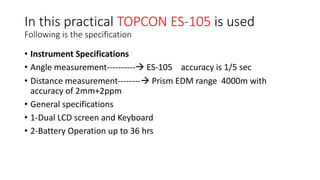
In this practical TOPCON ES-105 is used
Following is the specification
• Instrument Specifications
• Angle measurement----------à ES-105 accuracy is 1/5 sec
• Distance measurement--------à Prism EDM range 4000m with
accuracy of 2mm+2ppm
• General specifications
• 1-Dual LCD screen and Keyboard
• 2-Battery Operation up to 36 hrs
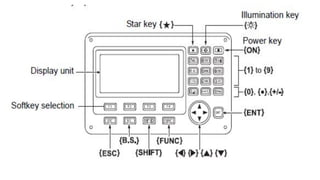
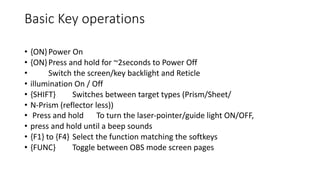
Basic Key operations
• {ON}Power On
• {ON}Press and hold for ~2seconds to Power Off
• Switch the screen/key backlight and Reticle
• illumination On / Off
• {SHIFT} Switches between target types (Prism/Sheet/
• N-Prism (reflector less))
• Press and hold To turn the laser-pointer/guide light ON/OFF,
• press and hold until a beep sounds
• {F1} to {F4} Select the function matching the softkeys
• {FUNC} Toggle between OBS mode screen pages
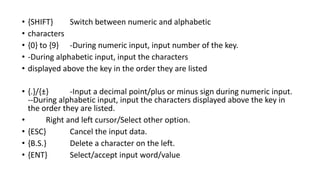
• {SHIFT} Switch between numeric and alphabetic
• characters
• {0} to {9} -During numeric input, input number of the key.
• -During alphabetic input, input the characters
• displayed above the key in the order they are listed
• {.}/{±} -Input a decimal point/plus or minus sign during numeric input.
--During alphabetic input, input the characters displayed above the key in
the order they are listed.
• Right and left cursor/Select other option.
• {ESC} Cancel the input data.
• {B.S.} Delete a character on the left.
• {ENT} Select/accept input word/value
Topcon ES-105 instrument includes three main pages as follows:
• Page 1:
• [MEAS] [SHV] [0SET] [COORD]
• Page 2:
• [MENU] [TILT] [H-SET] [EDM]
• Page 3:
• [MLM] [OFFSET] [TOPO] [S-O]
The following functions can be allocated to the softkeys.
• [MEAS] : Distance measurement
• [SHV]: Switch between angle display and distance display
• [0SET]: Set horizontal angle to 0
• [COORD]: Coordinates measurement
• [REP]: Repetition measurement
• [MLM]: Missing line measurement
• [S-O]: Setting-out measurement
• [OFFSET] : Offset measurement
• [TOPO] :To TOPO menu
• [EDM]: Setting EDM
• [H-SET]: Set required horizontal angle
• [TILT]: Display tilt angle
• [MENU]To Menu mode (Coordinates measurement, setting-out
measurement, offset measurement, repetition measurement, missing
line measurement, REM measurement, resection measurement,
surface area measurement, set-out line, set-out arc, point projection,
intersections, traverse
the horizontal angle to a required value (Hz angle hold)
• You can reset horizontal angle to a required value and use this value to find the horizontal angle of a new target.
• PROCEDURE Entering the horizontal angle
• 1-Target the instrument to the prism.
• 2-Press [H-SET] on the second page of the BOS mode and select “Angle”.
• 3-Enter the angle you wish to set then press [OK]. Then press [REC] to set and record the horizontal angle.
• 4-Attempt to sight the second target. As the result, the horizontal angle from the second target to the value set as the
horizontal angle is displayed.
DISTANCE MEASUREMENT
• 1-light the target
• 2-In the first page of OBS mode, press [MEAS] to start distance measurement.
• When measurement starts, EDM information (distance mode, prism constant correction value, atmospheric
correction factor) is represented by a flashing light.
• A short beep sound, and the measured distance data (SD),
• Vertical angle (ZA), and horizontal angle (HA-R) are displayed.
• 3-Press [STOP] to record distance measurement.
• NOTE:
• • Each time [SHV] is pressed, slope distance (SD), horizontal distance (HD) and height difference (VD) are
displayed alternately.

lecture_(1)_(Leveling-Centering-Tilting-FUNC-total station

  • 1.
    1 TOTAL STATION Prepared by Asst.Prof. Salar k Hussein Asst. Lecturer. Kamal Yaseen TOTAL STATION 2021-2022 Engineering- Surveying Plane and Applied Surveying -2 Practical part 1
  • 2.
    1- Report Number(4) 2-Report name Setting up the Instrument total Station, Angle measurement & Distance measurement.
  • 3.
    APPARATUS 1-Total Station instrument1 No. 2- Tripod 1 No. 3- Reflector 1 No. 4- Tape 1 No. 5- Pins 5 Nos.
  • 4.
    OBJECT . Object: To Setupthe total station instrument (Centering, Leveling, Tilting) then perform different measurements. Note: Always perform Levelling, Centering and Tilting when the instrument is setup
  • 5.
    Setting up theinstrument NOTE: Mount the battery in the instrument before performing this operation because the instrument will tilt slightly if the battery is mounted after levelling. 1-PROCEDURE Centering with the optical plummet eyepiece A-Make sure the legs are spaced at equal intervals and the head is approximately level. Set the tripod so that the head is positioned over the survey point .Make sure the tripod shoes are firmly fixed in the ground. B-Place the instrument on the tripod head. Supporting it with one hand, tighten the centering screw on the bottom of the unit to make sure it is secured to the tripod.
  • 6.
    C-Looking through theoptical plummet eyepiece, turn the optical plummet eyepiece to focus on the reticle. Turn the optical plummet focussing ring to focus on the survey point
  • 7.
    2-Leveling Procedure 1-Adjust thelevelling foot screws to center the survey point in the optical plummet reticle. 2-Center the bubble in the circular level by either shortening the tripod leg closer to the off- center direction of the bubble or by lengthening the tripod leg farthest from the off center direction of the bubble. Adjust one more tripod leg to center the bubble .Turn the levelling foot screws while checking the circular level until the bubble is centered in the center circle. 3-Press {ON} to power on. The circular level is displayed on the screen. 4-Try to Center ● in the circular level
  • 8.
    5- To levelthe instrument correctly and easily, Turn the instrument until the telescope is parallel to a linebetween levelling foot screws Aand B, then tighten the horizontal clamp. 6-Set the tilt angle to 0° using foot screws A and B for the X direction and levelling screw C for the Y direction. 7- Loosen the centering screw slightly. Looking through the optical plummet eyepiece, slide the instrument over the tripod head until the survey point is exactly centered in the reticle. Retighten the centering screw securely. 8-Finally, When levelling is completed, press [OK]changes to the OBS mode.
  • 9.
    In this practicalTOPCON ES-105 is used Following is the specification • Instrument Specifications • Angle measurement----------à ES-105 accuracy is 1/5 sec • Distance measurement--------à Prism EDM range 4000m with accuracy of 2mm+2ppm • General specifications • 1-Dual LCD screen and Keyboard • 2-Battery Operation up to 36 hrs
  • 11.
    Basic Key operations •{ON}Power On • {ON}Press and hold for ~2seconds to Power Off • Switch the screen/key backlight and Reticle • illumination On / Off • {SHIFT} Switches between target types (Prism/Sheet/ • N-Prism (reflector less)) • Press and hold To turn the laser-pointer/guide light ON/OFF, • press and hold until a beep sounds • {F1} to {F4} Select the function matching the softkeys • {FUNC} Toggle between OBS mode screen pages
  • 12.
    • {SHIFT} Switchbetween numeric and alphabetic • characters • {0} to {9} -During numeric input, input number of the key. • -During alphabetic input, input the characters • displayed above the key in the order they are listed • {.}/{±} -Input a decimal point/plus or minus sign during numeric input. --During alphabetic input, input the characters displayed above the key in the order they are listed. • Right and left cursor/Select other option. • {ESC} Cancel the input data. • {B.S.} Delete a character on the left. • {ENT} Select/accept input word/value
  • 13.
    Topcon ES-105 instrumentincludes three main pages as follows: • Page 1: • [MEAS] [SHV] [0SET] [COORD] • Page 2: • [MENU] [TILT] [H-SET] [EDM] • Page 3: • [MLM] [OFFSET] [TOPO] [S-O]
  • 14.
    The following functionscan be allocated to the softkeys. • [MEAS] : Distance measurement • [SHV]: Switch between angle display and distance display • [0SET]: Set horizontal angle to 0 • [COORD]: Coordinates measurement • [REP]: Repetition measurement • [MLM]: Missing line measurement • [S-O]: Setting-out measurement • [OFFSET] : Offset measurement • [TOPO] :To TOPO menu • [EDM]: Setting EDM • [H-SET]: Set required horizontal angle • [TILT]: Display tilt angle
  • 15.
    • [MENU]To Menumode (Coordinates measurement, setting-out measurement, offset measurement, repetition measurement, missing line measurement, REM measurement, resection measurement, surface area measurement, set-out line, set-out arc, point projection, intersections, traverse
  • 16.
    the horizontal angleto a required value (Hz angle hold) • You can reset horizontal angle to a required value and use this value to find the horizontal angle of a new target. • PROCEDURE Entering the horizontal angle • 1-Target the instrument to the prism. • 2-Press [H-SET] on the second page of the BOS mode and select “Angle”. • 3-Enter the angle you wish to set then press [OK]. Then press [REC] to set and record the horizontal angle. • 4-Attempt to sight the second target. As the result, the horizontal angle from the second target to the value set as the horizontal angle is displayed.
  • 17.
    DISTANCE MEASUREMENT • 1-lightthe target • 2-In the first page of OBS mode, press [MEAS] to start distance measurement. • When measurement starts, EDM information (distance mode, prism constant correction value, atmospheric correction factor) is represented by a flashing light. • A short beep sound, and the measured distance data (SD), • Vertical angle (ZA), and horizontal angle (HA-R) are displayed. • 3-Press [STOP] to record distance measurement. • NOTE: • • Each time [SHV] is pressed, slope distance (SD), horizontal distance (HD) and height difference (VD) are displayed alternately.