SURVEYING - II
LAB MANUAL
DEPARTMENT OF CIVIL ENGINEERING
2017 - 18
CERTIFICATE
This is to certify that this manual is a bonafide record of practical work in the
Surveying - II Laboratory in Second Semester of Second Year B. Tech (Civil)
programme during the academic year 2017-18. The book is prepared by Ms. M.
Nanditha Asst.Professor, Department of Civil Engineering and Mr. T. Jaya
Krishna, Asst.Professor, Department of Civil Engineering
Signature of HOD Signature of Director Signature of Principal
INDEX
S. No CONTENT PAGE NO
1 PREFACE i
2 ACKNOWLEDGEMENT ii
3 GENERAL INSTRUCTIONS iii
4 SAFETY PRECAUTIONS iv
5 INSTITUTE VISION AND MISSION v
6 DEPARTMENT VISION AND MISSION vi
7 PROGRAMME EDUCATIONAL OBJECTIVES vi
8 SPECIFIC OUTCOMES, PROGRAMME OUTCOMES vi
9 COURSE STRUCTURE, OBJECTIVES AND OUTCOMES vii
10 INTRODUCTION 1 - 6
11 DETERMINATION OF AREA USING TOTAL STATION 7 – 9
12 TRAVERSING USING TOTAL STATION 10 – 12
13 CONTOURING USING TOTAL STATION 13 – 16
14 DETERMINATION OF REMOTE HEIGHT USING 17 - 18
TOTAL STATION
15 STAKE – OUT USING TOTAL STATION 19 – 20
16 DISTANCE, GRADIENT, DIFFERENCE, HEIGHT BETWEEN 21 - 23
TWO INACCESSIBLE POINTS USING TOTAL STATION
17 CURVE SETTING USING TOTAL STATION 24 – 27
18 RESECTION USING TOTAL STATION 28 – 30
19 SETTING OUT WORKS FOR BUILDINGS AND PIPE LINES 31 – 32
20 FINDING POSITION OF STATIONUSING GPS 33 – 36
21 ANNEXURE 1 37 - 38
DEPARTMENT OF CIVIL ENGINEERING SURVEYING – II LAB MANUAL
1
INTRODUCTION
TOTAL STATION:
The total station is an electronic theodolite (transit) integrated with an electronic distance
measurement (EDM) to read slope distances from the instrument to a particular point, and an
on-board computer to collect data and perform advanced coordinate based calculations.
FUNCTION:
Angle measurement
Most total station instruments measure angles by means of electro-optical scanning of
extremely precise digital bar-codes etched on rotating glass cylinders or discs within the
instrument. The best quality total stations are capable of measuring angles to 0.5 arc-second.
Inexpensive "construction grade" total stations can generally measure angles to 5 or 10 arc-
seconds.
Distance measurement
Measurement of distance is accomplished with a modulated infrared carrier signal, generated
by a small solid-state emitter within the instrument's optical path, and reflected by a prism
reflector or the object under survey. The modulation pattern in the returning signal is read and
interpreted by the computer in the total station. The distance is determined by emitting and
receiving multiple frequencies, and determining the integer number of wavelengths to the
target for each frequency. Most total stations use purpose-built glass corner cube
prism reflectors for the EDM signal. A typical total station can measure distances with an
accuracy of about 1.5 millimetres (0.0049 feet) + 2 parts per million over a distance of up to
1,500 meters (4,900 feet).
Reflector less total stations can measure distances to any object that is reasonably light in
colour, up to a few hundred meters.
Coordinate measurement:
The coordinates of an unknown point relative to a known coordinate can be determined using
the total station as long as a direct line of sight can be established between the two points.
Angles and distances are measured from the total station to points under survey, and
the coordinates (X, Y, and Z or easting, northing and elevation) of surveyed points relative to
the total station position are calculated using trigonometry and triangulation. To determine an
absolute location a Total Station requires line of sight observations and can be set up over a
known point or with line of sight to 2 or more points with known location, called Resection
(Free Stationing).
For this reason, some total stations also have a Global Navigation Satellite System receiver and
do not require a direct line of sight to determine coordinates. However, GNSS measurements
may require longer occupation periods and offer relatively poor accuracy in the vertical axis.
Data processing Some models include internal electronic data storage to record distance,
horizontal angle, and vertical angle measured, while other models are equipped to write these
measurements to an external data collector, such as a hand-held computer.
DEPARTMENT OF CIVIL ENGINEERING SURVEYING – II LAB MANUAL
2
When data is downloaded from a total station onto a computer, application software can be
used to compute results and generate a map of the surveyed area. The newest generation of
total stations can also show the map on the touch-screen of the instrument immediately after
measuring the points.
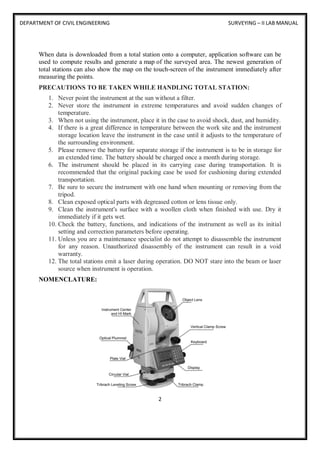
PRECAUTIONS TO BE TAKEN WHILE HANDLING TOTAL STATION:
1. Never point the instrument at the sun without a filter.
2. Never store the instrument in extreme temperatures and avoid sudden changes of
temperature.
3. When not using the instrument, place it in the case to avoid shock, dust, and humidity.
4. If there is a great difference in temperature between the work site and the instrument
storage location leave the instrument in the case until it adjusts to the temperature of
the surrounding environment.
5. Please remove the battery for separate storage if the instrument is to be in storage for
an extended time. The battery should be charged once a month during storage.
6. The instrument should be placed in its carrying case during transportation. It is
recommended that the original packing case be used for cushioning during extended
transportation.
7. Be sure to secure the instrument with one hand when mounting or removing from the
tripod.
8. Clean exposed optical parts with degreased cotton or lens tissue only.
9. Clean the instrument's surface with a woollen cloth when finished with use. Dry it
immediately if it gets wet.
10. Check the battery, functions, and indications of the instrument as well as its initial
setting and correction parameters before operating.
11. Unless you are a maintenance specialist do not attempt to disassemble the instrument
for any reason. Unauthorized disassembly of the instrument can result in a void
warranty.
12. The total stations emit a laser during operation. DO NOT stare into the beam or laser
source when instrument is operation.
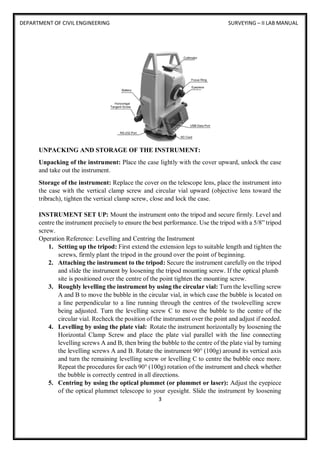
NOMENCLATURE:
DEPARTMENT OF CIVIL ENGINEERING SURVEYING – II LAB MANUAL
3
UNPACKING AND STORAGE OF THE INSTRUMENT:
Unpacking of the instrument: Place the case lightly with the cover upward, unlock the case
and take out the instrument.
Storage of the instrument: Replace the cover on the telescope lens, place the instrument into
the case with the vertical clamp screw and circular vial upward (objective lens toward the
tribrach), tighten the vertical clamp screw, close and lock the case.
INSTRUMENT SET UP: Mount the instrument onto the tripod and secure firmly. Level and
centre the instrument precisely to ensure the best performance. Use the tripod with a 5/8” tripod
screw.
Operation Reference: Levelling and Centring the Instrument
1. Setting up the tripod: First extend the extension legs to suitable length and tighten the
screws, firmly plant the tripod in the ground over the point of beginning.
2. Attaching the instrument to the tripod: Secure the instrument carefully on the tripod
and slide the instrument by loosening the tripod mounting screw. If the optical plumb
site is positioned over the centre of the point tighten the mounting screw.
3. Roughly levelling the instrument by using the circular vial: Turn the levelling screw
A and B to move the bubble in the circular vial, in which case the bubble is located on
a line perpendicular to a line running through the centres of the twolevelling screw
being adjusted. Turn the levelling screw C to move the bubble to the centre of the
circular vial. Recheck the position of the instrument over the point and adjust if needed.
4. Levelling by using the plate vial: Rotate the instrument horizontally by loosening the
Horizontal Clamp Screw and place the plate vial parallel with the line connecting
levelling screws A and B, then bring the bubble to the centre of the plate vial by turning
the levelling screws A and B. Rotate the instrument 90° (100g) around its vertical axis
and turn the remaining levelling screw or levelling C to centre the bubble once more.
Repeat the procedures for each 90° (100g) rotation of the instrument and check whether
the bubble is correctly centred in all directions.
5. Centring by using the optical plummet (or plummet or laser): Adjust the eyepiece
of the optical plummet telescope to your eyesight. Slide the instrument by loosening
DEPARTMENT OF CIVIL ENGINEERING SURVEYING – II LAB MANUAL
4
the tripod screw; place the point on the centre mark of the optical plummet. Sliding the
instrument carefully as to not rotate the axis will allow you to get 7 the least dislocation
of the bubble. (Place star-key after power on, then press F4(LASER)key, press
F1(ON)key to turn on the laser plummet. Slide the instrument by loosening the tripod
screw; Place laser facular on the occupied pointing, Sliding the instrument carefully as
to not rotate the axis will allow you to get the least dislocation of the bubble. The last,
press ESC key, and laser plummet turn off automatically.)
6. complete levelling the instrument: Level the instrument precisely as in Step 4. Rotate
the instrument and check to see that the bubble is in the centre of the plate level
regardless of the telescope direction then tighten the tripod screw firmly.
BATTERY REMOVAL & INSERTION - INFORMATION AND RECHARGING:
Battery removal and insertion: Insert the battery into the battery slot and push the battery
until it clicks. Press the right and left buttons of the battery compartment to remove the battery.
Battery information: ------------- Indicates that battery is fully charged
------------- Indicates that the battery can only be used for about 1 hour. Recharge the battery
or prepare a recharged battery for use.
------------- Recharge the battery or prepare a recharged battery for use
Note: The working time of the battery is determined by environment
conditions, recharging time, and other factors.
Battery recharging: Battery should be recharged only with the charger supplied with the
instrument. Remove the on-board battery from instrument as instructed and connect to the
battery charger.
Battery removal caution: Before you take the battery out of the instrument, make sure that
the power is turned off. Otherwise the instrument can be damaged.
Recharging Caution:
 The charger has built-in circuitry for protection from overcharging. However, do not
leave the charger plugged into the power outlet after recharging is completed.
 Be sure to recharge the battery at a temperature of 0℃~45℃, recharging may be
abnormal beyond the specified temperature range.
 When the indicator lamp does not light after connecting the battery and charger the
battery or the charger may be damaged.
Storage Caution:
 The rechargeable battery can be repeatedly recharged 300-500 times. Complete
discharge of the battery may shorten its service life.
DEPARTMENT OF CIVIL ENGINEERING SURVEYING – II LAB MANUAL
5
 In order to get the maximum service life be sure to recharge the battery at least once a
month.
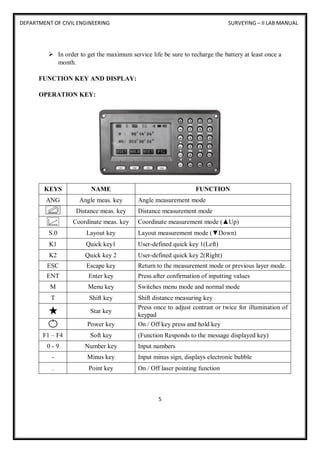
FUNCTION KEY AND DISPLAY:
OPERATION KEY:
KEYS NAME FUNCTION
ANG Angle meas. key Angle measurement mode
Distance meas. key Distance measurement mode
Coordinate meas. key Coordinate measurement mode (▲Up)
S.0 Layout key Layout measurement mode (▼Down)
K1 Quick key1 User-defined quick key 1(Left)
K2 Quick key 2 User-defined quick key 2(Right)
ESC Escape key Return to the measurement mode or previous layer mode.
ENT Enter key Press after confirmation of inputting values
M Menu key Switches menu mode and normal mode
T Shift key Shift distance measuring key
Star key
Press once to adjust contrast or twice for illumination of
keypad
Power key On / Off key press and hold key
F1 – F4 Soft key (Function Responds to the message displayed key)
0 - 9 Number key Input numbers
- Minus key Input minus sign, displays electronic bubble
. Point key On / Off laser pointing function
DEPARTMENT OF CIVIL ENGINEERING SURVEYING – II LAB MANUAL
6
DISPLAY CONTENT
V Vertical angle
V% Vertical angle as a percentage
(Gradient display)
HR Horizontal angle (right)
HL Horizontal angle (left)
HD Horizontal distance
VD Elevation difference
SD Slope distance
N North coordinate
E East coordinate
Z Z or elevation coordinate
* EDM working
m/ft Switches units between meters
and feet
m Meter unit
S/A Sets temperature, air pressure,
prism constant
PSM Prism constant (unit: mm)
PPM Atmospheric correction
DEPARTMENT OF CIVIL ENGINEERING SURVEYING – II LAB MANUAL
7
EXPERIMENT NO: 1
DETERMINATION OF AREA USING TOTAL STATION
OBJECTIVE:
To find the area of a closed or open traverse using total station.
EQUIPMENT:
S.NO NAME OF THE EQUIPMENT QUANTITY
1 Total station 1
2 Prism 1
3 Tripod 1
4 Pegs / Arrows Depends on points plotted
PERCAUTIONS:
a) Temporary adjustment for total station
b) Levelling and centring
c) Focusing adjustment
PROCEDURE:
1. Fix the total station over a station and level it
2. press the power button to switch on the instrument.
3. select MODE B→ S function→ file management→ create (enter a name)
→accept then press ESC to go to the starting page then set zero by double
clicking on 0 set(F3)
4. then go to S Function → measure → rectangular co-ordinate > station → press
enter.
5. Here enter the point number or name, instrument height and prism code
6. Then press accept(Fs)
DEPARTMENT OF CIVIL ENGINEERING SURVEYING – II LAB MANUAL
8
7. Keep the reflecting prism on the first point and turn the total station to the
prism, focus it and bisect it exactly using a horizontal and vertical clamp.
8. Then select MEAS and the display panel will show the point specification
9. Now select edit and re-enter the point number or name point code and enter the
prism height that we have set.
10. Then press MEAS/SAVE (F3) so that the measurement to the first point will
automatically be saved and the display panel will show the second point.
11. Then turn the total station to second point and do the same procedure.
12. Repeat the steps to the rest of the stations and close the traverse
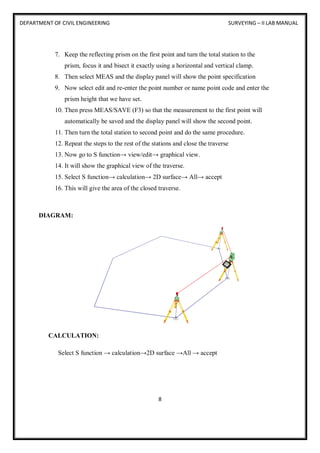
13. Now go to S function→ view/edit→ graphical view.
14. It will show the graphical view of the traverse.
15. Select S function→ calculation→ 2D surface→ All→ accept
16. This will give the area of the closed traverse.
DIAGRAM:
CALCULATION:
Select S function → calculation→2D surface →All → accept
DEPARTMENT OF CIVIL ENGINEERING SURVEYING – II LAB MANUAL
9
RESULTS:
Select S function → calculation →2D surface → All → accept.
This will give the area of the. Area of the is calculated.
VIVA QUESTIONS:
1. What are the temporary adjustments of total station?
2. What is the instrument used for ranging?
3. What is levelling?
4. What are the precautions to be taken while determining the area?
5. What is closed traverse?
DEPARTMENT OF CIVIL ENGINEERING SURVEYING – II LAB MANUAL
10
EXPERIMENT NO: 2
TRAVERSING USING TOTAL STATION
OBJECTIVE:
To form a closed traverse using total station.
EQUIPMENT:
S.NO NAME OF THE EQUIPMENT QUANTITY
1 Total station 1
2 Prism 1
3 Tripod 1
4 Pegs / Arrows Depends on points plotted
PERCAUTIONS:
a) Temporary adjustment for total station
b) Levelling and centring
c) Focusing adjustment
PROCEDURE:
1. Fix the total station over a station and level it
2. Press the power button to switch on the instrument.
3. Select MODE B → S function→ file management→ create (enter a name) →accept
4. Then press ESC to go to the starting page
5. Then set zero by double clicking on 0 set(F3)
6. Then go to S function → measure → rectangular
7. Then go to S Function →measure → rectangular co- ordinate → station → press enter.
8. Here enter the point number or name, instrument height and prism code.
9. Then press accept(Fs)
10. keep the reflecting prism on the first point and turn the total station to the prism, focus
it and bisect it exactly using a horizontal and vertical clamp.
DEPARTMENT OF CIVIL ENGINEERING SURVEYING – II LAB MANUAL
11
11. Then select MEAS and the display panel will show the point specification.
12. Now select edit and re-enter the point number or name point code and enter the
prism height that we have set.
13. Then press MEAS/SAVE (F3) so that the measurement to the first point will
automatically be saved and the display panel will show the second point.
14. Then turn the total station to second point and do the same procedure.
15. Repeat the steps to the rest of the stations and close the traverse
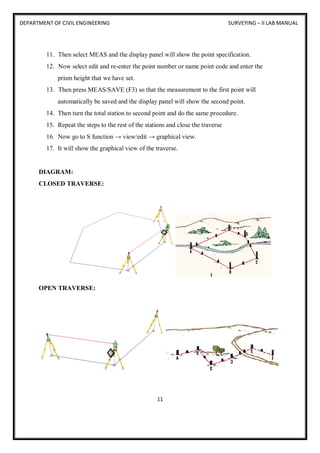
16. Now go to S function → view/edit → graphical view.
17. It will show the graphical view of the traverse.
DIAGRAM:
CLOSED TRAVERSE:
OPEN TRAVERSE:
DEPARTMENT OF CIVIL ENGINEERING SURVEYING – II LAB MANUAL
12
CALCULATION:
Select S function→ calculation→ 2D surface→ All→ accept.
RESULTS:
Select S function→calculation→2D surface→ All→ accept This will give the area of
the closed traverse. Area of the closed traverse is calculated.
VIVA QUESTIONS:
1. What is traversing?
2. What are the types of traversing?
3. What are the advantage so traversing?
4. What are the disadvantages of traversing?
5. What is the difference between the open traverse and closed traverse?
6. What is fixed traverse?
DEPARTMENT OF CIVIL ENGINEERING SURVEYING – II LAB MANUAL
13
EXPERIMENT NO: 3
CONTOURING USING TOTAL STATION
OBJECTIVE:
Counter plan of given area (One full size drawing sheet) using total station.
EQUIPMENT:
S.NO NAME OF THE EQUIPMENT QUANTITY
1 Total station 1
2 Prism 1
3 Tripod 1
4 Pegs / Arrows Depends on points plotted
PERCAUTIONS:
a) Temporary adjustment for total station
b) Levelling and centring
c) Focusing adjustment
PROCEDURE:
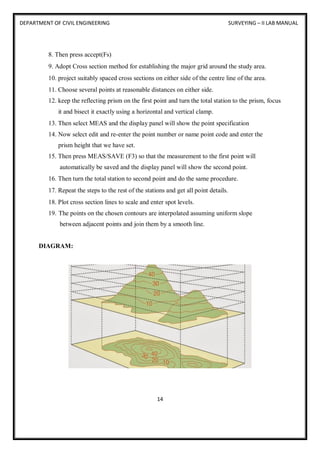
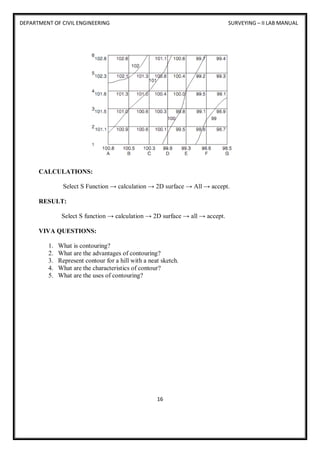
The elevation and depression and the undulations of the surface of the ground are shown as
map by interaction of level surface with by means of contour line. A contour may be defined
as the line of intersection of a level surface with the surface of the ground.
1. Fix the total station over a station and level it
2. press the power button to switch on the instrument.
3. select MODE B → S function→ file management→ create (enter a name) →accept
4. then press ESC to go to the starting page
5. then set zero by double clicking on 0 set(F3)
6. Then go to S function →measure→ rectangular co-ordinate→ station →enter.
7. Here enter the point number or name, instrument height and prism code.
DEPARTMENT OF CIVIL ENGINEERING SURVEYING – II LAB MANUAL
14
8. Then press accept(Fs)
9. Adopt Cross section method for establishing the major grid around the study area.
10. project suitably spaced cross sections on either side of the centre line of the area.
11. Choose several points at reasonable distances on either side.
12. keep the reflecting prism on the first point and turn the total station to the prism, focus
it and bisect it exactly using a horizontal and vertical clamp.
13. Then select MEAS and the display panel will show the point specification
14. Now select edit and re-enter the point number or name point code and enter the
prism height that we have set.
15. Then press MEAS/SAVE (F3) so that the measurement to the first point will
automatically be saved and the display panel will show the second point.
16. Then turn the total station to second point and do the same procedure.
17. Repeat the steps to the rest of the stations and get all point details.
18. Plot cross section lines to scale and enter spot levels.
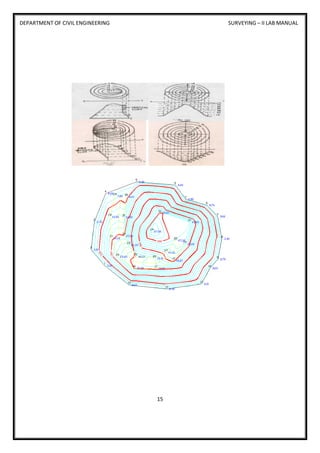
19. The points on the chosen contours are interpolated assuming uniform slope
between adjacent points and join them by a smooth line.
DIAGRAM:
DEPARTMENT OF CIVIL ENGINEERING SURVEYING – II LAB MANUAL
15
DEPARTMENT OF CIVIL ENGINEERING SURVEYING – II LAB MANUAL
16
CALCULATIONS:
Select S Function → calculation → 2D surface → All → accept.
RESULT:
Select S function → calculation → 2D surface → all → accept.
VIVA QUESTIONS:
1. What is contouring?
2. What are the advantages of contouring?
3. Represent contour for a hill with a neat sketch.
4. What are the characteristics of contour?
5. What are the uses of contouring?
DEPARTMENT OF CIVIL ENGINEERING SURVEYING – II LAB MANUAL
17
EXPERIMENT NO: 4
DETERMINATION OF REMOTE HEIGHT USING TOTAL STATION
OBJECTIVE:
To find the height of a remote point using total station.
EQUIPMENT:
S.NO NAME OF THE EQUIPMENT QUANTITY
1 Total station 1
2 Prism 1
3 Tripod 1
4 Pegs / Arrows Depends on points plotted
PERCAUTIONS:
a) Temporary adjustment for total station
b) Levelling and centring
c) Focusing adjustment
PROCEDURE:
1. Fix the total station over a station and level it
2. press the power button to switch on the instrument.
3. Select MODE B→ S function→ file management → create (enter a name) → accept
4. Press ESC to go to the starting page
5. Then set zero by double clicking on 0 set(F3)
6. Then go to S function → measure→ rectangular co-ordinate→ station →press enter.
7. Here enter the point number or name, instrument height and prism code.
8. Then press accept (Fs)
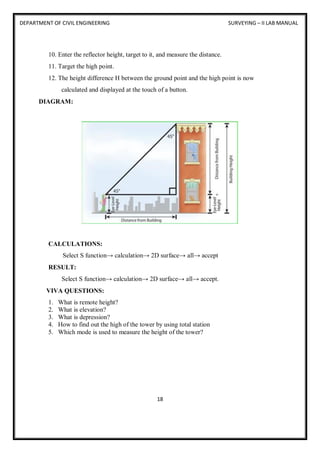
9. Setup a reflector vertically beneath the point, the height of which is to be determined.
DEPARTMENT OF CIVIL ENGINEERING SURVEYING – II LAB MANUAL
18
10. Enter the reflector height, target to it, and measure the distance.
11. Target the high point.
12. The height difference H between the ground point and the high point is now
calculated and displayed at the touch of a button.
DIAGRAM:
CALCULATIONS:
Select S function→ calculation→ 2D surface→ all→ accept
RESULT:
Select S function→ calculation→ 2D surface→ all→ accept.
VIVA QUESTIONS:
1. What is remote height?
2. What is elevation?
3. What is depression?
4. How to find out the high of the tower by using total station
5. Which mode is used to measure the height of the tower?
DEPARTMENT OF CIVIL ENGINEERING SURVEYING – II LAB MANUAL
19
EXPERIMENT NO: 5
STAKE-OUT USING TOTAL STATION
OBJECTIVE:
To find a specific point in the field using Total Station
EQUIPMENT:
S.NO NAME OF THE EQUIPMENT QUANTITY
1 Total station 1
2 Prism 1
3 Tripod 1
4 Pegs / Arrows Depends on points plotted
PERCAUTIONS:
a) Temporary adjustment for total station
b) Levelling and centring
c) Focusing adjustment
PROCEDURE:
Place the total station in the spot from which you want to stake out points after you
have finished entering the coordinates for the area into the total station's internal
memory.
1. Make sure that the total station is level and on secure, even ground before continuing.
2. Press the "Power" button to turn on the instrument.
3. Press the "Menu" button and use the navigation arrows to move down to the "Stake
Out" menu option. Press the "Select" button to enter the stake out menu.
4. Select the method to stake out the point. Select "XY" to stake out by coordinates
which will be the most common method.
5. Press the "Yes" button to continue the process using the coordinates on the screen.
6. If the coordinates are incorrect, press the "No" button to try again.
DEPARTMENT OF CIVIL ENGINEERING SURVEYING – II LAB MANUAL
20
7. In the next screen, use the keypad to enter the coordinates or distances and press the
"OK" button to measure.
8. The results will be displayed on the following screen.
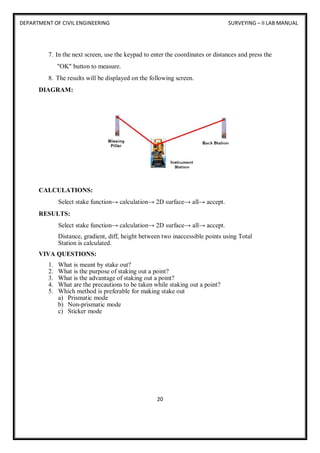
DIAGRAM:
CALCULATIONS:
Select stake function→ calculation→ 2D surface→ all→ accept.
RESULTS:
Select stake function→ calculation→ 2D surface→ all→ accept.
Distance, gradient, diff, height between two inaccessible points using Total
Station is calculated.
VIVA QUESTIONS:
1. What is meant by stake out?
2. What is the purpose of staking out a point?
3. What is the advantage of staking out a point?
4. What are the precautions to be taken while staking out a point?
5. Which method is preferable for making stake out
a) Prismatic mode
b) Non-prismatic mode
c) Sticker mode
DEPARTMENT OF CIVIL ENGINEERING SURVEYING – II LAB MANUAL
21
EXPERIMENT NO: 6
DISTANCE, GRADIENT, DIFFERENCE, HEIGHT BETWEEN TWO
INACCESSIBLE POINTS USING TOTAL STATION
OBJECTIVE:
To find the Distance, gradient, diff, height between two inaccessible points using
Total Station.
EQUIPMENT:
S.NO NAME OF THE EQUIPMENT QUANTITY
1 Total station 1
2 Prism 1
3 Tripod 1
4 Pegs / Arrows Depends on points plotted
PERCAUTIONS:
a) Temporary adjustment for total station
b) Levelling and centring
c) Focusing adjustment
PROCEDURE:
1. Fix the total station over a station “O” and level it
2. Press the power button to switch on the instrument.
3. Select MODE B → S function→ file management→ create (enter a name) → accept
4. Press ESC to go to the starting page
5. Then set zero by double clicking on 0 set (F3)
6. Then go to S function→ measure→ rectangular co-ordinate→ station→ press enter.
7. Here enter the point number or name, instrument height and prism code.
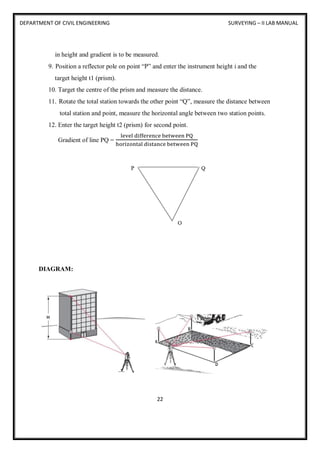
8. Select two inaccessible points “P” and “Q” between which the distance, difference
DEPARTMENT OF CIVIL ENGINEERING SURVEYING – II LAB MANUAL
22
in height and gradient is to be measured.
9. Position a reflector pole on point “P” and enter the instrument height i and the
target height t1 (prism).
10. Target the centre of the prism and measure the distance.
11. Rotate the total station towards the other point “Q”, measure the distance between
total station and point, measure the horizontal angle between two station points.
12. Enter the target height t2 (prism) for second point.
Gradient of line PQ =
level difference between PQ
horizontal distance between PQ
DIAGRAM:
DEPARTMENT OF CIVIL ENGINEERING SURVEYING – II LAB MANUAL
23
CALCULATION:
Select S function→ calculation→ 2D surface→ all→ accept.
RESULT:
Select S function→ calculation→ 2D surface→ all→ accept.
Distance, gradient, diff, height between two inaccessible points using Total Station
is calculated.
VIVA QUESTION:
1. What is gradient?
2. What is meant by inaccessible points?
3. Where the procedure of measuring distance between two inaccessible points will be
applied practically?
4. How the gradient will be calculated?
DEPARTMENT OF CIVIL ENGINEERING SURVEYING – II LAB MANUAL
24
EXPERIMENT NO: 7
CURVE SETTING USING TOTAL STATION
OBJECTIVE:
To determine angle/distance measurements to known points using total station.
EQUIPMENT:
S.NO NAME OF THE EQUIPMENT QUANTITY
1 Total station 1
2 Prism 1
3 Tripod 1
4 Pegs / Arrows Depends on points plotted
PERCAUTIONS:
a) Temporary adjustment for total station
b) Levelling and centring
c) Focusing adjustment
PROCEDURE:
Simple Curve: A simple curve is a circular arc in the horizontal plane that has a central angle
of less than 180 degrees (PI radians). A simple curve starts at the PC (Point of Curvature), has
a CC (Circle Centre) and a PI (Point of Intersection for the tangents to the curve), and ends at
the PT (Point of Tangency, the ending point of the curve).
1. From the Power Topo Lite screen, press [F2] [CALC] to view CALCULATION screen.
DEPARTMENT OF CIVIL ENGINEERING SURVEYING – II LAB MANUAL
25
2. Select 1. COGO and press [ENT] to view the COGO screen.
3. Select the 1. INVERSE and press [ENT] to view INVERSE screen.
4. Start point input (Input the PN, Coordinates and PC of the Start point.)
5. Select 1. SP and press [ENT] to view SP screen.
6. [LIST] key All stored points can be displayed as follows by pressing [F2] [LIST]. Press
[F2] [LIST] to view POINT SELECTION FROM THE LIST screen.
7. Press [ENT] to open the SP input screen.
8. Input your desired Point Name by pressing keys, and press [ENT] to open the X
coordinate input screen.
9. Input your desired value by pressing each keys and press [ENT] to go Y coordinate.
DEPARTMENT OF CIVIL ENGINEERING SURVEYING – II LAB MANUAL
26
10. Press [ENT] to open the Y coordinate input screen and input.
11. Press [ENT] to open the Z coordinate input screen and input.
12. Press [ENT] to open the PC input screen and input.
13. End point coordinates input (Input the PN, Coordinates and PC of the End point.)
14. After PC input, EP screen is viewed.
15. Input the PN, X, Y, Z Coordinates and PC name of the End point.
16. Press [ENT] to view the RESULT OF INVERSE screen.
17. Another End Point Coordinates input the PN, X, Y, Z Coordinates and PC name of
another End point, and another inverse result can be performed.
18. A point Coordinates is calculated from a known point Coordinates and the Distance and
Horizontal angle of the Second point.
DEPARTMENT OF CIVIL ENGINEERING SURVEYING – II LAB MANUAL
27
19. Input: Coordinates of a known point, Distance and Horizontal angle of the Second point
Output: Coordinates of the Second point
20. From the Power Topo Lite screen, press [F2] [CALC] to view the CALCULATION
screen.
21. Select 1.COGO and press [ENT] to view the COGO screen.
DIAGRAM:
CALCULATION:
From the Power Topo Lite screen, press [F2] [CALC] to view the CALCULATION screen.
RESULT:
Defining and setting of curve is done.
22. From the Power Topo Lite screen, press [F2] [CALC] to view the CALCULATION
screen.
VIVA QUESTIONS:
1. What is curve setting?
2. Where the curve setting method is applied in civil engineering constructions?
3. What are the programs you can find in COGO?
4. What are the various methods available for curve setting?
5. Give a list of various types of curves.
DEPARTMENT OF CIVIL ENGINEERING SURVEYING – II LAB MANUAL
28
EXPERIMENT NO: 8
RESECTION USING TOTAL STATION
OBJECTIVE:
To determine a location of one unknown point in relation to known points.
EQUIPMENT:
S.NO NAME OF THE EQUIPMENT QUANTITY
1 Total station 1
2 Prism 1
3 Tripod 1
4 Pegs / Arrows Depends on point plotted
PERCAUTIONS:
a) Temporary adjustment for total station
b) Levelling and centring
c) Focusing adjustment
PROCEDURE:
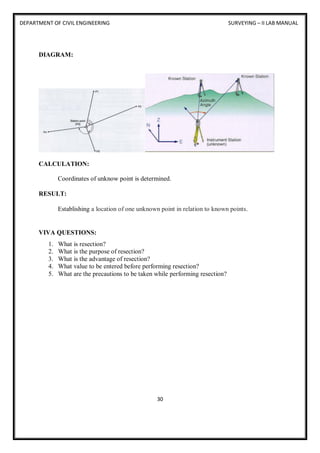
 In surveying, free stationing (also known as resection) is a method of determining a
location of one unknown point in relation to known points. There is a zero point of
reference called a Total station. The instrument can be freely positioned so that all
survey points are at a suitable site from the instrument.
 Resection uses 3 or more known target survey points known target survey points to
automatically determine to automatically determine the X, Y,Z coordinates of the the
X,Y,Z coordinates of the instrument.
 This has the significant This has the significant advantage of not requiring the
instrument to be levelled the instrument exactly on a survey point any convenient
location where you can sight the targets is OK.
 The ideal geometry is displayed to the right
DEPARTMENT OF CIVIL ENGINEERING SURVEYING – II LAB MANUAL
29
1. Prior to resection enter survey markers as known points through the “MEM” menu.
2. From the “MEAS” menu select “[MENU]” > [RESEC].
3. The resection procedure requires that the known coordinates be defined first coordinates,
and in the order that they will be shot.
4. In the top right screen, the 1st point has been point defined and the 2-defined point is being
entered. You point is being entered. You can use [READ] to read in previously entered or
can use [READ] to read in previously entered or measured points measured point.
5. Press the “>” or “< “arrow to move to next or previous point.
6. When all points are entered select [MEAS].
7. The [MEAS] screen (right) displays the point being shot – in this example the 1st point.
8. Choose [DIST] if you are shooting to a mirror target, [ANGLE] if not.
9. Select [YES] to accept measurement, [NO] to re measurement, [NO] to re -shoot, [EDIT]
to change target height.
10. The [CALC] option will be displayed when the standard deviation of northing and easting
can be displayed.
11. Press [CALC] or [YES] on last point to display the calculated instrument coordinates and
the standard deviation of coordinates of easting ( easting ( σ E) and northing ( σN). Press
[OK] to finish Resection
DEPARTMENT OF CIVIL ENGINEERING SURVEYING – II LAB MANUAL
30
DIAGRAM:
CALCULATION:
Coordinates of unknow point is determined.
RESULT:
Establishing a location of one unknown point in relation to known points.
VIVA QUESTIONS:
1. What is resection?
2. What is the purpose of resection?
3. What is the advantage of resection?
4. What value to be entered before performing resection?
5. What are the precautions to be taken while performing resection?
DEPARTMENT OF CIVIL ENGINEERING SURVEYING – II LAB MANUAL
31
EXPERIMENT NO: 9
SETTING OUT WORKS FOR BUILDINGS AND PIPE LINES
OBJECTIVE:
To set out building points and pipe line points on ground using total station.
EQUIPMENT:
S.NO NAME OF THE EQUIPMENT QUANTITY
1 Total station 1
2 Prism 1
3 Tripod 1
4 Pegs / Arrows Depends on points plotted
PERCAUTIONS:
a) Temporary adjustment for total station
b) Levelling and centring
c) Focusing adjustment
PROCEDURE:
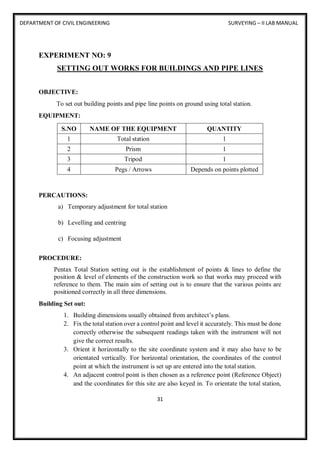
Pentax Total Station setting out is the establishment of points & lines to define the
position & level of elements of the construction work so that works may proceed with
reference to them. The main aim of setting out is to ensure that the various points are
positioned correctly in all three dimensions.
Building Set out:
1. Building dimensions usually obtained from architect’s plans.
2. Fix the total station over a control point and level it accurately. This must be done
correctly otherwise the subsequent readings taken with the instrument will not
give the correct results.
3. Orient it horizontally to the site coordinate system and it may also have to be
orientated vertically. For horizontal orientation, the coordinates of the control
point at which the instrument is set up are entered into the total station.
4. An adjacent control point is then chosen as a reference point (Reference Object)
and the coordinates for this site are also keyed in. To orientate the total station,
DEPARTMENT OF CIVIL ENGINEERING SURVEYING – II LAB MANUAL
32
the RO is sighted and the horizontal circle orientation programme automatically
computes the bearing from the total station to the RO.
5. Once the total station has been orientated it can be used for setting out horizontal
positions either using the coordinates of the points to be set out directly or using
bearing and distance values calculated from these coordinates.
6. Setting out a building to ground-floor level falls into the first category of setting
out.
7. Two corners of the building are set out from a baseline, site grid or control points.
8. From these two corners, the two other corners are set out using a Total Station to
turn off the right angels as shown below. Diagonals are checked.
Pipeline Set out:
1. Setting out a pipeline falls into the first category of setting out. sewers normally
follow the natural fall in the land and are laid at gradients which induce self-
cleansing velocity.
2. The working drawings will show the directions of the sewer pipes and the
positions of the manholes. The line of the sewer is normally pegged at 20 to 30m
intervals using coordinate methods of positioning from reference points or in
relation to existing detail. The direction of the line can be sighted using Total
station.
3. Fix the total station over a control point and level it accurately. The coordinates
of the control point at which the instrument is set up are entered into the total
station.
4. Determine the sewer line points with reference to the control points by horizontal
positioning method.
RESULTS:
Building points and pipe line points on ground are established.
VIVA QUESTIONS:
1. What is setting out?
2. When is setting out done?
3. What are the precautions to be taken while setting out building?
4. What are the precautions to be taken while pipeline set out?
5. What is purpose of setting out building?
6. What is purpose of setting out pipelines?
7. What is the first step for setting works for buildings and pipe lines?
DEPARTMENT OF CIVIL ENGINEERING SURVEYING – II LAB MANUAL
33
EXPERIMENT NO: 10
FINDING POSITION OF STATION USING GPS
OBJECTIVE:
To find the position of station using GPS.
EQUIPMENT:
S.NO NAME OF THE EQUIPMENT QUANTITY
1 GPS meter 1
2 Pegs / Arrows Depends on points plotted
3 GPS software 1
4 Total station 1
PERCAUTIONS:
a) Temporary adjustment for total station
b) Levelling and centring
c) Focusing adjustment
THEORY:
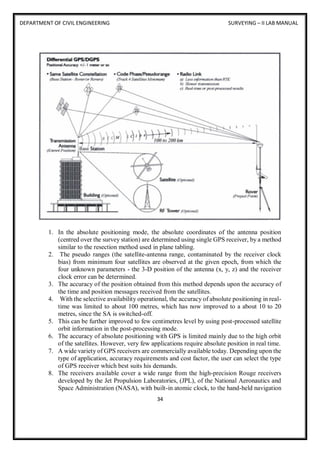
The Global Positioning System (GPS) employs trilateration to calculate the coordinates of
positions at or near the Earth's surface. Trilateration refers to the trigonometric law by which
the interior angles of a triangle can be determined if the lengths of all three triangle sides are
known. GPS extends this principle to three dimensions.
A GPS receiver can fix its latitude and longitude by calculating its distance from three or more
Earth-orbiting satellites, whose positions in space and time are known.
DEPARTMENT OF CIVIL ENGINEERING SURVEYING – II LAB MANUAL
34
1. In the absolute positioning mode, the absolute coordinates of the antenna position
(centred over the survey station) are determined using single GPS receiver, by a method
similar to the resection method used in plane tabling.
2. The pseudo ranges (the satellite-antenna range, contaminated by the receiver clock
bias) from minimum four satellites are observed at the given epoch, from which the
four unknown parameters - the 3-D position of the antenna (x, y, z) and the receiver
clock error can be determined.
3. The accuracy of the position obtained from this method depends upon the accuracy of
the time and position messages received from the satellites.
4. With the selective availability operational, the accuracy of absolute positioning in real-
time was limited to about 100 metres, which has now improved to a about 10 to 20
metres, since the SA is switched-off.
5. This can be further improved to few centimetres level by using post-processed satellite
orbit information in the post-processing mode.
6. The accuracy of absolute positioning with GPS is limited mainly due to the high orbit
of the satellites. However, very few applications require absolute position in real time.
7. A wide variety of GPS receivers are commercially available today. Depending upon the
type of application, accuracy requirements and cost factor, the user can select the type
of GPS receiver which best suits his demands.
8. The receivers available cover a wide range from the high-precision Rouge receivers
developed by the Jet Propulsion Laboratories, (JPL), of the National Aeronautics and
Space Administration (NASA), with built-in atomic clock, to the hand-held navigation
DEPARTMENT OF CIVIL ENGINEERING SURVEYING – II LAB MANUAL
35
receivers used by Army personnel, mountaineers, etc., which can give the position to
few-metres accuracy. Even wrist-watches with built-in GPS receivers are now
commercially available (e.g.: the Casio GPS watch).
9. The surveying type of receivers are single frequency, multi-channel receivers, which
are useful for most surveying applications, including cadastral mapping applications,
providing tertiary survey control, engineering surveys, etc.
10. These are more expensive than the navigation type of receivers, and more versatile. The
data from many of these receivers can be directly imported in to most commonly used
GIS software packages / formats.
11. Most of these receivers can also be used in DGPS mode. Examples of surveying
receivers are the PRO-XR model of Trimble Navigation Ltd., the SR 100 model of
Leica Ag., etc
PROCEDURE:
1. Visit the Trimble website.
Hover your mouse cursor over Support & Training, and click on Support A-Z.
2. In the list of Support Products A-Z, find and click on the Planning Software link.
3. On the Planning Software page that you land on, follow the Trimble GPS Data
Resources link.
In the next step you may be prompted to install Microsoft Silverlight.
If you are prompted to install Silverlight, go ahead and do so. There are Windows and
Mac versions. The software will download and then you will need to install it. Use
the Run as Administrator option to do so. If the installation process comes back with a
message that Silverlight is already installed, the implication is that you have more
than one browser app installed on your machine and you just need to open the one that
Silverlight is associated with. Chances are that it is Internet Explorer that you need to
use.
4. On the GPS Data Resources page, follow the GNSS Planning Tool link.
The GNSS Planning Online interface will open. You will land on the Settings page.
5. Go ahead and enter at least longitude and latitude information for a location you are
interested in.
You can also use the Pick button to interactively select a location. After you pick a
location from the map, click the Apply button.
6. Change or take note of the other setting in the Settings dialog window.
7. Click the Settings window Apply button.
Your settings will be processed. Then you can click on any of the other buttons along
the left side of the interface.
For example, the Satellite Library button gives you access to the satellites in the
various GPS systems that exist. You can choose the satellites you want to use.
Clicking on a satellite entry from one of the system lists will bring up its almanac
information.
DEPARTMENT OF CIVIL ENGINEERING SURVEYING – II LAB MANUAL
36
8. Click the DOPs button. This allows you to see how the various sources of Dilution of
Precision vary throughout the time period that was specified on the Settings page.
Can you determine the best and worst times of day for GPS work?
9. Spend some time investigating what the other buttons allow you to investigate.
10. Trimble's GNSS Planning Online tool is not a teaching tool; you will not find a Help
button that links to explanations of the functionality. The planning tool is aimed at
users already versed in the terminology and technology.
RESULT:
Position of station is determined.
VIVA QUESTIONS:
1. What is GIS?
2. What is GPS?
3. Differentiate Total station and GPS.
4. What are the advantages of GPS?
5. List out the types of GPS and GPS positioning.
DEPARTMENT OF CIVIL ENGINEERING SURVEYING – II LAB MANUAL
37
ANNEXURE 1
1. What is Total Station?
2. What are the major components of Total Station?
3. What are the uses of Total Station?
4. What is the Least of Count of Total Station?
5. What are temporary adjustments of Total Station?
6. Nowadays targets are not necessary for doing surveying. Is it true?
7. What are the types of Horizontal Curves?
8. What are the elements of Simple Circular Curve?
9. List out various methods used in Curve Setting?
10. What is the degree of curve?
11. What is the name for starting point of a curve?
12. What is the name for ending point of a curve?
13. What is difference between sub-chord and normal chord?
14. What do you mean by back tangent?
15. Which method is simple – Rankine’s method or Double theodolite method? Justify.
16. What is the instrument used for ranging?
17. What is levelling?
18. What are the precautions to be taken while determining the area?
19. What is closed traverse?
20. What is traversing?
21. What are the types of traversing?
22. What are the advantage so traversing?
23. What are the disadvantages of traversing?
24. What is the difference between the open traverse and closed traverse?
25. What is fixed traverse?
26. What is setting out?
27. When is setting out done?
28. What are the precautions to be taken while setting out building?
29. What are the precautions to be taken while pipeline set out?
30. What is purpose of setting out building?
31. What is purpose of setting out pipelines?
32. What is the first step for setting works for buildings and pipe lines?
33. What are the methods of surveying?
34. What are the general principles of surveying?
35. What is contour line?
36. What are the objects of preparing contour map?
37. Explain contour interval.
38. How to measure of the height of instrument?
DEPARTMENT OF CIVIL ENGINEERING SURVEYING – II LAB MANUAL
38
39. How the sensitiveness of a bubble tube is designated?
40. How the benchmark is established?
41. As a surveyor, what are your primary job tasks?
42. What is remote height?
43. What is elevation?
44. What is depression?
45. How to find out the high of the tower by using total station
46. Which mode is used to measure the height of the tower?
47. What is meant by stake out?
48. What is the purpose of staking out a point?
49. What is the advantage of staking out a point?
50. What are the precautions to be taken while staking out a point?
51. Which method is preferable for making stake out
d) Prismatic mode
e) Non-prismatic mode
f) Sticker mode
52. What is resection?
53. What is the purpose of resection?
54. What is the advantage of resection?
55. What value to be entered before performing resection?
56. What are the precautions to be taken while performing resection?
57. What is GIS?
58. What is GPS?
59. Differentiate Total station and GPS.
60. What are the advantages of GPS?
61. List out the types of GPS and GPS positioning.
62. What are the GIS tools?
63. Differentiate between GIS and LIS.
64. List out the main components of GIS.
65. Discuss briefly the impact of the internet on GIS.
66. Discuss briefly the functions of GIS.
67. What are the GIS commands?
68. Explain the role of GPS in GIS.
69. What is GIS technologies?
70. What is GIS data mining?

2017-18 surveying lab 2 manual total sta

  • 1.
    SURVEYING - II LABMANUAL DEPARTMENT OF CIVIL ENGINEERING 2017 - 18
  • 2.
    CERTIFICATE This is tocertify that this manual is a bonafide record of practical work in the Surveying - II Laboratory in Second Semester of Second Year B. Tech (Civil) programme during the academic year 2017-18. The book is prepared by Ms. M. Nanditha Asst.Professor, Department of Civil Engineering and Mr. T. Jaya Krishna, Asst.Professor, Department of Civil Engineering Signature of HOD Signature of Director Signature of Principal
  • 3.
    INDEX S. No CONTENTPAGE NO 1 PREFACE i 2 ACKNOWLEDGEMENT ii 3 GENERAL INSTRUCTIONS iii 4 SAFETY PRECAUTIONS iv 5 INSTITUTE VISION AND MISSION v 6 DEPARTMENT VISION AND MISSION vi 7 PROGRAMME EDUCATIONAL OBJECTIVES vi 8 SPECIFIC OUTCOMES, PROGRAMME OUTCOMES vi 9 COURSE STRUCTURE, OBJECTIVES AND OUTCOMES vii 10 INTRODUCTION 1 - 6 11 DETERMINATION OF AREA USING TOTAL STATION 7 – 9 12 TRAVERSING USING TOTAL STATION 10 – 12 13 CONTOURING USING TOTAL STATION 13 – 16 14 DETERMINATION OF REMOTE HEIGHT USING 17 - 18 TOTAL STATION 15 STAKE – OUT USING TOTAL STATION 19 – 20 16 DISTANCE, GRADIENT, DIFFERENCE, HEIGHT BETWEEN 21 - 23 TWO INACCESSIBLE POINTS USING TOTAL STATION 17 CURVE SETTING USING TOTAL STATION 24 – 27 18 RESECTION USING TOTAL STATION 28 – 30 19 SETTING OUT WORKS FOR BUILDINGS AND PIPE LINES 31 – 32 20 FINDING POSITION OF STATIONUSING GPS 33 – 36 21 ANNEXURE 1 37 - 38
  • 4.
    DEPARTMENT OF CIVILENGINEERING SURVEYING – II LAB MANUAL 1 INTRODUCTION TOTAL STATION: The total station is an electronic theodolite (transit) integrated with an electronic distance measurement (EDM) to read slope distances from the instrument to a particular point, and an on-board computer to collect data and perform advanced coordinate based calculations. FUNCTION: Angle measurement Most total station instruments measure angles by means of electro-optical scanning of extremely precise digital bar-codes etched on rotating glass cylinders or discs within the instrument. The best quality total stations are capable of measuring angles to 0.5 arc-second. Inexpensive "construction grade" total stations can generally measure angles to 5 or 10 arc- seconds. Distance measurement Measurement of distance is accomplished with a modulated infrared carrier signal, generated by a small solid-state emitter within the instrument's optical path, and reflected by a prism reflector or the object under survey. The modulation pattern in the returning signal is read and interpreted by the computer in the total station. The distance is determined by emitting and receiving multiple frequencies, and determining the integer number of wavelengths to the target for each frequency. Most total stations use purpose-built glass corner cube prism reflectors for the EDM signal. A typical total station can measure distances with an accuracy of about 1.5 millimetres (0.0049 feet) + 2 parts per million over a distance of up to 1,500 meters (4,900 feet). Reflector less total stations can measure distances to any object that is reasonably light in colour, up to a few hundred meters. Coordinate measurement: The coordinates of an unknown point relative to a known coordinate can be determined using the total station as long as a direct line of sight can be established between the two points. Angles and distances are measured from the total station to points under survey, and the coordinates (X, Y, and Z or easting, northing and elevation) of surveyed points relative to the total station position are calculated using trigonometry and triangulation. To determine an absolute location a Total Station requires line of sight observations and can be set up over a known point or with line of sight to 2 or more points with known location, called Resection (Free Stationing). For this reason, some total stations also have a Global Navigation Satellite System receiver and do not require a direct line of sight to determine coordinates. However, GNSS measurements may require longer occupation periods and offer relatively poor accuracy in the vertical axis. Data processing Some models include internal electronic data storage to record distance, horizontal angle, and vertical angle measured, while other models are equipped to write these measurements to an external data collector, such as a hand-held computer.
  • 5.
    DEPARTMENT OF CIVILENGINEERING SURVEYING – II LAB MANUAL 2 When data is downloaded from a total station onto a computer, application software can be used to compute results and generate a map of the surveyed area. The newest generation of total stations can also show the map on the touch-screen of the instrument immediately after measuring the points. PRECAUTIONS TO BE TAKEN WHILE HANDLING TOTAL STATION: 1. Never point the instrument at the sun without a filter. 2. Never store the instrument in extreme temperatures and avoid sudden changes of temperature. 3. When not using the instrument, place it in the case to avoid shock, dust, and humidity. 4. If there is a great difference in temperature between the work site and the instrument storage location leave the instrument in the case until it adjusts to the temperature of the surrounding environment. 5. Please remove the battery for separate storage if the instrument is to be in storage for an extended time. The battery should be charged once a month during storage. 6. The instrument should be placed in its carrying case during transportation. It is recommended that the original packing case be used for cushioning during extended transportation. 7. Be sure to secure the instrument with one hand when mounting or removing from the tripod. 8. Clean exposed optical parts with degreased cotton or lens tissue only. 9. Clean the instrument's surface with a woollen cloth when finished with use. Dry it immediately if it gets wet. 10. Check the battery, functions, and indications of the instrument as well as its initial setting and correction parameters before operating. 11. Unless you are a maintenance specialist do not attempt to disassemble the instrument for any reason. Unauthorized disassembly of the instrument can result in a void warranty. 12. The total stations emit a laser during operation. DO NOT stare into the beam or laser source when instrument is operation. NOMENCLATURE:
  • 6.
    DEPARTMENT OF CIVILENGINEERING SURVEYING – II LAB MANUAL 3 UNPACKING AND STORAGE OF THE INSTRUMENT: Unpacking of the instrument: Place the case lightly with the cover upward, unlock the case and take out the instrument. Storage of the instrument: Replace the cover on the telescope lens, place the instrument into the case with the vertical clamp screw and circular vial upward (objective lens toward the tribrach), tighten the vertical clamp screw, close and lock the case. INSTRUMENT SET UP: Mount the instrument onto the tripod and secure firmly. Level and centre the instrument precisely to ensure the best performance. Use the tripod with a 5/8” tripod screw. Operation Reference: Levelling and Centring the Instrument 1. Setting up the tripod: First extend the extension legs to suitable length and tighten the screws, firmly plant the tripod in the ground over the point of beginning. 2. Attaching the instrument to the tripod: Secure the instrument carefully on the tripod and slide the instrument by loosening the tripod mounting screw. If the optical plumb site is positioned over the centre of the point tighten the mounting screw. 3. Roughly levelling the instrument by using the circular vial: Turn the levelling screw A and B to move the bubble in the circular vial, in which case the bubble is located on a line perpendicular to a line running through the centres of the twolevelling screw being adjusted. Turn the levelling screw C to move the bubble to the centre of the circular vial. Recheck the position of the instrument over the point and adjust if needed. 4. Levelling by using the plate vial: Rotate the instrument horizontally by loosening the Horizontal Clamp Screw and place the plate vial parallel with the line connecting levelling screws A and B, then bring the bubble to the centre of the plate vial by turning the levelling screws A and B. Rotate the instrument 90° (100g) around its vertical axis and turn the remaining levelling screw or levelling C to centre the bubble once more. Repeat the procedures for each 90° (100g) rotation of the instrument and check whether the bubble is correctly centred in all directions. 5. Centring by using the optical plummet (or plummet or laser): Adjust the eyepiece of the optical plummet telescope to your eyesight. Slide the instrument by loosening
  • 7.
    DEPARTMENT OF CIVILENGINEERING SURVEYING – II LAB MANUAL 4 the tripod screw; place the point on the centre mark of the optical plummet. Sliding the instrument carefully as to not rotate the axis will allow you to get 7 the least dislocation of the bubble. (Place star-key after power on, then press F4(LASER)key, press F1(ON)key to turn on the laser plummet. Slide the instrument by loosening the tripod screw; Place laser facular on the occupied pointing, Sliding the instrument carefully as to not rotate the axis will allow you to get the least dislocation of the bubble. The last, press ESC key, and laser plummet turn off automatically.) 6. complete levelling the instrument: Level the instrument precisely as in Step 4. Rotate the instrument and check to see that the bubble is in the centre of the plate level regardless of the telescope direction then tighten the tripod screw firmly. BATTERY REMOVAL & INSERTION - INFORMATION AND RECHARGING: Battery removal and insertion: Insert the battery into the battery slot and push the battery until it clicks. Press the right and left buttons of the battery compartment to remove the battery. Battery information: ------------- Indicates that battery is fully charged ------------- Indicates that the battery can only be used for about 1 hour. Recharge the battery or prepare a recharged battery for use. ------------- Recharge the battery or prepare a recharged battery for use Note: The working time of the battery is determined by environment conditions, recharging time, and other factors. Battery recharging: Battery should be recharged only with the charger supplied with the instrument. Remove the on-board battery from instrument as instructed and connect to the battery charger. Battery removal caution: Before you take the battery out of the instrument, make sure that the power is turned off. Otherwise the instrument can be damaged. Recharging Caution:  The charger has built-in circuitry for protection from overcharging. However, do not leave the charger plugged into the power outlet after recharging is completed.  Be sure to recharge the battery at a temperature of 0℃~45℃, recharging may be abnormal beyond the specified temperature range.  When the indicator lamp does not light after connecting the battery and charger the battery or the charger may be damaged. Storage Caution:  The rechargeable battery can be repeatedly recharged 300-500 times. Complete discharge of the battery may shorten its service life.
  • 8.
    DEPARTMENT OF CIVILENGINEERING SURVEYING – II LAB MANUAL 5  In order to get the maximum service life be sure to recharge the battery at least once a month. FUNCTION KEY AND DISPLAY: OPERATION KEY: KEYS NAME FUNCTION ANG Angle meas. key Angle measurement mode Distance meas. key Distance measurement mode Coordinate meas. key Coordinate measurement mode (▲Up) S.0 Layout key Layout measurement mode (▼Down) K1 Quick key1 User-defined quick key 1(Left) K2 Quick key 2 User-defined quick key 2(Right) ESC Escape key Return to the measurement mode or previous layer mode. ENT Enter key Press after confirmation of inputting values M Menu key Switches menu mode and normal mode T Shift key Shift distance measuring key Star key Press once to adjust contrast or twice for illumination of keypad Power key On / Off key press and hold key F1 – F4 Soft key (Function Responds to the message displayed key) 0 - 9 Number key Input numbers - Minus key Input minus sign, displays electronic bubble . Point key On / Off laser pointing function
  • 9.
    DEPARTMENT OF CIVILENGINEERING SURVEYING – II LAB MANUAL 6 DISPLAY CONTENT V Vertical angle V% Vertical angle as a percentage (Gradient display) HR Horizontal angle (right) HL Horizontal angle (left) HD Horizontal distance VD Elevation difference SD Slope distance N North coordinate E East coordinate Z Z or elevation coordinate * EDM working m/ft Switches units between meters and feet m Meter unit S/A Sets temperature, air pressure, prism constant PSM Prism constant (unit: mm) PPM Atmospheric correction
  • 10.
    DEPARTMENT OF CIVILENGINEERING SURVEYING – II LAB MANUAL 7 EXPERIMENT NO: 1 DETERMINATION OF AREA USING TOTAL STATION OBJECTIVE: To find the area of a closed or open traverse using total station. EQUIPMENT: S.NO NAME OF THE EQUIPMENT QUANTITY 1 Total station 1 2 Prism 1 3 Tripod 1 4 Pegs / Arrows Depends on points plotted PERCAUTIONS: a) Temporary adjustment for total station b) Levelling and centring c) Focusing adjustment PROCEDURE: 1. Fix the total station over a station and level it 2. press the power button to switch on the instrument. 3. select MODE B→ S function→ file management→ create (enter a name) →accept then press ESC to go to the starting page then set zero by double clicking on 0 set(F3) 4. then go to S Function → measure → rectangular co-ordinate > station → press enter. 5. Here enter the point number or name, instrument height and prism code 6. Then press accept(Fs)
  • 11.
    DEPARTMENT OF CIVILENGINEERING SURVEYING – II LAB MANUAL 8 7. Keep the reflecting prism on the first point and turn the total station to the prism, focus it and bisect it exactly using a horizontal and vertical clamp. 8. Then select MEAS and the display panel will show the point specification 9. Now select edit and re-enter the point number or name point code and enter the prism height that we have set. 10. Then press MEAS/SAVE (F3) so that the measurement to the first point will automatically be saved and the display panel will show the second point. 11. Then turn the total station to second point and do the same procedure. 12. Repeat the steps to the rest of the stations and close the traverse 13. Now go to S function→ view/edit→ graphical view. 14. It will show the graphical view of the traverse. 15. Select S function→ calculation→ 2D surface→ All→ accept 16. This will give the area of the closed traverse. DIAGRAM: CALCULATION: Select S function → calculation→2D surface →All → accept
  • 12.
    DEPARTMENT OF CIVILENGINEERING SURVEYING – II LAB MANUAL 9 RESULTS: Select S function → calculation →2D surface → All → accept. This will give the area of the. Area of the is calculated. VIVA QUESTIONS: 1. What are the temporary adjustments of total station? 2. What is the instrument used for ranging? 3. What is levelling? 4. What are the precautions to be taken while determining the area? 5. What is closed traverse?
  • 13.
    DEPARTMENT OF CIVILENGINEERING SURVEYING – II LAB MANUAL 10 EXPERIMENT NO: 2 TRAVERSING USING TOTAL STATION OBJECTIVE: To form a closed traverse using total station. EQUIPMENT: S.NO NAME OF THE EQUIPMENT QUANTITY 1 Total station 1 2 Prism 1 3 Tripod 1 4 Pegs / Arrows Depends on points plotted PERCAUTIONS: a) Temporary adjustment for total station b) Levelling and centring c) Focusing adjustment PROCEDURE: 1. Fix the total station over a station and level it 2. Press the power button to switch on the instrument. 3. Select MODE B → S function→ file management→ create (enter a name) →accept 4. Then press ESC to go to the starting page 5. Then set zero by double clicking on 0 set(F3) 6. Then go to S function → measure → rectangular 7. Then go to S Function →measure → rectangular co- ordinate → station → press enter. 8. Here enter the point number or name, instrument height and prism code. 9. Then press accept(Fs) 10. keep the reflecting prism on the first point and turn the total station to the prism, focus it and bisect it exactly using a horizontal and vertical clamp.
  • 14.
    DEPARTMENT OF CIVILENGINEERING SURVEYING – II LAB MANUAL 11 11. Then select MEAS and the display panel will show the point specification. 12. Now select edit and re-enter the point number or name point code and enter the prism height that we have set. 13. Then press MEAS/SAVE (F3) so that the measurement to the first point will automatically be saved and the display panel will show the second point. 14. Then turn the total station to second point and do the same procedure. 15. Repeat the steps to the rest of the stations and close the traverse 16. Now go to S function → view/edit → graphical view. 17. It will show the graphical view of the traverse. DIAGRAM: CLOSED TRAVERSE: OPEN TRAVERSE:
  • 15.
    DEPARTMENT OF CIVILENGINEERING SURVEYING – II LAB MANUAL 12 CALCULATION: Select S function→ calculation→ 2D surface→ All→ accept. RESULTS: Select S function→calculation→2D surface→ All→ accept This will give the area of the closed traverse. Area of the closed traverse is calculated. VIVA QUESTIONS: 1. What is traversing? 2. What are the types of traversing? 3. What are the advantage so traversing? 4. What are the disadvantages of traversing? 5. What is the difference between the open traverse and closed traverse? 6. What is fixed traverse?
  • 16.
    DEPARTMENT OF CIVILENGINEERING SURVEYING – II LAB MANUAL 13 EXPERIMENT NO: 3 CONTOURING USING TOTAL STATION OBJECTIVE: Counter plan of given area (One full size drawing sheet) using total station. EQUIPMENT: S.NO NAME OF THE EQUIPMENT QUANTITY 1 Total station 1 2 Prism 1 3 Tripod 1 4 Pegs / Arrows Depends on points plotted PERCAUTIONS: a) Temporary adjustment for total station b) Levelling and centring c) Focusing adjustment PROCEDURE: The elevation and depression and the undulations of the surface of the ground are shown as map by interaction of level surface with by means of contour line. A contour may be defined as the line of intersection of a level surface with the surface of the ground. 1. Fix the total station over a station and level it 2. press the power button to switch on the instrument. 3. select MODE B → S function→ file management→ create (enter a name) →accept 4. then press ESC to go to the starting page 5. then set zero by double clicking on 0 set(F3) 6. Then go to S function →measure→ rectangular co-ordinate→ station →enter. 7. Here enter the point number or name, instrument height and prism code.
  • 17.
    DEPARTMENT OF CIVILENGINEERING SURVEYING – II LAB MANUAL 14 8. Then press accept(Fs) 9. Adopt Cross section method for establishing the major grid around the study area. 10. project suitably spaced cross sections on either side of the centre line of the area. 11. Choose several points at reasonable distances on either side. 12. keep the reflecting prism on the first point and turn the total station to the prism, focus it and bisect it exactly using a horizontal and vertical clamp. 13. Then select MEAS and the display panel will show the point specification 14. Now select edit and re-enter the point number or name point code and enter the prism height that we have set. 15. Then press MEAS/SAVE (F3) so that the measurement to the first point will automatically be saved and the display panel will show the second point. 16. Then turn the total station to second point and do the same procedure. 17. Repeat the steps to the rest of the stations and get all point details. 18. Plot cross section lines to scale and enter spot levels. 19. The points on the chosen contours are interpolated assuming uniform slope between adjacent points and join them by a smooth line. DIAGRAM:
  • 18.
    DEPARTMENT OF CIVILENGINEERING SURVEYING – II LAB MANUAL 15
  • 19.
    DEPARTMENT OF CIVILENGINEERING SURVEYING – II LAB MANUAL 16 CALCULATIONS: Select S Function → calculation → 2D surface → All → accept. RESULT: Select S function → calculation → 2D surface → all → accept. VIVA QUESTIONS: 1. What is contouring? 2. What are the advantages of contouring? 3. Represent contour for a hill with a neat sketch. 4. What are the characteristics of contour? 5. What are the uses of contouring?
  • 20.
    DEPARTMENT OF CIVILENGINEERING SURVEYING – II LAB MANUAL 17 EXPERIMENT NO: 4 DETERMINATION OF REMOTE HEIGHT USING TOTAL STATION OBJECTIVE: To find the height of a remote point using total station. EQUIPMENT: S.NO NAME OF THE EQUIPMENT QUANTITY 1 Total station 1 2 Prism 1 3 Tripod 1 4 Pegs / Arrows Depends on points plotted PERCAUTIONS: a) Temporary adjustment for total station b) Levelling and centring c) Focusing adjustment PROCEDURE: 1. Fix the total station over a station and level it 2. press the power button to switch on the instrument. 3. Select MODE B→ S function→ file management → create (enter a name) → accept 4. Press ESC to go to the starting page 5. Then set zero by double clicking on 0 set(F3) 6. Then go to S function → measure→ rectangular co-ordinate→ station →press enter. 7. Here enter the point number or name, instrument height and prism code. 8. Then press accept (Fs) 9. Setup a reflector vertically beneath the point, the height of which is to be determined.
  • 21.
    DEPARTMENT OF CIVILENGINEERING SURVEYING – II LAB MANUAL 18 10. Enter the reflector height, target to it, and measure the distance. 11. Target the high point. 12. The height difference H between the ground point and the high point is now calculated and displayed at the touch of a button. DIAGRAM: CALCULATIONS: Select S function→ calculation→ 2D surface→ all→ accept RESULT: Select S function→ calculation→ 2D surface→ all→ accept. VIVA QUESTIONS: 1. What is remote height? 2. What is elevation? 3. What is depression? 4. How to find out the high of the tower by using total station 5. Which mode is used to measure the height of the tower?
  • 22.
    DEPARTMENT OF CIVILENGINEERING SURVEYING – II LAB MANUAL 19 EXPERIMENT NO: 5 STAKE-OUT USING TOTAL STATION OBJECTIVE: To find a specific point in the field using Total Station EQUIPMENT: S.NO NAME OF THE EQUIPMENT QUANTITY 1 Total station 1 2 Prism 1 3 Tripod 1 4 Pegs / Arrows Depends on points plotted PERCAUTIONS: a) Temporary adjustment for total station b) Levelling and centring c) Focusing adjustment PROCEDURE: Place the total station in the spot from which you want to stake out points after you have finished entering the coordinates for the area into the total station's internal memory. 1. Make sure that the total station is level and on secure, even ground before continuing. 2. Press the "Power" button to turn on the instrument. 3. Press the "Menu" button and use the navigation arrows to move down to the "Stake Out" menu option. Press the "Select" button to enter the stake out menu. 4. Select the method to stake out the point. Select "XY" to stake out by coordinates which will be the most common method. 5. Press the "Yes" button to continue the process using the coordinates on the screen. 6. If the coordinates are incorrect, press the "No" button to try again.
  • 23.
    DEPARTMENT OF CIVILENGINEERING SURVEYING – II LAB MANUAL 20 7. In the next screen, use the keypad to enter the coordinates or distances and press the "OK" button to measure. 8. The results will be displayed on the following screen. DIAGRAM: CALCULATIONS: Select stake function→ calculation→ 2D surface→ all→ accept. RESULTS: Select stake function→ calculation→ 2D surface→ all→ accept. Distance, gradient, diff, height between two inaccessible points using Total Station is calculated. VIVA QUESTIONS: 1. What is meant by stake out? 2. What is the purpose of staking out a point? 3. What is the advantage of staking out a point? 4. What are the precautions to be taken while staking out a point? 5. Which method is preferable for making stake out a) Prismatic mode b) Non-prismatic mode c) Sticker mode
  • 24.
    DEPARTMENT OF CIVILENGINEERING SURVEYING – II LAB MANUAL 21 EXPERIMENT NO: 6 DISTANCE, GRADIENT, DIFFERENCE, HEIGHT BETWEEN TWO INACCESSIBLE POINTS USING TOTAL STATION OBJECTIVE: To find the Distance, gradient, diff, height between two inaccessible points using Total Station. EQUIPMENT: S.NO NAME OF THE EQUIPMENT QUANTITY 1 Total station 1 2 Prism 1 3 Tripod 1 4 Pegs / Arrows Depends on points plotted PERCAUTIONS: a) Temporary adjustment for total station b) Levelling and centring c) Focusing adjustment PROCEDURE: 1. Fix the total station over a station “O” and level it 2. Press the power button to switch on the instrument. 3. Select MODE B → S function→ file management→ create (enter a name) → accept 4. Press ESC to go to the starting page 5. Then set zero by double clicking on 0 set (F3) 6. Then go to S function→ measure→ rectangular co-ordinate→ station→ press enter. 7. Here enter the point number or name, instrument height and prism code. 8. Select two inaccessible points “P” and “Q” between which the distance, difference
  • 25.
    DEPARTMENT OF CIVILENGINEERING SURVEYING – II LAB MANUAL 22 in height and gradient is to be measured. 9. Position a reflector pole on point “P” and enter the instrument height i and the target height t1 (prism). 10. Target the centre of the prism and measure the distance. 11. Rotate the total station towards the other point “Q”, measure the distance between total station and point, measure the horizontal angle between two station points. 12. Enter the target height t2 (prism) for second point. Gradient of line PQ = level difference between PQ horizontal distance between PQ DIAGRAM:
  • 26.
    DEPARTMENT OF CIVILENGINEERING SURVEYING – II LAB MANUAL 23 CALCULATION: Select S function→ calculation→ 2D surface→ all→ accept. RESULT: Select S function→ calculation→ 2D surface→ all→ accept. Distance, gradient, diff, height between two inaccessible points using Total Station is calculated. VIVA QUESTION: 1. What is gradient? 2. What is meant by inaccessible points? 3. Where the procedure of measuring distance between two inaccessible points will be applied practically? 4. How the gradient will be calculated?
  • 27.
    DEPARTMENT OF CIVILENGINEERING SURVEYING – II LAB MANUAL 24 EXPERIMENT NO: 7 CURVE SETTING USING TOTAL STATION OBJECTIVE: To determine angle/distance measurements to known points using total station. EQUIPMENT: S.NO NAME OF THE EQUIPMENT QUANTITY 1 Total station 1 2 Prism 1 3 Tripod 1 4 Pegs / Arrows Depends on points plotted PERCAUTIONS: a) Temporary adjustment for total station b) Levelling and centring c) Focusing adjustment PROCEDURE: Simple Curve: A simple curve is a circular arc in the horizontal plane that has a central angle of less than 180 degrees (PI radians). A simple curve starts at the PC (Point of Curvature), has a CC (Circle Centre) and a PI (Point of Intersection for the tangents to the curve), and ends at the PT (Point of Tangency, the ending point of the curve). 1. From the Power Topo Lite screen, press [F2] [CALC] to view CALCULATION screen.
  • 28.
    DEPARTMENT OF CIVILENGINEERING SURVEYING – II LAB MANUAL 25 2. Select 1. COGO and press [ENT] to view the COGO screen. 3. Select the 1. INVERSE and press [ENT] to view INVERSE screen. 4. Start point input (Input the PN, Coordinates and PC of the Start point.) 5. Select 1. SP and press [ENT] to view SP screen. 6. [LIST] key All stored points can be displayed as follows by pressing [F2] [LIST]. Press [F2] [LIST] to view POINT SELECTION FROM THE LIST screen. 7. Press [ENT] to open the SP input screen. 8. Input your desired Point Name by pressing keys, and press [ENT] to open the X coordinate input screen. 9. Input your desired value by pressing each keys and press [ENT] to go Y coordinate.
  • 29.
    DEPARTMENT OF CIVILENGINEERING SURVEYING – II LAB MANUAL 26 10. Press [ENT] to open the Y coordinate input screen and input. 11. Press [ENT] to open the Z coordinate input screen and input. 12. Press [ENT] to open the PC input screen and input. 13. End point coordinates input (Input the PN, Coordinates and PC of the End point.) 14. After PC input, EP screen is viewed. 15. Input the PN, X, Y, Z Coordinates and PC name of the End point. 16. Press [ENT] to view the RESULT OF INVERSE screen. 17. Another End Point Coordinates input the PN, X, Y, Z Coordinates and PC name of another End point, and another inverse result can be performed. 18. A point Coordinates is calculated from a known point Coordinates and the Distance and Horizontal angle of the Second point.
  • 30.
    DEPARTMENT OF CIVILENGINEERING SURVEYING – II LAB MANUAL 27 19. Input: Coordinates of a known point, Distance and Horizontal angle of the Second point Output: Coordinates of the Second point 20. From the Power Topo Lite screen, press [F2] [CALC] to view the CALCULATION screen. 21. Select 1.COGO and press [ENT] to view the COGO screen. DIAGRAM: CALCULATION: From the Power Topo Lite screen, press [F2] [CALC] to view the CALCULATION screen. RESULT: Defining and setting of curve is done. 22. From the Power Topo Lite screen, press [F2] [CALC] to view the CALCULATION screen. VIVA QUESTIONS: 1. What is curve setting? 2. Where the curve setting method is applied in civil engineering constructions? 3. What are the programs you can find in COGO? 4. What are the various methods available for curve setting? 5. Give a list of various types of curves.
  • 31.
    DEPARTMENT OF CIVILENGINEERING SURVEYING – II LAB MANUAL 28 EXPERIMENT NO: 8 RESECTION USING TOTAL STATION OBJECTIVE: To determine a location of one unknown point in relation to known points. EQUIPMENT: S.NO NAME OF THE EQUIPMENT QUANTITY 1 Total station 1 2 Prism 1 3 Tripod 1 4 Pegs / Arrows Depends on point plotted PERCAUTIONS: a) Temporary adjustment for total station b) Levelling and centring c) Focusing adjustment PROCEDURE:  In surveying, free stationing (also known as resection) is a method of determining a location of one unknown point in relation to known points. There is a zero point of reference called a Total station. The instrument can be freely positioned so that all survey points are at a suitable site from the instrument.  Resection uses 3 or more known target survey points known target survey points to automatically determine to automatically determine the X, Y,Z coordinates of the the X,Y,Z coordinates of the instrument.  This has the significant This has the significant advantage of not requiring the instrument to be levelled the instrument exactly on a survey point any convenient location where you can sight the targets is OK.  The ideal geometry is displayed to the right
  • 32.
    DEPARTMENT OF CIVILENGINEERING SURVEYING – II LAB MANUAL 29 1. Prior to resection enter survey markers as known points through the “MEM” menu. 2. From the “MEAS” menu select “[MENU]” > [RESEC]. 3. The resection procedure requires that the known coordinates be defined first coordinates, and in the order that they will be shot. 4. In the top right screen, the 1st point has been point defined and the 2-defined point is being entered. You point is being entered. You can use [READ] to read in previously entered or can use [READ] to read in previously entered or measured points measured point. 5. Press the “>” or “< “arrow to move to next or previous point. 6. When all points are entered select [MEAS]. 7. The [MEAS] screen (right) displays the point being shot – in this example the 1st point. 8. Choose [DIST] if you are shooting to a mirror target, [ANGLE] if not. 9. Select [YES] to accept measurement, [NO] to re measurement, [NO] to re -shoot, [EDIT] to change target height. 10. The [CALC] option will be displayed when the standard deviation of northing and easting can be displayed. 11. Press [CALC] or [YES] on last point to display the calculated instrument coordinates and the standard deviation of coordinates of easting ( easting ( σ E) and northing ( σN). Press [OK] to finish Resection
  • 33.
    DEPARTMENT OF CIVILENGINEERING SURVEYING – II LAB MANUAL 30 DIAGRAM: CALCULATION: Coordinates of unknow point is determined. RESULT: Establishing a location of one unknown point in relation to known points. VIVA QUESTIONS: 1. What is resection? 2. What is the purpose of resection? 3. What is the advantage of resection? 4. What value to be entered before performing resection? 5. What are the precautions to be taken while performing resection?
  • 34.
    DEPARTMENT OF CIVILENGINEERING SURVEYING – II LAB MANUAL 31 EXPERIMENT NO: 9 SETTING OUT WORKS FOR BUILDINGS AND PIPE LINES OBJECTIVE: To set out building points and pipe line points on ground using total station. EQUIPMENT: S.NO NAME OF THE EQUIPMENT QUANTITY 1 Total station 1 2 Prism 1 3 Tripod 1 4 Pegs / Arrows Depends on points plotted PERCAUTIONS: a) Temporary adjustment for total station b) Levelling and centring c) Focusing adjustment PROCEDURE: Pentax Total Station setting out is the establishment of points & lines to define the position & level of elements of the construction work so that works may proceed with reference to them. The main aim of setting out is to ensure that the various points are positioned correctly in all three dimensions. Building Set out: 1. Building dimensions usually obtained from architect’s plans. 2. Fix the total station over a control point and level it accurately. This must be done correctly otherwise the subsequent readings taken with the instrument will not give the correct results. 3. Orient it horizontally to the site coordinate system and it may also have to be orientated vertically. For horizontal orientation, the coordinates of the control point at which the instrument is set up are entered into the total station. 4. An adjacent control point is then chosen as a reference point (Reference Object) and the coordinates for this site are also keyed in. To orientate the total station,
  • 35.
    DEPARTMENT OF CIVILENGINEERING SURVEYING – II LAB MANUAL 32 the RO is sighted and the horizontal circle orientation programme automatically computes the bearing from the total station to the RO. 5. Once the total station has been orientated it can be used for setting out horizontal positions either using the coordinates of the points to be set out directly or using bearing and distance values calculated from these coordinates. 6. Setting out a building to ground-floor level falls into the first category of setting out. 7. Two corners of the building are set out from a baseline, site grid or control points. 8. From these two corners, the two other corners are set out using a Total Station to turn off the right angels as shown below. Diagonals are checked. Pipeline Set out: 1. Setting out a pipeline falls into the first category of setting out. sewers normally follow the natural fall in the land and are laid at gradients which induce self- cleansing velocity. 2. The working drawings will show the directions of the sewer pipes and the positions of the manholes. The line of the sewer is normally pegged at 20 to 30m intervals using coordinate methods of positioning from reference points or in relation to existing detail. The direction of the line can be sighted using Total station. 3. Fix the total station over a control point and level it accurately. The coordinates of the control point at which the instrument is set up are entered into the total station. 4. Determine the sewer line points with reference to the control points by horizontal positioning method. RESULTS: Building points and pipe line points on ground are established. VIVA QUESTIONS: 1. What is setting out? 2. When is setting out done? 3. What are the precautions to be taken while setting out building? 4. What are the precautions to be taken while pipeline set out? 5. What is purpose of setting out building? 6. What is purpose of setting out pipelines? 7. What is the first step for setting works for buildings and pipe lines?
  • 36.
    DEPARTMENT OF CIVILENGINEERING SURVEYING – II LAB MANUAL 33 EXPERIMENT NO: 10 FINDING POSITION OF STATION USING GPS OBJECTIVE: To find the position of station using GPS. EQUIPMENT: S.NO NAME OF THE EQUIPMENT QUANTITY 1 GPS meter 1 2 Pegs / Arrows Depends on points plotted 3 GPS software 1 4 Total station 1 PERCAUTIONS: a) Temporary adjustment for total station b) Levelling and centring c) Focusing adjustment THEORY: The Global Positioning System (GPS) employs trilateration to calculate the coordinates of positions at or near the Earth's surface. Trilateration refers to the trigonometric law by which the interior angles of a triangle can be determined if the lengths of all three triangle sides are known. GPS extends this principle to three dimensions. A GPS receiver can fix its latitude and longitude by calculating its distance from three or more Earth-orbiting satellites, whose positions in space and time are known.
  • 37.
    DEPARTMENT OF CIVILENGINEERING SURVEYING – II LAB MANUAL 34 1. In the absolute positioning mode, the absolute coordinates of the antenna position (centred over the survey station) are determined using single GPS receiver, by a method similar to the resection method used in plane tabling. 2. The pseudo ranges (the satellite-antenna range, contaminated by the receiver clock bias) from minimum four satellites are observed at the given epoch, from which the four unknown parameters - the 3-D position of the antenna (x, y, z) and the receiver clock error can be determined. 3. The accuracy of the position obtained from this method depends upon the accuracy of the time and position messages received from the satellites. 4. With the selective availability operational, the accuracy of absolute positioning in real- time was limited to about 100 metres, which has now improved to a about 10 to 20 metres, since the SA is switched-off. 5. This can be further improved to few centimetres level by using post-processed satellite orbit information in the post-processing mode. 6. The accuracy of absolute positioning with GPS is limited mainly due to the high orbit of the satellites. However, very few applications require absolute position in real time. 7. A wide variety of GPS receivers are commercially available today. Depending upon the type of application, accuracy requirements and cost factor, the user can select the type of GPS receiver which best suits his demands. 8. The receivers available cover a wide range from the high-precision Rouge receivers developed by the Jet Propulsion Laboratories, (JPL), of the National Aeronautics and Space Administration (NASA), with built-in atomic clock, to the hand-held navigation
  • 38.
    DEPARTMENT OF CIVILENGINEERING SURVEYING – II LAB MANUAL 35 receivers used by Army personnel, mountaineers, etc., which can give the position to few-metres accuracy. Even wrist-watches with built-in GPS receivers are now commercially available (e.g.: the Casio GPS watch). 9. The surveying type of receivers are single frequency, multi-channel receivers, which are useful for most surveying applications, including cadastral mapping applications, providing tertiary survey control, engineering surveys, etc. 10. These are more expensive than the navigation type of receivers, and more versatile. The data from many of these receivers can be directly imported in to most commonly used GIS software packages / formats. 11. Most of these receivers can also be used in DGPS mode. Examples of surveying receivers are the PRO-XR model of Trimble Navigation Ltd., the SR 100 model of Leica Ag., etc PROCEDURE: 1. Visit the Trimble website. Hover your mouse cursor over Support & Training, and click on Support A-Z. 2. In the list of Support Products A-Z, find and click on the Planning Software link. 3. On the Planning Software page that you land on, follow the Trimble GPS Data Resources link. In the next step you may be prompted to install Microsoft Silverlight. If you are prompted to install Silverlight, go ahead and do so. There are Windows and Mac versions. The software will download and then you will need to install it. Use the Run as Administrator option to do so. If the installation process comes back with a message that Silverlight is already installed, the implication is that you have more than one browser app installed on your machine and you just need to open the one that Silverlight is associated with. Chances are that it is Internet Explorer that you need to use. 4. On the GPS Data Resources page, follow the GNSS Planning Tool link. The GNSS Planning Online interface will open. You will land on the Settings page. 5. Go ahead and enter at least longitude and latitude information for a location you are interested in. You can also use the Pick button to interactively select a location. After you pick a location from the map, click the Apply button. 6. Change or take note of the other setting in the Settings dialog window. 7. Click the Settings window Apply button. Your settings will be processed. Then you can click on any of the other buttons along the left side of the interface. For example, the Satellite Library button gives you access to the satellites in the various GPS systems that exist. You can choose the satellites you want to use. Clicking on a satellite entry from one of the system lists will bring up its almanac information.
  • 39.
    DEPARTMENT OF CIVILENGINEERING SURVEYING – II LAB MANUAL 36 8. Click the DOPs button. This allows you to see how the various sources of Dilution of Precision vary throughout the time period that was specified on the Settings page. Can you determine the best and worst times of day for GPS work? 9. Spend some time investigating what the other buttons allow you to investigate. 10. Trimble's GNSS Planning Online tool is not a teaching tool; you will not find a Help button that links to explanations of the functionality. The planning tool is aimed at users already versed in the terminology and technology. RESULT: Position of station is determined. VIVA QUESTIONS: 1. What is GIS? 2. What is GPS? 3. Differentiate Total station and GPS. 4. What are the advantages of GPS? 5. List out the types of GPS and GPS positioning.
  • 40.
    DEPARTMENT OF CIVILENGINEERING SURVEYING – II LAB MANUAL 37 ANNEXURE 1 1. What is Total Station? 2. What are the major components of Total Station? 3. What are the uses of Total Station? 4. What is the Least of Count of Total Station? 5. What are temporary adjustments of Total Station? 6. Nowadays targets are not necessary for doing surveying. Is it true? 7. What are the types of Horizontal Curves? 8. What are the elements of Simple Circular Curve? 9. List out various methods used in Curve Setting? 10. What is the degree of curve? 11. What is the name for starting point of a curve? 12. What is the name for ending point of a curve? 13. What is difference between sub-chord and normal chord? 14. What do you mean by back tangent? 15. Which method is simple – Rankine’s method or Double theodolite method? Justify. 16. What is the instrument used for ranging? 17. What is levelling? 18. What are the precautions to be taken while determining the area? 19. What is closed traverse? 20. What is traversing? 21. What are the types of traversing? 22. What are the advantage so traversing? 23. What are the disadvantages of traversing? 24. What is the difference between the open traverse and closed traverse? 25. What is fixed traverse? 26. What is setting out? 27. When is setting out done? 28. What are the precautions to be taken while setting out building? 29. What are the precautions to be taken while pipeline set out? 30. What is purpose of setting out building? 31. What is purpose of setting out pipelines? 32. What is the first step for setting works for buildings and pipe lines? 33. What are the methods of surveying? 34. What are the general principles of surveying? 35. What is contour line? 36. What are the objects of preparing contour map? 37. Explain contour interval. 38. How to measure of the height of instrument?
  • 41.
    DEPARTMENT OF CIVILENGINEERING SURVEYING – II LAB MANUAL 38 39. How the sensitiveness of a bubble tube is designated? 40. How the benchmark is established? 41. As a surveyor, what are your primary job tasks? 42. What is remote height? 43. What is elevation? 44. What is depression? 45. How to find out the high of the tower by using total station 46. Which mode is used to measure the height of the tower? 47. What is meant by stake out? 48. What is the purpose of staking out a point? 49. What is the advantage of staking out a point? 50. What are the precautions to be taken while staking out a point? 51. Which method is preferable for making stake out d) Prismatic mode e) Non-prismatic mode f) Sticker mode 52. What is resection? 53. What is the purpose of resection? 54. What is the advantage of resection? 55. What value to be entered before performing resection? 56. What are the precautions to be taken while performing resection? 57. What is GIS? 58. What is GPS? 59. Differentiate Total station and GPS. 60. What are the advantages of GPS? 61. List out the types of GPS and GPS positioning. 62. What are the GIS tools? 63. Differentiate between GIS and LIS. 64. List out the main components of GIS. 65. Discuss briefly the impact of the internet on GIS. 66. Discuss briefly the functions of GIS. 67. What are the GIS commands? 68. Explain the role of GPS in GIS. 69. What is GIS technologies? 70. What is GIS data mining?