6-1
Dr. D. J. Jackson Lecture 6-1Electrical & Computer Engineering
Programmable Logic
Controllers
PLC Counter Functions
Dr. D. J. Jackson Lecture 6-2Electrical & Computer Engineering
Outline
• Introduction
• PLC Counter Functions
• Examples of Counter Function Applications
6-2
Dr. D. J. Jackson Lecture 6-3Electrical & Computer Engineering
Objectives
• Describe the PLC counter functions.
• List some of the major counting functions
used in circuits and processes.
• Apply the PLC counter function and
associated circuitry to process control.
• Apply combinations of counters and timers to
process control.
Dr. D. J. Jackson Lecture 6-4Electrical & Computer Engineering
Introduction
• PLC counters have programming formats
which are similar to timer formats
• Transitions on counter input rung causes the
counter to count up (or down)
• Counter reset is accomplished via the (RES)
instruction
6-3
Dr. D. J. Jackson Lecture 6-5Electrical & Computer Engineering
Up Counter (CTU)
• The CTU is an instruction that counts false-to-true rung
transitions.
– Rung transitions can be caused by events occurring in the program
(from internal logic or by external devices) such as parts traveling
past a detector or actuating a limit switch.
• When rung conditions for a CTU instruction have made a
false-to-true transition, the accumulated value is
incremented by one count, provided that the rung containing
the CTU instruction is evaluated between these transitions.
– The ability of the counter to detect false–to–true transitions depends
on the speed (frequency) of the incoming signal.
• The accumulated value is retained when the rung conditions
again become false.
• The accumulated count is retained until cleared by a reset
(RES) instruction.
Dr. D. J. Jackson Lecture 6-6Electrical & Computer Engineering
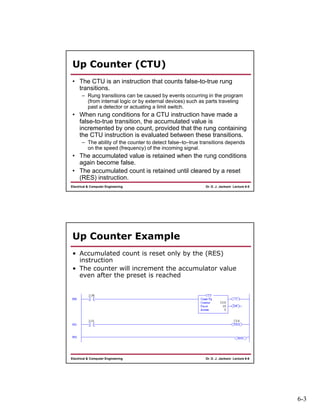
Up Counter Example
• Accumulated count is reset only by the (RES)
instruction
• The counter will increment the accumulator value
even after the preset is reached
6-4
Dr. D. J. Jackson Lecture 6-7Electrical & Computer Engineering
Counter Status Bits
• /CU: count up
• /CD: count down
• /DN: counter done
• /OV: counter overflow
• /UN: counter underflow
Dr. D. J. Jackson Lecture 6-8Electrical & Computer Engineering
Using Status Bits (CTU)
This bit Is Set When And remains set until
Count Up Overflow
Bit (OV)
Accumulated value
wraps around to
-32768 (from
+32767)
A (RES) instruction with the
same address as the CTU
instruction is enabled OR the
count is decremented less than
or equal to +32767 with a
count down (CTD) instruction
Done Bit (DN) Accumulated value
is equal to or
greater than the
preset value
Accumulated value becomes
less than the preset value
Count Up Enable
Bit (CU)
Rung conditions are
true
Rung conditions go false or a
(RES) instruction with the
same address as the CTU
instruction is enabled
6-5
Dr. D. J. Jackson Lecture 6-9Electrical & Computer Engineering
Down Counter (CTD)
• The CTD is an instruction that counts false-to-true rung
transitions.
– Rung transitions can be caused by events occurring in the program
such as parts traveling past a detector or actuating a limit switch.
• When rung conditions for a CTD instruction have made a
false-to-true transition, the accumulated value is
decremented by one count, provided that the rung containing
the CTD instruction is evaluated between these transitions.
• The accumulated counts are retained when the rung
conditions again become false.
• The accumulated count is retained until cleared by a reset
(RES) instruction.
Dr. D. J. Jackson Lecture 6-10Electrical & Computer Engineering
Down Counter Example
• Accumulated count is reset only by the (RES)
instruction
• The counter will decrement the accumulator value
even after a 0 count is reached
6-6
Dr. D. J. Jackson Lecture 6-11Electrical & Computer Engineering
Using Status Bits (CTD)
This bit Is Set When And remains set until
Count Down
Underflow Bit (UN)
Accumulated value
wraps around to
+32,767 (from
-32,768) and
continues counting
down from there
A (RES) instruction with the
same address as the CTD
instruction is enabled OR the
count is decremented less than
or equal to +32767 with a
count down (CTU) instruction
Done Bit (DN) Accumulated value
is equal to or
greater than the
preset value
Accumulated value becomes
less than the preset value
Count Down
Enable Bit (CD)
Rung conditions are
true
Rung conditions go false or a
(RES) instruction with the
same address as the CTD
instruction is enabled
Dr. D. J. Jackson Lecture 6-12Electrical & Computer Engineering
Counter Applications
• Straight counting in a process
– The counter output goes on after the set count is
received by repetitive pulses to the counter input.
• A process where a timed interval is started
when a count reaches a preset value
• A process where a count of events is to start
after a fixed time interval
6-7
Dr. D. J. Jackson Lecture 6-13Electrical & Computer Engineering
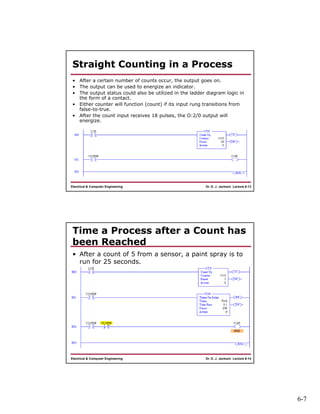
Straight Counting in a Process
• After a certain number of counts occur, the output goes on.
• The output can be used to energize an indicator.
• The output status could also be utilized in the ladder diagram logic in
the form of a contact.
• Either counter will function (count) if its input rung transitions from
false-to-true.
• After the count input receives 18 pulses, the O:2/0 output will
energize.
Dr. D. J. Jackson Lecture 6-14Electrical & Computer Engineering
Time a Process after a Count has
been Reached
• After a count of 5 from a sensor, a paint spray is to
run for 25 seconds.
6-8
Dr. D. J. Jackson Lecture 6-15Electrical & Computer Engineering
Delayed Start of the Counting
Process
• In this process we do not wish to start
counting until one hour after the process
starts.
• A timer output contact in the timer run line
closes after the time period.
• The closure then enables the counter to start
counting input pulses.
• After a count of 150, the output comes on.
Dr. D. J. Jackson Lecture 6-16Electrical & Computer Engineering
Ladder Logic Example

Lect06

  • 1.
    6-1 Dr. D. J.Jackson Lecture 6-1Electrical & Computer Engineering Programmable Logic Controllers PLC Counter Functions Dr. D. J. Jackson Lecture 6-2Electrical & Computer Engineering Outline • Introduction • PLC Counter Functions • Examples of Counter Function Applications
  • 2.
    6-2 Dr. D. J.Jackson Lecture 6-3Electrical & Computer Engineering Objectives • Describe the PLC counter functions. • List some of the major counting functions used in circuits and processes. • Apply the PLC counter function and associated circuitry to process control. • Apply combinations of counters and timers to process control. Dr. D. J. Jackson Lecture 6-4Electrical & Computer Engineering Introduction • PLC counters have programming formats which are similar to timer formats • Transitions on counter input rung causes the counter to count up (or down) • Counter reset is accomplished via the (RES) instruction
  • 3.
    6-3 Dr. D. J.Jackson Lecture 6-5Electrical & Computer Engineering Up Counter (CTU) • The CTU is an instruction that counts false-to-true rung transitions. – Rung transitions can be caused by events occurring in the program (from internal logic or by external devices) such as parts traveling past a detector or actuating a limit switch. • When rung conditions for a CTU instruction have made a false-to-true transition, the accumulated value is incremented by one count, provided that the rung containing the CTU instruction is evaluated between these transitions. – The ability of the counter to detect false–to–true transitions depends on the speed (frequency) of the incoming signal. • The accumulated value is retained when the rung conditions again become false. • The accumulated count is retained until cleared by a reset (RES) instruction. Dr. D. J. Jackson Lecture 6-6Electrical & Computer Engineering Up Counter Example • Accumulated count is reset only by the (RES) instruction • The counter will increment the accumulator value even after the preset is reached
  • 4.
    6-4 Dr. D. J.Jackson Lecture 6-7Electrical & Computer Engineering Counter Status Bits • /CU: count up • /CD: count down • /DN: counter done • /OV: counter overflow • /UN: counter underflow Dr. D. J. Jackson Lecture 6-8Electrical & Computer Engineering Using Status Bits (CTU) This bit Is Set When And remains set until Count Up Overflow Bit (OV) Accumulated value wraps around to -32768 (from +32767) A (RES) instruction with the same address as the CTU instruction is enabled OR the count is decremented less than or equal to +32767 with a count down (CTD) instruction Done Bit (DN) Accumulated value is equal to or greater than the preset value Accumulated value becomes less than the preset value Count Up Enable Bit (CU) Rung conditions are true Rung conditions go false or a (RES) instruction with the same address as the CTU instruction is enabled
  • 5.
    6-5 Dr. D. J.Jackson Lecture 6-9Electrical & Computer Engineering Down Counter (CTD) • The CTD is an instruction that counts false-to-true rung transitions. – Rung transitions can be caused by events occurring in the program such as parts traveling past a detector or actuating a limit switch. • When rung conditions for a CTD instruction have made a false-to-true transition, the accumulated value is decremented by one count, provided that the rung containing the CTD instruction is evaluated between these transitions. • The accumulated counts are retained when the rung conditions again become false. • The accumulated count is retained until cleared by a reset (RES) instruction. Dr. D. J. Jackson Lecture 6-10Electrical & Computer Engineering Down Counter Example • Accumulated count is reset only by the (RES) instruction • The counter will decrement the accumulator value even after a 0 count is reached
  • 6.
    6-6 Dr. D. J.Jackson Lecture 6-11Electrical & Computer Engineering Using Status Bits (CTD) This bit Is Set When And remains set until Count Down Underflow Bit (UN) Accumulated value wraps around to +32,767 (from -32,768) and continues counting down from there A (RES) instruction with the same address as the CTD instruction is enabled OR the count is decremented less than or equal to +32767 with a count down (CTU) instruction Done Bit (DN) Accumulated value is equal to or greater than the preset value Accumulated value becomes less than the preset value Count Down Enable Bit (CD) Rung conditions are true Rung conditions go false or a (RES) instruction with the same address as the CTD instruction is enabled Dr. D. J. Jackson Lecture 6-12Electrical & Computer Engineering Counter Applications • Straight counting in a process – The counter output goes on after the set count is received by repetitive pulses to the counter input. • A process where a timed interval is started when a count reaches a preset value • A process where a count of events is to start after a fixed time interval
  • 7.
    6-7 Dr. D. J.Jackson Lecture 6-13Electrical & Computer Engineering Straight Counting in a Process • After a certain number of counts occur, the output goes on. • The output can be used to energize an indicator. • The output status could also be utilized in the ladder diagram logic in the form of a contact. • Either counter will function (count) if its input rung transitions from false-to-true. • After the count input receives 18 pulses, the O:2/0 output will energize. Dr. D. J. Jackson Lecture 6-14Electrical & Computer Engineering Time a Process after a Count has been Reached • After a count of 5 from a sensor, a paint spray is to run for 25 seconds.
  • 8.
    6-8 Dr. D. J.Jackson Lecture 6-15Electrical & Computer Engineering Delayed Start of the Counting Process • In this process we do not wish to start counting until one hour after the process starts. • A timer output contact in the timer run line closes after the time period. • The closure then enables the counter to start counting input pulses. • After a count of 150, the output comes on. Dr. D. J. Jackson Lecture 6-16Electrical & Computer Engineering Ladder Logic Example