AJAX.
XML and JSON
Andrii Siusko
October 2013
AGENDA
What is AJAX? Why do we need it?
HTMLRequest object
Data formats
– XML
• structure and syntax
• basic rules and restrictions
• best practices of use
– JSON
• YAML principles and structure
• basic rules
• best practices
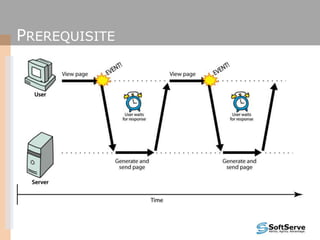
PREREQUISITE
SO WHAT’S THE PROBLEM?
user must wait while new
pages load
POSSIBLE SOLUTION
user can keep interacting
with page while data loads
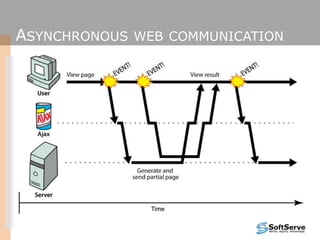
ASYNCHRONOUS WEB COMMUNICATION
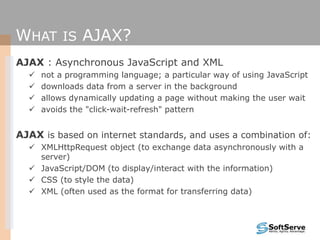
WHAT IS AJAX?
AJAX : Asynchronous JavaScript and XML
 not a programming language; a particular way of using JavaScript
 downloads data from a server in the background
 allows dynamically updating a page without making the user wait
 avoids the "click-wait-refresh" pattern
AJAX is based on internet standards, and uses a combination of:
 XMLHttpRequest object (to exchange data asynchronously with a
server)
 JavaScript/DOM (to display/interact with the information)
 CSS (to style the data)
 XML (often used as the format for transferring data)
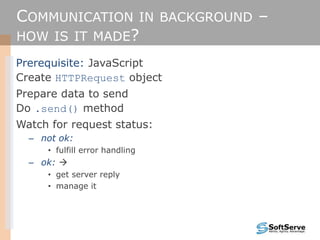
COMMUNICATION IN BACKGROUND –
HOW IS IT MADE?
Prerequisite: JavaScript
Create HTTPRequest object
Prepare data to send
Do .send() method
Watch for request status:
– not ok:
• fulfill error handling
– ok: 
• get server reply
• manage it
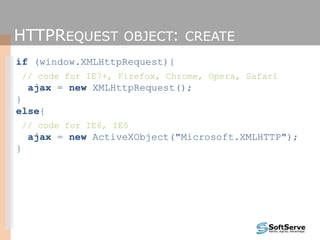
HTTPREQUEST OBJECT: CREATE
if (window.XMLHttpRequest){
// code for IE7+, Firefox, Chrome, Opera, Safari
ajax = new XMLHttpRequest();
}
else{
// code for IE6, IE5
ajax = new ActiveXObject("Microsoft.XMLHTTP");
}
HTTPREQUEST OBJECT:
HANDLE (METHODS)
.open(method, URL, async,
[userName], [password]);
• method = “GET” || “POST”;
• boolean async;
.send([content]);
.abort();
.getAllResponseHeaders();
• returns all headers as String;
.getResponseHeader(headerName);
• returns all headers as String;
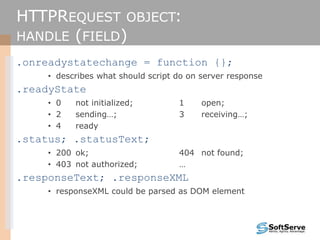
HTTPREQUEST OBJECT:
HANDLE (FIELD)
.onreadystatechange = function {};
• describes what should script do on server response
.readyState
• 0 not initialized; 1 open;
• 2 sending…; 3 receiving…;
• 4 ready
.status; .statusText;
• 200 ok; 404 not found;
• 403 not authorized; …
.responseText; .responseXML
• responseXML could be parsed as DOM element
XMLHTTPREQUEST SECURITY
RESTRICTIONS
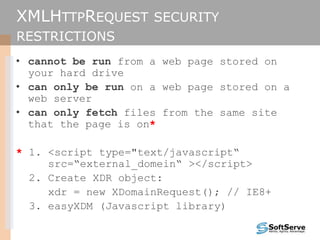
• cannot be run from a web page stored on
your hard drive
• can only be run on a web page stored on a
web server
• can only fetch files from the same site
that the page is on*
* 1. <script type="text/javascript“
src=“external_domein“ ></script>
2. Create XDR object:
xdr = new XDomainRequest(); // IE8+
3. easyXDM (Javascript library)
GOT REPLY. WHAT’S NOW?
Get text reply or XML
Parse it (if need)
Use DHTML principles to change existing content
• document.getElementById(ID).innerText || .innerHTML
XML – WHAT IS THIS?
eXtensible Markup Language
– tag based;
– has DOM structure;
languages written in XML specify:
− names of tags in XHTML: h1, div, img, etc.
− names of attributes in XHTML: id/class, src, href, etc.
− rules about how they go together in XHTML: inline vs.
block-level elements
XML – RESTRICTIONS
Should have header and root element;
Tags are case sensitive;
< and & should be encoded
• >, single and double quotes should be encoded too
Tags should be nested properly
The best practice is to use schemata or DTD
XML – RESTRICTIONS
Should have header and root element;
Tags are case sensitive;
< and & should be encoded
• >, single and double quotes should be encoded too
Tags should be nested properly
The best practice is to use schemata or DTD
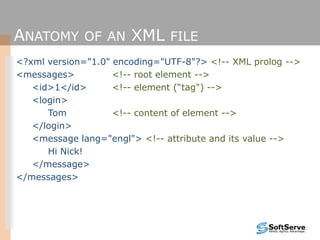
ANATOMY OF AN XML FILE
<?xml version="1.0" encoding="UTF-8"?> <!-- XML prolog -->
<messages> <!-- root element -->
<id>1</id> <!-- element (“tag") -->
<login>
Tom <!-- content of element -->
</login>
<message lang="engl"> <!-- attribute and its value -->
Hi Nick!
</message>
</messages>
JSON
JavaScript Object Notation (JSON):
− Data format that represents data as a set of
JavaScript objects
− invented by JS guru Douglas Crockford of Yahoo!
− natively supported by all modern browsers (and
libraries to support it in old ones)
− not yet as popular as XML, but steadily rising due
to its simplicity and ease of use
JSON SYNTAX
JSON is object
It can contain:
– “name” : “value” pairs;
– objects
• {
• “name1” : “value1”, // comma required;
• “name2” : “value2”
• }
– arrays: “arr” : [“val1”, “val2”, “val3”]
– // Java-style comments allowed
Any value could be:
• integer • “string”
• true/false/null • object or array
JSON HANDLE
var s =
‘{“name”: “value”,
“arr”: [1,2,33,40,],
“obj”: {“n1”: “v1”, “n2”: “v2”}
}’;
var jsonObj = JSON.parse(s);
// jsonObj.name = “value”;
// jsonObj.arr[2] = 33;
// jsonObj.obj.n2 = “v2”;
REFERENCES
http://google.com
http://www.w3.org/Protocols/rfc2616/rfc2616.html
http://www.w3.org/TR/XMLHttpRequest/
https://github.com/oyvindkinsey/easyXDM#readme
http://msdn.microsoft.com/en-us/library/cc288060(v=vs.85).aspx (XDR)
http://json.org
Thank you!
Andrii Siusko
skype: asyusko
mail: asyusko@gmail.com

Ajax xml json

  • 1.
    AJAX. XML and JSON AndriiSiusko October 2013
  • 2.
    AGENDA What is AJAX?Why do we need it? HTMLRequest object Data formats – XML • structure and syntax • basic rules and restrictions • best practices of use – JSON • YAML principles and structure • basic rules • best practices
  • 3.
  • 4.
    SO WHAT’S THEPROBLEM? user must wait while new pages load
  • 5.
    POSSIBLE SOLUTION user cankeep interacting with page while data loads
  • 6.
  • 7.
    WHAT IS AJAX? AJAX: Asynchronous JavaScript and XML  not a programming language; a particular way of using JavaScript  downloads data from a server in the background  allows dynamically updating a page without making the user wait  avoids the "click-wait-refresh" pattern AJAX is based on internet standards, and uses a combination of:  XMLHttpRequest object (to exchange data asynchronously with a server)  JavaScript/DOM (to display/interact with the information)  CSS (to style the data)  XML (often used as the format for transferring data)
  • 8.
    COMMUNICATION IN BACKGROUND– HOW IS IT MADE? Prerequisite: JavaScript Create HTTPRequest object Prepare data to send Do .send() method Watch for request status: – not ok: • fulfill error handling – ok:  • get server reply • manage it
  • 9.
    HTTPREQUEST OBJECT: CREATE if(window.XMLHttpRequest){ // code for IE7+, Firefox, Chrome, Opera, Safari ajax = new XMLHttpRequest(); } else{ // code for IE6, IE5 ajax = new ActiveXObject("Microsoft.XMLHTTP"); }
  • 10.
    HTTPREQUEST OBJECT: HANDLE (METHODS) .open(method,URL, async, [userName], [password]); • method = “GET” || “POST”; • boolean async; .send([content]); .abort(); .getAllResponseHeaders(); • returns all headers as String; .getResponseHeader(headerName); • returns all headers as String;
  • 11.
    HTTPREQUEST OBJECT: HANDLE (FIELD) .onreadystatechange= function {}; • describes what should script do on server response .readyState • 0 not initialized; 1 open; • 2 sending…; 3 receiving…; • 4 ready .status; .statusText; • 200 ok; 404 not found; • 403 not authorized; … .responseText; .responseXML • responseXML could be parsed as DOM element
  • 12.
    XMLHTTPREQUEST SECURITY RESTRICTIONS • cannotbe run from a web page stored on your hard drive • can only be run on a web page stored on a web server • can only fetch files from the same site that the page is on* * 1. <script type="text/javascript“ src=“external_domein“ ></script> 2. Create XDR object: xdr = new XDomainRequest(); // IE8+ 3. easyXDM (Javascript library)
  • 13.
    GOT REPLY. WHAT’SNOW? Get text reply or XML Parse it (if need) Use DHTML principles to change existing content • document.getElementById(ID).innerText || .innerHTML
  • 14.
    XML – WHATIS THIS? eXtensible Markup Language – tag based; – has DOM structure; languages written in XML specify: − names of tags in XHTML: h1, div, img, etc. − names of attributes in XHTML: id/class, src, href, etc. − rules about how they go together in XHTML: inline vs. block-level elements
  • 15.
    XML – RESTRICTIONS Shouldhave header and root element; Tags are case sensitive; < and & should be encoded • >, single and double quotes should be encoded too Tags should be nested properly The best practice is to use schemata or DTD
  • 16.
    XML – RESTRICTIONS Shouldhave header and root element; Tags are case sensitive; < and & should be encoded • >, single and double quotes should be encoded too Tags should be nested properly The best practice is to use schemata or DTD
  • 17.
    ANATOMY OF ANXML FILE <?xml version="1.0" encoding="UTF-8"?> <!-- XML prolog --> <messages> <!-- root element --> <id>1</id> <!-- element (“tag") --> <login> Tom <!-- content of element --> </login> <message lang="engl"> <!-- attribute and its value --> Hi Nick! </message> </messages>
  • 18.
    JSON JavaScript Object Notation(JSON): − Data format that represents data as a set of JavaScript objects − invented by JS guru Douglas Crockford of Yahoo! − natively supported by all modern browsers (and libraries to support it in old ones) − not yet as popular as XML, but steadily rising due to its simplicity and ease of use
  • 19.
    JSON SYNTAX JSON isobject It can contain: – “name” : “value” pairs; – objects • { • “name1” : “value1”, // comma required; • “name2” : “value2” • } – arrays: “arr” : [“val1”, “val2”, “val3”] – // Java-style comments allowed Any value could be: • integer • “string” • true/false/null • object or array
  • 20.
    JSON HANDLE var s= ‘{“name”: “value”, “arr”: [1,2,33,40,], “obj”: {“n1”: “v1”, “n2”: “v2”} }’; var jsonObj = JSON.parse(s); // jsonObj.name = “value”; // jsonObj.arr[2] = 33; // jsonObj.obj.n2 = “v2”;
  • 21.
  • 22.
    Thank you! Andrii Siusko skype:asyusko mail: asyusko@gmail.com