Learn Kubernetes in 90 minutes
Larry Cai <larry.caiyu@gmail.com>
Agenda
 Introduction
 Exercise 1: First web service in kubernetes
 Exercise 2: Revisit pod, deployment and service
 Exercise 3: Controller – Deployment (scale)
 Exercise 4: Deploy with YAML file
 Exercise 5: install Microservice: Guestbook
 Reference
Learn kubernetes in 90 minutes2 10/2/2017
Minikube environment setup is in appendix
Environment using k8s playground
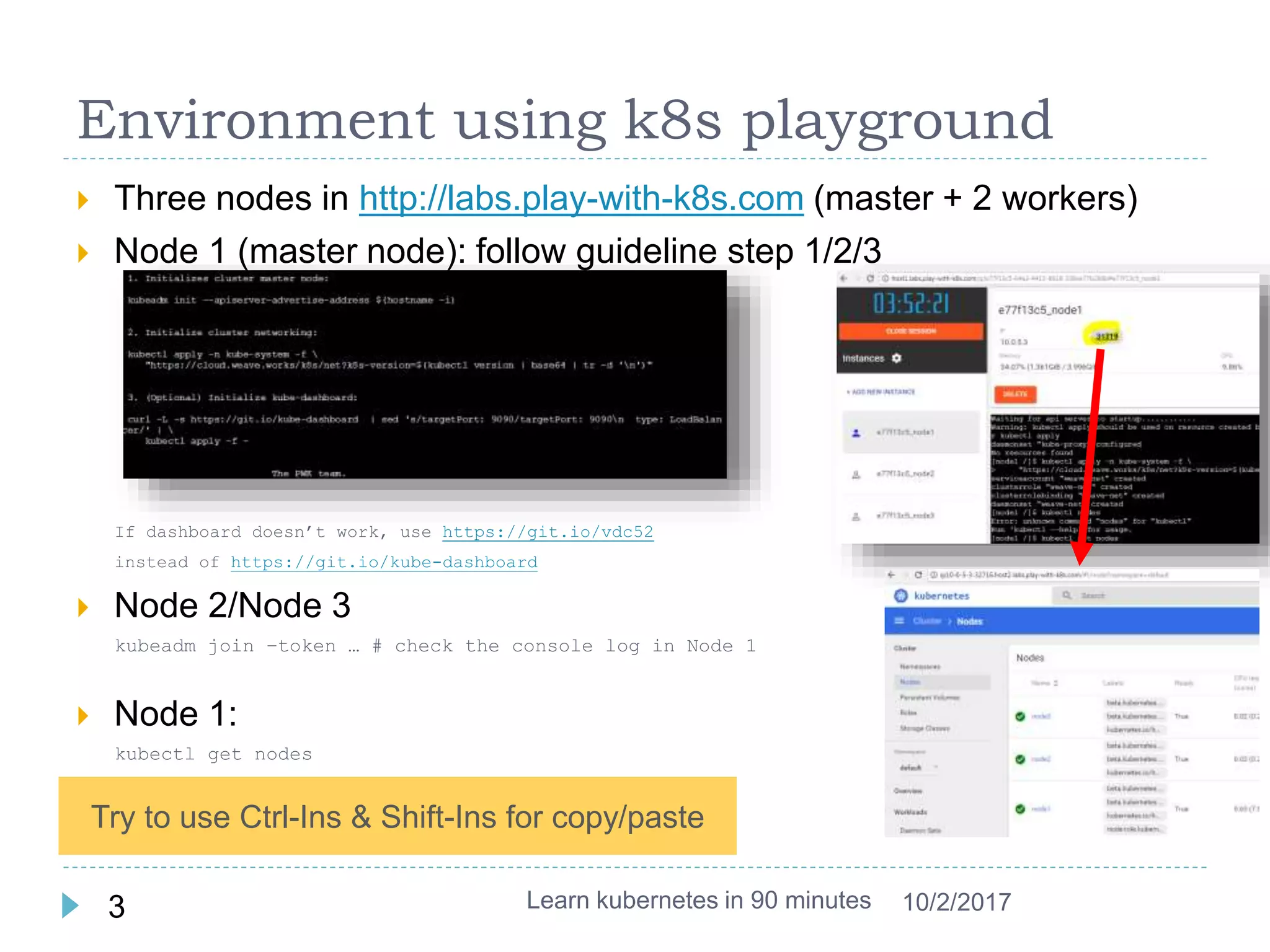
 Three nodes in http://labs.play-with-k8s.com (master + 2 workers)
 Node 1 (master node): follow guideline step 1/2/3
If dashboard doesn’t work, use https://git.io/vdc52
instead of https://git.io/kube-dashboard
 Node 2/Node 3
kubeadm join –token … # check the console log in Node 1
 Node 1:
kubectl get nodes
 Click the port to open dashboard
Learn kubernetes in 90 minutes3 10/2/2017
Try to use Ctrl-Ins & Shift-Ins for copy/paste
Background – Container/Docker
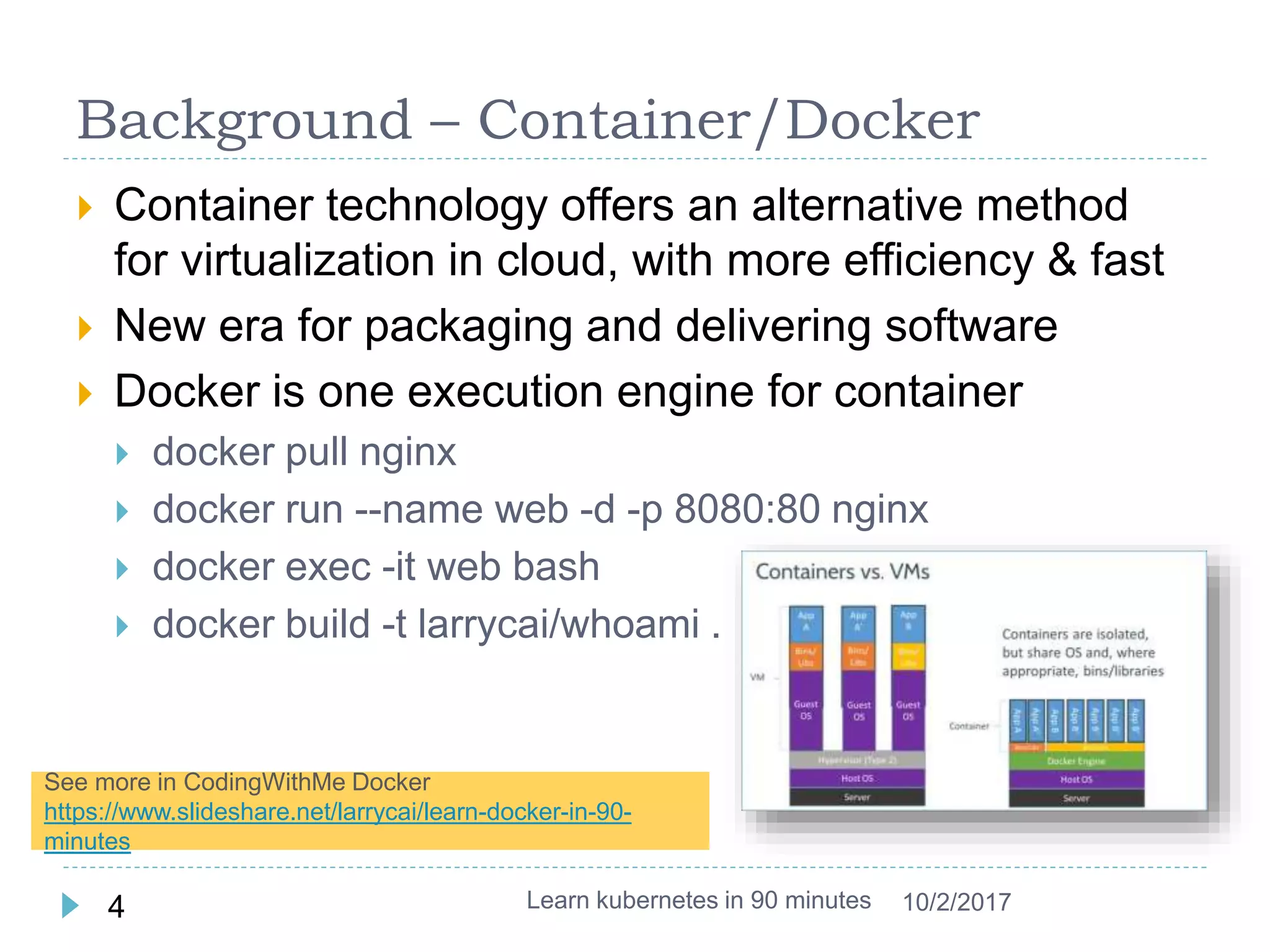
 Container technology offers an alternative method
for virtualization in cloud, with more efficiency & fast
 New era for packaging and delivering software
 Docker is one execution engine for container
 docker pull nginx
 docker run --name web -d -p 8080:80 nginx
 docker exec -it web bash
 docker build -t larrycai/whoami .
Learn kubernetes in 90 minutes4 10/2/2017
See more in CodingWithMe Docker
https://www.slideshare.net/larrycai/learn-docker-in-90-
minutes
What is kubernetes ?
 Kubernetes is an open source container
orchestration platform that helps manage
distributed, containerized applications at massive
scale.
 Kubernetes (k8s) comes from google
 kubernetes is a product platform to run container (Docker
is one type of container execution engine)
 k8s to container likes openstack to virtual machine.
 Key features (list partly):
 Auto-scaling
 Self-healing infrastructure
 Application lifecycle management
Learn kubernetes in 90 minutes5 10/2/2017
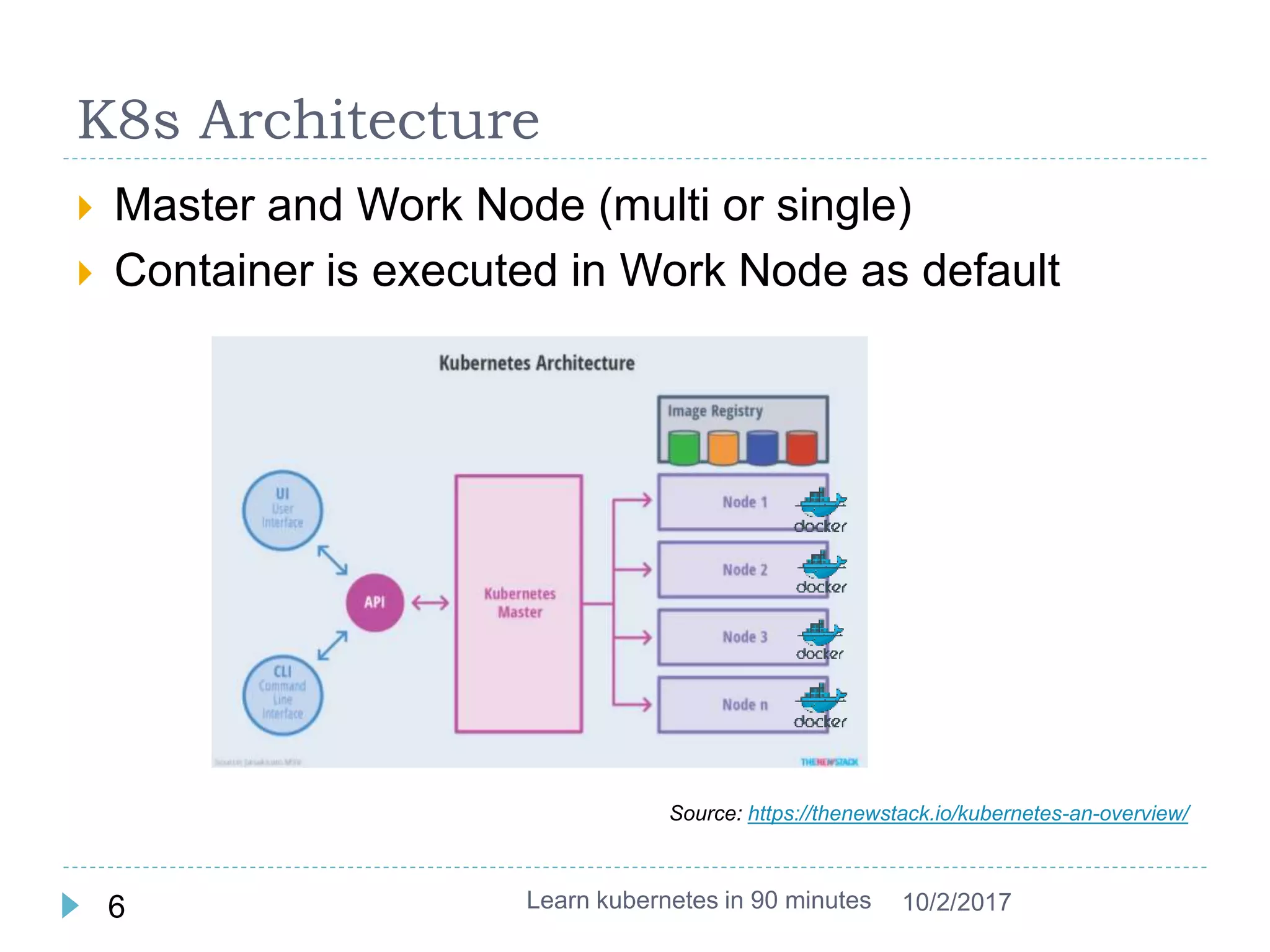
K8s Architecture
 Master and Work Node (multi or single)
 Container is executed in Work Node as default
Learn kubernetes in 90 minutes6 10/2/2017
Source: https://thenewstack.io/kubernetes-an-overview/
Exer 1: running first web service
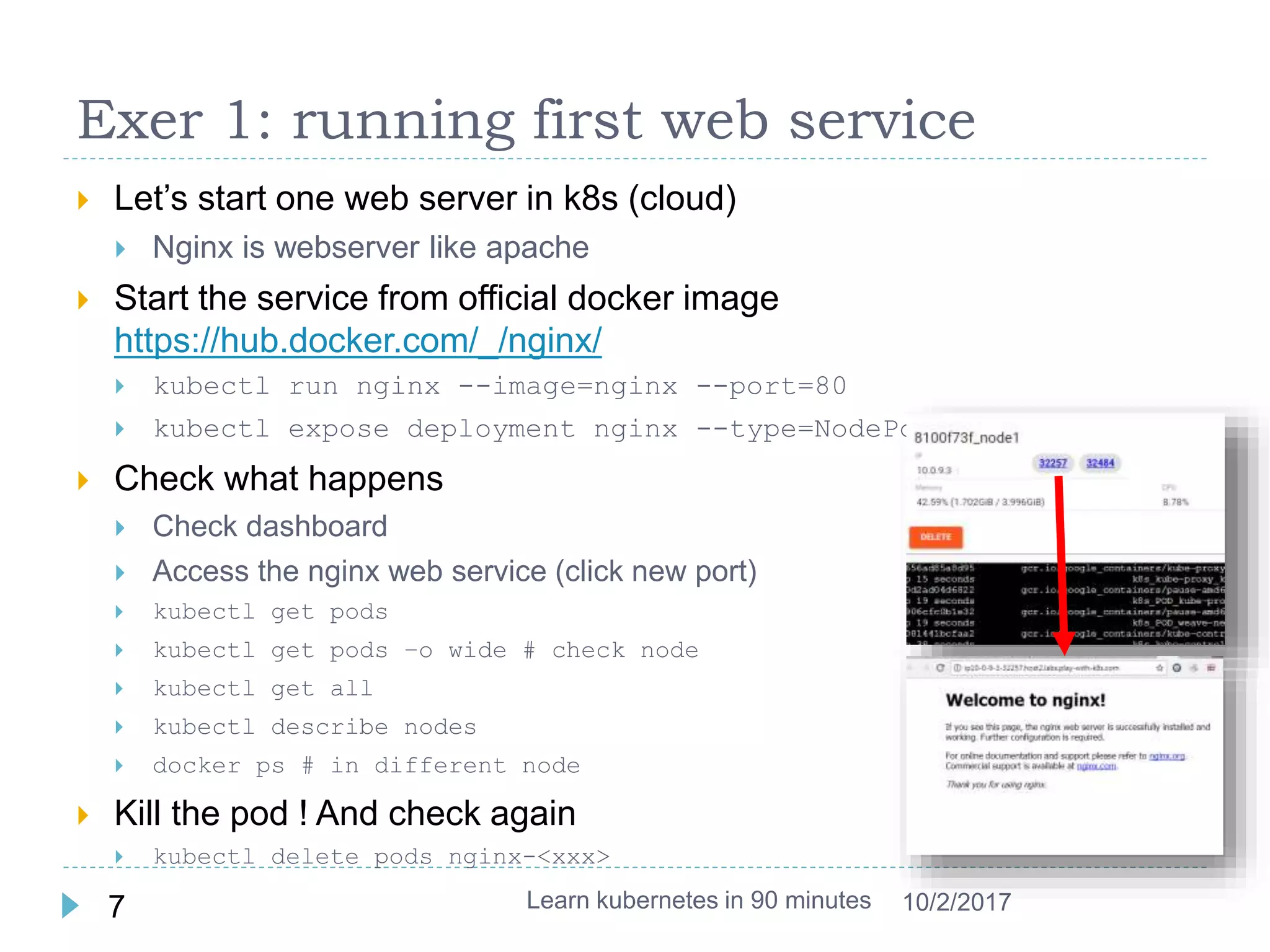
 Let’s start one web server in k8s (cloud)
 Nginx is webserver like apache
 Start the service from official docker image
https://hub.docker.com/_/nginx/
 kubectl run nginx --image=nginx --port=80
 kubectl expose deployment nginx --type=NodePort
 Check what happens
 Check dashboard
 Access the nginx web service (click new port)
 kubectl get pods
 kubectl get pods –o wide # check node
 kubectl get all
 kubectl describe nodes
 docker ps # in different node
 Kill the pod ! And check again
 kubectl delete pods nginx-<xxx>
Learn kubernetes in 90 minutes7 10/2/2017
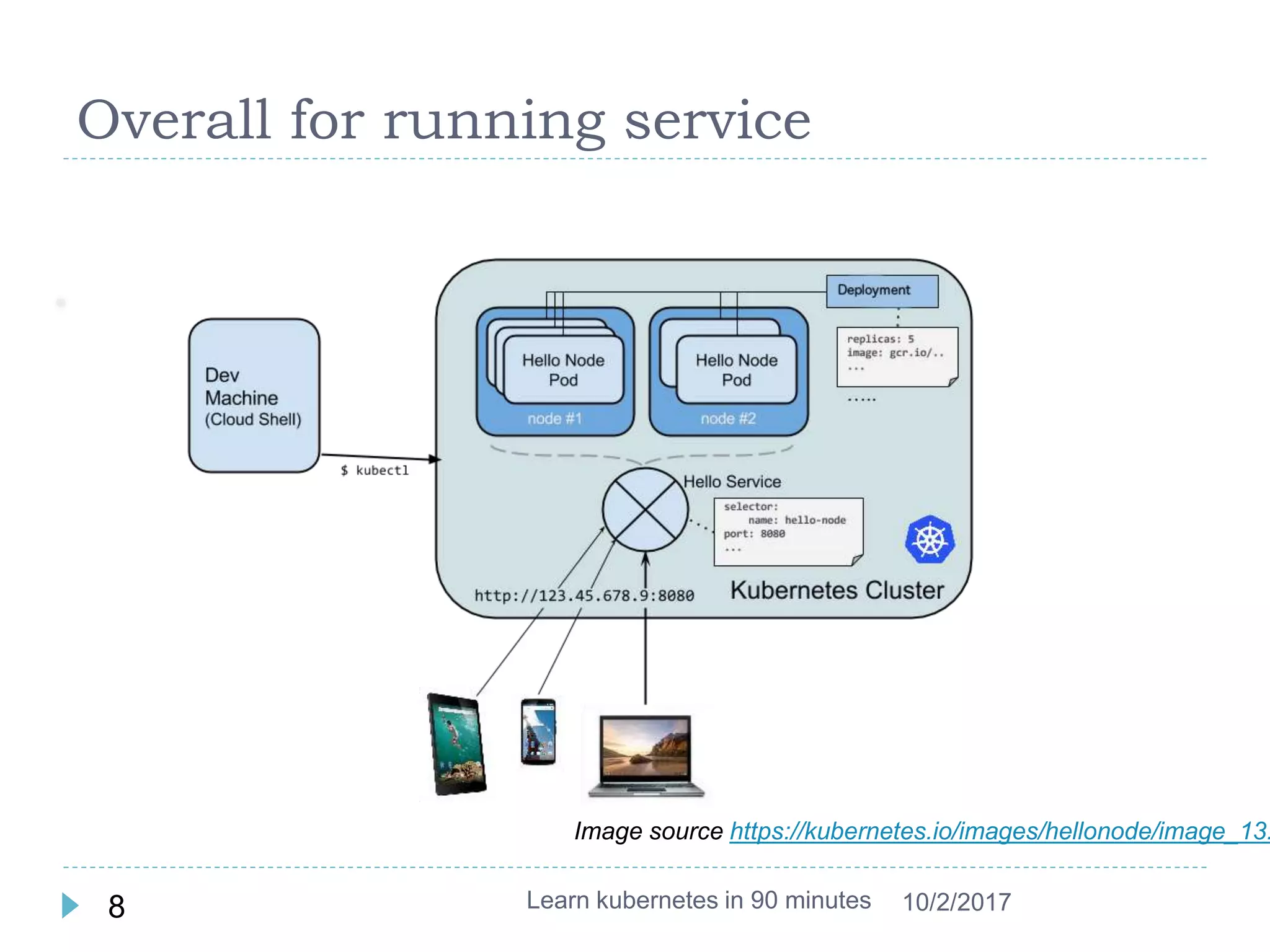
Overall for running service
Learn kubernetes in 90 minutes8 10/2/2017
Image source https://kubernetes.io/images/hellonode/image_13.
What is Pod ?
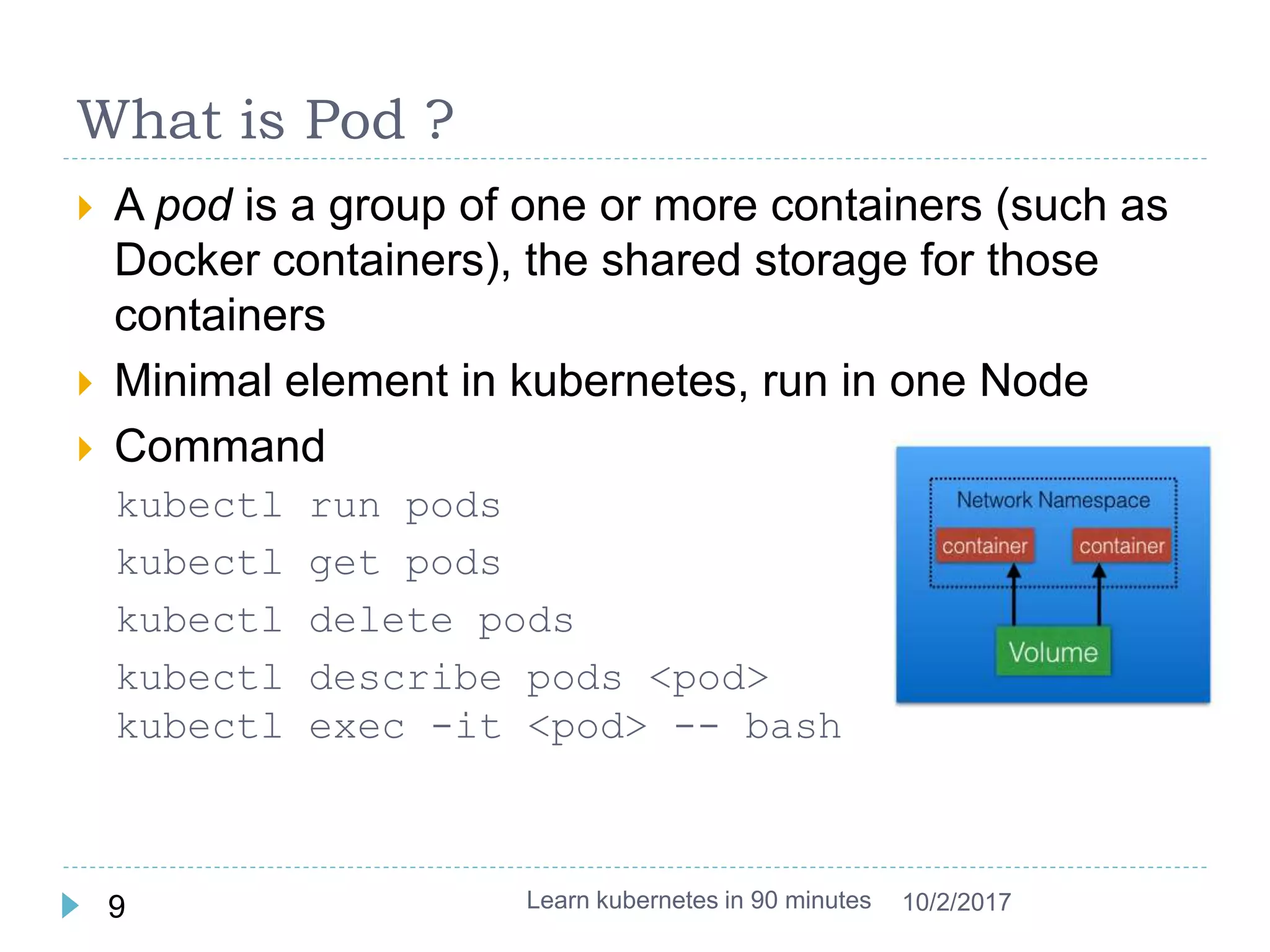
 A pod is a group of one or more containers (such as
Docker containers), the shared storage for those
containers
 Minimal element in kubernetes, run in one Node
 Command
kubectl run pods
kubectl get pods
kubectl delete pods
kubectl describe pods <pod>
kubectl exec -it <pod> -- bash
Learn kubernetes in 90 minutes9 10/2/2017
What is Deployment ?
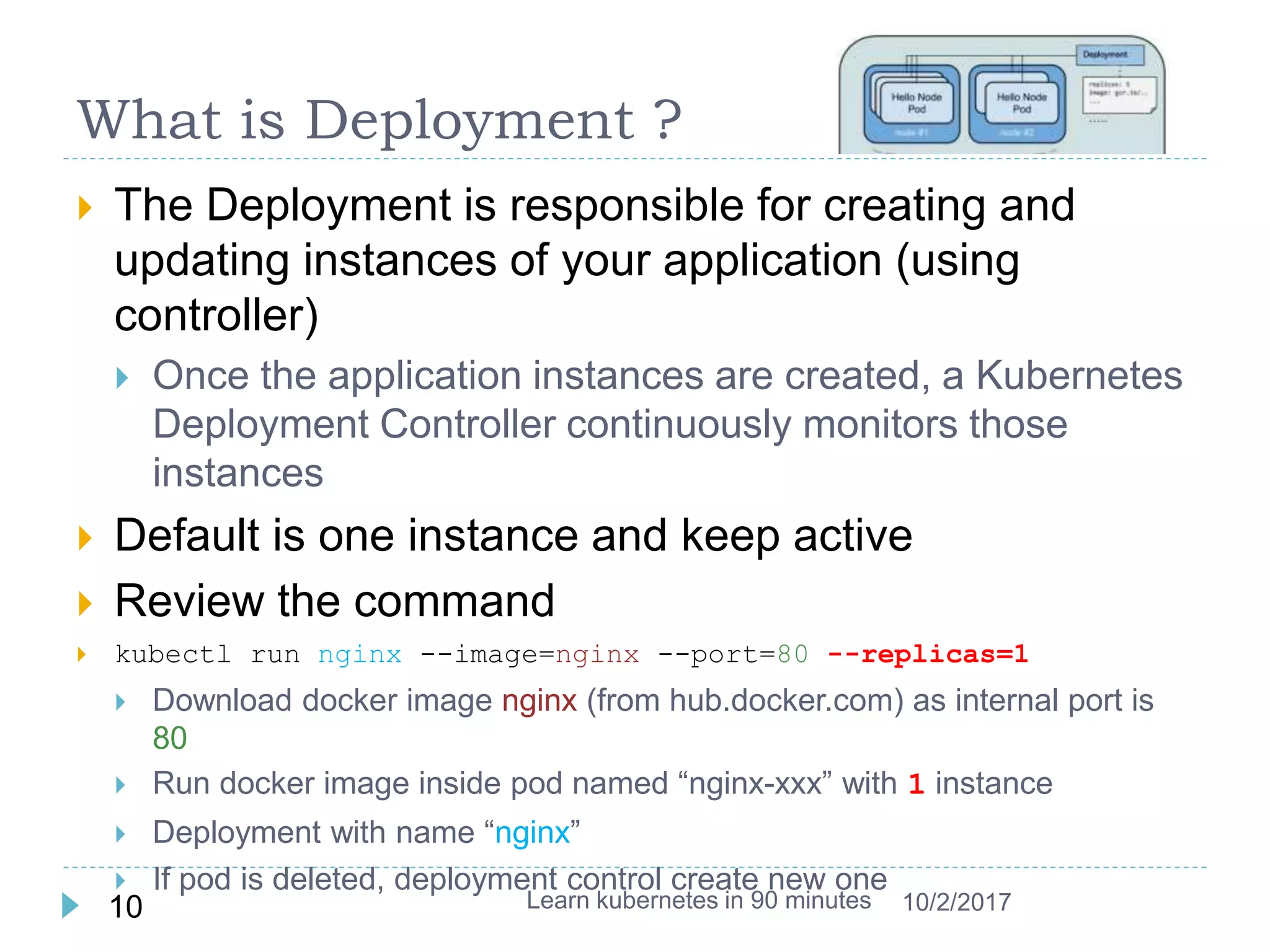
 The Deployment is responsible for creating and
updating instances of your application (using
controller)
 Once the application instances are created, a Kubernetes
Deployment Controller continuously monitors those
instances
 Default is one instance and keep active
 Review the command
 kubectl run nginx --image=nginx --port=80 --replicas=1
 Download docker image nginx (from hub.docker.com) as internal port is
80
 Run docker image inside pod named “nginx-xxx” with 1 instance
 Deployment with name “nginx”
 If pod is deleted, deployment control create new one
Learn kubernetes in 90 minutes10 10/2/2017
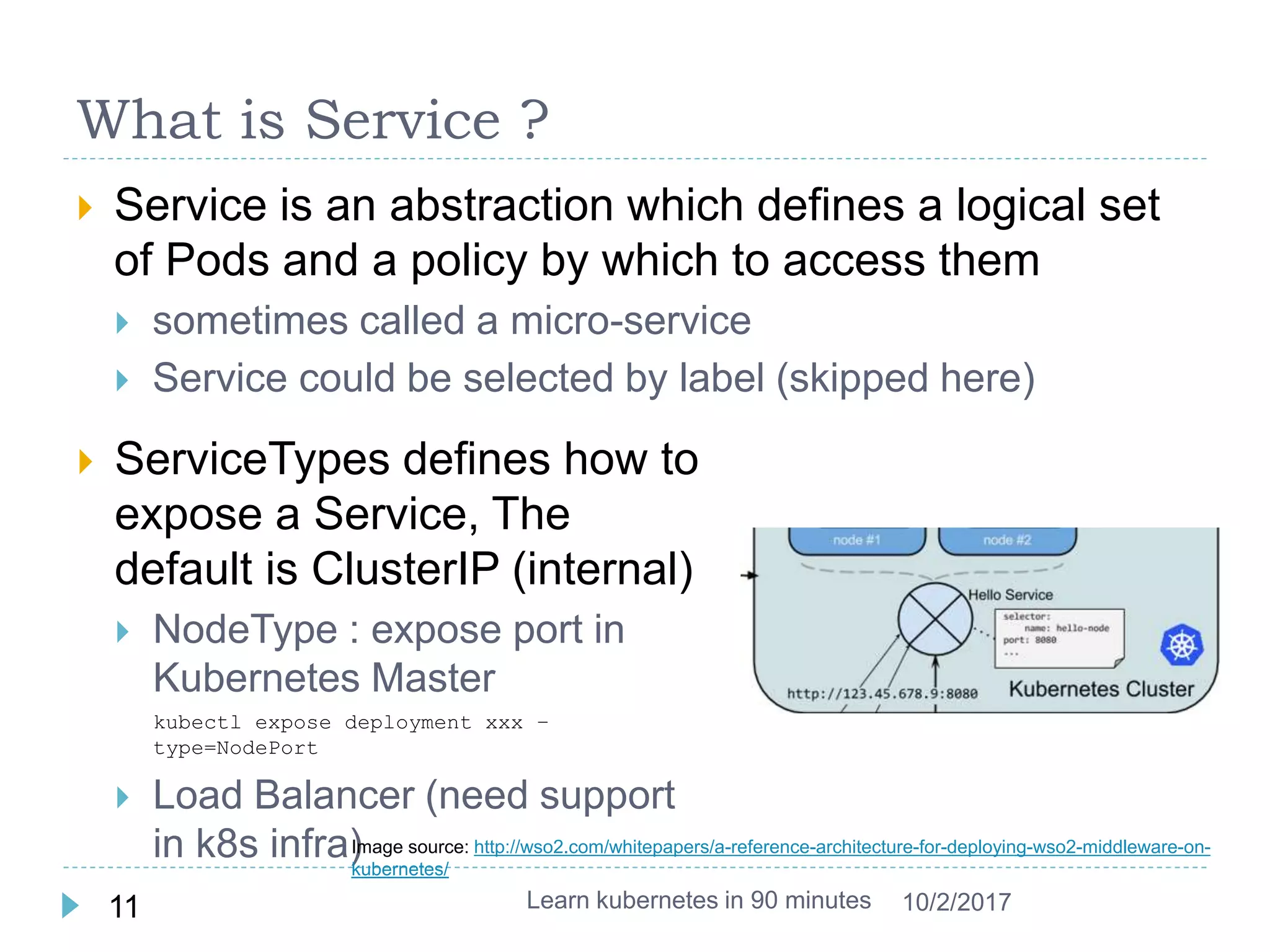
What is Service ?
 Service is an abstraction which defines a logical set
of Pods and a policy by which to access them
 sometimes called a micro-service
 Service could be selected by label (skipped here)
Learn kubernetes in 90 minutes11 10/2/2017
 ServiceTypes defines how to
expose a Service, The
default is ClusterIP (internal)
 NodeType : expose port in
Kubernetes Master
kubectl expose deployment xxx –
type=NodePort
 Load Balancer (need support
in k8s infra)Image source: http://wso2.com/whitepapers/a-reference-architecture-for-deploying-wso2-middleware-on-
kubernetes/
Exer 2: Revisit pod, deployment and service
 Enter into container inside pod
 kubectl exec -it nginx-xxx -- bash
 Start pod only without deployment
 kubectl run nginx --image=nginx --port=80 --restart=Never
 kubectl run -i --tty busybox --image=busybox -- sh
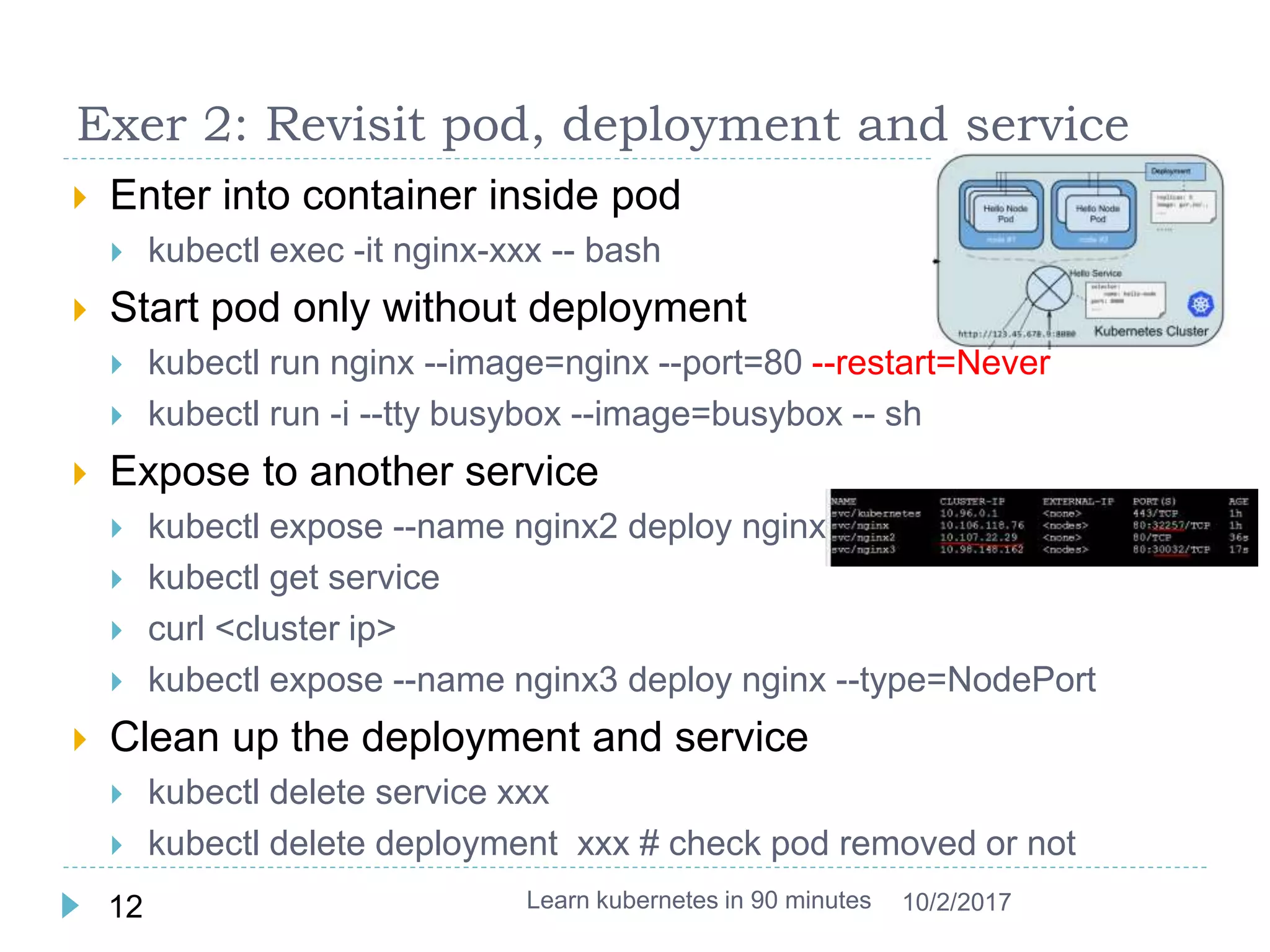
 Expose to another service
 kubectl expose --name nginx2 deploy nginx
 kubectl get service
 curl <cluster ip>
 kubectl expose --name nginx3 deploy nginx --type=NodePort
 Clean up the deployment and service
 kubectl delete service xxx
 kubectl delete deployment xxx # check pod removed or not
Learn kubernetes in 90 minutes12 10/2/2017
Deployment more
 Deployment describe the desired state in a
Deployment object, and the Deployment controller
will change the actual state to the desired state at a
controlled rate for you
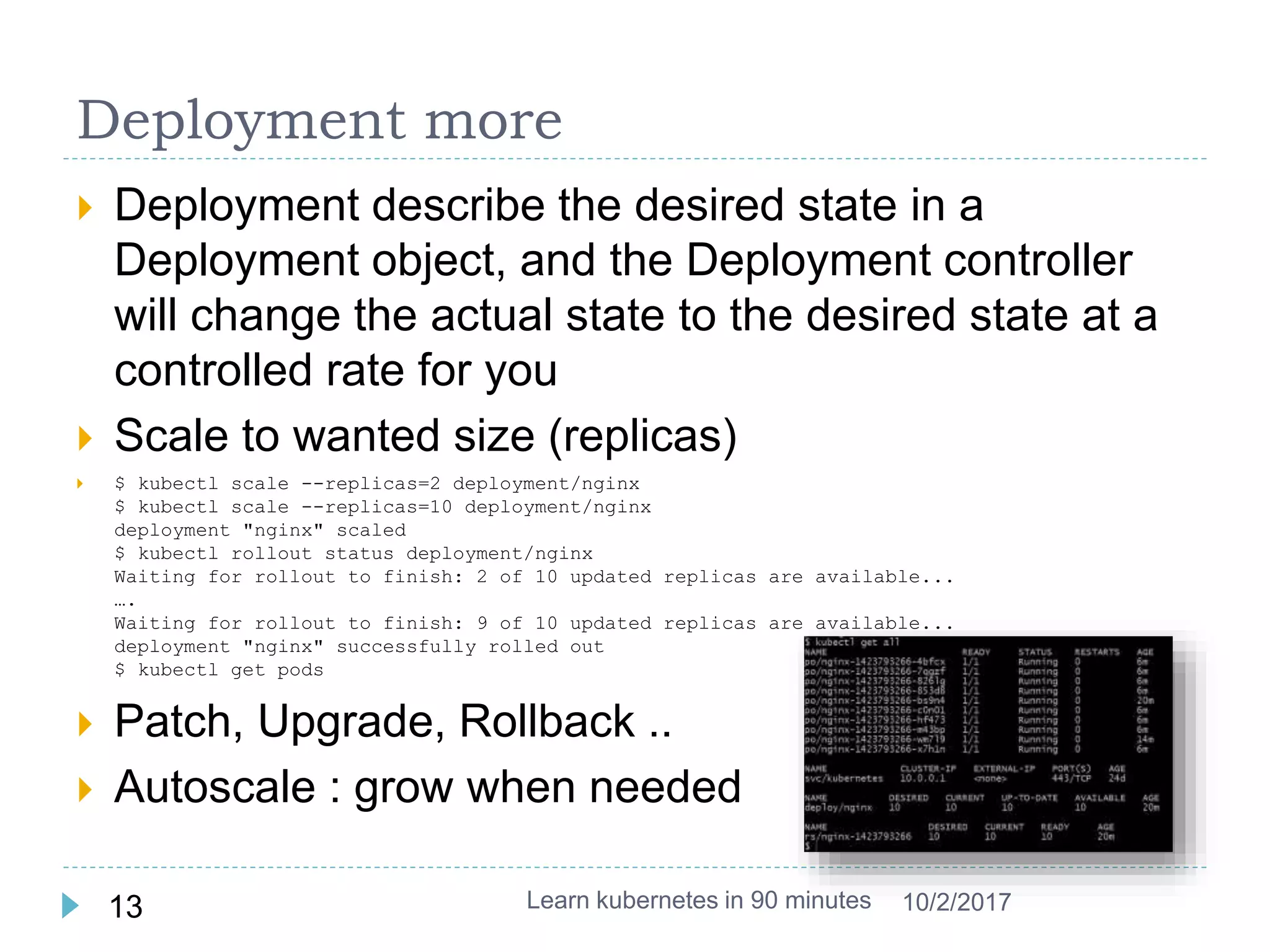
 Scale to wanted size (replicas)
 $ kubectl scale --replicas=2 deployment/nginx
$ kubectl scale --replicas=10 deployment/nginx
deployment "nginx" scaled
$ kubectl rollout status deployment/nginx
Waiting for rollout to finish: 2 of 10 updated replicas are available...
….
Waiting for rollout to finish: 9 of 10 updated replicas are available...
deployment "nginx" successfully rolled out
$ kubectl get pods
 Patch, Upgrade, Rollback ..
 Autoscale : grow when needed
Learn kubernetes in 90 minutes13 10/2/2017
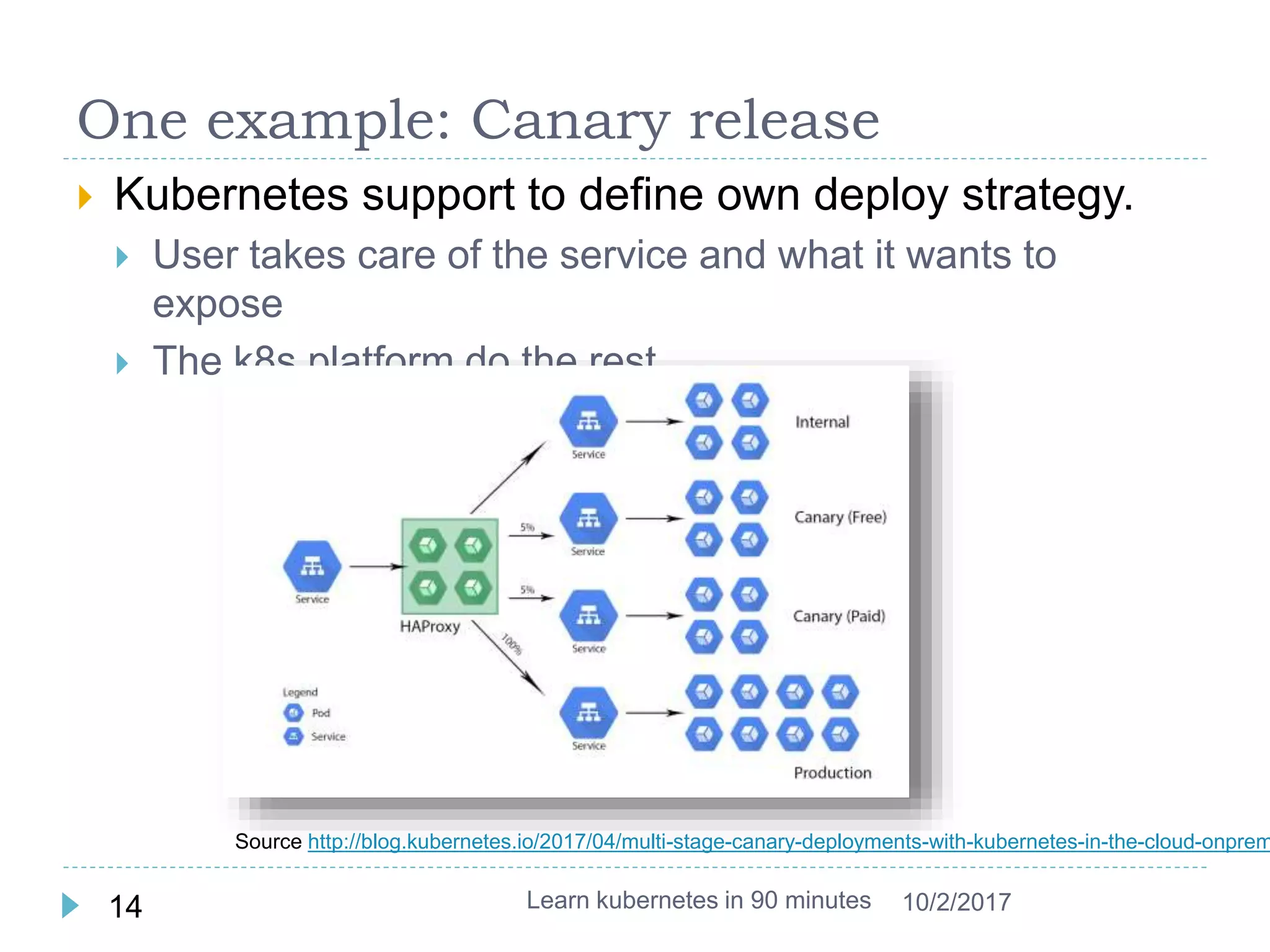
One example: Canary release
 Kubernetes support to define own deploy strategy.
 User takes care of the service and what it wants to
expose
 The k8s platform do the rest
Learn kubernetes in 90 minutes14 10/2/2017
Source http://blog.kubernetes.io/2017/04/multi-stage-canary-deployments-with-kubernetes-in-the-cloud-onprem
Exer 3 : Deployment with Scale
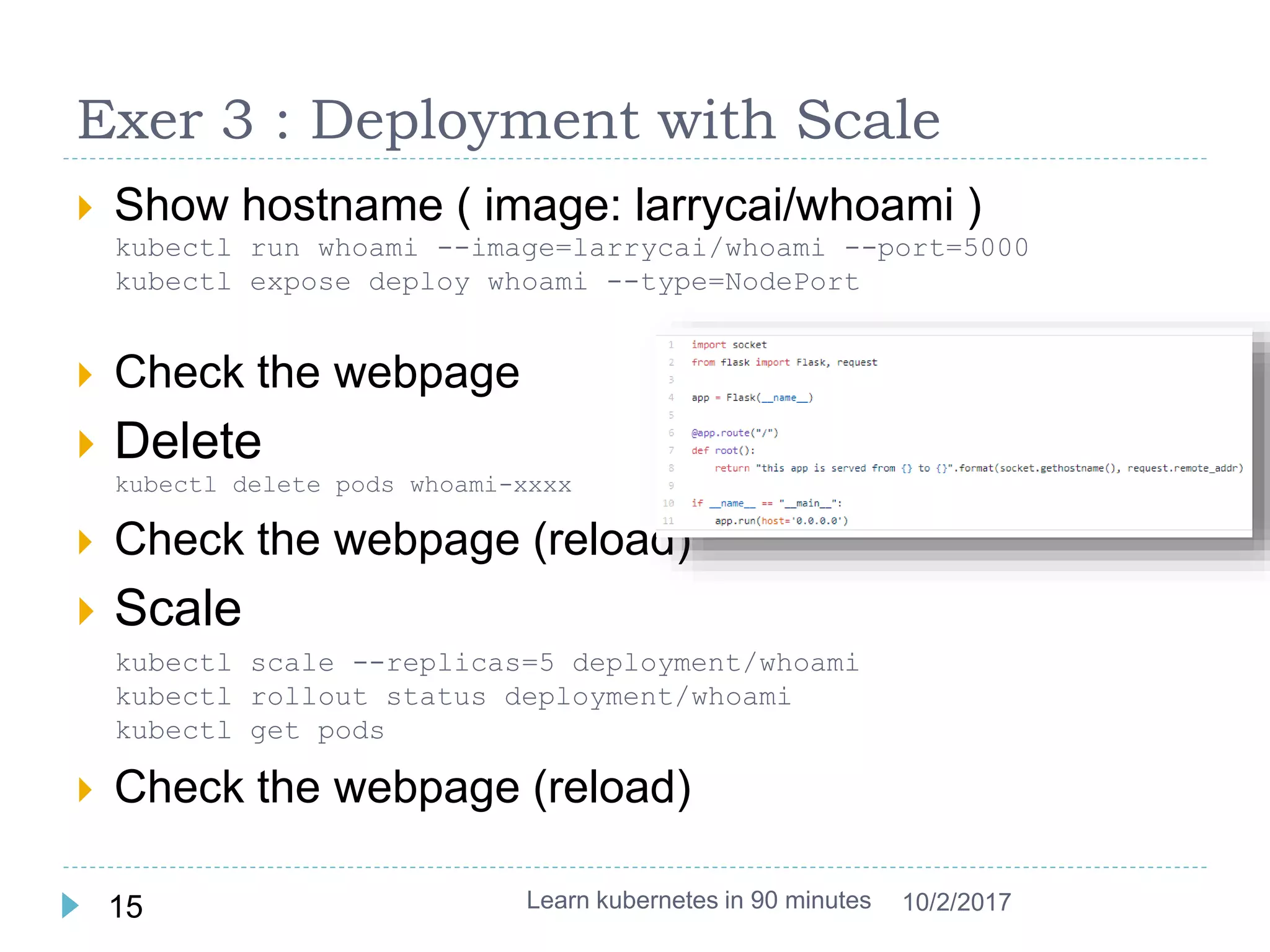
 Show hostname ( image: larrycai/whoami )
kubectl run whoami --image=larrycai/whoami --port=5000
kubectl expose deploy whoami --type=NodePort
 Check the webpage
 Delete
kubectl delete pods whoami-xxxx
 Check the webpage (reload)
 Scale
kubectl scale --replicas=5 deployment/whoami
kubectl rollout status deployment/whoami
kubectl get pods
 Check the webpage (reload)
Learn kubernetes in 90 minutes15 10/2/2017
YAML descriptors
 Kubectl command line to deal with objects with
limited set of properties
 Difficult to maintain and version control
 YAML file is used to manage the object
kubectl create -f node-pod.yaml
kubectl create –f http://example.com/nginx-pod.yaml
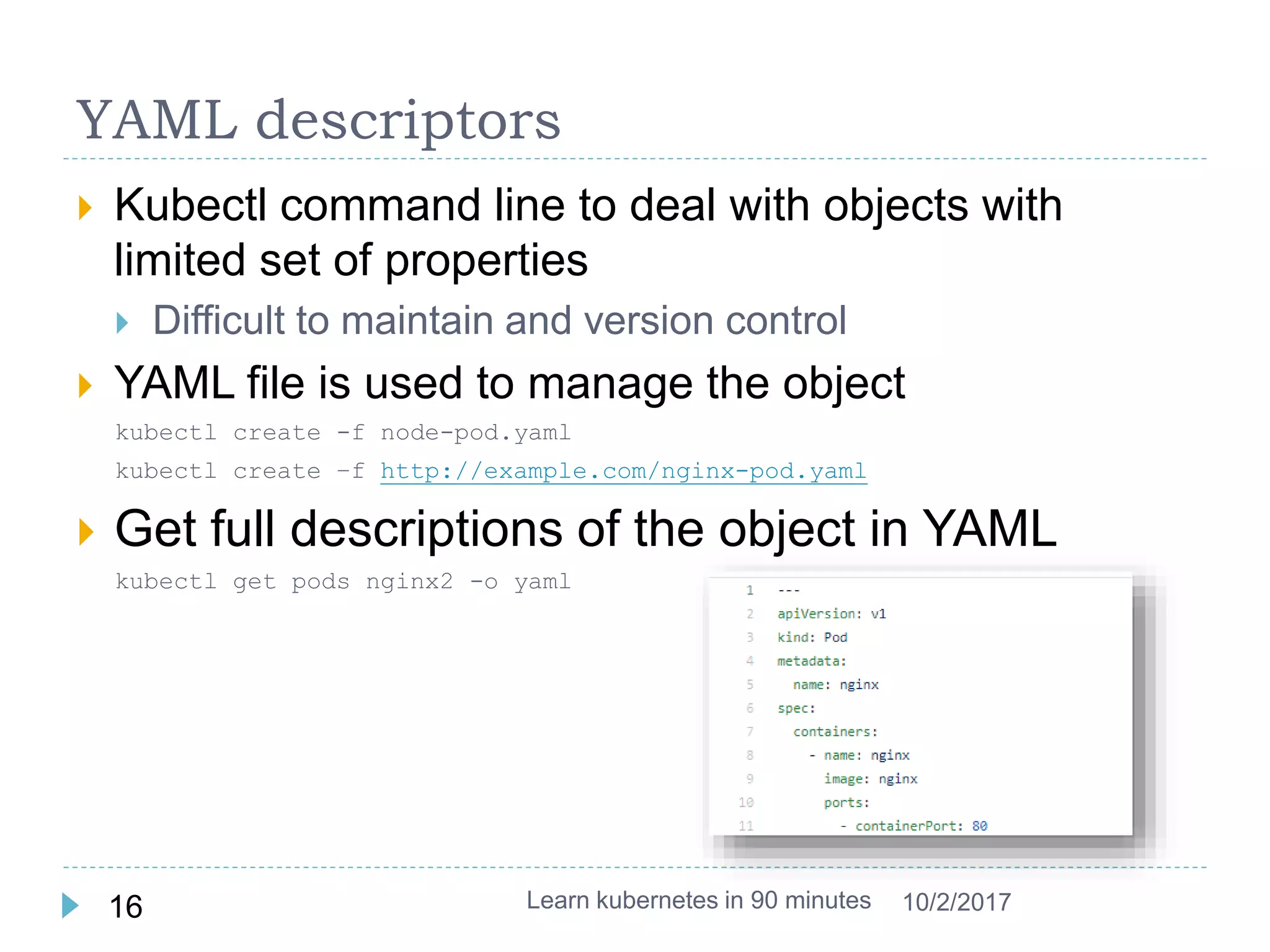
 Get full descriptions of the object in YAML
kubectl get pods nginx2 -o yaml
Learn kubernetes in 90 minutes16 10/2/2017
Exer 4: deploy from YAML file
 Create whoami deploy yaml file (use pod as
reference)
kubectl get deploy whoami -o yaml
 Download and create
https://github.com/larrycai/codingwithme-
k8s/blob/master/whoami.yaml
curl -L -o whoami.yaml https://git.io/v7yd8
kubectl delete service whoami
kubectl delete deploy whoami
kubectl create -f whoami.yaml
 Change the ReplicaSet to 5 and run it again
kubectl apply -f whoami.yaml
Learn kubernetes in 90 minutes17 10/2/2017
Microservices in Kubernetes
 Kubernetes is a great tool for microservices clustering
and orchestration.
 It is still a quite new and under active development
 Kubernetes provides lots of features to be used to deploy
microservices
 Declare in YAML to deploy them
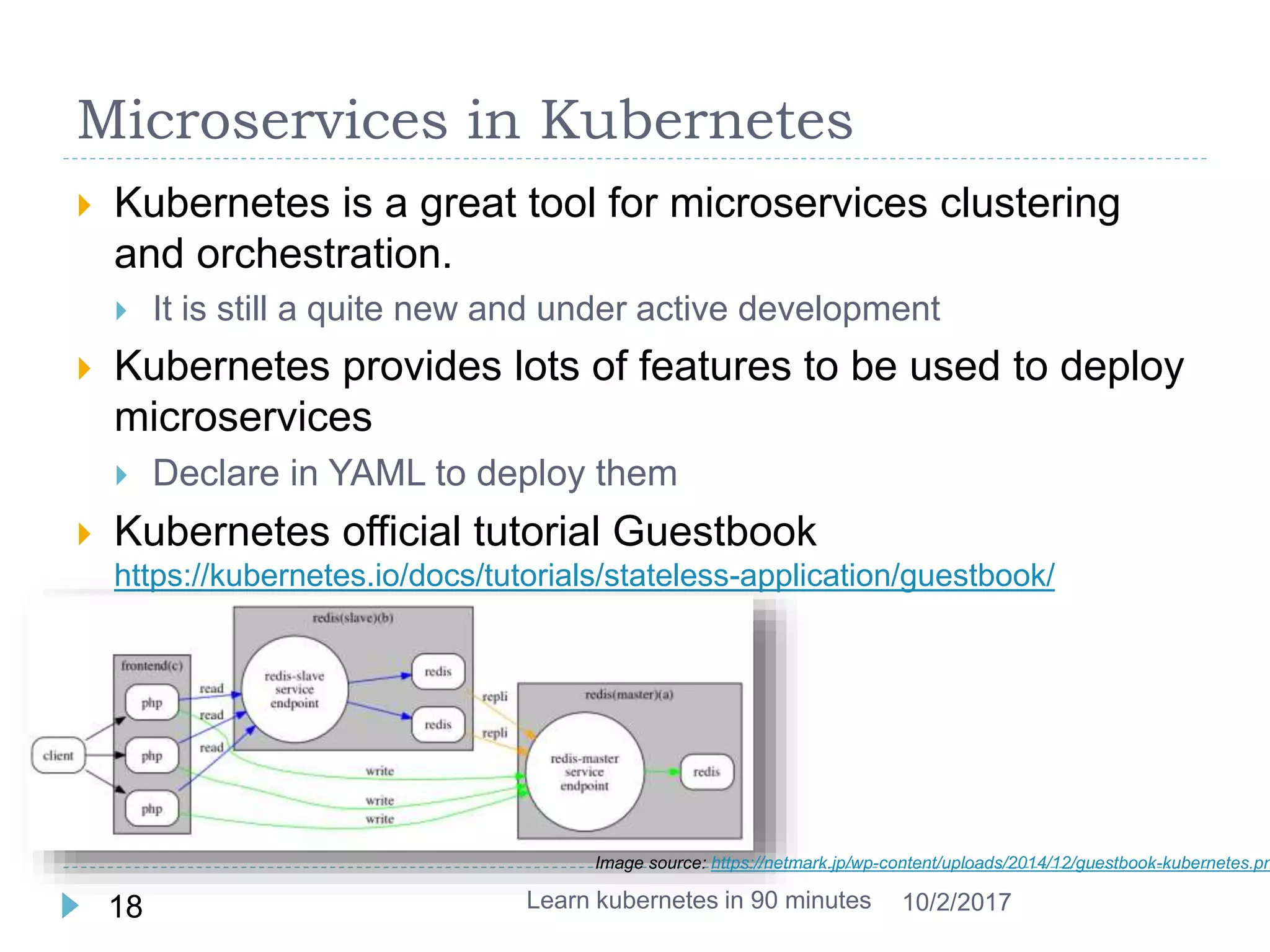
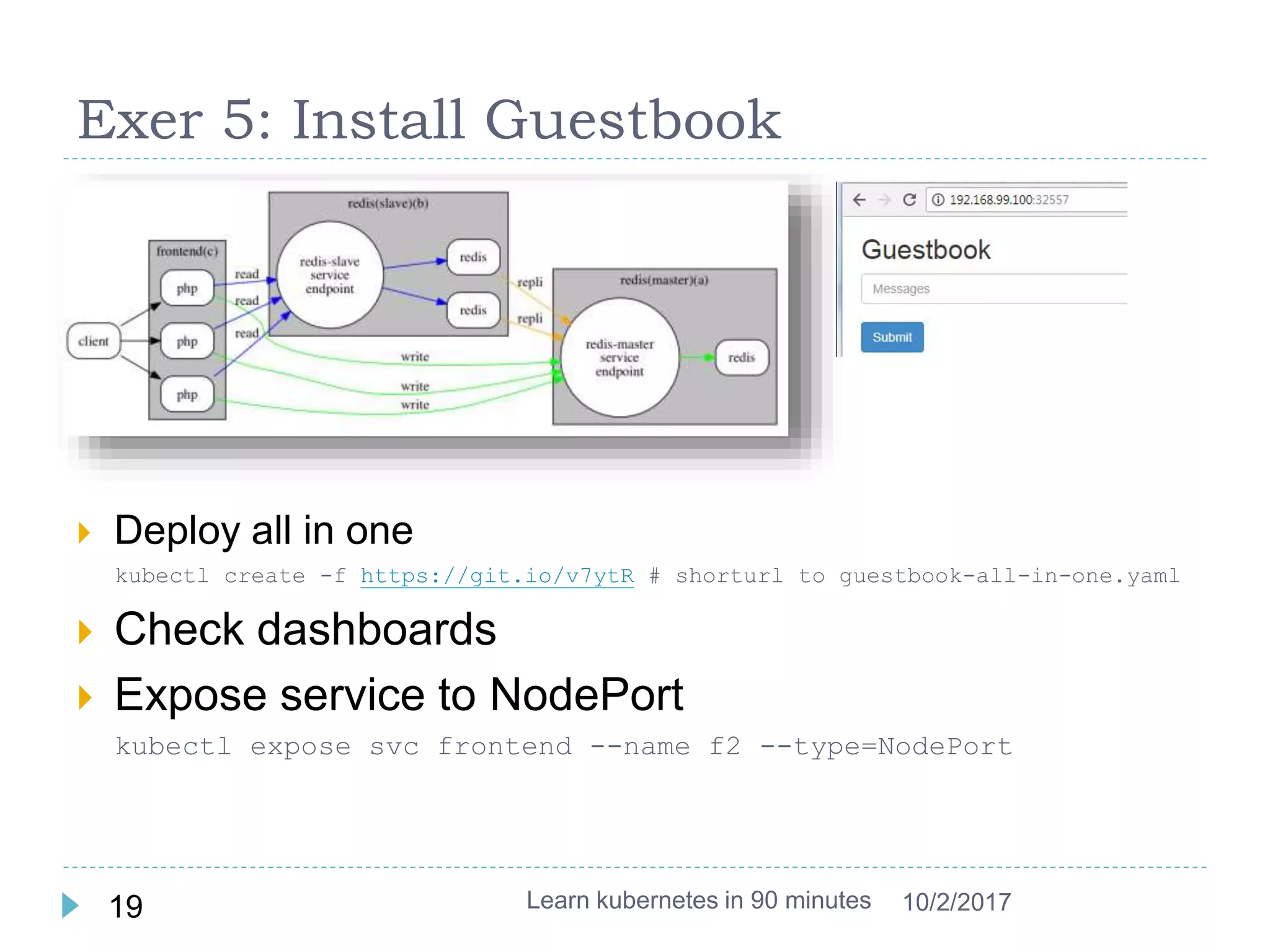
 Kubernetes official tutorial Guestbook
https://kubernetes.io/docs/tutorials/stateless-application/guestbook/
Learn kubernetes in 90 minutes18 10/2/2017
Image source: https://netmark.jp/wp-content/uploads/2014/12/guestbook-kubernetes.pn
Exer 5: Install Guestbook
 Deploy all in one
kubectl create -f https://git.io/v7ytR # shorturl to guestbook-all-in-one.yaml
 Check dashboards
 Expose service to NodePort
kubectl expose svc frontend --name f2 --type=NodePort
Learn kubernetes in 90 minutes19 10/2/2017
Summary
 Kubernetes: a platform to run container (docker)
 Concept:
 A Node is a worker machine in Kubernetes
 A Pod is the basic building block of Kubernetes, which
has a group of containers
 Deployment controls the state of the pod (scale, replicate)
 Service is an abstraction which defines a logical set of
Pods and a policy by which to access them. (micro
service ..)
 Kubernetes grows very fast, follow it.
Learn kubernetes in 90 minutes20 10/2/2017
Reference
 K8s doc: https://kubernetes.io/docs/home/
 Code: https://github.com/larrycai/codingwithme-k8s
 Minikube: https://github.com/kubernetes/minikube
 Blog: multi stage deployment with kubernetes:
http://blog.kubernetes.io/2017/04/multi-stage-canary-deployments-
with-kubernetes-in-the-cloud-onprem.html
 Video: The Illustrated Children's Guide to Kubernetes
 Sandbox online: http://labs.play-with-k8s.com/
 Book: Kubernetes in Action (Manning)
Learn kubernetes in 90 minutes21 10/2/2017
ChangeLog
 2017/07/23: first version
 2017/08/11: use k8s playground
 2017/10/2: fix dashboard url
Learn kubernetes in 90 minutes22 10/2/2017
Appendix
Learn kubernetes in 90 minutes23 10/2/2017
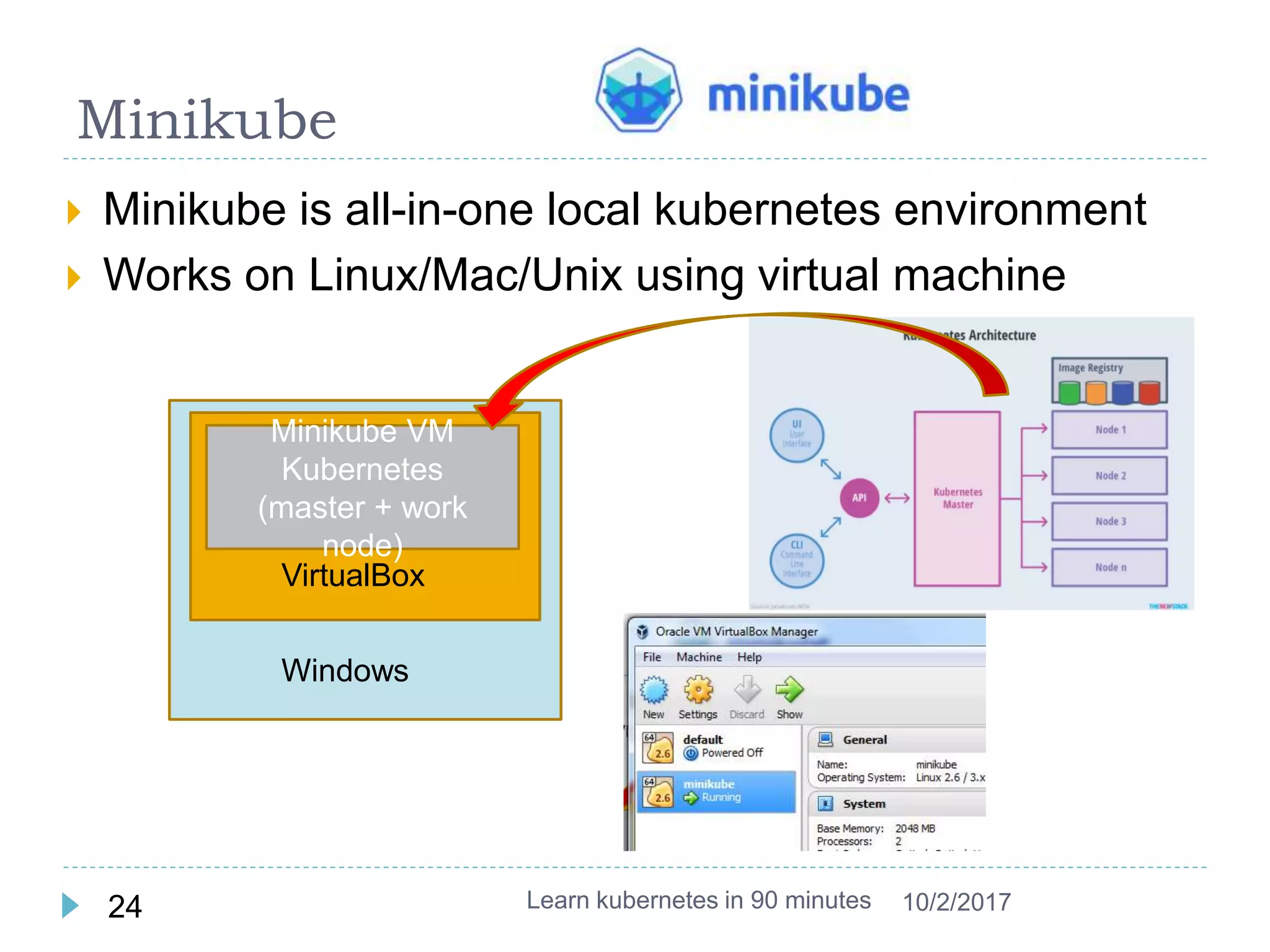
Minikube
 Minikube is all-in-one local kubernetes environment
 Works on Linux/Mac/Unix using virtual machine
Learn kubernetes in 90 minutes24 10/2/2017
Minikube VM
Kubernetes
(master + work
node)
VirtualBox
Windows
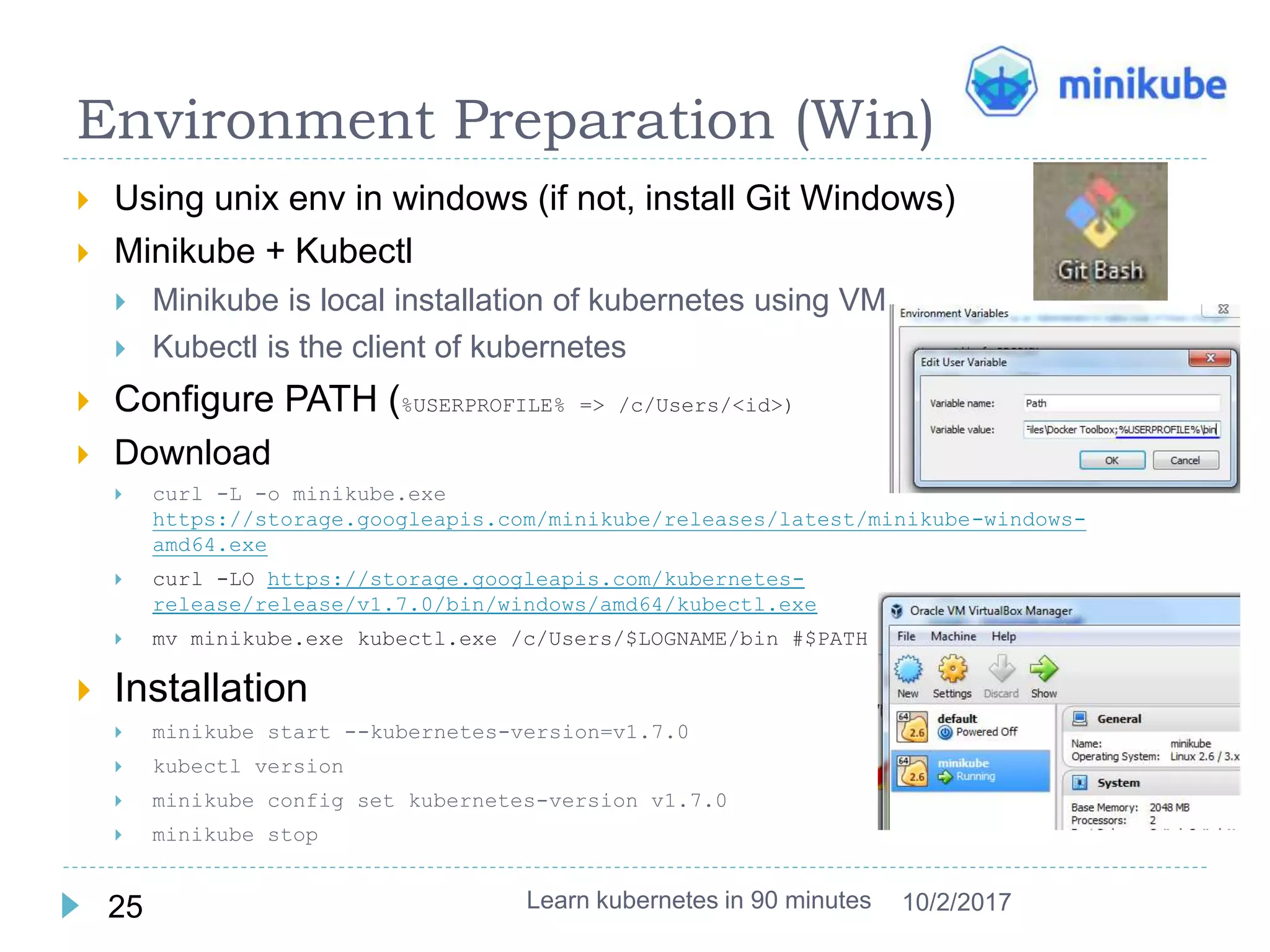
Environment Preparation (Win)
 Using unix env in windows (if not, install Git Windows)
 Minikube + Kubectl
 Minikube is local installation of kubernetes using VM
 Kubectl is the client of kubernetes
 Configure PATH (%USERPROFILE% => /c/Users/<id>)
 Download
 curl -L -o minikube.exe
https://storage.googleapis.com/minikube/releases/latest/minikube-windows-
amd64.exe
 curl -LO https://storage.googleapis.com/kubernetes-
release/release/v1.7.0/bin/windows/amd64/kubectl.exe
 mv minikube.exe kubectl.exe /c/Users/$LOGNAME/bin #$PATH
 Installation
 minikube start --kubernetes-version=v1.7.0
 kubectl version
 minikube config set kubernetes-version v1.7.0
 minikube stop
Learn kubernetes in 90 minutes25 10/2/2017
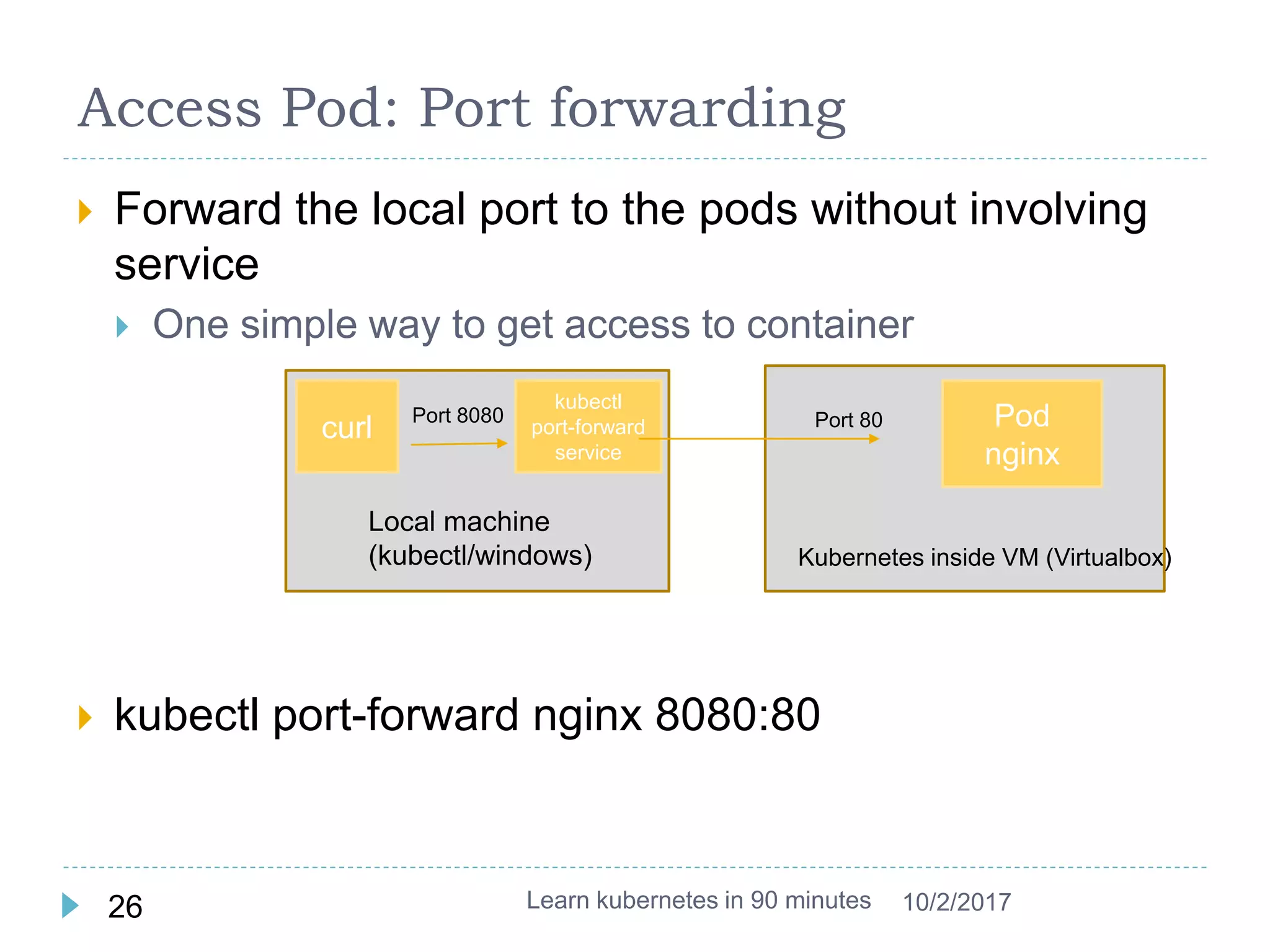
 Forward the local port to the pods without involving
service
 One simple way to get access to container
 kubectl port-forward nginx 8080:80
Access Pod: Port forwarding
Learn kubernetes in 90 minutes26 10/2/2017
curl
Local machine
(kubectl/windows)
kubectl
port-forward
service
Port 8080
Kubernetes inside VM (Virtualbox)
Pod
nginx
Port 80
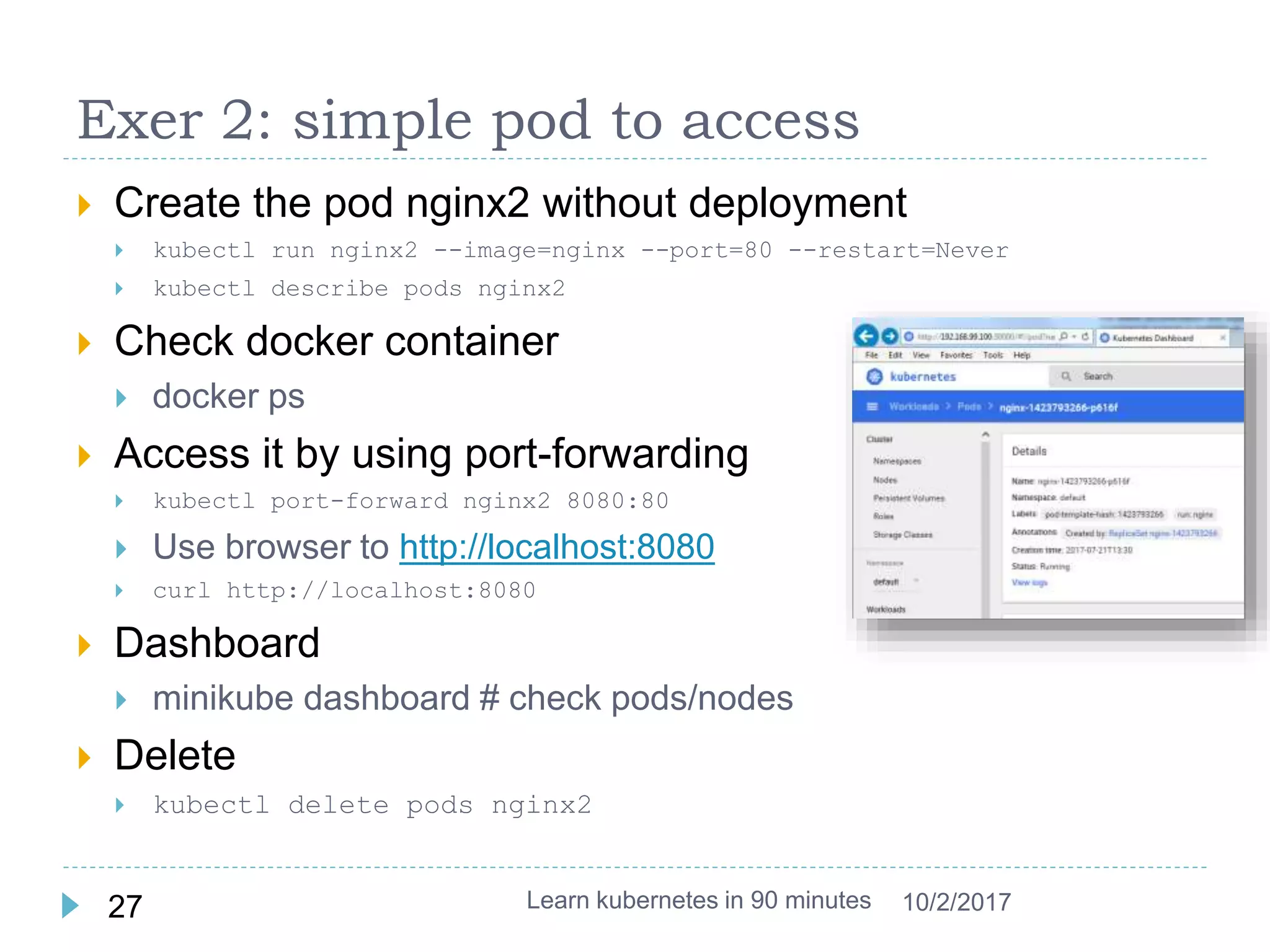
Exer 2: simple pod to access
 Create the pod nginx2 without deployment
 kubectl run nginx2 --image=nginx --port=80 --restart=Never
 kubectl describe pods nginx2
 Check docker container
 docker ps
 Access it by using port-forwarding
 kubectl port-forward nginx2 8080:80
 Use browser to http://localhost:8080
 curl http://localhost:8080
 Dashboard
 minikube dashboard # check pods/nodes
 Delete
 kubectl delete pods nginx2
Learn kubernetes in 90 minutes27 10/2/2017

Learn kubernetes in 90 minutes

  • 1.
    Learn Kubernetes in90 minutes Larry Cai <larry.caiyu@gmail.com>
  • 2.
    Agenda  Introduction  Exercise1: First web service in kubernetes  Exercise 2: Revisit pod, deployment and service  Exercise 3: Controller – Deployment (scale)  Exercise 4: Deploy with YAML file  Exercise 5: install Microservice: Guestbook  Reference Learn kubernetes in 90 minutes2 10/2/2017 Minikube environment setup is in appendix
  • 3.
    Environment using k8splayground  Three nodes in http://labs.play-with-k8s.com (master + 2 workers)  Node 1 (master node): follow guideline step 1/2/3 If dashboard doesn’t work, use https://git.io/vdc52 instead of https://git.io/kube-dashboard  Node 2/Node 3 kubeadm join –token … # check the console log in Node 1  Node 1: kubectl get nodes  Click the port to open dashboard Learn kubernetes in 90 minutes3 10/2/2017 Try to use Ctrl-Ins & Shift-Ins for copy/paste
  • 4.
    Background – Container/Docker Container technology offers an alternative method for virtualization in cloud, with more efficiency & fast  New era for packaging and delivering software  Docker is one execution engine for container  docker pull nginx  docker run --name web -d -p 8080:80 nginx  docker exec -it web bash  docker build -t larrycai/whoami . Learn kubernetes in 90 minutes4 10/2/2017 See more in CodingWithMe Docker https://www.slideshare.net/larrycai/learn-docker-in-90- minutes
  • 5.
    What is kubernetes?  Kubernetes is an open source container orchestration platform that helps manage distributed, containerized applications at massive scale.  Kubernetes (k8s) comes from google  kubernetes is a product platform to run container (Docker is one type of container execution engine)  k8s to container likes openstack to virtual machine.  Key features (list partly):  Auto-scaling  Self-healing infrastructure  Application lifecycle management Learn kubernetes in 90 minutes5 10/2/2017
  • 6.
    K8s Architecture  Masterand Work Node (multi or single)  Container is executed in Work Node as default Learn kubernetes in 90 minutes6 10/2/2017 Source: https://thenewstack.io/kubernetes-an-overview/
  • 7.
    Exer 1: runningfirst web service  Let’s start one web server in k8s (cloud)  Nginx is webserver like apache  Start the service from official docker image https://hub.docker.com/_/nginx/  kubectl run nginx --image=nginx --port=80  kubectl expose deployment nginx --type=NodePort  Check what happens  Check dashboard  Access the nginx web service (click new port)  kubectl get pods  kubectl get pods –o wide # check node  kubectl get all  kubectl describe nodes  docker ps # in different node  Kill the pod ! And check again  kubectl delete pods nginx-<xxx> Learn kubernetes in 90 minutes7 10/2/2017
  • 8.
    Overall for runningservice Learn kubernetes in 90 minutes8 10/2/2017 Image source https://kubernetes.io/images/hellonode/image_13.
  • 9.
    What is Pod?  A pod is a group of one or more containers (such as Docker containers), the shared storage for those containers  Minimal element in kubernetes, run in one Node  Command kubectl run pods kubectl get pods kubectl delete pods kubectl describe pods <pod> kubectl exec -it <pod> -- bash Learn kubernetes in 90 minutes9 10/2/2017
  • 10.
    What is Deployment?  The Deployment is responsible for creating and updating instances of your application (using controller)  Once the application instances are created, a Kubernetes Deployment Controller continuously monitors those instances  Default is one instance and keep active  Review the command  kubectl run nginx --image=nginx --port=80 --replicas=1  Download docker image nginx (from hub.docker.com) as internal port is 80  Run docker image inside pod named “nginx-xxx” with 1 instance  Deployment with name “nginx”  If pod is deleted, deployment control create new one Learn kubernetes in 90 minutes10 10/2/2017
  • 11.
    What is Service?  Service is an abstraction which defines a logical set of Pods and a policy by which to access them  sometimes called a micro-service  Service could be selected by label (skipped here) Learn kubernetes in 90 minutes11 10/2/2017  ServiceTypes defines how to expose a Service, The default is ClusterIP (internal)  NodeType : expose port in Kubernetes Master kubectl expose deployment xxx – type=NodePort  Load Balancer (need support in k8s infra)Image source: http://wso2.com/whitepapers/a-reference-architecture-for-deploying-wso2-middleware-on- kubernetes/
  • 12.
    Exer 2: Revisitpod, deployment and service  Enter into container inside pod  kubectl exec -it nginx-xxx -- bash  Start pod only without deployment  kubectl run nginx --image=nginx --port=80 --restart=Never  kubectl run -i --tty busybox --image=busybox -- sh  Expose to another service  kubectl expose --name nginx2 deploy nginx  kubectl get service  curl <cluster ip>  kubectl expose --name nginx3 deploy nginx --type=NodePort  Clean up the deployment and service  kubectl delete service xxx  kubectl delete deployment xxx # check pod removed or not Learn kubernetes in 90 minutes12 10/2/2017
  • 13.
    Deployment more  Deploymentdescribe the desired state in a Deployment object, and the Deployment controller will change the actual state to the desired state at a controlled rate for you  Scale to wanted size (replicas)  $ kubectl scale --replicas=2 deployment/nginx $ kubectl scale --replicas=10 deployment/nginx deployment "nginx" scaled $ kubectl rollout status deployment/nginx Waiting for rollout to finish: 2 of 10 updated replicas are available... …. Waiting for rollout to finish: 9 of 10 updated replicas are available... deployment "nginx" successfully rolled out $ kubectl get pods  Patch, Upgrade, Rollback ..  Autoscale : grow when needed Learn kubernetes in 90 minutes13 10/2/2017
  • 14.
    One example: Canaryrelease  Kubernetes support to define own deploy strategy.  User takes care of the service and what it wants to expose  The k8s platform do the rest Learn kubernetes in 90 minutes14 10/2/2017 Source http://blog.kubernetes.io/2017/04/multi-stage-canary-deployments-with-kubernetes-in-the-cloud-onprem
  • 15.
    Exer 3 :Deployment with Scale  Show hostname ( image: larrycai/whoami ) kubectl run whoami --image=larrycai/whoami --port=5000 kubectl expose deploy whoami --type=NodePort  Check the webpage  Delete kubectl delete pods whoami-xxxx  Check the webpage (reload)  Scale kubectl scale --replicas=5 deployment/whoami kubectl rollout status deployment/whoami kubectl get pods  Check the webpage (reload) Learn kubernetes in 90 minutes15 10/2/2017
  • 16.
    YAML descriptors  Kubectlcommand line to deal with objects with limited set of properties  Difficult to maintain and version control  YAML file is used to manage the object kubectl create -f node-pod.yaml kubectl create –f http://example.com/nginx-pod.yaml  Get full descriptions of the object in YAML kubectl get pods nginx2 -o yaml Learn kubernetes in 90 minutes16 10/2/2017
  • 17.
    Exer 4: deployfrom YAML file  Create whoami deploy yaml file (use pod as reference) kubectl get deploy whoami -o yaml  Download and create https://github.com/larrycai/codingwithme- k8s/blob/master/whoami.yaml curl -L -o whoami.yaml https://git.io/v7yd8 kubectl delete service whoami kubectl delete deploy whoami kubectl create -f whoami.yaml  Change the ReplicaSet to 5 and run it again kubectl apply -f whoami.yaml Learn kubernetes in 90 minutes17 10/2/2017
  • 18.
    Microservices in Kubernetes Kubernetes is a great tool for microservices clustering and orchestration.  It is still a quite new and under active development  Kubernetes provides lots of features to be used to deploy microservices  Declare in YAML to deploy them  Kubernetes official tutorial Guestbook https://kubernetes.io/docs/tutorials/stateless-application/guestbook/ Learn kubernetes in 90 minutes18 10/2/2017 Image source: https://netmark.jp/wp-content/uploads/2014/12/guestbook-kubernetes.pn
  • 19.
    Exer 5: InstallGuestbook  Deploy all in one kubectl create -f https://git.io/v7ytR # shorturl to guestbook-all-in-one.yaml  Check dashboards  Expose service to NodePort kubectl expose svc frontend --name f2 --type=NodePort Learn kubernetes in 90 minutes19 10/2/2017
  • 20.
    Summary  Kubernetes: aplatform to run container (docker)  Concept:  A Node is a worker machine in Kubernetes  A Pod is the basic building block of Kubernetes, which has a group of containers  Deployment controls the state of the pod (scale, replicate)  Service is an abstraction which defines a logical set of Pods and a policy by which to access them. (micro service ..)  Kubernetes grows very fast, follow it. Learn kubernetes in 90 minutes20 10/2/2017
  • 21.
    Reference  K8s doc:https://kubernetes.io/docs/home/  Code: https://github.com/larrycai/codingwithme-k8s  Minikube: https://github.com/kubernetes/minikube  Blog: multi stage deployment with kubernetes: http://blog.kubernetes.io/2017/04/multi-stage-canary-deployments- with-kubernetes-in-the-cloud-onprem.html  Video: The Illustrated Children's Guide to Kubernetes  Sandbox online: http://labs.play-with-k8s.com/  Book: Kubernetes in Action (Manning) Learn kubernetes in 90 minutes21 10/2/2017
  • 22.
    ChangeLog  2017/07/23: firstversion  2017/08/11: use k8s playground  2017/10/2: fix dashboard url Learn kubernetes in 90 minutes22 10/2/2017
  • 23.
    Appendix Learn kubernetes in90 minutes23 10/2/2017
  • 24.
    Minikube  Minikube isall-in-one local kubernetes environment  Works on Linux/Mac/Unix using virtual machine Learn kubernetes in 90 minutes24 10/2/2017 Minikube VM Kubernetes (master + work node) VirtualBox Windows
  • 25.
    Environment Preparation (Win) Using unix env in windows (if not, install Git Windows)  Minikube + Kubectl  Minikube is local installation of kubernetes using VM  Kubectl is the client of kubernetes  Configure PATH (%USERPROFILE% => /c/Users/<id>)  Download  curl -L -o minikube.exe https://storage.googleapis.com/minikube/releases/latest/minikube-windows- amd64.exe  curl -LO https://storage.googleapis.com/kubernetes- release/release/v1.7.0/bin/windows/amd64/kubectl.exe  mv minikube.exe kubectl.exe /c/Users/$LOGNAME/bin #$PATH  Installation  minikube start --kubernetes-version=v1.7.0  kubectl version  minikube config set kubernetes-version v1.7.0  minikube stop Learn kubernetes in 90 minutes25 10/2/2017
  • 26.
     Forward thelocal port to the pods without involving service  One simple way to get access to container  kubectl port-forward nginx 8080:80 Access Pod: Port forwarding Learn kubernetes in 90 minutes26 10/2/2017 curl Local machine (kubectl/windows) kubectl port-forward service Port 8080 Kubernetes inside VM (Virtualbox) Pod nginx Port 80
  • 27.
    Exer 2: simplepod to access  Create the pod nginx2 without deployment  kubectl run nginx2 --image=nginx --port=80 --restart=Never  kubectl describe pods nginx2  Check docker container  docker ps  Access it by using port-forwarding  kubectl port-forward nginx2 8080:80  Use browser to http://localhost:8080  curl http://localhost:8080  Dashboard  minikube dashboard # check pods/nodes  Delete  kubectl delete pods nginx2 Learn kubernetes in 90 minutes27 10/2/2017