Larry cai <larry.caiyu@gmail.com>
Agenda
 Introduction
 Exercise 1: Install Dashing
 Exercise 2:Add one widget
 Exercise 3: Update the view
 Exercise 4: Control the data
 Exercise 5: Update the data with color (coffeescript)
 Exercise 6: Pull the data (jobs)
 Reference
Learn Dashing Widget2 06/16/16
Introduction
Learn Dashing Widget3
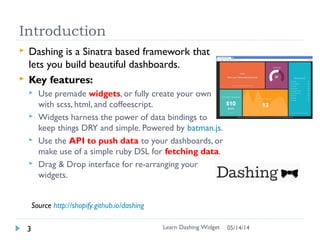
 Dashing is a Sinatra based framework that
lets you build beautiful dashboards.
 Key features:
 Use premade widgets, or fully create your own
with scss, html, and coffeescript.
 Widgets harness the power of data bindings to
keep things DRY and simple. Powered by batman.js.
 Use the API to push data to your dashboards, or
make use of a simple ruby DSL for fetching data.
 Drag & Drop interface for re-arranging your
widgets.
Source http://shopify.github.io/dashing
06/16/16
Environment
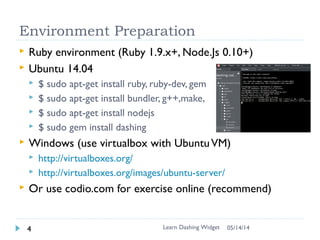
 Ruby environment (Ruby 1.9.x+, Node.Js 0.10+)
 Ubuntu 14.04
 $ sudo apt-get install ruby, ruby-dev, gem
 $ sudo apt-get install bundler, g++,make,
 $ sudo apt-get install nodejs
 $ sudo gem install dashing
 Windows (use virtualbox with UbuntuVM)
 http://virtualboxes.org/
 http://virtualboxes.org/images/ubuntu-server/
 Or use online service for exercise
http://c9.io , http://codio.com
Learn Dashing Widget4 06/16/16
Environment using c9.io
 https://c9.io/
 New Ruby workspace
 In console:
gem install dashing
Learn Dashing Widget5 06/16/16
Exercise 1: Install Dashing
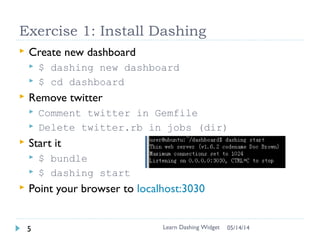
 Create new dashboard
 $ dashing new dashboard
 $ cd dashboard
 Remove twitter (need both)
 Comment out twitter in Gemfile
 Delete twitter.rb in jobs (dir)
 Start it
 $ bundle
 $ dashing start –p 8080 # default is 3030
 Point your browser to http://localhost:8080
 Or Run panel (if c9.io)
Learn Dashing Widget7 06/16/16
Widget
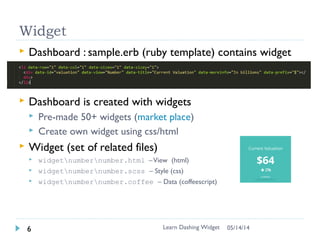
 Dashboard : dashboard/sample.erb (ruby template)
contains widget
 Dashboard is created with widgets
 Pre-made 50+ widgets (market place)
 Create own widget using css/html
 Widget (set of related files)
 widgetnumbernumber.html –View (html)
 widgetnumbernumber.scss – Style (css)
 widgetnumbernumber.coffee – Data (coffeescript)
Learn Dashing Widget8 06/16/16
Dashboard
Widget
Exercise 2: Add new widget
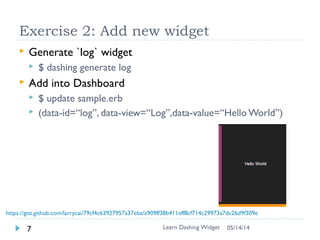
 Generate `log` widget
 $ dashing generate widget log
 Add into Dashboard
 # update sample.erb
 Check log.html
 Change data-view from Log to Text
 View can be used in other widget “instance”
/”object”
!! Log shall be capitalized for data-view !!!
Learn Dashing Widget9 06/16/16
https://gist.github.com/larrycai/79cf4c63927957a37eba/a909ff38b411eff8cf714c29973a7dc26d9f309e
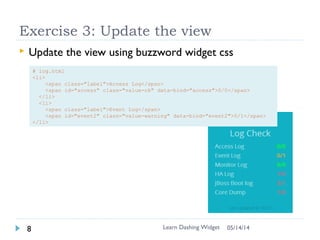
Exercise 3: Update the view
 Update log.html
 Update log.scss
 Copy the view using list widget css (list.scss -> log.scss)
 Change inside .widget-list -> .widget-log
Learn Dashing Widget10 06/16/16
# log.html
<h1 class="title" data-bind="title"></h1>
<ul class="list-nostyle">
<li>
<span class="label">Access Log</span>
<span class="value" data-bind="access">0</span>
</li>
<li>
<span class="label">Event Log</span>
<span class="value" data-bind="event2">0</span>
</li>
</ul>
<p class="updated-at" data-bind="updatedAtMessage"></p>
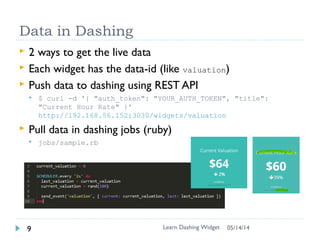
Data in Dashing
 Each widget has the data-id (like log), which provides the
URL access point to update the data
 Push data to dashing using REST API (see bottom)
 $ curl -d '{ "auth_token": "YOUR_AUTH_TOKEN", "title":
"Current Hour Rate" }' http://<your url>/widgets/log
Learn Dashing Widget11 06/16/16
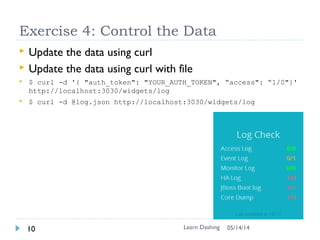
Exercise 4: Control the Data
 Update the data using curl for welcome message
 Find in the bottom of your dashboard (remove 443,  front of
http)
 Update the data using curl for log
 $ curl -d '{ "auth_token": "YOUR_AUTH_TOKEN", “access”: “100“,
“event2”:”87”}' http://<url>/widgets/log
 Update the data using curl for log
 # Save the request into log.json
 $ curl -d @log.json http://<url>/widgets/log
 Write your own script from anywhere!! (homework)
Learn Dashing12 06/16/16
Data in Dashing (more)
 Push data from anywhere using any language besides curl
 i.e. Python in jenkins job
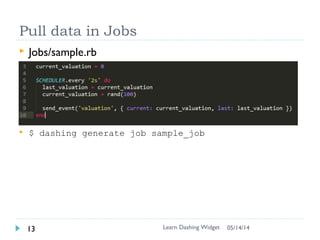
 Push data in dashing jobs (ruby)
 jobs/sample.rb
Learn Dashing Widget13 06/16/16
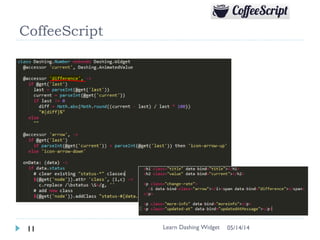
CoffeeScript
 CofferScript is like javascript to control views when data
comes (like color) (log.coffeescript)
Learn Dashing Widget14 06/16/16
(Skipped)
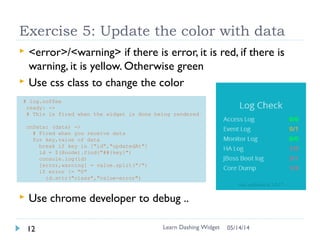
Exercise 5: Update the color with data
 <error>/<warning> if there is error, it is red, if there is
warning, it is yellow. Otherwise green
 Use css class to change the color
 Use chrome developer to debug ..
Learn Dashing Widget15 06/16/16
# log.coffee
ready: ->
# This is fired when the widget is done being rendered
onData: (data) ->
# Fired when you receive data
for key,value of data
break if key in ["id","updatedAt"]
id = $(@node).find("##{key}")
console.log(id)
[error,warning] = value.split("/")
if error != "0"
id.attr("class","value-error")
(Skipped)
Exercise 6: Pull data in jobs
 Write log job to simulate fetching the log and send event
to widget
 $ dashing generate job log
 Update the data in every 5 second with random data
 Check sample.rb
Learn Dashing Widget16 06/16/16
Summary
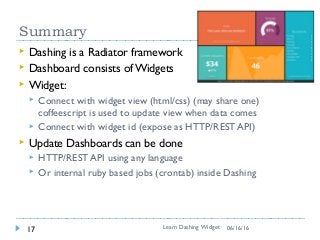
 Dashing is a Radiator framework
 Dashboard consists of Widgets
 Widget:
 Connect with widget view (html/css) (may share one)
coffeescript is used to update view when data comes
 Connect with widget id (expose as HTTP/REST API)
 Update Dashboards can be done
 HTTP/REST API using any language
 Or internal ruby based jobs (crontab) inside Dashing
Learn Dashing Widget17 06/16/16
Reference
 http://shopify.github.io/dashing/
 https://github.com/Shopify/dashing/wiki/Additional-
Widgets
 http://dashing.challengepost.com/submissions
 https://www.andreydevyatkin.com/archives/getting-
started-with-dashing/
 http://www.alexecollins.com/content/team-dashboard-
dashing/
 Log widget gist:
https://gist.github.com/larrycai/79cf4c63927957a37eba
Learn Dashing Widget18 06/16/16

Learn Dashing Widget in 90 minutes

  • 1.
  • 2.
    Agenda  Introduction  Exercise1: Install Dashing  Exercise 2:Add one widget  Exercise 3: Update the view  Exercise 4: Control the data  Exercise 5: Update the data with color (coffeescript)  Exercise 6: Pull the data (jobs)  Reference Learn Dashing Widget2 06/16/16
  • 3.
    Introduction Learn Dashing Widget3 Dashing is a Sinatra based framework that lets you build beautiful dashboards.  Key features:  Use premade widgets, or fully create your own with scss, html, and coffeescript.  Widgets harness the power of data bindings to keep things DRY and simple. Powered by batman.js.  Use the API to push data to your dashboards, or make use of a simple ruby DSL for fetching data.  Drag & Drop interface for re-arranging your widgets. Source http://shopify.github.io/dashing 06/16/16
  • 4.
    Environment  Ruby environment(Ruby 1.9.x+, Node.Js 0.10+)  Ubuntu 14.04  $ sudo apt-get install ruby, ruby-dev, gem  $ sudo apt-get install bundler, g++,make,  $ sudo apt-get install nodejs  $ sudo gem install dashing  Windows (use virtualbox with UbuntuVM)  http://virtualboxes.org/  http://virtualboxes.org/images/ubuntu-server/  Or use online service for exercise http://c9.io , http://codio.com Learn Dashing Widget4 06/16/16
  • 5.
    Environment using c9.io https://c9.io/  New Ruby workspace  In console: gem install dashing Learn Dashing Widget5 06/16/16
  • 6.
    Exercise 1: InstallDashing  Create new dashboard  $ dashing new dashboard  $ cd dashboard  Remove twitter (need both)  Comment out twitter in Gemfile  Delete twitter.rb in jobs (dir)  Start it  $ bundle  $ dashing start –p 8080 # default is 3030  Point your browser to http://localhost:8080  Or Run panel (if c9.io) Learn Dashing Widget7 06/16/16
  • 7.
    Widget  Dashboard :dashboard/sample.erb (ruby template) contains widget  Dashboard is created with widgets  Pre-made 50+ widgets (market place)  Create own widget using css/html  Widget (set of related files)  widgetnumbernumber.html –View (html)  widgetnumbernumber.scss – Style (css)  widgetnumbernumber.coffee – Data (coffeescript) Learn Dashing Widget8 06/16/16 Dashboard Widget
  • 8.
    Exercise 2: Addnew widget  Generate `log` widget  $ dashing generate widget log  Add into Dashboard  # update sample.erb  Check log.html  Change data-view from Log to Text  View can be used in other widget “instance” /”object” !! Log shall be capitalized for data-view !!! Learn Dashing Widget9 06/16/16 https://gist.github.com/larrycai/79cf4c63927957a37eba/a909ff38b411eff8cf714c29973a7dc26d9f309e
  • 9.
    Exercise 3: Updatethe view  Update log.html  Update log.scss  Copy the view using list widget css (list.scss -> log.scss)  Change inside .widget-list -> .widget-log Learn Dashing Widget10 06/16/16 # log.html <h1 class="title" data-bind="title"></h1> <ul class="list-nostyle"> <li> <span class="label">Access Log</span> <span class="value" data-bind="access">0</span> </li> <li> <span class="label">Event Log</span> <span class="value" data-bind="event2">0</span> </li> </ul> <p class="updated-at" data-bind="updatedAtMessage"></p>
  • 10.
    Data in Dashing Each widget has the data-id (like log), which provides the URL access point to update the data  Push data to dashing using REST API (see bottom)  $ curl -d '{ "auth_token": "YOUR_AUTH_TOKEN", "title": "Current Hour Rate" }' http://<your url>/widgets/log Learn Dashing Widget11 06/16/16
  • 11.
    Exercise 4: Controlthe Data  Update the data using curl for welcome message  Find in the bottom of your dashboard (remove 443, front of http)  Update the data using curl for log  $ curl -d '{ "auth_token": "YOUR_AUTH_TOKEN", “access”: “100“, “event2”:”87”}' http://<url>/widgets/log  Update the data using curl for log  # Save the request into log.json  $ curl -d @log.json http://<url>/widgets/log  Write your own script from anywhere!! (homework) Learn Dashing12 06/16/16
  • 12.
    Data in Dashing(more)  Push data from anywhere using any language besides curl  i.e. Python in jenkins job  Push data in dashing jobs (ruby)  jobs/sample.rb Learn Dashing Widget13 06/16/16
  • 13.
    CoffeeScript  CofferScript islike javascript to control views when data comes (like color) (log.coffeescript) Learn Dashing Widget14 06/16/16
  • 14.
    (Skipped) Exercise 5: Updatethe color with data  <error>/<warning> if there is error, it is red, if there is warning, it is yellow. Otherwise green  Use css class to change the color  Use chrome developer to debug .. Learn Dashing Widget15 06/16/16 # log.coffee ready: -> # This is fired when the widget is done being rendered onData: (data) -> # Fired when you receive data for key,value of data break if key in ["id","updatedAt"] id = $(@node).find("##{key}") console.log(id) [error,warning] = value.split("/") if error != "0" id.attr("class","value-error")
  • 15.
    (Skipped) Exercise 6: Pulldata in jobs  Write log job to simulate fetching the log and send event to widget  $ dashing generate job log  Update the data in every 5 second with random data  Check sample.rb Learn Dashing Widget16 06/16/16
  • 16.
    Summary  Dashing isa Radiator framework  Dashboard consists of Widgets  Widget:  Connect with widget view (html/css) (may share one) coffeescript is used to update view when data comes  Connect with widget id (expose as HTTP/REST API)  Update Dashboards can be done  HTTP/REST API using any language  Or internal ruby based jobs (crontab) inside Dashing Learn Dashing Widget17 06/16/16
  • 17.
    Reference  http://shopify.github.io/dashing/  https://github.com/Shopify/dashing/wiki/Additional- Widgets http://dashing.challengepost.com/submissions  https://www.andreydevyatkin.com/archives/getting- started-with-dashing/  http://www.alexecollins.com/content/team-dashboard- dashing/  Log widget gist: https://gist.github.com/larrycai/79cf4c63927957a37eba Learn Dashing Widget18 06/16/16