Larry cai <larry.caiyu@gmail.com>
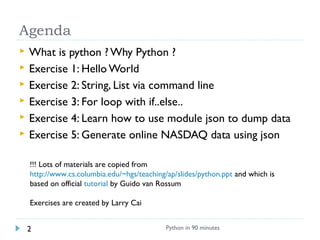
 What is python ? Why Python ?
 Exercise 1: Hello World
 Exercise 2: String, List via command line
 Exercise 3: For loop with if..else..
 Exercise 4: Learn how to use module json to dump data
 Exercise 5: Generate online NASDAQ data using json
!!! Lots of materials are copied from
http://www.cs.columbia.edu/~hgs/teaching/ap/slides/python.ppt and which is
based on official tutorial by Guido van Rossum
Exercises are created by Larry Cai
Python in 90 minutes2
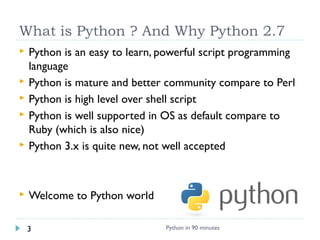
What is Python ? And Why Python 2.7
 Python is an easy to learn, powerful script programming
language
 Python is mature and better community compare to Perl
 Python is high level over shell script
 Python is well supported in OS as default compare to
Ruby (which is also nice)
 Python 3.x is quite new, not well accepted
 Welcome to Python world
Python in 90 minutes3
 Python 2.7.x In Windows with Git Bash
 http://www.python.org/ftp/python/2.7.3/python-2.7.3.msi
 Add into Path
 How to run ?
 /usr/local/bin/python
 #!/usr/bin/env python
 interactive use
Python 2.7.3 (default,Apr 10 2012, 23:24:47) [MSC v.1500 64 bit (AMD64)] on win32
Type "help", "copyright", "credits" or "license" for more information.
>>>
 $ python script.py
Python in 90 minutes4
 Hello World
 hello.py
#!/usr/bin/env python
for name in [“larry”,”cai”]:
print "hello" , name
Python in 90 minutes5
Tips: Indent is important for python
 Visible symbol in your favorite editor
Python in 90 minutes6
Python forces to use a certainPython forces to use a certain
indentation style instead of “{,}”indentation style instead of “{,}”
Basic operations & program
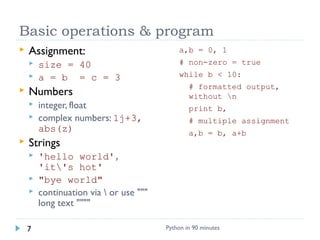
 Assignment:
 size = 40
 a = b = c = 3
 Numbers
 integer, float
 complex numbers: 1j+3,
abs(z)
 Strings
 'hello world',
'it's hot'
 "bye world"
 continuation via  or use """
long text """"
a,b = 0, 1
# non-zero = true
while b < 10:
# formatted output,
without n
print b,
# multiple assignment
a,b = b, a+b
Python in 90 minutes7
String & List operations
 concatenate with + or
neighbors
 word = 'Help' + x
 word = 'Help' 'a'
 subscripting of strings
 'Hello'[2]  'l'
 slice: 'Hello'[1:2]  'el'
 word[-1]  last character
 len(word)  5
 immutable: cannot assign to
subscript
 lists can be heterogeneous
 a = ['spam', 'eggs',
100, 1234, 2*2]
 Lists can be indexed and
sliced:
 a[0]  spam
 a[:2]  ['spam', 'eggs']
 Lists can be manipulated
 a[2] = a[2] + 23
 a[0:2] = [1,12]
 a[0:0] = []
 len(a)  5
Python in 90 minutes8
Learn the standard script sample
https://gist.github.com/4308811
Help doc
Import library
Function
Main func
Start here !
Python in 90 minutes9
Exercise 2: remove characters
 Practices basic operation in Interactive Shell
 Add features to remove two characters each from input
 ./hello2.py -m larry,cai
hello rry
hello i
Hints: nameHints: names = messages.split(“,”)s = messages.split(“,”)
Python in 90 minutes10
Control flow: if & for
x =
int(raw_input("Please
enter #:"))
if x < 0:
x = 0
print 'Negative
changed to zero'
elif x == 0:
print 'Zero'
elif x == 1:
print 'Single'
else:
print 'More'
 no case statement
a = ['cat', 'window',
'defenestrate']
for x in a:
print x, len(x)
 no arithmetic
progression, but
 range(10)  [0, 1, 2,
3, 4, 5, 6, 7, 8, 9]
 for i in
range(len(a)):
print i, a[i]
 do not modify the
sequence being iterated
over
Python in 90 minutes11
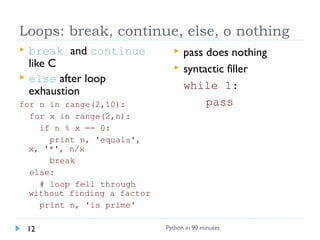
Loops: break, continue, else, o nothing
 break and continue
like C
 else after loop
exhaustion
for n in range(2,10):
for x in range(2,n):
if n % x == 0:
print n, 'equals',
x, '*', n/x
break
else:
# loop fell through
without finding a factor
print n, 'is prime'
 pass does nothing
 syntactic filler
while 1:
pass
Python in 90 minutes12
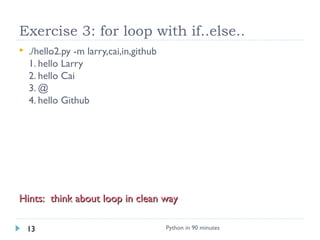
Exercise 3: for loop with if..else..
 ./hello2.py -m larry,cai,in,github
1. hello Larry
2. hello Cai
3. @
4. hello Github
Hints: think about loop in clean wayHints: think about loop in clean way
Python in 90 minutes13
Defining functions
def fib(n):
"""Print a Fibonacci
series up to n."""
a, b = 0, 1
while b < n:
print b,
a, b = b, a+b
>>> fib(2000)
 First line is docstring
 first look for variables in
local, then global
 need global to assign global
variables
def ask_ok(prompt,
retries=4, complaint='Yes
or no, please!'):
while 1:
ok = raw_input(prompt)
if ok in ('y', 'ye',
'yes'): return 1
if ok in ('n', 'no'):
return 0
retries = retries - 1
if retries < 0: raise
IOError, 'refusenik
error'
print complaint
>>> ask_ok('Really?')
Python in 90 minutes14
Modules
 import module:
import fibo
 Use modules via "name
space":
>>> fibo.fib(1000)
>>> fibo.__name__
'fibo'
 can give it a local name:
>>> fib = fibo.fib
>>> fib(500)
 function definition +
executable statements
 executed only when module
is imported
 modules have private symbol
tables
 avoids name clash for global
variables
 accessible as
module.globalname
 can import into name space:
>>> from fibo import fib,
fib2
>>> fib(500)
 can import all names defined
by module:
>>> from fibo import *
Python in 90 minutes15
Exercise 4: write into json config file
 JSON (JavaScript Object Notation) dump list of the
messages into external config files
 ./hello2.py -m larry,cai,in,github > config.json
 $ cat config.json
[
“larry”,
“cai”,
“in”,
“github”
]
Hints: json.dumps(data, indent=2)Hints: json.dumps(data, indent=2)
Python in 90 minutes16
Tuples and sequences
 lists, strings, tuples: examples
of sequence type
 tuple = values separated by
commas
>>> t = 123, 543, 'bar'
>>> t[0]
123
>>> t
(123, 543, 'bar')
 Tuples may be nested
>>> u = t, (1,2)
>>> u
((123, 542, 'bar'), (1,2))
 Empty tuples: ()
>>> empty = ()
>>> len(empty)
0
 sequence unpacking  distribute
elements across variables
>>> t = 123, 543, 'bar'
>>> x, y, z = t
>>> x
123
 packing always creates tuple
 unpacking works for any sequence
Python in 90 minutes17
Dictionaries
 like Tcl or awk associative
arrays
 indexed by keys
 keys are any immutable type:
e.g., tuples
 but not lists (mutable!)
 uses 'key: value' notation
>>> tel = {'hgs' : 7042, 'lennox':
7018}
>>> tel['cs'] = 7000
>>> tel
 no particular order
 delete elements with del
>>> del tel['foo']
 keys() method  unsorted list of
keys
>>> tel.keys()
['cs', 'lennox', 'hgs']
 use has_key() to check for existence
>>> tel.has_key('foo')
0
Python in 90 minutes18
Exercise 5: Generate report from internet
 Print MSFT, GOOG stock via Nasdaq live JSON with sort
 ./hello2.py –s MSFT,GOOG
“Getting live data from NASDAQ @ <current time>
GOOG: xx
MSFT: xx
$ curl -x <proxy> "http://finance.google.com/finance/info?client=ig&q=NASDAQ:MSFT,NASDAQ:GOOG “
fl = urlopen (“link”)
data = json.loads(contents)
[
{
"id": "694653"
,"t" : "GOOG"
,"e" : "NASDAQ"
,"l" : "701.96"
,"l_cur" : "701.96"
,"s": "0"
,"ltt":"4:00PM EST"
,"lt" : "Dec 14, 4:00PM EST"
,"c" : "-0.74"
,"cp" : "-0.10"
,"ccol" : "chr"
}
]
Hints: urlopen -> json.load -> data ..Hints: urlopen -> json.load -> data ..
Python in 90 minutes19
 Automate your daily work in python scripts
 Keep coding in python !!!
 Reading books and sample codes !!
Python in 90 minutes20
 Slides:
 http://www.slideshare.net/doughellmann/an-introduction-to-
the-zen-of-python - Doug Hellmann
 http://www.cs.columbia.edu/~hgs/teaching/ap/slides/python.ppt
 List books, articles, and electronic sources
 http://docs.python.org/2.7/
 Python cheatsheet: http://www.addedbytes.com/cheat-
sheets/python-cheat-sheet/
 Example for last exercise
 http://digitalpbk.com/stock/google-finance-get-stock-quote-realtime
Python in 90 minutes21

Python in 90mins

  • 1.
  • 2.
     What ispython ? Why Python ?  Exercise 1: Hello World  Exercise 2: String, List via command line  Exercise 3: For loop with if..else..  Exercise 4: Learn how to use module json to dump data  Exercise 5: Generate online NASDAQ data using json !!! Lots of materials are copied from http://www.cs.columbia.edu/~hgs/teaching/ap/slides/python.ppt and which is based on official tutorial by Guido van Rossum Exercises are created by Larry Cai Python in 90 minutes2
  • 3.
    What is Python? And Why Python 2.7  Python is an easy to learn, powerful script programming language  Python is mature and better community compare to Perl  Python is high level over shell script  Python is well supported in OS as default compare to Ruby (which is also nice)  Python 3.x is quite new, not well accepted  Welcome to Python world Python in 90 minutes3
  • 4.
     Python 2.7.xIn Windows with Git Bash  http://www.python.org/ftp/python/2.7.3/python-2.7.3.msi  Add into Path  How to run ?  /usr/local/bin/python  #!/usr/bin/env python  interactive use Python 2.7.3 (default,Apr 10 2012, 23:24:47) [MSC v.1500 64 bit (AMD64)] on win32 Type "help", "copyright", "credits" or "license" for more information. >>>  $ python script.py Python in 90 minutes4
  • 5.
     Hello World hello.py #!/usr/bin/env python for name in [“larry”,”cai”]: print "hello" , name Python in 90 minutes5
  • 6.
    Tips: Indent isimportant for python  Visible symbol in your favorite editor Python in 90 minutes6 Python forces to use a certainPython forces to use a certain indentation style instead of “{,}”indentation style instead of “{,}”
  • 7.
    Basic operations &program  Assignment:  size = 40  a = b = c = 3  Numbers  integer, float  complex numbers: 1j+3, abs(z)  Strings  'hello world', 'it's hot'  "bye world"  continuation via or use """ long text """" a,b = 0, 1 # non-zero = true while b < 10: # formatted output, without n print b, # multiple assignment a,b = b, a+b Python in 90 minutes7
  • 8.
    String & Listoperations  concatenate with + or neighbors  word = 'Help' + x  word = 'Help' 'a'  subscripting of strings  'Hello'[2]  'l'  slice: 'Hello'[1:2]  'el'  word[-1]  last character  len(word)  5  immutable: cannot assign to subscript  lists can be heterogeneous  a = ['spam', 'eggs', 100, 1234, 2*2]  Lists can be indexed and sliced:  a[0]  spam  a[:2]  ['spam', 'eggs']  Lists can be manipulated  a[2] = a[2] + 23  a[0:2] = [1,12]  a[0:0] = []  len(a)  5 Python in 90 minutes8
  • 9.
    Learn the standardscript sample https://gist.github.com/4308811 Help doc Import library Function Main func Start here ! Python in 90 minutes9
  • 10.
    Exercise 2: removecharacters  Practices basic operation in Interactive Shell  Add features to remove two characters each from input  ./hello2.py -m larry,cai hello rry hello i Hints: nameHints: names = messages.split(“,”)s = messages.split(“,”) Python in 90 minutes10
  • 11.
    Control flow: if& for x = int(raw_input("Please enter #:")) if x < 0: x = 0 print 'Negative changed to zero' elif x == 0: print 'Zero' elif x == 1: print 'Single' else: print 'More'  no case statement a = ['cat', 'window', 'defenestrate'] for x in a: print x, len(x)  no arithmetic progression, but  range(10)  [0, 1, 2, 3, 4, 5, 6, 7, 8, 9]  for i in range(len(a)): print i, a[i]  do not modify the sequence being iterated over Python in 90 minutes11
  • 12.
    Loops: break, continue,else, o nothing  break and continue like C  else after loop exhaustion for n in range(2,10): for x in range(2,n): if n % x == 0: print n, 'equals', x, '*', n/x break else: # loop fell through without finding a factor print n, 'is prime'  pass does nothing  syntactic filler while 1: pass Python in 90 minutes12
  • 13.
    Exercise 3: forloop with if..else..  ./hello2.py -m larry,cai,in,github 1. hello Larry 2. hello Cai 3. @ 4. hello Github Hints: think about loop in clean wayHints: think about loop in clean way Python in 90 minutes13
  • 14.
    Defining functions def fib(n): """Printa Fibonacci series up to n.""" a, b = 0, 1 while b < n: print b, a, b = b, a+b >>> fib(2000)  First line is docstring  first look for variables in local, then global  need global to assign global variables def ask_ok(prompt, retries=4, complaint='Yes or no, please!'): while 1: ok = raw_input(prompt) if ok in ('y', 'ye', 'yes'): return 1 if ok in ('n', 'no'): return 0 retries = retries - 1 if retries < 0: raise IOError, 'refusenik error' print complaint >>> ask_ok('Really?') Python in 90 minutes14
  • 15.
    Modules  import module: importfibo  Use modules via "name space": >>> fibo.fib(1000) >>> fibo.__name__ 'fibo'  can give it a local name: >>> fib = fibo.fib >>> fib(500)  function definition + executable statements  executed only when module is imported  modules have private symbol tables  avoids name clash for global variables  accessible as module.globalname  can import into name space: >>> from fibo import fib, fib2 >>> fib(500)  can import all names defined by module: >>> from fibo import * Python in 90 minutes15
  • 16.
    Exercise 4: writeinto json config file  JSON (JavaScript Object Notation) dump list of the messages into external config files  ./hello2.py -m larry,cai,in,github > config.json  $ cat config.json [ “larry”, “cai”, “in”, “github” ] Hints: json.dumps(data, indent=2)Hints: json.dumps(data, indent=2) Python in 90 minutes16
  • 17.
    Tuples and sequences lists, strings, tuples: examples of sequence type  tuple = values separated by commas >>> t = 123, 543, 'bar' >>> t[0] 123 >>> t (123, 543, 'bar')  Tuples may be nested >>> u = t, (1,2) >>> u ((123, 542, 'bar'), (1,2))  Empty tuples: () >>> empty = () >>> len(empty) 0  sequence unpacking  distribute elements across variables >>> t = 123, 543, 'bar' >>> x, y, z = t >>> x 123  packing always creates tuple  unpacking works for any sequence Python in 90 minutes17
  • 18.
    Dictionaries  like Tclor awk associative arrays  indexed by keys  keys are any immutable type: e.g., tuples  but not lists (mutable!)  uses 'key: value' notation >>> tel = {'hgs' : 7042, 'lennox': 7018} >>> tel['cs'] = 7000 >>> tel  no particular order  delete elements with del >>> del tel['foo']  keys() method  unsorted list of keys >>> tel.keys() ['cs', 'lennox', 'hgs']  use has_key() to check for existence >>> tel.has_key('foo') 0 Python in 90 minutes18
  • 19.
    Exercise 5: Generatereport from internet  Print MSFT, GOOG stock via Nasdaq live JSON with sort  ./hello2.py –s MSFT,GOOG “Getting live data from NASDAQ @ <current time> GOOG: xx MSFT: xx $ curl -x <proxy> "http://finance.google.com/finance/info?client=ig&q=NASDAQ:MSFT,NASDAQ:GOOG “ fl = urlopen (“link”) data = json.loads(contents) [ { "id": "694653" ,"t" : "GOOG" ,"e" : "NASDAQ" ,"l" : "701.96" ,"l_cur" : "701.96" ,"s": "0" ,"ltt":"4:00PM EST" ,"lt" : "Dec 14, 4:00PM EST" ,"c" : "-0.74" ,"cp" : "-0.10" ,"ccol" : "chr" } ] Hints: urlopen -> json.load -> data ..Hints: urlopen -> json.load -> data .. Python in 90 minutes19
  • 20.
     Automate yourdaily work in python scripts  Keep coding in python !!!  Reading books and sample codes !! Python in 90 minutes20
  • 21.
     Slides:  http://www.slideshare.net/doughellmann/an-introduction-to- the-zen-of-python- Doug Hellmann  http://www.cs.columbia.edu/~hgs/teaching/ap/slides/python.ppt  List books, articles, and electronic sources  http://docs.python.org/2.7/  Python cheatsheet: http://www.addedbytes.com/cheat- sheets/python-cheat-sheet/  Example for last exercise  http://digitalpbk.com/stock/google-finance-get-stock-quote-realtime Python in 90 minutes21