Open Source
Data:7/12/2018
non-commercial use
Kubernetes
1
Jason(李孟澤)
Experience
Speaker-CNTUG
Graduate Student
Fields
Android
GoLang
Kubernetes
OpenStack
Who am I
2
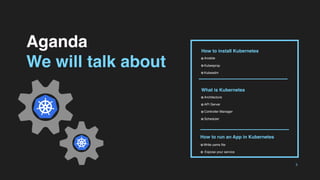
Aganda
We will talk about
3
How to install Kubernetes
Ansible
Kubespray
Kubeadm
What is Kubernetes
Architecture
API Server
Controller Manager
Scheduler
How to run an App in Kubernetes
Write yams file
Expose your service
Kubernetes
& Ansible
Building a Kubernetes production ready environment
is quite complicated, so we use automated
subordinate tools to help us implement it.
What is Anisble
Ansible is an IT automation tool. It can configure systems,
deploy software, and orchestrate more advanced IT tasks such
as continuous deployments or zero downtime rolling updates.
4
Kubespray
Kubernetes-incubator
Kubespray is a composition of Ansible playbooks, inventory, provisioning
tools, and domain knowledge for generic OS/Kubernetes clusters
configuration management tasks. Kubespray provides:
a highly available cluster
composable attributes
support for most popular Linux distributions (CoreOS, Debian Jessie,
Ubuntu 16.04, CentOS/RHEL 7, Fedora/CentOS Atomic)
continuous integration tests
5
Kubeadm
Kubernetes-official
kubeadm’s simplicity means it can serve a wide range of use cases:
New users can start with kubeadm to try Kubernetes out for the
first time.
Users familiar with Kubernetes can spin up clusters with kubeadm
and test their applications.
Larger projects can include kubeadm as a building block in a more
complex system that can also include other installer tools.
6
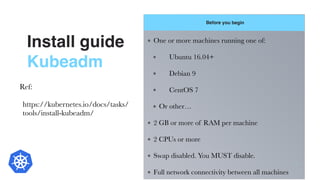
Install guide
Kubeadm
Before you begin
7
One or more machines running one of:
	 Ubuntu 16.04+
	 Debian 9
	 CentOS 7
Or other…
2 GB or more of RAM per machine
2 CPUs or more
Swap disabled. You MUST disable.
Full network connectivity between all machines
Ref:
https://kubernetes.io/docs/tasks/
tools/install-kubeadm/
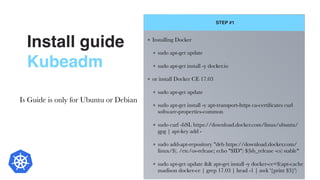
Install guide
Kubeadm
STEP #1
8
Installing Docker
sudo apt-get update
sudo apt-get install -y docker.io
or install Docker CE 17.03
sudo apt-get update
sudo apt-get install -y apt-transport-https ca-certificates curl
software-properties-common
sudo curl -fsSL https://download.docker.com/linux/ubuntu/
gpg | apt-key add -
sudo add-apt-repository "deb https://download.docker.com/
linux/$(. /etc/os-release; echo "$ID") $(lsb_release -cs) stable"
sudo apt-get update && apt-get install -y docker-ce=$(apt-cache
madison docker-ce | grep 17.03 | head -1 | awk '{print $3}')
Is Guide is only for Ubuntu or Debian
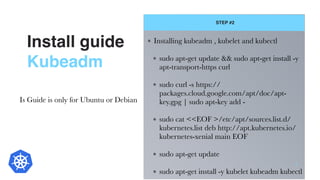
Install guide
Kubeadm
STEP #2
9
Installing kubeadm , kubelet and kubectl
sudo apt-get update && sudo apt-get install -y
apt-transport-https curl
sudo curl -s https://
packages.cloud.google.com/apt/doc/apt-
key.gpg | sudo apt-key add -
sudo cat <<EOF >/etc/apt/sources.list.d/
kubernetes.list deb http://apt.kubernetes.io/
kubernetes-xenial main EOF
sudo apt-get update
sudo apt-get install -y kubelet kubeadm kubectl
Is Guide is only for Ubuntu or Debian
Install guide
Kubeadm
STEP #3
10
Disable swap
sudo swapoff -a
sudo sysctl -w vm.swappiness=0
sudo sed '/swap.img/d' -i /etc/fstab
Set the following system parameters
cat <<EOF | tee /etc/sysctl.d/k8s.conf
net.ipv4.ip_forward = 1

net.bridge.bridge-nf-call-ip6tables =1

net.bridge.bridge-nf-call-iptables = 1

EOF
sudo sysctl -p /etc/sysctl.d/k8s.conf
Is Guide is only for Ubuntu or Debian
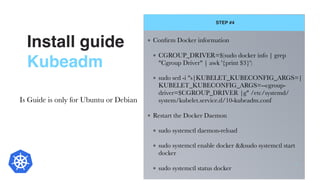
Install guide
Kubeadm
STEP #4
11
Confirm Docker information
CGROUP_DRIVER=$(sudo docker info | grep
"Cgroup Driver" | awk '{print $3}')
sudo sed -i "s|KUBELET_KUBECONFIG_ARGS=|
KUBELET_KUBECONFIG_ARGS=--cgroup-
driver=$CGROUP_DRIVER |g" /etc/systemd/
system/kubelet.service.d/10-kubeadm.conf
Restart the Docker Daemon
sudo systemctl daemon-reload
sudo systemctl enable docker &&sudo systemctl start
docker
sudo systemctl status docker
Is Guide is only for Ubuntu or Debian
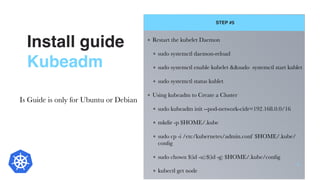
Install guide
Kubeadm
STEP #5
12
Restart the kubelet Daemon
sudo systemctl daemon-reload
sudo systemctl enable kubelet &&sudo systemctl start kublet
sudo systemctl status kublet
Using kubeadm to Create a Cluster
sudo kubeadm init --pod-network-cidr=192.168.0.0/16
mkdir -p $HOME/.kube
sudo cp -i /etc/kubernetes/admin.conf $HOME/.kube/
config
sudo chown $(id -u):$(id -g) $HOME/.kube/config
kubectl get node
Is Guide is only for Ubuntu or Debian
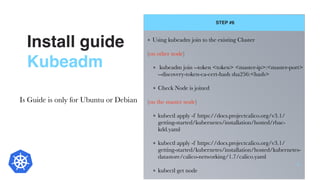
Install guide
Kubeadm
STEP #6
13
Using kubeadm join to the existing Cluster
(on other node)
kubeadm join --token <token> <master-ip>:<master-port>
--discovery-token-ca-cert-hash sha256:<hash>
Check Node is joined
(on the master node)
kubectl apply -f https://docs.projectcalico.org/v3.1/
getting-started/kubernetes/installation/hosted/rbac-
kdd.yaml
kubectl apply -f https://docs.projectcalico.org/v3.1/
getting-started/kubernetes/installation/hosted/kubernetes-
datastore/calico-networking/1.7/calico.yaml
kubectl get node
Is Guide is only for Ubuntu or Debian
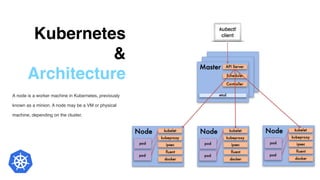
Kubernetes
&
Architecture
A node is a worker machine in Kubernetes, previously
known as a minion. A node may be a VM or physical
machine, depending on the cluster.
14
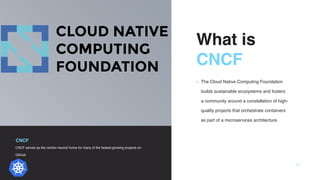
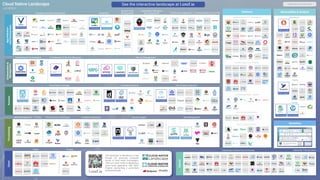
What is

CNCF 
▪ The Cloud Native Computing Foundation
builds sustainable ecosystems and fosters
a community around a constellation of high-
quality projects that orchestrate containers
as part of a microservices architecture.
CNCF
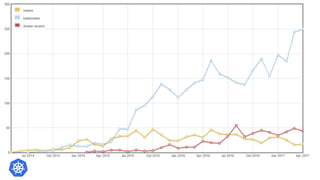
CNCF serves as the vendor-neutral home for many of the fastest-growing projects on
GitHub
15
What is

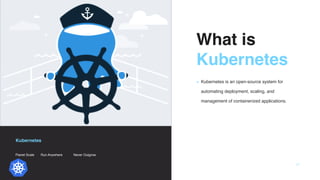
Kubernetes 
▪ Kubernetes is an open-source system for
automating deployment, scaling, and
management of containerized applications.
Kubernetes
Planet Scale Run Anywhere Never Outgrow
17
Kubernetes
&
Architecture
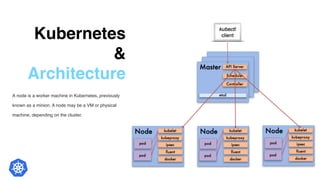
A node is a worker machine in Kubernetes, previously
known as a minion. A node may be a VM or physical
machine, depending on the cluster.
19
Kubernetes
&
Master node
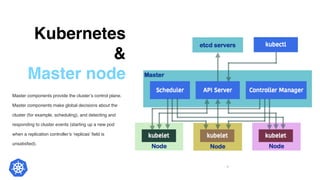
Master components provide the cluster’s control plane.
Master components make global decisions about the
cluster (for example, scheduling), and detecting and
responding to cluster events (starting up a new pod
when a replication controller’s ‘replicas’ field is
unsatisfied).
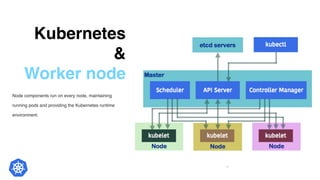
20
Kubernetes
&
Worker node
Node components run on every node, maintaining
running pods and providing the Kubernetes runtime
environment.
21
Kubernetes
&
Worker node
Addons are pods and services that implement cluster
features. The pods may be managed by Deployments,
ReplicationControllers, and so on. Namespaced addon
objects are created in the kube-system namespace.
22
Kubernetes
CNI
 A Cloud Native Computing Foundation project, consists
of a specification and libraries for writing plugins to
configure network interfaces in Linux containers
Flannel
Calico
Weave
Kuryr
Canal
Cilium
Contiv
CNI (Container Network Interface)
23
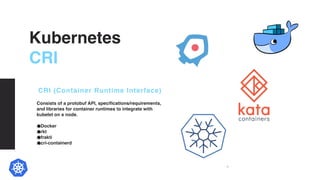
Kubernetes
CRI
Consists of a protobuf API, specifications/requirements,
and libraries for container runtimes to integrate with
kubelet on a node. 
Docker
rkt
frakti
cri-containerd
CRI (Container Runtime Interface)
24
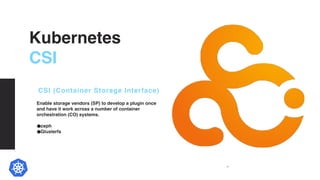
Kubernetes
CSI
Enable storage vendors (SP) to develop a plugin once
and have it work across a number of container
orchestration (CO) systems.
ceph
Glusterfs
CSI (Container Storage Interface)
25
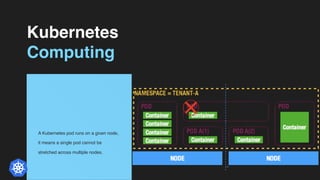
Kubernetes
Computing
A Kubernetes pod runs on a given node,
it means a single pod cannot be
stretched across multiple nodes.
26
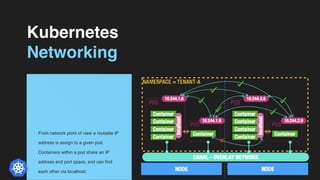
Kubernetes
Networking
From network point of view a routable IP
address is assign to a given pod.
Containers within a pod share an IP
address and port space, and can find
each other via localhost.
27
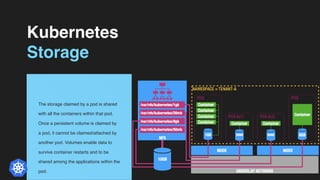
Kubernetes
Storage
The storage claimed by a pod is shared
with all the containers within that pod.
Once a persistent volume is claimed by
a pod, it cannot be claimed/attached by
another pod. Volumes enable data to
survive container restarts and to be
shared among the applications within the
pod.
28
Kubernetes
Scheduling
By default the kube-
scheduler service ensures that pods are
only placed on nodes that have sufficient
free resources. Also, it tries to balance
out the resource utilisation of nodes.
29
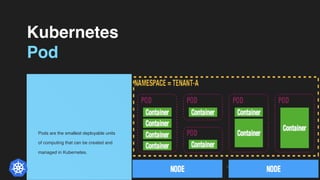
Kubernetes
Pod
Pods are the smallest deployable units
of computing that can be created and
managed in Kubernetes.
30
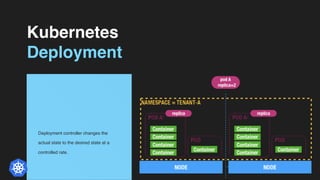
Kubernetes
Deployment
Deployment controller changes the
actual state to the desired state at a
controlled rate. 
31
Kubernetes
WokerShop
Q&A
TIME
Kubernetes

Kubernetes

  • 1.
  • 2.
  • 3.
    Aganda We will talkabout 3 How to install Kubernetes Ansible Kubespray Kubeadm What is Kubernetes Architecture API Server Controller Manager Scheduler How to run an App in Kubernetes Write yams file Expose your service
  • 4.
    Kubernetes & Ansible Building aKubernetes production ready environment is quite complicated, so we use automated subordinate tools to help us implement it. What is Anisble Ansible is an IT automation tool. It can configure systems, deploy software, and orchestrate more advanced IT tasks such as continuous deployments or zero downtime rolling updates. 4
  • 5.
    Kubespray Kubernetes-incubator Kubespray is acomposition of Ansible playbooks, inventory, provisioning tools, and domain knowledge for generic OS/Kubernetes clusters configuration management tasks. Kubespray provides: a highly available cluster composable attributes support for most popular Linux distributions (CoreOS, Debian Jessie, Ubuntu 16.04, CentOS/RHEL 7, Fedora/CentOS Atomic) continuous integration tests 5
  • 6.
    Kubeadm Kubernetes-official kubeadm’s simplicity meansit can serve a wide range of use cases: New users can start with kubeadm to try Kubernetes out for the first time. Users familiar with Kubernetes can spin up clusters with kubeadm and test their applications. Larger projects can include kubeadm as a building block in a more complex system that can also include other installer tools. 6
  • 7.
    Install guide Kubeadm Before youbegin 7 One or more machines running one of: Ubuntu 16.04+ Debian 9 CentOS 7 Or other… 2 GB or more of RAM per machine 2 CPUs or more Swap disabled. You MUST disable. Full network connectivity between all machines Ref: https://kubernetes.io/docs/tasks/ tools/install-kubeadm/
  • 8.
    Install guide Kubeadm STEP #1 8 InstallingDocker sudo apt-get update sudo apt-get install -y docker.io or install Docker CE 17.03 sudo apt-get update sudo apt-get install -y apt-transport-https ca-certificates curl software-properties-common sudo curl -fsSL https://download.docker.com/linux/ubuntu/ gpg | apt-key add - sudo add-apt-repository "deb https://download.docker.com/ linux/$(. /etc/os-release; echo "$ID") $(lsb_release -cs) stable" sudo apt-get update && apt-get install -y docker-ce=$(apt-cache madison docker-ce | grep 17.03 | head -1 | awk '{print $3}') Is Guide is only for Ubuntu or Debian
  • 9.
    Install guide Kubeadm STEP #2 9 Installingkubeadm , kubelet and kubectl sudo apt-get update && sudo apt-get install -y apt-transport-https curl sudo curl -s https:// packages.cloud.google.com/apt/doc/apt- key.gpg | sudo apt-key add - sudo cat <<EOF >/etc/apt/sources.list.d/ kubernetes.list deb http://apt.kubernetes.io/ kubernetes-xenial main EOF sudo apt-get update sudo apt-get install -y kubelet kubeadm kubectl Is Guide is only for Ubuntu or Debian
  • 10.
    Install guide Kubeadm STEP #3 10 Disableswap sudo swapoff -a sudo sysctl -w vm.swappiness=0 sudo sed '/swap.img/d' -i /etc/fstab Set the following system parameters cat <<EOF | tee /etc/sysctl.d/k8s.conf net.ipv4.ip_forward = 1
 net.bridge.bridge-nf-call-ip6tables =1
 net.bridge.bridge-nf-call-iptables = 1
 EOF sudo sysctl -p /etc/sysctl.d/k8s.conf Is Guide is only for Ubuntu or Debian
  • 11.
    Install guide Kubeadm STEP #4 11 ConfirmDocker information CGROUP_DRIVER=$(sudo docker info | grep "Cgroup Driver" | awk '{print $3}') sudo sed -i "s|KUBELET_KUBECONFIG_ARGS=| KUBELET_KUBECONFIG_ARGS=--cgroup- driver=$CGROUP_DRIVER |g" /etc/systemd/ system/kubelet.service.d/10-kubeadm.conf Restart the Docker Daemon sudo systemctl daemon-reload sudo systemctl enable docker &&sudo systemctl start docker sudo systemctl status docker Is Guide is only for Ubuntu or Debian
  • 12.
    Install guide Kubeadm STEP #5 12 Restartthe kubelet Daemon sudo systemctl daemon-reload sudo systemctl enable kubelet &&sudo systemctl start kublet sudo systemctl status kublet Using kubeadm to Create a Cluster sudo kubeadm init --pod-network-cidr=192.168.0.0/16 mkdir -p $HOME/.kube sudo cp -i /etc/kubernetes/admin.conf $HOME/.kube/ config sudo chown $(id -u):$(id -g) $HOME/.kube/config kubectl get node Is Guide is only for Ubuntu or Debian
  • 13.
    Install guide Kubeadm STEP #6 13 Usingkubeadm join to the existing Cluster (on other node) kubeadm join --token <token> <master-ip>:<master-port> --discovery-token-ca-cert-hash sha256:<hash> Check Node is joined (on the master node) kubectl apply -f https://docs.projectcalico.org/v3.1/ getting-started/kubernetes/installation/hosted/rbac- kdd.yaml kubectl apply -f https://docs.projectcalico.org/v3.1/ getting-started/kubernetes/installation/hosted/kubernetes- datastore/calico-networking/1.7/calico.yaml kubectl get node Is Guide is only for Ubuntu or Debian
  • 14.
    Kubernetes & Architecture A node is a workermachine in Kubernetes, previously known as a minion. A node may be a VM or physical machine, depending on the cluster. 14
  • 15.
    What is
 CNCF  ▪ TheCloud Native Computing Foundation builds sustainable ecosystems and fosters a community around a constellation of high- quality projects that orchestrate containers as part of a microservices architecture. CNCF CNCF serves as the vendor-neutral home for many of the fastest-growing projects on GitHub 15
  • 17.
    What is
 Kubernetes  ▪ Kubernetes isan open-source system for automating deployment, scaling, and management of containerized applications. Kubernetes Planet Scale Run Anywhere Never Outgrow 17
  • 19.
    Kubernetes & Architecture A node is a workermachine in Kubernetes, previously known as a minion. A node may be a VM or physical machine, depending on the cluster. 19
  • 20.
    Kubernetes & Master node Master componentsprovide the cluster’s control plane. Master components make global decisions about the cluster (for example, scheduling), and detecting and responding to cluster events (starting up a new pod when a replication controller’s ‘replicas’ field is unsatisfied). 20
  • 21.
    Kubernetes & Worker node Node componentsrun on every node, maintaining running pods and providing the Kubernetes runtime environment. 21
  • 22.
    Kubernetes & Worker node Addons arepods and services that implement cluster features. The pods may be managed by Deployments, ReplicationControllers, and so on. Namespaced addon objects are created in the kube-system namespace. 22
  • 23.
    Kubernetes CNI  A Cloud Native ComputingFoundation project, consists of a specification and libraries for writing plugins to configure network interfaces in Linux containers Flannel Calico Weave Kuryr Canal Cilium Contiv CNI (Container Network Interface) 23
  • 24.
    Kubernetes CRI Consists of a protobufAPI, specifications/requirements, and libraries for container runtimes to integrate with kubelet on a node.  Docker rkt frakti cri-containerd CRI (Container Runtime Interface) 24
  • 25.
    Kubernetes CSI Enable storage vendors(SP) to develop a plugin once and have it work across a number of container orchestration (CO) systems. ceph Glusterfs CSI (Container Storage Interface) 25
  • 26.
    Kubernetes Computing A Kubernetes podruns on a given node, it means a single pod cannot be stretched across multiple nodes. 26
  • 27.
    Kubernetes Networking From network pointof view a routable IP address is assign to a given pod. Containers within a pod share an IP address and port space, and can find each other via localhost. 27
  • 28.
    Kubernetes Storage The storage claimedby a pod is shared with all the containers within that pod. Once a persistent volume is claimed by a pod, it cannot be claimed/attached by another pod. Volumes enable data to survive container restarts and to be shared among the applications within the pod. 28
  • 29.
    Kubernetes Scheduling By default the kube- scheduler service ensuresthat pods are only placed on nodes that have sufficient free resources. Also, it tries to balance out the resource utilisation of nodes. 29
  • 30.
    Kubernetes Pod Pods are the smallestdeployable units of computing that can be created and managed in Kubernetes. 30
  • 31.
    Kubernetes Deployment Deployment controller changesthe actual state to the desired state at a controlled rate.  31
  • 32.
  • 33.