Larry cai <larry.caiyu@gmail.com>
Agenda
 Introduction
 Exercise 1: Run the example to know the power
 Exercise 2: Hello World – first DSL
 Exercise 3: One complete JobDSL
 Exercise 4: JenkinsView and Loop
 Exercise 5: Configure Block to extend DSL
 Reference
2 08/12/15
Environment Preparation (docker)
 Boot2docker Installer (127M)
 Contains latest docker already, fast
 Container persistence via disk automount on /var/lib/docker
 $ docker -v
 User/Passwd: docker/tcuser (192.168.59.103)
 Download Jenkins JobDSL docker images
 $ docker pull larrycai/jenkins-jobdsl
 Notepad++ & MobaXterm are recommended
3 08/12/15
http://boot2docker.io/
Introduction
 Jenkins is a de-facto CI standard used for lots of products
 Easy to start, configure and extending (300+ plugins)
 Configure jobs in UI mostly
 Weak parts:
 Update git repo for many jobs
 Create dozens of jobs in fly for new project
 Monitor the changes
4 08/12/15
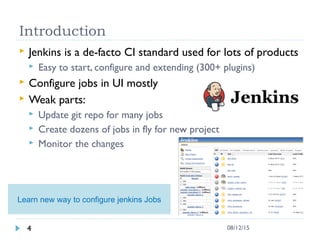
Learn new way to configure jenkins Jobs
Exercise 1: Hello World
 Run first app inside docker environment
$ cd /c/<Users>/codingwithme/jobdsl # create in advance
$ docker run -it –v $PWD:/opt/jenkins/data/jobs/jobdsl/workspace -p
8080:8080 larrycai/jenkins-jobdsl
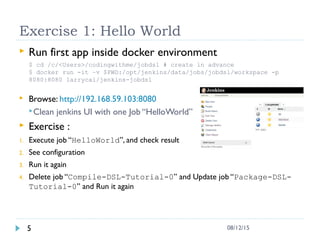
 Browse: http://192.168.59.103:8080
Clean jenkins UI with one Job “HelloWorld”
 Exercise :
1. Execute job “HelloWorld”, and check result
2. See configuration
3. Run it again
4. Delete job “Compile-DSL-Tutorial-0” and Update job “Package-DSL-
Tutorial-0” and Run it again
5 08/12/15
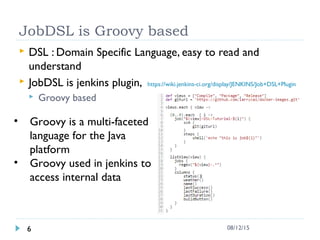
JobDSL is Groovy based
 DSL : Domain Specific Language, easy to read and
understand
 JobDSL is jenkins plugin, https://wiki.jenkins-ci.org/display/JENKINS/Job+DSL+Plugin
 Groovy based
6 08/12/15
• Groovy is a multi-faceted
language for the Java
platform
• Groovy used in jenkins to
access internal data
JobDSL & Idempotent
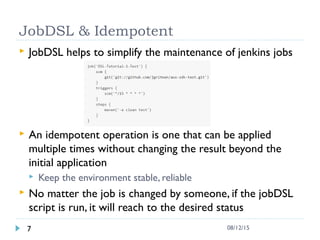
 JobDSL helps to simplify the maintenance of jenkins jobs
 An idempotent operation is one that can be applied
multiple times without changing the result beyond the
initial application
 Keep the environment stable, reliable
 No matter the job is changed by someone, if the jobDSL
script is run, it will reach to the desired status
7 08/12/15
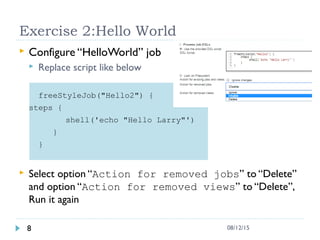
Exercise 2:Hello World
 Configure “HelloWorld” job
 Replace script like below
freeStyleJob("Hello2") {
steps {
shell('echo "Hello Larry"')
}
}
 Select option “Action for removed jobs” to “Delete”
and option “Action for removed views” to “Delete”,
Run it again
8 08/12/15
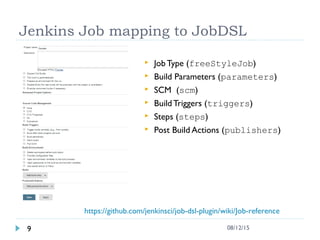
Jenkins Job mapping to JobDSL
9 08/12/15
 Job Type (freeStyleJob)
 Build Parameters (parameters)
 SCM (scm)
 BuildTriggers (triggers)
 Steps (steps)
 Post Build Actions (publishers)
https://github.com/jenkinsci/job-dsl-plugin/wiki/Job-reference
Exercise 3: Complete JobDSL example
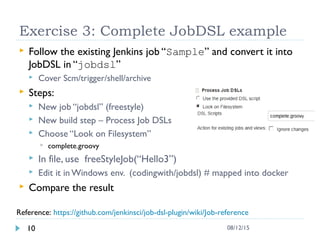
 Follow the existing Jenkins job “Sample” and convert it into
JobDSL in “jobdsl”
 Cover Scm/trigger/shell/archive
 Steps:
 New job “jobdsl” (freestyle)
 New build step – Process Job DSLs
 Choose “Look on Filesystem”
 complete.groovy
 In file, use freeStyleJob(“Hello3”)
 Edit it in Windows env. (codingwith/jobdsl) # mapped into docker
 Compare the result
10 08/12/15
Reference: https://github.com/jenkinsci/job-dsl-plugin/wiki/Job-reference
Jenkins View & Groovy DSL
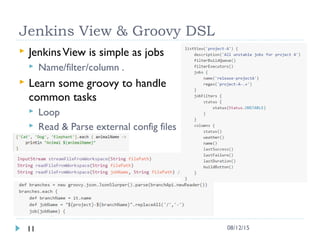
 JenkinsView is simple as jobs
 Name/filter/column .
 Learn some groovy to handle
common tasks
 Loop
 Read & Parse external config files
11 08/12/15
Exercise 4: List View and Loop
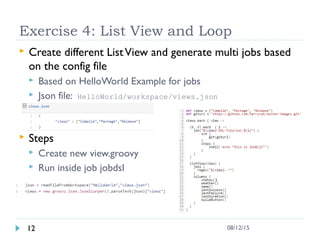
 Create different ListView and generate multi jobs based
on the config file
 Based on HelloWorld Example for jobs
 Json file: HelloWorld/workspace/views.json
 Steps
 Create new view.groovy
 Run inside job jobdsl
12 08/12/15
Configure block
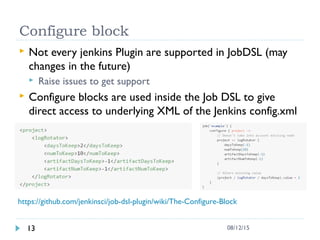
 Not every jenkins Plugin are supported in JobDSL (may
changes in the future)
 Raise issues to get support
 Configure blocks are used inside the Job DSL to give
direct access to underlying XML of the Jenkins config.xml
13 08/12/15
https://github.com/jenkinsci/job-dsl-plugin/wiki/The-Configure-Block
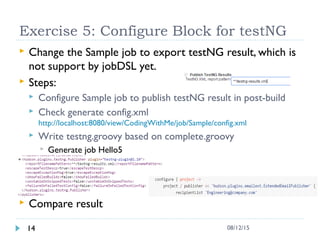
Exercise 5: Configure Block for testNG
 Change the Sample job to export testNG result, which is
not support by jobDSL yet.
 Steps:
 Configure Sample job to publish testNG result in post-build
 Check generate config.xml
http://localhost:8080/view/CodingWithMe/job/Sample/config.xml
 Write testng.groovy based on complete.groovy
 Generate job Hello5
 Compare result
14 08/12/15
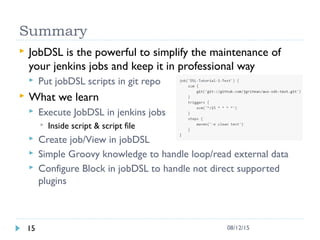
Summary
 JobDSL is the powerful to simplify the maintenance of
your jenkins jobs and keep it in professional way
 Put jobDSL scripts in git repo
 What we learn
 Execute JobDSL in jenkins jobs
 Inside script & script file
 Create job/View in jobDSL
 Simple Groovy knowledge to handle loop/read external data
 Configure Block in jobDSL to handle not direct supported
plugins
15 08/12/15
Reference
 jobDSL slides
 http://www.slideshare.net/daspilker/configuration-as-code-the-job-dsl-plugin
 JobDSL ref
 https://github.com/jenkinsci/job-dsl-plugin/wiki/View-Reference
 https://github.com/jenkinsci/job-dsl-plugin/wiki/Job-reference
 https://github.com/jenkinsci/job-dsl-plugin/wiki/The-Configure-Block
 Groovy Json
 http://www.groovy-lang.org/json.html
 Exercise Gist
 https://gist.github.com/larrycai/aeb9a3b037dcb17df9b2
16 08/12/15
CodingWithMe
 "CodingWithMe - Learning by Coding" is a coding
workshop, it aims to learn one technology in 90
minutes by practice
 Features:
 4-5 well tuned hands on exercises in 90 minutes
 First exercise shall be started in 20 minutes
 It well follows Bob Pike’s 90/20/8 rules (happen to
know)
 It is recommended arranged for several parallel
sessions if it is organized in the company.
17 08/12/15
http://www.larrycaiyu.com/blog/2014/03/18/codingwithme_introduction/

Learn jobDSL for Jenkins

  • 1.
  • 2.
    Agenda  Introduction  Exercise1: Run the example to know the power  Exercise 2: Hello World – first DSL  Exercise 3: One complete JobDSL  Exercise 4: JenkinsView and Loop  Exercise 5: Configure Block to extend DSL  Reference 2 08/12/15
  • 3.
    Environment Preparation (docker) Boot2docker Installer (127M)  Contains latest docker already, fast  Container persistence via disk automount on /var/lib/docker  $ docker -v  User/Passwd: docker/tcuser (192.168.59.103)  Download Jenkins JobDSL docker images  $ docker pull larrycai/jenkins-jobdsl  Notepad++ & MobaXterm are recommended 3 08/12/15 http://boot2docker.io/
  • 4.
    Introduction  Jenkins isa de-facto CI standard used for lots of products  Easy to start, configure and extending (300+ plugins)  Configure jobs in UI mostly  Weak parts:  Update git repo for many jobs  Create dozens of jobs in fly for new project  Monitor the changes 4 08/12/15 Learn new way to configure jenkins Jobs
  • 5.
    Exercise 1: HelloWorld  Run first app inside docker environment $ cd /c/<Users>/codingwithme/jobdsl # create in advance $ docker run -it –v $PWD:/opt/jenkins/data/jobs/jobdsl/workspace -p 8080:8080 larrycai/jenkins-jobdsl  Browse: http://192.168.59.103:8080 Clean jenkins UI with one Job “HelloWorld”  Exercise : 1. Execute job “HelloWorld”, and check result 2. See configuration 3. Run it again 4. Delete job “Compile-DSL-Tutorial-0” and Update job “Package-DSL- Tutorial-0” and Run it again 5 08/12/15
  • 6.
    JobDSL is Groovybased  DSL : Domain Specific Language, easy to read and understand  JobDSL is jenkins plugin, https://wiki.jenkins-ci.org/display/JENKINS/Job+DSL+Plugin  Groovy based 6 08/12/15 • Groovy is a multi-faceted language for the Java platform • Groovy used in jenkins to access internal data
  • 7.
    JobDSL & Idempotent JobDSL helps to simplify the maintenance of jenkins jobs  An idempotent operation is one that can be applied multiple times without changing the result beyond the initial application  Keep the environment stable, reliable  No matter the job is changed by someone, if the jobDSL script is run, it will reach to the desired status 7 08/12/15
  • 8.
    Exercise 2:Hello World Configure “HelloWorld” job  Replace script like below freeStyleJob("Hello2") { steps { shell('echo "Hello Larry"') } }  Select option “Action for removed jobs” to “Delete” and option “Action for removed views” to “Delete”, Run it again 8 08/12/15
  • 9.
    Jenkins Job mappingto JobDSL 9 08/12/15  Job Type (freeStyleJob)  Build Parameters (parameters)  SCM (scm)  BuildTriggers (triggers)  Steps (steps)  Post Build Actions (publishers) https://github.com/jenkinsci/job-dsl-plugin/wiki/Job-reference
  • 10.
    Exercise 3: CompleteJobDSL example  Follow the existing Jenkins job “Sample” and convert it into JobDSL in “jobdsl”  Cover Scm/trigger/shell/archive  Steps:  New job “jobdsl” (freestyle)  New build step – Process Job DSLs  Choose “Look on Filesystem”  complete.groovy  In file, use freeStyleJob(“Hello3”)  Edit it in Windows env. (codingwith/jobdsl) # mapped into docker  Compare the result 10 08/12/15 Reference: https://github.com/jenkinsci/job-dsl-plugin/wiki/Job-reference
  • 11.
    Jenkins View &Groovy DSL  JenkinsView is simple as jobs  Name/filter/column .  Learn some groovy to handle common tasks  Loop  Read & Parse external config files 11 08/12/15
  • 12.
    Exercise 4: ListView and Loop  Create different ListView and generate multi jobs based on the config file  Based on HelloWorld Example for jobs  Json file: HelloWorld/workspace/views.json  Steps  Create new view.groovy  Run inside job jobdsl 12 08/12/15
  • 13.
    Configure block  Notevery jenkins Plugin are supported in JobDSL (may changes in the future)  Raise issues to get support  Configure blocks are used inside the Job DSL to give direct access to underlying XML of the Jenkins config.xml 13 08/12/15 https://github.com/jenkinsci/job-dsl-plugin/wiki/The-Configure-Block
  • 14.
    Exercise 5: ConfigureBlock for testNG  Change the Sample job to export testNG result, which is not support by jobDSL yet.  Steps:  Configure Sample job to publish testNG result in post-build  Check generate config.xml http://localhost:8080/view/CodingWithMe/job/Sample/config.xml  Write testng.groovy based on complete.groovy  Generate job Hello5  Compare result 14 08/12/15
  • 15.
    Summary  JobDSL isthe powerful to simplify the maintenance of your jenkins jobs and keep it in professional way  Put jobDSL scripts in git repo  What we learn  Execute JobDSL in jenkins jobs  Inside script & script file  Create job/View in jobDSL  Simple Groovy knowledge to handle loop/read external data  Configure Block in jobDSL to handle not direct supported plugins 15 08/12/15
  • 16.
    Reference  jobDSL slides http://www.slideshare.net/daspilker/configuration-as-code-the-job-dsl-plugin  JobDSL ref  https://github.com/jenkinsci/job-dsl-plugin/wiki/View-Reference  https://github.com/jenkinsci/job-dsl-plugin/wiki/Job-reference  https://github.com/jenkinsci/job-dsl-plugin/wiki/The-Configure-Block  Groovy Json  http://www.groovy-lang.org/json.html  Exercise Gist  https://gist.github.com/larrycai/aeb9a3b037dcb17df9b2 16 08/12/15
  • 17.
    CodingWithMe  "CodingWithMe -Learning by Coding" is a coding workshop, it aims to learn one technology in 90 minutes by practice  Features:  4-5 well tuned hands on exercises in 90 minutes  First exercise shall be started in 20 minutes  It well follows Bob Pike’s 90/20/8 rules (happen to know)  It is recommended arranged for several parallel sessions if it is organized in the company. 17 08/12/15 http://www.larrycaiyu.com/blog/2014/03/18/codingwithme_introduction/