Intro to KubernetesMiloš Simić :: NS BigData Meetup
Plan
• What is Kubernetes
• Architecture
• Building blocks
• Where to go next
• Questions
http://www.businesscloudnews.com/2016/06/02/emc-launches-storage-provisioning-
framework-for-containers/
What is Kubernetes
• Kubernetes is an open-source system (written in Go) for automating
deployment, scaling, and management of containerized applications
• It groups containers that make up an application into logical units for easy
management and discovery.
• Kubernetes builds upon 15 years of experience of running production
workloads at Google, combined with best ideas and practices from the
community.
• Inspired and informed by Google’s experiences and internal systems (Borg
best name ever :D)
• Supports multiple cloud and bare-metal environments
• Supports multiple container runtimes
https://www.joyent.com/triton/compute
What can
Kubernetes
do
• Automatic binpacking
• Horizontal auto-scaling
• Automated rollouts and rollbacks
• Self-healing
• Application health checking
• …
• Manage applications, not
machines
http://www.businesscloudnews.com/2016/06/02/emc-launches-storage-provisioning-
framework-for-containers/
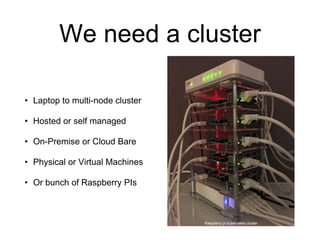
We need a cluster
• Laptop to multi-node cluster
• Hosted or self managed
• On-Premise or Cloud Bare
• Physical or Virtual Machines
• Or bunch of Raspberry PIs
Raspberry pi kubernetes cluster
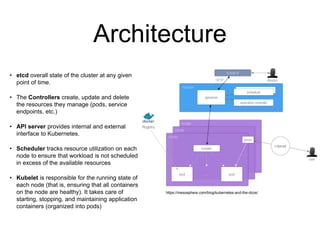
Architecture
• etcd overall state of the cluster at any given
point of time.
• The Controllers create, update and delete
the resources they manage (pods, service
endpoints, etc.)
• API server provides internal and external
interface to Kubernetes.
• Scheduler tracks resource utilization on each
node to ensure that workload is not scheduled
in excess of the available resources
• Kubelet is responsible for the running state of
each node (that is, ensuring that all containers
on the node are healthy). It takes care of
starting, stopping, and maintaining application
containers (organized into pods)
https://mesosphere.com/blog/kubernetes-and-the-dcos/
Building blocks
pods
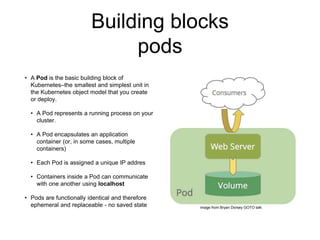
• A Pod is the basic building block of
Kubernetes–the smallest and simplest unit in
the Kubernetes object model that you create
or deploy.
• A Pod represents a running process on your
cluster.
• A Pod encapsulates an application
container (or, in some cases, multiple
containers)
• Each Pod is assigned a unique IP addres
• Containers inside a Pod can communicate
with one another using localhost
• Pods are functionally identical and therefore
ephemeral and replaceable - no saved state image from Bryan Dorsey GOTO talk
Building blocks
service and labels
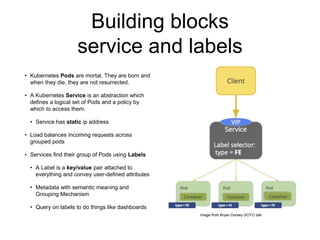
• Kubernetes Pods are mortal. They are born and
when they die, they are not resurrected.
• A Kubernetes Service is an abstraction which
defines a logical set of Pods and a policy by
which to access them.
• Service has static ip address
• Load balances incoming requests across
grouped pods
• Services find their group of Pods using Labels
• A Label is a key/value pair attached to
everything and convey user-defined attributes
• Metadata with semantic meaning and
Grouping Mechanism
• Query on labels to do things like dashboards
image from Bryan Dorsey GOTO talk
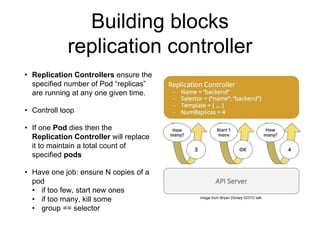
Building blocks
replication controller
• Replication Controllers ensure the
specified number of Pod “replicas”
are running at any one given time.
• Controll loop
• If one Pod dies then the
Replication Controller will replace
it to maintain a total count of
specified pods
• Have one job: ensure N copies of a
pod
• if too few, start new ones
• if too many, kill some
• group == selector
image from Bryan Dorsey GOTO talk
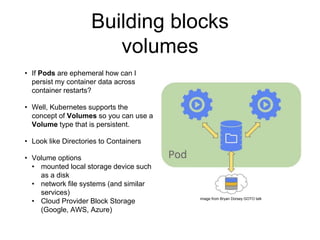
Building blocks
volumes
• If Pods are ephemeral how can I
persist my container data across
container restarts?
• Well, Kubernetes supports the
concept of Volumes so you can use a
Volume type that is persistent.
• Look like Directories to Containers
• Volume options
• mounted local storage device such
as a disk
• network file systems (and similar
services)
• Cloud Provider Block Storage
(Google, AWS, Azure)
image from Bryan Dorsey GOTO talk
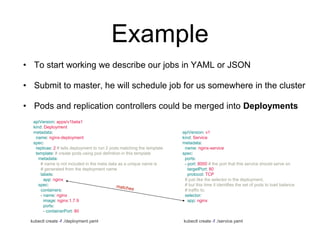
Example
apiVersion: apps/v1beta1
kind: Deployment
metadata:
name: nginx-deployment
spec:
replicas: 2 # tells deployment to run 2 pods matching the template
template: # create pods using pod definition in this template
metadata:
# name is not included in the meta data as a unique name is
# generated from the deployment name
labels:
app: nginx
spec:
containers:
- name: nginx
image: nginx:1.7.9
ports:
- containerPort: 80
apiVersion: v1
kind: Service
metadata:
name: nginx-service
spec:
ports:
- port: 8000 # the port that this service should serve on
targetPort: 80
protocol: TCP
# just like the selector in the deployment,
# but this time it identifies the set of pods to load balance
# traffic to.
selector:
app: nginx
• To start working we describe our jobs in YAML or JSON
• Submit to master, he will schedule job for us somewhere in the cluster
• Pods and replication controllers could be merged into Deployments
kubectl create -f ./deployment.yaml kubectl create -f ./service.yaml
Patterns
• Canary update
• Only a part of the audience get access to the new version of the
app, while the rest still access the “old” version one.
• very useful when we want to be sure about stability in case of
any changes which may be breaking, and have big side effects.
• Rolling updates
• Rolling updates allow Deployments update to take place with
zero downtime by incrementally updating Pods instances with
new ones.
• New Pods will be scheduled on Nodes with available resources.
Where to go next
• kubernetes.io
• Google Kubernetes Engine
• Play with kubernetes
• hello Minikube, test on your
machine
• Read Borg and Omega
papers :)
https://github.com/kubernetes/minikube
Questions?
Thank you for your
attention :)
milossimicsimo@gmail.com@MilosSimicSimoMilosSimic
http://www.businesscloudnews.com/2016/06/02/emc-launches-storage-provisioning-
framework-for-containers/

Intro to kubernetes

  • 1.
    Intro to KubernetesMilošSimić :: NS BigData Meetup
  • 2.
    Plan • What isKubernetes • Architecture • Building blocks • Where to go next • Questions http://www.businesscloudnews.com/2016/06/02/emc-launches-storage-provisioning- framework-for-containers/
  • 3.
    What is Kubernetes •Kubernetes is an open-source system (written in Go) for automating deployment, scaling, and management of containerized applications • It groups containers that make up an application into logical units for easy management and discovery. • Kubernetes builds upon 15 years of experience of running production workloads at Google, combined with best ideas and practices from the community. • Inspired and informed by Google’s experiences and internal systems (Borg best name ever :D) • Supports multiple cloud and bare-metal environments • Supports multiple container runtimes https://www.joyent.com/triton/compute
  • 4.
    What can Kubernetes do • Automaticbinpacking • Horizontal auto-scaling • Automated rollouts and rollbacks • Self-healing • Application health checking • … • Manage applications, not machines http://www.businesscloudnews.com/2016/06/02/emc-launches-storage-provisioning- framework-for-containers/
  • 5.
    We need acluster • Laptop to multi-node cluster • Hosted or self managed • On-Premise or Cloud Bare • Physical or Virtual Machines • Or bunch of Raspberry PIs Raspberry pi kubernetes cluster
  • 6.
    Architecture • etcd overallstate of the cluster at any given point of time. • The Controllers create, update and delete the resources they manage (pods, service endpoints, etc.) • API server provides internal and external interface to Kubernetes. • Scheduler tracks resource utilization on each node to ensure that workload is not scheduled in excess of the available resources • Kubelet is responsible for the running state of each node (that is, ensuring that all containers on the node are healthy). It takes care of starting, stopping, and maintaining application containers (organized into pods) https://mesosphere.com/blog/kubernetes-and-the-dcos/
  • 7.
    Building blocks pods • APod is the basic building block of Kubernetes–the smallest and simplest unit in the Kubernetes object model that you create or deploy. • A Pod represents a running process on your cluster. • A Pod encapsulates an application container (or, in some cases, multiple containers) • Each Pod is assigned a unique IP addres • Containers inside a Pod can communicate with one another using localhost • Pods are functionally identical and therefore ephemeral and replaceable - no saved state image from Bryan Dorsey GOTO talk
  • 8.
    Building blocks service andlabels • Kubernetes Pods are mortal. They are born and when they die, they are not resurrected. • A Kubernetes Service is an abstraction which defines a logical set of Pods and a policy by which to access them. • Service has static ip address • Load balances incoming requests across grouped pods • Services find their group of Pods using Labels • A Label is a key/value pair attached to everything and convey user-defined attributes • Metadata with semantic meaning and Grouping Mechanism • Query on labels to do things like dashboards image from Bryan Dorsey GOTO talk
  • 9.
    Building blocks replication controller •Replication Controllers ensure the specified number of Pod “replicas” are running at any one given time. • Controll loop • If one Pod dies then the Replication Controller will replace it to maintain a total count of specified pods • Have one job: ensure N copies of a pod • if too few, start new ones • if too many, kill some • group == selector image from Bryan Dorsey GOTO talk
  • 10.
    Building blocks volumes • IfPods are ephemeral how can I persist my container data across container restarts? • Well, Kubernetes supports the concept of Volumes so you can use a Volume type that is persistent. • Look like Directories to Containers • Volume options • mounted local storage device such as a disk • network file systems (and similar services) • Cloud Provider Block Storage (Google, AWS, Azure) image from Bryan Dorsey GOTO talk
  • 11.
    Example apiVersion: apps/v1beta1 kind: Deployment metadata: name:nginx-deployment spec: replicas: 2 # tells deployment to run 2 pods matching the template template: # create pods using pod definition in this template metadata: # name is not included in the meta data as a unique name is # generated from the deployment name labels: app: nginx spec: containers: - name: nginx image: nginx:1.7.9 ports: - containerPort: 80 apiVersion: v1 kind: Service metadata: name: nginx-service spec: ports: - port: 8000 # the port that this service should serve on targetPort: 80 protocol: TCP # just like the selector in the deployment, # but this time it identifies the set of pods to load balance # traffic to. selector: app: nginx • To start working we describe our jobs in YAML or JSON • Submit to master, he will schedule job for us somewhere in the cluster • Pods and replication controllers could be merged into Deployments kubectl create -f ./deployment.yaml kubectl create -f ./service.yaml
  • 12.
    Patterns • Canary update •Only a part of the audience get access to the new version of the app, while the rest still access the “old” version one. • very useful when we want to be sure about stability in case of any changes which may be breaking, and have big side effects. • Rolling updates • Rolling updates allow Deployments update to take place with zero downtime by incrementally updating Pods instances with new ones. • New Pods will be scheduled on Nodes with available resources.
  • 13.
    Where to gonext • kubernetes.io • Google Kubernetes Engine • Play with kubernetes • hello Minikube, test on your machine • Read Borg and Omega papers :) https://github.com/kubernetes/minikube
  • 14.
    Questions? Thank you foryour attention :) milossimicsimo@gmail.com@MilosSimicSimoMilosSimic http://www.businesscloudnews.com/2016/06/02/emc-launches-storage-provisioning- framework-for-containers/