Kubernetes 101
Lobster Ink - 2020
Plan for today
1. The “Why?” Question
2. The history of the project in a few sentences
3. Containers
4. Orchestration and Orchestrators
5. Container wars
6. Managed versions
7. k8s Architecture
8. Local clusters
9. Basic primitives
Big 5 Why’s?
Let’s explore :)
● Why we need to adopt k8s?
● Why k8s?
● Why we need to change ways we do things?
● Why k8s is not a hype?
● Why this presentation is in light blue colour
scheme?
History
● Kubernetes greek for “helmsman” or “pilot”
● Started from Google’s proprietary project know
as Borg
● Initially, project was called Seven of Nine
● Jun 2014 first commit to github repository
● April 2015 Borg Paper published
● K8s v1.0 was released on July 21, 2015 and
donated to CNCF organisation for future
development
● Build in Go :)
● Fully Open Source
● More here: The History of Kubernetes on a
Timeline | @RisingStack
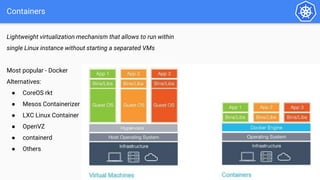
Containers
Lightweight virtualization mechanism that allows to run within
single Linux instance without starting a separated VMs
Most popular - Docker
Alternatives:
● CoreOS rkt
● Mesos Containerizer
● LXC Linux Container
● OpenVZ
● containerd
● Others
Containers Wars
Containers Wars
Managed k8s offerings
Azure AKS
Free Control
Plane
Google GKE
One Free
Cluster,
$0.10 p/h
AWS EKS
$0.10 p/h
Digital Ocean
Free Control
Plane
Linode
Free Control
Plane
In fact many others out there these days…. even Oracle Cloud has it
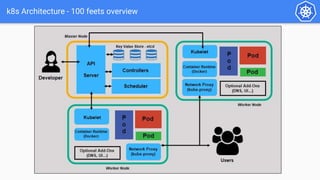
k8s Architecture - 100 feets overview
Architecture
Master Node(s)
Worker Node(s)
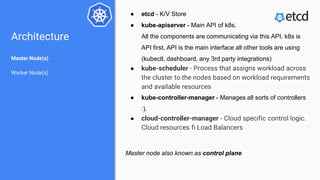
● etcd - K/V Store
● kube-apiserver - Main API of k8s.
All the components are communicating via this API. k8s is
API first, API is the main interface all other tools are using
(kubectl, dashboard, any 3rd party integrations)
● kube-scheduler - Process that assigns workload across
the cluster to the nodes based on workload requirements
and available resources
● kube-controller-manager - Manages all sorts of controllers
:).
● cloud-controller-manager - Cloud specific control logic.
Cloud resources fi Load Balancers
Master node also known as control plane
Architecture
Master Node(s)
Worker Node(s)
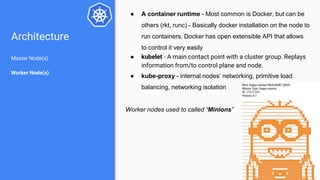
● A container runtime - Most common is Docker, but can be
others (rkt, runc) - Basically docker installation on the node to
run containers. Docker has open extensible API that allows
to control it very easily
● kubelet - A main contact point with a cluster group. Replays
information from/to control plane and node.
● kube-proxy - internal nodes’ networking, primitive load
balancing, networking isolation
Worker nodes used to called “Minions”
Local clusters
How the one does the
development locally?
Local clusters
minikube
During our hands on sessions we are going to use Minikube
Also might be handy - k8s Dashboard
But cool kids use command line ;)
Manifest
● It’s YAML :(
● You can wrap it into something human processable
● You manage everything in k8s via manifests
Basic primitives
PODs
Replica Sets / Replication Controllers
Deployments
Services
Ingress
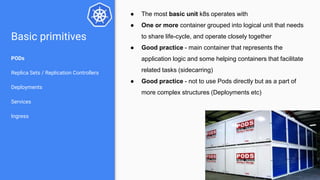
● The most basic unit k8s operates with
● One or more container grouped into logical unit that needs
to share life-cycle, and operate closely together
● Good practice - main container that represents the
application logic and some helping containers that facilitate
related tasks (sidecarring)
● Good practice - not to use Pods directly but as a part of
more complex structures (Deployments etc)
Basic primitives
PODs
Replica Sets / Replication Controllers
Deployments
Services
Ingress
Typical manifest for pods:
Basic primitives
PODs
Replica Sets / Replication Controllers
Deployments
Services
Ingress
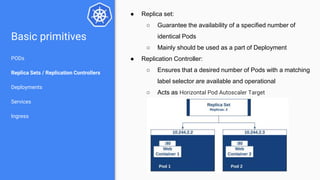
● Replica set:
○ Guarantee the availability of a specified number of
identical Pods
○ Mainly should be used as a part of Deployment
● Replication Controller:
○ Ensures that a desired number of Pods with a matching
label selector are available and operational
○ Acts as Horizontal Pod Autoscaler Target
Basic primitives
PODs
Replica Sets / Replication Controllers
Deployments
Services
Ingress
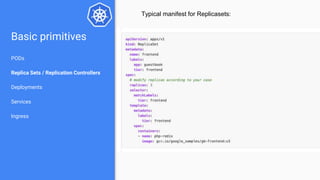
Typical manifest for Replicasets:
Basic primitives
PODs
Replica Sets / Replication Controllers
Deployments
Services
Ingress
● Declarative updates for Pods and ReplicaSets
● You describe a desired state in a Deployment, and the
Deployment Controller changes the actual state to the
desired state at a controlled rate.
Basic primitives
PODs
Replica Sets / Replication Controllers
Deployments
Services
Ingress
Typical manifest for Deployment:
Basic primitives
PODs
Replica Sets / Replication Controllers
Deployments
Services
Ingress
● An abstract way to expose an application running on a set of
Pods as a network service.
● Service Discovery primitive
● Yes, microservices defined as Services in k8s
Basic primitives
PODs
Replica Sets / Replication Controllers
Deployments
Services
Ingress
Typical Service manifest
Basic primitives
PODs
Replica Sets / Replication Controllers
Deployments
Services
Ingress
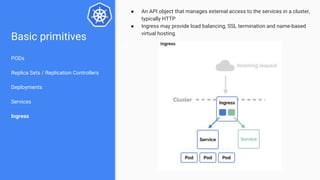
● An API object that manages external access to the services in a cluster,
typically HTTP
● Ingress may provide load balancing, SSL termination and name-based
virtual hosting.
Basic primitives
PODs
Replica Sets / Replication Controllers
Deployments
Services
Ingress
Typical Ingress manifest
Basic primitives
PODs
Replica Sets / Replication Controllers
Deployments
Services
Ingress
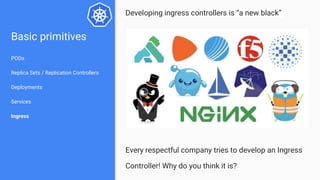
Developing ingress controllers is “a new black”
Every respectful company tries to develop an Ingress
Controller! Why do you think it is?
More?
● EdpointSlices
● Volumes
● Persistent Volumes
● Volume Snapshots
● ConfigMaps
● Secrets
● Jobs
● DeamonSets
● ...
This is only from the official documentation :). In fact there is more! Much more!
But it will be pretty much always same YAML Manifests
Stan, what do
you mean no
demo?
Let’s do this!
Let’s deploy something… Learnish-Axonish :)
# Getting helm
brew install helm
# Adding charts repository
helm repo add bitnami https://charts.bitnami.com/bitnami
# Installing moodle :)
helm install my-release bitnami/moodle
Summary: DevOps
after k8s
● Even closer DevOps cycles - IaaC to the max
● From Idempotency to Immutability - whole infra represented as
a set of specialized, stateless, disposable, containers
● Security out of the box - in cluster communications are
encrypted and there are tons of good practices to make stuff
very secure cheap
● Clouds are commodity - let’s not allow Microsoft and Co to
dictate us rules of the game
● Host OS is a commodity - well, as long as it is linux right ;)
● Serious and complex Operations now a reality for small and
mid size companies:
○ Global clusters
○ Cloud agnosticism(Hybrid or Multi Cloud workloads)
○ High availability(Cloud provider wide outages)
○ 0 - trust security
What is next?
1. Further Sessions like this one :)
2. Kubernetes Concepts https://kubernetes.io/docs/concepts/
3. Certified Kubernetes Applications Developer
https://www.cncf.io/certification/ckad/
4. Certified Kubernetes Administrator
https://www.cncf.io/certification/cka/
More Advanced topics:
1. Helm Charts (https://helm.sh/)
2. Operators (Operator pattern)
3. Security (Certified Kubernetes Security Specialist)
4. Service mesh(https://istio.io/, https://linkerd.io/, others)
5. OPA (https://www.openpolicyagent.org/ )
6. Knative (https://knative.dev/)
7. And More
Questions?

Kubernetes 101

  • 1.
  • 2.
    Plan for today 1.The “Why?” Question 2. The history of the project in a few sentences 3. Containers 4. Orchestration and Orchestrators 5. Container wars 6. Managed versions 7. k8s Architecture 8. Local clusters 9. Basic primitives
  • 3.
    Big 5 Why’s? Let’sexplore :) ● Why we need to adopt k8s? ● Why k8s? ● Why we need to change ways we do things? ● Why k8s is not a hype? ● Why this presentation is in light blue colour scheme?
  • 4.
    History ● Kubernetes greekfor “helmsman” or “pilot” ● Started from Google’s proprietary project know as Borg ● Initially, project was called Seven of Nine ● Jun 2014 first commit to github repository ● April 2015 Borg Paper published ● K8s v1.0 was released on July 21, 2015 and donated to CNCF organisation for future development ● Build in Go :) ● Fully Open Source ● More here: The History of Kubernetes on a Timeline | @RisingStack
  • 5.
    Containers Lightweight virtualization mechanismthat allows to run within single Linux instance without starting a separated VMs Most popular - Docker Alternatives: ● CoreOS rkt ● Mesos Containerizer ● LXC Linux Container ● OpenVZ ● containerd ● Others
  • 6.
  • 7.
  • 8.
    Managed k8s offerings AzureAKS Free Control Plane Google GKE One Free Cluster, $0.10 p/h AWS EKS $0.10 p/h Digital Ocean Free Control Plane Linode Free Control Plane In fact many others out there these days…. even Oracle Cloud has it
  • 9.
    k8s Architecture -100 feets overview
  • 10.
    Architecture Master Node(s) Worker Node(s) ●etcd - K/V Store ● kube-apiserver - Main API of k8s. All the components are communicating via this API. k8s is API first, API is the main interface all other tools are using (kubectl, dashboard, any 3rd party integrations) ● kube-scheduler - Process that assigns workload across the cluster to the nodes based on workload requirements and available resources ● kube-controller-manager - Manages all sorts of controllers :). ● cloud-controller-manager - Cloud specific control logic. Cloud resources fi Load Balancers Master node also known as control plane
  • 11.
    Architecture Master Node(s) Worker Node(s) ●A container runtime - Most common is Docker, but can be others (rkt, runc) - Basically docker installation on the node to run containers. Docker has open extensible API that allows to control it very easily ● kubelet - A main contact point with a cluster group. Replays information from/to control plane and node. ● kube-proxy - internal nodes’ networking, primitive load balancing, networking isolation Worker nodes used to called “Minions”
  • 12.
    Local clusters How theone does the development locally?
  • 13.
    Local clusters minikube During ourhands on sessions we are going to use Minikube
  • 14.
    Also might behandy - k8s Dashboard
  • 15.
    But cool kidsuse command line ;)
  • 16.
    Manifest ● It’s YAML:( ● You can wrap it into something human processable ● You manage everything in k8s via manifests
  • 17.
    Basic primitives PODs Replica Sets/ Replication Controllers Deployments Services Ingress ● The most basic unit k8s operates with ● One or more container grouped into logical unit that needs to share life-cycle, and operate closely together ● Good practice - main container that represents the application logic and some helping containers that facilitate related tasks (sidecarring) ● Good practice - not to use Pods directly but as a part of more complex structures (Deployments etc)
  • 18.
    Basic primitives PODs Replica Sets/ Replication Controllers Deployments Services Ingress Typical manifest for pods:
  • 19.
    Basic primitives PODs Replica Sets/ Replication Controllers Deployments Services Ingress ● Replica set: ○ Guarantee the availability of a specified number of identical Pods ○ Mainly should be used as a part of Deployment ● Replication Controller: ○ Ensures that a desired number of Pods with a matching label selector are available and operational ○ Acts as Horizontal Pod Autoscaler Target
  • 20.
    Basic primitives PODs Replica Sets/ Replication Controllers Deployments Services Ingress Typical manifest for Replicasets:
  • 21.
    Basic primitives PODs Replica Sets/ Replication Controllers Deployments Services Ingress ● Declarative updates for Pods and ReplicaSets ● You describe a desired state in a Deployment, and the Deployment Controller changes the actual state to the desired state at a controlled rate.
  • 22.
    Basic primitives PODs Replica Sets/ Replication Controllers Deployments Services Ingress Typical manifest for Deployment:
  • 23.
    Basic primitives PODs Replica Sets/ Replication Controllers Deployments Services Ingress ● An abstract way to expose an application running on a set of Pods as a network service. ● Service Discovery primitive ● Yes, microservices defined as Services in k8s
  • 24.
    Basic primitives PODs Replica Sets/ Replication Controllers Deployments Services Ingress Typical Service manifest
  • 25.
    Basic primitives PODs Replica Sets/ Replication Controllers Deployments Services Ingress ● An API object that manages external access to the services in a cluster, typically HTTP ● Ingress may provide load balancing, SSL termination and name-based virtual hosting.
  • 26.
    Basic primitives PODs Replica Sets/ Replication Controllers Deployments Services Ingress Typical Ingress manifest
  • 27.
    Basic primitives PODs Replica Sets/ Replication Controllers Deployments Services Ingress Developing ingress controllers is “a new black” Every respectful company tries to develop an Ingress Controller! Why do you think it is?
  • 28.
    More? ● EdpointSlices ● Volumes ●Persistent Volumes ● Volume Snapshots ● ConfigMaps ● Secrets ● Jobs ● DeamonSets ● ... This is only from the official documentation :). In fact there is more! Much more! But it will be pretty much always same YAML Manifests
  • 29.
    Stan, what do youmean no demo?
  • 30.
    Let’s do this! Let’sdeploy something… Learnish-Axonish :) # Getting helm brew install helm # Adding charts repository helm repo add bitnami https://charts.bitnami.com/bitnami # Installing moodle :) helm install my-release bitnami/moodle
  • 31.
    Summary: DevOps after k8s ●Even closer DevOps cycles - IaaC to the max ● From Idempotency to Immutability - whole infra represented as a set of specialized, stateless, disposable, containers ● Security out of the box - in cluster communications are encrypted and there are tons of good practices to make stuff very secure cheap ● Clouds are commodity - let’s not allow Microsoft and Co to dictate us rules of the game ● Host OS is a commodity - well, as long as it is linux right ;) ● Serious and complex Operations now a reality for small and mid size companies: ○ Global clusters ○ Cloud agnosticism(Hybrid or Multi Cloud workloads) ○ High availability(Cloud provider wide outages) ○ 0 - trust security
  • 32.
    What is next? 1.Further Sessions like this one :) 2. Kubernetes Concepts https://kubernetes.io/docs/concepts/ 3. Certified Kubernetes Applications Developer https://www.cncf.io/certification/ckad/ 4. Certified Kubernetes Administrator https://www.cncf.io/certification/cka/ More Advanced topics: 1. Helm Charts (https://helm.sh/) 2. Operators (Operator pattern) 3. Security (Certified Kubernetes Security Specialist) 4. Service mesh(https://istio.io/, https://linkerd.io/, others) 5. OPA (https://www.openpolicyagent.org/ ) 6. Knative (https://knative.dev/) 7. And More
  • 33.

Editor's Notes

  • #8 Typical google - winner takes all
  • #10 https://medium.com/@mohan08p/simplified-kubernetes-architecture-3febe12480eb
  • #16 kubectl