

From Zero to Hero
ORI STOLIAR
CTO
● K8s Overview
● K8s Architecture
● K8s Objects
● Installing K8s
● Show time!
● Q&A
AGENDA
CONTAINERS?
?
SO…
WHAT IS
“Open-source system for automating deployment, scaling, and
management of containerized applications.”
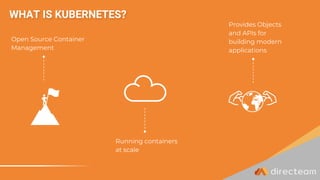
Running containers
at scale
Provides Objects
and APIs for
building modern
applications
Open Source Container
Management
WHAT IS KUBERNETES?
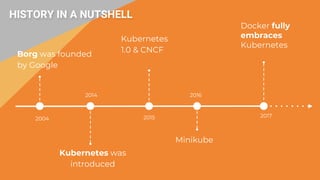
HISTORY IN A NUTSHELL
Borg was founded
by Google
2004
Kubernetes was
introduced
2014
2015
Kubernetes
1.0 & CNCF
2017
Docker fully
embraces
Kubernetes
Minikube
2016
WHY ?
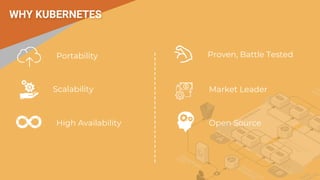
WHY KUBERNETES
Scalability
Portability
High Availability Open Source
Market Leader
Proven, Battle Tested
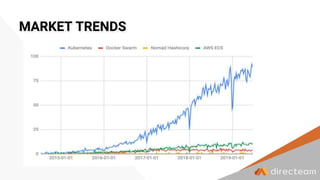
MARKET TRENDS
Architecture
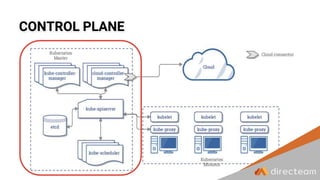
CONTROL PLANE
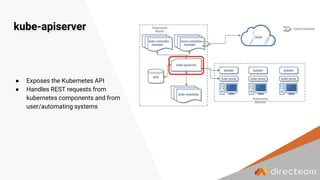
kube-apiserver
● Exposes the Kubernetes API
● Handles REST requests from
kubernetes components and from
user/automating systems
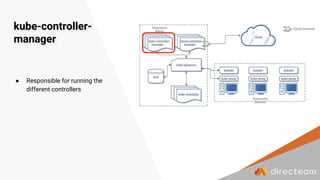
kube-controller-
manager
● Responsible for running the
different controllers
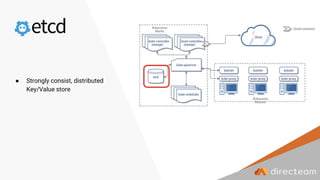
● Strongly consist, distributed
Key/Value store
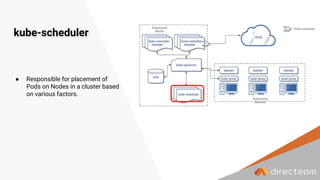
kube-scheduler
● Responsible for placement of
Pods on Nodes in a cluster based
on various factors.
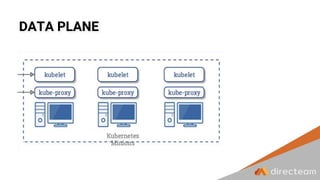
DATA PLANE
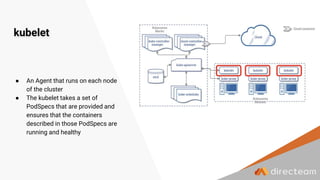
kubelet
● An Agent that runs on each node
of the cluster
● The kubelet takes a set of
PodSpecs that are provided and
ensures that the containers
described in those PodSpecs are
running and healthy
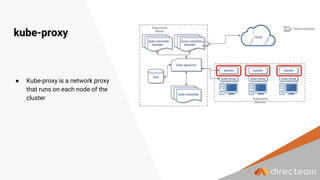
kube-proxy
● Kube-proxy is a network proxy
that runs on each node of the
cluster
apiVersion: v1
kind: Pod
metadata:
name: myapp-pod
labels:
app: myapp
spec:
containers:
- name: myapp-container
image: busybox
command: ['sh', '-c', 'echo
Hello Kubernetes! && sleep
3600']
apiVersion: apps/v1
kind: Deployment
metadata:
name: nginx-deployment
labels:
app: nginx
spec:
replicas: 3
selector:
matchLabels:
app: nginx
template:
metadata:
labels:
app: nginx
spec:
containers:
- name: nginx
image: nginx:1.7.9
ports:
- containerPort: 80
OBJECTS apiVersion: v1
kind: Service
metadata:
name: dt-service
spec:
selector:
app: directeam
ports:
- protocol: TCP
port: 80
targetPort: 9376
Virtual cluster backed by the
same physical cluster
Volume
Namespace: prod
Pod
Labels: [app: dt-app]
Container
Name: dt-app
Image: nginx
Namespace
Pod
Labels
Volume
smallest deployable units of
computing
key/value pairs that are
attached to objects
Abstraction layer for
having persistence
storage
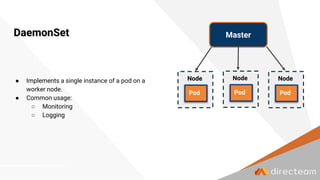
DaemonSet
● Implements a single instance of a pod on a
worker node.
● Common usage:
○ Monitoring
○ Logging
Node
Pod
Node
Pod
Master
Node
Pod
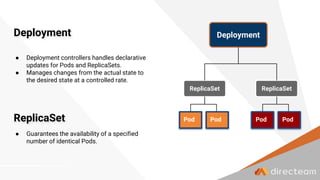
Deployment
● Deployment controllers handles declarative
updates for Pods and ReplicaSets.
● Manages changes from the actual state to
the desired state at a controlled rate.
Deployment
Pod Pod
ReplicaSet
Pod Pod
ReplicaSet
ReplicaSet
● Guarantees the availability of a specified
number of identical Pods.
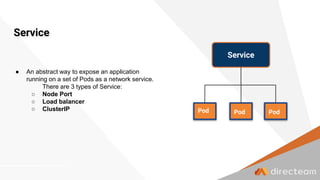
Service
● An abstract way to expose an application
running on a set of Pods as a network service.
There are 3 types of Service:
○ Node Port
○ Load balancer
○ ClusterIP
Service
Pod Pod Pod
DNS
CoreDNS - Open Source DNS Server written in Go, Kubernetes default DNS server
since version 1.13
● CoreDNS runs as Deployment
● Default cluster domain - cluster.local
● Default allocated DNS records:
○ <SERVICE_NAME>.<NAMESPACE>.svc.cluster.local
○ <POD_IP>.<NAMESPACE>.pod.cluster.local
Installing
!
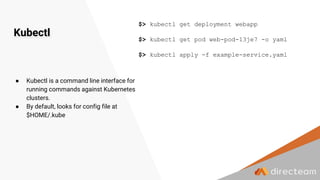
Kubectl
$> kubectl get deployment webapp
$> kubectl get pod web-pod-13je7 -o yaml
$> kubectl apply -f example-service.yaml
● Kubectl is a command line interface for
running commands against Kubernetes
clusters.
● By default, looks for config file at
$HOME/.kube
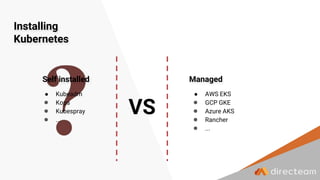
Installing
Kubernetes
● Kubeadm
● Kops
● Kubespray
● ...
● AWS EKS
● GCP GKE
● Azure AKS
● Rancher
● ...
Self installed Managed
VS
FOCUS ON WHAT'S IMPORTANT
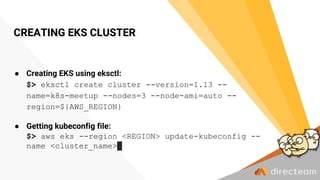
CREATING EKS CLUSTER
● Creating EKS using eksctl:
$> eksctl create cluster --version=1.13 --
name=k8s-meetup --nodes=3 --node-ami=auto --
region=${AWS_REGION}
● Getting kubeconfig file:
$> aws eks --region <REGION> update-kubeconfig --
name <cluster_name>
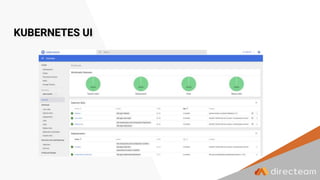
KUBERNETES UI
IT’S SHOW TIME!
● Demonstration over AWS
● Run BE & FE services
● Expose the FE service to the internet via
Load balancer
● Use secure HTTPS connection
● Attach DNS record to the load balancer
● Scale automatically the FE service based on
collected metrics
● Scale manually the BE service.
● Helm - deploy apps at ease
● Monitoring - what are the right
metrics?
● Logging - what do we even look
for?
NEXT STEPS
Q&A
Thank
You!
ori@directeam.io

Kuberenetes - From Zero to Hero

  • 1.
  • 2.
  • 3.
    ● K8s Overview ●K8s Architecture ● K8s Objects ● Installing K8s ● Show time! ● Q&A AGENDA
  • 4.
  • 5.
    ? SO… WHAT IS “Open-source systemfor automating deployment, scaling, and management of containerized applications.”
  • 6.
    Running containers at scale ProvidesObjects and APIs for building modern applications Open Source Container Management WHAT IS KUBERNETES?
  • 7.
    HISTORY IN ANUTSHELL Borg was founded by Google 2004 Kubernetes was introduced 2014 2015 Kubernetes 1.0 & CNCF 2017 Docker fully embraces Kubernetes Minikube 2016
  • 8.
  • 9.
    WHY KUBERNETES Scalability Portability High AvailabilityOpen Source Market Leader Proven, Battle Tested
  • 10.
  • 12.
  • 13.
  • 14.
    kube-apiserver ● Exposes theKubernetes API ● Handles REST requests from kubernetes components and from user/automating systems
  • 15.
    kube-controller- manager ● Responsible forrunning the different controllers
  • 16.
    ● Strongly consist,distributed Key/Value store
  • 17.
    kube-scheduler ● Responsible forplacement of Pods on Nodes in a cluster based on various factors.
  • 18.
  • 19.
    kubelet ● An Agentthat runs on each node of the cluster ● The kubelet takes a set of PodSpecs that are provided and ensures that the containers described in those PodSpecs are running and healthy
  • 20.
    kube-proxy ● Kube-proxy isa network proxy that runs on each node of the cluster
  • 21.
    apiVersion: v1 kind: Pod metadata: name:myapp-pod labels: app: myapp spec: containers: - name: myapp-container image: busybox command: ['sh', '-c', 'echo Hello Kubernetes! && sleep 3600'] apiVersion: apps/v1 kind: Deployment metadata: name: nginx-deployment labels: app: nginx spec: replicas: 3 selector: matchLabels: app: nginx template: metadata: labels: app: nginx spec: containers: - name: nginx image: nginx:1.7.9 ports: - containerPort: 80 OBJECTS apiVersion: v1 kind: Service metadata: name: dt-service spec: selector: app: directeam ports: - protocol: TCP port: 80 targetPort: 9376
  • 22.
    Virtual cluster backedby the same physical cluster Volume Namespace: prod Pod Labels: [app: dt-app] Container Name: dt-app Image: nginx Namespace Pod Labels Volume smallest deployable units of computing key/value pairs that are attached to objects Abstraction layer for having persistence storage
  • 23.
    DaemonSet ● Implements asingle instance of a pod on a worker node. ● Common usage: ○ Monitoring ○ Logging Node Pod Node Pod Master Node Pod
  • 24.
    Deployment ● Deployment controllershandles declarative updates for Pods and ReplicaSets. ● Manages changes from the actual state to the desired state at a controlled rate. Deployment Pod Pod ReplicaSet Pod Pod ReplicaSet ReplicaSet ● Guarantees the availability of a specified number of identical Pods.
  • 25.
    Service ● An abstractway to expose an application running on a set of Pods as a network service. There are 3 types of Service: ○ Node Port ○ Load balancer ○ ClusterIP Service Pod Pod Pod
  • 26.
    DNS CoreDNS - OpenSource DNS Server written in Go, Kubernetes default DNS server since version 1.13 ● CoreDNS runs as Deployment ● Default cluster domain - cluster.local ● Default allocated DNS records: ○ <SERVICE_NAME>.<NAMESPACE>.svc.cluster.local ○ <POD_IP>.<NAMESPACE>.pod.cluster.local
  • 28.
  • 29.
    Kubectl $> kubectl getdeployment webapp $> kubectl get pod web-pod-13je7 -o yaml $> kubectl apply -f example-service.yaml ● Kubectl is a command line interface for running commands against Kubernetes clusters. ● By default, looks for config file at $HOME/.kube
  • 30.
    Installing Kubernetes ● Kubeadm ● Kops ●Kubespray ● ... ● AWS EKS ● GCP GKE ● Azure AKS ● Rancher ● ... Self installed Managed VS
  • 31.
    FOCUS ON WHAT'SIMPORTANT
  • 32.
    CREATING EKS CLUSTER ●Creating EKS using eksctl: $> eksctl create cluster --version=1.13 -- name=k8s-meetup --nodes=3 --node-ami=auto -- region=${AWS_REGION} ● Getting kubeconfig file: $> aws eks --region <REGION> update-kubeconfig -- name <cluster_name>
  • 33.
  • 34.
    IT’S SHOW TIME! ●Demonstration over AWS ● Run BE & FE services ● Expose the FE service to the internet via Load balancer ● Use secure HTTPS connection ● Attach DNS record to the load balancer ● Scale automatically the FE service based on collected metrics ● Scale manually the BE service.
  • 35.
    ● Helm -deploy apps at ease ● Monitoring - what are the right metrics? ● Logging - what do we even look for? NEXT STEPS
  • 36.
  • 37.