Learn Nginx in 90 minutes
Larry cai <larry.caiyu@gmail.com>
Agenda
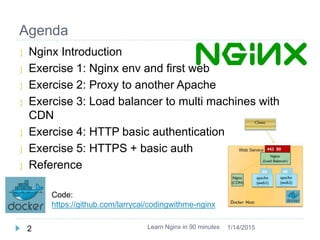
 Nginx Introduction
 Exercise 1: Nginx env and first web
 Exercise 2: Proxy to another Apache
 Exercise 3: Load balancer to multi machines with
CDN
 Exercise 4: HTTP basic authentication
 Exercise 5: HTTPS + basic auth
 Reference
Learn Nginx in 90 minutes2 1/14/2015
Code:
https://github.com/larrycai/codingwithme-nginx
Environment (docker)
Learn Nginx in 90 minutes3 1/14/2015
http://boot2docker.io/ Boot2docker 1.3.x /recommend
 Add proxy /var/lib/boot2docker/profile if needed
 $ sudo vi /var/lib/boot2docker/profile
 export http_proxy=<your proxy>
 $ sudo /etc/init.d/docker restart
 $ docker -v
 User/Passwd: docker/tcuser
 Or create CoreOS VM, and assign public IP to
access
http://ustack.com or https://cloud.digitalocean.com
Preparation
Learn Nginx in 90 minutes4 1/14/2015
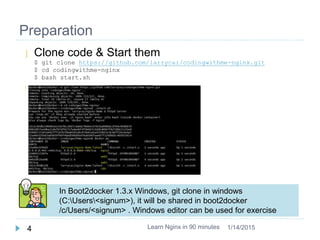
 Clone code & Start them
$ git clone https://github.com/larrycai/codingwithme-nginx.git
$ cd codingwithme-nginx
$ bash start.sh

In Boot2docker 1.3.x Windows, git clone in windows
(C:Users<signum>), it will be shared in boot2docker
/c/Users/<signum> . Windows editor can be used for exercise
What is Nginx
 Nginx [engine x] is an HTTP and reverse proxy
server, as well as a mail proxy server
 Stable release 1.6.2 (2014.12.01)
 High performance and efficiency on I/O
 Nginx: event-driven and asynchronous
 Apache: processes and threads
Learn Nginx in 90 minutes5 1/14/2015
image source
http://news.netcraft.com/archives/2014/11/19/november-2014-web-server-survey.html
Working Nginx
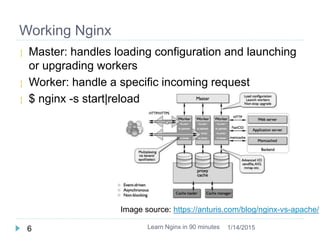
 Master: handles loading configuration and launching
or upgrading workers
 Worker: handle a specific incoming request
 $ nginx -s start|reload
Learn Nginx in 90 minutes6 1/14/2015
Image source: https://anturis.com/blog/nginx-vs-apache/
Environment
 All the servers are started as docker container in
advance
 ./start.sh
 or
 ./start-without-exec.sh for docker <1.3 like coreos earlier version
Learn Nginx in 90 minutes7 1/14/2015
Exercise 1: first web page
 Check the default web page
 curl/browser (http://192.168.59.103:8080 )
 Running into nginx and check the process
 $ docker logs –f nginx
 $ docker exec -it nginx bash
 $ ps –ef
 $ cd /nginx # same as folder codingwithme-nginx
 Add missing image, and reload it
 $ vi exer1.conf
 $ nginx –s reload
Learn Nginx in 90 minutes8 1/14/2015
Docker Host
Nginx
(Load Balancer)
8080Web Service
Client
Nginx installation
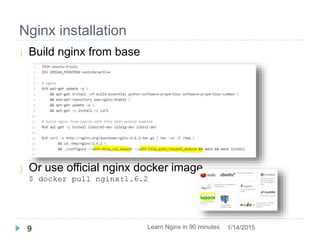
 Build nginx from base
 Or use official nginx docker image
$ docker pull nginx:1.6.2
Learn Nginx in 90 minutes9 1/14/2015
Nginx configuration
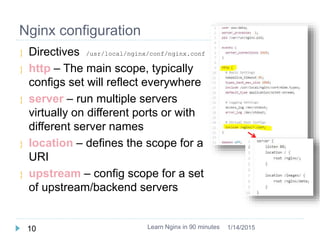
 Directives /usr/local/nginx/conf/nginx.conf
 http – The main scope, typically
configs set will reflect everywhere
 server – run multiple servers
virtually on different ports or with
different server names
 location – defines the scope for a
URI
 upstream – config scope for a set
of upstream/backend servers
Learn Nginx in 90 minutes10 1/14/2015
Exercise 2: proxy to web server
 Add one backend apache (already started as web2)
curl web2
 Example (exer1.conf):
location /name/ {
proxy_pass http://web2/;
}
 Check the real path
 http://192.168.59.103:8080/name/
Learn Nginx in 90 minutes11 1/14/2015
Docker Host
Nginx
(Load Balancer)
8080
80
Web Service
apache
(web2)
Client
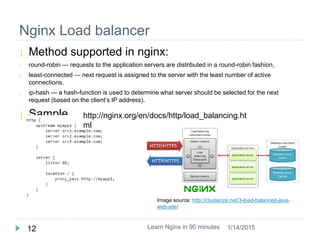
 Method supported in nginx:
 round-robin — requests to the application servers are distributed in a round-robin fashion,
 least-connected — next request is assigned to the server with the least number of active
connections,
 ip-hash — a hash-function is used to determine what server should be selected for the next
request (based on the client’s IP address).
 Sample
Nginx Load balancer
Learn Nginx in 90 minutes12 1/14/2015
Image source: http://clusterize.net/3-load-balanced-java-
web-site/
http://nginx.org/en/docs/http/load_balancing.ht
ml
Exercise 3: Load balancer to multi machines
with CDN
 Load balancer
 Images are send to CDN server (/images)
 All other requests goes to web server
 Check three methods
upstream myapp1 {
# ip_hash|least_conn|fair;
server web1;
…
 Hints:
http://192.168.59.103:8080
http://192.168.59.103:8080/images/my.png
curl/docker logs –f web1/web2/cdn/nginx
Learn Nginx in 90 minutes13 1/14/2015
Docker Host
Nginx
(Load Balancer)
apache
(web1)
8080
80
Web Service
apache
(web2)
80
Client
Nginx
(CDN)
Check docs
http://nginx.org/en/docs/http/load_balancing.html
Nginx basic auth
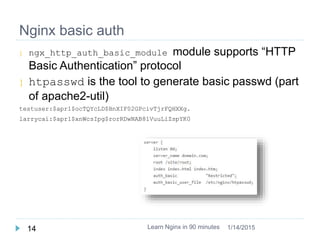
 ngx_http_auth_basic_module module supports “HTTP
Basic Authentication” protocol
 htpasswd is the tool to generate basic passwd (part
of apache2-util)
testuser:$apr1$ocTQYcLD$BnXIF02GPcivTjrFQHXXg.
larrycai:$apr1$xnWcsIpg$rorRDwNAB81VuuLiZspYK0
Learn Nginx in 90 minutes14 1/14/2015
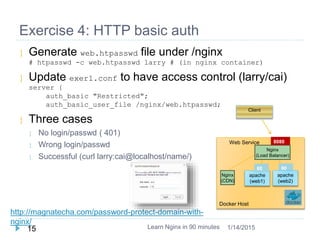
Exercise 4: HTTP basic auth
 Generate web.htpasswd file under /nginx
# htpasswd -c web.htpasswd larry # (in nginx container)
 Update exer1.conf to have access control (larry/cai)
server {
auth_basic "Restricted";
auth_basic_user_file /nginx/web.htpasswd;
 Three cases
 No login/passwd ( 401)
 Wrong login/passwd
 Successful (curl larry:cai@localhost/name/)
Learn Nginx in 90 minutes15 1/14/2015
http://magnatecha.com/password-protect-domain-with-
nginx/
Docker Host
Nginx
(Load Balancer)
apache
(web1)
8080
80
Web Service
apache
(web2)
80
Client
Nginx
(CDN)
HTTPS + basic auth
 HTTPS is secure HTTP to protect transfer
 It needs certification signed by CA or self-signed
 Signed process
 Private-key
 CSR: Certificate Signing Request from Private key
 CRT: Generate a self-signed Certificate / or Send to CA
 HTTPS can be handled/terminated by nginx
 ssl parameter shall be used in nginx
Learn Nginx in 90 minutes16 1/14/2015
Exercise 5: HTTPS + basic auth
Learn docker in 90 minutes17 1/14/2015
Docker Host
Nginx
(Load Balancer)
apache
(web1)
8080443
80
Web Service
apache
(web2)
80
Client
Nginx
(CDN)
 Check normal https certification
https://www.docker.com/ , who signed
 Generate self-signed key for website
# openssl req -new -nodes -keyout server.key -out server.csr
# openssl x509 -req -days 365 -in server.csr -signkey server.key -out server.crt
 Config in nginx.conf
# add extra server
server {
listen 443 ssl;
ssl_certificate /nginx/server.crt;
ssl_certificate_key /nginx/server.key;
 Verify http/https: curl -k https://
 Verify https+basic auth
Bonus
 Learn nginx used for docker private registry authentication
https://github.com/larrycai/nginx-registry
 Authentication with LDAP
 Log on demand https://github.com/tobegit3hub/nginx-log-service
Learn Nginx in 90 minutes18 1/14/2015
Summary
 Nginx is HTTP server, which widely used in internet
company for high performance.
 Large community with active module development
 Learn Nginx plugin to extend your functions
 Tune configuration to have best performance
 Use in your own case/product
Learn Nginx in 90 minutes19 1/14/2015
Reference
 http://nginx.org official web site
 http://tengine.taobao.org/ taobao adapted engine
 Docker images:
 https://registry.hub.docker.com/_/nginx/
 Articles:
 https://anturis.com/blog/nginx-vs-apache/
 https://www.linode.com/docs/websites/nginx/basic-nginx-
configuration
Learn Nginx in 90 minutes20 1/14/2015

Learn nginx in 90mins

  • 1.
    Learn Nginx in90 minutes Larry cai <larry.caiyu@gmail.com>
  • 2.
    Agenda  Nginx Introduction Exercise 1: Nginx env and first web  Exercise 2: Proxy to another Apache  Exercise 3: Load balancer to multi machines with CDN  Exercise 4: HTTP basic authentication  Exercise 5: HTTPS + basic auth  Reference Learn Nginx in 90 minutes2 1/14/2015 Code: https://github.com/larrycai/codingwithme-nginx
  • 3.
    Environment (docker) Learn Nginxin 90 minutes3 1/14/2015 http://boot2docker.io/ Boot2docker 1.3.x /recommend  Add proxy /var/lib/boot2docker/profile if needed  $ sudo vi /var/lib/boot2docker/profile  export http_proxy=<your proxy>  $ sudo /etc/init.d/docker restart  $ docker -v  User/Passwd: docker/tcuser  Or create CoreOS VM, and assign public IP to access http://ustack.com or https://cloud.digitalocean.com
  • 4.
    Preparation Learn Nginx in90 minutes4 1/14/2015  Clone code & Start them $ git clone https://github.com/larrycai/codingwithme-nginx.git $ cd codingwithme-nginx $ bash start.sh  In Boot2docker 1.3.x Windows, git clone in windows (C:Users<signum>), it will be shared in boot2docker /c/Users/<signum> . Windows editor can be used for exercise
  • 5.
    What is Nginx Nginx [engine x] is an HTTP and reverse proxy server, as well as a mail proxy server  Stable release 1.6.2 (2014.12.01)  High performance and efficiency on I/O  Nginx: event-driven and asynchronous  Apache: processes and threads Learn Nginx in 90 minutes5 1/14/2015 image source http://news.netcraft.com/archives/2014/11/19/november-2014-web-server-survey.html
  • 6.
    Working Nginx  Master:handles loading configuration and launching or upgrading workers  Worker: handle a specific incoming request  $ nginx -s start|reload Learn Nginx in 90 minutes6 1/14/2015 Image source: https://anturis.com/blog/nginx-vs-apache/
  • 7.
    Environment  All theservers are started as docker container in advance  ./start.sh  or  ./start-without-exec.sh for docker <1.3 like coreos earlier version Learn Nginx in 90 minutes7 1/14/2015
  • 8.
    Exercise 1: firstweb page  Check the default web page  curl/browser (http://192.168.59.103:8080 )  Running into nginx and check the process  $ docker logs –f nginx  $ docker exec -it nginx bash  $ ps –ef  $ cd /nginx # same as folder codingwithme-nginx  Add missing image, and reload it  $ vi exer1.conf  $ nginx –s reload Learn Nginx in 90 minutes8 1/14/2015 Docker Host Nginx (Load Balancer) 8080Web Service Client
  • 9.
    Nginx installation  Buildnginx from base  Or use official nginx docker image $ docker pull nginx:1.6.2 Learn Nginx in 90 minutes9 1/14/2015
  • 10.
    Nginx configuration  Directives/usr/local/nginx/conf/nginx.conf  http – The main scope, typically configs set will reflect everywhere  server – run multiple servers virtually on different ports or with different server names  location – defines the scope for a URI  upstream – config scope for a set of upstream/backend servers Learn Nginx in 90 minutes10 1/14/2015
  • 11.
    Exercise 2: proxyto web server  Add one backend apache (already started as web2) curl web2  Example (exer1.conf): location /name/ { proxy_pass http://web2/; }  Check the real path  http://192.168.59.103:8080/name/ Learn Nginx in 90 minutes11 1/14/2015 Docker Host Nginx (Load Balancer) 8080 80 Web Service apache (web2) Client
  • 12.
     Method supportedin nginx:  round-robin — requests to the application servers are distributed in a round-robin fashion,  least-connected — next request is assigned to the server with the least number of active connections,  ip-hash — a hash-function is used to determine what server should be selected for the next request (based on the client’s IP address).  Sample Nginx Load balancer Learn Nginx in 90 minutes12 1/14/2015 Image source: http://clusterize.net/3-load-balanced-java- web-site/ http://nginx.org/en/docs/http/load_balancing.ht ml
  • 13.
    Exercise 3: Loadbalancer to multi machines with CDN  Load balancer  Images are send to CDN server (/images)  All other requests goes to web server  Check three methods upstream myapp1 { # ip_hash|least_conn|fair; server web1; …  Hints: http://192.168.59.103:8080 http://192.168.59.103:8080/images/my.png curl/docker logs –f web1/web2/cdn/nginx Learn Nginx in 90 minutes13 1/14/2015 Docker Host Nginx (Load Balancer) apache (web1) 8080 80 Web Service apache (web2) 80 Client Nginx (CDN) Check docs http://nginx.org/en/docs/http/load_balancing.html
  • 14.
    Nginx basic auth ngx_http_auth_basic_module module supports “HTTP Basic Authentication” protocol  htpasswd is the tool to generate basic passwd (part of apache2-util) testuser:$apr1$ocTQYcLD$BnXIF02GPcivTjrFQHXXg. larrycai:$apr1$xnWcsIpg$rorRDwNAB81VuuLiZspYK0 Learn Nginx in 90 minutes14 1/14/2015
  • 15.
    Exercise 4: HTTPbasic auth  Generate web.htpasswd file under /nginx # htpasswd -c web.htpasswd larry # (in nginx container)  Update exer1.conf to have access control (larry/cai) server { auth_basic "Restricted"; auth_basic_user_file /nginx/web.htpasswd;  Three cases  No login/passwd ( 401)  Wrong login/passwd  Successful (curl larry:cai@localhost/name/) Learn Nginx in 90 minutes15 1/14/2015 http://magnatecha.com/password-protect-domain-with- nginx/ Docker Host Nginx (Load Balancer) apache (web1) 8080 80 Web Service apache (web2) 80 Client Nginx (CDN)
  • 16.
    HTTPS + basicauth  HTTPS is secure HTTP to protect transfer  It needs certification signed by CA or self-signed  Signed process  Private-key  CSR: Certificate Signing Request from Private key  CRT: Generate a self-signed Certificate / or Send to CA  HTTPS can be handled/terminated by nginx  ssl parameter shall be used in nginx Learn Nginx in 90 minutes16 1/14/2015
  • 17.
    Exercise 5: HTTPS+ basic auth Learn docker in 90 minutes17 1/14/2015 Docker Host Nginx (Load Balancer) apache (web1) 8080443 80 Web Service apache (web2) 80 Client Nginx (CDN)  Check normal https certification https://www.docker.com/ , who signed  Generate self-signed key for website # openssl req -new -nodes -keyout server.key -out server.csr # openssl x509 -req -days 365 -in server.csr -signkey server.key -out server.crt  Config in nginx.conf # add extra server server { listen 443 ssl; ssl_certificate /nginx/server.crt; ssl_certificate_key /nginx/server.key;  Verify http/https: curl -k https://  Verify https+basic auth
  • 18.
    Bonus  Learn nginxused for docker private registry authentication https://github.com/larrycai/nginx-registry  Authentication with LDAP  Log on demand https://github.com/tobegit3hub/nginx-log-service Learn Nginx in 90 minutes18 1/14/2015
  • 19.
    Summary  Nginx isHTTP server, which widely used in internet company for high performance.  Large community with active module development  Learn Nginx plugin to extend your functions  Tune configuration to have best performance  Use in your own case/product Learn Nginx in 90 minutes19 1/14/2015
  • 20.
    Reference  http://nginx.org officialweb site  http://tengine.taobao.org/ taobao adapted engine  Docker images:  https://registry.hub.docker.com/_/nginx/  Articles:  https://anturis.com/blog/nginx-vs-apache/  https://www.linode.com/docs/websites/nginx/basic-nginx- configuration Learn Nginx in 90 minutes20 1/14/2015