Introduction to Kubernetes and Overview of
the Kubernetes Conformance Certification
Program
Brad Topol, Ph.D.
IBM Distinguished Engineer
Kubernetes Contributor
Member, Kubernetes Conformance Workgroup
2
What is Kubernetes?
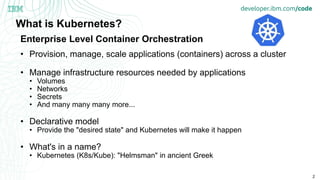
• Provision, manage, scale applications (containers) across a cluster
• Manage infrastructure resources needed by applications
• Volumes
• Networks
• Secrets
• And many many many more...
• Declarative model
• Provide the "desired state" and Kubernetes will make it happen
• What's in a name?
• Kubernetes (K8s/Kube): "Helmsman" in ancient Greek
Enterprise Level Container Orchestration
3
How was Kubernetes created?
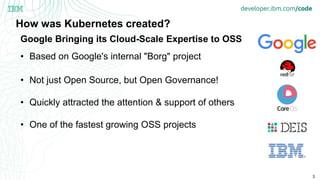
• Based on Google's internal "Borg" project
• Not just Open Source, but Open Governance!
• Quickly attracted the attention & support of others
• One of the fastest growing OSS projects
Google Bringing its Cloud-Scale Expertise to OSS
4
Where is the Kubernetes community?
• Main source entry point: https://github.com/kubernetes/
• Communications
• https://github.com/kubernetes/community/blob/master/communication.md
• Mailing list / google groups:
• Devs: kubernetes-dev@googlegroups.com
• Users: kubernetes-users@googlegroups.com
• Weekly Community Meeting
• Conferences (CNCF-con & KubeCon)
• Lots of SIGs (special interest groups) for focused areas/functionality
• https://github.com/kubernetes/community/blob/master/sig-list.md
• Each with their own slack channel, mailing lists, regular calls, ...
• Leaders: Google, RedHat, CoreOS, Microsoft (Deis), IBM, Huawei
5
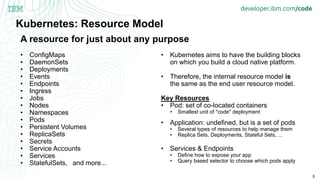
Kubernetes: Resource Model
• ConfigMaps
• DaemonSets
• Deployments
• Events
• Endpoints
• Ingress
• Jobs
• Nodes
• Namespaces
• Pods
• Persistent Volumes
• ReplicaSets
• Secrets
• Service Accounts
• Services
• StatefulSets, and more...
• Kubernetes aims to have the building blocks
on which you build a cloud native platform.
• Therefore, the internal resource model is
the same as the end user resource model.
Key Resources
• Pod: set of co-located containers
• Smallest unit of "code" deployment
• Application: undefined, but is a set of pods
• Several types of resources to help manage them
• Replica Sets, Deployments, Stateful Sets, ...
• Services & Endpoints
• Define how to expose your app
• Query based selector to choose which pods apply
A resource for just about any purpose
6
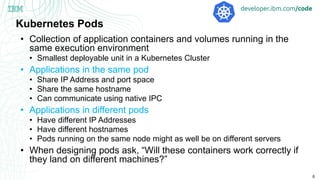
Kubernetes Pods
• Collection of application containers and volumes running in the
same execution environment
• Smallest deployable unit in a Kubernetes Cluster
• Applications in the same pod
• Share IP Address and port space
• Share the same hostname
• Can communicate using native IPC
• Applications in different pods
• Have different IP Addresses
• Have different hostnames
• Pods running on the same node might as well be on different servers
• When designing pods ask, “Will these containers work correctly if
they land on different machines?”
7
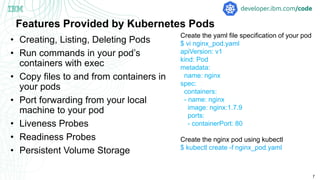
Features Provided by Kubernetes Pods
• Creating, Listing, Deleting Pods
• Run commands in your pod’s
containers with exec
• Copy files to and from containers in
your pods
• Port forwarding from your local
machine to your pod
• Liveness Probes
• Readiness Probes
• Persistent Volume Storage
Create the yaml file specification of your pod
$ vi nginx_pod.yaml
apiVersion: v1
kind: Pod
metadata:
name: nginx
spec:
containers:
- name: nginx
image: nginx:1.7.9
ports:
- containerPort: 80
Create the nginx pod using kubectl
$ kubectl create -f nginx_pod.yaml
8
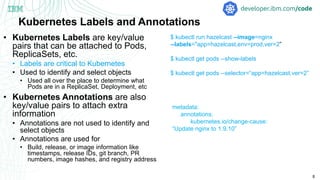
Kubernetes Labels and Annotations
• Kubernetes Labels are key/value
pairs that can be attached to Pods,
ReplicaSets, etc.
• Labels are critical to Kubernetes
• Used to identify and select objects
• Used all over the place to determine what
Pods are in a ReplicaSet, Deployment, etc
• Kubernetes Annotations are also
key/value pairs to attach extra
information
• Annotations are not used to identify and
select objects
• Annotations are used for
• Build, release, or image information like
timestamps, release IDs, git branch, PR
numbers, image hashes, and registry address
$ kubectl run hazelcast --image=nginx
--labels="app=hazelcast,env=prod,ver=2”
$ kubectl get pods --show-labels
$ kubectl get pods --selector=“app=hazelcast,ver=2”
metadata:
annotations:
kubernetes.io/change-cause:
“Update nginx to 1.9.10”
9
Kubernetes ReplicaSets
• Kubernetes ReplicaSet is a cluster-
wide pod manager that ensures the
proper number of pods are running at
all times.
• Pods managed by ReplicaSets are
automatically rescheduled under
failure conditions
• ReplicaSets are defined via a
specification
• Contains name, number of pods, and pod
template
• ReplicaSets identify their replicas via
a set of Pod labels
Create the yaml file specification of your ReplicaSet
$ vi frontend.yaml
apiVersion: apps/v1
kind: ReplicaSet
metadata:
name: frontend
labels:
app: guestbook
tier: frontend
spec:
# this replicas value is default
# modify it according to your case
replicas: 3
selector:
matchLabels:
tier: frontend
matchExpressions:
- {key: tier, operator: In, values: [frontend]}
template:
metadata:
labels:
app: guestbook
tier: frontend
spec:
containers:
- name: php-redis
image: gcr.io/google_samples/gb-frontend:v3
ports:
- containerPort: 80
Create the nginx pod using kubectl
$ kubectl create -f frontend.yaml
10
Updating Kubernetes ReplicaSets
• Kubernetes ReplicaSets can be
updated by updating the
ReplicaSet specification yaml.
• Use the kubectl apply command to
update
• ReplicaSets are easily deleted
• kubectl delete rs frontend
• kubectl delete rs frontend --
cascade=false
• ReplicaSets also support
horizontal pod autoscaling (HPA)
• kubectl autoscale rs frontend --min=3
--max=7 --cpu-percent=80
Create the yaml file specification of your ReplicaSet
$ vi frontend.yaml
apiVersion: apps/v1
kind: ReplicaSet
metadata:
name: frontend
labels:
app: guestbook
tier: frontend
spec:
# this replicas value is default
# modify it according to your case
replicas: 6
selector:
matchLabels:
tier: frontend
matchExpressions:
- {key: tier, operator: In, values: [frontend]}
template:
metadata:
labels:
app: guestbook
tier: frontend
spec:
containers:
- name: php-redis
image: gcr.io/google_samples/gb-frontend:v3
ports:
- containerPort: 80
Update nginx pod using kubectl and updated spec
$ kubectl apply -f frontend.yaml
11
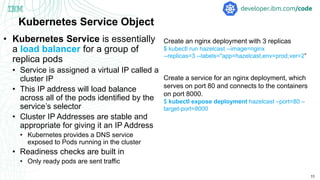
Kubernetes Service Object
• Kubernetes Service is essentially
a load balancer for a group of
replica pods
• Service is assigned a virtual IP called a
cluster IP
• This IP address will load balance
across all of the pods identified by the
service’s selector
• Cluster IP Addresses are stable and
appropriate for giving it an IP Address
• Kubernetes provides a DNS service
exposed to Pods running in the cluster
• Readiness checks are built in
• Only ready pods are sent traffic
Create an nginx deployment with 3 replicas
$ kubectl run hazelcast --image=nginx
--replicas=3 --labels="app=hazelcast,env=prod,ver=2”
Create a service for an nginx deployment, which
serves on port 80 and connects to the containers
on port 8000.
$ kubectl expose deployment hazelcast –port=80 –
target-port=8000
12
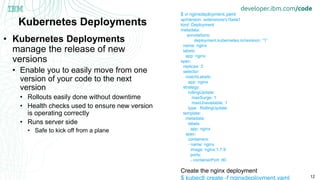
Kubernetes Deployments
• Kubernetes Deployments
manage the release of new
versions
• Enable you to easily move from one
version of your code to the next
version
• Rollouts easily done without downtime
• Health checks used to ensure new version
is operating correctly
• Runs server side
• Safe to kick off from a plane
$ vi nginxdeployment.yaml
apiVersion: extensions/v1beta1
kind: Deployment
metadata:
annotations:
deployment.kubernetes.io/revision: “1”
name: nginx
labels:
app: nginx
spec:
replicas: 3
selector:
matchLabels:
app: nginx
strategy:
rollingUpdate:
maxSurge: 1
maxUnavailable: 1
type: RollingUpdate
template:
metadata:
labels:
app: nginx
spec:
containers:
- name: nginx
image: nginx:1.7.9
ports:
- containerPort: 80
Create the nginx deployment
$ kubectl create -f nginxdeployment.yaml
13
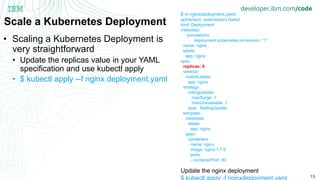
Scale a Kubernetes Deployment
• Scaling a Kubernetes Deployment is
very straightforward
• Update the replicas value in your YAML
specification and use kubectl apply
• $ kubectl apply --f nginx deployment.yaml
$ vi nginxdeployment.yaml
apiVersion: extensions/v1beta1
kind: Deployment
metadata:
annotations:
deployment.kubernetes.io/revision: “1”
name: nginx
labels:
app: nginx
spec:
replicas: 6
selector:
matchLabels:
app: nginx
strategy:
rollingUpdate:
maxSurge: 1
maxUnavailable: 1
type: RollingUpdate
template:
metadata:
labels:
app: nginx
spec:
containers:
- name: nginx
image: nginx:1.7.9
ports:
- containerPort: 80
Update the nginx deployment
$ kubectl apply -f nginxdeployment.yaml
14
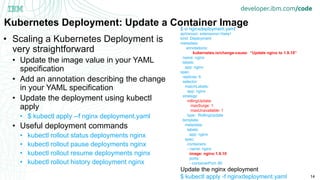
Kubernetes Deployment: Update a Container Image
• Scaling a Kubernetes Deployment is
very straightforward
• Update the image value in your YAML
specification
• Add an annotation describing the change
in your YAML specification
• Update the deployment using kubectl
apply
• $ kubectl apply --f nginx deployment.yaml
• Useful deployment commands
• kubectl rollout status deployments nginx
• kubectl rollout pause deployments nginx
• kubectl rollout resume deployments nginx
• kubectl rollout history deployment nginx
$ vi nginxdeployment.yaml
apiVersion: extensions/v1beta1
kind: Deployment
metadata:
annotations:
kubernetes.io/change-cause: “Update nginx to 1.9.10”
name: nginx
labels:
app: nginx
spec:
replicas: 6
selector:
matchLabels:
app: nginx
strategy:
rollingUpdate:
maxSurge: 1
maxUnavailable: 1
type: RollingUpdate
template:
metadata:
labels:
app: nginx
spec:
containers:
- name: nginx
image: nginx:1.9.10
ports:
- containerPort: 80
Update the nginx deployment
$ kubectl apply -f nginxdeployment.yaml
Node
15
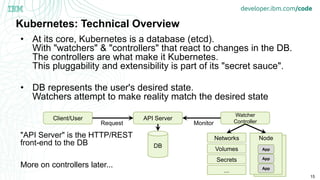
Kubernetes: Technical Overview
• At its core, Kubernetes is a database (etcd).
With "watchers" & "controllers" that react to changes in the DB.
The controllers are what make it Kubernetes.
This pluggability and extensibility is part of its "secret sauce".
• DB represents the user's desired state.
Watchers attempt to make reality match the desired state
"API Server" is the HTTP/REST
front-end to the DB
More on controllers later...
DB
API ServerClient/User
Watcher
Controller
Node
App
App
App
Networks
Volumes
Secrets
...
Request Monitor
16
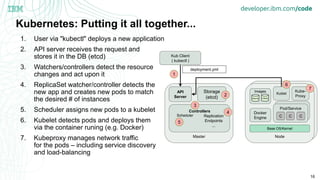
Kubernetes: Putting it all together...
1. User via "kubectl" deploys a new application
2. API server receives the request and
stores it in the DB (etcd)
3. Watchers/controllers detect the resource
changes and act upon it
4. ReplicaSet watcher/controller detects the
new app and creates new pods to match
the desired # of instances
5. Scheduler assigns new pods to a kubelet
6. Kubelet detects pods and deploys them
via the container runing (e.g. Docker)
7. Kubeproxy manages network traffic
for the pods – including service discovery
and load-balancing
Node
Node
Pod
Base OS/Kernel
Docker
Engine
Images
LibertyUbuntu
Kublet
Kube-
Proxy
Pod/Service
C C C
Master
API
Server
Controllers
Replication
Endpoints
...
Kub Client
( kubectl )
deployment.yml
Storage
(etcd)
7
1
2
3
4
6
Scheduler
5
17
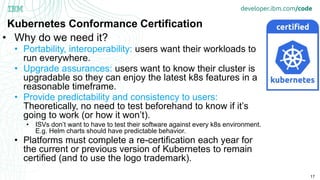
Kubernetes Conformance Certification
• Why do we need it?
• Portability, interoperability: users want their workloads to
run everywhere.
• Upgrade assurances: users want to know their cluster is
upgradable so they can enjoy the latest k8s features in a
reasonable timeframe.
• Provide predictability and consistency to users:
Theoretically, no need to test beforehand to know if it’s
going to work (or how it won’t).
• ISVs don’t want to have to test their software against every k8s environment.
E.g. Helm charts should have predictable behavior.
• Platforms must complete a re-certification each year for
the current or previous version of Kubernetes to remain
certified (and to use the logo trademark).
18
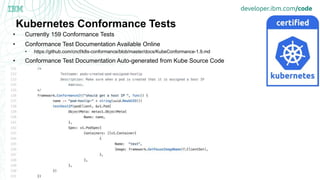
Kubernetes Conformance Tests
• Currently 159 Conformance Tests
• Conformance Test Documentation Available Online
• https://github.com/cncf/k8s-conformance/blob/master/docs/KubeConformance-1.9.md
• Conformance Test Documentation Auto-generated from Kube Source Code
20
Kubernetes Conformance Certification Test Focus Areas
• ConfigMap operations
• DNS operations
• Downward API operations
• Events
• Kubectl operations
• Networking operations
• Pod operations
• Proxy operations
• Liveness Probes
• Readiness Probes
• ReplicationController operations
• ReplicaSet operations
• Scheduler operations
• Service Accounts
• Secret operations
• Volume support
A managed Kubernetes service providing an intuitive user
experience with on-going cluster management. Built-in security
and isolation to enable rapid delivery of apps, while leveraging
IBM Cloud Services including Weather data, IoT, Analytics, or AI
capabilities with Watson. Available in six IBM regions WW,
including 20+ datacenters.
https://www.ibm.com/cloud/container-service
IBM Cloud Container Service | ©2018 IBM Corporation
Kubernetes Certified Service Provider
Kubernetes Technology Partner
Kubernetes Service Providers
22
Kubernetes: Let's Get Started
• Development Guide
• Getting Started Guide from IBM's Mike Brown
• Kubernetes Source Code Tour from IBM's Brad Topol
• Help: Ask on the appropriate SIG Slack channel
• Kubernetes Conformance Certification Update
• Looking for work:
• Backlog of issues – many many open issues
• Contributor experience, testing, "process" related activities
• Find us on the Slack channel and ask questions!
• Journeys
• https://developer.ibm.com/code/journey/run-gitlab-kubernetes/
• https://developer.ibm.com/code/journey/deploy-microprofile-java-microservices-on-kubernetes/
• https://developer.ibm.com/code/events/manage-microservices-traffic-using-istio/
Q & A
23
24
Advanced Topics
25
Kubernetes ConfigMaps
• Kubernetes ConfigMaps provide
configuration information for
container images
• ConfigMaps are composed of
key/value pairs
• Three ways to use ConfigMaps
• File created for each entry based on
keyname
• Set value of an environment variable
• Dynamically create command line for a
container based on ConfigMap values
$ vi config.txt
apiVersion: v1
kind: ConfigMap
metadata:
name: special-config
namespace: default
data:
special.level: very
special.type: charm
Create the ConfigMap
$ kubectl create configmap --from-file=config.txt
apiVersion: v1
kind: Pod
metadata:
name: dapi-test-pod
spec:
containers:
- name: test-container
image: k8s.gcr.io/busybox
command: [ "/bin/sh", "-c", "ls /etc/config/" ]
volumeMounts:
- name: config-volume
mountPath: /etc/config
volumes:
- name: config-volume
configMap:
name: special-config
26
Kubernetes ConfigMaps
• Kubernetes ConfigMaps provide
configuration information for
container images
• ConfigMaps are composed of
key/value pairs
• Three ways to use ConfigMaps
• File created for each entry based on
keyname
• Set value of an environment variable
• Dynamically create command line for a
container based on ConfigMap values
$ vi config.txt
apiVersion: v1
kind: ConfigMap
metadata:
name: special-config
namespace: default
data:
special.level: very
special.type: charm
Create the ConfigMap
$ kubectl create configmap --from-file=config.txt
apiVersion: v1
kind: Pod
metadata:
name: dapi-test-pod
spec:
containers:
- name: test-container
image: k8s.gcr.io/busybox
command: [ "/bin/sh", "-c", "env" ]
envFrom:
- configMapRef:
name: special-config
restartPolicy: Never
27
Kubernetes ConfigMaps
• Kubernetes ConfigMaps provide
configuration information for
container images
• ConfigMaps are composed of key/value
pairs
• Three ways to use ConfigMaps
• File created for each entry based on keyname
• Set value of an environment variable
• Dynamically create command line for a
container based on ConfigMap values
apiVersion: v1
apiVersion: v1
kind: Pod
metadata:
name: dapi-test-pod
spec:
containers:
- name: test-container
image: k8s.gcr.io/busybox
command: [ "/bin/sh", "-c", "echo $(SPECIAL_LEVEL_KEY)
$(SPECIAL_TYPE_KEY)" ]
env:
- name: SPECIAL_LEVEL_KEY
valueFrom:
configMapKeyRef:
name: special-config
key: SPECIAL_LEVEL
- name: SPECIAL_TYPE_KEY
valueFrom:
configMapKeyRef:
name: special-config
key: SPECIAL_TYPE
restartPolicy: Never
28
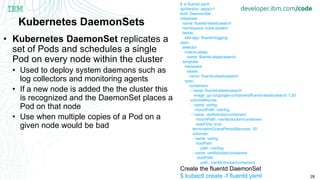
Kubernetes DaemonSets
• Kubernetes DaemonSet replicates a
set of Pods and schedules a single
Pod on every node within the cluster
• Used to deploy system daemons such as
log collectors and monitoring agents
• If a new node is added the the cluster this
is recognized and the DaemonSet places a
Pod on that node
• Use when multiple copies of a Pod on a
given node would be bad
$ vi fluentd.yaml
apiVersion: apps/v1
kind: DaemonSet
metadata:
name: fluentd-elasticsearch
namespace: kube-system
labels:
k8s-app: fluentd-logging
spec:
selector:
matchLabels:
name: fluentd-elasticsearch
template:
metadata:
labels:
name: fluentd-elasticsearch
spec:
containers:
- name: fluentd-elasticsearch
image: gcr.io/google-containers/fluentd-elasticsearch:1.20
volumeMounts:
- name: varlog
mountPath: /var/log
- name: varlibdockercontainers
mountPath: /var/lib/docker/containers
readOnly: true
terminationGracePeriodSeconds: 30
volumes:
- name: varlog
hostPath:
path: /var/log
- name: varlibdockercontainers
hostPath:
path: /var/lib/docker/containers
Create the fluentd DaemonSet
$ kubectl create -f fluentd.yaml

Kube Overview and Kube Conformance Certification OpenSource101 Raleigh

  • 1.
    Introduction to Kubernetesand Overview of the Kubernetes Conformance Certification Program Brad Topol, Ph.D. IBM Distinguished Engineer Kubernetes Contributor Member, Kubernetes Conformance Workgroup
  • 2.
    2 What is Kubernetes? •Provision, manage, scale applications (containers) across a cluster • Manage infrastructure resources needed by applications • Volumes • Networks • Secrets • And many many many more... • Declarative model • Provide the "desired state" and Kubernetes will make it happen • What's in a name? • Kubernetes (K8s/Kube): "Helmsman" in ancient Greek Enterprise Level Container Orchestration
  • 3.
    3 How was Kubernetescreated? • Based on Google's internal "Borg" project • Not just Open Source, but Open Governance! • Quickly attracted the attention & support of others • One of the fastest growing OSS projects Google Bringing its Cloud-Scale Expertise to OSS
  • 4.
    4 Where is theKubernetes community? • Main source entry point: https://github.com/kubernetes/ • Communications • https://github.com/kubernetes/community/blob/master/communication.md • Mailing list / google groups: • Devs: kubernetes-dev@googlegroups.com • Users: kubernetes-users@googlegroups.com • Weekly Community Meeting • Conferences (CNCF-con & KubeCon) • Lots of SIGs (special interest groups) for focused areas/functionality • https://github.com/kubernetes/community/blob/master/sig-list.md • Each with their own slack channel, mailing lists, regular calls, ... • Leaders: Google, RedHat, CoreOS, Microsoft (Deis), IBM, Huawei
  • 5.
    5 Kubernetes: Resource Model •ConfigMaps • DaemonSets • Deployments • Events • Endpoints • Ingress • Jobs • Nodes • Namespaces • Pods • Persistent Volumes • ReplicaSets • Secrets • Service Accounts • Services • StatefulSets, and more... • Kubernetes aims to have the building blocks on which you build a cloud native platform. • Therefore, the internal resource model is the same as the end user resource model. Key Resources • Pod: set of co-located containers • Smallest unit of "code" deployment • Application: undefined, but is a set of pods • Several types of resources to help manage them • Replica Sets, Deployments, Stateful Sets, ... • Services & Endpoints • Define how to expose your app • Query based selector to choose which pods apply A resource for just about any purpose
  • 6.
    6 Kubernetes Pods • Collectionof application containers and volumes running in the same execution environment • Smallest deployable unit in a Kubernetes Cluster • Applications in the same pod • Share IP Address and port space • Share the same hostname • Can communicate using native IPC • Applications in different pods • Have different IP Addresses • Have different hostnames • Pods running on the same node might as well be on different servers • When designing pods ask, “Will these containers work correctly if they land on different machines?”
  • 7.
    7 Features Provided byKubernetes Pods • Creating, Listing, Deleting Pods • Run commands in your pod’s containers with exec • Copy files to and from containers in your pods • Port forwarding from your local machine to your pod • Liveness Probes • Readiness Probes • Persistent Volume Storage Create the yaml file specification of your pod $ vi nginx_pod.yaml apiVersion: v1 kind: Pod metadata: name: nginx spec: containers: - name: nginx image: nginx:1.7.9 ports: - containerPort: 80 Create the nginx pod using kubectl $ kubectl create -f nginx_pod.yaml
  • 8.
    8 Kubernetes Labels andAnnotations • Kubernetes Labels are key/value pairs that can be attached to Pods, ReplicaSets, etc. • Labels are critical to Kubernetes • Used to identify and select objects • Used all over the place to determine what Pods are in a ReplicaSet, Deployment, etc • Kubernetes Annotations are also key/value pairs to attach extra information • Annotations are not used to identify and select objects • Annotations are used for • Build, release, or image information like timestamps, release IDs, git branch, PR numbers, image hashes, and registry address $ kubectl run hazelcast --image=nginx --labels="app=hazelcast,env=prod,ver=2” $ kubectl get pods --show-labels $ kubectl get pods --selector=“app=hazelcast,ver=2” metadata: annotations: kubernetes.io/change-cause: “Update nginx to 1.9.10”
  • 9.
    9 Kubernetes ReplicaSets • KubernetesReplicaSet is a cluster- wide pod manager that ensures the proper number of pods are running at all times. • Pods managed by ReplicaSets are automatically rescheduled under failure conditions • ReplicaSets are defined via a specification • Contains name, number of pods, and pod template • ReplicaSets identify their replicas via a set of Pod labels Create the yaml file specification of your ReplicaSet $ vi frontend.yaml apiVersion: apps/v1 kind: ReplicaSet metadata: name: frontend labels: app: guestbook tier: frontend spec: # this replicas value is default # modify it according to your case replicas: 3 selector: matchLabels: tier: frontend matchExpressions: - {key: tier, operator: In, values: [frontend]} template: metadata: labels: app: guestbook tier: frontend spec: containers: - name: php-redis image: gcr.io/google_samples/gb-frontend:v3 ports: - containerPort: 80 Create the nginx pod using kubectl $ kubectl create -f frontend.yaml
  • 10.
    10 Updating Kubernetes ReplicaSets •Kubernetes ReplicaSets can be updated by updating the ReplicaSet specification yaml. • Use the kubectl apply command to update • ReplicaSets are easily deleted • kubectl delete rs frontend • kubectl delete rs frontend -- cascade=false • ReplicaSets also support horizontal pod autoscaling (HPA) • kubectl autoscale rs frontend --min=3 --max=7 --cpu-percent=80 Create the yaml file specification of your ReplicaSet $ vi frontend.yaml apiVersion: apps/v1 kind: ReplicaSet metadata: name: frontend labels: app: guestbook tier: frontend spec: # this replicas value is default # modify it according to your case replicas: 6 selector: matchLabels: tier: frontend matchExpressions: - {key: tier, operator: In, values: [frontend]} template: metadata: labels: app: guestbook tier: frontend spec: containers: - name: php-redis image: gcr.io/google_samples/gb-frontend:v3 ports: - containerPort: 80 Update nginx pod using kubectl and updated spec $ kubectl apply -f frontend.yaml
  • 11.
    11 Kubernetes Service Object •Kubernetes Service is essentially a load balancer for a group of replica pods • Service is assigned a virtual IP called a cluster IP • This IP address will load balance across all of the pods identified by the service’s selector • Cluster IP Addresses are stable and appropriate for giving it an IP Address • Kubernetes provides a DNS service exposed to Pods running in the cluster • Readiness checks are built in • Only ready pods are sent traffic Create an nginx deployment with 3 replicas $ kubectl run hazelcast --image=nginx --replicas=3 --labels="app=hazelcast,env=prod,ver=2” Create a service for an nginx deployment, which serves on port 80 and connects to the containers on port 8000. $ kubectl expose deployment hazelcast –port=80 – target-port=8000
  • 12.
    12 Kubernetes Deployments • KubernetesDeployments manage the release of new versions • Enable you to easily move from one version of your code to the next version • Rollouts easily done without downtime • Health checks used to ensure new version is operating correctly • Runs server side • Safe to kick off from a plane $ vi nginxdeployment.yaml apiVersion: extensions/v1beta1 kind: Deployment metadata: annotations: deployment.kubernetes.io/revision: “1” name: nginx labels: app: nginx spec: replicas: 3 selector: matchLabels: app: nginx strategy: rollingUpdate: maxSurge: 1 maxUnavailable: 1 type: RollingUpdate template: metadata: labels: app: nginx spec: containers: - name: nginx image: nginx:1.7.9 ports: - containerPort: 80 Create the nginx deployment $ kubectl create -f nginxdeployment.yaml
  • 13.
    13 Scale a KubernetesDeployment • Scaling a Kubernetes Deployment is very straightforward • Update the replicas value in your YAML specification and use kubectl apply • $ kubectl apply --f nginx deployment.yaml $ vi nginxdeployment.yaml apiVersion: extensions/v1beta1 kind: Deployment metadata: annotations: deployment.kubernetes.io/revision: “1” name: nginx labels: app: nginx spec: replicas: 6 selector: matchLabels: app: nginx strategy: rollingUpdate: maxSurge: 1 maxUnavailable: 1 type: RollingUpdate template: metadata: labels: app: nginx spec: containers: - name: nginx image: nginx:1.7.9 ports: - containerPort: 80 Update the nginx deployment $ kubectl apply -f nginxdeployment.yaml
  • 14.
    14 Kubernetes Deployment: Updatea Container Image • Scaling a Kubernetes Deployment is very straightforward • Update the image value in your YAML specification • Add an annotation describing the change in your YAML specification • Update the deployment using kubectl apply • $ kubectl apply --f nginx deployment.yaml • Useful deployment commands • kubectl rollout status deployments nginx • kubectl rollout pause deployments nginx • kubectl rollout resume deployments nginx • kubectl rollout history deployment nginx $ vi nginxdeployment.yaml apiVersion: extensions/v1beta1 kind: Deployment metadata: annotations: kubernetes.io/change-cause: “Update nginx to 1.9.10” name: nginx labels: app: nginx spec: replicas: 6 selector: matchLabels: app: nginx strategy: rollingUpdate: maxSurge: 1 maxUnavailable: 1 type: RollingUpdate template: metadata: labels: app: nginx spec: containers: - name: nginx image: nginx:1.9.10 ports: - containerPort: 80 Update the nginx deployment $ kubectl apply -f nginxdeployment.yaml
  • 15.
    Node 15 Kubernetes: Technical Overview •At its core, Kubernetes is a database (etcd). With "watchers" & "controllers" that react to changes in the DB. The controllers are what make it Kubernetes. This pluggability and extensibility is part of its "secret sauce". • DB represents the user's desired state. Watchers attempt to make reality match the desired state "API Server" is the HTTP/REST front-end to the DB More on controllers later... DB API ServerClient/User Watcher Controller Node App App App Networks Volumes Secrets ... Request Monitor
  • 16.
    16 Kubernetes: Putting itall together... 1. User via "kubectl" deploys a new application 2. API server receives the request and stores it in the DB (etcd) 3. Watchers/controllers detect the resource changes and act upon it 4. ReplicaSet watcher/controller detects the new app and creates new pods to match the desired # of instances 5. Scheduler assigns new pods to a kubelet 6. Kubelet detects pods and deploys them via the container runing (e.g. Docker) 7. Kubeproxy manages network traffic for the pods – including service discovery and load-balancing Node Node Pod Base OS/Kernel Docker Engine Images LibertyUbuntu Kublet Kube- Proxy Pod/Service C C C Master API Server Controllers Replication Endpoints ... Kub Client ( kubectl ) deployment.yml Storage (etcd) 7 1 2 3 4 6 Scheduler 5
  • 17.
    17 Kubernetes Conformance Certification •Why do we need it? • Portability, interoperability: users want their workloads to run everywhere. • Upgrade assurances: users want to know their cluster is upgradable so they can enjoy the latest k8s features in a reasonable timeframe. • Provide predictability and consistency to users: Theoretically, no need to test beforehand to know if it’s going to work (or how it won’t). • ISVs don’t want to have to test their software against every k8s environment. E.g. Helm charts should have predictable behavior. • Platforms must complete a re-certification each year for the current or previous version of Kubernetes to remain certified (and to use the logo trademark).
  • 18.
  • 19.
    Kubernetes Conformance Tests •Currently 159 Conformance Tests • Conformance Test Documentation Available Online • https://github.com/cncf/k8s-conformance/blob/master/docs/KubeConformance-1.9.md • Conformance Test Documentation Auto-generated from Kube Source Code
  • 20.
    20 Kubernetes Conformance CertificationTest Focus Areas • ConfigMap operations • DNS operations • Downward API operations • Events • Kubectl operations • Networking operations • Pod operations • Proxy operations • Liveness Probes • Readiness Probes • ReplicationController operations • ReplicaSet operations • Scheduler operations • Service Accounts • Secret operations • Volume support
  • 21.
    A managed Kubernetesservice providing an intuitive user experience with on-going cluster management. Built-in security and isolation to enable rapid delivery of apps, while leveraging IBM Cloud Services including Weather data, IoT, Analytics, or AI capabilities with Watson. Available in six IBM regions WW, including 20+ datacenters. https://www.ibm.com/cloud/container-service IBM Cloud Container Service | ©2018 IBM Corporation Kubernetes Certified Service Provider Kubernetes Technology Partner Kubernetes Service Providers
  • 22.
    22 Kubernetes: Let's GetStarted • Development Guide • Getting Started Guide from IBM's Mike Brown • Kubernetes Source Code Tour from IBM's Brad Topol • Help: Ask on the appropriate SIG Slack channel • Kubernetes Conformance Certification Update • Looking for work: • Backlog of issues – many many open issues • Contributor experience, testing, "process" related activities • Find us on the Slack channel and ask questions! • Journeys • https://developer.ibm.com/code/journey/run-gitlab-kubernetes/ • https://developer.ibm.com/code/journey/deploy-microprofile-java-microservices-on-kubernetes/ • https://developer.ibm.com/code/events/manage-microservices-traffic-using-istio/
  • 23.
  • 24.
  • 25.
    25 Kubernetes ConfigMaps • KubernetesConfigMaps provide configuration information for container images • ConfigMaps are composed of key/value pairs • Three ways to use ConfigMaps • File created for each entry based on keyname • Set value of an environment variable • Dynamically create command line for a container based on ConfigMap values $ vi config.txt apiVersion: v1 kind: ConfigMap metadata: name: special-config namespace: default data: special.level: very special.type: charm Create the ConfigMap $ kubectl create configmap --from-file=config.txt apiVersion: v1 kind: Pod metadata: name: dapi-test-pod spec: containers: - name: test-container image: k8s.gcr.io/busybox command: [ "/bin/sh", "-c", "ls /etc/config/" ] volumeMounts: - name: config-volume mountPath: /etc/config volumes: - name: config-volume configMap: name: special-config
  • 26.
    26 Kubernetes ConfigMaps • KubernetesConfigMaps provide configuration information for container images • ConfigMaps are composed of key/value pairs • Three ways to use ConfigMaps • File created for each entry based on keyname • Set value of an environment variable • Dynamically create command line for a container based on ConfigMap values $ vi config.txt apiVersion: v1 kind: ConfigMap metadata: name: special-config namespace: default data: special.level: very special.type: charm Create the ConfigMap $ kubectl create configmap --from-file=config.txt apiVersion: v1 kind: Pod metadata: name: dapi-test-pod spec: containers: - name: test-container image: k8s.gcr.io/busybox command: [ "/bin/sh", "-c", "env" ] envFrom: - configMapRef: name: special-config restartPolicy: Never
  • 27.
    27 Kubernetes ConfigMaps • KubernetesConfigMaps provide configuration information for container images • ConfigMaps are composed of key/value pairs • Three ways to use ConfigMaps • File created for each entry based on keyname • Set value of an environment variable • Dynamically create command line for a container based on ConfigMap values apiVersion: v1 apiVersion: v1 kind: Pod metadata: name: dapi-test-pod spec: containers: - name: test-container image: k8s.gcr.io/busybox command: [ "/bin/sh", "-c", "echo $(SPECIAL_LEVEL_KEY) $(SPECIAL_TYPE_KEY)" ] env: - name: SPECIAL_LEVEL_KEY valueFrom: configMapKeyRef: name: special-config key: SPECIAL_LEVEL - name: SPECIAL_TYPE_KEY valueFrom: configMapKeyRef: name: special-config key: SPECIAL_TYPE restartPolicy: Never
  • 28.
    28 Kubernetes DaemonSets • KubernetesDaemonSet replicates a set of Pods and schedules a single Pod on every node within the cluster • Used to deploy system daemons such as log collectors and monitoring agents • If a new node is added the the cluster this is recognized and the DaemonSet places a Pod on that node • Use when multiple copies of a Pod on a given node would be bad $ vi fluentd.yaml apiVersion: apps/v1 kind: DaemonSet metadata: name: fluentd-elasticsearch namespace: kube-system labels: k8s-app: fluentd-logging spec: selector: matchLabels: name: fluentd-elasticsearch template: metadata: labels: name: fluentd-elasticsearch spec: containers: - name: fluentd-elasticsearch image: gcr.io/google-containers/fluentd-elasticsearch:1.20 volumeMounts: - name: varlog mountPath: /var/log - name: varlibdockercontainers mountPath: /var/lib/docker/containers readOnly: true terminationGracePeriodSeconds: 30 volumes: - name: varlog hostPath: path: /var/log - name: varlibdockercontainers hostPath: path: /var/lib/docker/containers Create the fluentd DaemonSet $ kubectl create -f fluentd.yaml

Editor's Notes

  • #3 So, what is Kubernetes? At its heart, Kubernetes is a "container orchestration engine". This means its there to manage the entire lifecycle of your containers within a cluster of hosts. And this is a lot more than just starting and stopping the processes in a container. For example, it will manage the volumes and networks that are connected up to your containers. It will help you scale your application as needed, and ensure the correct number of instances of your app are always running. It will manage any additional resources that might be needed by your application – such as "secrets" (things to securely store data). And many many more things. Kubernetes does this via a "declarative model". By this I mean that instead of doing something like "asking Kubernetes to add one more instance of your app", you tell Kubernetes how many total instances you want and it'll try its best to modify the environment to achieve your desired state. So, you "declare" what you want the system to look like and Kubernetes will try to match it. And finally, since lots of people like to use short-cuts, just as an FYI "Kubernetes" will often be shorted as "K8s" or "Kube". And, a bit of history, just for fun... "Kubernetes" means "Helmsman" in ancient Greek.
  • #4 With that introduction, let's talk about how Kubernetes came to be. Kubernetes was started by Google as an open source project to share their cloud-scale management expertise with the broader cloud community Many of the concepts in Kubernetes were taken from an internal Google project called "Borg". It is important to note that Kubernetes is not just Open Source but also Open Governance. And these two things are a bit different. While open source means that the code is made freely available to people, it does not necessarily mean that anyone can contribute back to it or that anyone can help guide the project. Often open source projects will limit the "leadership" roles to people from a certain company. Open Governance on the other hand extends the open source model to include the idea that the leaderships positions of a project can be earned by anyone in the community if they follow a well defined process. In other words, Open Governance projects are specifically setup to not be under one company's control. Kubernetes, while starting out as a Google owned and run project, is working very hard to become truly open governance and not be viewed as a "Google" project. This means getting non-Googlers into key leadership roles. Once Kubernetes was open sourced, it quickly gained the attention of the container community. Not only because it was coming from Google, but also because people were looking for alternatives to Docker. As a result you'll see other big players in there – like IBM, RedHat and Microsoft. All of this had made Kubernetes one of the most popular and fastest growing open source projects out there. However, this massive growth has not been w/o its challenges. Managing such a large project with a large # of people is hard. Often they've had to ask for people to "slow down" a bit and have "stability releases" to ensure that quality wasn't compromised as they grew and added new features.
  • #5 With that quick history, let me provide some useful information for people who want to learn about Kubernetes. On this page you'll see some key links, like pointers to: The main repository The main mailing lists The Kubernetes community has weekly "community" calls that are open to everyone and of course there's the bi-annual CNCF/Kube conferences Additionally, given Kuberenete's size, they have split up the community into SIGs, or special interest groups. Each SIG is responsible for a certain aspect or functional area of Kubernetes. Each SIG will typically have their own meeting and mini-community. So feel free to find and join any of those – you do not need to be an expert, just someone who wants to join in and help. There's a link on this slide too with a list of the SIGs.
  • #6 Here we see some of the resources that make up the Kubernetes model. We're not going to go through all of them, but hopefully as you look at this list you'll be able to see that it covers just about anything you could want to manage with respect to cloud native apps – you have networking concepts, storage and secrets just to name a few. One resource that's important to call out is something called a "pod". A pod is nothing more than a group of "containers" that are co-located on the same host and share resources - such as the networking stack. In essence, the containers are acting as one unit, but the difference is that each container is independent enough that if it dies and is restarted, the other containers are not effected. This allows you to do things like have your container be co-located with something like a log-monitoring service that acts on the logs generated by the app's container, but doesn't require you to build the "container image" with both inside of it. You can compose/co-locate these independent services at runtime. Another key aspect of Kubernetes is that it technically doesn't have the notion of an "application". How an application is defined to the user can vary. Kube, instead, offers a variety of ways to deploy and connect to pods to achieve their desired end goal. Whether or not the user conceptualizes the grouping as an "app" is up to them. One key way is by assigning "labels" to pods and then telling Kubernetes to treat all pods with a certain set of labels as the target of an action. For example, let's say you define an "endpoint" (a connection for external users to hit). You can tell Kubernetes to direct all traffic from that endpoint to the set of pods that contain a set of labels. And if there is more than one pod that matches the label it will simply round-robin the requests across that set of pods. While it may not seem as easy to manage as having an "application" as a first class citizen, it actually is far more flexible and powerful when it comes to more advanced usecases such as blue/green upgrades.
  • #7 So, what is Kubernetes? At its heart, Kubernetes is a "container orchestration engine". This means its there to manage the entire lifecycle of your containers within a cluster of hosts. And this is a lot more than just starting and stopping the processes in a container. For example, it will manage the volumes and networks that are connected up to your containers. It will help you scale your application as needed, and ensure the correct number of instances of your app are always running. It will manage any additional resources that might be needed by your application – such as "secrets" (things to securely store data). And many many more things. Kubernetes does this via a "declarative model". By this I mean that instead of doing something like "asking Kubernetes to add one more instance of your app", you tell Kubernetes how many total instances you want and it'll try its best to modify the environment to achieve your desired state. So, you "declare" what you want the system to look like and Kubernetes will try to match it. And finally, since lots of people like to use short-cuts, just as an FYI "Kubernetes" will often be shorted as "K8s" or "Kube". And, a bit of history, just for fun... "Kubernetes" means "Helmsman" in ancient Greek.
  • #8 So, what is Kubernetes? At its heart, Kubernetes is a "container orchestration engine". This means its there to manage the entire lifecycle of your containers within a cluster of hosts. And this is a lot more than just starting and stopping the processes in a container. For example, it will manage the volumes and networks that are connected up to your containers. It will help you scale your application as needed, and ensure the correct number of instances of your app are always running. It will manage any additional resources that might be needed by your application – such as "secrets" (things to securely store data). And many many more things. Kubernetes does this via a "declarative model". By this I mean that instead of doing something like "asking Kubernetes to add one more instance of your app", you tell Kubernetes how many total instances you want and it'll try its best to modify the environment to achieve your desired state. So, you "declare" what you want the system to look like and Kubernetes will try to match it. And finally, since lots of people like to use short-cuts, just as an FYI "Kubernetes" will often be shorted as "K8s" or "Kube". And, a bit of history, just for fun... "Kubernetes" means "Helmsman" in ancient Greek.
  • #9 So, what is Kubernetes? At its heart, Kubernetes is a "container orchestration engine". This means its there to manage the entire lifecycle of your containers within a cluster of hosts. And this is a lot more than just starting and stopping the processes in a container. For example, it will manage the volumes and networks that are connected up to your containers. It will help you scale your application as needed, and ensure the correct number of instances of your app are always running. It will manage any additional resources that might be needed by your application – such as "secrets" (things to securely store data). And many many more things. Kubernetes does this via a "declarative model". By this I mean that instead of doing something like "asking Kubernetes to add one more instance of your app", you tell Kubernetes how many total instances you want and it'll try its best to modify the environment to achieve your desired state. So, you "declare" what you want the system to look like and Kubernetes will try to match it. And finally, since lots of people like to use short-cuts, just as an FYI "Kubernetes" will often be shorted as "K8s" or "Kube". And, a bit of history, just for fun... "Kubernetes" means "Helmsman" in ancient Greek.
  • #10 So, what is Kubernetes? At its heart, Kubernetes is a "container orchestration engine". This means its there to manage the entire lifecycle of your containers within a cluster of hosts. And this is a lot more than just starting and stopping the processes in a container. For example, it will manage the volumes and networks that are connected up to your containers. It will help you scale your application as needed, and ensure the correct number of instances of your app are always running. It will manage any additional resources that might be needed by your application – such as "secrets" (things to securely store data). And many many more things. Kubernetes does this via a "declarative model". By this I mean that instead of doing something like "asking Kubernetes to add one more instance of your app", you tell Kubernetes how many total instances you want and it'll try its best to modify the environment to achieve your desired state. So, you "declare" what you want the system to look like and Kubernetes will try to match it. And finally, since lots of people like to use short-cuts, just as an FYI "Kubernetes" will often be shorted as "K8s" or "Kube". And, a bit of history, just for fun... "Kubernetes" means "Helmsman" in ancient Greek.
  • #11 So, what is Kubernetes? At its heart, Kubernetes is a "container orchestration engine". This means its there to manage the entire lifecycle of your containers within a cluster of hosts. And this is a lot more than just starting and stopping the processes in a container. For example, it will manage the volumes and networks that are connected up to your containers. It will help you scale your application as needed, and ensure the correct number of instances of your app are always running. It will manage any additional resources that might be needed by your application – such as "secrets" (things to securely store data). And many many more things. Kubernetes does this via a "declarative model". By this I mean that instead of doing something like "asking Kubernetes to add one more instance of your app", you tell Kubernetes how many total instances you want and it'll try its best to modify the environment to achieve your desired state. So, you "declare" what you want the system to look like and Kubernetes will try to match it. And finally, since lots of people like to use short-cuts, just as an FYI "Kubernetes" will often be shorted as "K8s" or "Kube". And, a bit of history, just for fun... "Kubernetes" means "Helmsman" in ancient Greek.
  • #12 So, what is Kubernetes? At its heart, Kubernetes is a "container orchestration engine". This means its there to manage the entire lifecycle of your containers within a cluster of hosts. And this is a lot more than just starting and stopping the processes in a container. For example, it will manage the volumes and networks that are connected up to your containers. It will help you scale your application as needed, and ensure the correct number of instances of your app are always running. It will manage any additional resources that might be needed by your application – such as "secrets" (things to securely store data). And many many more things. Kubernetes does this via a "declarative model". By this I mean that instead of doing something like "asking Kubernetes to add one more instance of your app", you tell Kubernetes how many total instances you want and it'll try its best to modify the environment to achieve your desired state. So, you "declare" what you want the system to look like and Kubernetes will try to match it. And finally, since lots of people like to use short-cuts, just as an FYI "Kubernetes" will often be shorted as "K8s" or "Kube". And, a bit of history, just for fun... "Kubernetes" means "Helmsman" in ancient Greek.
  • #13 So, what is Kubernetes? At its heart, Kubernetes is a "container orchestration engine". This means its there to manage the entire lifecycle of your containers within a cluster of hosts. And this is a lot more than just starting and stopping the processes in a container. For example, it will manage the volumes and networks that are connected up to your containers. It will help you scale your application as needed, and ensure the correct number of instances of your app are always running. It will manage any additional resources that might be needed by your application – such as "secrets" (things to securely store data). And many many more things. Kubernetes does this via a "declarative model". By this I mean that instead of doing something like "asking Kubernetes to add one more instance of your app", you tell Kubernetes how many total instances you want and it'll try its best to modify the environment to achieve your desired state. So, you "declare" what you want the system to look like and Kubernetes will try to match it. And finally, since lots of people like to use short-cuts, just as an FYI "Kubernetes" will often be shorted as "K8s" or "Kube". And, a bit of history, just for fun... "Kubernetes" means "Helmsman" in ancient Greek.
  • #14 So, what is Kubernetes? At its heart, Kubernetes is a "container orchestration engine". This means its there to manage the entire lifecycle of your containers within a cluster of hosts. And this is a lot more than just starting and stopping the processes in a container. For example, it will manage the volumes and networks that are connected up to your containers. It will help you scale your application as needed, and ensure the correct number of instances of your app are always running. It will manage any additional resources that might be needed by your application – such as "secrets" (things to securely store data). And many many more things. Kubernetes does this via a "declarative model". By this I mean that instead of doing something like "asking Kubernetes to add one more instance of your app", you tell Kubernetes how many total instances you want and it'll try its best to modify the environment to achieve your desired state. So, you "declare" what you want the system to look like and Kubernetes will try to match it. And finally, since lots of people like to use short-cuts, just as an FYI "Kubernetes" will often be shorted as "K8s" or "Kube". And, a bit of history, just for fun... "Kubernetes" means "Helmsman" in ancient Greek.
  • #15 So, what is Kubernetes? At its heart, Kubernetes is a "container orchestration engine". This means its there to manage the entire lifecycle of your containers within a cluster of hosts. And this is a lot more than just starting and stopping the processes in a container. For example, it will manage the volumes and networks that are connected up to your containers. It will help you scale your application as needed, and ensure the correct number of instances of your app are always running. It will manage any additional resources that might be needed by your application – such as "secrets" (things to securely store data). And many many more things. Kubernetes does this via a "declarative model". By this I mean that instead of doing something like "asking Kubernetes to add one more instance of your app", you tell Kubernetes how many total instances you want and it'll try its best to modify the environment to achieve your desired state. So, you "declare" what you want the system to look like and Kubernetes will try to match it. And finally, since lots of people like to use short-cuts, just as an FYI "Kubernetes" will often be shorted as "K8s" or "Kube". And, a bit of history, just for fun... "Kubernetes" means "Helmsman" in ancient Greek.
  • #16 With that very high level introduction to Kubernetes, let's now dive a little deeper and explain Kubernetes from a technical perspective. At the most basic level, Kubernetes is just a database. This database is where the user's "desired state" is kept. Around this DB are a set of "controllers" that "watch" for changes in the DB and then react to those changes. And for the most part that's what makes up the core processing model of Kubernetes. So, its really these controllers and the resource model that they manage that gives Kubernetes its power. And Kubernete's internal APIs used by the controllers is the same API that's exposed to users, which means anyone can create new controllers, or replace existing controllers, at will – making it a very extensible and powerful system. We'll discuss these controller a bit more later, but first let's talk about the resource model in Kubernetes. The picture represents, pictorially, how it all works: 1 – a client (e.g. a user) submit a request to the "API server" (the HTTP front-end to the DB), to add/modify a resource in the model. 2 – the API server stores the results in the DB 3 – a watcher detects the change in the resource model and modified the actual resources to match it. E.g. modify networks, volumes, apps....
  • #17 So now let's review what we talked about with a step-by-step picture: 1 – using some HTTP client, such as "kubectl", we ask to store the resources defined in the "deployment.yaml" file into Kubernetes 2 – the "API Server" (the http front-end to the DB) accepts the request and stores it in the DB 3 – controllers watching the DB detect the new resources and act upon it. In this case our deployment.yaml defined a set of pod and something called a ReplicaSet which is Kubernete's way of asking for a scalable set of Pods – meaning you define the Pod and indicate how many instances of it you want. 4 – the ReplicaSet controller will notice that we've asked for a certain # of Pods and none are there so it creates that many Pods in the DB. In essence, the ReplicaSet controller is now acting like any other kubernetes client modifying the DB. 5 – the "scheduler" controller will see there are Pods in the DB that have not been assigned to any hosts so it does so by modifying those Pods in the DB. 6 – A "Kubelet" is the component/controller that manages the Pods on a host. It also acts as a controller of sorts by watching for new Pods that are assigned to it and then creates those Pods on the host. It does this by talking to the container engine (e.g. Docker) running on the host. 7 – And finally, there's another component that lives on the host called "kubeproxy" that will manage the network traffic for the pods on a Host. We won't go into details about it here, but its worth mentioning that it exists and you'll learn more about that as you learn more about the internals of Kubernetes. With that quick overview of how Kubernetes works, let's pull back a bit and talk a little more about the Kubernetes community and project
  • #18 While one of the best ways to learn about using Kubernetes is to simply check the documentation, to help get started with Kubernetes we've listed some introductory education material here. Additionally, if you want to start to contribute to Kubernetes, one of the best ways to do that is to look at the backlog of open issues for some smaller/easier ones. That not only eases you into the code, but also helps out the community by reducing the backlog. Or simply join of the the slack channels for a certain special interest group and ask if there's something easy that you might be able to help with. And finally, I've listed a few of the many "Journeys" that leverage Kubernetes. These are a great step-by-step set of exercises to help you learn about Kubernetes.
  • #20 While one of the best ways to learn about using Kubernetes is to simply check the documentation, to help get started with Kubernetes we've listed some introductory education material here. Additionally, if you want to start to contribute to Kubernetes, one of the best ways to do that is to look at the backlog of open issues for some smaller/easier ones. That not only eases you into the code, but also helps out the community by reducing the backlog. Or simply join of the the slack channels for a certain special interest group and ask if there's something easy that you might be able to help with. And finally, I've listed a few of the many "Journeys" that leverage Kubernetes. These are a great step-by-step set of exercises to help you learn about Kubernetes.
  • #21 While one of the best ways to learn about using Kubernetes is to simply check the documentation, to help get started with Kubernetes we've listed some introductory education material here. Additionally, if you want to start to contribute to Kubernetes, one of the best ways to do that is to look at the backlog of open issues for some smaller/easier ones. That not only eases you into the code, but also helps out the community by reducing the backlog. Or simply join of the the slack channels for a certain special interest group and ask if there's something easy that you might be able to help with. And finally, I've listed a few of the many "Journeys" that leverage Kubernetes. These are a great step-by-step set of exercises to help you learn about Kubernetes.
  • #23 While one of the best ways to learn about using Kubernetes is to simply check the documentation, to help get started with Kubernetes we've listed some introductory education material here. Additionally, if you want to start to contribute to Kubernetes, one of the best ways to do that is to look at the backlog of open issues for some smaller/easier ones. That not only eases you into the code, but also helps out the community by reducing the backlog. Or simply join of the the slack channels for a certain special interest group and ask if there's something easy that you might be able to help with. And finally, I've listed a few of the many "Journeys" that leverage Kubernetes. These are a great step-by-step set of exercises to help you learn about Kubernetes.
  • #26 So, what is Kubernetes? At its heart, Kubernetes is a "container orchestration engine". This means its there to manage the entire lifecycle of your containers within a cluster of hosts. And this is a lot more than just starting and stopping the processes in a container. For example, it will manage the volumes and networks that are connected up to your containers. It will help you scale your application as needed, and ensure the correct number of instances of your app are always running. It will manage any additional resources that might be needed by your application – such as "secrets" (things to securely store data). And many many more things. Kubernetes does this via a "declarative model". By this I mean that instead of doing something like "asking Kubernetes to add one more instance of your app", you tell Kubernetes how many total instances you want and it'll try its best to modify the environment to achieve your desired state. So, you "declare" what you want the system to look like and Kubernetes will try to match it. And finally, since lots of people like to use short-cuts, just as an FYI "Kubernetes" will often be shorted as "K8s" or "Kube". And, a bit of history, just for fun... "Kubernetes" means "Helmsman" in ancient Greek.
  • #27 So, what is Kubernetes? At its heart, Kubernetes is a "container orchestration engine". This means its there to manage the entire lifecycle of your containers within a cluster of hosts. And this is a lot more than just starting and stopping the processes in a container. For example, it will manage the volumes and networks that are connected up to your containers. It will help you scale your application as needed, and ensure the correct number of instances of your app are always running. It will manage any additional resources that might be needed by your application – such as "secrets" (things to securely store data). And many many more things. Kubernetes does this via a "declarative model". By this I mean that instead of doing something like "asking Kubernetes to add one more instance of your app", you tell Kubernetes how many total instances you want and it'll try its best to modify the environment to achieve your desired state. So, you "declare" what you want the system to look like and Kubernetes will try to match it. And finally, since lots of people like to use short-cuts, just as an FYI "Kubernetes" will often be shorted as "K8s" or "Kube". And, a bit of history, just for fun... "Kubernetes" means "Helmsman" in ancient Greek.
  • #28 So, what is Kubernetes? At its heart, Kubernetes is a "container orchestration engine". This means its there to manage the entire lifecycle of your containers within a cluster of hosts. And this is a lot more than just starting and stopping the processes in a container. For example, it will manage the volumes and networks that are connected up to your containers. It will help you scale your application as needed, and ensure the correct number of instances of your app are always running. It will manage any additional resources that might be needed by your application – such as "secrets" (things to securely store data). And many many more things. Kubernetes does this via a "declarative model". By this I mean that instead of doing something like "asking Kubernetes to add one more instance of your app", you tell Kubernetes how many total instances you want and it'll try its best to modify the environment to achieve your desired state. So, you "declare" what you want the system to look like and Kubernetes will try to match it. And finally, since lots of people like to use short-cuts, just as an FYI "Kubernetes" will often be shorted as "K8s" or "Kube". And, a bit of history, just for fun... "Kubernetes" means "Helmsman" in ancient Greek.
  • #29 So, what is Kubernetes? At its heart, Kubernetes is a "container orchestration engine". This means its there to manage the entire lifecycle of your containers within a cluster of hosts. And this is a lot more than just starting and stopping the processes in a container. For example, it will manage the volumes and networks that are connected up to your containers. It will help you scale your application as needed, and ensure the correct number of instances of your app are always running. It will manage any additional resources that might be needed by your application – such as "secrets" (things to securely store data). And many many more things. Kubernetes does this via a "declarative model". By this I mean that instead of doing something like "asking Kubernetes to add one more instance of your app", you tell Kubernetes how many total instances you want and it'll try its best to modify the environment to achieve your desired state. So, you "declare" what you want the system to look like and Kubernetes will try to match it. And finally, since lots of people like to use short-cuts, just as an FYI "Kubernetes" will often be shorted as "K8s" or "Kube". And, a bit of history, just for fun... "Kubernetes" means "Helmsman" in ancient Greek.