Download as PDF, PPTX


![You can also declare an array of arrays (also known as a multidimensional array) by using
two or more sets of brackets, such as String[ ][ ] names. Each element, therefore, must be
accessed by a corresponding number of index values.
In the Java programming language, a multidimensional array is an array whose components
are themselves arrays. This is unlike arrays in C or Fortran. A consequence of this is that the
rows are allowed to vary in length
Example of multi dimensional array is excel sheet:
It has 3 rows and 3 columns. This type of arrays are known as Multi Dimensional Array](https://image.slidesharecdn.com/javappt9-150623035747-lva1-app6892/85/Learn-Java-Part-9-2-320.jpg)
![Declaring a Variable to Refer to a Multi-dimensional array:
datatype[ ][ ] arrayName; or
datatype [ ][ ]arrayName; or
datatype arrayName[ ][ ];
For example to declare an array of integer variables:
int[ ][ ] a; or
int [ ][ ]a; or
int a[ ][ ]; this form is discouraged, please don’t use this
always use the first form i.e. datatype[ ][ ] arrayName;
Similarly, you can declare arrays of other types:
byte[][] aMultidimensionalArrayOfBytes;
short[][] aMultidimensionalArrayOfShorts;
long[][] aMultidimensionalArrayOfLongs;
float[][] aMultidimensionalArrayOfFloats;
double[][] aMultidimensionalArrayOfDoubles;
boolean[][] aMultidimensionalArrayOfBooleans;
char[][] aMultidimensionalArrayOfChars;
String[][] aMultidimensionalArrayOfStrings;](https://image.slidesharecdn.com/javappt9-150623035747-lva1-app6892/85/Learn-Java-Part-9-3-320.jpg)
![One way to create a multi-dimensional array is with the new operator.
int[ ][ ] a; //declare a array variable
a=new int[3][4]; //create an array of 3 rows and 4 columns
we can also write:
a=new int[m][n]; //m and n must be initialised before
if we don’t use this statement then following error is printed:
Variable a may not have been initialized.
we can also combine the above two statements into one:
int[ ][ ] a=new int[3][4];
When we write this statement, a memory area for 12 integers is reserved. All elements are
assigned value zero.](https://image.slidesharecdn.com/javappt9-150623035747-lva1-app6892/85/Learn-Java-Part-9-4-320.jpg)
![Index
1000 2000 3000
0 1 2
3
length
Values
Memory Address: 5000(Suppose)
5000
a a points Memory Address: 5000(Suppose)
0 0 0 0
0 1 2 3
4
length
0 0 0 0
0 1 2 3
4
length
0 0 0 0
0 1 2 3
4
length
Memory Address: 1000(Suppose) Memory Address: 2000(Suppose) Memory Address: 3000(Suppose)
a.length = 3
a[0].length = 4 a[1].length = 4 a[2].length = 4](https://image.slidesharecdn.com/javappt9-150623035747-lva1-app6892/85/Learn-Java-Part-9-5-320.jpg)
![As we have defined array as :
int[ ][ ] a=new int[3][4];
So elements are accessed like:
To print all elements of array you can use the following loop:
for(int i=0;i<a.length;i++)
for(int j=0;j<a[i].length;j++)
System.out.print(a[ i ][ j ]+” “);](https://image.slidesharecdn.com/javappt9-150623035747-lva1-app6892/85/Learn-Java-Part-9-6-320.jpg)
![We can also initialise the array as:
int[ ][ ] a={ { 1,2,3} , {4, 5, 6} , {7, 8, 9} };
We can make rows of variable length as:
int[ ][ ] a={ { 1,2,3} , {4, 5, 6,7,8} , {9,10} };
this will initialise the array as:
a[0][0]=1 a[1][0]=4 a[1][3]=7 a[2][0]=9
a[0][1]=2 a[1][1]=5 a[1][4]=8 a[2][1]=10
a[0][2]=3 a[1][2]=6
a[0] a[1] a[2]
a[0][0] a[0][1] a[0][2]](https://image.slidesharecdn.com/javappt9-150623035747-lva1-app6892/85/Learn-Java-Part-9-7-320.jpg)
![We can also make rows of variable length as:
int[ ][ ] a=new int[3][ ];
a[0]=new int[ 3];
a[1]=new int[5];
a[2]=new int[2];
this will initialise the array as:
a[0][0]=0 a[1][0]=0 a[1][3]=0 a[2][0]=0
a[0][1]=0 a[1][1]=0 a[1][4]=0 a[2][1]=0
a[0][2]=0 a[1][2]=0](https://image.slidesharecdn.com/javappt9-150623035747-lva1-app6892/85/Learn-Java-Part-9-8-320.jpg)
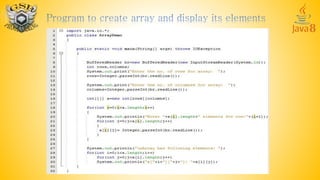
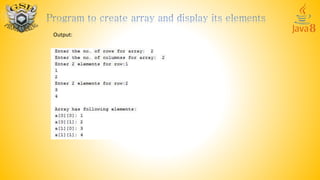


A multi-dimensional array in Java is an array whose elements are themselves arrays. This allows rows to vary in length. A multi-dimensional array can be declared using two or more sets of brackets, such as int[][] array, and each element is accessed using a corresponding number of index values. Elements are stored in contiguous memory locations, with the first dimension varying the fastest. Multi-dimensional arrays can be initialized using the new operator, or with an initializer list.


![Numeric Arrays [6]](https://cdn.slidesharecdn.com/ss_thumbnails/numeric-arrays-6-1233232810091749-3-thumbnail.jpg?width=640&height=640&fit=bounds)


