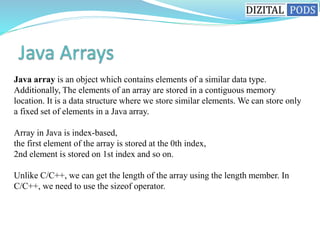
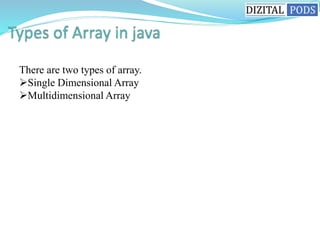
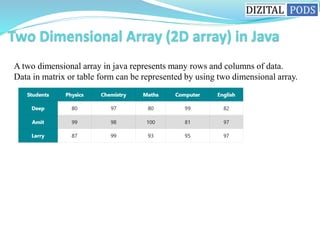
Java arrays allow storing of multiple elements of the same type. Elements are stored in contiguous memory locations and accessed via indexes. There are single and multi-dimensional arrays. Single dimensional arrays store elements in one row while multi-dimensional arrays can store elements in multiple rows and columns, represented as a table of data. Arrays must be declared with a size and individual elements can then be accessed via their index position.
![Syntax to Declare an Array in Java
dataType[] arr; (or)
dataType []arr; (or)
dataType arr[];
Instantiation of an Array in Java
arrayRefVar=new datatype[size];](https://image.slidesharecdn.com/dizitalpodssession6-arrays-220721043306-ae0780d9/85/dizital-pods-session-6-arrays-ppsx-3-320.jpg)
![int marks[ ] = { 90, 97, 95, 99, 100 }; // declare marks[ ] and initialize with five values.
int marks[ ]; // declare marks arrays.
marks = new int[5]; // allocating memory for storing 5 integer elements into an array.
int marks[ ]=new int[5]; // declare and allocate memory for 5 ints](https://image.slidesharecdn.com/dizitalpodssession6-arrays-220721043306-ae0780d9/85/dizital-pods-session-6-arrays-ppsx-4-320.jpg)
![int marks[ ] = new int[5];
marks[0] = 90;
marks[1] = 97;
marks[2] = 95;
marks[3] = 99;
marks[4] = 100;](https://image.slidesharecdn.com/dizitalpodssession6-arrays-220721043306-ae0780d9/85/dizital-pods-session-6-arrays-ppsx-5-320.jpg)
![package arraysProgram;
public class OneDArr {
public static void main(String[] args)
{
// Declare and initialize an array of five integer values.
int arr[] = {2, 4, 6, 8, 10};
// Display all five elements on the console.
for (int i = 0; i < arr.length; i++)
System.out.println(arr[i] + " ");
}
}](https://image.slidesharecdn.com/dizitalpodssession6-arrays-220721043306-ae0780d9/85/dizital-pods-session-6-arrays-ppsx-6-320.jpg)
![package arraysProgram;
public class OneDArr {
public static void main(String[] args)
{
// Declare and initialize an array of five integer values.
int[ ] num = {2, 4, 6, 8, 10, 12, 14};
// Display the length of array.
System.out.println("Length of array: " +num.length);
}
}](https://image.slidesharecdn.com/dizitalpodssession6-arrays-220721043306-ae0780d9/85/dizital-pods-session-6-arrays-ppsx-7-320.jpg)
![The syntax to create a two dimensional array and directly store elements at the time of
its declaration
int marks[ ] [ ] = {{50, 60, 78, 87, 95},
{98, 87, 75, 76, 99},
{98, 99, 97, 95, 100} };](https://image.slidesharecdn.com/dizitalpodssession6-arrays-220721043306-ae0780d9/85/dizital-pods-session-6-arrays-ppsx-9-320.jpg)
![In a two-dimensional array, an element is accessed through a row and column index.
2. The second way for creating a two dimensional array is that first declare an array
and then allocate memory for it using the new operator.
int[ ][ ] marks; // declaring a marks array. marks = new int[3][5]; // allocating
memory for storing 15 elements.
int[ ][ ] marks = new int[3][5];
JVM allocates memory for storing 15 integer values into the array. But so far, we have
not stored 15 values into an array.](https://image.slidesharecdn.com/dizitalpodssession6-arrays-220721043306-ae0780d9/85/dizital-pods-session-6-arrays-ppsx-10-320.jpg)
![package arraysProgram;
public class TwoDArrayExample {
public static void main(String[] args)
{
// Create a 2D array of int type.
int[ ][ ] x = {{1, 2, 3},
{4, 5, 6},
{7, 8, 9}
};
// Read and display array elements in a matrix form. System.out.println("Displaying
elements of 2D array in a matrix form:");
// Applying nested for loop.
for(int i = 0; i < 3; i++) // Outer for loop for Rows
{
for(int j = 0; j < 3; j++) // Columns in each row.
{
System.out.print(x[i][j]+ "t");
}
System.out.println(); // next line.
}
}
}](https://image.slidesharecdn.com/dizitalpodssession6-arrays-220721043306-ae0780d9/85/dizital-pods-session-6-arrays-ppsx-11-320.jpg)


![How Big Brands are Taking Your Traffic in Alberta [Data Inside].pptx](https://cdn.slidesharecdn.com/ss_thumbnails/howbigbrandsaretakingyourtrafficinalbertadatainside-260123180142-42d276f3-thumbnail.jpg?width=640&height=640&fit=bounds)


