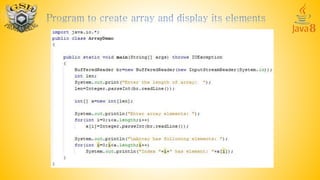
Array: One dimensional Array
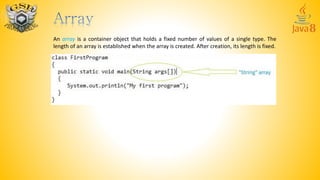
An array is a container object that holds a fixed number of values of a single type. The
length of an array is established when the array is created. After creation, its length is fixed.
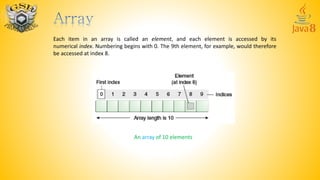
Each item in an array is called an element, and each element is accessed by its
numerical index. Numbering begins with 0. The 9th element, for example, would therefore
be accessed at index 8.
An array of 10 elements
Declaring a Variable to Refer to an array:
datatype[ ] arrayName; or
datatype [ ]arrayName; or
datatype arrayName[];
For example to declare an array of integer variables:
int[ ] a; or
int [ ]a; or
int a[ ]; this form is discouraged, please don’t use this
always use the first form i.e. datatype[ ] arrayName;
Similarly, you can declare arrays of other types:
byte[] anArrayOfBytes;
short[] anArrayOfShorts;
long[] anArrayOfLongs;
float[] anArrayOfFloats;
double[] anArrayOfDoubles;
boolean[] anArrayOfBooleans;
char[] anArrayOfChars;
String[] anArrayOfStrings;
One way to create an array is with the new operator.
int[ ] a; //declare a array variable
a=new int[10]; //create an array of 10 integers
we can also write:
a=new int[m]; //m must be initialised before
if we don’t use this statement then following error is printed:
Variable a may not have been initialized.
we can also combine the above two statements into one:
int[ ] a=new int[10];
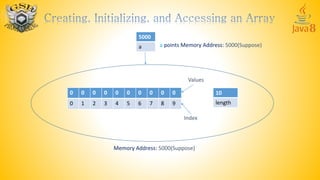
When we write this statement, a memory area for 10 integers is reserved. And a got the
reference to that memory area. All elements are assigned value zero. Also a variable length
is created which represents the total length of array i.e. total number of elements in an
array
Index
0 0 0 0 0 0 0 0 0 0
0 1 2 3 4 5 6 7 8 9
10
length
Values
Memory Address: 5000(Suppose)
5000
a a points Memory Address: 5000(Suppose)
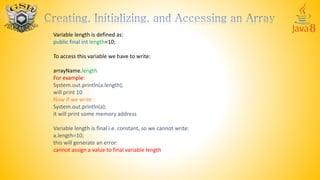
Variable length is defined as:
public final int length=10;
To access this variable we have to write:
arrayName.length
For example:
System.out.println(a.length);
will print 10
Now if we write :
System.out.println(a);
it will print some memory address
Variable length is final i.e. constant, so we cannot write:
a.length=10;
this will generate an error:
cannot assign a value to final variable length
Now to access any element we have to write:
a[index]
where index is from 0 to length-1
To access first element we have to write
a[0]
To access second element we have to write
a[1]
Similarly we can write a[9] to access last element. However, if we write a[10] it will
generate an exception at runtime: ArrayIndexOutOfBoundsException
We can initialize array elements as:
a[0]=1; a[6]=7;
a[1]=2; a[7]=8;
a[2]=3; a[8]=9;
a[3]=4; a[9]=10;
a[4]=5;
a[5]=6;
We can also create an array in following manner:
int[ ] a= { 1,2,3,4,5,6,7,8,9,10};
it will create the array with given element and automatically finds its length. So the
following statement:
System.out.println(a.length);
will print 10
To print all elements of array you can use the following loop:
for(int i=0;i<a.length;i++)
System.out.print(a[i]+” “);
it will print:
1 2 3 4 5 6 7 8 9 10
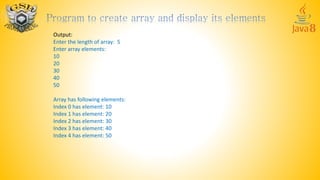
Output:
Enter the length of array: 5
Enter array elements:
10
20
30
40
50
Array has following elements:
Index 0 has element: 10
Index 1 has element: 20
Index 2 has element: 30
Index 3 has element: 40
Index 4 has element: 50
Output:
Enter the length of array: 5
Enter array elements:
10
20
30
40
50
Array has following elements:
Index 0 has element: 10
Index 1 has element: 20
Index 2 has element: 30
Index 3 has element: 40
Index 4 has element: 50
The System class has an arraycopy method that you can use to efficiently copy data from one array into
another:
public static void arraycopy(Object src, int srcPos, Object dest, int destPos, int length)
The two Object arguments specify the array to copy from and the array to copy to. The three int
arguments specify the starting position in the source array, the starting position in the destination
array, and the number of array elements to copy.
class ArrayCopyDemo {
public static void main(String[] args) {
char[] copyFrom = { 'd', 'e', 'c', 'a', 'f', 'f', 'e', 'i', 'n', 'a', 't', 'e', 'd' };
char[] copyTo = new char[7];
System.arraycopy(copyFrom, 2, copyTo, 0, 7);
System.out.println(new String(copyTo));
}
}
The output from this program is:
caffein
For more Visit:
http://gsb-programming.blogspot.in/search/label/Java

Learn Java Part 8

  • 1.
  • 2.
    An array isa container object that holds a fixed number of values of a single type. The length of an array is established when the array is created. After creation, its length is fixed.
  • 3.
    Each item inan array is called an element, and each element is accessed by its numerical index. Numbering begins with 0. The 9th element, for example, would therefore be accessed at index 8. An array of 10 elements
  • 4.
    Declaring a Variableto Refer to an array: datatype[ ] arrayName; or datatype [ ]arrayName; or datatype arrayName[]; For example to declare an array of integer variables: int[ ] a; or int [ ]a; or int a[ ]; this form is discouraged, please don’t use this always use the first form i.e. datatype[ ] arrayName; Similarly, you can declare arrays of other types: byte[] anArrayOfBytes; short[] anArrayOfShorts; long[] anArrayOfLongs; float[] anArrayOfFloats; double[] anArrayOfDoubles; boolean[] anArrayOfBooleans; char[] anArrayOfChars; String[] anArrayOfStrings;
  • 5.
    One way tocreate an array is with the new operator. int[ ] a; //declare a array variable a=new int[10]; //create an array of 10 integers we can also write: a=new int[m]; //m must be initialised before if we don’t use this statement then following error is printed: Variable a may not have been initialized. we can also combine the above two statements into one: int[ ] a=new int[10]; When we write this statement, a memory area for 10 integers is reserved. And a got the reference to that memory area. All elements are assigned value zero. Also a variable length is created which represents the total length of array i.e. total number of elements in an array
  • 6.
    Index 0 0 00 0 0 0 0 0 0 0 1 2 3 4 5 6 7 8 9 10 length Values Memory Address: 5000(Suppose) 5000 a a points Memory Address: 5000(Suppose)
  • 7.
    Variable length isdefined as: public final int length=10; To access this variable we have to write: arrayName.length For example: System.out.println(a.length); will print 10 Now if we write : System.out.println(a); it will print some memory address Variable length is final i.e. constant, so we cannot write: a.length=10; this will generate an error: cannot assign a value to final variable length
  • 8.
    Now to accessany element we have to write: a[index] where index is from 0 to length-1 To access first element we have to write a[0] To access second element we have to write a[1] Similarly we can write a[9] to access last element. However, if we write a[10] it will generate an exception at runtime: ArrayIndexOutOfBoundsException We can initialize array elements as: a[0]=1; a[6]=7; a[1]=2; a[7]=8; a[2]=3; a[8]=9; a[3]=4; a[9]=10; a[4]=5; a[5]=6;
  • 9.
    We can alsocreate an array in following manner: int[ ] a= { 1,2,3,4,5,6,7,8,9,10}; it will create the array with given element and automatically finds its length. So the following statement: System.out.println(a.length); will print 10 To print all elements of array you can use the following loop: for(int i=0;i<a.length;i++) System.out.print(a[i]+” “); it will print: 1 2 3 4 5 6 7 8 9 10
  • 11.
    Output: Enter the lengthof array: 5 Enter array elements: 10 20 30 40 50 Array has following elements: Index 0 has element: 10 Index 1 has element: 20 Index 2 has element: 30 Index 3 has element: 40 Index 4 has element: 50
  • 12.
    Output: Enter the lengthof array: 5 Enter array elements: 10 20 30 40 50 Array has following elements: Index 0 has element: 10 Index 1 has element: 20 Index 2 has element: 30 Index 3 has element: 40 Index 4 has element: 50
  • 13.
    The System classhas an arraycopy method that you can use to efficiently copy data from one array into another: public static void arraycopy(Object src, int srcPos, Object dest, int destPos, int length) The two Object arguments specify the array to copy from and the array to copy to. The three int arguments specify the starting position in the source array, the starting position in the destination array, and the number of array elements to copy. class ArrayCopyDemo { public static void main(String[] args) { char[] copyFrom = { 'd', 'e', 'c', 'a', 'f', 'f', 'e', 'i', 'n', 'a', 't', 'e', 'd' }; char[] copyTo = new char[7]; System.arraycopy(copyFrom, 2, copyTo, 0, 7); System.out.println(new String(copyTo)); } } The output from this program is: caffein
  • 14.