
![Introduction
• Sequential collection of elements of the same type
• used to store a collection of data
• consist of contiguous memory locations
• lowest address corresponds to the first element and the highest
address to the last element.
First Element Last Element
Number[0] Number[1] Number[2] Number[3] Number[4] ………](https://image.slidesharecdn.com/t108array1-141120021724-conversion-gate01/85/array-2-320.jpg)
![One-Dimensional Array
• Declaration
int[] intArray;
• Initializing an Array
int[] iArr = new int [10];
• Assigning Values to an Array
int[] iArr = int double[10];
balance[0] = 450;
int[] iArr = { 234, 45, 34};
int [] marks = new int [5] { 99, 98, 92, 97, 95};](https://image.slidesharecdn.com/t108array1-141120021724-conversion-gate01/85/array-4-320.jpg)
![Two-Dimensional Array
• Initializing
int [,] a = int [3,4] = {
{0, 1, 2, 3} , /* initializers for row indexed by 0 */
{4, 5, 6, 7} , /* initializers for row indexed by 1 */
{8, 9, 10, 11} /* initializers for row indexed by 2 */
};
• Accessing
int val = a[2,3];](https://image.slidesharecdn.com/t108array1-141120021724-conversion-gate01/85/array-5-320.jpg)
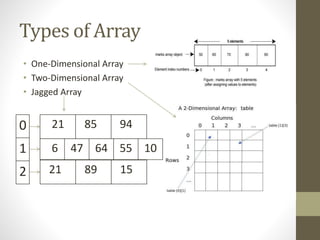
![Jagged Array
• is an array of arrays
• elements of a jagged array can be of different dimensions and
sizes
• Jagged Array for 1-D Array
Int [][] jaggedArray = new int[3][];
jaggedArray[0] = new int[] { 1, 3, 5, 7, 9 };
jaggedArray[1] = new int[] { 0, 2, 4, 6 };
jaggedArray[2] = new int[] { 11, 22 };
• Jagged Array for 2-D Array
int[][,] jaggedArray4 = new int [3][,] {
new int[,] { {1,3}, {5,7} },
new int[,] { {0,2}, {4,6}, {8,10} },
new int[,] { {11,22}, {99,88}, {0,9} }
};](https://image.slidesharecdn.com/t108array1-141120021724-conversion-gate01/85/array-6-320.jpg)

![C# Jagged vs. 2D Array
Note 1:
• Jagged Array are faster than 2D Array
• Rectangular Jagged Array takes more memory than 2D Array.
//Program that tests jagged array memory: C#
using System;
class Program
{ static void Main()
{ long b1 = GC.GetTotalMemory(true);
// This program tests the memory usage of a 1000
x 100 element jagged array.
int[][] jagged = new int[1000][];
for (int i = 0; i < 1000; i++)
{ jagged[i] = new int[100]; }
long b2 = GC.GetTotalMemory(true);
jagged[0][0] = 0;
Console.WriteLine("{0} bytes (jagged 1000 x
100)", b2 - b1); } }
Output 416028 bytes (jagged 1000 x 100)
Program that tests 2D array memory: C#
using System;
class Program
{ static void Main()
{ long b1 = GC.GetTotalMemory(true);
// This tests the memory usage of a 1000 x
100 element two-dimensional array. //
int[,] array = new int[1000, 100];
long b2 = GC.GetTotalMemory(true);
array[0, 0] = 0;
Console.WriteLine("{0} bytes (2D 1000 x
100)", b2 - b1); } }
Output 400032 bytes (2D 1000 x 100)](https://image.slidesharecdn.com/t108array1-141120021724-conversion-gate01/85/array-8-320.jpg)



The document discusses different types of arrays in C#, including one-dimensional, two-dimensional, and jagged arrays. It describes how to declare, initialize, and access array elements. Jagged arrays are arrays of arrays that can hold elements of different sizes, while two-dimensional arrays have a fixed rectangular structure. The document also compares memory usage between jagged and two-dimensional arrays, with jagged generally using more memory. Finally, it briefly introduces the Array class for creating and manipulating arrays.


