Reading Inputs:String, Character, Integer & Floating Values
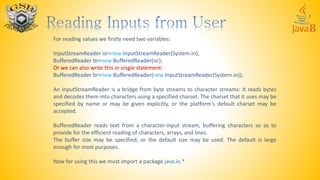
For reading values we firstly need two variables:
InputStreamReader isr=new InputStreamReader(System.in);
BufferedReader br=new BufferedReader(isr);
Or we can also write this in single statement:
BufferedReader br=new BufferedReader(new InputStreamReader(System.in));
An InputStreamReader is a bridge from byte streams to character streams: It reads bytes
and decodes them into characters using a specified charset. The charset that it uses may be
specified by name or may be given explicitly, or the platform's default charset may be
accepted.
BufferedReader reads text from a character-input stream, buffering characters so as to
provide for the efficient reading of characters, arrays, and lines.
The buffer size may be specified, or the default size may be used. The default is large
enough for most purposes.
Now for using this we must import a package java.io.*
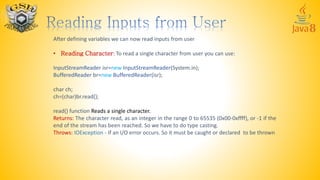
After defining variables we can now read inputs from user
• Reading Character: To read a single character from user you can use:
InputStreamReader isr=new InputStreamReader(System.in);
BufferedReader br=new BufferedReader(isr);
char ch;
ch=(char)br.read();
read() function Reads a single character.
Returns: The character read, as an integer in the range 0 to 65535 (0x00-0xffff), or -1 if the
end of the stream has been reached. So we have to do type casting.
Throws: IOException - If an I/O error occurs. So it must be caught or declared to be thrown
import java.io.*;
class First
{
public static void main(String args[]) throws IOException
{
InputStreamReader isr=new InputStreamReader(System.in);
BufferedReader br=new BufferedReader(isr);
char ch;
System.out.print(“Enter a Character: ");
ch=(char)br.read();
System.out.println(“Character read: "+ch);
}
}
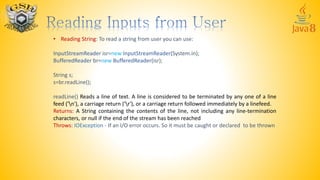
• Reading String: To read a string from user you can use:
InputStreamReader isr=new InputStreamReader(System.in);
BufferedReader br=new BufferedReader(isr);
String s;
s=br.readLine();
readLine() Reads a line of text. A line is considered to be terminated by any one of a line
feed ('n'), a carriage return ('r'), or a carriage return followed immediately by a linefeed.
Returns: A String containing the contents of the line, not including any line-termination
characters, or null if the end of the stream has been reached
Throws: IOException - If an I/O error occurs. So it must be caught or declared to be thrown
import java.io.*;
class First
{
public static void main(String args[]) throws IOException
{
InputStreamReader isr=new InputStreamReader(System.in);
BufferedReader br=new BufferedReader(isr);
String s;
System.out.print(“Enter a String: ");
s=br.readLine();
System.out.println(“String read: "+s);
}
}
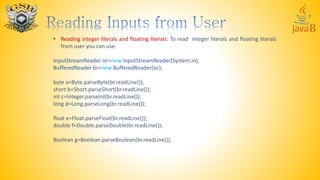
• Reading integer literals and floating literals: To read integer literals and floating literals
from user you can use:
InputStreamReader isr=new InputStreamReader(System.in);
BufferedReader br=new BufferedReader(isr);
byte a=Byte.parseByte(br.readLine());
short b=Short.parseShort(br.readLine());
int c=Integer.parseInt(br.readLine());
long d=Long.parseLong(br.readLine());
float e=Float.parseFloat(br.readLine());
double f=Double.parseDouble(br.readLine());
Boolean g=Boolean.parseBoolean(br.readLine());

Learn Java Part 4

  • 1.
    Reading Inputs:String, Character,Integer & Floating Values
  • 2.
    For reading valueswe firstly need two variables: InputStreamReader isr=new InputStreamReader(System.in); BufferedReader br=new BufferedReader(isr); Or we can also write this in single statement: BufferedReader br=new BufferedReader(new InputStreamReader(System.in)); An InputStreamReader is a bridge from byte streams to character streams: It reads bytes and decodes them into characters using a specified charset. The charset that it uses may be specified by name or may be given explicitly, or the platform's default charset may be accepted. BufferedReader reads text from a character-input stream, buffering characters so as to provide for the efficient reading of characters, arrays, and lines. The buffer size may be specified, or the default size may be used. The default is large enough for most purposes. Now for using this we must import a package java.io.*
  • 3.
    After defining variableswe can now read inputs from user • Reading Character: To read a single character from user you can use: InputStreamReader isr=new InputStreamReader(System.in); BufferedReader br=new BufferedReader(isr); char ch; ch=(char)br.read(); read() function Reads a single character. Returns: The character read, as an integer in the range 0 to 65535 (0x00-0xffff), or -1 if the end of the stream has been reached. So we have to do type casting. Throws: IOException - If an I/O error occurs. So it must be caught or declared to be thrown
  • 4.
    import java.io.*; class First { publicstatic void main(String args[]) throws IOException { InputStreamReader isr=new InputStreamReader(System.in); BufferedReader br=new BufferedReader(isr); char ch; System.out.print(“Enter a Character: "); ch=(char)br.read(); System.out.println(“Character read: "+ch); } }
  • 5.
    • Reading String:To read a string from user you can use: InputStreamReader isr=new InputStreamReader(System.in); BufferedReader br=new BufferedReader(isr); String s; s=br.readLine(); readLine() Reads a line of text. A line is considered to be terminated by any one of a line feed ('n'), a carriage return ('r'), or a carriage return followed immediately by a linefeed. Returns: A String containing the contents of the line, not including any line-termination characters, or null if the end of the stream has been reached Throws: IOException - If an I/O error occurs. So it must be caught or declared to be thrown
  • 6.
    import java.io.*; class First { publicstatic void main(String args[]) throws IOException { InputStreamReader isr=new InputStreamReader(System.in); BufferedReader br=new BufferedReader(isr); String s; System.out.print(“Enter a String: "); s=br.readLine(); System.out.println(“String read: "+s); } }
  • 7.
    • Reading integerliterals and floating literals: To read integer literals and floating literals from user you can use: InputStreamReader isr=new InputStreamReader(System.in); BufferedReader br=new BufferedReader(isr); byte a=Byte.parseByte(br.readLine()); short b=Short.parseShort(br.readLine()); int c=Integer.parseInt(br.readLine()); long d=Long.parseLong(br.readLine()); float e=Float.parseFloat(br.readLine()); double f=Double.parseDouble(br.readLine()); Boolean g=Boolean.parseBoolean(br.readLine());