Downloaded 25 times

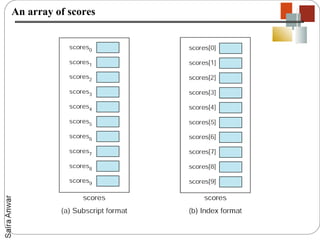
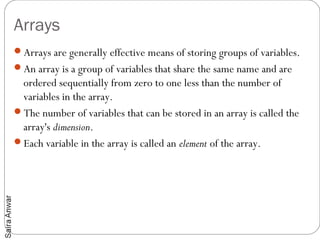
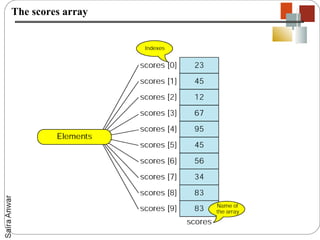
![Declaring Arrays
Like other variables in Java, an array must have a specific type like
byte, int, String or double.
Only variables of the appropriate type can be stored in an array.
You cannot have an array that will store both ints and Strings, for
instance.
Like all other variables in Java an array must be declared.
When you declare an array variable you suffix the type with [] to
indicate that this variable is an array. Here are some examples:
int[] k;
float[] yt;
String[] names;](https://image.slidesharecdn.com/comp102-lec8-121104114538-phpapp02/85/Comp102-lec-8-9-320.jpg)
![Allocating Arrays
Declaring an array merely says what it is. It does not create the array.
To actually create the array (or any other object) use the new operator.
When we create an array we need to tell the compiler how many
elements will be stored in it.
Here's how we'd create the variables declared above
new k = new int[3];
yt = new float[7];
names = new String[50];
The numbers in the brackets specify the dimension of the array; i.e. how
many slots it has to hold values. With the dimensions above k can hold
three ints, yt can hold seven floats and names can hold fifty Strings.](https://image.slidesharecdn.com/comp102-lec8-121104114538-phpapp02/85/Comp102-lec-8-10-320.jpg)
![Initializing Arrays
Individual elements of the array are referenced by the array name and by an
integer which represents their position in the array.
The numbers we use to identify them are called subscripts or indexes into the
array.
Subscripts are consecutive integers beginning with 0.
Thus the array k above has elements k[0], k[1], and k[2].
Since we started counting at zero there is no k[3], and trying to access it will
generate an ArrayIndexOutOfBoundsException.
Here's how we'd store values in the arrays we've been working with:
k[0] = 2;
k[1] = 5;
k[2] = -2;
yt[6] = 7.5f;
names[4] = "Fred";](https://image.slidesharecdn.com/comp102-lec8-121104114538-phpapp02/85/Comp102-lec-8-11-320.jpg)
![Loop for initialization
For even medium sized arrays, it's unwieldy to specify each
element individually. It is often helpful to use for loops to initialize
the array. For instance here is a loop that fills an array with the
squares of the numbers from 0 to 100.
float[] squares = new float[101];
for (int i=0; i <= 100; i++)
{
squares[i] = i*2;
}](https://image.slidesharecdn.com/comp102-lec8-121104114538-phpapp02/85/Comp102-lec-8-12-320.jpg)
![Shortcuts
We can declare and allocate an array at the same time like this:
int[] k = new int[3];
float[] yt = new float[7];
String[] names = new String[50];
We can even declare, allocate, and initialize an array at the same
time providing a list of the initial values inside brackets like so:
int[] k = {1, 2, 3};
float[] yt = {0.0f, 1.2f, 3.4f, -9.87f, 65.4f, 0.0f, 567.9f};](https://image.slidesharecdn.com/comp102-lec8-121104114538-phpapp02/85/Comp102-lec-8-13-320.jpg)
![Passing Array to functions
public class test
{
public static void main(String [] args)
{
int [] x = {1,2,3};
print(x);
}
static void print(int [] y)
{
for(int i=0;i<3;i++)
{
System.out.println(y[i]);
}
}
}](https://image.slidesharecdn.com/comp102-lec8-121104114538-phpapp02/85/Comp102-lec-8-14-320.jpg)
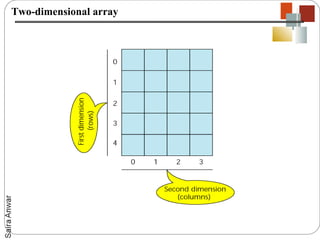
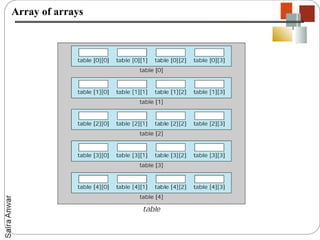
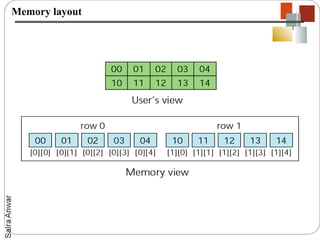
![Declaring, Allocating and Initializing Two
Dimensional Arrays
Two dimensional arrays are declared, allocated and initialized much like
one dimensional arrays.
However we have to specify two dimensions rather than one, and we
typically use two nested for loops to fill the array.
int[][] M;
M = new int[4][5];
for (int row=0; row < 4; row++)
{
for (int col=0; col < 5; col++)
{
M[row][col] = row+col;
}
}](https://image.slidesharecdn.com/comp102-lec8-121104114538-phpapp02/85/Comp102-lec-8-18-320.jpg)
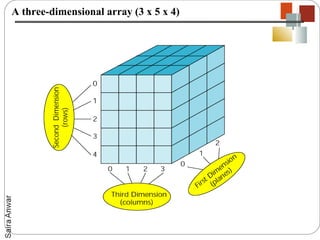
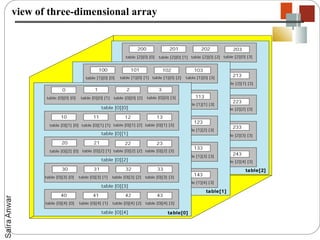
![Syntax of three dimensional Arrays
The syntax for three dimensional arrays is a direct extension of that
for two-dimensional arrays. Here's a program that declares,
allocates and initializes a three-dimensional array:
int[][][] M;
M = new int[4][5][3];
for (int row=0; row < 4; row++) {
for (int col=0; col < 5; col++) {
for (int ver=0; ver < 3; ver++) {
M[row][col][ver] = row+col+ver;
}
}
}](https://image.slidesharecdn.com/comp102-lec8-121104114538-phpapp02/85/Comp102-lec-8-25-320.jpg)

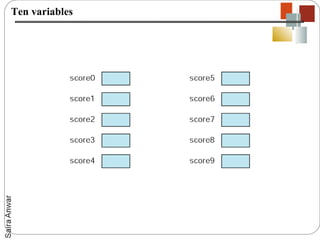
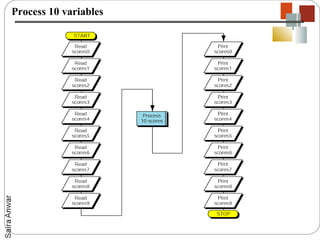
This document discusses arrays in Java. It defines arrays as groups of variables that share the same name and are ordered sequentially. The key points covered include: - Arrays have a dimension that specifies how many elements they can store. - Arrays are declared with a type and size, allocated with "new", and initialized by assigning values to elements indexed from 0. - Multidimensional arrays like 2D arrays of arrays can be used to store tabular data and are initialized with nested for loops. - Arrays can be passed to methods and multi-dimensional arrays of 3+ dimensions are also supported in Java syntax, though may not be the best data structure.


