



HÖNNUN OG SMÍÐI HUGBÚNAÐAR 2015
L20 Scalability
Agenda
▪ Evolution - where are we today?
▪ Requirements of 21st century web applications
▪ Session State
▪ Distribution Strategies
▪ Scale Cube
▪ Eventual Consistency
– CAP Theorm
▪ Real World Example
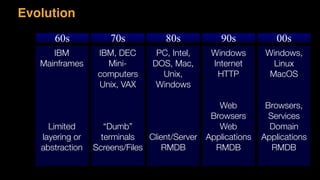
Evolution
60s 70s 80s 90s 00s
IBM
Mainframes
Limited
layering or

abstraction
IBM, DEC
Mini-

computers
Unix, VAX
“Dumb”
terminals
Screens/Files
PC, Intel,
DOS, Mac, 

Unix, 

Windows

Client/Server
RMDB
Windows
Internet
HTTP
Web 

Browsers
Web

Applications
RMDB
Windows,

Linux
MacOS
Browsers,
Services
Domain

Applications
RMDB
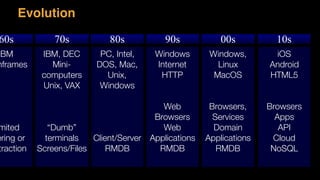
Evolution
60s 70s 80s 90s 00s
IBM
nframes
mited
ering or

traction
IBM, DEC
Mini-

computers
Unix, VAX
“Dumb”
terminals
Screens/Files
PC, Intel,
DOS, Mac, 

Unix, 

Windows

Client/Server
RMDB
Windows
Internet
HTTP
Web 

Browsers
Web

Applications
RMDB
Windows,

Linux
MacOS
Browsers,
Services
Domain

Applications
RMDB
iOS
Android
HTML5
Browsers
Apps
API
Cloud
NoSQL
10s
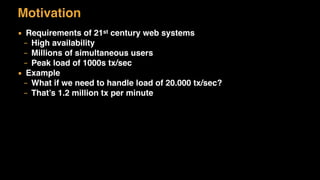
Motivation
▪ Requirements of 21st century web systems
– High availability
– Millions of simultaneous users
– Peak load of 1000s tx/sec
▪ Example
– What if we need to handle load of 20.000 tx/sec?
– That’s 1.2 million tx per minute
Session State
Business Transactions
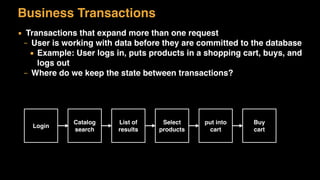
▪ Transactions that expand more than one request
– User is working with data before they are committed to the database
• Example: User logs in, puts products in a shopping cart, buys, and
logs out
– Where do we keep the state between transactions?
Login
Catalog
search
List of
results
Select
products
put into
cart
Buy
cart
State
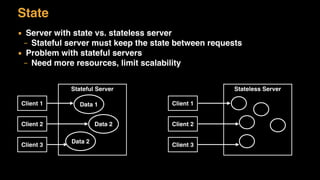
▪ Server with state vs. stateless server
– Stateful server must keep the state between requests
▪ Problem with stateful servers
– Need more resources, limit scalability
Client 1
Client 2
Client 3
Stateful Server Stateless Server
Client 1
Client 2
Client 3
Data 1
Data 2
Data 2
Stateless Servers
▪ Stateless servers scale much better
▪ Use fewer resources
▪ Example:
– View book information
– Each request is separate
▪ REST was designed to be stateless
Stateful Servers
▪ Stateful servers are the norm
▪ Not easy to get rid of them
▪ Problem: they take resources and cause server affinity
▪ Example:
– 100 users make request every 10 second, each request takes 1
second
– One stateful object per user
– Object are Idle 90% of the time
Session State
▪ State that is relevant to a session
– State used in business transactions and belong to a specific client
– Data structure belonging to a client
– May not be consistent until they are persisted
▪ Session is distinct from record data
– Record data is a long-term persistent data in a database
– Session state might en up as record data
Question:
	 Where	do	you	store	the	session?
EXCERISE
Ways to Store Session State
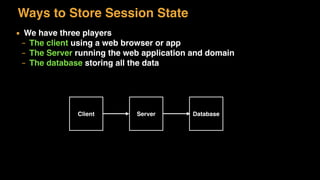
▪ We have three players
– The client using a web browser or app
– The Server running the web application and domain
– The database storing all the data
Client Server Database
Ways to Store Session State
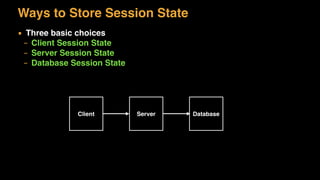
▪ Three basic choices
– Client Session State
– Server Session State
– Database Session State
Client Server Database
Client Session State
Store session state on the client
▪ How It Works
– Desktop applications can store the state in memory
– Web solutions can store state in cookies, hide it in the web page, or
use the URL
– Data Transfer Object can be used
– Session ID is the minimum client state
– Works well with REST - Representational State Transfer
Client Session State
▪ When to Use It
– Works well if server is stateless
– Maximal clustering and failover resiliency
▪ Drawbacks
– Does not work well for large amount of data
– Data gets lost if client crashes
– Security issues
Server Session State
Store session state on a server in a 

serialised form
▪ How It Works
– Session Objects – data structures on the server keyed to session Id
▪ Format of data
– Can be binary, objects or XML
▪ Where to store session
– Memory, application server, file or local or in-memory database
Server Session State
▪ Specific Implementations
– HttpSession
– Stateful Session Beans – EJB
▪ When to Use It
– Simplicity, it is easy to store and receive data
▪ Drawbacks
– Data can get lost if server goes down
– Clustering and session migration becomes difficult
– Space complexity (memory of server)
– Inactive sessions need to be cleaned up
Database Session State
Store session data as committed data in the database
▪ How It Works
– Session State stored in the database
– Can be stored as temporary data to distinguish from committed
record data
▪ Pending session data
– Pending session data might violate integrity rules
– Use of pending field or pending tables
• When pending session data becomes record data it is save in the
real tables
Database Session State
▪ When to Use It
– Improved scalability – easy to add servers
– Works well in clusters
– Data is persisted, even if data centre goes down
▪ Drawbacks
– Database becomes a bottleneck
– Need of clean up procedure of pending data that did not become
record data – user just left
What about dead sessions?
▪ Client session
– Not our problem
▪ Server session
– Web servers will send inactive message upon timeout
▪ Database session
– Need to be clean up
– Retention routines
Caching
▪ Caching is temporary data that is kept in memory between requests
for performance reasons
– Not session data
– Can be thrown away and retrieved any time
▪ Saves the round-trip to the database
▪ Can become stale or old and out-dated
– Distributed caching (message driven cache) is one way to solve that
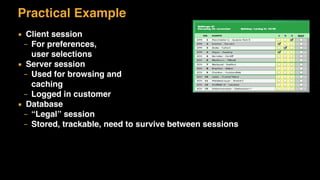
Practical Example
▪ Client session
– For preferences, 

user selections
▪ Server session
– Used for browsing and

caching
– Logged in customer
▪ Database
– “Legal” session
– Stored, trackable, need to survive between sessions
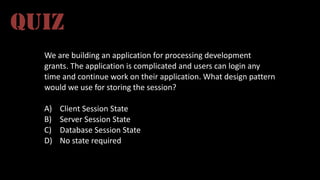
We	are	building	an	application	for	processing	development	
grants.	The	application	is	complicated	and	users	can	login	any	
time	and	continue	work	on	their	application.	What	design	pattern	
would	we	use	for	storing	the	session?
A) Client	Session	State
B) Server	Session	State
C) Database	Session	State
D) No	state	required
QUIZ
Distribution Strategies
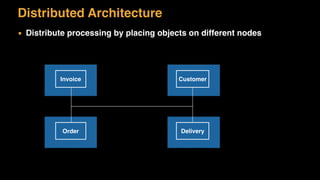
Distributed Architecture
▪ Distribute processing by placing objects on different nodes
Invoice
Order
Customer
Delivery
Distributed Architecture
▪ Distribute processing by placing objects on different nodes
▪ Benefits
– Load is distributed between different nodes giving overall better
performance
– It is easy to add new nodes
– Middleware products make calls between nodes transparent
But is this true?
Distributed Architecture
▪ Distribute processing by placing objects different nodes
“This design sucks like an inverted hurricane” – Fowler
Fowler’s First Law of Distributed Object Design: Don't Distribute your
objects!
Remote and Local Interfaces
▪ Local calls
– Calls between components on the same node are local
▪ Remote calls
– Calls between components on different machines are remote
▪ Objects Oriented programming
– Promotes fine-grained objects
Remote and Local Interfaces
▪ Local call within a process is very, very fast
▪ Remote call between two processes is order-of-magnitude s l o w e r
– Marshalling and un-marshalling of objects
– Data transfer over the network
▪ With fine-grained object oriented design, remote components can kill
performance
▪ Example
– Address object has get and set method for each member, city,
street, and so on
– Will result in many remote calls
Remote and Local Interfaces
▪ With distributed architectures, interfaces must be course-grained
– Minimising remote function calls
▪ Service Architecture has to have course-grained APIs and combine
several objects
– Avoid fine-grained interfaces
▪ Example
– Instead of having getters and setters for each field, bulk assessors
are used
Distributed Architecture
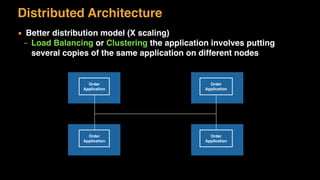
▪ Better distribution model (X scaling)
– Load Balancing or Clustering the application involves putting
several copies of the same application on different nodes
Order
Application
Order
Application
Order
Application
Order
Application
Where You Have to Distribute
▪ As architect, try to eliminate as many remote call as possible
– If this cannot be archived choose carefully where the distribution
boundaries lay
▪ Distribution Boundaries
– Client/Server
– Server/Database
– Web Server/Application Server
– Separation due to vendor differences
– There might be some genuine reason
Optimizing Remote Calls
▪ We know remote calls are expensive
▪ How can we minimize the cost of remote calls?
▪ The overhead is
– Marshaling or serializing data
– Network transfer
▪ Put as enough data into the call
– Course grained call
– Use binary protocols – avoid XML
How to Model Services
Term microservices is sometimes used, but is misleading
Has nothing to do with lines of code
How big is a service?
Example definition:
Balance between integration points and size
Time: Can be rewritten in one iteration (2 weeks)
Features: All things that belong together
Loose Coupling
When services are loosely coupled, a change in one
service should not require a change in another
A loosely coupled service knows as little about the
services with which it collaborates
Source: Building Microservices
High Cohesion
We want related behaviour to sit together, and unrelated
to sit elsewhere
Group together stuff the belongs together, as in SRP
If you want to change something, it should change in one
place, as in DRY
Source: Building Microservices
Bounded Context
Concept that comes from Domain-driven Design (DDD)
Any given domain contains multiple bounded contexts,
and within each are “models” or “things” (or “objects”)
that do not need to be communicated outside
that are shared with other bounded contexts
The shared objects are define the explicit interface to the
bounded context
Source: Building Microservices
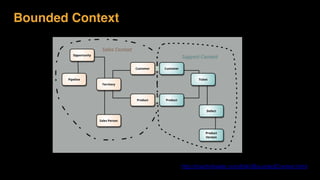
Bounded Context
Source: Martin Fowler, BoundedContext
http://martinfowler.com/bliki/BoundedContext.html
The Right Balance
▪ In Service Architecture, we want to split by functionality (Y Scaling)
– Boundaries must be well designed – objects that work together are
grouped together
– APIs must be sufficiently course grained
The Scale Cube
Scaling the application
▪ Today’s web sites must handle multiple simulations users
▪ Examples:
– All web based apps must handle several users
– mbl.is handles >200.000 users/day
– Betware must handle up to 100.000 simultaneous users and 1,2
million tx/min for terminal system peak load
The World we Live in
▪ Average number of tweets per day 500 million
▪ Total number of minutes spent on Facebook each month
700 billion
▪ SnapChat has 100 million daily active users who send 1
billion snaps each day
▪ Instagram has over 200 million users on the platform
who send 60 million photos per day
▪ Number of messages sent by WhatsApp: 30 billion
Scalability
▪ Scalability is the ability of a system, network, or process to handle a
growing amount of work in a capable manner or its ability to be
enlarged to accommodate that growth
▪ With more load, how does the load of the system vary?
Scalability
▪ Scalability is the measure of how adding resource (usually hardware)
affects the performance
– Vertical scalability (up) – increase server power
– Horizontal scalability (out) – increase the servers
▪ Session migration
– Move the session for one server to another
▪ Server affinity
– Keep the session on one server and make the client always use the
same server
Scalability
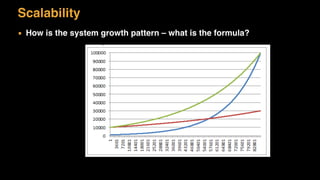
▪ How is the system growth pattern – what is the formula?
Scaling Applications
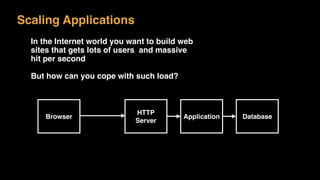
In the Internet world you want to build web
sites that gets lots of users and massive
hit per second
But how can you cope with such load?
Browser
HTTP
Server
Application Database
The Scaling Problem
▪ We need to handle number of request to our system
▪ There are two ways to scale:
– Vertically or scale up:Add more capacity to your hardware, more memory
for example
– Horizontal or scale out:Add more machines
Scaling Up
▪ This is the traditional approach for many monolithic systems
▪ Use a big powerful system
▪ Pros:
– Easy to do, easy to understand
– One memory space and one database
▪ Cons:
– Has very hard limits
– Does not work for the 21st century requirements
Scaling Out (X scaling)
▪ This can work for monolithic systems if the database requirements is
not high
▪ Use a many machines and distribute the load
– Have one big powerful database
▪ Pros:
– Scales well – handles much more load
– Shared database
▪ Cons:
– Session management is a challenge
– Database is a bottleneck
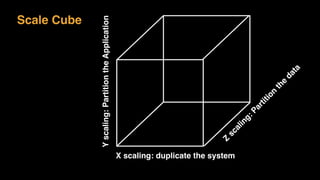
Scale Cube
X scaling: duplicate the system
Z
scaling:Partition
the
data
Yscaling:PartitiontheApplication
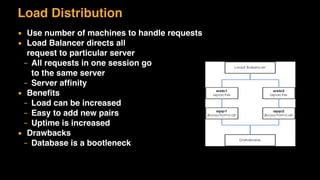
Load Distribution
▪ Use number of machines to handle requests
▪ Load Balancer directs all

request to particular server
– All requests in one session go

to the same server
– Server affinity
▪ Benefits
– Load can be increased
– Easy to add new pairs
– Uptime is increased
▪ Drawbacks
– Database is a bootleneck
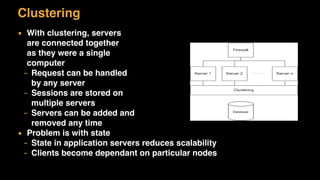
Clustering
▪ With clustering, servers

are connected together

as they were a single

computer
– Request can be handled

by any server
– Sessions are stored on

multiple servers
– Servers can be added and

removed any time
▪ Problem is with state
– State in application servers reduces scalability
– Clients become dependant on particular nodes
Clustering State
▪ Application functionality
– Handle it yourself, but this is complicated, not worth the effort
▪ Shared resources
– Well-known pattern (Database Session State)
– Problem with bottlenecks limits scalablity
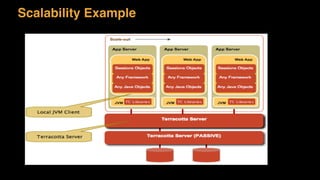
▪ Clustering Middleware
– Several solutions, for example JBoss, Terracotta
▪ Clustering JVM or network
– Low levels, transparent to applications
Scalability Example
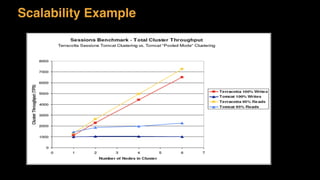
Scalability Example
Amdahl’s Law
Amdahl’s Law
▪ This law is used to find the maximum expected improvement to an
overall system when only part of the system is improved
▪ In parallel computing, it states that a small portion of the program
which cannot be parallelized will limit the overall speed-up available
from parallelization
Amdahl’s Law
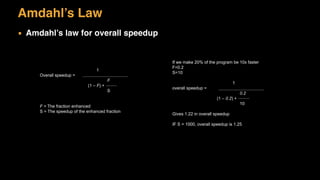
▪ Amdahl’s law for overall speedup
1
Overall speedup =
F
(1 – F) +
S
F = The fraction enhanced
S = The speedup of the enhanced fraction
If we make 20% of the program be 10x faster
F=0.2
S=10
1
overall speedup =
0.2
(1 – 0.2) +
10
Gives 1.22 in overall speedup
IF S = 1000, overall speedup is 1.25
Amdahl’s Corollary
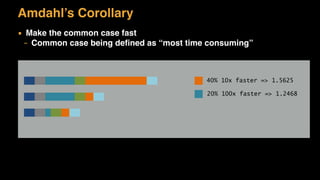
▪ Make the common case fast
– Common case being defined as “most time consuming”
40% 10x faster => 1.5625
20% 100x faster => 1.2468
The Optimization Process
▪ There is only one way to test scalability: Measure
– Find the bottleneck (the common case)
– Hypothesize about improvement
– Make optimization – change only one thing a time
– Measure again and repeat
Eventual Consistency
Transactions
▪ Transaction is a bounded sequence of work
– Both start and finish is well defined
– Transaction must complete on an all-or-nothing basis
▪ All resources are in consistent state before and after the transaction
▪ Example: Database transaction
– Withdraw data from account
– Buy the product
– Update stock information
▪ Transactions must have ACID properties
ACID properties
▪ Atomicity
– All steps are completed successfully – or rolled back
▪ Consistency
– Data is consistent at the start and the end of the transaction
▪ Isolation
– Transaction is not visible to any other until that transaction commits
successfully
▪ Durability
– Any results of a committed transaction must be made permanent
Transactional Resources
▪ Anything that is transactional
– Use transaction to control concurrency
– Databases, printers, message queues
▪ Transaction must be as short as possible
– Provides greatest throughput
– Should not span multiple requests
– Long transactions span multiple request
Transaction Isolations and Liveness
▪ Transactions lock tables (or resources)
– Need to provide isolation to guarantee correctness
– Liveness suffers
– We need to control isolation
▪ Serializable Transactions
– Full isolation
– Transactions are executed serially, one after the other
– Benefits: Guarantees correctness
– Drawbacks: Can seriously damage liveness and performance
Isolation Level
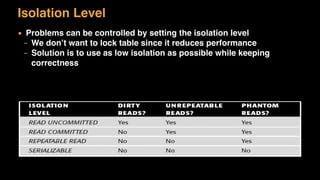
▪ Problems can be controlled by setting the isolation level
– We don’t want to lock table since it reduces performance
– Solution is to use as low isolation as possible while keeping
correctness
Problem
▪ Serialization crates scalability bottlenecks
▪ Applications that support fully secure serialization of using RMDB
have hard time with scale
▪ Can we scarify something?
– Can we relax these requirements?
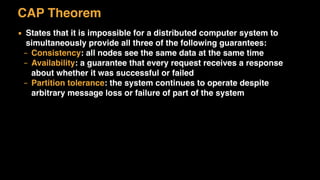
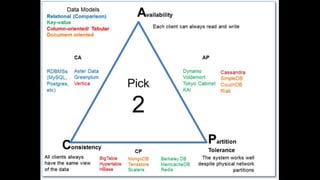
CAP Theorem
▪ States that it is impossible for a distributed computer system to
simultaneously provide all three of the following guarantees:
– Consistency: all nodes see the same data at the same time
– Availability: a guarantee that every request receives a response
about whether it was successful or failed
– Partition tolerance: the system continues to operate despite
arbitrary message loss or failure of part of the system
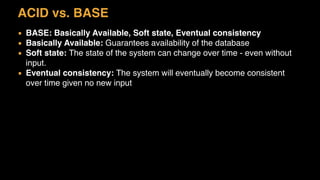
ACID vs. BASE
▪ BASE: Basically Available, Soft state, Eventual consistency
▪ Basically Available: Guarantees availability of the database
▪ Soft state: The state of the system can change over time - even without
input.
▪ Eventual consistency: The system will eventually become consistent
over time given no new input
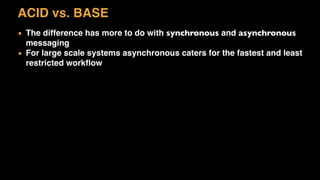
ACID vs. BASE
▪ The difference has more to do with synchronous and asynchronous
messaging
▪ For large scale systems asynchronous caters for the fastest and least
restricted workflow
Asynchronous
▪ Eventual Consistency example
Web	Layer	
Requests
Approve
RMDB
MsgQ
Process
Measuring Scalability
▪ The only meaningful way to know about system’s performance is to
measure it
▪ Performance Tools can help this process
– Give indication of scalability
– Identify bottlenecks
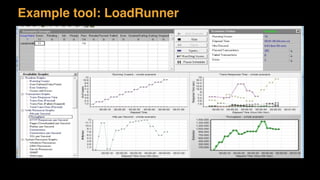
Example tool: LoadRunner
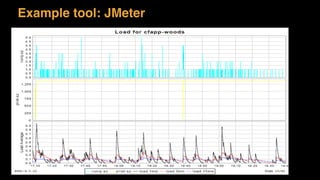
Example tool: JMeter
Summary
▪ Requirements of 21st century web applications
– Availability, Eventual consistency
▪ Session State
– Client, Server, Database
▪ Distribution Strategies
– Don’t distribute fine grained object – identify bouneries
▪ The Scale Cube
▪ Eventual Consistency
– CAP Theorm
▪ Real World Example

L20 Scalability

  • 1.
    HÖNNUN OG SMÍÐIHUGBÚNAÐAR 2015 L20 Scalability
  • 2.
    Agenda ▪ Evolution -where are we today? ▪ Requirements of 21st century web applications ▪ Session State ▪ Distribution Strategies ▪ Scale Cube ▪ Eventual Consistency – CAP Theorm ▪ Real World Example
  • 3.
    Evolution 60s 70s 80s90s 00s IBM Mainframes Limited layering or
 abstraction IBM, DEC Mini-
 computers Unix, VAX “Dumb” terminals Screens/Files PC, Intel, DOS, Mac, 
 Unix, 
 Windows
 Client/Server RMDB Windows Internet HTTP Web 
 Browsers Web
 Applications RMDB Windows,
 Linux MacOS Browsers, Services Domain
 Applications RMDB
  • 4.
    Evolution 60s 70s 80s90s 00s IBM nframes mited ering or
 traction IBM, DEC Mini-
 computers Unix, VAX “Dumb” terminals Screens/Files PC, Intel, DOS, Mac, 
 Unix, 
 Windows
 Client/Server RMDB Windows Internet HTTP Web 
 Browsers Web
 Applications RMDB Windows,
 Linux MacOS Browsers, Services Domain
 Applications RMDB iOS Android HTML5 Browsers Apps API Cloud NoSQL 10s
  • 5.
    Motivation ▪ Requirements of21st century web systems – High availability – Millions of simultaneous users – Peak load of 1000s tx/sec ▪ Example – What if we need to handle load of 20.000 tx/sec? – That’s 1.2 million tx per minute
  • 6.
  • 7.
    Business Transactions ▪ Transactionsthat expand more than one request – User is working with data before they are committed to the database • Example: User logs in, puts products in a shopping cart, buys, and logs out – Where do we keep the state between transactions? Login Catalog search List of results Select products put into cart Buy cart
  • 8.
    State ▪ Server withstate vs. stateless server – Stateful server must keep the state between requests ▪ Problem with stateful servers – Need more resources, limit scalability Client 1 Client 2 Client 3 Stateful Server Stateless Server Client 1 Client 2 Client 3 Data 1 Data 2 Data 2
  • 9.
    Stateless Servers ▪ Statelessservers scale much better ▪ Use fewer resources ▪ Example: – View book information – Each request is separate ▪ REST was designed to be stateless
  • 10.
    Stateful Servers ▪ Statefulservers are the norm ▪ Not easy to get rid of them ▪ Problem: they take resources and cause server affinity ▪ Example: – 100 users make request every 10 second, each request takes 1 second – One stateful object per user – Object are Idle 90% of the time
  • 11.
    Session State ▪ Statethat is relevant to a session – State used in business transactions and belong to a specific client – Data structure belonging to a client – May not be consistent until they are persisted ▪ Session is distinct from record data – Record data is a long-term persistent data in a database – Session state might en up as record data
  • 12.
  • 13.
    Ways to StoreSession State ▪ We have three players – The client using a web browser or app – The Server running the web application and domain – The database storing all the data Client Server Database
  • 14.
    Ways to StoreSession State ▪ Three basic choices – Client Session State – Server Session State – Database Session State Client Server Database
  • 15.
    Client Session State Storesession state on the client ▪ How It Works – Desktop applications can store the state in memory – Web solutions can store state in cookies, hide it in the web page, or use the URL – Data Transfer Object can be used – Session ID is the minimum client state – Works well with REST - Representational State Transfer
  • 16.
    Client Session State ▪When to Use It – Works well if server is stateless – Maximal clustering and failover resiliency ▪ Drawbacks – Does not work well for large amount of data – Data gets lost if client crashes – Security issues
  • 17.
    Server Session State Storesession state on a server in a 
 serialised form ▪ How It Works – Session Objects – data structures on the server keyed to session Id ▪ Format of data – Can be binary, objects or XML ▪ Where to store session – Memory, application server, file or local or in-memory database
  • 18.
    Server Session State ▪Specific Implementations – HttpSession – Stateful Session Beans – EJB ▪ When to Use It – Simplicity, it is easy to store and receive data ▪ Drawbacks – Data can get lost if server goes down – Clustering and session migration becomes difficult – Space complexity (memory of server) – Inactive sessions need to be cleaned up
  • 19.
    Database Session State Storesession data as committed data in the database ▪ How It Works – Session State stored in the database – Can be stored as temporary data to distinguish from committed record data ▪ Pending session data – Pending session data might violate integrity rules – Use of pending field or pending tables • When pending session data becomes record data it is save in the real tables
  • 20.
    Database Session State ▪When to Use It – Improved scalability – easy to add servers – Works well in clusters – Data is persisted, even if data centre goes down ▪ Drawbacks – Database becomes a bottleneck – Need of clean up procedure of pending data that did not become record data – user just left
  • 21.
    What about deadsessions? ▪ Client session – Not our problem ▪ Server session – Web servers will send inactive message upon timeout ▪ Database session – Need to be clean up – Retention routines
  • 22.
    Caching ▪ Caching istemporary data that is kept in memory between requests for performance reasons – Not session data – Can be thrown away and retrieved any time ▪ Saves the round-trip to the database ▪ Can become stale or old and out-dated – Distributed caching (message driven cache) is one way to solve that
  • 23.
    Practical Example ▪ Clientsession – For preferences, 
 user selections ▪ Server session – Used for browsing and
 caching – Logged in customer ▪ Database – “Legal” session – Stored, trackable, need to survive between sessions
  • 24.
  • 25.
  • 26.
    Distributed Architecture ▪ Distributeprocessing by placing objects on different nodes Invoice Order Customer Delivery
  • 27.
    Distributed Architecture ▪ Distributeprocessing by placing objects on different nodes ▪ Benefits – Load is distributed between different nodes giving overall better performance – It is easy to add new nodes – Middleware products make calls between nodes transparent But is this true?
  • 28.
    Distributed Architecture ▪ Distributeprocessing by placing objects different nodes “This design sucks like an inverted hurricane” – Fowler Fowler’s First Law of Distributed Object Design: Don't Distribute your objects!
  • 29.
    Remote and LocalInterfaces ▪ Local calls – Calls between components on the same node are local ▪ Remote calls – Calls between components on different machines are remote ▪ Objects Oriented programming – Promotes fine-grained objects
  • 30.
    Remote and LocalInterfaces ▪ Local call within a process is very, very fast ▪ Remote call between two processes is order-of-magnitude s l o w e r – Marshalling and un-marshalling of objects – Data transfer over the network ▪ With fine-grained object oriented design, remote components can kill performance ▪ Example – Address object has get and set method for each member, city, street, and so on – Will result in many remote calls
  • 31.
    Remote and LocalInterfaces ▪ With distributed architectures, interfaces must be course-grained – Minimising remote function calls ▪ Service Architecture has to have course-grained APIs and combine several objects – Avoid fine-grained interfaces ▪ Example – Instead of having getters and setters for each field, bulk assessors are used
  • 32.
    Distributed Architecture ▪ Betterdistribution model (X scaling) – Load Balancing or Clustering the application involves putting several copies of the same application on different nodes Order Application Order Application Order Application Order Application
  • 33.
    Where You Haveto Distribute ▪ As architect, try to eliminate as many remote call as possible – If this cannot be archived choose carefully where the distribution boundaries lay ▪ Distribution Boundaries – Client/Server – Server/Database – Web Server/Application Server – Separation due to vendor differences – There might be some genuine reason
  • 34.
    Optimizing Remote Calls ▪We know remote calls are expensive ▪ How can we minimize the cost of remote calls? ▪ The overhead is – Marshaling or serializing data – Network transfer ▪ Put as enough data into the call – Course grained call – Use binary protocols – avoid XML
  • 35.
    How to ModelServices
  • 36.
    Term microservices issometimes used, but is misleading Has nothing to do with lines of code How big is a service? Example definition: Balance between integration points and size Time: Can be rewritten in one iteration (2 weeks) Features: All things that belong together
  • 37.
    Loose Coupling When servicesare loosely coupled, a change in one service should not require a change in another A loosely coupled service knows as little about the services with which it collaborates Source: Building Microservices
  • 38.
    High Cohesion We wantrelated behaviour to sit together, and unrelated to sit elsewhere Group together stuff the belongs together, as in SRP If you want to change something, it should change in one place, as in DRY Source: Building Microservices
  • 39.
    Bounded Context Concept thatcomes from Domain-driven Design (DDD) Any given domain contains multiple bounded contexts, and within each are “models” or “things” (or “objects”) that do not need to be communicated outside that are shared with other bounded contexts The shared objects are define the explicit interface to the bounded context Source: Building Microservices
  • 40.
    Bounded Context Source: MartinFowler, BoundedContext http://martinfowler.com/bliki/BoundedContext.html
  • 41.
    The Right Balance ▪In Service Architecture, we want to split by functionality (Y Scaling) – Boundaries must be well designed – objects that work together are grouped together – APIs must be sufficiently course grained
  • 42.
  • 43.
    Scaling the application ▪Today’s web sites must handle multiple simulations users ▪ Examples: – All web based apps must handle several users – mbl.is handles >200.000 users/day – Betware must handle up to 100.000 simultaneous users and 1,2 million tx/min for terminal system peak load
  • 45.
    The World weLive in ▪ Average number of tweets per day 500 million ▪ Total number of minutes spent on Facebook each month 700 billion ▪ SnapChat has 100 million daily active users who send 1 billion snaps each day ▪ Instagram has over 200 million users on the platform who send 60 million photos per day ▪ Number of messages sent by WhatsApp: 30 billion
  • 46.
    Scalability ▪ Scalability isthe ability of a system, network, or process to handle a growing amount of work in a capable manner or its ability to be enlarged to accommodate that growth ▪ With more load, how does the load of the system vary?
  • 47.
    Scalability ▪ Scalability isthe measure of how adding resource (usually hardware) affects the performance – Vertical scalability (up) – increase server power – Horizontal scalability (out) – increase the servers ▪ Session migration – Move the session for one server to another ▪ Server affinity – Keep the session on one server and make the client always use the same server
  • 48.
    Scalability ▪ How isthe system growth pattern – what is the formula?
  • 49.
    Scaling Applications In theInternet world you want to build web sites that gets lots of users and massive hit per second But how can you cope with such load? Browser HTTP Server Application Database
  • 50.
    The Scaling Problem ▪We need to handle number of request to our system ▪ There are two ways to scale: – Vertically or scale up:Add more capacity to your hardware, more memory for example – Horizontal or scale out:Add more machines
  • 51.
    Scaling Up ▪ Thisis the traditional approach for many monolithic systems ▪ Use a big powerful system ▪ Pros: – Easy to do, easy to understand – One memory space and one database ▪ Cons: – Has very hard limits – Does not work for the 21st century requirements
  • 52.
    Scaling Out (Xscaling) ▪ This can work for monolithic systems if the database requirements is not high ▪ Use a many machines and distribute the load – Have one big powerful database ▪ Pros: – Scales well – handles much more load – Shared database ▪ Cons: – Session management is a challenge – Database is a bottleneck
  • 53.
    Scale Cube X scaling:duplicate the system Z scaling:Partition the data Yscaling:PartitiontheApplication
  • 54.
    Load Distribution ▪ Usenumber of machines to handle requests ▪ Load Balancer directs all
 request to particular server – All requests in one session go
 to the same server – Server affinity ▪ Benefits – Load can be increased – Easy to add new pairs – Uptime is increased ▪ Drawbacks – Database is a bootleneck
  • 55.
    Clustering ▪ With clustering,servers
 are connected together
 as they were a single
 computer – Request can be handled
 by any server – Sessions are stored on
 multiple servers – Servers can be added and
 removed any time ▪ Problem is with state – State in application servers reduces scalability – Clients become dependant on particular nodes
  • 56.
    Clustering State ▪ Applicationfunctionality – Handle it yourself, but this is complicated, not worth the effort ▪ Shared resources – Well-known pattern (Database Session State) – Problem with bottlenecks limits scalablity ▪ Clustering Middleware – Several solutions, for example JBoss, Terracotta ▪ Clustering JVM or network – Low levels, transparent to applications
  • 57.
  • 58.
  • 59.
  • 60.
    Amdahl’s Law ▪ Thislaw is used to find the maximum expected improvement to an overall system when only part of the system is improved ▪ In parallel computing, it states that a small portion of the program which cannot be parallelized will limit the overall speed-up available from parallelization
  • 61.
    Amdahl’s Law ▪ Amdahl’slaw for overall speedup 1 Overall speedup = F (1 – F) + S F = The fraction enhanced S = The speedup of the enhanced fraction If we make 20% of the program be 10x faster F=0.2 S=10 1 overall speedup = 0.2 (1 – 0.2) + 10 Gives 1.22 in overall speedup IF S = 1000, overall speedup is 1.25
  • 62.
    Amdahl’s Corollary ▪ Makethe common case fast – Common case being defined as “most time consuming” 40% 10x faster => 1.5625 20% 100x faster => 1.2468
  • 63.
    The Optimization Process ▪There is only one way to test scalability: Measure – Find the bottleneck (the common case) – Hypothesize about improvement – Make optimization – change only one thing a time – Measure again and repeat
  • 64.
  • 65.
    Transactions ▪ Transaction isa bounded sequence of work – Both start and finish is well defined – Transaction must complete on an all-or-nothing basis ▪ All resources are in consistent state before and after the transaction ▪ Example: Database transaction – Withdraw data from account – Buy the product – Update stock information ▪ Transactions must have ACID properties
  • 66.
    ACID properties ▪ Atomicity –All steps are completed successfully – or rolled back ▪ Consistency – Data is consistent at the start and the end of the transaction ▪ Isolation – Transaction is not visible to any other until that transaction commits successfully ▪ Durability – Any results of a committed transaction must be made permanent
  • 67.
    Transactional Resources ▪ Anythingthat is transactional – Use transaction to control concurrency – Databases, printers, message queues ▪ Transaction must be as short as possible – Provides greatest throughput – Should not span multiple requests – Long transactions span multiple request
  • 68.
    Transaction Isolations andLiveness ▪ Transactions lock tables (or resources) – Need to provide isolation to guarantee correctness – Liveness suffers – We need to control isolation ▪ Serializable Transactions – Full isolation – Transactions are executed serially, one after the other – Benefits: Guarantees correctness – Drawbacks: Can seriously damage liveness and performance
  • 69.
    Isolation Level ▪ Problemscan be controlled by setting the isolation level – We don’t want to lock table since it reduces performance – Solution is to use as low isolation as possible while keeping correctness
  • 70.
    Problem ▪ Serialization cratesscalability bottlenecks ▪ Applications that support fully secure serialization of using RMDB have hard time with scale ▪ Can we scarify something? – Can we relax these requirements?
  • 71.
    CAP Theorem ▪ Statesthat it is impossible for a distributed computer system to simultaneously provide all three of the following guarantees: – Consistency: all nodes see the same data at the same time – Availability: a guarantee that every request receives a response about whether it was successful or failed – Partition tolerance: the system continues to operate despite arbitrary message loss or failure of part of the system
  • 73.
    ACID vs. BASE ▪BASE: Basically Available, Soft state, Eventual consistency ▪ Basically Available: Guarantees availability of the database ▪ Soft state: The state of the system can change over time - even without input. ▪ Eventual consistency: The system will eventually become consistent over time given no new input
  • 74.
    ACID vs. BASE ▪The difference has more to do with synchronous and asynchronous messaging ▪ For large scale systems asynchronous caters for the fastest and least restricted workflow
  • 75.
    Asynchronous ▪ Eventual Consistencyexample Web Layer Requests Approve RMDB MsgQ Process
  • 76.
    Measuring Scalability ▪ Theonly meaningful way to know about system’s performance is to measure it ▪ Performance Tools can help this process – Give indication of scalability – Identify bottlenecks
  • 77.
  • 78.
  • 79.
    Summary ▪ Requirements of21st century web applications – Availability, Eventual consistency ▪ Session State – Client, Server, Database ▪ Distribution Strategies – Don’t distribute fine grained object – identify bouneries ▪ The Scale Cube ▪ Eventual Consistency – CAP Theorm ▪ Real World Example