




•Introduction
system analysis
•System requirements
•System design
•Technologies used
•Testing and implementation
•Screen shots
•Conclusion
•Future enhancement
•bibliography
ABSTRACT
In “Info ware Services” maintaining all the
details of frequently asked questions in the database subject wise,
to avail them to all the students. And they will update the
questions as and when required. The primary goal of a Info ware
Services is to provide an environment that is both “convenient” and
“efficient” to use in retrieving and storing database information.
Disadvantages:
PROPOSED SYSTEM
Merits of This System:
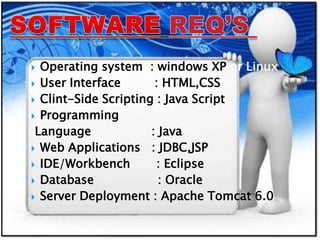
 Operating system : windows XP or Linux
 User Interface : HTML,CSS
 Clint-Side Scripting : Java Script
 Programming
Language : Java
 Web Applications : JDBC,JSP
 IDE/Workbench : Eclipse
 Database : Oracle
 Server Deployment : Apache Tomcat 6.0
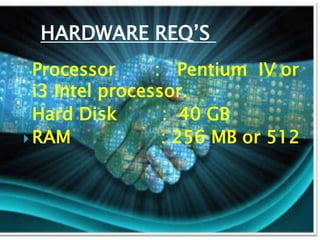
HARDWARE REQ’S
 Processor : Pentium IV or
i3 Intel processor.
 Hard Disk : 40 GB
 RAM : 256 MB or 512
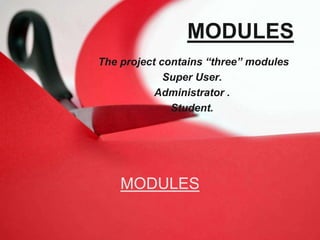
MODULES
The project contains “three” modules
Super User.
Administrator .
Student.
MODULES
1.Super user:
The responsibility of the super user is to centrally control the
data, appoint administrators to all the departments and shifting
the administrators one department to other and replacing with
others when there is a vacancy in any departments.
The super user can also have a right to change the
questions like adding deleting the records from the database. The
super user provides the login names and password for entire
administrators department wise.
2.Administrator
Each department will have one or more administrator; some departments
may have more than one administrator. The major responsibility of
administrator is to answer all the questions posted by students on a
regular basis.
The administrator can add, modify or remove questions from all the
Categories (about the question categories described below).
All the questions posted by the students will be added to
the list of existing questions only when the administrator answers that
question, simultaneously a copy of answer is sent to student who
initiated that question.
Administrator also reserves a right to post a question into a
particular category even if it is not a question frequently asked. The
administrators have the capability of changing his password as when he
requires.
adminstrator
Students
These are the users at the lower level of our
abstraction. Before posting a question, the student
has to select the department to which it belongs. A
copy of the answer will be sent to the student after the
administrator answered his question.
students
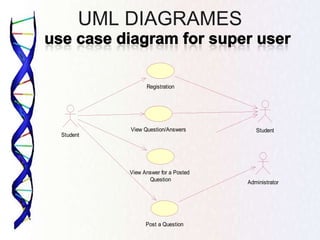
UML DIAGRAMES
Student
Registration
View Question/Answers
Post a Question
Administrator
View Answer for a Posted
Question
Student
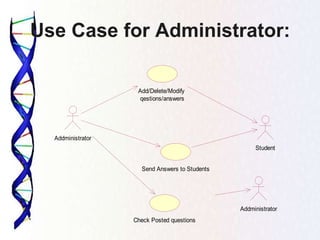
Use Case for Administrator:
Addministrator
Send Answers to Students
Add/Delete/Modify
qestions/answers
Student
Check Posted questions
Addministrator
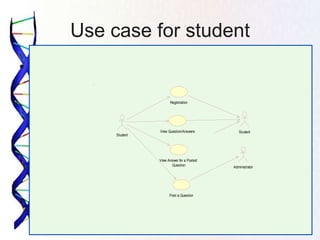
Use case for student
•
Student
Registration
View Question/Answers
Post a Question
Administrator
View Answer for a Posted
Question
Student
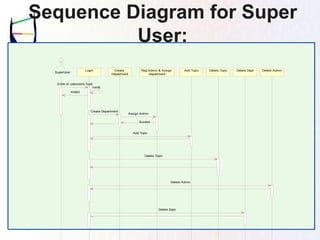
Sequence Diagram for Super
User:
: SuperUser
Login Create
Department
Reg Admin & Assign
Department
Add Topic Delete Topic Delete Dept Delete Admin
Enter Id ,password,Type
Verify
Invalid
Create Department
Assign Admin
Add Topic
Sucess
Delete Topic
Delete Admin
Delete Dept
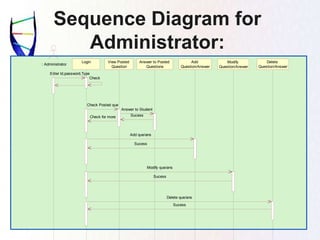
Sequence Diagram for
Administrator:
: Administrator
Login View Posted
Question
Answer to Posted
Questions
Add
Question/Answer
Modify
Question/Answer
Delete
Question/Answer
Enter Id,password,Type
Check
Check Posted que
Answer to Student
SucessCheck for more
Add que/ans
Sucess
Modify que/ans
Sucess
Delete que/ans
Sucess
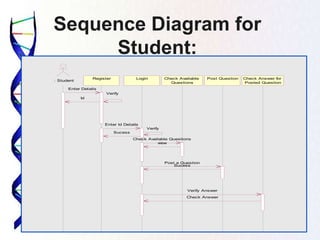
Sequence Diagram for
Student:
Post Question
: Student
Register Login Check Available
Questions
Check Answer for
Posted Question
Enter Details
Id
Enter Id Details
Verify
Verify
Sucess
Check Available Questions
view
Post a Question
Sucess
Verify Answer
Check Answer
Collaboration Diagram for
Super User
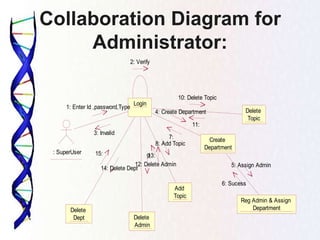
Collaboration Diagram for
Administrator:
: SuperUser
Login
Create
Department
Reg Admin & Assign
Department
Add
Topic
Delete
Topic
Delete
Dept Delete
Admin
1: Enter Id ,password,Type
2: Verify
3: Invalid
4: Create Department
5: Assign Admin
6: Sucess
7:
8: Add Topic
9:
10: Delete Topic
11:
12: Delete Admin
13:
14: Delete Dept
15:
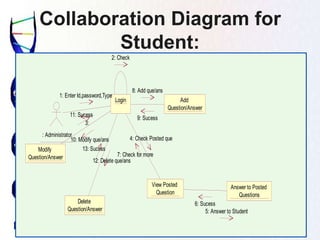
Collaboration Diagram for
Student:
Answer to Posted
Questions
: Administrator
Login Add
Question/Answer
Modify
Question/Answer
View Posted
Question
Delete
Question/Answer
1: Enter Id,password,Type
2: Check
3:
4: Check Posted que
5: Answer to Student
6: Sucess
7: Check for more
8: Add que/ans
9: Sucess
10: Modify que/ans
11: Sucess
12: Delete que/ans
13: Sucess
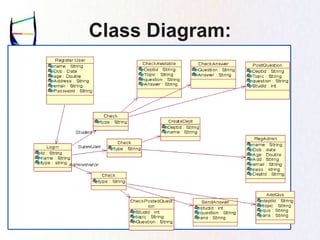
Class Diagram:
Entity-Relationship Diagrams:
DATABASE DESIGN
• The design starts with the end users view of t
he organization called conceptual requiremen
ts and user in a decision-making, which uses
information obtained by accessing the databa
se. The end users also provide data to be sto
red in the database. In considering the end us
er requirements tradeoff have to be taken into
account.
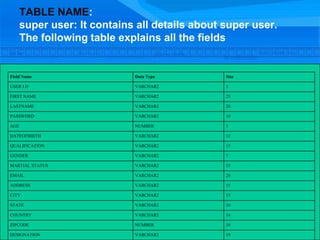
TABLE NAME:
super user: It contains all details about super user.
The following table explains all the fields
Field Name Data Type Size
USER I.D VARCHAR2 5
FIRST NAME VARCHAR2 25
LASTNAME VARCHAR2 20
PASSWORD VARCHAR2 10
AGE NUMBER 3
DATEOFBIRTH VARCHAR2 12
QUALIFICATION VARCHAR2 15
GENDER VARCHAR2 7
MARTIAL STATUS VARCHAR2 15
EMAIL VARCHAR2 20
ADDRESS VARCHAR2 15
CITY VARCHAR2 15
STATE VARCHAR2 16
COUNTRY VARCHAR2 14
ZIPCODE NUMBER 10
DESIGNATION VARCHAR2 19
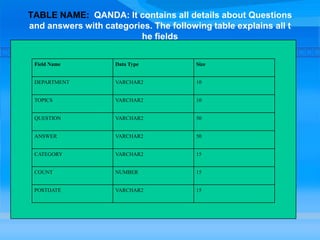
TABLE NAME: QANDA: It contains all details about Questions
and answers with categories. The following table explains all t
he fields
Field Name Data Type Size
DEPARTMENT VARCHAR2 10
TOPICS VARCHAR2 10
QUESTION VARCHAR2 50
ANSWER VARCHAR2 50
CATEGORY VARCHAR2 15
COUNT NUMBER 15
POSTDATE VARCHAR2 15
Field Name Data Type Size
DEPARTMENT VARCHAR2 10
TOPICS VARCHAR2 10
QUESTION VARCHAR2 50
ANSWER VARCHAR2 50
CATEGORY VARCHAR2 15
COUNT NUMBER 15
POSTDATE VARCHAR2 15
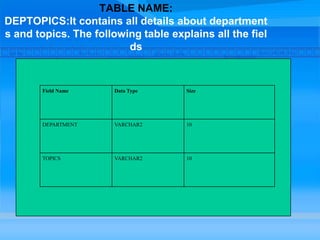
TABLE NAME:
DEPTOPICS:It contains all details about department
s and topics. The following table explains all the fiel
ds
Field Name Data Type Size
DEPARTMENT VARCHAR2 10
TOPICS VARCHAR2 10
Field Name Data Type Size
DEPARTMENT VARCHAR2 10
TOPICS VARCHAR2 10
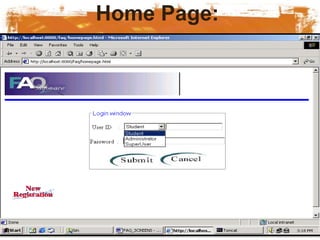
Home Page:
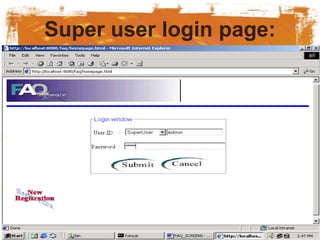
Super user login page:
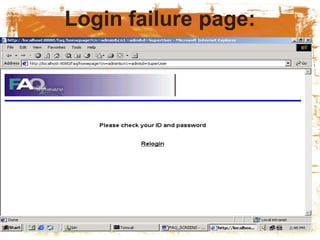
Login failure page:
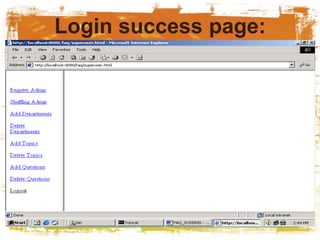
Login success page:
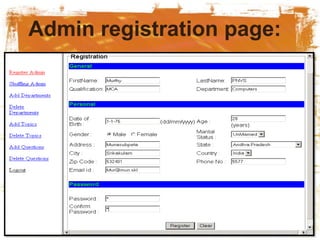
Admin registration page:
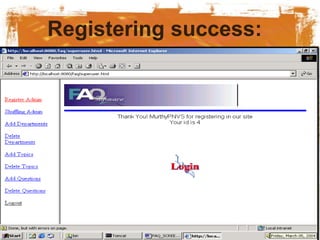
Registering success:
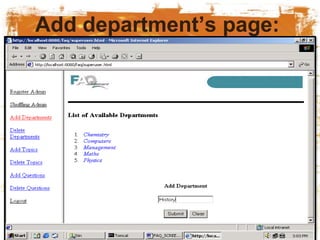
Add department’s page:
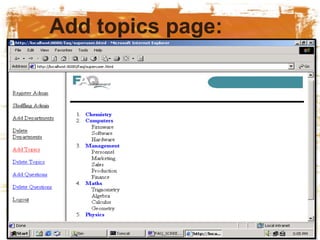
Add topics page:
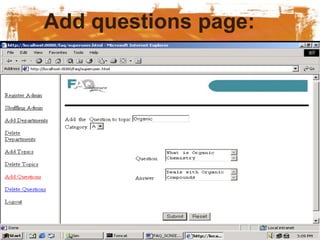
Add questions page:
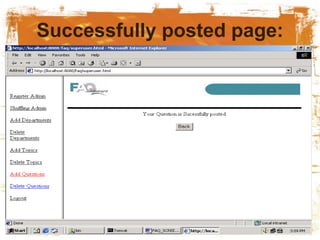
Successfully posted page:
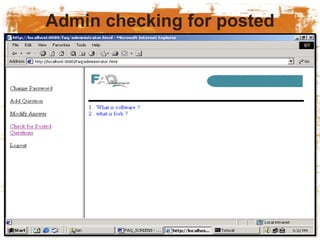
Admin checking for posted
questions page:
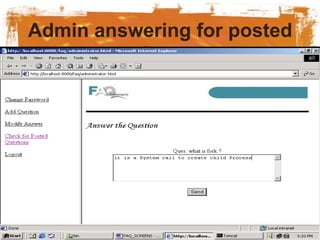
Admin answering for posted
question page:
TESTING
Test levels
• Unit testing tests the minimal software compo
nent and sub-component or modules by the p
rogrammers.
• Integration testing exposes defects in the inte
rfaces and interaction between integrated co
mponents (modules).
• Functional testing tests the product accordin
g to programmable work.
• System testing tests an integrated system to
verify/validate that it meets its requirements.
ALPHA TESTING:
• Alpha testing is simulated or actual operation
al testing by potential users/customers or an i
ndependent test team at the developers' site.
Alpha testing is often employed for off-the-sh
elf software as a form of internal acceptance t
esting, before the software goes to beta testin
g
BETA TESTING
• Beta testing comes after alpha testing. Ver
sions of the software, known as beta versio
ns, are released to a limited audience outsi
de of the company. The software is release
d to groups of people so that further testin
g can ensure the product has few faults or
bugs. Sometimes, beta versions are made
available to the open public to increase the
feedback field to a maximal number of futu
re users.
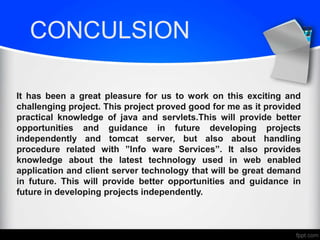
CONCULSION
It has been a great pleasure for us to work on this exciting and
challenging project. This project proved good for me as it provided
practical knowledge of java and servlets.This will provide better
opportunities and guidance in future developing projects
independently and tomcat server, but also about handling
procedure related with ”Info ware Services”. It also provides
knowledge about the latest technology used in web enabled
application and client server technology that will be great demand
in future. This will provide better opportunities and guidance in
future in developing projects independently.
FUTURE ENHANCEMENT
Future enhancement of this project can be achieved
by adding web seminars between the lecturers and
students so that they can interact each other at the
moment. Hence they can clarify their doubts
instantaneously.
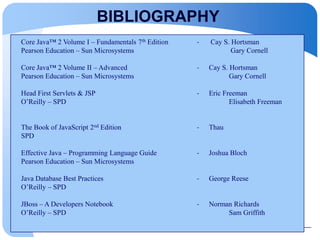
BIBLIOGRAPHY
Core Java™ 2 Volume I – Fundamentals 7th Edition - Cay S. Hortsman
Pearson Education – Sun Microsystems Gary Cornell
Core Java™ 2 Volume II – Advanced - Cay S. Hortsman
Pearson Education – Sun Microsystems Gary Cornell
Head First Servlets & JSP - Eric Freeman
O’Reilly – SPD Elisabeth Freeman
The Book of JavaScript 2nd Edition - Thau
SPD
Effective Java – Programming Language Guide - Joshua Bloch
Pearson Education – Sun Microsystems
Java Database Best Practices - George Reese
O’Reilly – SPD
JBoss – A Developers Notebook - Norman Richards
O’Reilly – SPD Sam Griffith
ANY QUIRES
kats.ppt

kats.ppt

  • 2.
    •Introduction system analysis •System requirements •Systemdesign •Technologies used •Testing and implementation •Screen shots •Conclusion •Future enhancement •bibliography
  • 3.
    ABSTRACT In “Info wareServices” maintaining all the details of frequently asked questions in the database subject wise, to avail them to all the students. And they will update the questions as and when required. The primary goal of a Info ware Services is to provide an environment that is both “convenient” and “efficient” to use in retrieving and storing database information.
  • 5.
  • 6.
  • 7.
  • 10.
     Operating system: windows XP or Linux  User Interface : HTML,CSS  Clint-Side Scripting : Java Script  Programming Language : Java  Web Applications : JDBC,JSP  IDE/Workbench : Eclipse  Database : Oracle  Server Deployment : Apache Tomcat 6.0
  • 11.
    HARDWARE REQ’S  Processor: Pentium IV or i3 Intel processor.  Hard Disk : 40 GB  RAM : 256 MB or 512
  • 12.
    MODULES The project contains“three” modules Super User. Administrator . Student. MODULES
  • 13.
    1.Super user: The responsibilityof the super user is to centrally control the data, appoint administrators to all the departments and shifting the administrators one department to other and replacing with others when there is a vacancy in any departments. The super user can also have a right to change the questions like adding deleting the records from the database. The super user provides the login names and password for entire administrators department wise.
  • 14.
    2.Administrator Each department willhave one or more administrator; some departments may have more than one administrator. The major responsibility of administrator is to answer all the questions posted by students on a regular basis. The administrator can add, modify or remove questions from all the Categories (about the question categories described below). All the questions posted by the students will be added to the list of existing questions only when the administrator answers that question, simultaneously a copy of answer is sent to student who initiated that question. Administrator also reserves a right to post a question into a particular category even if it is not a question frequently asked. The administrators have the capability of changing his password as when he requires. adminstrator
  • 15.
    Students These are theusers at the lower level of our abstraction. Before posting a question, the student has to select the department to which it belongs. A copy of the answer will be sent to the student after the administrator answered his question. students
  • 16.
    UML DIAGRAMES Student Registration View Question/Answers Posta Question Administrator View Answer for a Posted Question Student
  • 17.
    Use Case forAdministrator: Addministrator Send Answers to Students Add/Delete/Modify qestions/answers Student Check Posted questions Addministrator
  • 18.
    Use case forstudent • Student Registration View Question/Answers Post a Question Administrator View Answer for a Posted Question Student
  • 19.
    Sequence Diagram forSuper User: : SuperUser Login Create Department Reg Admin & Assign Department Add Topic Delete Topic Delete Dept Delete Admin Enter Id ,password,Type Verify Invalid Create Department Assign Admin Add Topic Sucess Delete Topic Delete Admin Delete Dept
  • 20.
    Sequence Diagram for Administrator: :Administrator Login View Posted Question Answer to Posted Questions Add Question/Answer Modify Question/Answer Delete Question/Answer Enter Id,password,Type Check Check Posted que Answer to Student SucessCheck for more Add que/ans Sucess Modify que/ans Sucess Delete que/ans Sucess
  • 21.
    Sequence Diagram for Student: PostQuestion : Student Register Login Check Available Questions Check Answer for Posted Question Enter Details Id Enter Id Details Verify Verify Sucess Check Available Questions view Post a Question Sucess Verify Answer Check Answer
  • 22.
  • 23.
    Collaboration Diagram for Administrator: :SuperUser Login Create Department Reg Admin & Assign Department Add Topic Delete Topic Delete Dept Delete Admin 1: Enter Id ,password,Type 2: Verify 3: Invalid 4: Create Department 5: Assign Admin 6: Sucess 7: 8: Add Topic 9: 10: Delete Topic 11: 12: Delete Admin 13: 14: Delete Dept 15:
  • 24.
    Collaboration Diagram for Student: Answerto Posted Questions : Administrator Login Add Question/Answer Modify Question/Answer View Posted Question Delete Question/Answer 1: Enter Id,password,Type 2: Check 3: 4: Check Posted que 5: Answer to Student 6: Sucess 7: Check for more 8: Add que/ans 9: Sucess 10: Modify que/ans 11: Sucess 12: Delete que/ans 13: Sucess
  • 25.
  • 26.
  • 27.
    DATABASE DESIGN • Thedesign starts with the end users view of t he organization called conceptual requiremen ts and user in a decision-making, which uses information obtained by accessing the databa se. The end users also provide data to be sto red in the database. In considering the end us er requirements tradeoff have to be taken into account.
  • 28.
    TABLE NAME: super user:It contains all details about super user. The following table explains all the fields Field Name Data Type Size USER I.D VARCHAR2 5 FIRST NAME VARCHAR2 25 LASTNAME VARCHAR2 20 PASSWORD VARCHAR2 10 AGE NUMBER 3 DATEOFBIRTH VARCHAR2 12 QUALIFICATION VARCHAR2 15 GENDER VARCHAR2 7 MARTIAL STATUS VARCHAR2 15 EMAIL VARCHAR2 20 ADDRESS VARCHAR2 15 CITY VARCHAR2 15 STATE VARCHAR2 16 COUNTRY VARCHAR2 14 ZIPCODE NUMBER 10 DESIGNATION VARCHAR2 19
  • 29.
    TABLE NAME: QANDA:It contains all details about Questions and answers with categories. The following table explains all t he fields Field Name Data Type Size DEPARTMENT VARCHAR2 10 TOPICS VARCHAR2 10 QUESTION VARCHAR2 50 ANSWER VARCHAR2 50 CATEGORY VARCHAR2 15 COUNT NUMBER 15 POSTDATE VARCHAR2 15 Field Name Data Type Size DEPARTMENT VARCHAR2 10 TOPICS VARCHAR2 10 QUESTION VARCHAR2 50 ANSWER VARCHAR2 50 CATEGORY VARCHAR2 15 COUNT NUMBER 15 POSTDATE VARCHAR2 15
  • 30.
    TABLE NAME: DEPTOPICS:It containsall details about department s and topics. The following table explains all the fiel ds Field Name Data Type Size DEPARTMENT VARCHAR2 10 TOPICS VARCHAR2 10 Field Name Data Type Size DEPARTMENT VARCHAR2 10 TOPICS VARCHAR2 10
  • 32.
  • 33.
  • 34.
  • 35.
  • 36.
  • 37.
  • 38.
  • 39.
  • 40.
  • 41.
  • 42.
    Admin checking forposted questions page:
  • 43.
    Admin answering forposted question page:
  • 44.
    TESTING Test levels • Unittesting tests the minimal software compo nent and sub-component or modules by the p rogrammers. • Integration testing exposes defects in the inte rfaces and interaction between integrated co mponents (modules). • Functional testing tests the product accordin g to programmable work. • System testing tests an integrated system to verify/validate that it meets its requirements.
  • 45.
    ALPHA TESTING: • Alphatesting is simulated or actual operation al testing by potential users/customers or an i ndependent test team at the developers' site. Alpha testing is often employed for off-the-sh elf software as a form of internal acceptance t esting, before the software goes to beta testin g
  • 46.
    BETA TESTING • Betatesting comes after alpha testing. Ver sions of the software, known as beta versio ns, are released to a limited audience outsi de of the company. The software is release d to groups of people so that further testin g can ensure the product has few faults or bugs. Sometimes, beta versions are made available to the open public to increase the feedback field to a maximal number of futu re users.
  • 47.
    CONCULSION It has beena great pleasure for us to work on this exciting and challenging project. This project proved good for me as it provided practical knowledge of java and servlets.This will provide better opportunities and guidance in future developing projects independently and tomcat server, but also about handling procedure related with ”Info ware Services”. It also provides knowledge about the latest technology used in web enabled application and client server technology that will be great demand in future. This will provide better opportunities and guidance in future in developing projects independently.
  • 48.
    FUTURE ENHANCEMENT Future enhancementof this project can be achieved by adding web seminars between the lecturers and students so that they can interact each other at the moment. Hence they can clarify their doubts instantaneously.
  • 49.
    BIBLIOGRAPHY Core Java™ 2Volume I – Fundamentals 7th Edition - Cay S. Hortsman Pearson Education – Sun Microsystems Gary Cornell Core Java™ 2 Volume II – Advanced - Cay S. Hortsman Pearson Education – Sun Microsystems Gary Cornell Head First Servlets & JSP - Eric Freeman O’Reilly – SPD Elisabeth Freeman The Book of JavaScript 2nd Edition - Thau SPD Effective Java – Programming Language Guide - Joshua Bloch Pearson Education – Sun Microsystems Java Database Best Practices - George Reese O’Reilly – SPD JBoss – A Developers Notebook - Norman Richards O’Reilly – SPD Sam Griffith
  • 50.