TOPIC:
( WINDOWS PHONE 7 MOBILE APPLICATION)
CONTENTS:
 ABSTRACT
 EXISTING SYSTEM
 PROPOSED SYSTEM
 HOW IT WORKS?
 MODULES OF THIS PROJECT
 FUNCTIONAL REQUIREMENTS
 CONCLUSION
ABSTRACT:
GOAL OF THIS PROJECT:
 The main intention of this project is to calculate the
uploading and downloading speed of a network
while accessing the internet in mobile phone
 We can estimate the efficiency of a network by
calculating it’s downloading speed if it is fast then
our network efficiency is good otherwise we can go
for another network.
EXISITNG SYSTEM
 There is an existing system is called
“BANDWIDTH TESTER V 2.0” before the SPEED TEST
 This existing system unable to calculate accurately as
SPEEDTEST
 And it can run only on normal PC’s and LAPTOPS and it
not supported by mobile phones
 It displays the total average downloading speed of a
network directly without showing how it varies during
downloading process
PROPOSED SYSTEM
 This SPEED TEST application is works only on WP7 it
overcomes all the draw backs of existing system.
 It calculate the Average downloading speed of a
network efficiently when compared to the existing
system
 Downloading speed calculation is very important in
order to check the efficiency of a network
 It can able to show how the rate of downloading
speed varies during the downloading process
HOW IT WORKS?:
 The functionality of this project is very simple and clear by
providing the good user friendly interface in WINDOWS
PHONE 7.
 Whenever user wants to know about network speed in his
mobile phone he achieved that by running this SPEED TEST
application in his mobile.
 This application only requires the file name which he
presently downloading in his phone as input.
MODULES OF THIS PROJECT:
This project mainly contains 4 modules:
 TAKING THE INPUT FROM USER
 CHECK THE INTERNET CONNECTIVITY
 CALCULATING THE DOWNLOADING SPEED
 RECALCULATE
TAKING THE INPUT FROM USER:
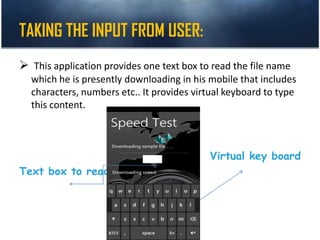
 This application provides one text box to read the file name
which he is presently downloading in his mobile that includes
characters, numbers etc.. It provides virtual keyboard to type
this content.
Virtual key board
Text box to read
CHECK THE INTERNET CONNECTIVITY
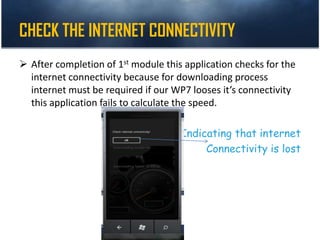
 After completion of 1st module this application checks for the
internet connectivity because for downloading process
internet must be required if our WP7 looses it’s connectivity
this application fails to calculate the speed.
Indicating that internet
Connectivity is lost
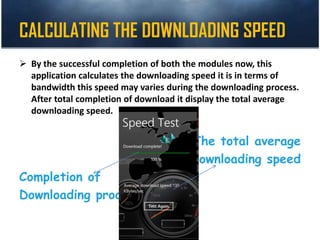
CALCULATING THE DOWNLOADING SPEED
 By the successful completion of both the modules now, this
application calculates the downloading speed it is in terms of
bandwidth this speed may varies during the downloading process.
After total completion of download it display the total average
downloading speed.
The total average
Downloading speed
Completion of
Downloading process
R
E
C
A
L
C
U
L
A
T
E
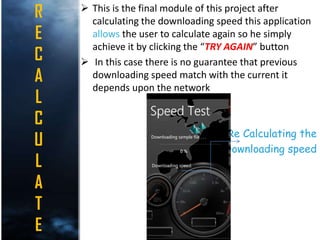
 This is the final module of this project after
calculating the downloading speed this application
allows the user to calculate again so he simply
achieve it by clicking the “TRY AGAIN” button
 In this case there is no guarantee that previous
downloading speed match with the current it
depends upon the network
Re Calculating the
Downloading speed
INPUTS:
 The major inputs of this project are internet connectivity
and Filename which currently downloading
 Without the internet connectivity this application cannot
run
 User must give the file name which he currently
downloading from internet as input to this application.
That must be correct
 This application provides a virtual keyboard to enter the
file name
OUT PUTS:
 The major output of this project is the Total average
downloading speed of a network it is in terms of
bandwidth(kbps)
 It displays final output whenever downloading
process completes.
 Whenever internet connectivity fails it ask the user
to connect the internet
 It also shows how this speed varies during the
downloading process.
HARDWARE REQUIREMENTS:
 PROCESSER : PENTIUM IV
 RAM : 2 GB or more
 HARD DISK : 16GB(recommended)
 CACHE : 1MB
SOFTWARE REQUIREMENTS
 OPERATING SYSTEM : WINDOWS7(Recommended) ,
WP7 OS in virtual mobile Emulator
 FRONTEND S/W : Visual Studio Express for WP7
 TECHNOLOGIES : SILVERLIGHT(C#,.NET),
XNA (C#,XNA frame work)
 S/W Development Kit : Windows Mobile Phone7 S/w
Development Kit
CONCLUSION
Knowing the Network Speed in a Normal PC’s and
LAPTOPS are easy but it in case of Mobiles it becomes
complex. But By using this application we can
achieved it Successfully. This Entire project was
developed By using the SILVER LIGHT, XNA
framework Technologies provided by Microsoft so
that it can work only on WP7.
SCOPE FOR EXPANISSION
 There must be a scope for expansion of this
project because it can support only in
Windows phone 7.
 By making it to work on the different
operating systems become very helpful.
karthiknch

karthiknch

  • 1.
    TOPIC: ( WINDOWS PHONE7 MOBILE APPLICATION)
  • 2.
    CONTENTS:  ABSTRACT  EXISTINGSYSTEM  PROPOSED SYSTEM  HOW IT WORKS?  MODULES OF THIS PROJECT  FUNCTIONAL REQUIREMENTS  CONCLUSION
  • 3.
    ABSTRACT: GOAL OF THISPROJECT:  The main intention of this project is to calculate the uploading and downloading speed of a network while accessing the internet in mobile phone  We can estimate the efficiency of a network by calculating it’s downloading speed if it is fast then our network efficiency is good otherwise we can go for another network.
  • 4.
    EXISITNG SYSTEM  Thereis an existing system is called “BANDWIDTH TESTER V 2.0” before the SPEED TEST  This existing system unable to calculate accurately as SPEEDTEST  And it can run only on normal PC’s and LAPTOPS and it not supported by mobile phones  It displays the total average downloading speed of a network directly without showing how it varies during downloading process
  • 5.
    PROPOSED SYSTEM  ThisSPEED TEST application is works only on WP7 it overcomes all the draw backs of existing system.  It calculate the Average downloading speed of a network efficiently when compared to the existing system  Downloading speed calculation is very important in order to check the efficiency of a network  It can able to show how the rate of downloading speed varies during the downloading process
  • 6.
    HOW IT WORKS?: The functionality of this project is very simple and clear by providing the good user friendly interface in WINDOWS PHONE 7.  Whenever user wants to know about network speed in his mobile phone he achieved that by running this SPEED TEST application in his mobile.  This application only requires the file name which he presently downloading in his phone as input.
  • 7.
    MODULES OF THISPROJECT: This project mainly contains 4 modules:  TAKING THE INPUT FROM USER  CHECK THE INTERNET CONNECTIVITY  CALCULATING THE DOWNLOADING SPEED  RECALCULATE
  • 8.
    TAKING THE INPUTFROM USER:  This application provides one text box to read the file name which he is presently downloading in his mobile that includes characters, numbers etc.. It provides virtual keyboard to type this content. Virtual key board Text box to read
  • 9.
    CHECK THE INTERNETCONNECTIVITY  After completion of 1st module this application checks for the internet connectivity because for downloading process internet must be required if our WP7 looses it’s connectivity this application fails to calculate the speed. Indicating that internet Connectivity is lost
  • 10.
    CALCULATING THE DOWNLOADINGSPEED  By the successful completion of both the modules now, this application calculates the downloading speed it is in terms of bandwidth this speed may varies during the downloading process. After total completion of download it display the total average downloading speed. The total average Downloading speed Completion of Downloading process
  • 11.
    R E C A L C U L A T E  This isthe final module of this project after calculating the downloading speed this application allows the user to calculate again so he simply achieve it by clicking the “TRY AGAIN” button  In this case there is no guarantee that previous downloading speed match with the current it depends upon the network Re Calculating the Downloading speed
  • 13.
    INPUTS:  The majorinputs of this project are internet connectivity and Filename which currently downloading  Without the internet connectivity this application cannot run  User must give the file name which he currently downloading from internet as input to this application. That must be correct  This application provides a virtual keyboard to enter the file name
  • 14.
    OUT PUTS:  Themajor output of this project is the Total average downloading speed of a network it is in terms of bandwidth(kbps)  It displays final output whenever downloading process completes.  Whenever internet connectivity fails it ask the user to connect the internet  It also shows how this speed varies during the downloading process.
  • 16.
    HARDWARE REQUIREMENTS:  PROCESSER: PENTIUM IV  RAM : 2 GB or more  HARD DISK : 16GB(recommended)  CACHE : 1MB
  • 17.
    SOFTWARE REQUIREMENTS  OPERATINGSYSTEM : WINDOWS7(Recommended) , WP7 OS in virtual mobile Emulator  FRONTEND S/W : Visual Studio Express for WP7  TECHNOLOGIES : SILVERLIGHT(C#,.NET), XNA (C#,XNA frame work)  S/W Development Kit : Windows Mobile Phone7 S/w Development Kit
  • 18.
    CONCLUSION Knowing the NetworkSpeed in a Normal PC’s and LAPTOPS are easy but it in case of Mobiles it becomes complex. But By using this application we can achieved it Successfully. This Entire project was developed By using the SILVER LIGHT, XNA framework Technologies provided by Microsoft so that it can work only on WP7.
  • 19.
    SCOPE FOR EXPANISSION There must be a scope for expansion of this project because it can support only in Windows phone 7.  By making it to work on the different operating systems become very helpful.