1
Stufac Connect
Developed By,
Priyanka Thakker
Guided By,
Bharat k Patel
2
3
Project Profile

Project Title: student faculty document sharing application

Project objective: share pdf, doc, jpeg, ppt files

Developed At: Anand Commerce college

Submitted to: sardar patel university

Tools Used: android studio, notepad++

Supporting Tools: LibreOffice writer, LibreOffice drawing,
paint

Hardware: Intel core i3

Operating System: Windows 7 or higher, Android

Period of Project work: 72 hours
4
Introduction cont..
Introduction

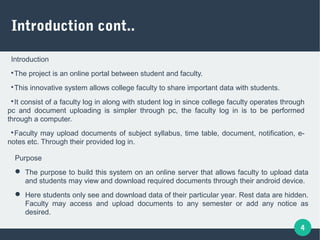
The project is an online portal between student and faculty.

This innovative system allows college faculty to share important data with students.

It consist of a faculty log in along with student log in since college faculty operates through
pc and document uploading is simpler through pc, the faculty log in is to be performed
through a computer.

Faculty may upload documents of subject syllabus, time table, document, notification, e-
notes etc. Through their provided log in.
Purpose
 The purpose to build this system on an online server that allows faculty to upload data
and students may view and download required documents through their android device.
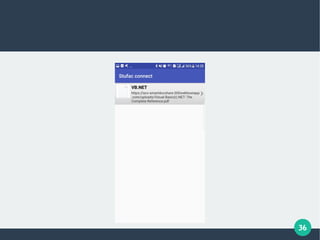
 Here students only see and download data of their particular year. Rest data are hidden.
Faculty may access and upload documents to any semester or add any notice as
desired.
5
Feasibility Study
A feasibility study is undertaken to determine the possibility or portability of either
improving the existing system or developing a complete new system.
There are three aspects in feasibility study portion of the preliminary investigation

Technical feasibility

Economical feasibility

Operational feasibility
If the system is user friendly with GUI support and so, it is very easy to
understand.
6
Technical feasibility

Technical feasibility determines whether the technology needed for
proposed system is available and now how it can be integrated.

The technical feasibility in the proposed system is deals with the
technology used in system. It deals with the hardware and software
used in system. It deals with the hardware and software used in the
system whether they are of latest technology
7
Economic feasibility:

Economic feasibility looks at the financial aspects of the project
economical feasibility convert with return from the investment in a
project.

“Propose system” fulfill within the cost of proposed manual system
budget.
8
Operational feasibility

Operational feasibility covers two aspects one is the technical
performance aspect and other is the acceptance within the “Propose
System”.

In the system operational feasibility checks whether the user who is
going to use
9
Study of Current System
At some organization system is not even exist and faculty and students
share the information or documents via papers and files only, which may
sometimes lead to loss of any documents or important information too.
10
Proposed System

The server allows the faculty to upload the data and the students can
see and download the required documents through the android device.

The faculty can upload or modify the documents to any semester as
desired.

The proposed system is worked on the server and all the files and
documents are uploaded on the server.

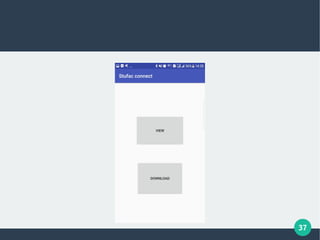
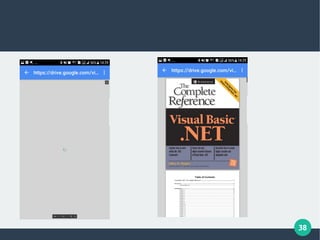
The students just need sign in through mobile application to view and
download document .

Proposed system saves lots of time of both faculties and students.
11
users
Mainly two types of users are working with this system,

Faculty

Students
12
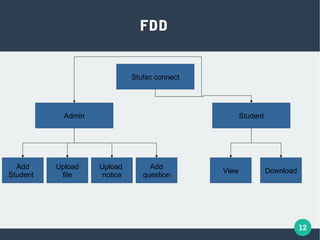
Stufac connect
Admin Student
Add
Student
Upload
file
Upload
notice
Add
question
DownloadView
FDD
13
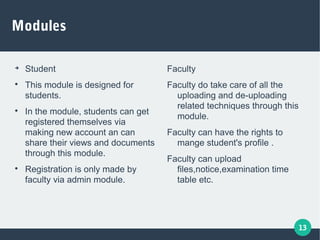
Modules

Student

This module is designed for
students.

In the module, students can get
registered themselves via
making new account an can
share their views and documents
through this module.

Registration is only made by
faculty via admin module.
Faculty
Faculty do take care of all the
uploading and de-uploading
related techniques through this
module.
Faculty can have the rights to
mange student's profile .
Faculty can upload
files,notice,examination time
table etc.
14
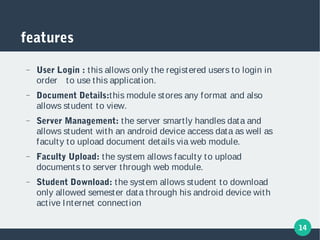
features
− User Login : this allows only the registered users to login in
order to use this application.
− Document Details:this module stores any format and also
allows student to view.
− Server Management: the server smartly handles data and
allows student with an android device access data as well as
faculty to upload document details via web module.
− Faculty Upload: the system allows faculty to upload
documents to server through web module.
− Student Download: the system allows student to download
only allowed semester data through his android device with
active Internet connection
15
16
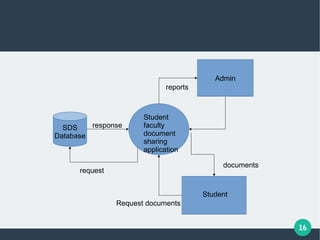
Admin
documents
Student
faculty
document
sharing
application
Student
reports
Request documents
SDS
Database
request
response
17
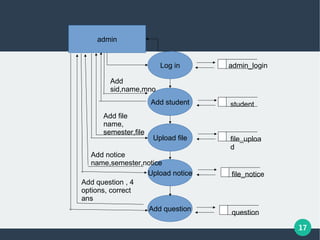
admin
Add student
Upload file
Upload notice
Add question
Log in admin_login
student
file_uploa
d
file_notice
question
Add
sid,name,mno
Add file
name,
semester,file
Add notice
name,semester,notice
Add question , 4
options, correct
ans
18
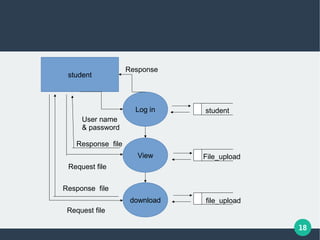
student
View
Log in
download
student
File_upload
file_upload
Request file
User name
& password
Request file
Response file
Response file
Response
19
20
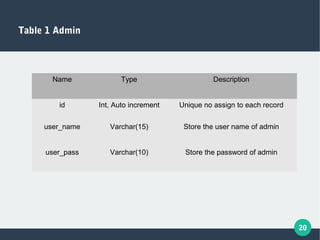
Table 1 Admin
Name Type Description
id Int, Auto increment Unique no assign to each record
user_name Varchar(15) Store the user name of admin
user_pass Varchar(10) Store the password of admin
21
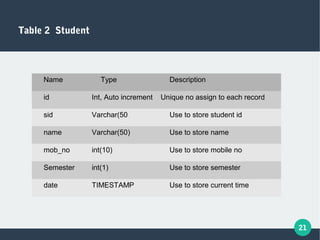
Table 2 Student
Name Type Description
id Int, Auto increment Unique no assign to each record
sid Varchar(50 Use to store student id
name Varchar(50) Use to store name
mob_no int(10) Use to store mobile no
Semester int(1) Use to store semester
date TIMESTAMP Use to store current time
22
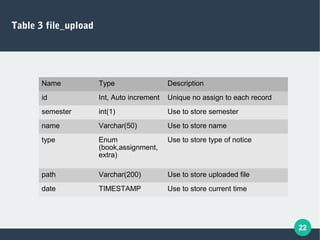
Table 3 file_upload
Name Type Description
id Int, Auto increment Unique no assign to each record
semester int(1) Use to store semester
name Varchar(50) Use to store name
type Enum
(book,assignment,
extra)
Use to store type of notice
path Varchar(200) Use to store uploaded file
date TIMESTAMP Use to store current time
23
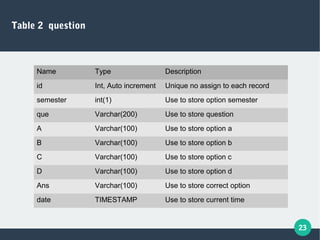
Table 2 question
Name Type Description
id Int, Auto increment Unique no assign to each record
semester int(1) Use to store option semester
que Varchar(200) Use to store question
A Varchar(100) Use to store option a
B Varchar(100) Use to store option b
C Varchar(100) Use to store option c
D Varchar(100) Use to store option d
Ans Varchar(100) Use to store correct option
date TIMESTAMP Use to store current time
24
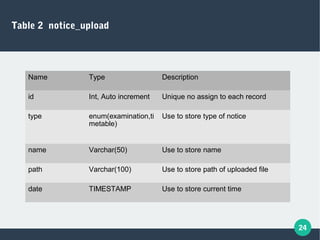
Table 2 notice_upload
Name Type Description
id Int, Auto increment Unique no assign to each record
type enum(examination,ti
metable)
Use to store type of notice
name Varchar(50) Use to store name
path Varchar(100) Use to store path of uploaded file
date TIMESTAMP Use to store current time
25
26
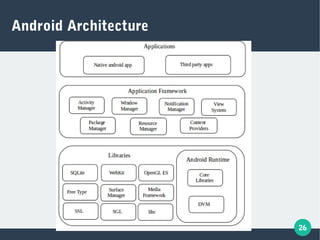
Android Architecture
27
Android Architecture Cont..

Linux OS kernel that provides the low-level interface with the hardware,
memory management and process control, all optimized for mobile
devices.

Open source libraries for providing various functionality like browsing,
font, rendering, multimedia, stuff etc. . it includes SQLite, WebKit,
OpenGL, media manager, free type and SGL, Surface manager etc.

An application framework that exposes system services to the
application layer, including the window manager, content providers,
location manager, telephony and peer to peer services.
28
29
Testing

Testing for performance

After you have identified specific performance requirements, you can begin testing to determine whether the
application meets those requirements. Performance testing presumes that the application is functioning,
stable and robust. As such ,its important to eliminate as many variables as possible. For example, bugs in
the code can create the appearance, performance problem or even mask performance problems.

Testing for reliability

Testing for reliability is about exercising an application so that failures are discovered and removed before
the system is deployed because the different combinations of pathways through an application are high; it is
unlikely that you can identify all potential failures in complex application.
30
Testing Methods

Software testing methods are traditionally divided into black box testing and
white box testing. These two approaches are used to describe the point of view
that test engineer takes when designing test cases

Black Box Testing

Black box testing treats the software as “black box”, without any knowledge of
internal implementation. Black box testing methods include:

Equivalence partitioning is a software testing technique in which test cases are
designed to execute representatives from each equivalence partition, i.e. a
partition of input values undergoing similar treatment. In principle, test cases
are designed to a necessary minimum. To select the right test cases to cover
all possible scenarios.

Boundary Value Analysis is a software testing design technique used to
determine test cases covering off-by-one errors.
31
32
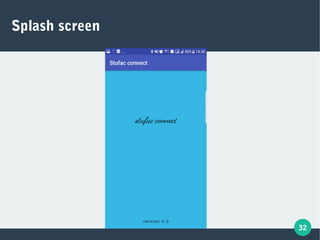
Splash screen
33
34
35
36
37
38
39
40
41
42
43
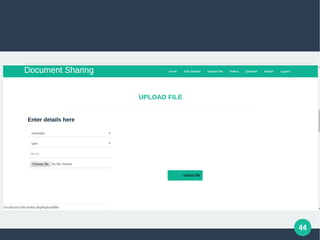
44
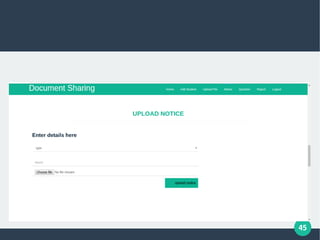
45
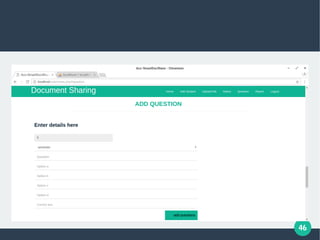
46
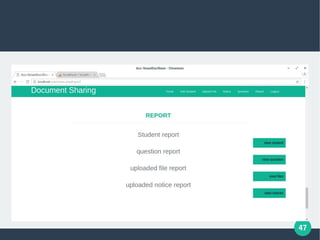
47
48
49
50
51
52
Limitations and future enhancement

Limitations
− Mobile user not be able to insert details.
− If the server goes down thus there is disadvantage of single point failure.
− Due to free web hosting maximum file size of uploading is 5 mb.

Future enhancement
− A password reset feature is added.
− Auto semester updating is added.
− Gui improved in near future.
− Search option is added.
53
54
Bibliography
http://google.com
http://stackoverflow.com/
55

Smart document sharing application presentation(stufac connect)

  • 1.
    1 Stufac Connect Developed By, PriyankaThakker Guided By, Bharat k Patel
  • 2.
  • 3.
    3 Project Profile  Project Title:student faculty document sharing application  Project objective: share pdf, doc, jpeg, ppt files  Developed At: Anand Commerce college  Submitted to: sardar patel university  Tools Used: android studio, notepad++  Supporting Tools: LibreOffice writer, LibreOffice drawing, paint  Hardware: Intel core i3  Operating System: Windows 7 or higher, Android  Period of Project work: 72 hours
  • 4.
    4 Introduction cont.. Introduction  The projectis an online portal between student and faculty.  This innovative system allows college faculty to share important data with students.  It consist of a faculty log in along with student log in since college faculty operates through pc and document uploading is simpler through pc, the faculty log in is to be performed through a computer.  Faculty may upload documents of subject syllabus, time table, document, notification, e- notes etc. Through their provided log in. Purpose  The purpose to build this system on an online server that allows faculty to upload data and students may view and download required documents through their android device.  Here students only see and download data of their particular year. Rest data are hidden. Faculty may access and upload documents to any semester or add any notice as desired.
  • 5.
    5 Feasibility Study A feasibilitystudy is undertaken to determine the possibility or portability of either improving the existing system or developing a complete new system. There are three aspects in feasibility study portion of the preliminary investigation  Technical feasibility  Economical feasibility  Operational feasibility If the system is user friendly with GUI support and so, it is very easy to understand.
  • 6.
    6 Technical feasibility  Technical feasibilitydetermines whether the technology needed for proposed system is available and now how it can be integrated.  The technical feasibility in the proposed system is deals with the technology used in system. It deals with the hardware and software used in system. It deals with the hardware and software used in the system whether they are of latest technology
  • 7.
    7 Economic feasibility:  Economic feasibilitylooks at the financial aspects of the project economical feasibility convert with return from the investment in a project.  “Propose system” fulfill within the cost of proposed manual system budget.
  • 8.
    8 Operational feasibility  Operational feasibilitycovers two aspects one is the technical performance aspect and other is the acceptance within the “Propose System”.  In the system operational feasibility checks whether the user who is going to use
  • 9.
    9 Study of CurrentSystem At some organization system is not even exist and faculty and students share the information or documents via papers and files only, which may sometimes lead to loss of any documents or important information too.
  • 10.
    10 Proposed System  The serverallows the faculty to upload the data and the students can see and download the required documents through the android device.  The faculty can upload or modify the documents to any semester as desired.  The proposed system is worked on the server and all the files and documents are uploaded on the server.  The students just need sign in through mobile application to view and download document .  Proposed system saves lots of time of both faculties and students.
  • 11.
    11 users Mainly two typesof users are working with this system,  Faculty  Students
  • 12.
  • 13.
    13 Modules  Student  This module isdesigned for students.  In the module, students can get registered themselves via making new account an can share their views and documents through this module.  Registration is only made by faculty via admin module. Faculty Faculty do take care of all the uploading and de-uploading related techniques through this module. Faculty can have the rights to mange student's profile . Faculty can upload files,notice,examination time table etc.
  • 14.
    14 features − User Login: this allows only the registered users to login in order to use this application. − Document Details:this module stores any format and also allows student to view. − Server Management: the server smartly handles data and allows student with an android device access data as well as faculty to upload document details via web module. − Faculty Upload: the system allows faculty to upload documents to server through web module. − Student Download: the system allows student to download only allowed semester data through his android device with active Internet connection
  • 15.
  • 16.
  • 17.
    17 admin Add student Upload file Uploadnotice Add question Log in admin_login student file_uploa d file_notice question Add sid,name,mno Add file name, semester,file Add notice name,semester,notice Add question , 4 options, correct ans
  • 18.
    18 student View Log in download student File_upload file_upload Request file Username & password Request file Response file Response file Response
  • 19.
  • 20.
    20 Table 1 Admin NameType Description id Int, Auto increment Unique no assign to each record user_name Varchar(15) Store the user name of admin user_pass Varchar(10) Store the password of admin
  • 21.
    21 Table 2 Student NameType Description id Int, Auto increment Unique no assign to each record sid Varchar(50 Use to store student id name Varchar(50) Use to store name mob_no int(10) Use to store mobile no Semester int(1) Use to store semester date TIMESTAMP Use to store current time
  • 22.
    22 Table 3 file_upload NameType Description id Int, Auto increment Unique no assign to each record semester int(1) Use to store semester name Varchar(50) Use to store name type Enum (book,assignment, extra) Use to store type of notice path Varchar(200) Use to store uploaded file date TIMESTAMP Use to store current time
  • 23.
    23 Table 2 question NameType Description id Int, Auto increment Unique no assign to each record semester int(1) Use to store option semester que Varchar(200) Use to store question A Varchar(100) Use to store option a B Varchar(100) Use to store option b C Varchar(100) Use to store option c D Varchar(100) Use to store option d Ans Varchar(100) Use to store correct option date TIMESTAMP Use to store current time
  • 24.
    24 Table 2 notice_upload NameType Description id Int, Auto increment Unique no assign to each record type enum(examination,ti metable) Use to store type of notice name Varchar(50) Use to store name path Varchar(100) Use to store path of uploaded file date TIMESTAMP Use to store current time
  • 25.
  • 26.
  • 27.
    27 Android Architecture Cont..  LinuxOS kernel that provides the low-level interface with the hardware, memory management and process control, all optimized for mobile devices.  Open source libraries for providing various functionality like browsing, font, rendering, multimedia, stuff etc. . it includes SQLite, WebKit, OpenGL, media manager, free type and SGL, Surface manager etc.  An application framework that exposes system services to the application layer, including the window manager, content providers, location manager, telephony and peer to peer services.
  • 28.
  • 29.
    29 Testing  Testing for performance  Afteryou have identified specific performance requirements, you can begin testing to determine whether the application meets those requirements. Performance testing presumes that the application is functioning, stable and robust. As such ,its important to eliminate as many variables as possible. For example, bugs in the code can create the appearance, performance problem or even mask performance problems.  Testing for reliability  Testing for reliability is about exercising an application so that failures are discovered and removed before the system is deployed because the different combinations of pathways through an application are high; it is unlikely that you can identify all potential failures in complex application.
  • 30.
    30 Testing Methods  Software testingmethods are traditionally divided into black box testing and white box testing. These two approaches are used to describe the point of view that test engineer takes when designing test cases  Black Box Testing  Black box testing treats the software as “black box”, without any knowledge of internal implementation. Black box testing methods include:  Equivalence partitioning is a software testing technique in which test cases are designed to execute representatives from each equivalence partition, i.e. a partition of input values undergoing similar treatment. In principle, test cases are designed to a necessary minimum. To select the right test cases to cover all possible scenarios.  Boundary Value Analysis is a software testing design technique used to determine test cases covering off-by-one errors.
  • 31.
  • 32.
  • 33.
  • 34.
  • 35.
  • 36.
  • 37.
  • 38.
  • 39.
  • 40.
  • 41.
  • 42.
  • 43.
  • 44.
  • 45.
  • 46.
  • 47.
  • 48.
  • 49.
  • 50.
  • 51.
  • 52.
    52 Limitations and futureenhancement  Limitations − Mobile user not be able to insert details. − If the server goes down thus there is disadvantage of single point failure. − Due to free web hosting maximum file size of uploading is 5 mb.  Future enhancement − A password reset feature is added. − Auto semester updating is added. − Gui improved in near future. − Search option is added.
  • 53.
  • 54.
  • 55.