K Means Clustering
What is K-Means Algorithm?
K-Means Clustering is an Unsupervised Learning algorithm, which groups the unlabelled
dataset into different clusters.
Here K defines the number of pre-defined clusters that need to be created in the
process, as if K=2, there will be two clusters, and for K=3, there will be three clusters,
and so on.
It is an iterative algorithm that divides the unlabelled dataset into k different clusters
in such a way that each dataset belongs only one group that has similar properties.
It is a centroid-based algorithm, where each cluster is associated with a centroid. The
main aim of this algorithm is to minimize the sum of distances between the data point
and their corresponding clusters.
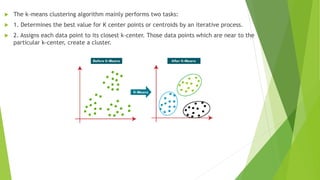
 The k-means clustering algorithm mainly performs two tasks:
 1. Determines the best value for K center points or centroids by an iterative process.
 2. Assigns each data point to its closest k-center. Those data points which are near to the
particular k-center, create a cluster.
 How does the K-Means Algorithm Work?
 The working of the K-Means algorithm is explained in the below steps:
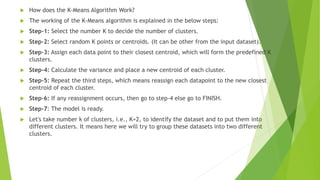
 Step-1: Select the number K to decide the number of clusters.
 Step-2: Select random K points or centroids. (It can be other from the input dataset).
 Step-3: Assign each data point to their closest centroid, which will form the predefined K
clusters.
 Step-4: Calculate the variance and place a new centroid of each cluster.
 Step-5: Repeat the third steps, which means reassign each datapoint to the new closest
centroid of each cluster.
 Step-6: If any reassignment occurs, then go to step-4 else go to FINISH.
 Step-7: The model is ready.
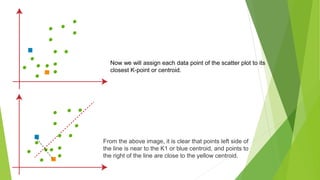
 Let's take number k of clusters, i.e., K=2, to identify the dataset and to put them into
different clusters. It means here we will try to group these datasets into two different
clusters.
Now we will assign each data point of the scatter plot to its
closest K-point or centroid.
From the above image, it is clear that points left side of
the line is near to the K1 or blue centroid, and points to
the right of the line are close to the yellow centroid.
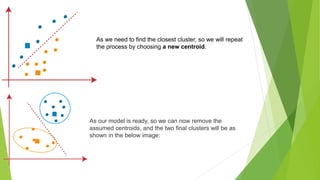
As we need to find the closest cluster, so we will repeat
the process by choosing a new centroid.
As our model is ready, so we can now remove the
assumed centroids, and the two final clusters will be as
shown in the below image:
 In the given dataset, we have Customer_Id, Gender, Age, Annual Income ($), and Spending
Score (which is the calculated value of how much a customer has spent in the mall, the more
the value, the more he has spent).
 From this dataset, we need to calculate some patterns, as it is an unsupervised method, so we
don't know what to calculate exactly.
 The steps to be followed for the implementation are given below:
 Data Pre-processing
 Finding the optimal number of clusters using the elbow method
 Training the K-means algorithm on the training dataset
 Visualizing the clusters
 The numpy we have imported for the performing mathematics calculation, matplotlib is
for plotting the graph, and pandas are for managing the dataset.
 Importing the Dataset:
Next, we will import the dataset that we need to use. So here, we are using the
Mall_Customer_data.csv dataset. It can be imported using the below code:
 import numpy as nm
 import matplotlib.pyplot as mtp
 import pandas as pd
 dataset = pd.read_csv('Mall_Customers_data.csv')
 print(dataset)
 Extracting Independent Variables
 Here we don't need any dependent variable for data pre-processing step as it is a clustering
problem, and we have no idea about what to determine. So we will just add a line of code
for the matrix of features.
 Finding the optimal number of clusters using the elbow method
 In the second step, we will try to find the optimal number of clusters for our clustering
problem. So, as discussed above, here we are going to use the elbow method for this
purpose.
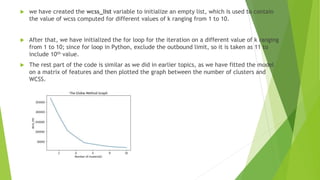
 Elbow method uses the WCSS concept to draw the plot by plotting WCSS values on the Y-axis
and the number of clusters on the X-axis.
 So we are going to calculate the value for WCSS for different k values ranging from 1 to 10.
Below is the code for it:
 #finding optimal number of clusters using the elbow method
 from sklearn.cluster import KMeans
 wcss_list= [] #Initializing the list for the values of WCSS

 #Using for loop for iterations from 1 to 10.
 for i in range(1, 11):
 kmeans = KMeans(n_clusters=i, init='k-means++', random_state= 42)
 kmeans.fit(x)
 wcss_list.append(kmeans.inertia_)
 mtp.plot(range(1, 11), wcss_list)
 mtp.title('The Elobw Method Graph')
 mtp.xlabel('Number of clusters(k)')
 mtp.ylabel('wcss_list')
 mtp.show()
 we have created the wcss_list variable to initialize an empty list, which is used to contain
the value of wcss computed for different values of k ranging from 1 to 10.
 After that, we have initialized the for loop for the iteration on a different value of k ranging
from 1 to 10; since for loop in Python, exclude the outbound limit, so it is taken as 11 to
include 10th value.
 The rest part of the code is similar as we did in earlier topics, as we have fitted the model
on a matrix of features and then plotted the graph between the number of clusters and
WCSS.
 Training the K-means algorithm on the training dataset
 As we have got the number of clusters, so we can now train the model on the
dataset.
 #training the K-means model on a dataset
 kmeans = KMeans(n_clusters=5, init='k-means++', random_state= 42)
 y_predict= kmeans.fit_predict(x)
 Visualizing the Clusters
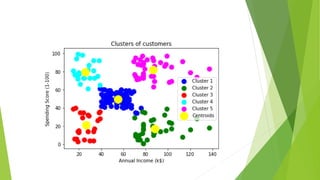
 The last step is to visualize the clusters. As we have 5 clusters for our model,
so we will visualize each cluster one by one.
 #visulaizing the clusters
 mtp.scatter(x[y_predict == 0, 0], x[y_predict == 0, 1], s = 100, c = 'blue', label = 'Cluster 1') #for first cluster
 mtp.scatter(x[y_predict == 1, 0], x[y_predict == 1, 1], s = 100, c = 'green', label = 'Cluster 2') #for second cluster
 mtp.scatter(x[y_predict== 2, 0], x[y_predict == 2, 1], s = 100, c = 'red', label = 'Cluster 3') #for third cluster
 mtp.scatter(x[y_predict == 3, 0], x[y_predict == 3, 1], s = 100, c = 'cyan', label = 'Cluster 4') #for fourth cluster
 mtp.scatter(x[y_predict == 4, 0], x[y_predict == 4, 1], s = 100, c = 'magenta', label = 'Cluster 5') #for fifth cluster
 mtp.scatter(kmeans.cluster_centers_[:, 0], kmeans.cluster_centers_[:, 1], s = 300, c = 'yellow', label = 'Centroid'
)
 mtp.title('Clusters of customers')
 mtp.xlabel('Annual Income (k$)')
 mtp.ylabel('Spending Score (1-100)')
 mtp.legend()
 mtp.show()
 Cluster1 shows the customers with average salary and average spending so we can
categorize these customers as Cluster1
 Cluster2 shows the customer has a high income but low spending, so we can
categorize them as careful.
 Cluster3 shows the low income and also low spending so they can be categorized as
sensible.
 Cluster4 shows the customers with low income with very high spending so they can be
categorized as careless.
 Cluster5 shows the customers with high income and high spending so they can be
categorized as target, and these customers can be the most profitable customers for
the mall owner.
 import numpy as nm
 import matplotlib.pyplot as mtp
 import pandas as pd
 dataset = pd.read_csv('Mall_Customers_data.csv')
 print(dataset)
 x = dataset.iloc[:, [3, 4]].values
 print(x)
 #finding optimal number of clusters using the elbow method
 from sklearn.cluster import KMeans
 wcss_list=[]
 #Initializing the list for the values of WCSS
 #Using for loop for iterations from 1 to 10.
 for i in range(1,11):
 kmeans=KMeans(n_clusters=i,init='k-means++',random_state=42)
 kmeans.fit(x)
 wcss_list.append(kmeans.inertia_)
 mtp.plot(range(1,11),wcss_list)
 mtp.title('The Elobw Method Graph')
 mtp.xlabel('Number of clusters(k)')
 mtp.ylabel('wcss_list')
 mtp.show()
 #training the K-means model on a dataset
 kmeans = KMeans(n_clusters=5, init='k-means++', random_state= 42)
 y_predict= kmeans.fit_predict(x)
 #visulaizing the clusters
 mtp.scatter(x[y_predict == 0, 0], x[y_predict == 0, 1], s = 100, c = 'blue', label = 'Cluster 1') #for first cluster
 mtp.scatter(x[y_predict == 1, 0], x[y_predict == 1, 1], s = 100, c = 'green', label = 'Cluster 2') #for second cluster
 mtp.scatter(x[y_predict== 2, 0], x[y_predict == 2, 1], s = 100, c = 'red', label = 'Cluster 3') #for third cluster
 mtp.scatter(x[y_predict == 3, 0], x[y_predict == 3, 1], s = 100, c = 'cyan', label = 'Cluster 4') #for fourth cluster
 mtp.scatter(x[y_predict == 4, 0], x[y_predict == 4, 1], s = 100, c = 'magenta', label = 'Cluster 5') #for fifth cluster
 mtp.scatter(kmeans.cluster_centers_[:, 0], kmeans.cluster_centers_[:, 1], s = 300, c = 'yellow', label =
'Centroid')
 mtp.title('Clusters of customers')
 mtp.xlabel('Annual Income (k$)')
 mtp.ylabel('Spending Score (1-100)')
 mtp.legend()
 mtp.show()
K Means Clustering in ML.pptx

K Means Clustering in ML.pptx

  • 1.
    K Means Clustering Whatis K-Means Algorithm? K-Means Clustering is an Unsupervised Learning algorithm, which groups the unlabelled dataset into different clusters. Here K defines the number of pre-defined clusters that need to be created in the process, as if K=2, there will be two clusters, and for K=3, there will be three clusters, and so on. It is an iterative algorithm that divides the unlabelled dataset into k different clusters in such a way that each dataset belongs only one group that has similar properties. It is a centroid-based algorithm, where each cluster is associated with a centroid. The main aim of this algorithm is to minimize the sum of distances between the data point and their corresponding clusters.
  • 2.
     The k-meansclustering algorithm mainly performs two tasks:  1. Determines the best value for K center points or centroids by an iterative process.  2. Assigns each data point to its closest k-center. Those data points which are near to the particular k-center, create a cluster.
  • 3.
     How doesthe K-Means Algorithm Work?  The working of the K-Means algorithm is explained in the below steps:  Step-1: Select the number K to decide the number of clusters.  Step-2: Select random K points or centroids. (It can be other from the input dataset).  Step-3: Assign each data point to their closest centroid, which will form the predefined K clusters.  Step-4: Calculate the variance and place a new centroid of each cluster.  Step-5: Repeat the third steps, which means reassign each datapoint to the new closest centroid of each cluster.  Step-6: If any reassignment occurs, then go to step-4 else go to FINISH.  Step-7: The model is ready.  Let's take number k of clusters, i.e., K=2, to identify the dataset and to put them into different clusters. It means here we will try to group these datasets into two different clusters.
  • 4.
    Now we willassign each data point of the scatter plot to its closest K-point or centroid. From the above image, it is clear that points left side of the line is near to the K1 or blue centroid, and points to the right of the line are close to the yellow centroid.
  • 5.
    As we needto find the closest cluster, so we will repeat the process by choosing a new centroid. As our model is ready, so we can now remove the assumed centroids, and the two final clusters will be as shown in the below image:
  • 6.
     In thegiven dataset, we have Customer_Id, Gender, Age, Annual Income ($), and Spending Score (which is the calculated value of how much a customer has spent in the mall, the more the value, the more he has spent).  From this dataset, we need to calculate some patterns, as it is an unsupervised method, so we don't know what to calculate exactly.  The steps to be followed for the implementation are given below:  Data Pre-processing  Finding the optimal number of clusters using the elbow method  Training the K-means algorithm on the training dataset  Visualizing the clusters
  • 7.
     The numpywe have imported for the performing mathematics calculation, matplotlib is for plotting the graph, and pandas are for managing the dataset.  Importing the Dataset: Next, we will import the dataset that we need to use. So here, we are using the Mall_Customer_data.csv dataset. It can be imported using the below code:  import numpy as nm  import matplotlib.pyplot as mtp  import pandas as pd  dataset = pd.read_csv('Mall_Customers_data.csv')  print(dataset)  Extracting Independent Variables  Here we don't need any dependent variable for data pre-processing step as it is a clustering problem, and we have no idea about what to determine. So we will just add a line of code for the matrix of features.
  • 8.
     Finding theoptimal number of clusters using the elbow method  In the second step, we will try to find the optimal number of clusters for our clustering problem. So, as discussed above, here we are going to use the elbow method for this purpose.  Elbow method uses the WCSS concept to draw the plot by plotting WCSS values on the Y-axis and the number of clusters on the X-axis.  So we are going to calculate the value for WCSS for different k values ranging from 1 to 10. Below is the code for it:
  • 9.
     #finding optimalnumber of clusters using the elbow method  from sklearn.cluster import KMeans  wcss_list= [] #Initializing the list for the values of WCSS   #Using for loop for iterations from 1 to 10.  for i in range(1, 11):  kmeans = KMeans(n_clusters=i, init='k-means++', random_state= 42)  kmeans.fit(x)  wcss_list.append(kmeans.inertia_)  mtp.plot(range(1, 11), wcss_list)  mtp.title('The Elobw Method Graph')  mtp.xlabel('Number of clusters(k)')  mtp.ylabel('wcss_list')  mtp.show()
  • 10.
     we havecreated the wcss_list variable to initialize an empty list, which is used to contain the value of wcss computed for different values of k ranging from 1 to 10.  After that, we have initialized the for loop for the iteration on a different value of k ranging from 1 to 10; since for loop in Python, exclude the outbound limit, so it is taken as 11 to include 10th value.  The rest part of the code is similar as we did in earlier topics, as we have fitted the model on a matrix of features and then plotted the graph between the number of clusters and WCSS.
  • 11.
     Training theK-means algorithm on the training dataset  As we have got the number of clusters, so we can now train the model on the dataset.  #training the K-means model on a dataset  kmeans = KMeans(n_clusters=5, init='k-means++', random_state= 42)  y_predict= kmeans.fit_predict(x)  Visualizing the Clusters  The last step is to visualize the clusters. As we have 5 clusters for our model, so we will visualize each cluster one by one.
  • 12.
     #visulaizing theclusters  mtp.scatter(x[y_predict == 0, 0], x[y_predict == 0, 1], s = 100, c = 'blue', label = 'Cluster 1') #for first cluster  mtp.scatter(x[y_predict == 1, 0], x[y_predict == 1, 1], s = 100, c = 'green', label = 'Cluster 2') #for second cluster  mtp.scatter(x[y_predict== 2, 0], x[y_predict == 2, 1], s = 100, c = 'red', label = 'Cluster 3') #for third cluster  mtp.scatter(x[y_predict == 3, 0], x[y_predict == 3, 1], s = 100, c = 'cyan', label = 'Cluster 4') #for fourth cluster  mtp.scatter(x[y_predict == 4, 0], x[y_predict == 4, 1], s = 100, c = 'magenta', label = 'Cluster 5') #for fifth cluster  mtp.scatter(kmeans.cluster_centers_[:, 0], kmeans.cluster_centers_[:, 1], s = 300, c = 'yellow', label = 'Centroid' )  mtp.title('Clusters of customers')  mtp.xlabel('Annual Income (k$)')  mtp.ylabel('Spending Score (1-100)')  mtp.legend()  mtp.show()
  • 13.
     Cluster1 showsthe customers with average salary and average spending so we can categorize these customers as Cluster1  Cluster2 shows the customer has a high income but low spending, so we can categorize them as careful.  Cluster3 shows the low income and also low spending so they can be categorized as sensible.  Cluster4 shows the customers with low income with very high spending so they can be categorized as careless.  Cluster5 shows the customers with high income and high spending so they can be categorized as target, and these customers can be the most profitable customers for the mall owner.
  • 14.
     import numpyas nm  import matplotlib.pyplot as mtp  import pandas as pd  dataset = pd.read_csv('Mall_Customers_data.csv')  print(dataset)  x = dataset.iloc[:, [3, 4]].values  print(x)  #finding optimal number of clusters using the elbow method  from sklearn.cluster import KMeans  wcss_list=[]  #Initializing the list for the values of WCSS  #Using for loop for iterations from 1 to 10.  for i in range(1,11):  kmeans=KMeans(n_clusters=i,init='k-means++',random_state=42)  kmeans.fit(x)  wcss_list.append(kmeans.inertia_)  mtp.plot(range(1,11),wcss_list)  mtp.title('The Elobw Method Graph')
  • 15.
     mtp.xlabel('Number ofclusters(k)')  mtp.ylabel('wcss_list')  mtp.show()  #training the K-means model on a dataset  kmeans = KMeans(n_clusters=5, init='k-means++', random_state= 42)  y_predict= kmeans.fit_predict(x)  #visulaizing the clusters  mtp.scatter(x[y_predict == 0, 0], x[y_predict == 0, 1], s = 100, c = 'blue', label = 'Cluster 1') #for first cluster  mtp.scatter(x[y_predict == 1, 0], x[y_predict == 1, 1], s = 100, c = 'green', label = 'Cluster 2') #for second cluster  mtp.scatter(x[y_predict== 2, 0], x[y_predict == 2, 1], s = 100, c = 'red', label = 'Cluster 3') #for third cluster  mtp.scatter(x[y_predict == 3, 0], x[y_predict == 3, 1], s = 100, c = 'cyan', label = 'Cluster 4') #for fourth cluster  mtp.scatter(x[y_predict == 4, 0], x[y_predict == 4, 1], s = 100, c = 'magenta', label = 'Cluster 5') #for fifth cluster  mtp.scatter(kmeans.cluster_centers_[:, 0], kmeans.cluster_centers_[:, 1], s = 300, c = 'yellow', label = 'Centroid')  mtp.title('Clusters of customers')  mtp.xlabel('Annual Income (k$)')  mtp.ylabel('Spending Score (1-100)')  mtp.legend()  mtp.show()