JSON
(JavaScript Object Notation)
BY
Prabhat Gangwar
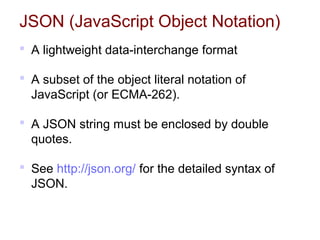
JSON (JavaScript Object Notation)
 A lightweight data-interchange format
 A subset of the object literal notation of
JavaScript (or ECMA-262).
 A JSON string must be enclosed by double
quotes.
 See http://json.org/ for the detailed syntax of
JSON.
JSON is built on two structures
 A collection of name/value pairs.
 In various languages, this is realized as an object,
record, struct, dictionary, hash table, keyed list, or
associative array.
 e.g.: An object with three properties named "a", "b",
and "c"
{ "a":1,"b":2,"c":3 }
 An ordered list of values.
 In most languages, this is realized as an array, vector,
list, or sequence.
 e.g.: An array of three integers and one string value
[ 1, 2, 3, "value #4 with" ]
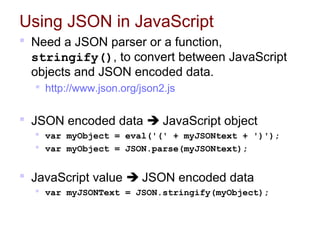
Using JSON in JavaScript
 Need a JSON parser or a function,
stringify(), to convert between JavaScript
objects and JSON encoded data.
 http://www.json.org/json2.js
 JSON encoded data  JavaScript object
 var myObject = eval('(' + myJSONtext + ')');
 var myObject = JSON.parse(myJSONtext);
 JavaScript value  JSON encoded data
 var myJSONText = JSON.stringify(myObject);
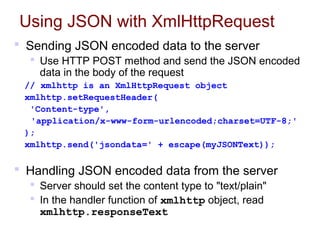
Using JSON with XmlHttpRequest
 Sending JSON encoded data to the server
 Use HTTP POST method and send the JSON encoded
data in the body of the request
// xmlhttp is an XmlHttpRequest object
xmlhttp.setRequestHeader(
'Content-type',
'application/x-www-form-urlencoded;charset=UTF-8;'
);
xmlhttp.send('jsondata=' + escape(myJSONText));
 Handling JSON encoded data from the server
 Server should set the content type to "text/plain"
 In the handler function of xmlhttp object, read
xmlhttp.responseText
Speeding Up AJAX with JSON
 Both XML and JSON use structured approaches
to mark up data.
 More and more web services are supporting
JSON
 e.g.: Yahoo's various search services, travel planners,
del.icio.us, and highway traffic services
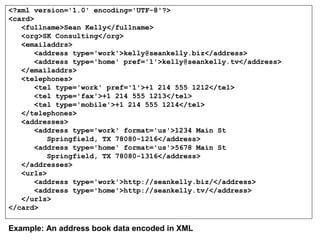
<?xml version='1.0' encoding='UTF-8'?>
<card>
<fullname>Sean Kelly</fullname>
<org>SK Consulting</org>
<emailaddrs>
<address type='work'>kelly@seankelly.biz</address>
<address type='home' pref='1'>kelly@seankelly.tv</address>
</emailaddrs>
<telephones>
<tel type='work' pref='1'>+1 214 555 1212</tel>
<tel type='fax'>+1 214 555 1213</tel>
<tel type='mobile'>+1 214 555 1214</tel>
</telephones>
<addresses>
<address type='work' format='us'>1234 Main St
Springfield, TX 78080-1216</address>
<address type='home' format='us'>5678 Main St
Springfield, TX 78080-1316</address>
</addresses>
<urls>
<address type='work'>http://seankelly.biz/</address>
<address type='home'>http://seankelly.tv/</address>
</urls>
</card>
Example: An address book data encoded in XML
{
"fullname": "Sean Kelly",
"org": "SK Consulting",
"emailaddrs": [
{"type": "work", "value": "kelly@seankelly.biz"},
{"type": "home", "pref": 1, "value": "kelly@seankelly.tv"}
],
"telephones": [
{"type": "work", "pref": 1, "value": "+1 214 555 1212"},
{"type": "fax", "value": "+1 214 555 1213"},
{"type": "mobile", "value": "+1 214 555 1214"}
],
"addresses": [
{"type": "work", "format": "us",
"value": "1234 Main StnSpringfield, TX 78080-1216"},
{"type": "home", "format": "us",
"value": "5678 Main StnSpringfield, TX 78080-1316"}
],
"urls": [
{"type": "work", "value": "http://seankelly.biz/"},
{"type": "home", "value": "http://seankelly.tv/"}
]
}
Example: The same address book data encoded in JSON
function myHandler() {
if (req.readyState == 4 /*complete*/) {
var addrField = document.getElementById('addr');
var root = req.responseXML;
var addrsElem = root.getElementsByTagName('addresses')[0];
var firstAddr = addrsElem.getElementsByTagName('address')[0];
var addrText = fistAddr.firstChild;
var addrValue = addrText.nodeValue;
addrField.value = addrValue;
}
}
JavaScript code to handle XML encoded data
function myHandler() {
if (req.readyState == 4 /*complete*/) {
var addrField = document.getElementById('addr');
var card = eval('(' + req.responseText + ')');
addrField.value = card.addresses[0].value;
}
}
JavaScript code to handle JSON encoded data
Both examples try to update the value of a form element
named "addr" with the data obtained from an HTTP request.
XML vs. JSON (in AJAX Application)
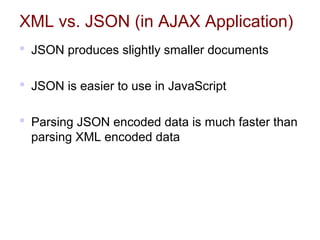
 JSON produces slightly smaller documents
 JSON is easier to use in JavaScript
 Parsing JSON encoded data is much faster than
parsing XML encoded data
XML vs. JSON (in AJAX Application)
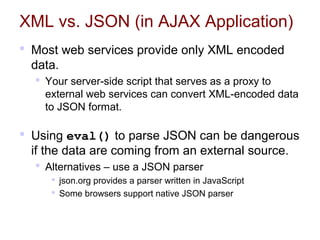
 Most web services provide only XML encoded
data.
 Your server-side script that serves as a proxy to
external web services can convert XML-encoded data
to JSON format.
 Using eval() to parse JSON can be dangerous
if the data are coming from an external source.
 Alternatives – use a JSON parser
 json.org provides a parser written in JavaScript
 Some browsers support native JSON parser
Support for JSON in PHP
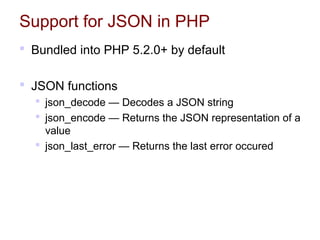
 Bundled into PHP 5.2.0+ by default
 JSON functions
 json_decode — Decodes a JSON string
 json_encode — Returns the JSON representation of a
value
 json_last_error — Returns the last error occured
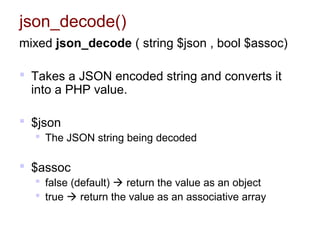
json_decode()
mixed json_decode ( string $json , bool $assoc)
 Takes a JSON encoded string and converts it
into a PHP value.
 $json
 The JSON string being decoded
 $assoc
 false (default)  return the value as an object
 true  return the value as an associative array
<?php
$json = '{"a":1,"b":2,"c":3}';
var_dump(json_decode($json));
var_dump(
  json_decode($json, true)
);
?> 
<?php
$json = '{"foo-bar": 12345}';
$obj = json_decode($json);
print $obj->{'foo-bar'}; // 12345
?>
object(stdClass)#1 (3) {
    ["a"] => int(1)
    ["b"] => int(2)
    ["c"] => int(3)
}
array(3) {
    ["a"] => int(1)
    ["b"] => int(2)
    ["c"] => int(3)
}
json_decode: Example #1
json_decode: Example #2
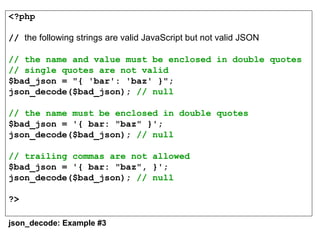
<?php
// the following strings are valid JavaScript but not valid JSON
// the name and value must be enclosed in double quotes
// single quotes are not valid 
$bad_json = "{ 'bar': 'baz' }";
json_decode($bad_json); // null
// the name must be enclosed in double quotes
$bad_json = '{ bar: "baz" }';
json_decode($bad_json); // null
// trailing commas are not allowed
$bad_json = '{ bar: "baz", }';
json_decode($bad_json); // null
?>
json_decode: Example #3
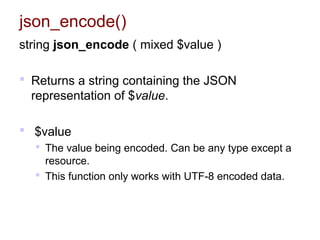
json_encode()
string json_encode ( mixed $value )
 Returns a string containing the JSON
representation of $value.
 $value
 The value being encoded. Can be any type except a
resource.
 This function only works with UTF-8 encoded data.
<?php
$arr = array ('a'=>1,'b'=>2,'c'=>3,'d'=>4,'e'=>5);
echo json_encode($arr);
// Output {"a":1,"b":2,"c":3,"d":4,"e":5}
$arr = array ( 1, 2, 3, 4, 5 );
echo json_encode($arr);
// Output [1,2,3,4,5]
$arr['x'] = 10;
echo json_encode($arr);
// Output {"0":1,"1":2,"2":3,"3":4,"4":5,"x":10}
echo json_encode(54321);
// Output 54321
?>
json_encode: Example #1
References
 JSON
 http://json.org/
 PHP Manual: JavaScript Object Notation
 http://www.php.net/json
 Speeding Up AJAX with JSON
 http://www.developer.com/lang/jscript/article.php/359
6836

Json

  • 1.
  • 2.
    JSON (JavaScript ObjectNotation)  A lightweight data-interchange format  A subset of the object literal notation of JavaScript (or ECMA-262).  A JSON string must be enclosed by double quotes.  See http://json.org/ for the detailed syntax of JSON.
  • 3.
    JSON is builton two structures  A collection of name/value pairs.  In various languages, this is realized as an object, record, struct, dictionary, hash table, keyed list, or associative array.  e.g.: An object with three properties named "a", "b", and "c" { "a":1,"b":2,"c":3 }  An ordered list of values.  In most languages, this is realized as an array, vector, list, or sequence.  e.g.: An array of three integers and one string value [ 1, 2, 3, "value #4 with" ]
  • 4.
    Using JSON inJavaScript  Need a JSON parser or a function, stringify(), to convert between JavaScript objects and JSON encoded data.  http://www.json.org/json2.js  JSON encoded data  JavaScript object  var myObject = eval('(' + myJSONtext + ')');  var myObject = JSON.parse(myJSONtext);  JavaScript value  JSON encoded data  var myJSONText = JSON.stringify(myObject);
  • 5.
    Using JSON withXmlHttpRequest  Sending JSON encoded data to the server  Use HTTP POST method and send the JSON encoded data in the body of the request // xmlhttp is an XmlHttpRequest object xmlhttp.setRequestHeader( 'Content-type', 'application/x-www-form-urlencoded;charset=UTF-8;' ); xmlhttp.send('jsondata=' + escape(myJSONText));  Handling JSON encoded data from the server  Server should set the content type to "text/plain"  In the handler function of xmlhttp object, read xmlhttp.responseText
  • 6.
    Speeding Up AJAXwith JSON  Both XML and JSON use structured approaches to mark up data.  More and more web services are supporting JSON  e.g.: Yahoo's various search services, travel planners, del.icio.us, and highway traffic services
  • 7.
    <?xml version='1.0' encoding='UTF-8'?> <card> <fullname>SeanKelly</fullname> <org>SK Consulting</org> <emailaddrs> <address type='work'>kelly@seankelly.biz</address> <address type='home' pref='1'>kelly@seankelly.tv</address> </emailaddrs> <telephones> <tel type='work' pref='1'>+1 214 555 1212</tel> <tel type='fax'>+1 214 555 1213</tel> <tel type='mobile'>+1 214 555 1214</tel> </telephones> <addresses> <address type='work' format='us'>1234 Main St Springfield, TX 78080-1216</address> <address type='home' format='us'>5678 Main St Springfield, TX 78080-1316</address> </addresses> <urls> <address type='work'>http://seankelly.biz/</address> <address type='home'>http://seankelly.tv/</address> </urls> </card> Example: An address book data encoded in XML
  • 8.
    { "fullname": "Sean Kelly", "org":"SK Consulting", "emailaddrs": [ {"type": "work", "value": "kelly@seankelly.biz"}, {"type": "home", "pref": 1, "value": "kelly@seankelly.tv"} ], "telephones": [ {"type": "work", "pref": 1, "value": "+1 214 555 1212"}, {"type": "fax", "value": "+1 214 555 1213"}, {"type": "mobile", "value": "+1 214 555 1214"} ], "addresses": [ {"type": "work", "format": "us", "value": "1234 Main StnSpringfield, TX 78080-1216"}, {"type": "home", "format": "us", "value": "5678 Main StnSpringfield, TX 78080-1316"} ], "urls": [ {"type": "work", "value": "http://seankelly.biz/"}, {"type": "home", "value": "http://seankelly.tv/"} ] } Example: The same address book data encoded in JSON
  • 9.
    function myHandler() { if(req.readyState == 4 /*complete*/) { var addrField = document.getElementById('addr'); var root = req.responseXML; var addrsElem = root.getElementsByTagName('addresses')[0]; var firstAddr = addrsElem.getElementsByTagName('address')[0]; var addrText = fistAddr.firstChild; var addrValue = addrText.nodeValue; addrField.value = addrValue; } } JavaScript code to handle XML encoded data function myHandler() { if (req.readyState == 4 /*complete*/) { var addrField = document.getElementById('addr'); var card = eval('(' + req.responseText + ')'); addrField.value = card.addresses[0].value; } } JavaScript code to handle JSON encoded data Both examples try to update the value of a form element named "addr" with the data obtained from an HTTP request.
  • 10.
    XML vs. JSON(in AJAX Application)  JSON produces slightly smaller documents  JSON is easier to use in JavaScript  Parsing JSON encoded data is much faster than parsing XML encoded data
  • 11.
    XML vs. JSON(in AJAX Application)  Most web services provide only XML encoded data.  Your server-side script that serves as a proxy to external web services can convert XML-encoded data to JSON format.  Using eval() to parse JSON can be dangerous if the data are coming from an external source.  Alternatives – use a JSON parser  json.org provides a parser written in JavaScript  Some browsers support native JSON parser
  • 12.
    Support for JSONin PHP  Bundled into PHP 5.2.0+ by default  JSON functions  json_decode — Decodes a JSON string  json_encode — Returns the JSON representation of a value  json_last_error — Returns the last error occured
  • 13.
    json_decode() mixed json_decode (string $json , bool $assoc)  Takes a JSON encoded string and converts it into a PHP value.  $json  The JSON string being decoded  $assoc  false (default)  return the value as an object  true  return the value as an associative array
  • 14.
  • 15.
    <?php // the following stringsare valid JavaScript but not valid JSON // the name and value must be enclosed in double quotes // single quotes are not valid  $bad_json = "{ 'bar': 'baz' }"; json_decode($bad_json); // null // the name must be enclosed in double quotes $bad_json = '{ bar: "baz" }'; json_decode($bad_json); // null // trailing commas are not allowed $bad_json = '{ bar: "baz", }'; json_decode($bad_json); // null ?> json_decode: Example #3
  • 16.
    json_encode() string json_encode (mixed $value )  Returns a string containing the JSON representation of $value.  $value  The value being encoded. Can be any type except a resource.  This function only works with UTF-8 encoded data.
  • 17.
    <?php $arr = array('a'=>1,'b'=>2,'c'=>3,'d'=>4,'e'=>5); echo json_encode($arr); // Output {"a":1,"b":2,"c":3,"d":4,"e":5} $arr = array ( 1, 2, 3, 4, 5 ); echo json_encode($arr); // Output [1,2,3,4,5] $arr['x'] = 10; echo json_encode($arr); // Output {"0":1,"1":2,"2":3,"3":4,"4":5,"x":10} echo json_encode(54321); // Output 54321 ?> json_encode: Example #1
  • 18.
    References  JSON  http://json.org/ PHP Manual: JavaScript Object Notation  http://www.php.net/json  Speeding Up AJAX with JSON  http://www.developer.com/lang/jscript/article.php/359 6836

Editor's Notes

  • #5 Note: When using eval() to parse a JSON encoded string, the text must be wrapped in parentheses to avoid tripping on an ambiguity in JavaScript&amp;apos;s syntax.