ElasticSearch
Mapping and Analysis
http://elastic.openthinklabs.com/
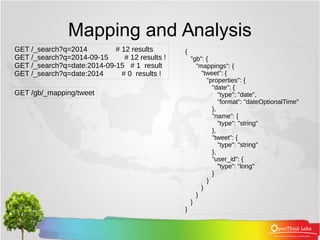
Mapping and Analysis
GET /_search?q=2014 # 12 results
GET /_search?q=2014-09-15 # 12 results !
GET /_search?q=date:2014-09-15 # 1 result
GET /_search?q=date:2014 # 0 results !
GET /gb/_mapping/tweet
{
"gb": {
"mappings": {
"tweet": {
"properties": {
"date": {
"type": "date",
"format": "dateOptionalTime"
},
"name": {
"type": "string"
},
"tweet": {
"type": "string"
},
"user_id": {
"type": "long"
}
}
}
}
}
}
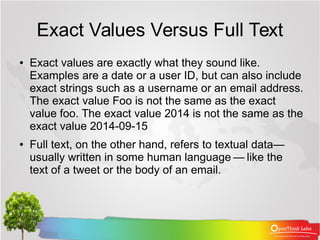
Exact Values Versus Full Text
● Exact values are exactly what they sound like.
Examples are a date or a user ID, but can also include
exact strings such as a username or an email address.
The exact value Foo is not the same as the exact
value foo. The exact value 2014 is not the same as the
exact value 2014-09-15
● Full text, on the other hand, refers to textual data—
usually written in some human language — like the   
text of a tweet or the body of an email.
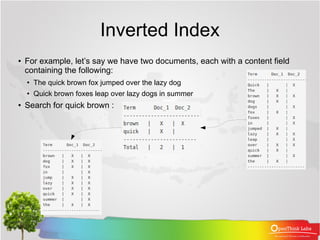
Inverted Index
●
For example, let’s say we have two documents, each with a content field
containing the following:
●
The quick brown fox jumped over the lazy dog
● Quick brown foxes leap over lazy dogs in summer
● Search for quick brown :
Analysis and Analyzers
● Analysis is a process that consists of the following:
● First, tokenizing a block of text into individual terms
suitable for use in an inverted index,
● Then normalizing these terms into a standard form to
improve their “searchability,” or recall
● An analyzer is really just a wrapper that combines
three functions into a single package:
● Character filters
● Tokenizer
● Token filters
Analysis and Analyzers
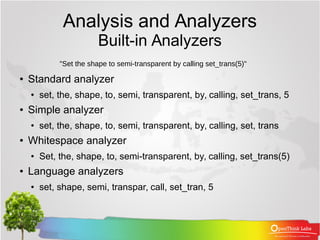
Built-in Analyzers
● Standard analyzer
● set, the, shape, to, semi, transparent, by, calling, set_trans, 5
● Simple analyzer
● set, the, shape, to, semi, transparent, by, calling, set, trans
● Whitespace analyzer
● Set, the, shape, to, semi-transparent, by, calling, set_trans(5)
● Language analyzers
● set, shape, semi, transpar, call, set_tran, 5
"Set the shape to semi-transparent by calling set_trans(5)"
Analysis and Analyzers
Testing Analyzers
GET /_analyze
{
"analyzer": "standard",
"text": "Text to analyze"
}
{
"tokens": [
{
"token":
"text",
"start_offset": 0,
"end_offset": 4,
"type":
"<ALPHANUM>",
"position": 1
},
{
"token": "to",
"start_offset": 5,
"end_offset": 7,
"type":
"<ALPHANUM>",
"position": 2
},
{
"token":
"analyze",
"start_offset": 8,
"end_offset": 15,
"type":
"<ALPHANUM>",
"position": 3
}
]
}
Analysis and Analyzers
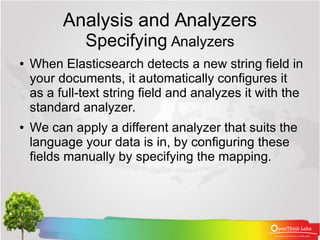
Specifying Analyzers
● When Elasticsearch detects a new string field in
your documents, it automatically configures it
as a full-text string field and analyzes it with the
standard analyzer.
● We can apply a different analyzer that suits the
language your data is in, by configuring these
fields manually by specifying the mapping.
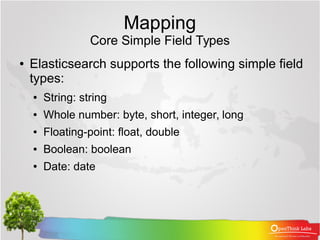
Mapping
Core Simple Field Types
● Elasticsearch supports the following simple field
types:
● String: string
● Whole number: byte, short, integer, long
● Floating-point: float, double
● Boolean: boolean
● Date: date
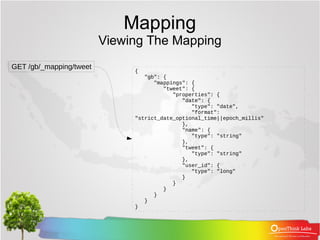
Mapping
Viewing The Mapping
GET /gb/_mapping/tweet {
"gb": {
"mappings": {
"tweet": {
"properties": {
"date": {
"type": "date",
"format":
"strict_date_optional_time||epoch_millis"
},
"name": {
"type": "string"
},
"tweet": {
"type": "string"
},
"user_id": {
"type": "long"
}
}
}
}
}
}
Mapping
Customizing Field Mappings
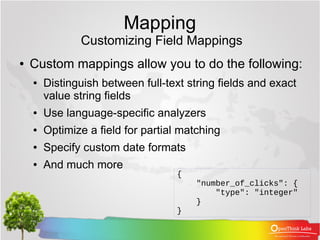
● Custom mappings allow you to do the following:
● Distinguish between full-text string fields and exact
value string fields
● Use language-specific analyzers
● Optimize a field for partial matching
● Specify custom date formats
● And much more
{
"number_of_clicks": {
"type": "integer"
}
}
Mapping
Customizing Field Mappings
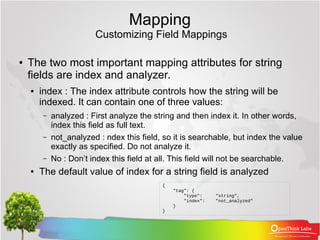
● The two most important mapping attributes for string
fields are index and analyzer.
● index : The index attribute controls how the string will be
indexed. It can contain one of three values:
– analyzed : First analyze the string and then index it. In other words,
index this field as full text.
– not_analyzed : ndex this field, so it is searchable, but index the value
exactly as specified. Do not analyze it.
– No : Don’t index this field at all. This field will not be searchable.
● The default value of index for a string field is analyzed
{
"tag": {
"type": "string",
"index": "not_analyzed"
}
}
Mapping
Customizing Field Mappings
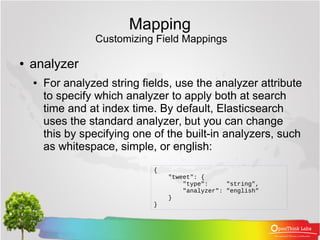
● analyzer
● For analyzed string fields, use the analyzer attribute
to specify which analyzer to apply both at search
time and at index time. By default, Elasticsearch
uses the standard analyzer, but you can change
this by specifying one of the built-in analyzers, such
as whitespace, simple, or english:
{
"tweet": {
"type": "string",
"analyzer": "english"
}
}
Mapping
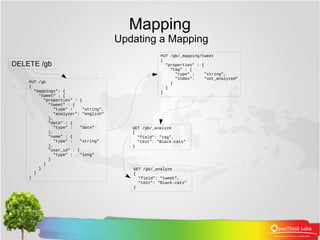
Updating a Mapping
DELETE /gb
PUT /gb
{
"mappings": {
"tweet" : {
"properties" : {
"tweet" : {
"type" : "string",
"analyzer": "english"
},
"date" : {
"type" : "date"
},
"name" : {
"type" : "string"
},
"user_id" : {
"type" : "long"
}
}
}
}
}
PUT /gb/_mapping/tweet
{
"properties" : {
"tag" : {
"type" : "string",
"index": "not_analyzed"
}
}
}
GET /gb/_analyze
{
"field": "tweet",
"text": "Black-cats"
}
GET /gb/_analyze
{
"field": "tag",
"text": "Black-cats"
}
Complex Core Field Types
● Besides the simple scalar datatypes that we
have mentioned, JSON also has null values,
arrays, and objects, all of which are supported
by Elasticsearch.
{ "tag": [ "search", "nosql" ]}
Multivalue Fields
"null_value": null,
"empty_array": [],
"array_with_null_value": [ null ]
Empty Fields
Complex Core Field Types
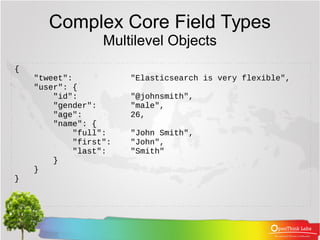
Multilevel Objects
{
"tweet": "Elasticsearch is very flexible",
"user": {
"id": "@johnsmith",
"gender": "male",
"age": 26,
"name": {
"full": "John Smith",
"first": "John",
"last": "Smith"
}
}
}
Complex Core Field Types
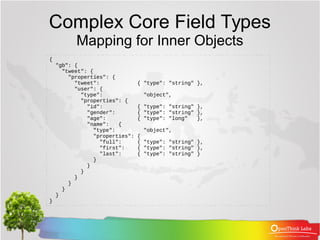
Mapping for Inner Objects
{
"gb": {
"tweet": {
"properties": {
"tweet": { "type": "string" },
"user": {
"type": "object",
"properties": {
"id": { "type": "string" },
"gender": { "type": "string" },
"age": { "type": "long" },
"name": {
"type": "object",
"properties": {
"full": { "type": "string" },
"first": { "type": "string" },
"last": { "type": "string" }
}
}
}
}
}
}
}
}
Complex Core Field Types
How Inner Objects are Indexed
● Lucene doesn’t understand inner objects. A Lucene
document consists of a flat list of key-value pairs. In order
for Elasticsearch to index inner objects usefully, it converts
our document into something like this:
{
"tweet": [elasticsearch, flexible, very],
"user.id": [@johnsmith],
"user.gender": [male],
"user.age": [26],
"user.name.full": [john, smith],
"user.name.first": [john],
"user.name.last": [smith]
}
Complex Core Field Types
Arrays of Inner Objects
● Finally, consider how an array containing inner objects would be
indexed. Let’s say we have a followers array that looks like this:
{
"followers": [
{ "age": 35, "name": "Mary White"},
{ "age": 26, "name": "Alex Jones"},
{ "age": 19, "name": "Lisa Smith"}
]
}
● This document will be flattened as we described previously, but
the result will look like this:
{
"followers.age": [19, 26, 35],
"followers.name": [alex, jones, lisa, smith, mary, white]
}
Referensi
● ElasticSearch, The Definitive Guide, A Distrib
uted Real-Time Search and Analytics Engine, Cl
inton Gormely & Zachary Tong, O’Reilly

06. ElasticSearch : Mapping and Analysis

  • 1.
  • 2.
    Mapping and Analysis GET/_search?q=2014 # 12 results GET /_search?q=2014-09-15 # 12 results ! GET /_search?q=date:2014-09-15 # 1 result GET /_search?q=date:2014 # 0 results ! GET /gb/_mapping/tweet { "gb": { "mappings": { "tweet": { "properties": { "date": { "type": "date", "format": "dateOptionalTime" }, "name": { "type": "string" }, "tweet": { "type": "string" }, "user_id": { "type": "long" } } } } } }
  • 3.
    Exact Values VersusFull Text ● Exact values are exactly what they sound like. Examples are a date or a user ID, but can also include exact strings such as a username or an email address. The exact value Foo is not the same as the exact value foo. The exact value 2014 is not the same as the exact value 2014-09-15 ● Full text, on the other hand, refers to textual data— usually written in some human language — like the    text of a tweet or the body of an email.
  • 4.
    Inverted Index ● For example,let’s say we have two documents, each with a content field containing the following: ● The quick brown fox jumped over the lazy dog ● Quick brown foxes leap over lazy dogs in summer ● Search for quick brown :
  • 5.
    Analysis and Analyzers ●Analysis is a process that consists of the following: ● First, tokenizing a block of text into individual terms suitable for use in an inverted index, ● Then normalizing these terms into a standard form to improve their “searchability,” or recall ● An analyzer is really just a wrapper that combines three functions into a single package: ● Character filters ● Tokenizer ● Token filters
  • 6.
    Analysis and Analyzers Built-inAnalyzers ● Standard analyzer ● set, the, shape, to, semi, transparent, by, calling, set_trans, 5 ● Simple analyzer ● set, the, shape, to, semi, transparent, by, calling, set, trans ● Whitespace analyzer ● Set, the, shape, to, semi-transparent, by, calling, set_trans(5) ● Language analyzers ● set, shape, semi, transpar, call, set_tran, 5 "Set the shape to semi-transparent by calling set_trans(5)"
  • 7.
    Analysis and Analyzers TestingAnalyzers GET /_analyze { "analyzer": "standard", "text": "Text to analyze" } { "tokens": [ { "token": "text", "start_offset": 0, "end_offset": 4, "type": "<ALPHANUM>", "position": 1 }, { "token": "to", "start_offset": 5, "end_offset": 7, "type": "<ALPHANUM>", "position": 2 }, { "token": "analyze", "start_offset": 8, "end_offset": 15, "type": "<ALPHANUM>", "position": 3 } ] }
  • 8.
    Analysis and Analyzers SpecifyingAnalyzers ● When Elasticsearch detects a new string field in your documents, it automatically configures it as a full-text string field and analyzes it with the standard analyzer. ● We can apply a different analyzer that suits the language your data is in, by configuring these fields manually by specifying the mapping.
  • 9.
    Mapping Core Simple FieldTypes ● Elasticsearch supports the following simple field types: ● String: string ● Whole number: byte, short, integer, long ● Floating-point: float, double ● Boolean: boolean ● Date: date
  • 10.
    Mapping Viewing The Mapping GET/gb/_mapping/tweet { "gb": { "mappings": { "tweet": { "properties": { "date": { "type": "date", "format": "strict_date_optional_time||epoch_millis" }, "name": { "type": "string" }, "tweet": { "type": "string" }, "user_id": { "type": "long" } } } } } }
  • 11.
    Mapping Customizing Field Mappings ●Custom mappings allow you to do the following: ● Distinguish between full-text string fields and exact value string fields ● Use language-specific analyzers ● Optimize a field for partial matching ● Specify custom date formats ● And much more { "number_of_clicks": { "type": "integer" } }
  • 12.
    Mapping Customizing Field Mappings ●The two most important mapping attributes for string fields are index and analyzer. ● index : The index attribute controls how the string will be indexed. It can contain one of three values: – analyzed : First analyze the string and then index it. In other words, index this field as full text. – not_analyzed : ndex this field, so it is searchable, but index the value exactly as specified. Do not analyze it. – No : Don’t index this field at all. This field will not be searchable. ● The default value of index for a string field is analyzed { "tag": { "type": "string", "index": "not_analyzed" } }
  • 13.
    Mapping Customizing Field Mappings ●analyzer ● For analyzed string fields, use the analyzer attribute to specify which analyzer to apply both at search time and at index time. By default, Elasticsearch uses the standard analyzer, but you can change this by specifying one of the built-in analyzers, such as whitespace, simple, or english: { "tweet": { "type": "string", "analyzer": "english" } }
  • 14.
    Mapping Updating a Mapping DELETE/gb PUT /gb { "mappings": { "tweet" : { "properties" : { "tweet" : { "type" : "string", "analyzer": "english" }, "date" : { "type" : "date" }, "name" : { "type" : "string" }, "user_id" : { "type" : "long" } } } } } PUT /gb/_mapping/tweet { "properties" : { "tag" : { "type" : "string", "index": "not_analyzed" } } } GET /gb/_analyze { "field": "tweet", "text": "Black-cats" } GET /gb/_analyze { "field": "tag", "text": "Black-cats" }
  • 15.
    Complex Core FieldTypes ● Besides the simple scalar datatypes that we have mentioned, JSON also has null values, arrays, and objects, all of which are supported by Elasticsearch. { "tag": [ "search", "nosql" ]} Multivalue Fields "null_value": null, "empty_array": [], "array_with_null_value": [ null ] Empty Fields
  • 16.
    Complex Core FieldTypes Multilevel Objects { "tweet": "Elasticsearch is very flexible", "user": { "id": "@johnsmith", "gender": "male", "age": 26, "name": { "full": "John Smith", "first": "John", "last": "Smith" } } }
  • 17.
    Complex Core FieldTypes Mapping for Inner Objects { "gb": { "tweet": { "properties": { "tweet": { "type": "string" }, "user": { "type": "object", "properties": { "id": { "type": "string" }, "gender": { "type": "string" }, "age": { "type": "long" }, "name": { "type": "object", "properties": { "full": { "type": "string" }, "first": { "type": "string" }, "last": { "type": "string" } } } } } } } } }
  • 18.
    Complex Core FieldTypes How Inner Objects are Indexed ● Lucene doesn’t understand inner objects. A Lucene document consists of a flat list of key-value pairs. In order for Elasticsearch to index inner objects usefully, it converts our document into something like this: { "tweet": [elasticsearch, flexible, very], "user.id": [@johnsmith], "user.gender": [male], "user.age": [26], "user.name.full": [john, smith], "user.name.first": [john], "user.name.last": [smith] }
  • 19.
    Complex Core FieldTypes Arrays of Inner Objects ● Finally, consider how an array containing inner objects would be indexed. Let’s say we have a followers array that looks like this: { "followers": [ { "age": 35, "name": "Mary White"}, { "age": 26, "name": "Alex Jones"}, { "age": 19, "name": "Lisa Smith"} ] } ● This document will be flattened as we described previously, but the result will look like this: { "followers.age": [19, 26, 35], "followers.name": [alex, jones, lisa, smith, mary, white] }
  • 20.
    Referensi ● ElasticSearch, TheDefinitive Guide, A Distrib uted Real-Time Search and Analytics Engine, Cl inton Gormely & Zachary Tong, O’Reilly