JSON Introduction
Android JSON
Mark Daniel G. Dacer
JSON
 JSON stands for JavaScript Object Notation
 JSON is a text format for storing and transporting data
 JSON is "self-describing" and easy to understand
 JSON is representing arbitrary data in ASCII format
 Can be easily transfer through the internet
 Can be store in disk
 Can be process by most of programming language
Computer and Data
 Computer are great at storing and processing data
 But the data format representation is different across
 The program that has written it
 The architecture of the machine using it
 There’s a good chance that the data is interpreted in different ways
 Can cause corrupt data, errors and incorrect data.
 JSON gives you a way to represent data structure that is free from the
program, it represent. XML does something similar
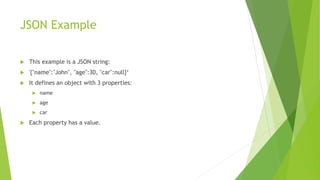
JSON Example
 This example is a JSON string:
 '{"name":"John", "age":30, "car":null}‘
 It defines an object with 3 properties:
 name
 age
 car
 Each property has a value.
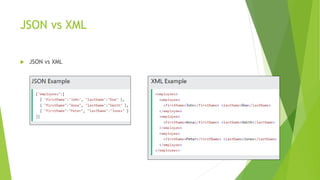
JSON vs XML
 JSON vs XML
JSON is like xml because
 Both JSON and XML are "self describing" (human readable)
 Both JSON and XML can be parsed and used by lots of programming languages
 Both JSON and XML can be fetched with an XMLHttpRequest
JSON is Unlike XML Because
 JSON doesn't use end tag
 JSON is shorter
 JSON is quicker to read and write
 JSON can use arrays
Why JSON is Better Than XML
 XML is much more difficult to parse than JSON.
 JSON is parsed into a ready-to-use JavaScript object.
 Its lightweight in some ways
 Has same parser as the JavaScript
JSON Valid Data Types
 In JSON, values must be one of the following
data types:
 a string
 a number
 an object (JSON object)
 an array
 a boolean
 null
• JSON values cannot be one of the
following data types:
• a function
• a date
• undefined
JSON Variable examples
 a string - {"name":"John"}
 a number - {"age":30}
 an object (JSON object) – {"employee":{"name":"John", "age":30, "city":"New
York"}}
 an array - {"employees":["John", "Anna", "Peter"]}
 a Boolean - {"sale":true}
 Null - {"middlename":null}
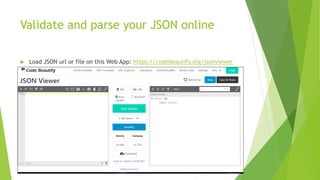
Validate and parse your JSON online
 Load JSON url or file on this Web App: https://codebeautify.org/jsonviewer
More learning links
 JSON, not Jason - https://www.youtube.com/watch?v=A0hoqSkyY7o
 Official JSON website - https://www.json.org/json-en.html
 Android JSON parser:
https://www.tutorialspoint.com/android/android_json_parser.htm

Intro to JSON

  • 1.
  • 2.
    JSON  JSON standsfor JavaScript Object Notation  JSON is a text format for storing and transporting data  JSON is "self-describing" and easy to understand  JSON is representing arbitrary data in ASCII format  Can be easily transfer through the internet  Can be store in disk  Can be process by most of programming language
  • 3.
    Computer and Data Computer are great at storing and processing data  But the data format representation is different across  The program that has written it  The architecture of the machine using it  There’s a good chance that the data is interpreted in different ways  Can cause corrupt data, errors and incorrect data.  JSON gives you a way to represent data structure that is free from the program, it represent. XML does something similar
  • 4.
    JSON Example  Thisexample is a JSON string:  '{"name":"John", "age":30, "car":null}‘  It defines an object with 3 properties:  name  age  car  Each property has a value.
  • 5.
    JSON vs XML JSON vs XML
  • 6.
    JSON is likexml because  Both JSON and XML are "self describing" (human readable)  Both JSON and XML can be parsed and used by lots of programming languages  Both JSON and XML can be fetched with an XMLHttpRequest
  • 7.
    JSON is UnlikeXML Because  JSON doesn't use end tag  JSON is shorter  JSON is quicker to read and write  JSON can use arrays
  • 8.
    Why JSON isBetter Than XML  XML is much more difficult to parse than JSON.  JSON is parsed into a ready-to-use JavaScript object.  Its lightweight in some ways  Has same parser as the JavaScript
  • 9.
    JSON Valid DataTypes  In JSON, values must be one of the following data types:  a string  a number  an object (JSON object)  an array  a boolean  null • JSON values cannot be one of the following data types: • a function • a date • undefined
  • 10.
    JSON Variable examples a string - {"name":"John"}  a number - {"age":30}  an object (JSON object) – {"employee":{"name":"John", "age":30, "city":"New York"}}  an array - {"employees":["John", "Anna", "Peter"]}  a Boolean - {"sale":true}  Null - {"middlename":null}
  • 11.
    Validate and parseyour JSON online  Load JSON url or file on this Web App: https://codebeautify.org/jsonviewer
  • 12.
    More learning links JSON, not Jason - https://www.youtube.com/watch?v=A0hoqSkyY7o  Official JSON website - https://www.json.org/json-en.html  Android JSON parser: https://www.tutorialspoint.com/android/android_json_parser.htm