Jonathan H. Wage OpenSky
Doctrine MongoDB
Object Document Mapper
+
Who am I?
Jonathan H. Wage
PHP Developer for over 10 years
Symfony Contributor
Doctrine Contributor
Published Author
Business Owner
Nashville, TN Resident
http://www.twitter.com/jwage
http://www.facebook.com/jwage
I work at
What is OpenSky?
“a social commerce platform”
Based in New York and is a major open
source software advocate
http://www.shopopensky.com
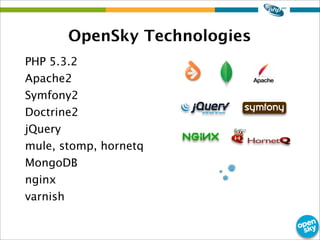
OpenSky Technologies
PHP 5.3.2
Apache2
Symfony2
Doctrine2
jQuery
mule, stomp, hornetq
MongoDB
nginx
varnish
What is Doctrine?
- Open Source PHP Project started in
2006
- Specializes in database functionality
Doctrine Libraries
- Database Abstraction Layer
- Database Migrations
- Object Relational Mapper
- MongoDB Object Document Manager
- CouchDB Object Document Manager
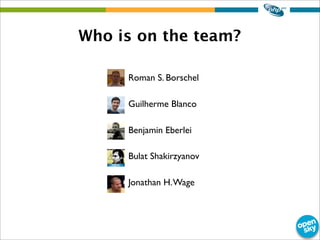
Who is on the team?
• Roman S. Borschel
• Guilherme Blanco
• Benjamin Eberlei
• Bulat Shakirzyanov
• Jonathan H.Wage
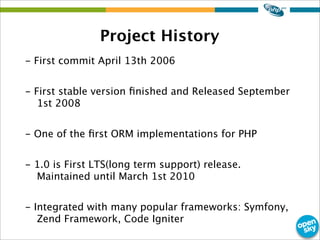
Project History
- First commit April 13th 2006
- First stable version finished and Released September
1st 2008
- One of the first ORM implementations for PHP
- 1.0 is First LTS(long term support) release.
Maintained until March 1st 2010
- Integrated with many popular frameworks: Symfony,
Zend Framework, Code Igniter
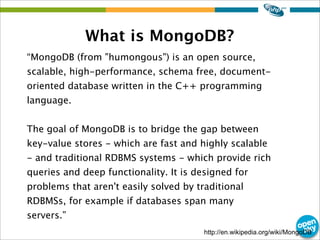
What is MongoDB?
http://en.wikipedia.org/wiki/MongoDB
“MongoDB (from "humongous") is an open source,
scalable, high-performance, schema free, document-
oriented database written in the C++ programming
language.
The goal of MongoDB is to bridge the gap between
key-value stores - which are fast and highly scalable
- and traditional RDBMS systems - which provide rich
queries and deep functionality. It is designed for
problems that aren't easily solved by traditional
RDBMSs, for example if databases span many
servers.”
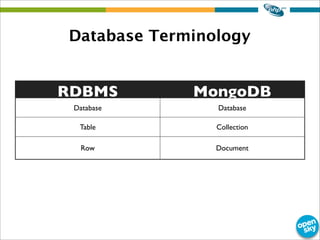
Database Terminology
RDBMS MongoDB
Database Database
Table Collection
Row Document
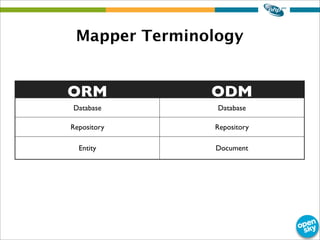
Mapper Terminology
ORM ODM
Database Database
Repository Repository
Entity Document
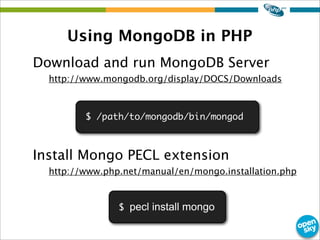
Using MongoDB in PHP
Download and run MongoDB Server
http://www.mongodb.org/display/DOCS/Downloads
Install Mongo PECL extension
http://www.php.net/manual/en/mongo.installation.php
$ /path/to/mongodb/bin/mongod
$ pecl install mongo
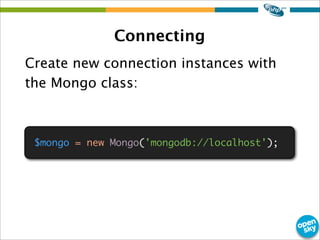
Connecting
Create new connection instances with
the Mongo class:
$mongo = new Mongo('mongodb://localhost');
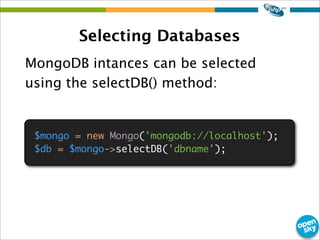
Selecting Databases
MongoDB intances can be selected
using the selectDB() method:
$mongo = new Mongo('mongodb://localhost');
$db = $mongo->selectDB('dbname');
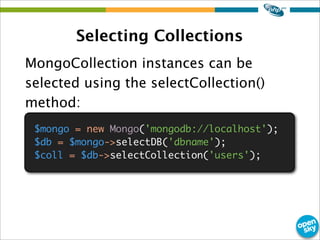
Selecting Collections
MongoCollection instances can be
selected using the selectCollection()
method:
$mongo = new Mongo('mongodb://localhost');
$db = $mongo->selectDB('dbname');
$coll = $db->selectCollection('users');
Inserting Documents
Insert a regular PHP array:
$user = array(
'username' => 'jwage',
'password' => md5('changeme')
'active' => true
);
$coll->insert($user);
echo $user['_id'];
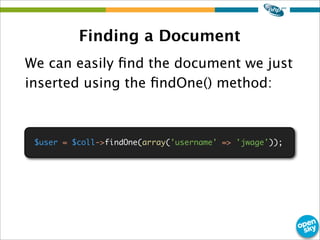
Finding a Document
We can easily find the document we just
inserted using the findOne() method:
$user = $coll->findOne(array('username' => 'jwage'));
Updating a Document
You can find a document, change it and
save the entire document:
$user = $coll->findOne(array('username' => 'jwage'));
$user['username'] = 'jonwage';
$user['password'] = md5('newpassword');
$coll->save($user);
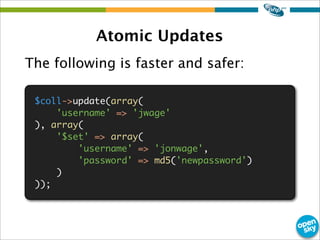
Atomic Updates
The following is faster and safer:
$coll->update(array(
'username' => 'jwage'
), array(
'$set' => array(
'username' => 'jonwage',
'password' => md5('newpassword')
)
));
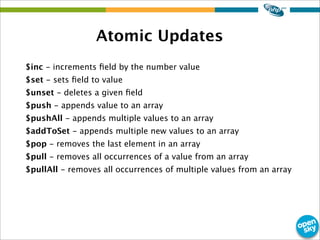
Atomic Updates
$inc - increments field by the number value
$set - sets field to value
$unset - deletes a given field
$push - appends value to an array
$pushAll - appends multiple values to an array
$addToSet - appends multiple new values to an array
$pop - removes the last element in an array
$pull - removes all occurrences of a value from an array
$pullAll - removes all occurrences of multiple values from an array
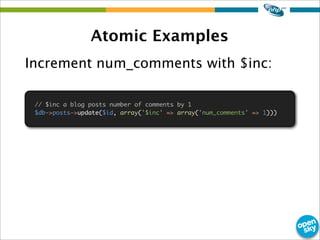
Atomic Examples
Increment num_comments with $inc:
// $inc a blog posts number of comments by 1
$db->posts->update($id, array('$inc' => array('num_comments' => 1)))
Atomic Examples
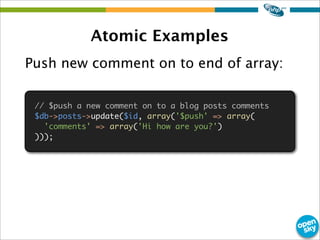
Push new comment on to end of array:
// $push a new comment on to a blog posts comments
$db->posts->update($id, array('$push' => array(
'comments' => array('Hi how are you?')
)));
Atomic Examples
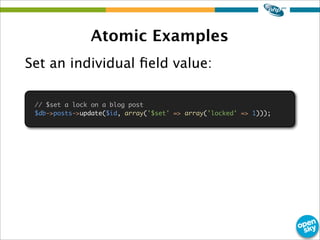
Set an individual field value:
// $set a lock on a blog post
$db->posts->update($id, array('$set' => array('locked' => 1)));
Atomic Examples
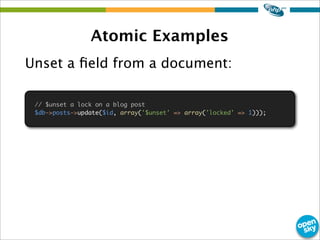
Unset a field from a document:
// $unset a lock on a blog post
$db->posts->update($id, array('$unset' => array('locked' => 1)));
Removing Documents
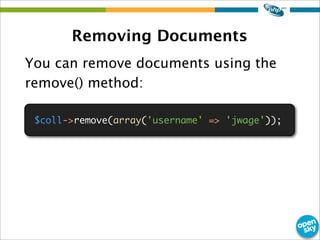
You can remove documents using the
remove() method:
$coll->remove(array('username' => 'jwage'));
+
Doctrine + MongoDB
=
What is it?
- Layer on top of Mongo PECL extension
- Work with objects instead of arrays
- Create rich OO PHP domain and persist
transparently using Doctrine
What does it do?
- Maps PHP classes to MongoDB
- Manages the state of objects
- Tracks changes and persists them
- Constructs regular PHP objects from
MongoDB data
How does it do it?
- Implements UnitOfWork
http://martinfowler.com/eaaCatalog/unitOfWork.html
- Tracks changes to managed objects
by maintaining a copy of its original
data
- Computes changesets and persists
them transparently
Easier to build than ORM
- Less work to convert objects to arrays
for persistence to MongoDB
- Less work to convert the data in the
database to objects since it is already
stored in a object-like structure
instead of flat like in a RDBMS
Architecture
Documents
- Lightweight persistent domain object
- Regular PHP class
- Does not extend any base Doctrine class
- Cannot be final or contain final methods
- Any two documents in a hierarchy of classes must not
have a mapped property with the same name
- Supports inheritance, polymorphic associations and
polymorphic queries.
- Both abstract and concrete classes can be documents
- Documents may extend non-document classes as well
as document classes, and non-document classes may
extend document classes
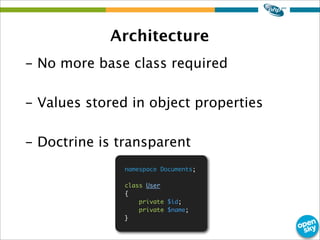
Architecture
- No more base class required
- Values stored in object properties
- Doctrine is transparent
namespace Documents;
class User
{
private $id;
private $name;
}
Architecture
The DocumentManager
- Central access point to the ODM functionality provided by
Doctrine. API is used to manage the persistence of your
objects and to query for persistent objects.
- Employes transactional write behind strategy that delays the
execution of queries in order to execute them in the most
efficient way
- Internally a DocumentManager uses a UnitOfWork to keep
track of your objects
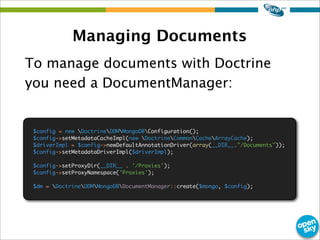
Managing Documents
To manage documents with Doctrine
you need a DocumentManager:
$config = new DoctrineODMMongoDBConfiguration();
$config->setMetadataCacheImpl(new DoctrineCommonCacheArrayCache);
$driverImpl = $config->newDefaultAnnotationDriver(array(__DIR__."/Documents"));
$config->setMetadataDriverImpl($driverImpl);
$config->setProxyDir(__DIR__ . '/Proxies');
$config->setProxyNamespace('Proxies');
$dm = DoctrineODMMongoDBDocumentManager::create($mongo, $config);
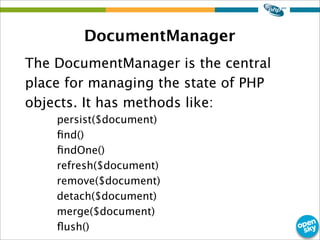
DocumentManager
The DocumentManager is the central
place for managing the state of PHP
objects. It has methods like:
persist($document)
find()
findOne()
refresh($document)
remove($document)
detach($document)
merge($document)
flush()
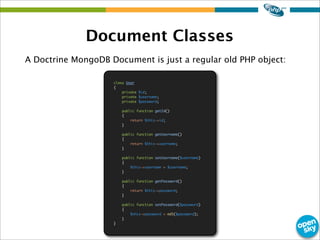
Document Classes
A Doctrine MongoDB Document is just a regular old PHP object:
class User
{
private $id;
private $username;
private $password;
public function getId()
{
return $this->id;
}
public function getUsername()
{
return $this->username;
}
public function setUsername($username)
{
$this->username = $username;
}
public function getPassword()
{
return $this->password;
}
public function setPassword($password)
{
$this->password = md5($password);
}
}
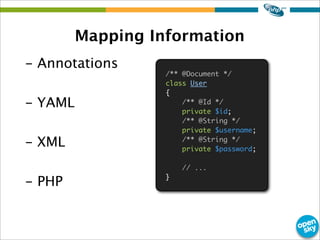
Mapping Information
- Annotations
- YAML
- XML
- PHP
/** @Document */
class User
{
/** @Id */
private $id;
/** @String */
private $username;
/** @String */
private $password;
// ...
}
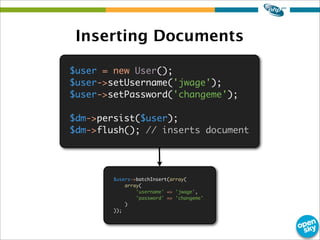
Inserting Documents
$user = new User();
$user->setUsername('jwage');
$user->setPassword('changeme');
$dm->persist($user);
$dm->flush(); // inserts document
$users->batchInsert(array(
array(
'username' => 'jwage',
'password' => 'changeme'
)
));
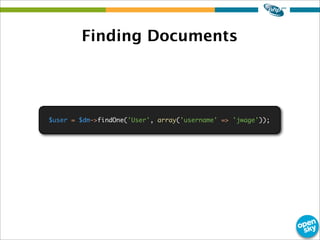
Finding Documents
$user = $dm->findOne('User', array('username' => 'jwage'));
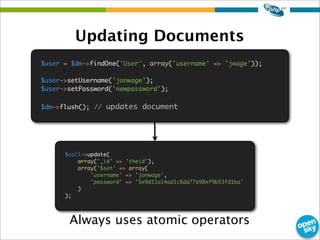
Updating Documents
Always uses atomic operators
$user = $dm->findOne('User', array('username' => 'jwage'));
$user->setUsername('jonwage');
$user->setPassword('newpassword');
$dm->flush(); // updates document
$coll->update(
array('_id' => 'theid'),
array('$set' => array(
'username' => 'jonwage',
'password' => '5e9d11a14ad1c8dd77e98ef9b53fd1ba'
)
);
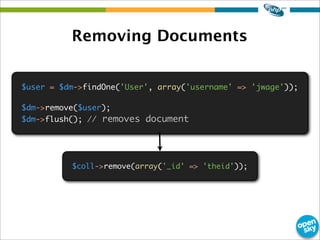
Removing Documents
$user = $dm->findOne('User', array('username' => 'jwage'));
$dm->remove($user);
$dm->flush(); // removes document
$coll->remove(array('_id' => 'theid'));
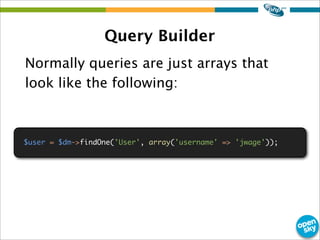
Query Builder
Normally queries are just arrays that
look like the following:
$user = $dm->findOne('User', array('username' => 'jwage'));
Problems
- Not OO
- Not re-usable
- Can become difficult to read as query
gets more complex
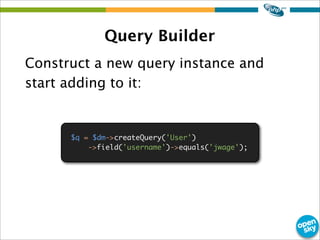
Query Builder
Construct a new query instance and
start adding to it:
$q = $dm->createQuery('User')
->field('username')->equals('jwage');
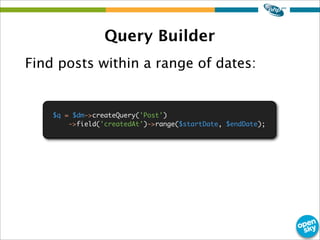
Query Builder
Find posts within a range of dates:
$q = $dm->createQuery('Post')
->field('createdAt')->range($startDate, $endDate);
Query Builder
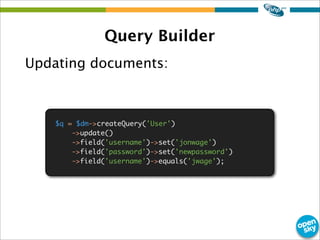
Updating documents:
$q = $dm->createQuery('User')
->update()
->field('username')->set('jonwage')
->field('password')->set('newpassword')
->field('username')->equals('jwage');
Query Builder
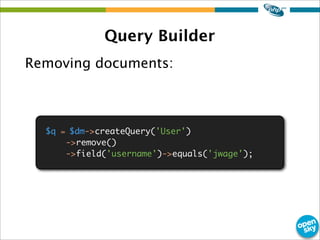
Removing documents:
$q = $dm->createQuery('User')
->remove()
->field('username')->equals('jwage');
Query Builder
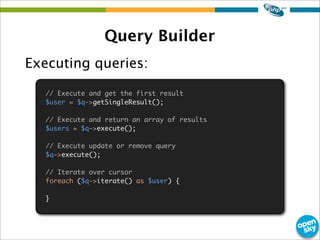
Executing queries:
// Execute and get the first result
$user = $q->getSingleResult();
// Execute and return an array of results
$users = $q->execute();
// Execute update or remove query
$q->execute();
// Iterate over cursor
foreach ($q->iterate() as $user) {
}
Embedded Documents
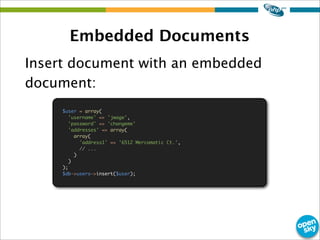
Insert document with an embedded
document:
$user = array(
'username' => 'jwage',
'password' => 'changeme'
'addresses' => array(
array(
'address1' => '6512 Mercomatic Ct.',
// ...
)
)
);
$db->users->insert($user);
Embedded Documents
Push a new address on to the end of
the addresses array:
$db->users->update($user['_id'], array('$push' => array(
'addresses' => array(
'address1' => 'New address'
)
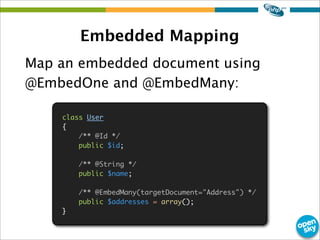
Embedded Mapping
Map an embedded document using
@EmbedOne and @EmbedMany:
class User
{
/** @Id */
public $id;
/** @String */
public $name;
/** @EmbedMany(targetDocument="Address") */
public $addresses = array();
}
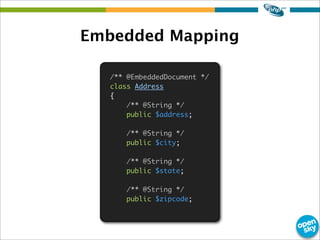
/** @EmbeddedDocument */
class Address
{
/** @String */
public $address;
/** @String */
public $city;
/** @String */
public $state;
/** @String */
public $zipcode;
Embedded Mapping
$user = new User();
$user->name = 'Jonathan H. Wage';
$address = new Address();
$address->address = '6512 Mercomatic Ct';
$address->city = 'Nashville';
$address->state = 'Tennessee';
$address->zipcode = '37209';
$user->addresses[] = $address;
$dm->persist($user);
$dm->flush();
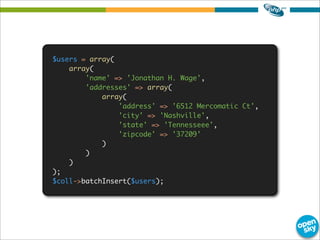
Persisting
$users = array(
array(
'name' => 'Jonathan H. Wage',
'addresses' => array(
array(
'address' => '6512 Mercomatic Ct',
'city' => 'Nashville',
'state' => 'Tennesseee',
'zipcode' => '37209'
)
)
)
);
$coll->batchInsert($users);
Updating Embedded Documents
$user = $dm->findOne('User', array('name' => 'Jonathan H. Wage'));
$user->addresses[0]->zipcode = '37205';
$coll->update(
array('_id' => 'theuserid'),
array('$set' => array('addresses.0.zipcode' => '37209'))
);
Adding new Address
$user = $dm->findOne('User', array('name' => 'Jonathan H. Wage'));
$address = new Address();
$address->address = '475 Buckhead Ave.';
$address->city = 'Atlanta';
$address->state = 'Georgia';
$address->zipcode = '30305';
$user->addresses[] = $address;
$dm->flush();
$coll->update(
array('_id' => 'theuserid'),
array('$pushAll' => array(
'addresses' => array(
array(
'address' => '475 Buckhead Ave.',
'city' => 'Atlanta',
'state' => 'Georgia',
'zipcode' => '30305'
)
)
))
);
Unsetting Properties
unset($user->addresses[0]->zipcode);
$dm->flush();
$coll->update(
array('_id' => 'theuserid'),
array(
'$unset' => array(
'addresses.0.zipcode' => 1
)
)
);
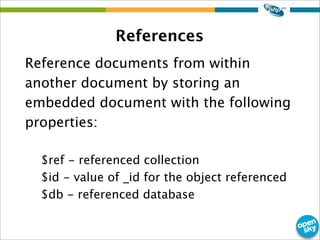
References
Reference documents from within
another document by storing an
embedded document with the following
properties:
$ref - referenced collection
$id - value of _id for the object referenced
$db - referenced database
References
- No JOIN syntax like in a relational DB
- References are resolved in app code
- Store one or many references
Reference Mapping
/** @Document */
class Organization
{
/** @Id */
private $id;
/** @String */
private $name;
/** @ReferenceMany(targetDocument="User") */
private $users = array();
public function setName($name)
{
$this->name = $name;
}
public function addUser(User $user)
{
$this->users[] = $user;
}
}
Reference Mapping
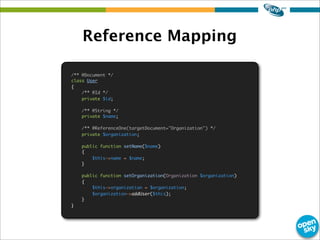
/** @Document */
class User
{
/** @Id */
private $id;
/** @String */
private $name;
/** @ReferenceOne(targetDocument="Organization") */
private $organization;
public function setName($name)
{
$this->name = $name;
}
public function setOrganization(Organization $organization)
{
$this->organization = $organization;
$organization->addUser($this);
}
}
Persisting
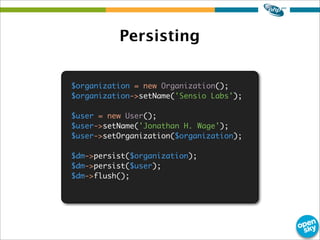
$organization = new Organization();
$organization->setName('Sensio Labs');
$user = new User();
$user->setName('Jonathan H. Wage');
$user->setOrganization($organization);
$dm->persist($organization);
$dm->persist($user);
$dm->flush();
Inserted Organization
Resulting organization has a reference
to the user:
Array
(
[_id] => 4c86acd78ead0e8759000000
[name] => Sensio Labs
[users] => Array
(
[0] => Array
(
[$ref] => User
[$id] => 4c86acd78ead0e8759010000
[$db] => doctrine_odm_sandbox
)
)
)
Inserted User
Resulting user has a reference to the
organization:
Array
(
[_id] => 4c86acd78ead0e8759010000
[name] => Jonathan H. Wage
[organization] => Array
(
[$ref] => Organization
[$id] => 4c86acd78ead0e8759000000
[$db] => doctrine_odm_sandbox
)
)
Working with References
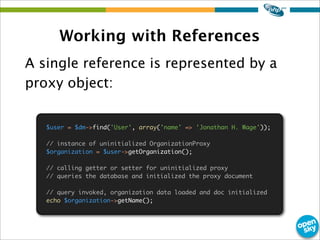
A single reference is represented by a
proxy object:
$user = $dm->find('User', array('name' => 'Jonathan H. Wage'));
// instance of uninitialized OrganizationProxy
$organization = $user->getOrganization();
// calling getter or setter for uninitialized proxy
// queries the database and initialized the proxy document
// query invoked, organization data loaded and doc initialized
echo $organization->getName();
Working with References
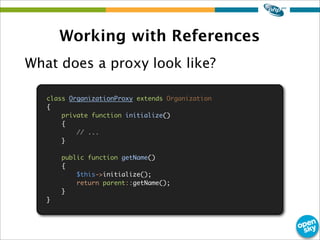
What does a proxy look like?
class OrganizationProxy extends Organization
{
private function initialize()
{
// ...
}
public function getName()
{
$this->initialize();
return parent::getName();
}
}
Working with References
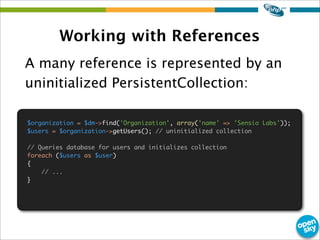
A many reference is represented by an
uninitialized PersistentCollection:
$organization = $dm->find('Organization', array('name' => 'Sensio Labs'));
$users = $organization->getUsers(); // uninitialized collection
// Queries database for users and initializes collection
foreach ($users as $user)
{
// ...
}
Document Query Language
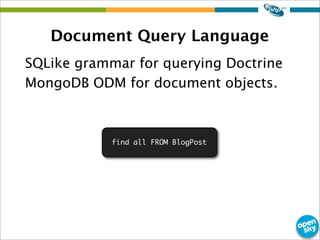
SQLike grammar for querying Doctrine
MongoDB ODM for document objects.
find all FROM BlogPost
QueryLanguage ::= FindQuery | InsertQuery | UpdateQuery | RemoveQuery
FindQuery ::= FindClause [WhereClause] [MapClause] [ReduceClause] [SortClause] [LimitClause]
[SkipClause]
FindClause ::= "FIND" all | SelectField {"," SelectField}
SelectField ::= DocumentFieldName
SortClause ::= SortClauseField {"," SortClauseField}
SortClauseField ::= DocumentFieldName "ASC | DESC"
LimitClause ::= "LIMIT" LimitInteger
SkipClause ::= "SKIP" SkipInteger
MapClause ::= "MAP" MapFunction
ReduceClause ::= "REDUCE" ReduceFunction
DocumentFieldName ::= DocumentFieldName | EmbeddedDocument "." {"." DocumentFieldName}
WhereClause ::= "WHERE" WhereClausePart {"AND" WhereClausePart}
WhereClausePart ::= ["all", "not"] DocumentFieldName WhereClauseExpression Value
WhereClauseExpression ::= "=" | "!=" | ">=" | "<=" | ">" | "<" | "in"
"notIn" | "all" | "size" | "exists" | "type"
Value ::= LiteralValue | JsonObject | JsonArray
UpdateQuery ::= UpdateClause [WhereClause]
UpdateClause ::= [SetExpression], [UnsetExpression], [IncrementExpression],
[PushExpression], [PushAllExpression], [PullExpression],
[PullAllExpression], [AddToSetExpression], [AddManyToSetExpression],
[PopFirstExpression], [PopLastExpression]
SetExpression ::= "SET" DocumentFieldName "=" Value {"," SetExpression}
UnsetExpression ::= "UNSET" DocumentFieldName {"," UnsetExpression}
IncrementExpression ::= "INC" DocumentFieldName "=" IncrementInteger {"," IncrementExpression}
PushExpression ::= "PUSH" DocumentFieldName Value {"," PushExpression}
PushAllExpression ::= "PUSHALL" DocumentFieldName Value {"," PushAllExpression}
PullExpression ::= "PULL" DocumentFieldName Value {"," PullExpression}
PullAllExpression ::= "PULLALL" DocumentFieldName Value {"," PullAllExpression}
AddToSetExpression ::= "ADDTOSET" DocumentFieldName Value {"," AddToSetExpression}
AddManyToSetExpression ::= "ADDMANYTOSET" DocumentFieldName Value {"," AddManyToSetExpression}
PopFirstExpression ::= "POPFIRST" DocumentFieldName {"," PopFirstExpression}
PopLastExpression ::= "POPLAST" DocumentFieldName {"," PopLastExpression}
InsertQuery ::= InsertClause InsertSetClause {"," InsertSetClause}
InsertSetClause ::= DocumentFieldName "=" Value
RemoveQuery ::= RemoveClause [WhereClause]
RemoveClause ::= "REMOVE" DocumentClassName
BNF
Creating Queries
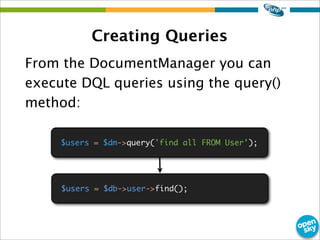
From the DocumentManager you can
execute DQL queries using the query()
method:
$users = $dm->query('find all FROM User');
$users = $db->user->find();
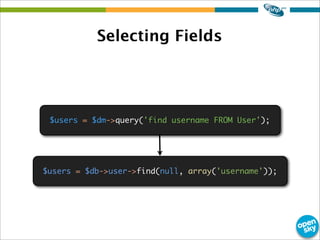
Selecting Fields
$users = $dm->query('find username FROM User');
$users = $db->user->find(null, array('username'));
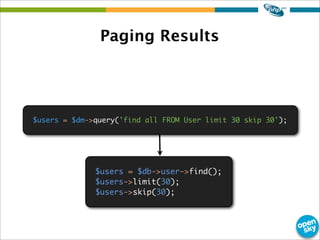
Paging Results
$users = $dm->query('find all FROM User limit 30 skip 30');
$users = $db->user->find();
$users->limit(30);
$users->skip(30);
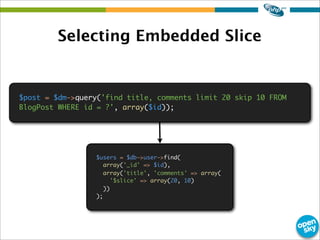
Selecting Embedded Slice
$post = $dm->query('find title, comments limit 20 skip 10 FROM
BlogPost WHERE id = ?', array($id));
$users = $db->user->find(
array('_id' => $id),
array('title', 'comments' => array(
'$slice' => array(20, 10)
))
);
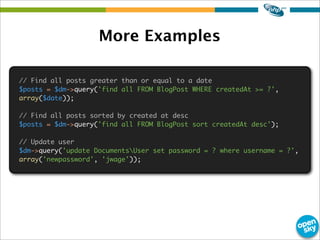
More Examples
// Find all posts greater than or equal to a date
$posts = $dm->query('find all FROM BlogPost WHERE createdAt >= ?',
array($date));
// Find all posts sorted by created at desc
$posts = $dm->query('find all FROM BlogPost sort createdAt desc');
// Update user
$dm->query('update DocumentsUser set password = ? where username = ?',
array('newpassword', 'jwage'));
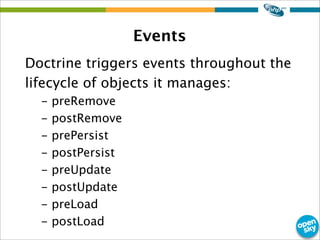
Events
Doctrine triggers events throughout the
lifecycle of objects it manages:
- preRemove
- postRemove
- prePersist
- postPersist
- preUpdate
- postUpdate
- preLoad
- postLoad
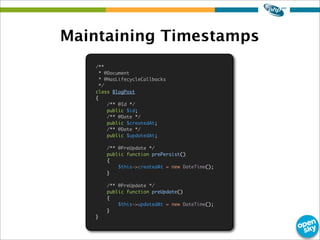
Maintaining Timestamps
/**
* @Document
* @HasLifecycleCallbacks
*/
class BlogPost
{
/** @Id */
public $id;
/** @Date */
public $createdAt;
/** @Date */
public $updatedAt;
/** @PreUpdate */
public function prePersist()
{
$this->createdAt = new DateTime();
}
/** @PreUpdate */
public function preUpdate()
{
$this->updatedAt = new DateTime();
}
}
Migrating Changes
Sometimes your documents change and
you will need to migrate your data.
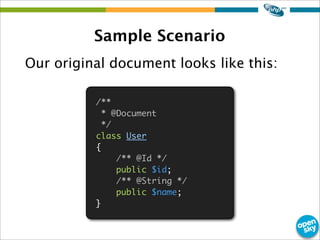
Sample Scenario
Our original document looks like this:
/**
* @Document
*/
class User
{
/** @Id */
public $id;
/** @String */
public $name;
}
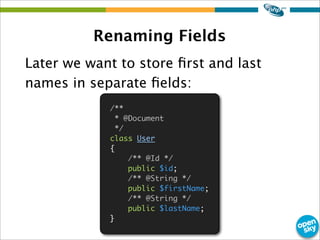
Renaming Fields
Later we want to store first and last
names in separate fields:
/**
* @Document
*/
class User
{
/** @Id */
public $id;
/** @String */
public $firstName;
/** @String */
public $lastName;
}
Renaming Fields
Handle documents with only a name:
/**
* @Document
* @HasLifecycleCallbacks
*/
class User
{
/** @Id */
public $id;
/** @String */
public $firstName;
/** @String */
public $lastName;
/** @PreLoad */
public function preLoad(array &$data)
{
if (isset($data['name']))
{
$e = explode(' ', $data['name']);
unset($data['name']);
$data['firstName'] = $e[0];
$data['lastName'] = $e[1];
}
}
}
Why use an object
mapper?
Encapsulate your domain in an object oriented interface
Encapsulation
The organization of your domain logic in an OO way
improved maintainability
Maintainability
Keeping a clean OO domain model makes your business
logic easily testable for improved stability
Testability
Write portable and thin application controller code and
fat models.
Portability
Questions?
- http://www.twitter.com/jwage
- http://www.facebook.com/jwage
- http://www.jwage.com
OpenSky is hiring! Inquire via e-mail at
jwage@theopenskyproject.com or in person
after this presentation!

ZendCon2010 Doctrine MongoDB ODM

  • 1.
    Jonathan H. WageOpenSky Doctrine MongoDB Object Document Mapper +
  • 2.
    Who am I? JonathanH. Wage PHP Developer for over 10 years Symfony Contributor Doctrine Contributor Published Author Business Owner Nashville, TN Resident http://www.twitter.com/jwage http://www.facebook.com/jwage
  • 3.
    I work at Whatis OpenSky? “a social commerce platform” Based in New York and is a major open source software advocate http://www.shopopensky.com
  • 4.
  • 5.
    What is Doctrine? -Open Source PHP Project started in 2006 - Specializes in database functionality
  • 6.
    Doctrine Libraries - DatabaseAbstraction Layer - Database Migrations - Object Relational Mapper - MongoDB Object Document Manager - CouchDB Object Document Manager
  • 7.
    Who is onthe team? • Roman S. Borschel • Guilherme Blanco • Benjamin Eberlei • Bulat Shakirzyanov • Jonathan H.Wage
  • 8.
    Project History - Firstcommit April 13th 2006 - First stable version finished and Released September 1st 2008 - One of the first ORM implementations for PHP - 1.0 is First LTS(long term support) release. Maintained until March 1st 2010 - Integrated with many popular frameworks: Symfony, Zend Framework, Code Igniter
  • 9.
    What is MongoDB? http://en.wikipedia.org/wiki/MongoDB “MongoDB(from "humongous") is an open source, scalable, high-performance, schema free, document- oriented database written in the C++ programming language. The goal of MongoDB is to bridge the gap between key-value stores - which are fast and highly scalable - and traditional RDBMS systems - which provide rich queries and deep functionality. It is designed for problems that aren't easily solved by traditional RDBMSs, for example if databases span many servers.”
  • 10.
    Database Terminology RDBMS MongoDB DatabaseDatabase Table Collection Row Document
  • 11.
    Mapper Terminology ORM ODM DatabaseDatabase Repository Repository Entity Document
  • 12.
    Using MongoDB inPHP Download and run MongoDB Server http://www.mongodb.org/display/DOCS/Downloads Install Mongo PECL extension http://www.php.net/manual/en/mongo.installation.php $ /path/to/mongodb/bin/mongod $ pecl install mongo
  • 13.
    Connecting Create new connectioninstances with the Mongo class: $mongo = new Mongo('mongodb://localhost');
  • 14.
    Selecting Databases MongoDB intancescan be selected using the selectDB() method: $mongo = new Mongo('mongodb://localhost'); $db = $mongo->selectDB('dbname');
  • 15.
    Selecting Collections MongoCollection instancescan be selected using the selectCollection() method: $mongo = new Mongo('mongodb://localhost'); $db = $mongo->selectDB('dbname'); $coll = $db->selectCollection('users');
  • 16.
    Inserting Documents Insert aregular PHP array: $user = array( 'username' => 'jwage', 'password' => md5('changeme') 'active' => true ); $coll->insert($user); echo $user['_id'];
  • 17.
    Finding a Document Wecan easily find the document we just inserted using the findOne() method: $user = $coll->findOne(array('username' => 'jwage'));
  • 18.
    Updating a Document Youcan find a document, change it and save the entire document: $user = $coll->findOne(array('username' => 'jwage')); $user['username'] = 'jonwage'; $user['password'] = md5('newpassword'); $coll->save($user);
  • 19.
    Atomic Updates The followingis faster and safer: $coll->update(array( 'username' => 'jwage' ), array( '$set' => array( 'username' => 'jonwage', 'password' => md5('newpassword') ) ));
  • 20.
    Atomic Updates $inc -increments field by the number value $set - sets field to value $unset - deletes a given field $push - appends value to an array $pushAll - appends multiple values to an array $addToSet - appends multiple new values to an array $pop - removes the last element in an array $pull - removes all occurrences of a value from an array $pullAll - removes all occurrences of multiple values from an array
  • 21.
    Atomic Examples Increment num_commentswith $inc: // $inc a blog posts number of comments by 1 $db->posts->update($id, array('$inc' => array('num_comments' => 1)))
  • 22.
    Atomic Examples Push newcomment on to end of array: // $push a new comment on to a blog posts comments $db->posts->update($id, array('$push' => array( 'comments' => array('Hi how are you?') )));
  • 23.
    Atomic Examples Set anindividual field value: // $set a lock on a blog post $db->posts->update($id, array('$set' => array('locked' => 1)));
  • 24.
    Atomic Examples Unset afield from a document: // $unset a lock on a blog post $db->posts->update($id, array('$unset' => array('locked' => 1)));
  • 25.
    Removing Documents You canremove documents using the remove() method: $coll->remove(array('username' => 'jwage'));
  • 26.
  • 27.
    What is it? -Layer on top of Mongo PECL extension - Work with objects instead of arrays - Create rich OO PHP domain and persist transparently using Doctrine
  • 28.
    What does itdo? - Maps PHP classes to MongoDB - Manages the state of objects - Tracks changes and persists them - Constructs regular PHP objects from MongoDB data
  • 29.
    How does itdo it? - Implements UnitOfWork http://martinfowler.com/eaaCatalog/unitOfWork.html - Tracks changes to managed objects by maintaining a copy of its original data - Computes changesets and persists them transparently
  • 30.
    Easier to buildthan ORM - Less work to convert objects to arrays for persistence to MongoDB - Less work to convert the data in the database to objects since it is already stored in a object-like structure instead of flat like in a RDBMS
  • 31.
    Architecture Documents - Lightweight persistentdomain object - Regular PHP class - Does not extend any base Doctrine class - Cannot be final or contain final methods - Any two documents in a hierarchy of classes must not have a mapped property with the same name - Supports inheritance, polymorphic associations and polymorphic queries. - Both abstract and concrete classes can be documents - Documents may extend non-document classes as well as document classes, and non-document classes may extend document classes
  • 32.
    Architecture - No morebase class required - Values stored in object properties - Doctrine is transparent namespace Documents; class User { private $id; private $name; }
  • 33.
    Architecture The DocumentManager - Centralaccess point to the ODM functionality provided by Doctrine. API is used to manage the persistence of your objects and to query for persistent objects. - Employes transactional write behind strategy that delays the execution of queries in order to execute them in the most efficient way - Internally a DocumentManager uses a UnitOfWork to keep track of your objects
  • 34.
    Managing Documents To managedocuments with Doctrine you need a DocumentManager: $config = new DoctrineODMMongoDBConfiguration(); $config->setMetadataCacheImpl(new DoctrineCommonCacheArrayCache); $driverImpl = $config->newDefaultAnnotationDriver(array(__DIR__."/Documents")); $config->setMetadataDriverImpl($driverImpl); $config->setProxyDir(__DIR__ . '/Proxies'); $config->setProxyNamespace('Proxies'); $dm = DoctrineODMMongoDBDocumentManager::create($mongo, $config);
  • 35.
    DocumentManager The DocumentManager isthe central place for managing the state of PHP objects. It has methods like: persist($document) find() findOne() refresh($document) remove($document) detach($document) merge($document) flush()
  • 36.
    Document Classes A DoctrineMongoDB Document is just a regular old PHP object: class User { private $id; private $username; private $password; public function getId() { return $this->id; } public function getUsername() { return $this->username; } public function setUsername($username) { $this->username = $username; } public function getPassword() { return $this->password; } public function setPassword($password) { $this->password = md5($password); } }
  • 37.
    Mapping Information - Annotations -YAML - XML - PHP /** @Document */ class User { /** @Id */ private $id; /** @String */ private $username; /** @String */ private $password; // ... }
  • 38.
    Inserting Documents $user =new User(); $user->setUsername('jwage'); $user->setPassword('changeme'); $dm->persist($user); $dm->flush(); // inserts document $users->batchInsert(array( array( 'username' => 'jwage', 'password' => 'changeme' ) ));
  • 39.
    Finding Documents $user =$dm->findOne('User', array('username' => 'jwage'));
  • 40.
    Updating Documents Always usesatomic operators $user = $dm->findOne('User', array('username' => 'jwage')); $user->setUsername('jonwage'); $user->setPassword('newpassword'); $dm->flush(); // updates document $coll->update( array('_id' => 'theid'), array('$set' => array( 'username' => 'jonwage', 'password' => '5e9d11a14ad1c8dd77e98ef9b53fd1ba' ) );
  • 41.
    Removing Documents $user =$dm->findOne('User', array('username' => 'jwage')); $dm->remove($user); $dm->flush(); // removes document $coll->remove(array('_id' => 'theid'));
  • 42.
    Query Builder Normally queriesare just arrays that look like the following: $user = $dm->findOne('User', array('username' => 'jwage'));
  • 43.
    Problems - Not OO -Not re-usable - Can become difficult to read as query gets more complex
  • 44.
    Query Builder Construct anew query instance and start adding to it: $q = $dm->createQuery('User') ->field('username')->equals('jwage');
  • 45.
    Query Builder Find postswithin a range of dates: $q = $dm->createQuery('Post') ->field('createdAt')->range($startDate, $endDate);
  • 46.
    Query Builder Updating documents: $q= $dm->createQuery('User') ->update() ->field('username')->set('jonwage') ->field('password')->set('newpassword') ->field('username')->equals('jwage');
  • 47.
    Query Builder Removing documents: $q= $dm->createQuery('User') ->remove() ->field('username')->equals('jwage');
  • 48.
    Query Builder Executing queries: //Execute and get the first result $user = $q->getSingleResult(); // Execute and return an array of results $users = $q->execute(); // Execute update or remove query $q->execute(); // Iterate over cursor foreach ($q->iterate() as $user) { }
  • 49.
    Embedded Documents Insert documentwith an embedded document: $user = array( 'username' => 'jwage', 'password' => 'changeme' 'addresses' => array( array( 'address1' => '6512 Mercomatic Ct.', // ... ) ) ); $db->users->insert($user);
  • 50.
    Embedded Documents Push anew address on to the end of the addresses array: $db->users->update($user['_id'], array('$push' => array( 'addresses' => array( 'address1' => 'New address' )
  • 51.
    Embedded Mapping Map anembedded document using @EmbedOne and @EmbedMany: class User { /** @Id */ public $id; /** @String */ public $name; /** @EmbedMany(targetDocument="Address") */ public $addresses = array(); }
  • 52.
    /** @EmbeddedDocument */ classAddress { /** @String */ public $address; /** @String */ public $city; /** @String */ public $state; /** @String */ public $zipcode; Embedded Mapping
  • 53.
    $user = newUser(); $user->name = 'Jonathan H. Wage'; $address = new Address(); $address->address = '6512 Mercomatic Ct'; $address->city = 'Nashville'; $address->state = 'Tennessee'; $address->zipcode = '37209'; $user->addresses[] = $address; $dm->persist($user); $dm->flush(); Persisting
  • 54.
    $users = array( array( 'name'=> 'Jonathan H. Wage', 'addresses' => array( array( 'address' => '6512 Mercomatic Ct', 'city' => 'Nashville', 'state' => 'Tennesseee', 'zipcode' => '37209' ) ) ) ); $coll->batchInsert($users);
  • 55.
    Updating Embedded Documents $user= $dm->findOne('User', array('name' => 'Jonathan H. Wage')); $user->addresses[0]->zipcode = '37205'; $coll->update( array('_id' => 'theuserid'), array('$set' => array('addresses.0.zipcode' => '37209')) );
  • 56.
    Adding new Address $user= $dm->findOne('User', array('name' => 'Jonathan H. Wage')); $address = new Address(); $address->address = '475 Buckhead Ave.'; $address->city = 'Atlanta'; $address->state = 'Georgia'; $address->zipcode = '30305'; $user->addresses[] = $address; $dm->flush(); $coll->update( array('_id' => 'theuserid'), array('$pushAll' => array( 'addresses' => array( array( 'address' => '475 Buckhead Ave.', 'city' => 'Atlanta', 'state' => 'Georgia', 'zipcode' => '30305' ) ) )) );
  • 57.
    Unsetting Properties unset($user->addresses[0]->zipcode); $dm->flush(); $coll->update( array('_id' =>'theuserid'), array( '$unset' => array( 'addresses.0.zipcode' => 1 ) ) );
  • 58.
    References Reference documents fromwithin another document by storing an embedded document with the following properties: $ref - referenced collection $id - value of _id for the object referenced $db - referenced database
  • 59.
    References - No JOINsyntax like in a relational DB - References are resolved in app code - Store one or many references
  • 60.
    Reference Mapping /** @Document*/ class Organization { /** @Id */ private $id; /** @String */ private $name; /** @ReferenceMany(targetDocument="User") */ private $users = array(); public function setName($name) { $this->name = $name; } public function addUser(User $user) { $this->users[] = $user; } }
  • 61.
    Reference Mapping /** @Document*/ class User { /** @Id */ private $id; /** @String */ private $name; /** @ReferenceOne(targetDocument="Organization") */ private $organization; public function setName($name) { $this->name = $name; } public function setOrganization(Organization $organization) { $this->organization = $organization; $organization->addUser($this); } }
  • 62.
    Persisting $organization = newOrganization(); $organization->setName('Sensio Labs'); $user = new User(); $user->setName('Jonathan H. Wage'); $user->setOrganization($organization); $dm->persist($organization); $dm->persist($user); $dm->flush();
  • 63.
    Inserted Organization Resulting organizationhas a reference to the user: Array ( [_id] => 4c86acd78ead0e8759000000 [name] => Sensio Labs [users] => Array ( [0] => Array ( [$ref] => User [$id] => 4c86acd78ead0e8759010000 [$db] => doctrine_odm_sandbox ) ) )
  • 64.
    Inserted User Resulting userhas a reference to the organization: Array ( [_id] => 4c86acd78ead0e8759010000 [name] => Jonathan H. Wage [organization] => Array ( [$ref] => Organization [$id] => 4c86acd78ead0e8759000000 [$db] => doctrine_odm_sandbox ) )
  • 65.
    Working with References Asingle reference is represented by a proxy object: $user = $dm->find('User', array('name' => 'Jonathan H. Wage')); // instance of uninitialized OrganizationProxy $organization = $user->getOrganization(); // calling getter or setter for uninitialized proxy // queries the database and initialized the proxy document // query invoked, organization data loaded and doc initialized echo $organization->getName();
  • 66.
    Working with References Whatdoes a proxy look like? class OrganizationProxy extends Organization { private function initialize() { // ... } public function getName() { $this->initialize(); return parent::getName(); } }
  • 67.
    Working with References Amany reference is represented by an uninitialized PersistentCollection: $organization = $dm->find('Organization', array('name' => 'Sensio Labs')); $users = $organization->getUsers(); // uninitialized collection // Queries database for users and initializes collection foreach ($users as $user) { // ... }
  • 68.
    Document Query Language SQLikegrammar for querying Doctrine MongoDB ODM for document objects. find all FROM BlogPost
  • 69.
    QueryLanguage ::= FindQuery| InsertQuery | UpdateQuery | RemoveQuery FindQuery ::= FindClause [WhereClause] [MapClause] [ReduceClause] [SortClause] [LimitClause] [SkipClause] FindClause ::= "FIND" all | SelectField {"," SelectField} SelectField ::= DocumentFieldName SortClause ::= SortClauseField {"," SortClauseField} SortClauseField ::= DocumentFieldName "ASC | DESC" LimitClause ::= "LIMIT" LimitInteger SkipClause ::= "SKIP" SkipInteger MapClause ::= "MAP" MapFunction ReduceClause ::= "REDUCE" ReduceFunction DocumentFieldName ::= DocumentFieldName | EmbeddedDocument "." {"." DocumentFieldName} WhereClause ::= "WHERE" WhereClausePart {"AND" WhereClausePart} WhereClausePart ::= ["all", "not"] DocumentFieldName WhereClauseExpression Value WhereClauseExpression ::= "=" | "!=" | ">=" | "<=" | ">" | "<" | "in" "notIn" | "all" | "size" | "exists" | "type" Value ::= LiteralValue | JsonObject | JsonArray UpdateQuery ::= UpdateClause [WhereClause] UpdateClause ::= [SetExpression], [UnsetExpression], [IncrementExpression], [PushExpression], [PushAllExpression], [PullExpression], [PullAllExpression], [AddToSetExpression], [AddManyToSetExpression], [PopFirstExpression], [PopLastExpression] SetExpression ::= "SET" DocumentFieldName "=" Value {"," SetExpression} UnsetExpression ::= "UNSET" DocumentFieldName {"," UnsetExpression} IncrementExpression ::= "INC" DocumentFieldName "=" IncrementInteger {"," IncrementExpression} PushExpression ::= "PUSH" DocumentFieldName Value {"," PushExpression} PushAllExpression ::= "PUSHALL" DocumentFieldName Value {"," PushAllExpression} PullExpression ::= "PULL" DocumentFieldName Value {"," PullExpression} PullAllExpression ::= "PULLALL" DocumentFieldName Value {"," PullAllExpression} AddToSetExpression ::= "ADDTOSET" DocumentFieldName Value {"," AddToSetExpression} AddManyToSetExpression ::= "ADDMANYTOSET" DocumentFieldName Value {"," AddManyToSetExpression} PopFirstExpression ::= "POPFIRST" DocumentFieldName {"," PopFirstExpression} PopLastExpression ::= "POPLAST" DocumentFieldName {"," PopLastExpression} InsertQuery ::= InsertClause InsertSetClause {"," InsertSetClause} InsertSetClause ::= DocumentFieldName "=" Value RemoveQuery ::= RemoveClause [WhereClause] RemoveClause ::= "REMOVE" DocumentClassName BNF
  • 70.
    Creating Queries From theDocumentManager you can execute DQL queries using the query() method: $users = $dm->query('find all FROM User'); $users = $db->user->find();
  • 71.
    Selecting Fields $users =$dm->query('find username FROM User'); $users = $db->user->find(null, array('username'));
  • 72.
    Paging Results $users =$dm->query('find all FROM User limit 30 skip 30'); $users = $db->user->find(); $users->limit(30); $users->skip(30);
  • 73.
    Selecting Embedded Slice $post= $dm->query('find title, comments limit 20 skip 10 FROM BlogPost WHERE id = ?', array($id)); $users = $db->user->find( array('_id' => $id), array('title', 'comments' => array( '$slice' => array(20, 10) )) );
  • 74.
    More Examples // Findall posts greater than or equal to a date $posts = $dm->query('find all FROM BlogPost WHERE createdAt >= ?', array($date)); // Find all posts sorted by created at desc $posts = $dm->query('find all FROM BlogPost sort createdAt desc'); // Update user $dm->query('update DocumentsUser set password = ? where username = ?', array('newpassword', 'jwage'));
  • 75.
    Events Doctrine triggers eventsthroughout the lifecycle of objects it manages: - preRemove - postRemove - prePersist - postPersist - preUpdate - postUpdate - preLoad - postLoad
  • 76.
    Maintaining Timestamps /** * @Document *@HasLifecycleCallbacks */ class BlogPost { /** @Id */ public $id; /** @Date */ public $createdAt; /** @Date */ public $updatedAt; /** @PreUpdate */ public function prePersist() { $this->createdAt = new DateTime(); } /** @PreUpdate */ public function preUpdate() { $this->updatedAt = new DateTime(); } }
  • 77.
    Migrating Changes Sometimes yourdocuments change and you will need to migrate your data.
  • 78.
    Sample Scenario Our originaldocument looks like this: /** * @Document */ class User { /** @Id */ public $id; /** @String */ public $name; }
  • 79.
    Renaming Fields Later wewant to store first and last names in separate fields: /** * @Document */ class User { /** @Id */ public $id; /** @String */ public $firstName; /** @String */ public $lastName; }
  • 80.
    Renaming Fields Handle documentswith only a name: /** * @Document * @HasLifecycleCallbacks */ class User { /** @Id */ public $id; /** @String */ public $firstName; /** @String */ public $lastName; /** @PreLoad */ public function preLoad(array &$data) { if (isset($data['name'])) { $e = explode(' ', $data['name']); unset($data['name']); $data['firstName'] = $e[0]; $data['lastName'] = $e[1]; } } }
  • 81.
    Why use anobject mapper?
  • 82.
    Encapsulate your domainin an object oriented interface Encapsulation
  • 83.
    The organization ofyour domain logic in an OO way improved maintainability Maintainability
  • 84.
    Keeping a cleanOO domain model makes your business logic easily testable for improved stability Testability
  • 85.
    Write portable andthin application controller code and fat models. Portability
  • 86.
    Questions? - http://www.twitter.com/jwage - http://www.facebook.com/jwage -http://www.jwage.com OpenSky is hiring! Inquire via e-mail at jwage@theopenskyproject.com or in person after this presentation!