Schema Design by Example
         Kevin Hanson
       Solutions Architect
         @hungarianhc
       kevin@10gen.com


                             1
Agenda


• MongoDB Data Model

• Blog Posts & Comments

• Geospatial Check-Ins

• Food For Thought
MongoDB Data Model:
  Rich Documents
 {
     title: ‘Who Needs Rows?’,
     reasons: [
       { name: ‘scalability’,
         desc: ‘no more joins!’ },
       { name: ‘human readable’,
         desc: ‘ah this is nice...’ }
     ],
     model: {
        relational: false,
        awesome: true
     }
 }
Embedded Documents
   { _id : ObjectId("4c4ba5c0672c685e5e8aabf3"),
     author : "roger",
     date : "Sat Jul 24 2010 19:47:11 GMT-0700 (PDT)",
     text : "Spirited Away",
     tags : [ "Tezuka", "Manga" ],
     comments : [
	

     {


     author : "Fred",


     date : "Sat Jul 24 2010 20:51:03 GMT-0700 (PDT)",


     text : "Best Movie Ever"
	

     }
     ]}
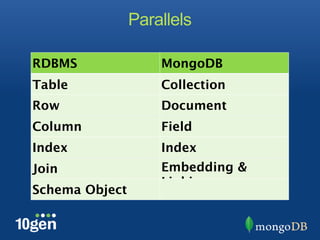
Parallels
Parallels

RDBMS               MongoDB
Table               Collection
Row                 Document
Column              Field
Index               Index
Join                Embedding &
                    Linking
Schema Object
Relational

                      Category
                  • Name
                  • Url


                           Article
       User       • Name
                                              Tag
• Name            • Slug             • Name
• Email Address   • Publish date     • Url
                  • Text


                     Comment
                  • Comment
                  • Date
                  • Author
MongoDB

                            Article
                     • Name
                     • Slug
                     • Publish date
     User            • Text
• Name               • Author
• Email Address
                         Comment[]
                      • Comment
                      • Date
                      • Author

                            Tag[]
                      • Value

                         Category[]
                      • Value
Blog Posts and Comments
How Should the Documents Look?

What Are We Going to Do with the
            Data?

       To embed or to link...
       That is the question!
1) Fully Embedded
{
    blog-title: ‘Commuting to Work’,
    blog-text: [
         ‘This section is about airplanes’,
         ‘this section is about trains’
    ],
    comments: [
      { author: ‘Kevin Hanson’,
        comment: ‘dude, what about driving?’ },
      { author: ‘John Smith’,
        comment: ‘this blog is aWful!!11!!!!’ }
    ],
}
1) Fully Embedded
1) Fully Embedded
Pros
• Can query the comments or the blog for results
• Cleanly encapsulated
1) Fully Embedded
Pros
• Can query the comments or the blog for results
• Cleanly encapsulated


Cons
• What if we get too many comments? (16MB
MongoDB doc size)
• What if we want our results to be comments, not
blog posts?
2) Separating Blog & Comments
{                             {
  _id:                          _id:
ObjectId("4c4ba5c0672c685     ObjectId("4c4ba5c0672c685e5e
e5e8aabf3")                   8aabf4")
  comment-ref:                  blog-ref:
ObjectId("4c4ba5c0672c685     ObjectId("4c4ba5c0672c685e5e
e5e8aabf4")                   8aabf3")
  blog-title: ‘Commuting to     comments: [
Work’,                            { author: ‘Kevin Hanson’,
  blog-text: [                      comment: ‘dude, what about
     ‘This section is about   driving?’ },
airplanes’,                       { author: ‘John Smith’,
     ‘this section is about         comment: ‘this blog is
trains’                       aWful!!11!!!!’ }
  ]                             ],
}                             }
2) Separating Blog & Comments
Pros
• Blog Post Size Stays Constant
• Can Search Sets of Comments
2) Separating Blog & Comments
Pros
• Blog Post Size Stays Constant
• Can Search Sets of Comments


Cons
• Too Many Comments? (same problem)
• Managing Document Links
3) Each Comment Gets Own Doc
      {
          blog-title: ‘Commuting to Work’,
          blog-text: [
             ‘This section is about airplanes’,
             ‘this section is about trains’]
      }


      {
       commenter: ‘Kevin Hanson’,
       comment: ‘dude, what about driving?’
      }


      {
       commenter: ‘John Smith’,
       comment: ‘this blog is aWful!!11!!!!’
      }
3) Each Comment Gets Own Doc
Pros
• Can Query Individual Comments
• Never Need to Worry About Doc Size
3) Each Comment Gets Own Doc
Pros
• Can Query Individual Comments
• Never Need to Worry About Doc Size


Cons
• Many Documents
• Standard Use Cases Become Complicated
Managing Arrays
Pushing to an Array Infinitely...
• Document Will Grow Larger than Allocated
Space
• Document May Increase Max Doc Size of
16MB

Can this be avoided??
• Yes!
• A Hybrid of Linking and Embedding
Geospatial Check-Ins
We Need 3 Things
We Need 3 Things


Places    Check-Ins   Users
Places


                    Q: Current location
                       A: Places near
                          location


User Generated
   Content


                   Places
Inserting a Place


var p = { name: “10gen HQ”,
      address: “578 Broadway, 7th
Floor”,
      city: “New York”,
      zip: “10012”}

> db.places.save(p)
Tags, Geo Coordinates, and Tips


       { name: “10gen HQ”,
       address: “578 Broadway, 7th Floor”,
       city: “New York”,
       zip: “10012”,
       tags: [“MongoDB”, “business”],
       latlong: [“40.0”, “72.0”],
       tips: [{user: “kevin”, time:
“3/15/2012”,tip: “Make sure to stop by
for office hours!”}],}
Updating Tips


db.places.update({name:"10gen HQ"},

     {$push :{tips:


     {user:"nosh", time:
3/15/2012, 
 
        
    tip:"stop by for
office hours on 
     

     Wednesdays from 4-6"}}}}
Querying Places
• Creating Indexes
  ★db.places.ensureIndex({tags:1})
  ★db.places.ensureIndex({name:1})
  ★db.places.ensureIndex({latlong:”2d”}
   )

• Finding Places
  ★db.places.find({latlong:{$near:
    [40,70]}})

• Regular Expressions
  ★db.places.find({name: /
   ^typeaheadstring/)
User Check-Ins


Record User Check-Ins    Users


                 Stats           Stats


  Check-Ins              Users
Users
user1 = {

    name: “Kevin Hanson”

    e-mail: “kevin@10gen.com”,

    check-ins:
[4b97e62bf1d8c7152c9ccb74,
5a20e62bf1d8c736ab]
}

checkins [] = ObjectId reference to Check-
Ins Collection
Check-Ins
checkin = {

    place: “10gen HQ”,

    ts: 9/20/2010 10:12:00,

    userId: <object id of user>
}

Every Check-In is Two Operations
• Insert a Check-In Object (check-ins
collection)
• Update ($push) user object with check-in
Simple Stats
db.checkins.find({place: “10gen HQ”)


db.checkins.find({place: “10gen HQ”})


  .sort({ts:-1}).limit(10)


db.checkins.find({place: “10gen HQ”, 	


  ts: {$gt: midnight}}).count()
Stats w/ MapReduce
mapFunc = function() {emit(this.place, 1);}

reduceFunc = function(key, values) {return
Array.sum(values);}

res =
db.checkins.mapReduce(mapFunc,reduceFunc,

     {query: {timestamp: {$gt:nowminus3hrs}}})

res = [{_id:”10gen HQ”, value: 17}, ….., ….]
     ... or try using the new aggregation framework!
                   Chris Westin @ 1:50PM
Food For Thought
Data How the App Wants It
Think About How the Application Wants
the Data, Not How it is most “Normalized”

Example: Our Business Cards
More info at http://www.mongodb.org/

               Kevin Hanson
        Solutions Architect, 10gen
          twitter: @hungarianhc
              kevin@10gen.com


   Facebook      |      Twitter         |
http://bit.ly/   @mongodb   http://linkd.in/joinmongo
   LinkedIn
mongofb

Schema Design by Example ~ MongoSF 2012

  • 1.
    Schema Design byExample Kevin Hanson Solutions Architect @hungarianhc kevin@10gen.com 1
  • 2.
    Agenda • MongoDB DataModel • Blog Posts & Comments • Geospatial Check-Ins • Food For Thought
  • 3.
    MongoDB Data Model: Rich Documents { title: ‘Who Needs Rows?’, reasons: [ { name: ‘scalability’, desc: ‘no more joins!’ }, { name: ‘human readable’, desc: ‘ah this is nice...’ } ], model: { relational: false, awesome: true } }
  • 4.
    Embedded Documents { _id : ObjectId("4c4ba5c0672c685e5e8aabf3"), author : "roger", date : "Sat Jul 24 2010 19:47:11 GMT-0700 (PDT)", text : "Spirited Away", tags : [ "Tezuka", "Manga" ], comments : [ { author : "Fred", date : "Sat Jul 24 2010 20:51:03 GMT-0700 (PDT)", text : "Best Movie Ever" } ]}
  • 5.
  • 6.
    Parallels RDBMS MongoDB Table Collection Row Document Column Field Index Index Join Embedding & Linking Schema Object
  • 7.
    Relational Category • Name • Url Article User • Name Tag • Name • Slug • Name • Email Address • Publish date • Url • Text Comment • Comment • Date • Author
  • 8.
    MongoDB Article • Name • Slug • Publish date User • Text • Name • Author • Email Address Comment[] • Comment • Date • Author Tag[] • Value Category[] • Value
  • 9.
  • 11.
    How Should theDocuments Look? What Are We Going to Do with the Data? To embed or to link... That is the question!
  • 12.
    1) Fully Embedded { blog-title: ‘Commuting to Work’, blog-text: [ ‘This section is about airplanes’, ‘this section is about trains’ ], comments: [ { author: ‘Kevin Hanson’, comment: ‘dude, what about driving?’ }, { author: ‘John Smith’, comment: ‘this blog is aWful!!11!!!!’ } ], }
  • 13.
  • 14.
    1) Fully Embedded Pros •Can query the comments or the blog for results • Cleanly encapsulated
  • 15.
    1) Fully Embedded Pros •Can query the comments or the blog for results • Cleanly encapsulated Cons • What if we get too many comments? (16MB MongoDB doc size) • What if we want our results to be comments, not blog posts?
  • 16.
    2) Separating Blog& Comments { { _id: _id: ObjectId("4c4ba5c0672c685 ObjectId("4c4ba5c0672c685e5e e5e8aabf3") 8aabf4") comment-ref: blog-ref: ObjectId("4c4ba5c0672c685 ObjectId("4c4ba5c0672c685e5e e5e8aabf4") 8aabf3") blog-title: ‘Commuting to comments: [ Work’, { author: ‘Kevin Hanson’, blog-text: [ comment: ‘dude, what about ‘This section is about driving?’ }, airplanes’, { author: ‘John Smith’, ‘this section is about comment: ‘this blog is trains’ aWful!!11!!!!’ } ] ], } }
  • 17.
  • 18.
    2) Separating Blog& Comments Pros • Blog Post Size Stays Constant • Can Search Sets of Comments
  • 19.
    2) Separating Blog& Comments Pros • Blog Post Size Stays Constant • Can Search Sets of Comments Cons • Too Many Comments? (same problem) • Managing Document Links
  • 20.
    3) Each CommentGets Own Doc { blog-title: ‘Commuting to Work’, blog-text: [ ‘This section is about airplanes’, ‘this section is about trains’] } { commenter: ‘Kevin Hanson’, comment: ‘dude, what about driving?’ } { commenter: ‘John Smith’, comment: ‘this blog is aWful!!11!!!!’ }
  • 21.
    3) Each CommentGets Own Doc
  • 22.
    3) Each CommentGets Own Doc Pros • Can Query Individual Comments • Never Need to Worry About Doc Size
  • 23.
    3) Each CommentGets Own Doc Pros • Can Query Individual Comments • Never Need to Worry About Doc Size Cons • Many Documents • Standard Use Cases Become Complicated
  • 24.
    Managing Arrays Pushing toan Array Infinitely... • Document Will Grow Larger than Allocated Space • Document May Increase Max Doc Size of 16MB Can this be avoided?? • Yes! • A Hybrid of Linking and Embedding
  • 25.
  • 26.
    We Need 3Things
  • 27.
    We Need 3Things Places Check-Ins Users
  • 28.
    Places Q: Current location A: Places near location User Generated Content Places
  • 29.
    Inserting a Place varp = { name: “10gen HQ”, address: “578 Broadway, 7th Floor”, city: “New York”, zip: “10012”} > db.places.save(p)
  • 30.
    Tags, Geo Coordinates,and Tips { name: “10gen HQ”, address: “578 Broadway, 7th Floor”, city: “New York”, zip: “10012”, tags: [“MongoDB”, “business”], latlong: [“40.0”, “72.0”], tips: [{user: “kevin”, time: “3/15/2012”,tip: “Make sure to stop by for office hours!”}],}
  • 31.
    Updating Tips db.places.update({name:"10gen HQ"}, {$push :{tips: {user:"nosh", time: 3/15/2012, tip:"stop by for office hours on Wednesdays from 4-6"}}}}
  • 32.
    Querying Places • CreatingIndexes ★db.places.ensureIndex({tags:1}) ★db.places.ensureIndex({name:1}) ★db.places.ensureIndex({latlong:”2d”} ) • Finding Places ★db.places.find({latlong:{$near: [40,70]}}) • Regular Expressions ★db.places.find({name: / ^typeaheadstring/)
  • 33.
    User Check-Ins Record UserCheck-Ins Users Stats Stats Check-Ins Users
  • 34.
    Users user1 = { name: “Kevin Hanson” e-mail: “kevin@10gen.com”, check-ins: [4b97e62bf1d8c7152c9ccb74, 5a20e62bf1d8c736ab] } checkins [] = ObjectId reference to Check- Ins Collection
  • 35.
    Check-Ins checkin = { place: “10gen HQ”, ts: 9/20/2010 10:12:00, userId: <object id of user> } Every Check-In is Two Operations • Insert a Check-In Object (check-ins collection) • Update ($push) user object with check-in
  • 36.
    Simple Stats db.checkins.find({place: “10genHQ”) db.checkins.find({place: “10gen HQ”}) .sort({ts:-1}).limit(10) db.checkins.find({place: “10gen HQ”, ts: {$gt: midnight}}).count()
  • 37.
    Stats w/ MapReduce mapFunc= function() {emit(this.place, 1);} reduceFunc = function(key, values) {return Array.sum(values);} res = db.checkins.mapReduce(mapFunc,reduceFunc, {query: {timestamp: {$gt:nowminus3hrs}}}) res = [{_id:”10gen HQ”, value: 17}, ….., ….] ... or try using the new aggregation framework! Chris Westin @ 1:50PM
  • 38.
  • 39.
    Data How theApp Wants It Think About How the Application Wants the Data, Not How it is most “Normalized” Example: Our Business Cards
  • 40.
    More info athttp://www.mongodb.org/ Kevin Hanson Solutions Architect, 10gen twitter: @hungarianhc kevin@10gen.com Facebook | Twitter | http://bit.ly/ @mongodb http://linkd.in/joinmongo LinkedIn mongofb

Editor's Notes

  • #2 \n
  • #3 \n
  • #4 key-values... where values are constant, array of values, or document\n
  • #5 key-values... where values are constant, array of values, or document\n
  • #6 schema in an RDBMS is a THING. You must create a schema, and it is an object. In mongo, a schema is implied based on similar data structure, but there is NO schema...\n\nThe first rule of schema is that there is no schema.\n
  • #7 normal relational model - only reason to deviate is performance\n
  • #8 \n
  • #9 \n
  • #10 How should the documents look = what should the schema be?\n\nWhat are we going to do with our data?\n\n\n
  • #11 How should the documents look = what should the schema be?\n\nWhat are we going to do with our data?\n\n\n
  • #12 How should the documents look = what should the schema be?\n\nWhat are we going to do with our data?\n\n\n
  • #13 Mention that I have another talk\n
  • #14 Mention that I have another talk\n
  • #15 Mention that I have another talk\n
  • #16 Mention that I have another talk\n
  • #17 Mention that I have another talk\n
  • #18 Mention that I have another talk\n
  • #19 expensive to do the most obvious things... cheap to do the other operations....\n\n
  • #20 expensive to do the most obvious things... cheap to do the other operations....\n\n
  • #21 expensive to do the most obvious things... cheap to do the other operations....\n\n
  • #22 pushing to arrays... doc size growing...\n\ncomments / history...\n\npre-allocate... larger than the current doc. \n\nstrategy 2.5 - chunks of ten comments\n\ndownsides... investigate compaction / avoid\n
  • #23 \n
  • #24 key-values... where values are constant, array of values, or document\n
  • #25 key-values... where values are constant, array of values, or document\n
  • #26 key-values... where values are constant, array of values, or document\n
  • #27 key-values... where values are constant, array of values, or document\n
  • #28 key-values... where values are constant, array of values, or document\n
  • #29 key-values... where values are constant, array of values, or document\n
  • #30 key-values... where values are constant, array of values, or document\n
  • #31 key-values... where values are constant, array of values, or document\n
  • #32 key-values... where values are constant, array of values, or document\n
  • #33 key-values... where values are constant, array of values, or document\n
  • #34 key-values... where values are constant, array of values, or document\n
  • #35 key-values... where values are constant, array of values, or document\n
  • #36 key-values... where values are constant, array of values, or document\n
  • #37 \n
  • #38 key-values... where values are constant, array of values, or document\n
  • #39 \n