JDBC
Java database
connection
Why to Learn JDBC?
JDBC stands for Java Database Connectivity, which is
a standard Java API for database-independent
connectivity between the Java programming language
and a wide range of databases.
The JDBC library includes APIs for each of the tasks
mentioned below that are commonly associated with
database usage.
•Making a connection to a database.
•Creating SQL or MySQL statements.
•Executing SQL or MySQL queries in the database.
•Viewing & Modifying the resulting records.
Applications of JDBC
Fundamentally, JDBC is a specification that provides a complete
set of interfaces that allows for portable access to an underlying
database. Java can be used to write different types of
executables, such as −
•Java Applications
•Java Applets
•Java Servlets
•Java ServerPages (JSPs)
•Enterprise JavaBeans (EJBs).
All of these different executables are able to use a JDBC driver
to access a database, and take advantage of the stored data.
JDBC provides the same capabilities as ODBC, allowing Java
programs to contain database-independent.
JDBC Architecture
The JDBC API supports both two-tier and three-tier
processing models for database access but in
general, JDBC Architecture consists of two layers −
•JDBC API: This provides the application-to-JDBC
Manager connection.
•JDBC Driver API: This supports the JDBC
Manager-to-Driver Connection.
The JDBC API uses a driver manager and database-
specific drivers to provide transparent connectivity to
heterogeneous databases.
The JDBC driver manager ensures that the correct
driver is used to access each data source.
Architecture diagram
Structure of JDBC
JDBC drivers are client-side adapters
(installed on the client machine, not on the
server) that convert requests from Java
programs to a protocol that the DBMS can
understand. There are 4 types of JDBC
drivers:
Type-1 driver or JDBC-ODBC bridge driver
Type-2 driver or Native-API driver
Type-3 driver or Network Protocol driver
Type-4 driver or Thin driver
JDBC Drivers
1) JDBC-ODBC bridge driver
Advantages:
easy to use.
can be easily connected to any database.
Disadvantages:
Performance degraded because JDBC
method call is converted into the ODBC
function calls.
The ODBC driver needs to be installed on the
client machine.
2) Native-API driver
Advantage:
performance upgraded than JDBC-
ODBC bridge driver.
Disadvantage:
The Native driver needs to be
installed on the each client
machine.
The Vendor client library needs to
be installed on client machine.
3) Network Protocol driver
Advantage:
No client side library is required because of
application server that can perform many tasks like
auditing, load balancing, logging etc.
Disadvantages:
Network support is required on client machine.
Requires database-specific coding to be done in
the middle tier.
Maintenance of Network Protocol driver becomes
costly because it requires database-specific coding
to be done in the middle tier.
4) Thin driver
Advantage:
Better performance than all
other drivers.
No software is required at
client side or server side.
Disadvantage:
Drivers depend on the
Database.
JDBC-TYPE-1 DRIVER CONNECT WITH MS-ACCESS
The JDBC –ODBC Bridge driver is called the Type 1 driver. The JDBC_ODBC
Bridge driver converts JDBC calls to open database connectivity(ODBC) calls.
ODBC is an open standard API to communicate with databases.
Creating a database in MS access
Start…>programs…>Microsoft office…>file…>New…>Blank database…>
Enter database name…>create.
Create a database name(DSN)
Start…>settings…>control panel…>administrative tools…>data sources
Click on database…>click on add…>select Microsoft Access driver…>finish
Enter DSN name…>click select…>select database…>ok…>ok.
Java JDBC: An example to connect
MS Access database
In this article, we will learn and list down the
steps to connect MS Access database and
finally executing a simple query to test
whether connected database works as
expected.
We will divide this article into 2 parts
1.MS Access database
2.Java JDBC application
Part 1: MS Access Database
Before working with JDBC API to interact with database
(to be specific MS Access database for this example), we
need to set up MS Access database and create
required things like
•Create database
•Create table inside newly created database
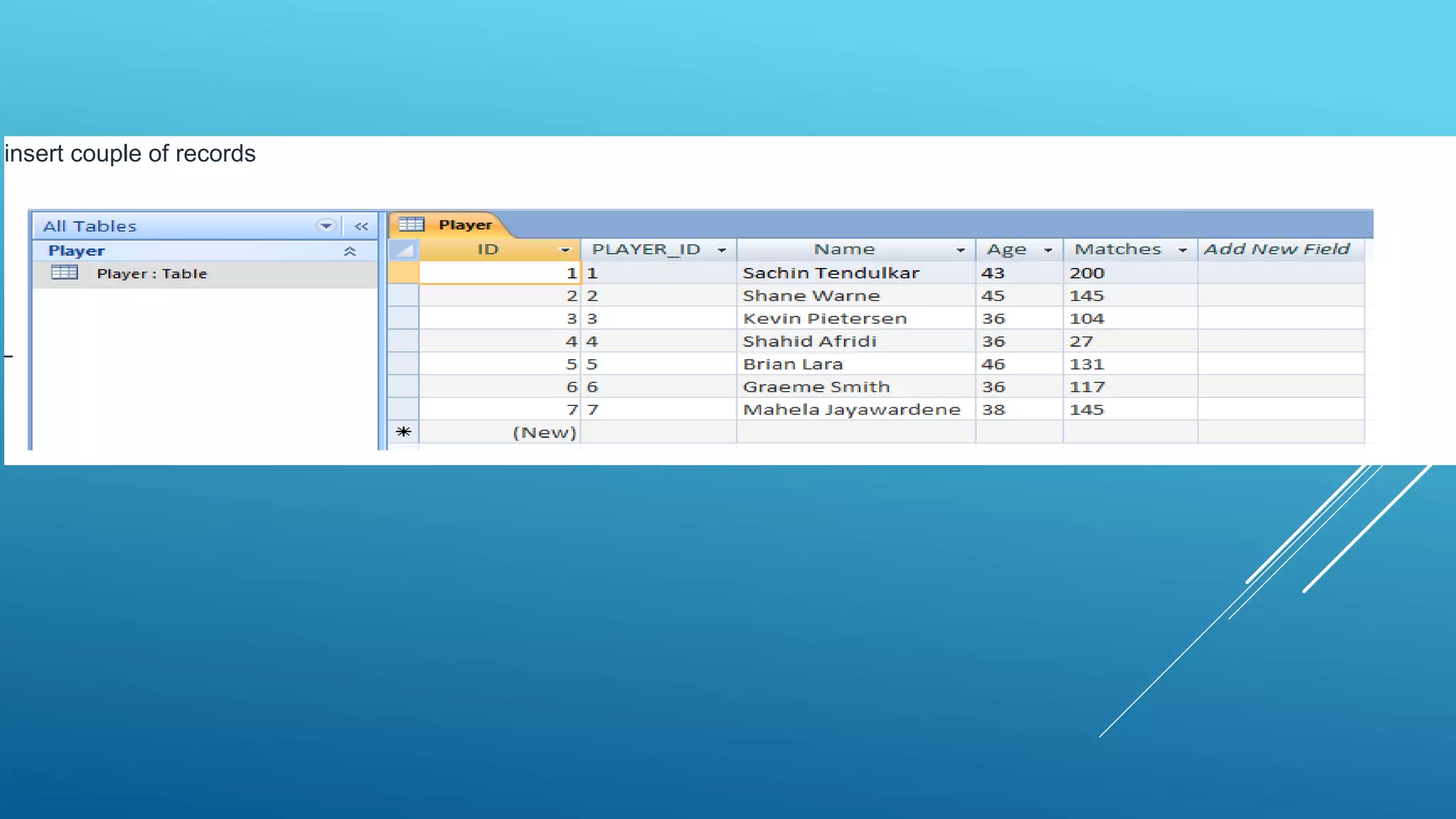
•Insert few sample records inside newly created table
It’s very easy open Microsoft Office Access 2007
Database and create new table called “Player” and add 4
fields like
•Player_ID
•Name
•Age
•Matches
insert couple of records
JDBC program to connect and
query MS Access database/table
•Once we are ready with above listed
things
•Then we can go ahead and code an
example to connect MS Access
database
•Finally querying database
package in.bench.resources.msaccess.db.example;
import java.sql.Connection;
import java.sql.DriverManager;
import java.sql.ResultSet;
import java.sql.SQLException;
import java.sql.Statement;
public class MsAccessDatabaseConnectionExample {
public static void main(String[] args) {
// variables
Connection connection = null;
Statement statement = null;
ResultSet resultSet = null;
// Step 1: Loading or
// registering Oracle JDBC driver class
try {
Class.forName("sun.jdbc.odbc.JdbcOdbcDriver");
}
catch(ClassNotFoundException cnfex) {
System.out.println("Problem in loading"
+ " MS Access JDBC driver");
cnfex.printStackTrace();
}
// Step 2: Opening database connection
try {
String msAccessDBName = "D:WORKSPACE"
+ "TEST_WORKSPACEJava-JDBCPlayer.accdb";
String dbURL = "jdbc:odbc:Driver="
+ "{Microsoft Access Driver (*.mdb, *.accdb)};"
+ "DBQ="
+ msAccessDBName
+ ";DriverID=22;READONLY=true";
// Step 2.A: Create and
// get connection using DriverManager class
connection = DriverManager.getConnection(dbURL);
// Step 2.B: Creating JDBC Statement
statement = connection.createStatement();
ID Name Age Matches
== ================ === =======
1 Sachin Tendulkar 43 200
2 Shane Warne 45 145
3 Kevin Pietersen 36 104
4 Shahid Afridi 36 27
5 Brian Lara 46 131
6 Graeme Smith 36 117
7 Mahela Jayawardene 38 145 :
output
THANK YOU

jdbc

  • 1.
  • 2.
    Why to LearnJDBC? JDBC stands for Java Database Connectivity, which is a standard Java API for database-independent connectivity between the Java programming language and a wide range of databases. The JDBC library includes APIs for each of the tasks mentioned below that are commonly associated with database usage. •Making a connection to a database. •Creating SQL or MySQL statements. •Executing SQL or MySQL queries in the database. •Viewing & Modifying the resulting records.
  • 3.
    Applications of JDBC Fundamentally,JDBC is a specification that provides a complete set of interfaces that allows for portable access to an underlying database. Java can be used to write different types of executables, such as − •Java Applications •Java Applets •Java Servlets •Java ServerPages (JSPs) •Enterprise JavaBeans (EJBs). All of these different executables are able to use a JDBC driver to access a database, and take advantage of the stored data. JDBC provides the same capabilities as ODBC, allowing Java programs to contain database-independent.
  • 4.
    JDBC Architecture The JDBCAPI supports both two-tier and three-tier processing models for database access but in general, JDBC Architecture consists of two layers − •JDBC API: This provides the application-to-JDBC Manager connection. •JDBC Driver API: This supports the JDBC Manager-to-Driver Connection. The JDBC API uses a driver manager and database- specific drivers to provide transparent connectivity to heterogeneous databases. The JDBC driver manager ensures that the correct driver is used to access each data source.
  • 5.
  • 6.
  • 7.
    JDBC drivers areclient-side adapters (installed on the client machine, not on the server) that convert requests from Java programs to a protocol that the DBMS can understand. There are 4 types of JDBC drivers: Type-1 driver or JDBC-ODBC bridge driver Type-2 driver or Native-API driver Type-3 driver or Network Protocol driver Type-4 driver or Thin driver JDBC Drivers
  • 8.
  • 9.
    Advantages: easy to use. canbe easily connected to any database. Disadvantages: Performance degraded because JDBC method call is converted into the ODBC function calls. The ODBC driver needs to be installed on the client machine.
  • 10.
  • 11.
    Advantage: performance upgraded thanJDBC- ODBC bridge driver. Disadvantage: The Native driver needs to be installed on the each client machine. The Vendor client library needs to be installed on client machine.
  • 12.
  • 13.
    Advantage: No client sidelibrary is required because of application server that can perform many tasks like auditing, load balancing, logging etc. Disadvantages: Network support is required on client machine. Requires database-specific coding to be done in the middle tier. Maintenance of Network Protocol driver becomes costly because it requires database-specific coding to be done in the middle tier.
  • 14.
  • 15.
    Advantage: Better performance thanall other drivers. No software is required at client side or server side. Disadvantage: Drivers depend on the Database.
  • 16.
    JDBC-TYPE-1 DRIVER CONNECTWITH MS-ACCESS The JDBC –ODBC Bridge driver is called the Type 1 driver. The JDBC_ODBC Bridge driver converts JDBC calls to open database connectivity(ODBC) calls. ODBC is an open standard API to communicate with databases. Creating a database in MS access Start…>programs…>Microsoft office…>file…>New…>Blank database…> Enter database name…>create. Create a database name(DSN) Start…>settings…>control panel…>administrative tools…>data sources Click on database…>click on add…>select Microsoft Access driver…>finish Enter DSN name…>click select…>select database…>ok…>ok.
  • 17.
    Java JDBC: Anexample to connect MS Access database In this article, we will learn and list down the steps to connect MS Access database and finally executing a simple query to test whether connected database works as expected. We will divide this article into 2 parts 1.MS Access database 2.Java JDBC application
  • 18.
    Part 1: MSAccess Database Before working with JDBC API to interact with database (to be specific MS Access database for this example), we need to set up MS Access database and create required things like •Create database •Create table inside newly created database •Insert few sample records inside newly created table It’s very easy open Microsoft Office Access 2007 Database and create new table called “Player” and add 4 fields like •Player_ID •Name •Age •Matches
  • 19.
  • 20.
    JDBC program toconnect and query MS Access database/table •Once we are ready with above listed things •Then we can go ahead and code an example to connect MS Access database •Finally querying database
  • 22.
    package in.bench.resources.msaccess.db.example; import java.sql.Connection; importjava.sql.DriverManager; import java.sql.ResultSet; import java.sql.SQLException; import java.sql.Statement; public class MsAccessDatabaseConnectionExample { public static void main(String[] args) { // variables Connection connection = null; Statement statement = null; ResultSet resultSet = null; // Step 1: Loading or // registering Oracle JDBC driver class try { Class.forName("sun.jdbc.odbc.JdbcOdbcDriver"); } catch(ClassNotFoundException cnfex) { System.out.println("Problem in loading" + " MS Access JDBC driver"); cnfex.printStackTrace(); } // Step 2: Opening database connection try { String msAccessDBName = "D:WORKSPACE" + "TEST_WORKSPACEJava-JDBCPlayer.accdb"; String dbURL = "jdbc:odbc:Driver=" + "{Microsoft Access Driver (*.mdb, *.accdb)};" + "DBQ=" + msAccessDBName + ";DriverID=22;READONLY=true"; // Step 2.A: Create and // get connection using DriverManager class connection = DriverManager.getConnection(dbURL); // Step 2.B: Creating JDBC Statement statement = connection.createStatement();
  • 23.
    ID Name AgeMatches == ================ === ======= 1 Sachin Tendulkar 43 200 2 Shane Warne 45 145 3 Kevin Pietersen 36 104 4 Shahid Afridi 36 27 5 Brian Lara 46 131 6 Graeme Smith 36 117 7 Mahela Jayawardene 38 145 : output
  • 24.