

SARDAR PATEL INSTITUTE OF
TECHNOLOGY AND MANAGEMENT
MANDLESHWAR

Submitted To
Proff.Aashutosh Yadav

Prepared by-:
Gayatri Patel
Enroll No.0881CS101009
CSE-Final year
TOPIC ON………………………..

INDUSTRIAL
INDUSTRIAL
TRAINING
TRAINING
ON
ON
J2EE
J2EE
CONTENTS
 Introduction
 Types of Driver
 JDBC Components
 JDBC Connection
JDBC – J ava D ata B ase C onnectivity
JDBC is a Java API that enables java program to
execute SQL Statements.
The JDBC API can also be used to interact with
multiple data sources in a distributed ,
heterogeneous environment.
JDBC
Driver

Java
Program

JDBC
API

Oracle
DB

Driver

SQL server
DB

Driver

MS-Access
DB
JDBC (Drivers )
 JDBC-ODBC Bridge

(Type 1)

 Native-API partly Java Driver

(Type 2)

 Net-Protocol All-Java Driver

(Type 3)

 Native Protocol All-Java Driver

(Type 4)
JDBC – ODBC Bridge (Type 1)
Java
Application

ODBC
Layer

JDBC
API

Database
JDBC
ODBC Drivers

ODBC
API

Function –
Translate JDBC call to ODBC calls and send them to the ODBC database.
It is a java Wrapper developed over ODBC API.
Advantages - 1. Easily available as part of JDK
2. Easy to install.
Disadvantages- 1. slower in performance.
2. Limited to functionality of ODBC driver.
3. Not Recommended for production environment.
Native-API partly Java Driver(Type2)
Java
Application

JDBC
API

Vendor API

Database
JDBC Driver

Written partly in java & partly in native code.
It uses a mixture of Java implementation and vendor-specific native API’s to
provide data
access.
Uses native ‘c’ language lib calls for conversion.
Advantage – these offer better performance than jdbc-odbc bridge as layers are
less and it uses Native API which is database specific.
Disadvantage – not fully in java so portability issue , if database is changed than
native API must be changed as it is database specific.
Network Protocol All-Java Driver(type3)
Java
Client

JDBC
API

JDBC Driver
Server

Native Driver

Database
JDBC Driver

This driver is Server based. So, the Vendor DB lib. Is not required for clients.
Uses DB independent Protocol to communicate DB-requests to a Server component.
Translates requests into DB-specific Protocol.
Advantages- 1. fully written in java , hence portable.
2. The net protocol can be designed to make the client JDBC driver very small
and
fast to load.
3. most efficient amongst all drivers.
Disadvantages- 1. requires another server application to be installed and maintained.
acts

2. clients connect to DB servers via an intermediate server component that
as a gateway for multiple database servers.
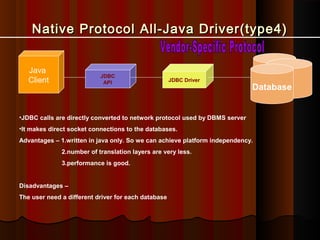
Native Protocol All-Java Driver(type4)
Java
Client

JDBC
API

JDBC Driver

Database

•JDBC calls are directly converted to network protocol used by DBMS server
•It makes direct socket connections to the databases.
Advantages – 1.written in java only. So we can achieve platform independency.
2.number of translation layers are very less.
3.performance is good.

Disadvantages –
The user need a different driver for each database
JDBC Components
JDBC
There are seven standard steps in querying
databases:
1. Load the JDBC driver.
2. Define the connection URL.
3. Establish the connection.
4. Create a statement object.
5. Execute a query or update.
6. Process the results.
7. Close the connection.
Load the JDBC driver……………….
Only one time load in jdbc driver
How does one load a "class" into the Virtual
machine?
Use the static method Class.forName()

Class.forName("sun.jdbc.odbc.JdbcOdbcDriver")
;
Package

ClassName
Define the connection URL………
•

Once a Driver is loaded, a connection can be made to the
database

•

The connection is defined by URL
• The URL has the following form:
• jdbc:driver:databasename

•

• Examples:
• jdbc:odbc:MyOdbcDatabase
• jdbc:postgres:WebsiteDatabase
• jdbc:oracle:CustomerInfo

A connection is obtained in the following manner:
• Connection conn =
DriverManager.getConnection("jdbc:odbc:MyDatabase“,"Usern
•

•

Establish the connection…….
The Connection interface defines many methods
for managing and using a connection to the
database
Connection aConnection;
• public Statement createStatement()
• public PreparedStatement

prepareStatement(String sql)
Create a statement object…….
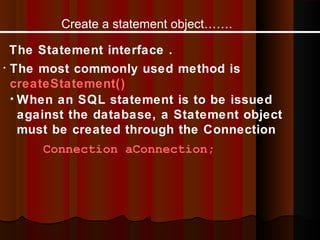
The Statement interface .
• The most commonly used method is
createStatement()
• When an SQL statement is to be issued
against the database, a Statement object
must be created through the Connection
Connection aConnection;
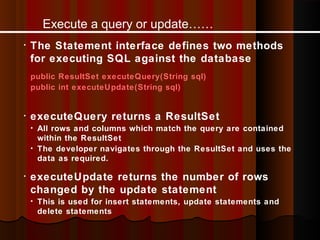
Execute a query or update……
•

The Statement interface defines two methods
for executing SQL against the database
public ResultSet executeQuery(String sql)
public int executeUpdate(String sql)

•

executeQuery returns a ResultSet
• All rows and columns which match the query are contained

within the ResultSet
• The developer navigates through the ResultSet and uses the
data as required.
•

executeUpdate returns the number of rows
changed by the update statement
• This is used for insert statements, update statements and

delete statements
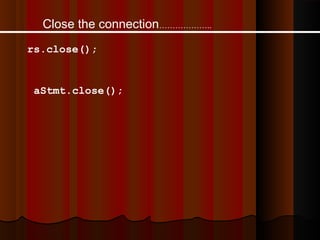
Close the connection………………..
rs.close();

aStmt.close();
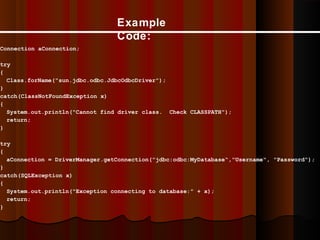
Example
Code:
Connection aConnection;
try
{
Class.forName("sun.jdbc.odbc.JdbcOdbcDriver");
}
catch(ClassNotFoundException x)
{
System.out.println("Cannot find driver class. Check CLASSPATH");
return;
}
try
{
aConnection = DriverManager.getConnection("jdbc:odbc:MyDatabase“,"Username", "Password");
}
catch(SQLException x)
{
System.out.println("Exception connecting to database:" + x);
return;
}
Example Code
(continued):

try
{
Statement aStmt = aConnection.createStatement();
StringBuffer sb = new StringBuffer("SELECT Employee_id, Employee_Name");
sb.append(" FROM Employee WHERE EmployeeId>100");
ResultSet rs = aStmt.executeQuery(sb.toString());
while(rs.next())
{
int employeeId = rs.getInt(1);
String employeeName = rs.getString(2);
System.out.println("Id:" + employeeId + "nName:" + employeeName);
}
rs.close();
aStmt.close();
}
catch(SQLException x)
{
System.out.println("Exception while executing query:" + x);
}
THANKYOU !!
Any Query?

jdbc

  • 1.
    SARDAR PATEL INSTITUTEOF TECHNOLOGY AND MANAGEMENT MANDLESHWAR Submitted To Proff.Aashutosh Yadav Prepared by-: Gayatri Patel Enroll No.0881CS101009 CSE-Final year
  • 2.
  • 3.
    CONTENTS  Introduction  Typesof Driver  JDBC Components  JDBC Connection
  • 4.
    JDBC – Java D ata B ase C onnectivity JDBC is a Java API that enables java program to execute SQL Statements. The JDBC API can also be used to interact with multiple data sources in a distributed , heterogeneous environment.
  • 5.
  • 6.
    JDBC (Drivers ) JDBC-ODBC Bridge (Type 1)  Native-API partly Java Driver (Type 2)  Net-Protocol All-Java Driver (Type 3)  Native Protocol All-Java Driver (Type 4)
  • 7.
    JDBC – ODBCBridge (Type 1) Java Application ODBC Layer JDBC API Database JDBC ODBC Drivers ODBC API Function – Translate JDBC call to ODBC calls and send them to the ODBC database. It is a java Wrapper developed over ODBC API. Advantages - 1. Easily available as part of JDK 2. Easy to install. Disadvantages- 1. slower in performance. 2. Limited to functionality of ODBC driver. 3. Not Recommended for production environment.
  • 8.
    Native-API partly JavaDriver(Type2) Java Application JDBC API Vendor API Database JDBC Driver Written partly in java & partly in native code. It uses a mixture of Java implementation and vendor-specific native API’s to provide data access. Uses native ‘c’ language lib calls for conversion. Advantage – these offer better performance than jdbc-odbc bridge as layers are less and it uses Native API which is database specific. Disadvantage – not fully in java so portability issue , if database is changed than native API must be changed as it is database specific.
  • 9.
    Network Protocol All-JavaDriver(type3) Java Client JDBC API JDBC Driver Server Native Driver Database JDBC Driver This driver is Server based. So, the Vendor DB lib. Is not required for clients. Uses DB independent Protocol to communicate DB-requests to a Server component. Translates requests into DB-specific Protocol. Advantages- 1. fully written in java , hence portable. 2. The net protocol can be designed to make the client JDBC driver very small and fast to load. 3. most efficient amongst all drivers. Disadvantages- 1. requires another server application to be installed and maintained. acts 2. clients connect to DB servers via an intermediate server component that as a gateway for multiple database servers.
  • 10.
    Native Protocol All-JavaDriver(type4) Java Client JDBC API JDBC Driver Database •JDBC calls are directly converted to network protocol used by DBMS server •It makes direct socket connections to the databases. Advantages – 1.written in java only. So we can achieve platform independency. 2.number of translation layers are very less. 3.performance is good. Disadvantages – The user need a different driver for each database
  • 11.
  • 12.
    JDBC There are sevenstandard steps in querying databases: 1. Load the JDBC driver. 2. Define the connection URL. 3. Establish the connection. 4. Create a statement object. 5. Execute a query or update. 6. Process the results. 7. Close the connection.
  • 13.
    Load the JDBCdriver………………. Only one time load in jdbc driver How does one load a "class" into the Virtual machine? Use the static method Class.forName() Class.forName("sun.jdbc.odbc.JdbcOdbcDriver") ; Package ClassName
  • 14.
    Define the connectionURL……… • Once a Driver is loaded, a connection can be made to the database • The connection is defined by URL • The URL has the following form: • jdbc:driver:databasename • • Examples: • jdbc:odbc:MyOdbcDatabase • jdbc:postgres:WebsiteDatabase • jdbc:oracle:CustomerInfo A connection is obtained in the following manner: • Connection conn = DriverManager.getConnection("jdbc:odbc:MyDatabase“,"Usern
  • 15.
    • • Establish the connection……. TheConnection interface defines many methods for managing and using a connection to the database Connection aConnection; • public Statement createStatement() • public PreparedStatement prepareStatement(String sql)
  • 16.
    Create a statementobject……. The Statement interface . • The most commonly used method is createStatement() • When an SQL statement is to be issued against the database, a Statement object must be created through the Connection Connection aConnection;
  • 17.
    Execute a queryor update…… • The Statement interface defines two methods for executing SQL against the database public ResultSet executeQuery(String sql) public int executeUpdate(String sql) • executeQuery returns a ResultSet • All rows and columns which match the query are contained within the ResultSet • The developer navigates through the ResultSet and uses the data as required. • executeUpdate returns the number of rows changed by the update statement • This is used for insert statements, update statements and delete statements
  • 18.
  • 19.
    Example Code: Connection aConnection; try { Class.forName("sun.jdbc.odbc.JdbcOdbcDriver"); } catch(ClassNotFoundException x) { System.out.println("Cannotfind driver class. Check CLASSPATH"); return; } try { aConnection = DriverManager.getConnection("jdbc:odbc:MyDatabase“,"Username", "Password"); } catch(SQLException x) { System.out.println("Exception connecting to database:" + x); return; }
  • 20.
    Example Code (continued): try { Statement aStmt= aConnection.createStatement(); StringBuffer sb = new StringBuffer("SELECT Employee_id, Employee_Name"); sb.append(" FROM Employee WHERE EmployeeId>100"); ResultSet rs = aStmt.executeQuery(sb.toString()); while(rs.next()) { int employeeId = rs.getInt(1); String employeeName = rs.getString(2); System.out.println("Id:" + employeeId + "nName:" + employeeName); } rs.close(); aStmt.close(); } catch(SQLException x) { System.out.println("Exception while executing query:" + x); }
  • 21.