Java Database Connectivity (JDBC)
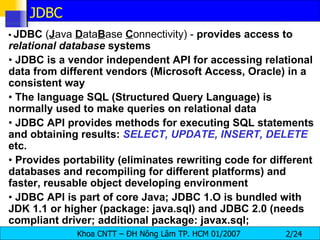
•  JDBC  ( J ava  D ata B ase  C onnectivity) -  provides access to  relational database  systems •  JDBC is a vendor independent API for accessing relational data from different vendors (Microsoft Access, Oracle) in a consistent way •  The language SQL (Structured Query Language) is normally used to make queries on relational data •  JDBC API provides methods for executing SQL statements and obtaining results:  SELECT, UPDATE, INSERT, DELETE   etc. •  Provides portability (eliminates rewriting code for different databases and recompiling for different platforms) and faster, reusable object developing environment •  JDBC API is part of core Java; JDBC 1.O is bundled with JDK 1.1 or higher (package: java.sql) and JDBC 2.0 (needs compliant driver; additional package: javax.sql;  JDBC
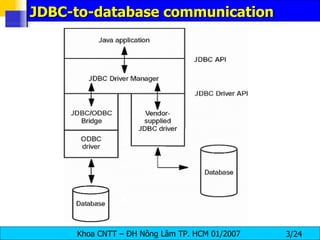
JDBC-to-database communication
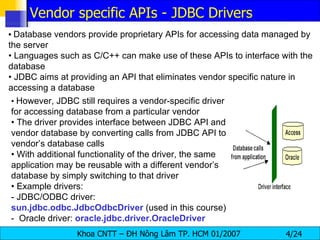
•   Database vendors provide proprietary APIs for accessing data managed by the server •  Languages such as C/C++ can make use of these APIs to interface with the database •  JDBC aims at providing an API that eliminates vendor specific nature in accessing a database •  However, JDBC still requires a vendor-specific driver for accessing database from a particular vendor •  The driver provides interface between JDBC API and vendor database by converting calls from JDBC API to vendor’s database calls •  With additional functionality of the driver, the same application may be reusable with a different vendor’s database by simply switching to that driver •  Example drivers: - JDBC/ODBC driver:  sun.jdbc.odbc.JdbcOdbcDriver  (used in this course) -  Oracle driver:  oracle.jdbc.driver.OracleDriver Vendor specific APIs - JDBC Drivers
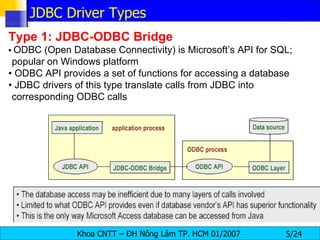
Type 1: JDBC-ODBC Bridge •   ODBC (Open Database Connectivity) is Microsoft’s API for SQL; popular on Windows platform •  ODBC API provides a set of functions for accessing a database •  JDBC drivers of this type translate calls from JDBC into corresponding ODBC calls JDBC Driver Types
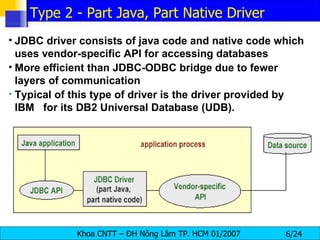
JDBC driver consists of java code and native code which uses vendor-specific API for accessing databases More efficient than JDBC-ODBC bridge due to fewer layers of communication Typical of this type of driver is the driver provided by IBM  for its DB2 Universal Database (UDB).  Type 2 - Part Java, Part Native Driver
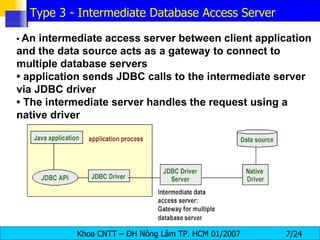
•  An intermediate access server between client application and the data source acts as a gateway to connect to multiple database servers •  application sends JDBC calls to the intermediate server via JDBC driver •  The intermediate server handles the request using a native driver Type 3 - Intermediate Database Access Server
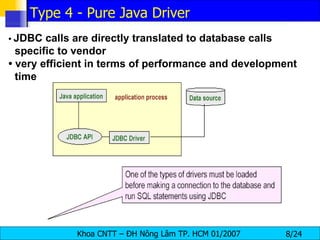
•  JDBC calls are directly translated to database calls specific to vendor •  very efficient in terms of performance and development time Type 4 - Pure Java Driver
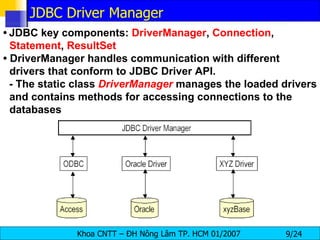
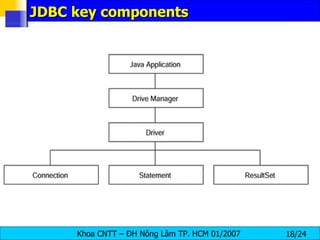
•   JDBC key components:  DriverManager ,  Connection ,  Statement ,  ResultSet •  DriverManager handles communication with different drivers that conform to JDBC Driver API. - The static class  DriverManager   manages the loaded drivers and contains methods for accessing connections to the databases JDBC Driver Manager
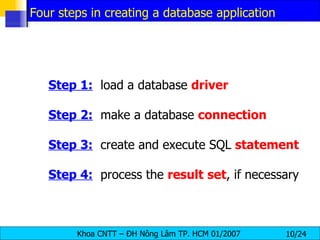
Step 1:   load a database  driver Step 2:   make a database  connection Step 3:   create and execute SQL  statement Step 4:   process the  result   set , if necessary Four steps in creating a database application
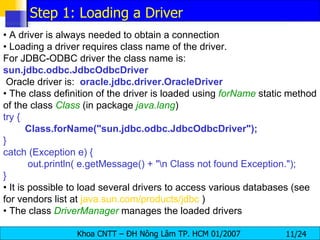
•  A driver is always needed to obtain a connection •  Loading a driver requires class name of the driver.  For JDBC-ODBC driver the class name is: sun.jdbc.odbc.JdbcOdbcDriver Oracle driver is:  oracle.jdbc.driver.OracleDriver •  The class definition of the driver is loaded using  forName   static method of the class  Class   (in package  java.lang ) try { Class.forName("sun.jdbc.odbc.JdbcOdbcDriver"); } catch (Exception e) { out.println( e.getMessage() + "\n Class not found Exception."); } •  It is possible to load several drivers to access various databases (see for vendors list at  java.sun.com/products/jdbc  ) •  The class  DriverManager   manages the loaded drivers Step 1: Loading a Driver
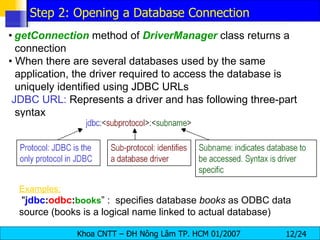
•   getConnection   method of  DriverManager   class returns a connection •  When there are several databases used by the same application, the driver required to access the database is uniquely identified using JDBC URLs JDBC URL:  Represents a driver and has following three-part syntax Examples:   " jdbc : odbc : books ” :  specifies database  books  as ODBC data source (books is a logical name linked to actual database) Step 2: Opening a Database Connection
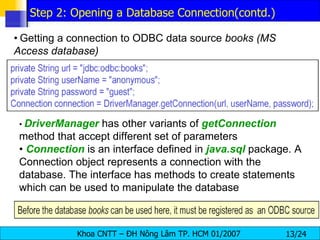
•   Getting a connection to ODBC data source  books (MS Access database) •  DriverManager  has other variants of  getConnection   method that accept different set of parameters •  Connection  is an interface defined in  java.sql   package. A Connection object represents a connection with the database. The interface has methods to create statements which can be used to manipulate the database Step 2: Opening a Database Connection(contd.)
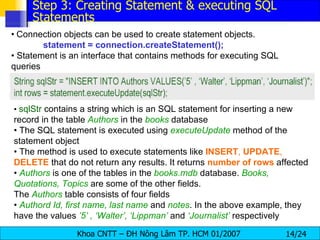
•   Connection objects can be used to create statement objects. statement = connection.createStatement(); •  Statement is an interface that contains methods for executing SQL queries •  sqlStr  contains a string which is an SQL statement for inserting a new record in the table  Authors   in the  books  database •  The SQL statement is executed using  executeUpdate  method of the statement object •  The method is used to execute statements like  INSERT ,  UPDATE ,  DELETE  that do not return any results. It returns  number   of   rows  affected •  Authors   is one of the tables in the  books.mdb  database.  Books, Quotations, Topics   are some of the other fields. The  Authors   table consists of four fields •  Authord Id, first name, last name  and  notes . In the above example, they have the values  ’5’ , ‘Walter’, ‘Lippman’  and  ‘Journalist’  respectively Step 3: Creating Statement & executing SQL Statements
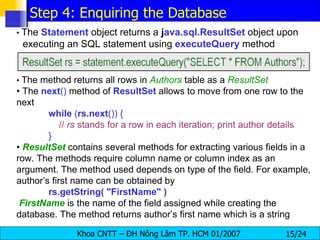
•  The  Statement  object returns a  j ava.sql.ResultSet  object upon executing an SQL statement using  executeQuery  method •  The method returns all rows in  Authors  table as a  ResultSet •  The  next ()  method of  ResultSet   allows to move from one row to the next while  ( rs.next ()) {   //  rs  stands for a row in each iteration; print author details } •  ResultSet   contains several methods for extracting various fields in a row. The methods require column name or column index as an argument. The method used depends on type of the field. For example, author’s first name can be obtained by rs.getString( "FirstName" ) FirstName   is the name of the field assigned while creating the database. The method returns author’s first name which is a string Step 4: Enquiring the Database
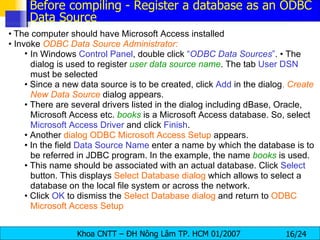
•   The computer should have Microsoft Access installed •  Invoke  ODBC Data Source Administrator: In Windows  Control Panel , double click  “ ODBC Data Sources ” . • The dialog is used to register  user data source name . The tab  User DSN  must be selected •  Since a new data source is to be created, click  Add  in the dialog .  Create New Data Source   dialog appears. •  There are several drivers listed in the dialog including dBase, Oracle, Microsoft Access etc.  books   is a Microsoft Access database. So, select  Microsoft Access Driver  and click  Finish . •  Another  dialog ODBC Microsoft Access Setup  appears. •  In the field  Data Source Name  enter a name by which the database is to be referred in JDBC program. In the example, the name  books   is used. •  This name should be associated with an actual database. Click  Select  button. This displays  Select Database dialog  which allows to select a database on the local file system or across the network. •  Click  OK  to dismiss the  Select Database   dialog  and return to  ODBC Microsoft Access Setup Before compiling - Register a database as an ODBC Data Source
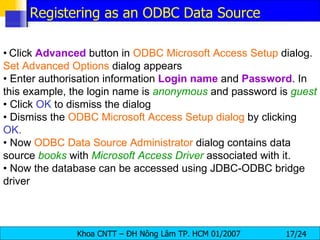
•   Click  Advanced  button in  ODBC Microsoft Access Setup  dialog.  Set Advanced Options  dialog appears •  Enter authorisation information  Login   name  and  Password . In this example, the login name is  anonymous   and password is  guest •  Click  OK  to dismiss the dialog •  Dismiss the  ODBC Microsoft Access Setup dialog  by clicking  OK. •  Now  ODBC Data Source Administrator  dialog contains data source  books  with  Microsoft Access Driver  associated with it. •  Now the database can be accessed using JDBC-ODBC bridge driver Registering as an ODBC Data Source
JDBC key components
The DriverManager Object. Once a driver is installed, you need to load it into your Java object by using the  DriverManager . It  provides a common interface to a JDBC driver object without having to delve into the internals of the database itself The driver is  responsible for creating and implementing  the  Connection ,  Statement , and  ResultSet  objects for the specific database. DriverManager  then is able to acquire those object implementations for itself. In so doing, applications that are written using the  DriverManager  are isolated from the implementation details of databases.
Database Connection Interface. The  Connection  object is responsible for  establishing  the link between the  Database   Management   System  and the Java application. It also enables the programmer to select the proper driver for the required application. The  Connection.getConnection  method accepts a  URL  and enables the  JDBC  object to use  different   drivers   depending  on the situation, isolates applets from connection-related information, and gives the application a means by which to  specify   the   specific   database  to  which   it   should   connect . The URL takes the form of  jdbc:<subprotocol>:<subname>.  The subprotocol is a kind of connectivity to the database
Database Statement Object. A  Statement  encapsulates a  query  written in  Structured   Query   Language  and enables the  JDBC  object to compose a series of steps to look up information in a database. Using a  Connection , the  Statement  can be forwarded to the database and obtain a  ResultSet
ResultSet Access Control. A  ResultSet   is a container for a series of rows and columns acquired from a  Statement   call. Using the  ResultSet's  iterator routines, the JDBC object can step through each row in the result set. Individual column fields can be retrieved using the get methods within the  ResultSet .  Columns may be specified by their field name or by their index.
Basic Database operations public   static   void  main(String[] args) { String url =  &quot;jdbc:odbc:sach&quot; ; String userName =  &quot;ltmang&quot; ; String password =  &quot;ltmang&quot; ; try  { Class. forName ( &quot;sun.jdbc.odbc.JdbcOdbcDriver&quot; ); Connection connection =  DriverManager. getConnection (url,userName,password); Statement statement = connection.createStatement(); String sql =  &quot;select * from sach&quot; ; ResultSet rs = statement.executeQuery(sql); while  (rs.next()) { System. out .println(rs.getString(  &quot;tens&quot;  )); }
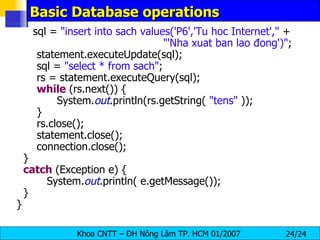
Basic Database operations sql =  &quot;insert into sach values('P6','Tu hoc Internet',&quot;  + &quot;'Nha xuat ban lao đong')&quot; ; statement.executeUpdate(sql); sql =  &quot;select * from sach&quot; ; rs = statement.executeQuery(sql); while  (rs.next()) { System. out .println(rs.getString(  &quot;tens&quot;  )); } rs.close(); statement.close(); connection.close(); } catch  (Exception e) { System. out .println( e.getMessage()); } }

Jdbc

  • 1.
  • 2.
    • JDBC ( J ava D ata B ase C onnectivity) - provides access to relational database systems • JDBC is a vendor independent API for accessing relational data from different vendors (Microsoft Access, Oracle) in a consistent way • The language SQL (Structured Query Language) is normally used to make queries on relational data • JDBC API provides methods for executing SQL statements and obtaining results: SELECT, UPDATE, INSERT, DELETE etc. • Provides portability (eliminates rewriting code for different databases and recompiling for different platforms) and faster, reusable object developing environment • JDBC API is part of core Java; JDBC 1.O is bundled with JDK 1.1 or higher (package: java.sql) and JDBC 2.0 (needs compliant driver; additional package: javax.sql; JDBC
  • 3.
  • 4.
    Database vendors provide proprietary APIs for accessing data managed by the server • Languages such as C/C++ can make use of these APIs to interface with the database • JDBC aims at providing an API that eliminates vendor specific nature in accessing a database • However, JDBC still requires a vendor-specific driver for accessing database from a particular vendor • The driver provides interface between JDBC API and vendor database by converting calls from JDBC API to vendor’s database calls • With additional functionality of the driver, the same application may be reusable with a different vendor’s database by simply switching to that driver • Example drivers: - JDBC/ODBC driver: sun.jdbc.odbc.JdbcOdbcDriver (used in this course) - Oracle driver: oracle.jdbc.driver.OracleDriver Vendor specific APIs - JDBC Drivers
  • 5.
    Type 1: JDBC-ODBCBridge • ODBC (Open Database Connectivity) is Microsoft’s API for SQL; popular on Windows platform • ODBC API provides a set of functions for accessing a database • JDBC drivers of this type translate calls from JDBC into corresponding ODBC calls JDBC Driver Types
  • 6.
    JDBC driver consistsof java code and native code which uses vendor-specific API for accessing databases More efficient than JDBC-ODBC bridge due to fewer layers of communication Typical of this type of driver is the driver provided by IBM for its DB2 Universal Database (UDB). Type 2 - Part Java, Part Native Driver
  • 7.
    • Anintermediate access server between client application and the data source acts as a gateway to connect to multiple database servers • application sends JDBC calls to the intermediate server via JDBC driver • The intermediate server handles the request using a native driver Type 3 - Intermediate Database Access Server
  • 8.
    • JDBCcalls are directly translated to database calls specific to vendor • very efficient in terms of performance and development time Type 4 - Pure Java Driver
  • 9.
    JDBC key components: DriverManager , Connection , Statement , ResultSet • DriverManager handles communication with different drivers that conform to JDBC Driver API. - The static class DriverManager manages the loaded drivers and contains methods for accessing connections to the databases JDBC Driver Manager
  • 10.
    Step 1: load a database driver Step 2: make a database connection Step 3: create and execute SQL statement Step 4: process the result set , if necessary Four steps in creating a database application
  • 11.
    • Adriver is always needed to obtain a connection • Loading a driver requires class name of the driver. For JDBC-ODBC driver the class name is: sun.jdbc.odbc.JdbcOdbcDriver Oracle driver is: oracle.jdbc.driver.OracleDriver • The class definition of the driver is loaded using forName static method of the class Class (in package java.lang ) try { Class.forName(&quot;sun.jdbc.odbc.JdbcOdbcDriver&quot;); } catch (Exception e) { out.println( e.getMessage() + &quot;\n Class not found Exception.&quot;); } • It is possible to load several drivers to access various databases (see for vendors list at java.sun.com/products/jdbc ) • The class DriverManager manages the loaded drivers Step 1: Loading a Driver
  • 12.
    getConnection method of DriverManager class returns a connection • When there are several databases used by the same application, the driver required to access the database is uniquely identified using JDBC URLs JDBC URL: Represents a driver and has following three-part syntax Examples: &quot; jdbc : odbc : books ” : specifies database books as ODBC data source (books is a logical name linked to actual database) Step 2: Opening a Database Connection
  • 13.
    Getting a connection to ODBC data source books (MS Access database) • DriverManager has other variants of getConnection method that accept different set of parameters • Connection is an interface defined in java.sql package. A Connection object represents a connection with the database. The interface has methods to create statements which can be used to manipulate the database Step 2: Opening a Database Connection(contd.)
  • 14.
    Connection objects can be used to create statement objects. statement = connection.createStatement(); • Statement is an interface that contains methods for executing SQL queries • sqlStr contains a string which is an SQL statement for inserting a new record in the table Authors in the books database • The SQL statement is executed using executeUpdate method of the statement object • The method is used to execute statements like INSERT , UPDATE , DELETE that do not return any results. It returns number of rows affected • Authors is one of the tables in the books.mdb database. Books, Quotations, Topics are some of the other fields. The Authors table consists of four fields • Authord Id, first name, last name and notes . In the above example, they have the values ’5’ , ‘Walter’, ‘Lippman’ and ‘Journalist’ respectively Step 3: Creating Statement & executing SQL Statements
  • 15.
    • The Statement object returns a j ava.sql.ResultSet object upon executing an SQL statement using executeQuery method • The method returns all rows in Authors table as a ResultSet • The next () method of ResultSet allows to move from one row to the next while ( rs.next ()) { // rs stands for a row in each iteration; print author details } • ResultSet contains several methods for extracting various fields in a row. The methods require column name or column index as an argument. The method used depends on type of the field. For example, author’s first name can be obtained by rs.getString( &quot;FirstName&quot; ) FirstName is the name of the field assigned while creating the database. The method returns author’s first name which is a string Step 4: Enquiring the Database
  • 16.
    The computer should have Microsoft Access installed • Invoke ODBC Data Source Administrator: In Windows Control Panel , double click “ ODBC Data Sources ” . • The dialog is used to register user data source name . The tab User DSN must be selected • Since a new data source is to be created, click Add in the dialog . Create New Data Source dialog appears. • There are several drivers listed in the dialog including dBase, Oracle, Microsoft Access etc. books is a Microsoft Access database. So, select Microsoft Access Driver and click Finish . • Another dialog ODBC Microsoft Access Setup appears. • In the field Data Source Name enter a name by which the database is to be referred in JDBC program. In the example, the name books is used. • This name should be associated with an actual database. Click Select button. This displays Select Database dialog which allows to select a database on the local file system or across the network. • Click OK to dismiss the Select Database dialog and return to ODBC Microsoft Access Setup Before compiling - Register a database as an ODBC Data Source
  • 17.
    Click Advanced button in ODBC Microsoft Access Setup dialog. Set Advanced Options dialog appears • Enter authorisation information Login name and Password . In this example, the login name is anonymous and password is guest • Click OK to dismiss the dialog • Dismiss the ODBC Microsoft Access Setup dialog by clicking OK. • Now ODBC Data Source Administrator dialog contains data source books with Microsoft Access Driver associated with it. • Now the database can be accessed using JDBC-ODBC bridge driver Registering as an ODBC Data Source
  • 18.
  • 19.
    The DriverManager Object.Once a driver is installed, you need to load it into your Java object by using the DriverManager . It provides a common interface to a JDBC driver object without having to delve into the internals of the database itself The driver is responsible for creating and implementing the Connection , Statement , and ResultSet objects for the specific database. DriverManager then is able to acquire those object implementations for itself. In so doing, applications that are written using the DriverManager are isolated from the implementation details of databases.
  • 20.
    Database Connection Interface.The Connection object is responsible for establishing the link between the Database Management System and the Java application. It also enables the programmer to select the proper driver for the required application. The Connection.getConnection method accepts a URL and enables the JDBC object to use different drivers depending on the situation, isolates applets from connection-related information, and gives the application a means by which to specify the specific database to which it should connect . The URL takes the form of jdbc:<subprotocol>:<subname>. The subprotocol is a kind of connectivity to the database
  • 21.
    Database Statement Object.A Statement encapsulates a query written in Structured Query Language and enables the JDBC object to compose a series of steps to look up information in a database. Using a Connection , the Statement can be forwarded to the database and obtain a ResultSet
  • 22.
    ResultSet Access Control.A ResultSet is a container for a series of rows and columns acquired from a Statement call. Using the ResultSet's iterator routines, the JDBC object can step through each row in the result set. Individual column fields can be retrieved using the get methods within the ResultSet . Columns may be specified by their field name or by their index.
  • 23.
    Basic Database operationspublic static void main(String[] args) { String url = &quot;jdbc:odbc:sach&quot; ; String userName = &quot;ltmang&quot; ; String password = &quot;ltmang&quot; ; try { Class. forName ( &quot;sun.jdbc.odbc.JdbcOdbcDriver&quot; ); Connection connection = DriverManager. getConnection (url,userName,password); Statement statement = connection.createStatement(); String sql = &quot;select * from sach&quot; ; ResultSet rs = statement.executeQuery(sql); while (rs.next()) { System. out .println(rs.getString( &quot;tens&quot; )); }
  • 24.
    Basic Database operationssql = &quot;insert into sach values('P6','Tu hoc Internet',&quot; + &quot;'Nha xuat ban lao đong')&quot; ; statement.executeUpdate(sql); sql = &quot;select * from sach&quot; ; rs = statement.executeQuery(sql); while (rs.next()) { System. out .println(rs.getString( &quot;tens&quot; )); } rs.close(); statement.close(); connection.close(); } catch (Exception e) { System. out .println( e.getMessage()); } }