
Sponsored by
Java Insecurity: How to Deal
with theConstant
Vulnerabilities
© 2013 Monterey Technology Group Inc.
Thanks to
© 2013 Monterey Technology Group Inc.
www.Lumension.com
Chris Merritt, Director of Solution Marketing
Preview of Key
Points
 Assessment & Identification
 Disabling
 Hardening
 Filtering
 Patching
Background
 This is not about “Java Script”
 No relationship to Java
 Java
 Supported onWindows,OS X, Linux
 Android too, kind of
 Not supported on iOS or Chrome
 What is the component?
 JVM now called JRE
 Installed by default?
 Windows: up to hardware manufacture
 OS X: pre-Lion yes, Lion+ no (more info javatest.org)
 Multiple versions can be installed
 Each browser has its own Java settings
Background
 Important changes with 7.10
 Ensuring the Most Secure JRE
 JRE Expiration Date
 Disabling Java in the Browser
 Setting the Security Level
 Advanced options
 Allow user to grant permissions to signed content
 Show sandbox warning banner
 Allow user to accept JNLP security requests
 Don't prompt for client certificate selection when no certificates or only one
exists
 Warn if site certificate does not match hostname
 Show site certificate even if it is valid
 Install options
Background
 Big changes in v7U21 (see here) …
 security model for signed applets was changed
 default plug-in security settings were changed
 improvements to standardized revocation services (of certs)
 dissociating client/browser use of Java (e.g., affecting home users) and
server use (e.g., affecting enterprise deployments)
 Latest version 1.7.0_25 (v7U25)
 40 security fixes
 http://www.oracle.com/technetwork/topics/security/javacpujun2013-
1899847.html
Assessment &
Identification
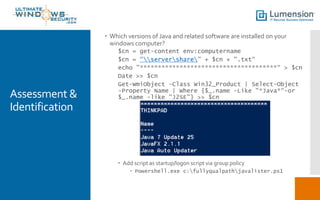
 Which versions of Java and related software are installed on your
windows computer?
$cn = get-content env:computername
$cn = “servershare” + $cn + ".txt“
echo "**************************************“ > $cn
Date >> $cn
Get-WmiObject -Class Win32_Product | Select-Object
-Property Name | Where {$_.name -Like "*Java*“-or
$_.name -like "J2SE"} >> $cn
 Add script as startup/logon script via group policy
 Powershell.exe c:fullyqualpathjavalister.ps1
Assessment &
Identification
 Which versions are really being used?
 Windows auditing
 To catch Java EXEs starting
 Enable Process tracking
 Event 4688/592 with “java”
 To catch DLLs
 Necessary?
 Enable File System auditing
 Enable auditing on c:program filesjava
 Look for 4663 with “java”
Assessment &
Identification
 Other questions
 Which browsers is it enabled in?
 http://javatester.org/version.html
Disabling Java
 What about when you need Java on certain websites?
 Disable Java in main browser
 Enable Java in alternate browser used for certain sites
Disabling Java
 Disabling Java
 Altogether
 Chrome
 http://mtwsec.blogspot.ca/2012/08/java-0-day-workarounds-silent-
disabling.html
 IE
 By script: http://support.microsoft.com/kb/2751647
 FireFox
 By script: http://mtwsec.blogspot.ca/2012/08/java-0-day-workarounds-silent-
disabling.html
Uninstall all
versions of
Java
 http://community.spiceworks.com/how_to/show/22997-use-a-batch-
file-and-group-policy-to-cleanly-update-java
 wmic product where "name like 'Java(TM) 6%%'" call uninstall
/nointeractive
wmic product where "name like 'Java(TM) 7%%'" call uninstall
/nointeractive
wmic product where "name like 'Java 7%%'" call uninstall /nointeractive
wmic product where "name like 'JavaFX%%'" call uninstall
/nointeractive
wmic product where "name like 'Java(TM) 7%%'" call uninstall
/nointeractive
wmic product where "name like 'Java(tm) 6%%'" call uninstall
/nointeractive
wmic product where "name like 'J2SE Runtime Environment%%'" call
uninstall /nointeractive
Installing
latest and
enabling
automatic
updates hence
forth
 Group Policy/Software Installation
 MSI files
 http://community.spiceworks.com/how_to/show/22997-use-a-batch-
file-and-group-policy-to-cleanly-update-java
Managing
Java
configuration
 Java normally stores its settings for each user in
 <UserApplication Data
Folder>SunJavaDeploymentdeployment.properties
 Mandate system wide settings with
 <Windows Directory>SunJavaDeploymentdeployment.config
 http://docs.oracle.com/javase/6/docs/technotes/guides/deployment/depl
oyment-guide/properties.html
 http://docs.oracle.com/javase/7/docs/technotes/guides/deployment/depl
oyment-guide/properties.html
 How to do it with group policy
 http://www.darkoperator.com/blog/2013/1/14/centralized-management-
of-java-se-environment-using-gpo-redu.html
Filtering
 Do you have a proxy server?
 Can you filter java applets at the gateway?
 Some firewalls and proxies make this possible.
 Java content removed from web pages
Patching
 Oracle still relies on independent auto-updaters on each endpoint
 Install by MSI
 Download and run the offline installer, but do not complete it. Look in
%userprofile%appdatalocallowsunjava.
 Open the folder jre<update number> and copy the msi and cab files there
to your server share where you deploy your msis. Deploy with group
policy as per normal.
 Silent install from script
 <jre>.exe [/s] [INSTALLDIR=<drive>:<JRE_install_path>] [STATIC=1]
[WEB_JAVA=0/1] [WEB_JAVA_SECURITY_LEVEL=VH/H/M/L]
 http://java.com/en/download/help/silent_install.xml
Bottom line
 Managing Java yourself
 Labor intensive – who has the time?
 Changes with each new version
 Requires fragile scripts
 No reporting/monitoring
 There must be a better way…
PROPRIETARY & CONFIDENTIAL - NOT FOR PUBLIC DISTRIBUTION
Java
Survival
Guide
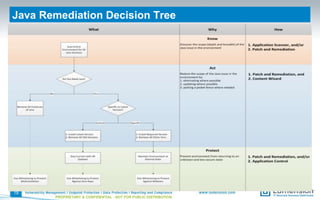
Java Remediation Decision Tree
19
PROPRIETARY & CONFIDENTIAL - NOT FOR PUBLIC DISTRIBUTION
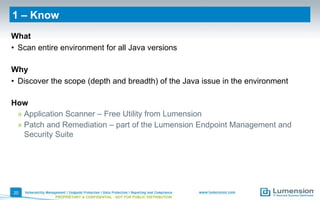
1 – Know
What
• Scan entire environment for all Java versions
Why
• Discover the scope (depth and breadth) of the Java issue in the environment
How
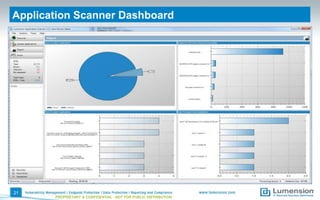
» Application Scanner – Free Utility from Lumension
» Patch and Remediation – part of the Lumension Endpoint Management and
Security Suite
20
PROPRIETARY & CONFIDENTIAL - NOT FOR PUBLIC DISTRIBUTION
Application Scanner Dashboard
21
PROPRIETARY & CONFIDENTIAL - NOT FOR PUBLIC DISTRIBUTION
Java Application Scanner
22
PROPRIETARY & CONFIDENTIAL - NOT FOR PUBLIC DISTRIBUTION
2 – Act
What
• How you need Java?
» If No, then remove all instances of Java
» If Yes, then do you need a specific version or the latest version?
Why
• Reduce the scope of the Java issue in the environment by:
» Eliminating where possible
» Updating where possible
» Putting a picket fence where needed
How
» Patch and Remediation – update, standardize
» Content Wizard – remove unwanted versions
23
PROPRIETARY & CONFIDENTIAL - NOT FOR PUBLIC DISTRIBUTION
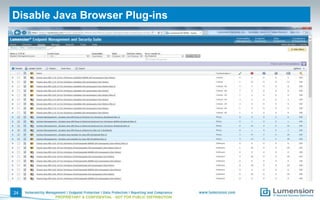
Disable Java Browser Plug-ins
24
PROPRIETARY & CONFIDENTIAL - NOT FOR PUBLIC DISTRIBUTION
3 – Protect
What
• Stay current with all updates
• Maintain environment in desired state
• Protect against known and unknown (zero-day) malware
Why
• Prevent environment from returning to an unknown and less secure state
How
» Patch and Remediation – maintain
» Application Control – prevent drift and malware
25
PROPRIETARY & CONFIDENTIAL - NOT FOR PUBLIC DISTRIBUTION
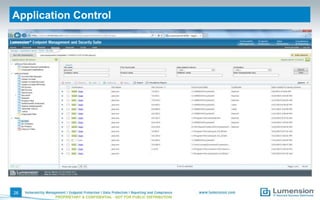
Application Control
26
PROPRIETARY & CONFIDENTIAL - NOT FOR PUBLIC DISTRIBUTION
More Information
• Free Java Application Scanner Tool
» Uncover every version of Java in your endpoint
environment to assess, prioritize and manage your
Java risk.
http://www.lumension.com/Resources/Security-
Tools/Java-App-Scanner-Tool.aspx
• Lumension® Endpoint Management
and Security Suite: Patch and
Remediation
» Online Demo Video:
http://www.lumension.com/Resources/Demo-
Center/Vulnerability-Management.aspx
» Free Trial (virtual or download):
http://www.lumension.com/vulnerability-
management/patch-management-software/free-
trial.aspx
27
PROPRIETARY & CONFIDENTIAL - NOT FOR PUBLIC DISTRIBUTION
• Surviving Java Resource Center
» Get free access to essential resources to help you
take control of your Java risk – in just 3 steps!
http://www.lumension.com/Resources/Resource-
Center/Java-Resource-Center.aspx
Global Headquarters
8660 East Hartford Drive
Suite 300
Scottsdale, AZ 85255
1.888.725.7828
info@lumension.com
http://blog.lumension.com

Java Insecurity: How to Deal with the Constant Vulnerabilities

  • 1.
    Sponsored by Java Insecurity:How to Deal with theConstant Vulnerabilities © 2013 Monterey Technology Group Inc.
  • 2.
    Thanks to © 2013Monterey Technology Group Inc. www.Lumension.com Chris Merritt, Director of Solution Marketing
  • 3.
    Preview of Key Points Assessment & Identification  Disabling  Hardening  Filtering  Patching
  • 4.
    Background  This isnot about “Java Script”  No relationship to Java  Java  Supported onWindows,OS X, Linux  Android too, kind of  Not supported on iOS or Chrome  What is the component?  JVM now called JRE  Installed by default?  Windows: up to hardware manufacture  OS X: pre-Lion yes, Lion+ no (more info javatest.org)  Multiple versions can be installed  Each browser has its own Java settings
  • 5.
    Background  Important changeswith 7.10  Ensuring the Most Secure JRE  JRE Expiration Date  Disabling Java in the Browser  Setting the Security Level  Advanced options  Allow user to grant permissions to signed content  Show sandbox warning banner  Allow user to accept JNLP security requests  Don't prompt for client certificate selection when no certificates or only one exists  Warn if site certificate does not match hostname  Show site certificate even if it is valid  Install options
  • 6.
    Background  Big changesin v7U21 (see here) …  security model for signed applets was changed  default plug-in security settings were changed  improvements to standardized revocation services (of certs)  dissociating client/browser use of Java (e.g., affecting home users) and server use (e.g., affecting enterprise deployments)  Latest version 1.7.0_25 (v7U25)  40 security fixes  http://www.oracle.com/technetwork/topics/security/javacpujun2013- 1899847.html
  • 7.
    Assessment & Identification  Whichversions of Java and related software are installed on your windows computer? $cn = get-content env:computername $cn = “servershare” + $cn + ".txt“ echo "**************************************“ > $cn Date >> $cn Get-WmiObject -Class Win32_Product | Select-Object -Property Name | Where {$_.name -Like "*Java*“-or $_.name -like "J2SE"} >> $cn  Add script as startup/logon script via group policy  Powershell.exe c:fullyqualpathjavalister.ps1
  • 8.
    Assessment & Identification  Whichversions are really being used?  Windows auditing  To catch Java EXEs starting  Enable Process tracking  Event 4688/592 with “java”  To catch DLLs  Necessary?  Enable File System auditing  Enable auditing on c:program filesjava  Look for 4663 with “java”
  • 9.
    Assessment & Identification  Otherquestions  Which browsers is it enabled in?  http://javatester.org/version.html
  • 10.
    Disabling Java  Whatabout when you need Java on certain websites?  Disable Java in main browser  Enable Java in alternate browser used for certain sites
  • 11.
    Disabling Java  DisablingJava  Altogether  Chrome  http://mtwsec.blogspot.ca/2012/08/java-0-day-workarounds-silent- disabling.html  IE  By script: http://support.microsoft.com/kb/2751647  FireFox  By script: http://mtwsec.blogspot.ca/2012/08/java-0-day-workarounds-silent- disabling.html
  • 12.
    Uninstall all versions of Java http://community.spiceworks.com/how_to/show/22997-use-a-batch- file-and-group-policy-to-cleanly-update-java  wmic product where "name like 'Java(TM) 6%%'" call uninstall /nointeractive wmic product where "name like 'Java(TM) 7%%'" call uninstall /nointeractive wmic product where "name like 'Java 7%%'" call uninstall /nointeractive wmic product where "name like 'JavaFX%%'" call uninstall /nointeractive wmic product where "name like 'Java(TM) 7%%'" call uninstall /nointeractive wmic product where "name like 'Java(tm) 6%%'" call uninstall /nointeractive wmic product where "name like 'J2SE Runtime Environment%%'" call uninstall /nointeractive
  • 13.
    Installing latest and enabling automatic updates hence forth Group Policy/Software Installation  MSI files  http://community.spiceworks.com/how_to/show/22997-use-a-batch- file-and-group-policy-to-cleanly-update-java
  • 14.
    Managing Java configuration  Java normallystores its settings for each user in  <UserApplication Data Folder>SunJavaDeploymentdeployment.properties  Mandate system wide settings with  <Windows Directory>SunJavaDeploymentdeployment.config  http://docs.oracle.com/javase/6/docs/technotes/guides/deployment/depl oyment-guide/properties.html  http://docs.oracle.com/javase/7/docs/technotes/guides/deployment/depl oyment-guide/properties.html  How to do it with group policy  http://www.darkoperator.com/blog/2013/1/14/centralized-management- of-java-se-environment-using-gpo-redu.html
  • 15.
    Filtering  Do youhave a proxy server?  Can you filter java applets at the gateway?  Some firewalls and proxies make this possible.  Java content removed from web pages
  • 16.
    Patching  Oracle stillrelies on independent auto-updaters on each endpoint  Install by MSI  Download and run the offline installer, but do not complete it. Look in %userprofile%appdatalocallowsunjava.  Open the folder jre<update number> and copy the msi and cab files there to your server share where you deploy your msis. Deploy with group policy as per normal.  Silent install from script  <jre>.exe [/s] [INSTALLDIR=<drive>:<JRE_install_path>] [STATIC=1] [WEB_JAVA=0/1] [WEB_JAVA_SECURITY_LEVEL=VH/H/M/L]  http://java.com/en/download/help/silent_install.xml
  • 17.
    Bottom line  ManagingJava yourself  Labor intensive – who has the time?  Changes with each new version  Requires fragile scripts  No reporting/monitoring  There must be a better way…
  • 18.
    PROPRIETARY & CONFIDENTIAL- NOT FOR PUBLIC DISTRIBUTION Java Survival Guide
  • 19.
    Java Remediation DecisionTree 19 PROPRIETARY & CONFIDENTIAL - NOT FOR PUBLIC DISTRIBUTION
  • 20.
    1 – Know What •Scan entire environment for all Java versions Why • Discover the scope (depth and breadth) of the Java issue in the environment How » Application Scanner – Free Utility from Lumension » Patch and Remediation – part of the Lumension Endpoint Management and Security Suite 20 PROPRIETARY & CONFIDENTIAL - NOT FOR PUBLIC DISTRIBUTION
  • 21.
    Application Scanner Dashboard 21 PROPRIETARY& CONFIDENTIAL - NOT FOR PUBLIC DISTRIBUTION
  • 22.
    Java Application Scanner 22 PROPRIETARY& CONFIDENTIAL - NOT FOR PUBLIC DISTRIBUTION
  • 23.
    2 – Act What •How you need Java? » If No, then remove all instances of Java » If Yes, then do you need a specific version or the latest version? Why • Reduce the scope of the Java issue in the environment by: » Eliminating where possible » Updating where possible » Putting a picket fence where needed How » Patch and Remediation – update, standardize » Content Wizard – remove unwanted versions 23 PROPRIETARY & CONFIDENTIAL - NOT FOR PUBLIC DISTRIBUTION
  • 24.
    Disable Java BrowserPlug-ins 24 PROPRIETARY & CONFIDENTIAL - NOT FOR PUBLIC DISTRIBUTION
  • 25.
    3 – Protect What •Stay current with all updates • Maintain environment in desired state • Protect against known and unknown (zero-day) malware Why • Prevent environment from returning to an unknown and less secure state How » Patch and Remediation – maintain » Application Control – prevent drift and malware 25 PROPRIETARY & CONFIDENTIAL - NOT FOR PUBLIC DISTRIBUTION
  • 26.
    Application Control 26 PROPRIETARY &CONFIDENTIAL - NOT FOR PUBLIC DISTRIBUTION
  • 27.
    More Information • FreeJava Application Scanner Tool » Uncover every version of Java in your endpoint environment to assess, prioritize and manage your Java risk. http://www.lumension.com/Resources/Security- Tools/Java-App-Scanner-Tool.aspx • Lumension® Endpoint Management and Security Suite: Patch and Remediation » Online Demo Video: http://www.lumension.com/Resources/Demo- Center/Vulnerability-Management.aspx » Free Trial (virtual or download): http://www.lumension.com/vulnerability- management/patch-management-software/free- trial.aspx 27 PROPRIETARY & CONFIDENTIAL - NOT FOR PUBLIC DISTRIBUTION • Surviving Java Resource Center » Get free access to essential resources to help you take control of your Java risk – in just 3 steps! http://www.lumension.com/Resources/Resource- Center/Java-Resource-Center.aspx
  • 28.
    Global Headquarters 8660 EastHartford Drive Suite 300 Scottsdale, AZ 85255 1.888.725.7828 info@lumension.com http://blog.lumension.com

Editor's Notes

  • #20 Notes: This decision tree could be applied across the entire organization as a whole; however, more likely any department, group or even individual will be unique in their needs. This decision tree could be applied across both server and endpoint environments. Determining the need for Java is likely unique by organization, department, group or even individual user; be sure to consider both vendor-supplied and in-house developed applications. There may be legitimate reasons for maintaining old versions of Java in your organization; if this is the case, then strategies to minimize the risk must be considered. A common recommendation is disable Java plug-ins in the browser(s); this configuration will greatly reduce common attack vectors.