

Windows 7 AppLocker: Understanding its Capabilities and Limitations Made possible by:© 2011 Monterey Technology Group Inc.
Brought to you bySpeakersChris Chevalier, Senior Product ManagerChris Merritt, Director of Solution Marketinghttp://www.lumension.com/Solutions/Intelligent-Whitelisting.aspx
Preview of Key PointsAppLockerHow it worksCapabilitiesLimitationsScenarios where it’s RightWrong© 2011 Monterey Technology Group Inc.
Open Ended Survey QuestionIf you could build your ideal endpoint security agent, what would you include?AntiVirusApplication WhitelistingPatchingFirewallDisk encryptionDLPDevice ControlWhat else? Please respond via Chat
AppLockerStarts from a deny all point of viewCan be applied toEXEsDLLs.dll and .ocxScripts.bat, .cmd, .js, .ps1, and .vbsWindows Installer .msiand .msp
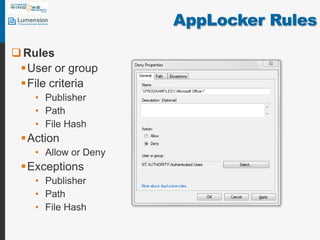
AppLocker RulesRulesUser or group File criteriaPublisherPathFile HashActionAllow or DenyExceptionsPublisherPathFile Hash
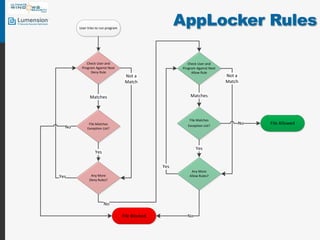
AppLocker Rules
AppLocker RulesAll deny rules processed before allow rulesOtherwise sequence not importantDefault rule is denyAdd allow rules for selected users and programsDeny rules override allow rulesOnly needed to override allow rulesExceptions simply cause next rule to be evaluatedMultiple GPOs?Rules additive (including local policy)Enforcement mode (last GPO wins)
ImplementationCreate Default RulesAutomatically Generate RulesEnforcement modeAudit OnlyEnforce
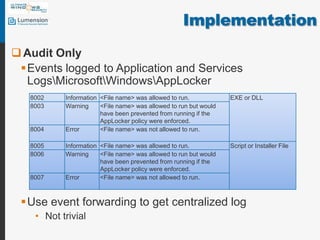
ImplementationAudit OnlyEvents logged to Application and Services Logs\Microsoft\Windows\AppLockerUse event forwarding to get centralized logNot trivial
ImplementationCan’t do AppLocker without PowerShell scriptingGet-AppLockerFileInformationReads event log to report broken filesNew-AppLockerPolicyCan build new policy from Get-AppLockerFileInformationSet-AppLockerPolicyPlug policy into a GPOTest-AppLockerPolicyTest whether a specified list of files are allowed to run on local computer for specified user
CaveatsWindows 7 Enterprise & Ultimate onlyNo support for Windows 7 Pro, Vista, XP…Based on Computer’s OU not User’s OUusers are locked out of some applications on some computers, but not othersDefault rulesAllow any local admin run everythingAllow Everyone to run everything under %Program Files%64 bit editions
CaveatsOnly intended for least privilege environmentsDefault rulesLocal admins can stop AppId serviceLocal admins can add allow rulesUser Account Control can be a gotcha
Big CaveatBack doors?LOAD_IGNORE_CODE_AUTHZ_LEVEL on LoadLibraryExSANDBOX_INERT on CreateRestrictedTokenLinkshttp://blog.didierstevens.com/2011/01/24/circumventing-srp-and-applocker-by-design/http://www.wilderssecurity.com/showthread.php?p=1818199http://www.wilderssecurity.com/showthread.php?p=1818225
When Does AppLocker Work?In Microsoft’s own wordsBusiness groups that typically use a finite set of applicationsNot suited for business groups that must be able to install applications as needed and without approval from the IT department Number of applications in your organization is known and manageableYou have resources to test policies against the organization's requirementsinvolve help desk or build a self-help process for end-user application access issues
Bottom LineStill designed for a homogenous environment based on a golden imageNot practical for diverse PC/user environmentsUnless you can depend on Publisher rules, updates break AppLocker or security weakened by path rulesNot effective against end-users with local admin authorityOn demand exceptions cumbersomeReporting is there but cumbersomeScript intensive© 2011 Monterey Technology Group Inc.
Bottom LineThe NeedCentralized control reportingAbility to phase in whitelisting on existing PCs with unique configurations and softwareAbility to completely automate support for updatesSupport for more than Win 7 Ultimate and Enterprise© 2011 Monterey Technology Group Inc.
Brought to you bySpeakersChris Chevalier, Senior Product ManagerChris Merritt, Director of Solution Marketinghttp://www.lumension.com/Solutions/Intelligent-Whitelisting.aspx

Windows 7 AppLocker: Understanding its Capabilities and Limitations

  • 1.
    Windows 7 AppLocker:Understanding its Capabilities and Limitations Made possible by:© 2011 Monterey Technology Group Inc.
  • 2.
    Brought to youbySpeakersChris Chevalier, Senior Product ManagerChris Merritt, Director of Solution Marketinghttp://www.lumension.com/Solutions/Intelligent-Whitelisting.aspx
  • 3.
    Preview of KeyPointsAppLockerHow it worksCapabilitiesLimitationsScenarios where it’s RightWrong© 2011 Monterey Technology Group Inc.
  • 4.
    Open Ended SurveyQuestionIf you could build your ideal endpoint security agent, what would you include?AntiVirusApplication WhitelistingPatchingFirewallDisk encryptionDLPDevice ControlWhat else? Please respond via Chat
  • 5.
    AppLockerStarts from adeny all point of viewCan be applied toEXEsDLLs.dll and .ocxScripts.bat, .cmd, .js, .ps1, and .vbsWindows Installer .msiand .msp
  • 6.
    AppLocker RulesRulesUser orgroup File criteriaPublisherPathFile HashActionAllow or DenyExceptionsPublisherPathFile Hash
  • 7.
  • 8.
    AppLocker RulesAll denyrules processed before allow rulesOtherwise sequence not importantDefault rule is denyAdd allow rules for selected users and programsDeny rules override allow rulesOnly needed to override allow rulesExceptions simply cause next rule to be evaluatedMultiple GPOs?Rules additive (including local policy)Enforcement mode (last GPO wins)
  • 9.
    ImplementationCreate Default RulesAutomaticallyGenerate RulesEnforcement modeAudit OnlyEnforce
  • 10.
    ImplementationAudit OnlyEvents loggedto Application and Services Logs\Microsoft\Windows\AppLockerUse event forwarding to get centralized logNot trivial
  • 11.
    ImplementationCan’t do AppLockerwithout PowerShell scriptingGet-AppLockerFileInformationReads event log to report broken filesNew-AppLockerPolicyCan build new policy from Get-AppLockerFileInformationSet-AppLockerPolicyPlug policy into a GPOTest-AppLockerPolicyTest whether a specified list of files are allowed to run on local computer for specified user
  • 12.
    CaveatsWindows 7 Enterprise& Ultimate onlyNo support for Windows 7 Pro, Vista, XP…Based on Computer’s OU not User’s OUusers are locked out of some applications on some computers, but not othersDefault rulesAllow any local admin run everythingAllow Everyone to run everything under %Program Files%64 bit editions
  • 13.
    CaveatsOnly intended forleast privilege environmentsDefault rulesLocal admins can stop AppId serviceLocal admins can add allow rulesUser Account Control can be a gotcha
  • 14.
    Big CaveatBack doors?LOAD_IGNORE_CODE_AUTHZ_LEVELon LoadLibraryExSANDBOX_INERT on CreateRestrictedTokenLinkshttp://blog.didierstevens.com/2011/01/24/circumventing-srp-and-applocker-by-design/http://www.wilderssecurity.com/showthread.php?p=1818199http://www.wilderssecurity.com/showthread.php?p=1818225
  • 15.
    When Does AppLockerWork?In Microsoft’s own wordsBusiness groups that typically use a finite set of applicationsNot suited for business groups that must be able to install applications as needed and without approval from the IT department Number of applications in your organization is known and manageableYou have resources to test policies against the organization's requirementsinvolve help desk or build a self-help process for end-user application access issues
  • 16.
    Bottom LineStill designedfor a homogenous environment based on a golden imageNot practical for diverse PC/user environmentsUnless you can depend on Publisher rules, updates break AppLocker or security weakened by path rulesNot effective against end-users with local admin authorityOn demand exceptions cumbersomeReporting is there but cumbersomeScript intensive© 2011 Monterey Technology Group Inc.
  • 17.
    Bottom LineThe NeedCentralizedcontrol reportingAbility to phase in whitelisting on existing PCs with unique configurations and softwareAbility to completely automate support for updatesSupport for more than Win 7 Ultimate and Enterprise© 2011 Monterey Technology Group Inc.
  • 18.
    Brought to youbySpeakersChris Chevalier, Senior Product ManagerChris Merritt, Director of Solution Marketinghttp://www.lumension.com/Solutions/Intelligent-Whitelisting.aspx