Effectively Utilizing
L.E.M.S.S.


Top 11 Security
Capabilities You Can
Implement Today
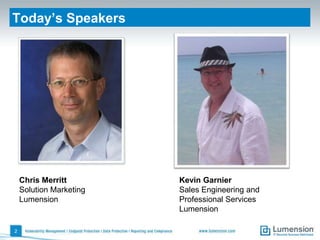
Today’s Speakers


    Chris Merritt        Kevin Garnier
    Solution Marketing   Sales Engineering and
    Lumension            Professional Services
                         Lumension

2
Traditional Defenses Don’t Always Work
Traditional Technical IT Defenses
• Antivirus
• Patching Microsoft OS and Apps
• Gateway Firewalls
• Strong Passwords


    If They Did, We Wouldn’t Have
    IT Security Breaches!


3
Where Traditional Defenses Fall Short
                  Gaps in Technical IT Defenses
                  • Risk from Unpatched 3rd Party
                    Apps
                  • Preventing Zero-Day Attacks and
                    Targeted Malware
                  • Controlling “Local Admins Gone
                    Wild”
                  • Actionable Reporting and
                    Security Measurement


4
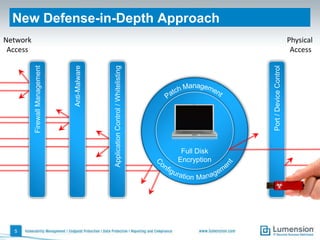
5
                                           Access
                  Firewall Management     Network


                         Anti-Malware


    Application Control / Whitelisting


      Full Disk
     Encryption
                                                     New Defense-in-Depth Approach


                  Port / Device Control
                                           Access
                                          Physical
11 Low-Cost Security Capabilities
    You Can Implement Today
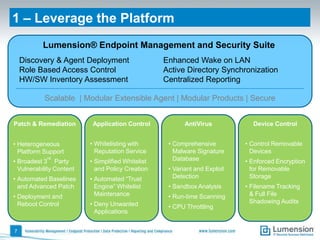
1 – Leverage the Platform
           Lumension® Endpoint Management and Security Suite
    Discovery & Agent Deployment                   Enhanced Wake on LAN
    Role Based Access Control                      Active Directory Synchronization
    HW/SW Inventory Assessment                     Centralized Reporting

           Scalable | Modular Extensible Agent | Modular Products | Secure


Patch & Remediation        Application Control            AntiVirus           Device Control


• Heterogeneous           • Whitelisting with       • Comprehensive         • Control Removable
  Platform Support          Reputation Service        Malware Signature       Devices
            rd
• Broadest 3 Party        • Simplified Whitelist      Database              • Enforced Encryption
  Vulnerability Content     and Policy Creation     • Variant and Exploit     for Removable
• Automated Baselines     • Automated “Trust          Detection               Storage
  and Advanced Patch        Engine” Whitelist       • Sandbox Analysis      • Filename Tracking
• Deployment and            Maintenance             • Run-time Scanning       & Full File
  Reboot Control          • Deny Unwanted                                     Shadowing Audits
                                                    • CPU Throttling
                            Applications


7
2 – Improve Patch Coverage
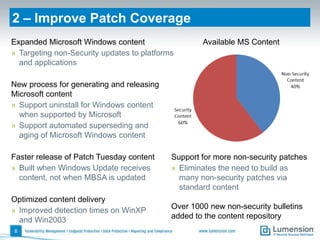
Expanded Microsoft Windows content                  Available MS Content
» Targeting non-Security updates to platforms
  and applications

New process for generating and releasing
Microsoft content
» Support uninstall for Windows content
  when supported by Microsoft
» Support automated superseding and
  aging of Microsoft Windows content

Faster release of Patch Tuesday content     Support for more non-security patches
» Built when Windows Update receives        » Eliminates the need to build as
  content, not when MBSA is updated           many non-security patches via
                                              standard content
Optimized content delivery
» Improved detection times on WinXP         Over 1000 new non-security bulletins
  and Win2003                               added to the content repository
8
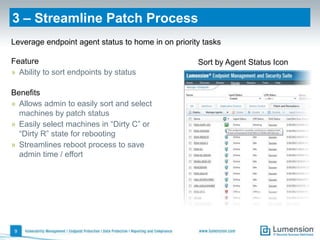
3 – Streamline Patch Process
Leverage endpoint agent status to home in on priority tasks

Feature                                             Sort by Agent Status Icon
» Ability to sort endpoints by status

Benefits
» Allows admin to easily sort and select
  machines by patch status
» Easily select machines in “Dirty C” or
  “Dirty R” state for rebooting
» Streamlines reboot process to save
  admin time / effort


9
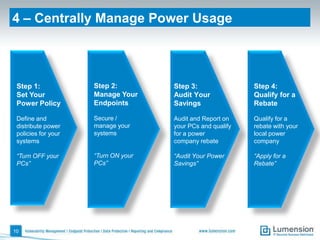
4 – Centrally Manage Power Usage


 Step 1:             Step 2:         Step 3:                Step 4:
 Set Your            Manage Your     Audit Your             Qualify for a
 Power Policy        Endpoints       Savings                Rebate

 Define and          Secure /        Audit and Report on    Qualify for a
 distribute power    manage your     your PCs and qualify   rebate with your
 policies for your   systems         for a power            local power
 systems                             company rebate         company

 “Turn OFF your      “Turn ON your   “Audit Your Power      “Apply for a
 PCs”                PCs”            Savings”               Rebate”


10
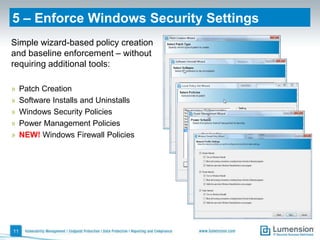
5 – Enforce Windows Security Settings
Simple wizard-based policy creation
and baseline enforcement – without
requiring additional tools:

»    Patch Creation
»    Software Installs and Uninstalls
»    Windows Security Policies
»    Power Management Policies
»    NEW! Windows Firewall Policies


11
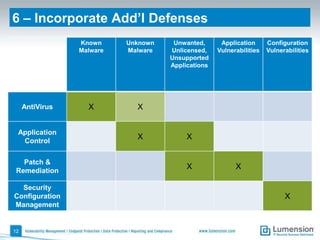
6 – Incorporate Add’l Defenses
                 Known     Unknown    Unwanted,      Application      Configuration
                 Malware   Malware   Unlicensed,    Vulnerabilities   Vulnerabilities
                                     Unsupported
                                     Applications


     AntiVirus     X         X


 Application
  Control
                             X            X


   Patch &
 Remediation
                                          X               X

  Security
Configuration                                                               X
Management


12
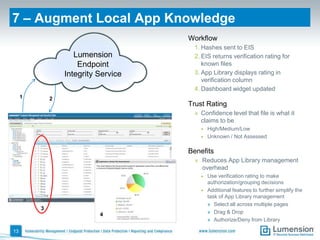
7 – Augment Local App Knowledge
                                     Workflow
                                      1. Hashes sent to EIS
                    Lumension         2. EIS returns verification rating for
                     Endpoint            known files
                 Integrity Service    3. App Library displays rating in
                                         verification column
                                      4. Dashboard widget updated
     1       2
                                     Trust Rating
                                      » Confidence level that file is what it
                                        claims to be
                                        • High/Medium/Low
                                        • Unknown / Not Assessed


                                     Benefits
                                       » Reduces App Library management
                                         overhead
                                        •   Use verification rating to make
                                            authorization/grouping decisions
                                        •   Additional features to further simplify the
                                            task of App Library management
                                            » Select all across multiple pages
         3
                           4                » Drag & Drop
                                            » Authorize/Deny from Library

13
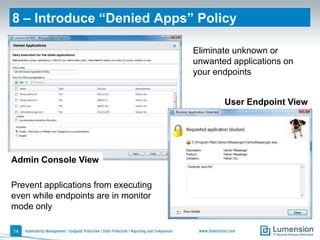
8 – Introduce “Denied Apps” Policy

                                      Eliminate unknown or
                                      unwanted applications on
                                      your endpoints


                                             User Endpoint View


Admin Console View

Prevent applications from executing
even while endpoints are in monitor
mode only

14
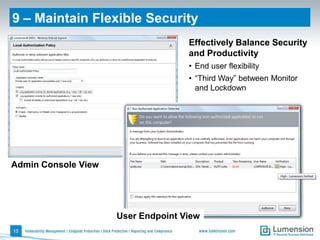
9 – Maintain Flexible Security
                                    Effectively Balance Security
                                    and Productivity
                                    • End user flexibility
                                    • “Third Way” between Monitor
                                      and Lockdown


Admin Console View


                     User Endpoint View
15
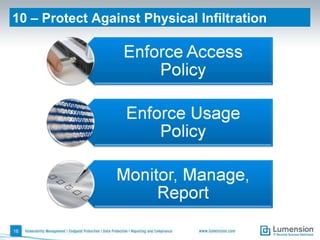
10 – Protect Against Physical Infiltration


16
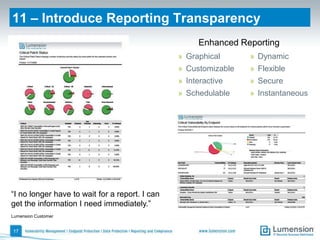
11 – Introduce Reporting Transparency
                                                     Enhanced Reporting
                                                » Graphical      » Dynamic
                                                » Customizable   » Flexible
                                                » Interactive    » Secure
                                                » Schedulable    » Instantaneous


“I no longer have to wait for a report. I can
get the information I need immediately.”
Lumension Customer


17
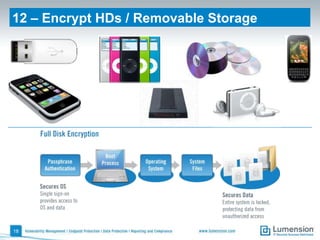
12 – Encrypt HDs / Removable Storage


18
Q&A
More Information
• Free Security Scanner Tools                    • Get a Quote (and more)
 » Application Scanner – discover all the apps    http://www.lumension.com/
   being used in your network                     intelligent-whitelisting/buy-now.aspx#7
 » Vulnerability Scanner – discover all OS and
   application vulnerabilities on your network
 » Device Scanner – discover all the devices
   being used in your network
   http://www.lumension.com/Resources/
   Security-Tools.aspx


• Lumension® Intelligent Whitelisting™
 » Online Demo Video:
   http://www.lumension.com/Resources/
   Demo-Center/Endpoint-Security.aspx
 » Free Trial (virtual or download):
   http://www.lumension.com/
   intelligent-whitelisting/free-trial.aspx

For in-depth technical discussion …
• kevin.garnier@lumension.com
• chris.merritt@lumension.com

20
Global Headquarters
8660 East Hartford Drive
Suite 300
Scottsdale, AZ 85255

1.888.725.7828
info@lumension.com

Effectively Utilizing LEMSS: Top 11 Security Capabilities You Can Implement Today

  • 1.
    Effectively Utilizing L.E.M.S.S. Top 11Security Capabilities You Can Implement Today
  • 2.
    Today’s Speakers Chris Merritt Kevin Garnier Solution Marketing Sales Engineering and Lumension Professional Services Lumension 2
  • 3.
    Traditional Defenses Don’tAlways Work Traditional Technical IT Defenses • Antivirus • Patching Microsoft OS and Apps • Gateway Firewalls • Strong Passwords If They Did, We Wouldn’t Have IT Security Breaches! 3
  • 4.
    Where Traditional DefensesFall Short Gaps in Technical IT Defenses • Risk from Unpatched 3rd Party Apps • Preventing Zero-Day Attacks and Targeted Malware • Controlling “Local Admins Gone Wild” • Actionable Reporting and Security Measurement 4
  • 5.
    5 Access Firewall Management Network Anti-Malware Application Control / Whitelisting Full Disk Encryption New Defense-in-Depth Approach Port / Device Control Access Physical
  • 6.
    11 Low-Cost SecurityCapabilities You Can Implement Today
  • 7.
    1 – Leveragethe Platform Lumension® Endpoint Management and Security Suite Discovery & Agent Deployment Enhanced Wake on LAN Role Based Access Control Active Directory Synchronization HW/SW Inventory Assessment Centralized Reporting Scalable | Modular Extensible Agent | Modular Products | Secure Patch & Remediation Application Control AntiVirus Device Control • Heterogeneous • Whitelisting with • Comprehensive • Control Removable Platform Support Reputation Service Malware Signature Devices rd • Broadest 3 Party • Simplified Whitelist Database • Enforced Encryption Vulnerability Content and Policy Creation • Variant and Exploit for Removable • Automated Baselines • Automated “Trust Detection Storage and Advanced Patch Engine” Whitelist • Sandbox Analysis • Filename Tracking • Deployment and Maintenance • Run-time Scanning & Full File Reboot Control • Deny Unwanted Shadowing Audits • CPU Throttling Applications 7
  • 8.
    2 – ImprovePatch Coverage Expanded Microsoft Windows content Available MS Content » Targeting non-Security updates to platforms and applications New process for generating and releasing Microsoft content » Support uninstall for Windows content when supported by Microsoft » Support automated superseding and aging of Microsoft Windows content Faster release of Patch Tuesday content Support for more non-security patches » Built when Windows Update receives » Eliminates the need to build as content, not when MBSA is updated many non-security patches via standard content Optimized content delivery » Improved detection times on WinXP Over 1000 new non-security bulletins and Win2003 added to the content repository 8
  • 9.
    3 – StreamlinePatch Process Leverage endpoint agent status to home in on priority tasks Feature Sort by Agent Status Icon » Ability to sort endpoints by status Benefits » Allows admin to easily sort and select machines by patch status » Easily select machines in “Dirty C” or “Dirty R” state for rebooting » Streamlines reboot process to save admin time / effort 9
  • 10.
    4 – CentrallyManage Power Usage Step 1: Step 2: Step 3: Step 4: Set Your Manage Your Audit Your Qualify for a Power Policy Endpoints Savings Rebate Define and Secure / Audit and Report on Qualify for a distribute power manage your your PCs and qualify rebate with your policies for your systems for a power local power systems company rebate company “Turn OFF your “Turn ON your “Audit Your Power “Apply for a PCs” PCs” Savings” Rebate” 10
  • 11.
    5 – EnforceWindows Security Settings Simple wizard-based policy creation and baseline enforcement – without requiring additional tools: » Patch Creation » Software Installs and Uninstalls » Windows Security Policies » Power Management Policies » NEW! Windows Firewall Policies 11
  • 12.
    6 – IncorporateAdd’l Defenses Known Unknown Unwanted, Application Configuration Malware Malware Unlicensed, Vulnerabilities Vulnerabilities Unsupported Applications AntiVirus X X Application Control X X Patch & Remediation X X Security Configuration X Management 12
  • 13.
    7 – AugmentLocal App Knowledge Workflow 1. Hashes sent to EIS Lumension 2. EIS returns verification rating for Endpoint known files Integrity Service 3. App Library displays rating in verification column 4. Dashboard widget updated 1 2 Trust Rating » Confidence level that file is what it claims to be • High/Medium/Low • Unknown / Not Assessed Benefits » Reduces App Library management overhead • Use verification rating to make authorization/grouping decisions • Additional features to further simplify the task of App Library management » Select all across multiple pages 3 4 » Drag & Drop » Authorize/Deny from Library 13
  • 14.
    8 – Introduce“Denied Apps” Policy Eliminate unknown or unwanted applications on your endpoints User Endpoint View Admin Console View Prevent applications from executing even while endpoints are in monitor mode only 14
  • 15.
    9 – MaintainFlexible Security Effectively Balance Security and Productivity • End user flexibility • “Third Way” between Monitor and Lockdown Admin Console View User Endpoint View 15
  • 16.
    10 – ProtectAgainst Physical Infiltration 16
  • 17.
    11 – IntroduceReporting Transparency Enhanced Reporting » Graphical » Dynamic » Customizable » Flexible » Interactive » Secure » Schedulable » Instantaneous “I no longer have to wait for a report. I can get the information I need immediately.” Lumension Customer 17
  • 18.
    12 – EncryptHDs / Removable Storage 18
  • 19.
  • 20.
    More Information • FreeSecurity Scanner Tools • Get a Quote (and more) » Application Scanner – discover all the apps http://www.lumension.com/ being used in your network intelligent-whitelisting/buy-now.aspx#7 » Vulnerability Scanner – discover all OS and application vulnerabilities on your network » Device Scanner – discover all the devices being used in your network http://www.lumension.com/Resources/ Security-Tools.aspx • Lumension® Intelligent Whitelisting™ » Online Demo Video: http://www.lumension.com/Resources/ Demo-Center/Endpoint-Security.aspx » Free Trial (virtual or download): http://www.lumension.com/ intelligent-whitelisting/free-trial.aspx For in-depth technical discussion … • kevin.garnier@lumension.com • chris.merritt@lumension.com 20
  • 21.
    Global Headquarters 8660 EastHartford Drive Suite 300 Scottsdale, AZ 85255 1.888.725.7828 info@lumension.com