-:  INTRODUCTION  :- Computer Applications Module - I Microsoft Office 2003 Microsoft Word 2003 Make Your Word document Look Great Header and Footers
- :  Headers and Footers  :- Headers and footers contain text that needs to be displayed on each page of a document. Headers get displayed at the top while footers at the bottom of a document, You can either have identical or different headers and footers.
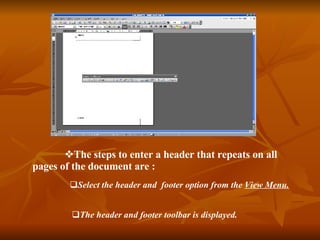
The steps to enter a header that repeats on all pages of the document are : Select the header and  footer option from the  View Menu. The header and footer toolbar is displayed.
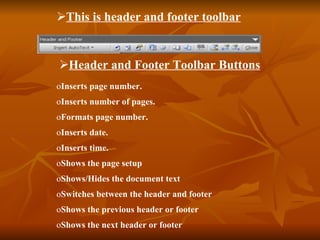
This is header and footer toolbar Inserts page number. Inserts number of pages. Formats page number. Inserts date. Inserts time. Shows the page setup Shows/Hides the document text Switches between the header and footer Shows the previous header or footer Shows the next header or footer  Header and Footer Toolbar Buttons
Type or edit the footer text. Type or edit the header text. Click on the close buttons or double-click in the main document.  When designing Headers and Footers, it is advisable to switch to Print Preview to see how they will appear when printed.  “  Thanking you ” Presentation   By  : Ismail

Ismail

  • 1.
    -: INTRODUCTION :- Computer Applications Module - I Microsoft Office 2003 Microsoft Word 2003 Make Your Word document Look Great Header and Footers
  • 2.
    - : Headers and Footers :- Headers and footers contain text that needs to be displayed on each page of a document. Headers get displayed at the top while footers at the bottom of a document, You can either have identical or different headers and footers.
  • 3.
    The steps toenter a header that repeats on all pages of the document are : Select the header and footer option from the View Menu. The header and footer toolbar is displayed.
  • 4.
    This is headerand footer toolbar Inserts page number. Inserts number of pages. Formats page number. Inserts date. Inserts time. Shows the page setup Shows/Hides the document text Switches between the header and footer Shows the previous header or footer Shows the next header or footer Header and Footer Toolbar Buttons
  • 5.
    Type or editthe footer text. Type or edit the header text. Click on the close buttons or double-click in the main document. When designing Headers and Footers, it is advisable to switch to Print Preview to see how they will appear when printed. “ Thanking you ” Presentation By : Ismail