Tips for Easy Google Docs Customization
www.synergyse.com
● If you use some of the same settings over and over. For example, I like to use a
particular font (it’s called Consolas). Fortunately, you can make a Google Document
look the same every time by configuring your default settings.
● Here are three ways to make your work easier, and make Google Docs work for
you.
1) Default Document Settings
2) Document Preferences and Auto-Correct
3) Working with Styles & Headings
www.synergyse.com
1) Default Document Settings
● Every time you create a new document, the default settings are applied. It’s not difficult to set your own
special font, margins, or background color as the default for your documents
a) Fonts
i) A great place to start is with the font style and size. With recent font changes in Google
Docs you can now use just about any font you want.
ii) Select one you like (from the already long list of fonts), or if you need more, simply select
‘More fonts” from the bottom of the list. Then you can select and add the fonts you want.
The default font size is 11, but you might like to set your default as 12 for an easier read,
the choice is yours.
b) Margins
i) To set up your document margins and letter size:
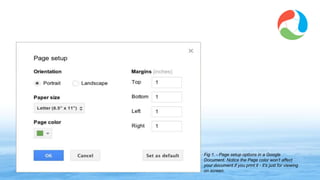
1. Click “File”, then “Page setup” to enter the page settings.
2. Set the top, bottom, left, and right margins. The standard for many documents tends
to be 1 inch all around, but depending on what you need to accomplish, those
margins might require a change.
www.synergyse.com
3. Set the paper size to match what you have in mind, too, especially if you’re preparing documents for
print.
4. When you’re happy with all of your settings, click the button in Page settings that says “Set as default”.
Now, whenever you create a new document, the default settings will match your preferences
● A note on Page color - it won’t affect the way your document looks when you print - it’s just for looks
during the creation / editing period on screen. All documents will print with a white background.
● For a special project, you can set the document to Landscape for more left/right space, but you only
want to set this as your default if you commonly use Landscape. Also, you won’t be able to make just
one page landscape while still keeping the others portrait. To do that, you’ll have to move your work to
a page layout program.
www.synergyse.com
Fig 1. - Page setup options in a Google
Document. Notice the Page color won’t affect
your document if you print it - it’s just for viewing
on screen.
www.synergyse.com
2) Document Preferences and Auto-Correct
● Document Preferences
○ There are a few more settings that affect the way your document handles things like links, and
special characters, like © and ™.
○ You can set what Google Docs should do when encountering links that you might type, or paste
in from someplace else. For example, if you type a valid web address then hit enter, Google Docs
will automatically make it into a clickable URL.
○ To set this up Click on “Tools”, then “Preferences”.
● Auto-Correct
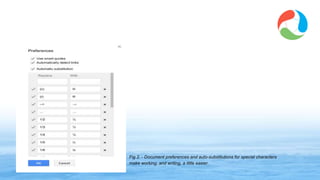
○ Google Document already provides a decent list of automatic substitutions for characters (called
‘Autocorrect’ in MS Office) for symbols and characters you might use on a frequent basis.
○ You can even add your own to the list, but know that if you’re adding your a proper noun, your
name for example, it won’t properly capitalize it, so it’s a little less useful in those instances.
www.synergyse.com
Fig 2. - Document preferences and auto-substitutions for special characters
make working, and writing, a little easier.
www.synergyse.com
3) Working with Styles & Headings
● Make use of Google Document’s headings and styles to format your project just the way you want.
● Next to where you select a font, there’s another drop down list that probably says “Normal text”. If you select that
list, you’ll also see Heading 1, Title, etc. Those are styles available within the document. While the options are
meager in Google Documents as compared to a full-featured word processing program like Word or Pages,
using the Headers can make quick and simple work of styling a document.
● Each style can be edited as well (and don’t forget this when setting your document defaults from section 1). So,
you can easily ask the program to make all Heading 1s look the same, and all text that matches that formatting
will change throughout your document. No need to edit each heading individually.
● If you have worked with the styles, and applied them to your default settings, it’s even quicker to get text to play
nice if you import or paste from someplace else. Just select all the text you want to fix, then click “Normal text” to
change all of the formatting to your defaults. No need to set the font, then the size, then the color, etc. Using the
styles makes editing, and adding a consistent look to a document, a snap!
www.synergyse.com
Join the conversation and follow us:
www.synergyse.com

Tips for Easy Google Docs Customization

  • 1.
    Tips for EasyGoogle Docs Customization www.synergyse.com
  • 2.
    ● If youuse some of the same settings over and over. For example, I like to use a particular font (it’s called Consolas). Fortunately, you can make a Google Document look the same every time by configuring your default settings. ● Here are three ways to make your work easier, and make Google Docs work for you. 1) Default Document Settings 2) Document Preferences and Auto-Correct 3) Working with Styles & Headings www.synergyse.com
  • 3.
    1) Default DocumentSettings ● Every time you create a new document, the default settings are applied. It’s not difficult to set your own special font, margins, or background color as the default for your documents a) Fonts i) A great place to start is with the font style and size. With recent font changes in Google Docs you can now use just about any font you want. ii) Select one you like (from the already long list of fonts), or if you need more, simply select ‘More fonts” from the bottom of the list. Then you can select and add the fonts you want. The default font size is 11, but you might like to set your default as 12 for an easier read, the choice is yours. b) Margins i) To set up your document margins and letter size: 1. Click “File”, then “Page setup” to enter the page settings. 2. Set the top, bottom, left, and right margins. The standard for many documents tends to be 1 inch all around, but depending on what you need to accomplish, those margins might require a change. www.synergyse.com
  • 4.
    3. Set thepaper size to match what you have in mind, too, especially if you’re preparing documents for print. 4. When you’re happy with all of your settings, click the button in Page settings that says “Set as default”. Now, whenever you create a new document, the default settings will match your preferences ● A note on Page color - it won’t affect the way your document looks when you print - it’s just for looks during the creation / editing period on screen. All documents will print with a white background. ● For a special project, you can set the document to Landscape for more left/right space, but you only want to set this as your default if you commonly use Landscape. Also, you won’t be able to make just one page landscape while still keeping the others portrait. To do that, you’ll have to move your work to a page layout program. www.synergyse.com
  • 5.
    Fig 1. -Page setup options in a Google Document. Notice the Page color won’t affect your document if you print it - it’s just for viewing on screen. www.synergyse.com
  • 6.
    2) Document Preferencesand Auto-Correct ● Document Preferences ○ There are a few more settings that affect the way your document handles things like links, and special characters, like © and ™. ○ You can set what Google Docs should do when encountering links that you might type, or paste in from someplace else. For example, if you type a valid web address then hit enter, Google Docs will automatically make it into a clickable URL. ○ To set this up Click on “Tools”, then “Preferences”. ● Auto-Correct ○ Google Document already provides a decent list of automatic substitutions for characters (called ‘Autocorrect’ in MS Office) for symbols and characters you might use on a frequent basis. ○ You can even add your own to the list, but know that if you’re adding your a proper noun, your name for example, it won’t properly capitalize it, so it’s a little less useful in those instances. www.synergyse.com
  • 7.
    Fig 2. -Document preferences and auto-substitutions for special characters make working, and writing, a little easier. www.synergyse.com
  • 8.
    3) Working withStyles & Headings ● Make use of Google Document’s headings and styles to format your project just the way you want. ● Next to where you select a font, there’s another drop down list that probably says “Normal text”. If you select that list, you’ll also see Heading 1, Title, etc. Those are styles available within the document. While the options are meager in Google Documents as compared to a full-featured word processing program like Word or Pages, using the Headers can make quick and simple work of styling a document. ● Each style can be edited as well (and don’t forget this when setting your document defaults from section 1). So, you can easily ask the program to make all Heading 1s look the same, and all text that matches that formatting will change throughout your document. No need to edit each heading individually. ● If you have worked with the styles, and applied them to your default settings, it’s even quicker to get text to play nice if you import or paste from someplace else. Just select all the text you want to fix, then click “Normal text” to change all of the formatting to your defaults. No need to set the font, then the size, then the color, etc. Using the styles makes editing, and adding a consistent look to a document, a snap! www.synergyse.com
  • 9.
    Join the conversationand follow us: www.synergyse.com

Editor's Notes

  • #2 Blog link: http://blog.synergyse.com/2013/10/tips-for-easy-google-docs-customization.html