By – Varnnit Jain
9990888972
File Permissions In RHEL
File Permissions
 Most file systems have methods to assign
permissions or access rights to specific users and
groups of users.
 These system control the ability of the users to
view, change, navigate, and execute the contents
of the file system.
 Permissions on the linux- systems are managed
in three distinct scopes or classes. Theses
scopes are known as users, groups or others.
 When a file is created on a linux-like system, its
permissions are restricted by the upmask of the
process that created it.
Scopes or Classes
 Files and directories are owned by a user. The owner
determines the file’s user class. Distinct permissions
apply to the owner.
 Files and directories are assigned to a group, which
defines the file’s group class. Distinct permissions
apply to members of the file’s group. The owner may
be a member of the file’s group. up.
 Users who are not the owner, nor a member of the
group, comprise a file’s other class. Distinct
permissions apply to others.
 The effective permissions are determined based on
the first class. The user falls within the order of the
user, group then others. For example, the user who is
owner of the file will have the permissions given to the
user class regardless of the permissions assigned to
Notations of traditional Linux Permissions
 Linux permissions are represented either in the
Symbolic notation or in numeric notation.
 The most common one is the symbolic notation.
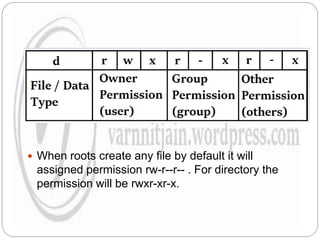
 The first character of the ll display indicates the
file type and is not related to permissions. The
remaining nine characters are in three sets, each
representing a class of permissions as three
characters
 The first set represents the user class.
 The second set represents the group class.
 The third set represents the others class
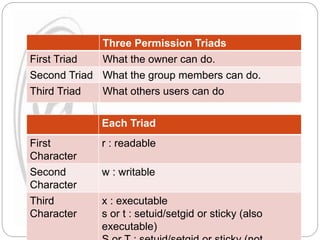
Three Permission Triads
First Triad What the owner can do.
Second Triad What the group members can do.
Third Triad What others users can do
Each Triad
First
Character
r : readable
Second
Character
w : writable
Third
Character
x : executable
s or t : setuid/setgid or sticky (also
executable)
Types of files
SYMBOLS TYPES
d Directories
- Regular files
c Character devices
p Process files
s Socket files
b Blocked files
l Symbolic link
 When roots create any file by default it will
assigned permission rw-r--r-- . For directory the
permission will be rwxr-xr-x.
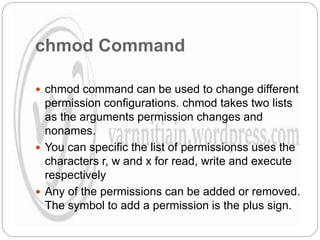
chmod Command
 chmod command can be used to change different
permission configurations. chmod takes two lists
as the arguments permission changes and
nonames.
 You can specific the list of permissionss uses the
characters r, w and x for read, write and execute
respectively
 Any of the permissions can be added or removed.
The symbol to add a permission is the plus sign.
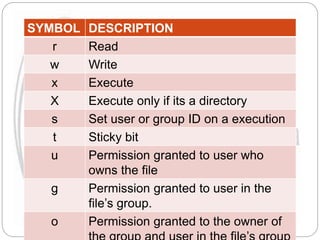
SYMBOL DESCRIPTION
r Read
w Write
x Execute
X Execute only if its a directory
s Set user or group ID on a execution
t Sticky bit
u Permission granted to user who
owns the file
g Permission granted to user in the
file’s group.
o Permission granted to the owner of
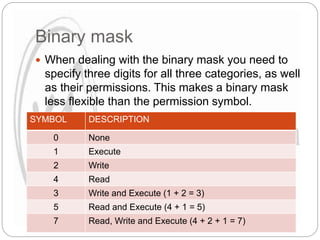
Binary mask
 When dealing with the binary mask you need to
specify three digits for all three categories, as well
as their permissions. This makes a binary mask
less flexible than the permission symbol.
SYMBOL DESCRIPTION
0 None
1 Execute
2 Write
4 Read
3 Write and Execute (1 + 2 = 3)
5 Read and Execute (4 + 1 = 5)
7 Read, Write and Execute (4 + 2 + 1 = 7)
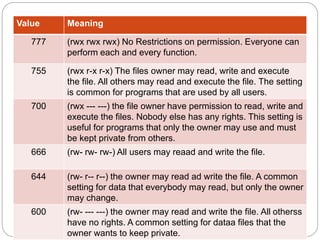
Value Meaning
777 (rwx rwx rwx) No Restrictions on permission. Everyone can
perform each and every function.
755 (rwx r-x r-x) The files owner may read, write and execute
the file. All others may read and execute the file. The setting
is common for programs that are used by all users.
700 (rwx --- ---) the file owner have permission to read, write and
execute the files. Nobody else has any rights. This setting is
useful for programs that only the owner may use and must
be kept private from others.
666 (rw- rw- rw-) All users may reaad and write the file.
644 (rw- r-- r--) the owner may read ad write the file. A common
setting for data that everybody may read, but only the owner
may change.
600 (rw- --- ---) the owner may read and write the file. All otherss
have no rights. A common setting for dataa files that the
owner wants to keep private.
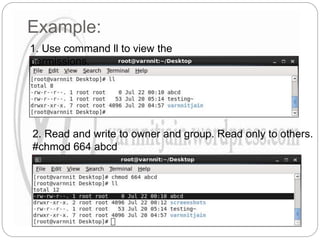
Example:
1. Use command ll to view the
permissions.
2. Read and write to owner and group. Read only to others.
#chmod 664 abcd
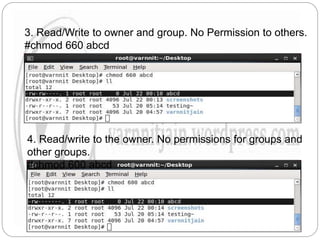
3. Read/Write to owner and group. No Permission to others.
#chmod 660 abcd
4. Read/write to the owner. No permissions for groups and
other groups.
#chmod 600 abcd
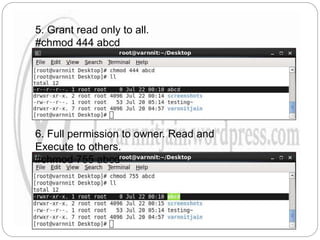
5. Grant read only to all.
#chmod 444 abcd
6. Full permission to owner. Read and
Execute to others.
#chmod 755 abcd
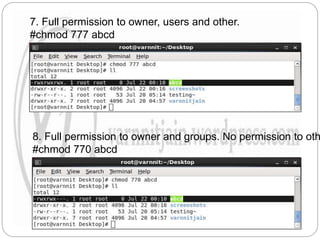
7. Full permission to owner, users and other.
#chmod 777 abcd
8. Full permission to owner and groups. No permission to oth
#chmod 770 abcd
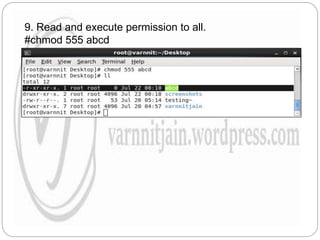
9. Read and execute permission to all.
#chmod 555 abcd
File permissions

File permissions

  • 1.
    By – VarnnitJain 9990888972 File Permissions In RHEL
  • 2.
    File Permissions  Mostfile systems have methods to assign permissions or access rights to specific users and groups of users.  These system control the ability of the users to view, change, navigate, and execute the contents of the file system.  Permissions on the linux- systems are managed in three distinct scopes or classes. Theses scopes are known as users, groups or others.  When a file is created on a linux-like system, its permissions are restricted by the upmask of the process that created it.
  • 3.
    Scopes or Classes Files and directories are owned by a user. The owner determines the file’s user class. Distinct permissions apply to the owner.  Files and directories are assigned to a group, which defines the file’s group class. Distinct permissions apply to members of the file’s group. The owner may be a member of the file’s group. up.  Users who are not the owner, nor a member of the group, comprise a file’s other class. Distinct permissions apply to others.  The effective permissions are determined based on the first class. The user falls within the order of the user, group then others. For example, the user who is owner of the file will have the permissions given to the user class regardless of the permissions assigned to
  • 4.
    Notations of traditionalLinux Permissions  Linux permissions are represented either in the Symbolic notation or in numeric notation.  The most common one is the symbolic notation.  The first character of the ll display indicates the file type and is not related to permissions. The remaining nine characters are in three sets, each representing a class of permissions as three characters  The first set represents the user class.  The second set represents the group class.  The third set represents the others class
  • 5.
    Three Permission Triads FirstTriad What the owner can do. Second Triad What the group members can do. Third Triad What others users can do Each Triad First Character r : readable Second Character w : writable Third Character x : executable s or t : setuid/setgid or sticky (also executable)
  • 6.
    Types of files SYMBOLSTYPES d Directories - Regular files c Character devices p Process files s Socket files b Blocked files l Symbolic link
  • 7.
     When rootscreate any file by default it will assigned permission rw-r--r-- . For directory the permission will be rwxr-xr-x.
  • 8.
    chmod Command  chmodcommand can be used to change different permission configurations. chmod takes two lists as the arguments permission changes and nonames.  You can specific the list of permissionss uses the characters r, w and x for read, write and execute respectively  Any of the permissions can be added or removed. The symbol to add a permission is the plus sign.
  • 9.
    SYMBOL DESCRIPTION r Read wWrite x Execute X Execute only if its a directory s Set user or group ID on a execution t Sticky bit u Permission granted to user who owns the file g Permission granted to user in the file’s group. o Permission granted to the owner of
  • 10.
    Binary mask  Whendealing with the binary mask you need to specify three digits for all three categories, as well as their permissions. This makes a binary mask less flexible than the permission symbol. SYMBOL DESCRIPTION 0 None 1 Execute 2 Write 4 Read 3 Write and Execute (1 + 2 = 3) 5 Read and Execute (4 + 1 = 5) 7 Read, Write and Execute (4 + 2 + 1 = 7)
  • 11.
    Value Meaning 777 (rwxrwx rwx) No Restrictions on permission. Everyone can perform each and every function. 755 (rwx r-x r-x) The files owner may read, write and execute the file. All others may read and execute the file. The setting is common for programs that are used by all users. 700 (rwx --- ---) the file owner have permission to read, write and execute the files. Nobody else has any rights. This setting is useful for programs that only the owner may use and must be kept private from others. 666 (rw- rw- rw-) All users may reaad and write the file. 644 (rw- r-- r--) the owner may read ad write the file. A common setting for data that everybody may read, but only the owner may change. 600 (rw- --- ---) the owner may read and write the file. All otherss have no rights. A common setting for dataa files that the owner wants to keep private.
  • 12.
    Example: 1. Use commandll to view the permissions. 2. Read and write to owner and group. Read only to others. #chmod 664 abcd
  • 13.
    3. Read/Write toowner and group. No Permission to others. #chmod 660 abcd 4. Read/write to the owner. No permissions for groups and other groups. #chmod 600 abcd
  • 14.
    5. Grant readonly to all. #chmod 444 abcd 6. Full permission to owner. Read and Execute to others. #chmod 755 abcd
  • 15.
    7. Full permissionto owner, users and other. #chmod 777 abcd 8. Full permission to owner and groups. No permission to oth #chmod 770 abcd
  • 16.
    9. Read andexecute permission to all. #chmod 555 abcd