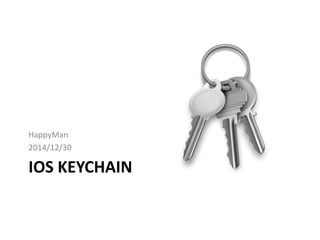
IOS KEYCHAIN
HappyMan
2014/12/30
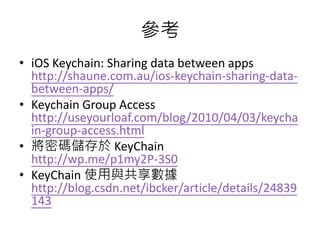
What is KeyChain
• Keychain is an encrypted container where you
can store secured information like passwords,
certificates, identities, …etc.
• In iOS, each application has its own keychain.
• To share the data between apps, they should
have the same Access Group in code signing
entitlements.
Accessing password-protected services
using a keychain in OS X
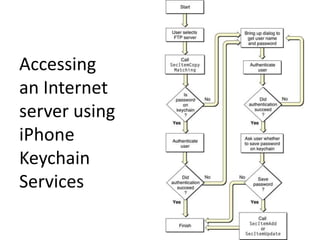
Accessing
an Internet
server using
iPhone
Keychain
Services
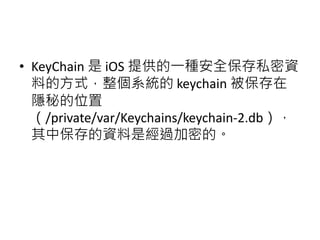
• KeyChain 是 iOS 提供的一種安全保存私密資
料的方式,整個系統的 keychain 被保存在
隱秘的位置
(/private/var/Keychains/keychain-2.db),
其中保存的資料是經過加密的。
優點
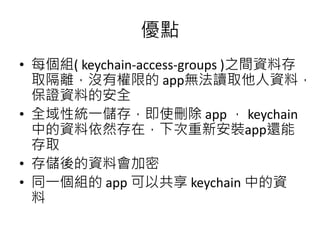
• 每個組( keychain-access-groups )之間資料存
取隔離,沒有權限的 app無法讀取他人資料,
保證資料的安全
• 全域性統一儲存,即使刪除 app , keychain
中的資料依然存在,下次重新安裝app還能
存取
• 存儲後的資料會加密
• 同一個組的 app 可以共享 keychain 中的資
料
缺點
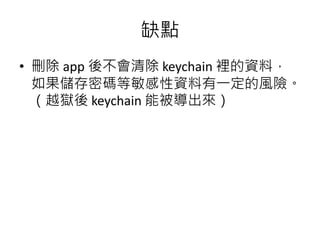
• 刪除 app 後不會清除 keychain 裡的資料,
如果儲存密碼等敏感性資料有一定的風險。
(越獄後 keychain 能被導出來)
實作API
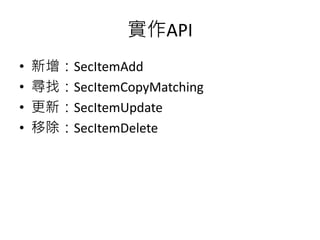
• 新增:SecItemAdd
• 尋找:SecItemCopyMatching
• 更新:SecItemUpdate
• 移除:SecItemDelete
準備資料
• -(NSMutableDictionary *) prepareDict:(NSString *)key
• {
• NSMutableDictionary *dict = [[NSMutableDictionary alloc] init];
• [dict setObject:(__bridge id)kSecClassGenericPassword forKey:(__bridge id)kSecClass];
•
• NSData *encodedKey = [key dataUsingEncoding:NSUTF8StringEncoding];
• [dict setObject:encodedKey forKey:(__bridge id)kSecAttrGeneric];
• [dict setObject:encodedKey forKey:(__bridge id)kSecAttrAccount];
• [dict setObject:service forKey:(__bridge id)kSecAttrService];
• [dict setObject:(__bridge id)kSecAttrAccessibleAlwaysThisDeviceOnly forKey:(__bridge
id)kSecAttrAccessible];
•
• return dict;
• }
新增
• -(BOOL) insert:(NSString *)key :(NSData *)data
• {
• NSMutableDictionary *dict =[self prepareDict:key];
• [dict setObject:data forKey:(__bridge id)kSecValueData];
•
• OSStatus status = SecItemAdd((__bridge CFDictionaryRef)dict,
NULL);
• if(errSecSuccess != status) {
• NSLog(@"Unable add item with key = %@ error:
%d",key,(int)status);
• }
• return (status == errSecSuccess);
• }
尋找
• -(NSData*) find:(NSString *)key
• {
• NSMutableDictionary *dict = [self prepareDict:key];
• [dict setObject:(__bridge id)kSecMatchLimitOne forKey:(__bridge id)kSecMatchLimit];
• [dict setObject:(id)kCFBooleanTrue forKey:(__bridge id)kSecReturnData];
• CFTypeRef result = NULL;
• OSStatus status = SecItemCopyMatching((__bridge CFDictionaryRef)dict,&result);
•
• if(status != errSecSuccess) {
• NSLog(@"Unable to fetch item for key %@ with error: %d",key,(int)status);
• return nil;
• }
•
• return (__bridge NSData *)result;
• }
更新
• -(BOOL) update:(NSString*)key :(NSData *)data
• {
• NSMutableDictionary *dictKey =[self prepareDict:key];
•
• NSMutableDictionary *dictUpdate =[[NSMutableDictionary alloc] init];
• [dictUpdate setObject:data forKey:(__bridge id)kSecValueData];
•
• OSStatus status = SecItemUpdate((__bridge CFDictionaryRef)dictKey, (__bridge
CFDictionaryRef)dictUpdate);
• if(status != errSecSuccess) {
• NSLog(@"Unable add update with key = %@ error: %d",key,(int)status);
• }
• return (status == errSecSuccess);
• }
移除
• -(BOOL) remove:(NSString *)key
• {
• NSMutableDictionary *dict = [self prepareDict:key];
• OSStatus status = SecItemDelete((__bridge
CFDictionaryRef)dict);
• if(status != errSecSuccess) {
• NSLog(@"Unable to remove item for key %@ with error:
%d",key,(int)status);
• }
• return (status == errSecSuccess);
• }
開源
• SSKeychain
https://github.com/soffes/sskeychain
Star: 1730 (2014/12/30)
• SFHFKeychainUtils
https://github.com/kamiro/SFHFKeychainUtils
Star: 60 (2014/12/30)
• Me: 2 projects
Demo
• https://github.com/happymanx/KeyChainTest
– 1). Initialization of the class
– 2). How to Add an item to keychain
– 3). Find an item in the keychain
– 4). Update an item in the keychain
– 5). Remove an item from keychain
參考
• iOS KeyChain Tutorial
http://hayageek.com/ios-keychain-tutorial/
• Securing and Encrypting Data on iOS
http://code.tutsplus.com/tutorials/securing-and-
encrypting-data-on-ios--mobile-21263
• Basic Security in iOS 5 – Part 1
http://www.raywenderlich.com/6475/basic-
security-in-ios-5-tutorial-part-1
• Basic Security in iOS 5 – Part 2
http://www.raywenderlich.com/6603/basic-
security-in-ios-5-tutorial-part-2
參考
• iOS Keychain: Sharing data between apps
http://shaune.com.au/ios-keychain-sharing-data-
between-apps/
• Keychain Group Access
http://useyourloaf.com/blog/2010/04/03/keycha
in-group-access.html
• 將密碼儲存於 KeyChain
http://wp.me/p1my2P-3S0
• KeyChain 使用與共享數據
http://blog.csdn.net/ibcker/article/details/24839
143
Apple連結
• Keychain Services Programming Guide
https://developer.apple.com/library/mac/docum
entation/Security/Conceptual/keychainServConc
epts/
• Keychain Services Reference
https://developer.apple.com/library/mac/docum
entation/Security/Reference/keychainservices/
• #WWDC14 session 711 - Keychain and
Authentication with Touch ID

iOS Keychain 介紹

  • 1.
  • 2.
    What is KeyChain •Keychain is an encrypted container where you can store secured information like passwords, certificates, identities, …etc. • In iOS, each application has its own keychain. • To share the data between apps, they should have the same Access Group in code signing entitlements.
  • 3.
  • 4.
  • 5.
    • KeyChain 是iOS 提供的一種安全保存私密資 料的方式,整個系統的 keychain 被保存在 隱秘的位置 (/private/var/Keychains/keychain-2.db), 其中保存的資料是經過加密的。
  • 6.
    優點 • 每個組( keychain-access-groups)之間資料存 取隔離,沒有權限的 app無法讀取他人資料, 保證資料的安全 • 全域性統一儲存,即使刪除 app , keychain 中的資料依然存在,下次重新安裝app還能 存取 • 存儲後的資料會加密 • 同一個組的 app 可以共享 keychain 中的資 料
  • 7.
    缺點 • 刪除 app後不會清除 keychain 裡的資料, 如果儲存密碼等敏感性資料有一定的風險。 (越獄後 keychain 能被導出來)
  • 9.
    實作API • 新增:SecItemAdd • 尋找:SecItemCopyMatching •更新:SecItemUpdate • 移除:SecItemDelete
  • 10.
    準備資料 • -(NSMutableDictionary *)prepareDict:(NSString *)key • { • NSMutableDictionary *dict = [[NSMutableDictionary alloc] init]; • [dict setObject:(__bridge id)kSecClassGenericPassword forKey:(__bridge id)kSecClass]; • • NSData *encodedKey = [key dataUsingEncoding:NSUTF8StringEncoding]; • [dict setObject:encodedKey forKey:(__bridge id)kSecAttrGeneric]; • [dict setObject:encodedKey forKey:(__bridge id)kSecAttrAccount]; • [dict setObject:service forKey:(__bridge id)kSecAttrService]; • [dict setObject:(__bridge id)kSecAttrAccessibleAlwaysThisDeviceOnly forKey:(__bridge id)kSecAttrAccessible]; • • return dict; • }
  • 11.
    新增 • -(BOOL) insert:(NSString*)key :(NSData *)data • { • NSMutableDictionary *dict =[self prepareDict:key]; • [dict setObject:data forKey:(__bridge id)kSecValueData]; • • OSStatus status = SecItemAdd((__bridge CFDictionaryRef)dict, NULL); • if(errSecSuccess != status) { • NSLog(@"Unable add item with key = %@ error: %d",key,(int)status); • } • return (status == errSecSuccess); • }
  • 12.
    尋找 • -(NSData*) find:(NSString*)key • { • NSMutableDictionary *dict = [self prepareDict:key]; • [dict setObject:(__bridge id)kSecMatchLimitOne forKey:(__bridge id)kSecMatchLimit]; • [dict setObject:(id)kCFBooleanTrue forKey:(__bridge id)kSecReturnData]; • CFTypeRef result = NULL; • OSStatus status = SecItemCopyMatching((__bridge CFDictionaryRef)dict,&result); • • if(status != errSecSuccess) { • NSLog(@"Unable to fetch item for key %@ with error: %d",key,(int)status); • return nil; • } • • return (__bridge NSData *)result; • }
  • 13.
    更新 • -(BOOL) update:(NSString*)key:(NSData *)data • { • NSMutableDictionary *dictKey =[self prepareDict:key]; • • NSMutableDictionary *dictUpdate =[[NSMutableDictionary alloc] init]; • [dictUpdate setObject:data forKey:(__bridge id)kSecValueData]; • • OSStatus status = SecItemUpdate((__bridge CFDictionaryRef)dictKey, (__bridge CFDictionaryRef)dictUpdate); • if(status != errSecSuccess) { • NSLog(@"Unable add update with key = %@ error: %d",key,(int)status); • } • return (status == errSecSuccess); • }
  • 14.
    移除 • -(BOOL) remove:(NSString*)key • { • NSMutableDictionary *dict = [self prepareDict:key]; • OSStatus status = SecItemDelete((__bridge CFDictionaryRef)dict); • if(status != errSecSuccess) { • NSLog(@"Unable to remove item for key %@ with error: %d",key,(int)status); • } • return (status == errSecSuccess); • }
  • 15.
    開源 • SSKeychain https://github.com/soffes/sskeychain Star: 1730(2014/12/30) • SFHFKeychainUtils https://github.com/kamiro/SFHFKeychainUtils Star: 60 (2014/12/30) • Me: 2 projects
  • 16.
    Demo • https://github.com/happymanx/KeyChainTest – 1).Initialization of the class – 2). How to Add an item to keychain – 3). Find an item in the keychain – 4). Update an item in the keychain – 5). Remove an item from keychain
  • 17.
    參考 • iOS KeyChainTutorial http://hayageek.com/ios-keychain-tutorial/ • Securing and Encrypting Data on iOS http://code.tutsplus.com/tutorials/securing-and- encrypting-data-on-ios--mobile-21263 • Basic Security in iOS 5 – Part 1 http://www.raywenderlich.com/6475/basic- security-in-ios-5-tutorial-part-1 • Basic Security in iOS 5 – Part 2 http://www.raywenderlich.com/6603/basic- security-in-ios-5-tutorial-part-2
  • 18.
    參考 • iOS Keychain:Sharing data between apps http://shaune.com.au/ios-keychain-sharing-data- between-apps/ • Keychain Group Access http://useyourloaf.com/blog/2010/04/03/keycha in-group-access.html • 將密碼儲存於 KeyChain http://wp.me/p1my2P-3S0 • KeyChain 使用與共享數據 http://blog.csdn.net/ibcker/article/details/24839 143
  • 19.
    Apple連結 • Keychain ServicesProgramming Guide https://developer.apple.com/library/mac/docum entation/Security/Conceptual/keychainServConc epts/ • Keychain Services Reference https://developer.apple.com/library/mac/docum entation/Security/Reference/keychainservices/ • #WWDC14 session 711 - Keychain and Authentication with Touch ID