Kanstantsin Charnukha, Yury Vasileuski 
Sharing credentials between native apps and Safari 
Mobile Camp, 2 August, 2014 
iOS authorization development team
Content 
Credentials 
Sharing credentials and iOS 7 
Sharing credentials and iOS 8
5 
Credentials
6 
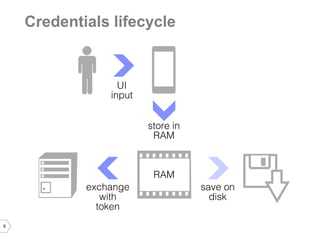
Credentials lifecycle
7 
UI and memory 
•Secure text entry 
•Dump memory with GDB and Jailbreak
8 
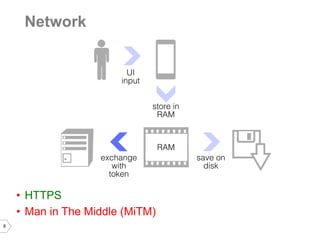
Network 
•HTTPS 
•Man in The Middle (MiTM)
9 
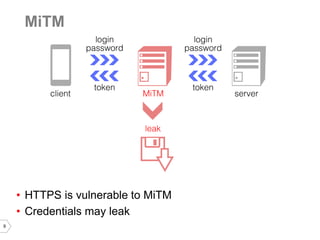
MiTM 
•HTTPS is vulnerable to MiTM 
•Credentials may leak
10 
SSL Pinning 
•Protection against MiTM 
•Connection only to known server
11 
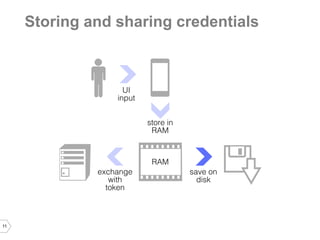
Storing and sharing credentials
12 
Storing credentials on disk 
•NSUserDefaults 
–Backup 
–Jailbreak 
–No ability to share between apps 
•NSFileManager 
–NSFileProtectionComplete 
–No passcode 
–Brute force 
–Jailbreak 
–No ability to share between apps 
•Keychain 
–Jailbreak 
–Sharing between apps of the vendor
13 
Keychain 
•Keychain is sqlite DB 
•/private/var/Keychains/keychain-2.db 
•Hardware specific key encryption 
•Key is unique per device
14 
Keychain is vulnerable 
•Physical access 
•Jailbreak 
•Connect over ssh 
•Copy and run keychain_dumper 
•Examine all of the keychain data 
More info here: http://www.securitylearn.net/tag/dump-passwords- from-iphone-keychain/
Keychain allows to share credentials 
Access group
Sharing with keychain 
•Same access group in entitlements 
•$(AppIdentifierPrefix) is the first part of group ID 
•$(AppIdentifierPrefix) may be retrieved programmatically by getting or adding any item in keychain
Options to store credentials 
•No credentials storage 
•Store authorization token 
•Store passwords in keychain 
•Store x-token in keychain
No credentials storage 
•User enters credentials each launch 
•Secure 
•No credentials storage
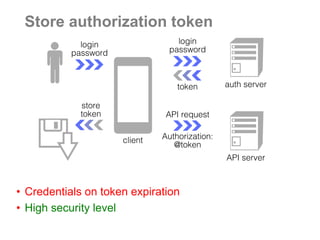
Store authorization token 
•Credentials on token expiration 
•High security level
Store passwords in keychain 
•User enters credentials only once 
•Common approach 
•Low security level
Store x-token in keychain 
•User enters credentials only once 
•High security level
Store x-token in keychain 
•Can be used by other apps
X-Token and credentials sharing 
•Password is exchanged with x-token. 
•Each app saves x-token to keychain. 
•Secure. Password is not stored on device. 
•Sharing between apps. 
•Each app can exchange it for token with special permissions.
Credentials and Safari 
?
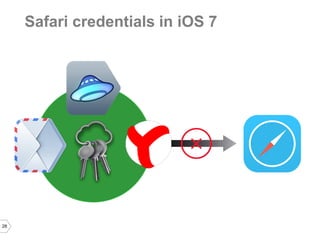
Safari credentials in iOS 7
Safari credentials in iOS 7 
•Saves passwords 
•No access to keychain data 
•No access to cookies
28 
Safari credentials in iOS 7
WWDC 2014 topics of interest 
•Shared web credentials API in Safari 
session 506: Your App, Your Website, and Safari 
•Support of actions by Safari 
session 217: Creating Extensions for iOS and OS X, Part Two
31 
Safari credentials in iOS 8
32 
Sharing credentials with Safari, iOS 8 
Shared web credentials API: 
•Direct export to app 
•Direct import from app 
Actions support: 
•Indirect import to Safari 
•Indirect export from Safari 
•Support of specific credentials
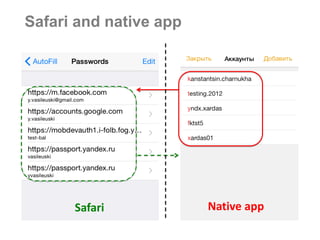
Safari and native app 
Safari 
Native app
34 
Safari shared web credentials
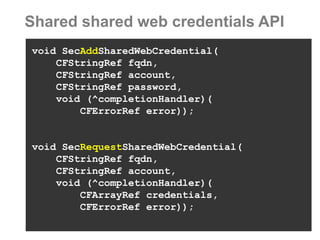
Shared shared web credentials API 
void SecAddSharedWebCredential( 
CFStringRef fqdn, 
CFStringRef account, 
CFStringRef password, 
void (^completionHandler)( 
CFErrorRef error)); 
void SecRequestSharedWebCredential( 
CFStringRef fqdn, 
CFStringRef account, 
void (^completionHandler)( 
CFArrayRef credentials, 
CFErrorRef error));
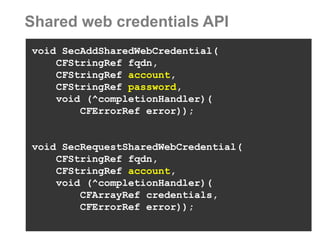
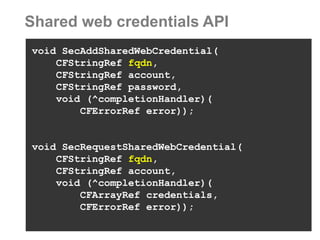
Shared web credentials API 
void SecAddSharedWebCredential( 
CFStringRef fqdn, 
CFStringRef account, 
CFStringRef password, 
void (^completionHandler)( 
CFErrorRef error)); 
void SecRequestSharedWebCredential( 
CFStringRef fqdn, 
CFStringRef account, 
void (^completionHandler)( 
CFArrayRef credentials, 
CFErrorRef error));
Account and password 
•Raw credentials 
•Easy to use and understand 
•Easy to import from Safari to any app 
•Difficult to export from “token-based” app to Safari
Shared web credentials API 
void SecAddSharedWebCredential( 
CFStringRef fqdn, 
CFStringRef account, 
CFStringRef password, 
void (^completionHandler)( 
CFErrorRef error)); 
void SecRequestSharedWebCredential( 
CFStringRef fqdn, 
CFStringRef account, 
void (^completionHandler)( 
CFArrayRef credentials, 
CFErrorRef error));
fqdn or Fully qualified domain name 
@function SecRequestSharedWebCredential 
@param fqdn (Optional) Fully qualified domain name of the website for which passwords are being requested. If NULL is passed in this argument, the domain name(s) listed in the calling application's 'com.apple.developer.associated-domains' entitlement are searched implicitly.
Associated domains 
Domains are listed at Safari AutoFill Settings.
41 
Safari and native app 
Safari 
Native app
42 
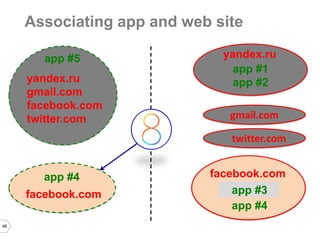
Associating app and web site 
app #5 
yandex.ru 
gmail.com 
facebook.com 
twitter.com 
app #4 
facebook.com
43 
Associating app and web site 
app #5 
yandex.ru 
gmail.com 
facebook.com 
twitter.com 
app #4 
facebook.com
44 
Associating app and web site 
app #5 
yandex.ru 
gmail.com 
facebook.com 
twitter.com 
yandex.ru 
app #1 
app #2 
facebook.com 
app #4 
facebook.com 
https://domain/apple-app-site-association 
gmail.com 
twitter.com 
app #3 
app #4
45 
Associating app and web site 
app #5 
yandex.ru 
gmail.com 
facebook.com 
twitter.com 
yandex.ru 
app #1 
app #2 
facebook.com 
app #3 
app #4 
facebook.com 
gmail.com 
twitter.com 
app #4
46 
Associating app and web site 
app #5 
yandex.ru 
gmail.com 
facebook.com 
twitter.com 
yandex.ru 
app #1 
app #2 
facebook.com 
app #3 
app #4 
facebook.com 
gmail.com 
twitter.com 
app #4
Test server setup with node.js 
// missing node.js common setup 
app.all('/apple-app-site-association', function(req, res, next) { 
res.setHeader('Content-Type', 'application/pkcs7-mime'); 
next(); 
}); 
var PORT = 8000; 
var HOST = ’test.host.on.private.network.net'; 
var sshKey = fs.readFileSync('./certs/key.pem'); 
var sshCert = fs.readFileSync('./certs/cert.pem') 
var https_options = {key: sshKey, cert: sshCert}; 
https.createServer(https_options, app).listen(PORT, HOST);
Test server setup with node.js 
// missing node.js common setup 
app.all('/apple-app-site-association', function(req, res, next) { 
res.setHeader('Content-Type', 'application/pkcs7-mime'); 
next(); 
}); 
var PORT = 8000; 
var HOST = ’test.host.on.private.network.net'; 
var sshKey = fs.readFileSync('./certs/key.pem'); 
var sshCert = fs.readFileSync('./certs/cert.pem') 
var https_options = {key: sshKey, cert: sshCert}; 
https.createServer(https_options, app).listen(PORT, HOST);
49 
Notes on server setup 
•Certificate is verified by iOS itself 
•Not available on simulator 
•No way to use self-signed certificate 
•Self-installed certificates impacts Safari, but not verification process 
•Provide certificate signed by iOS trusted CA 
•Use static domains, no local IPs. 
•Apply to multiple domains
50 
•Multiple app prefixes (AppStore, AdHoc, Debug) 
•Multiple bundles (AppStore, inhouse) 
•Different certificates for every domain 
// apps.json content 
{"webcredentials":{"apps":["APPSTORE_PREFIX.ru.yandex.app1", "APPSTORE_PREFIX.ru.yandex.app2"]}} 
cat apps.json | openssl smime -sign –inkey certs/key.pem – signer certs/cert.pem -noattr -nodetach -outform DER > apple- app-site-association 
apple-app-site-association
User control and credential access
52 
Usage drawbacks 
1.User-side security but poor user experience 
2.User asked on every single credential access 
3.No method to check account existence 
4.Difficult to sync account addition and removal
53 
Actions and Safari
54 
Actions 
Action is an extension point that helps users to manipulate or view content within the context of another app, e.g. transforming DOM within Safari.
55 
Empty login page within Safari
56 
Safari actions bar
57 
Custom actions within Safari
58 
•UIActivityViewController 
•NSURL 
NSString *stringURL = @"https://yandex.ru"; 
NSURL *pageURL = [NSURL URLWithString:stringURL]; 
UIActivityViewController *activityVC = [[UIActivityViewController alloc] 
initWithActivityItems:@[pageURL, stringURL] 
applicationActivities:nil]; 
[mainVC presentViewController:activityVC 
animated:YES 
completion:nil]; 
Displaying activities within Safari
59 
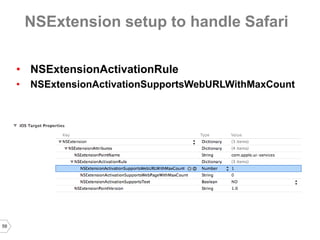
NSExtension setup to handle Safari 
•NSExtensionActivationRule 
•NSExtensionActivationSupportsWebURLWithMaxCount
Native app keychain credentials
61 
Completed login page
62 
NSExtension setup to access DOM 
•NSExtensionAttributes 
•NSExtensionJavaScriptPreprocessingFile
63 
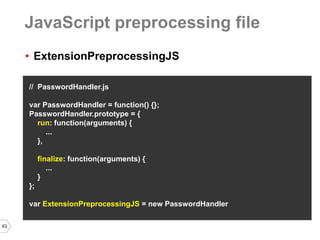
•ExtensionPreprocessingJS 
// PasswordHandler.js 
var PasswordHandler = function() {}; 
PasswordHandler.prototype = { 
run: function(arguments) { 
... 
}, 
finalize: function(arguments) { 
... 
} 
}; 
var ExtensionPreprocessingJS = new PasswordHandler 
JavaScript preprocessing file
64 
run: function(arguments) { 
var loginInput = document.getElementsByName("login")[0] 
var loginInputText = loginInput.value 
var passwdInput = document.getElementsByName("passwd")[0] 
var passwdInputText = passwdInput.value 
arguments.completionFunction({ 
”login" : loginInputText, ”passwd" : passwdInputText}) 
} 
finalize: function(arguments) { 
var loginInput = document.getElementsByName("login")[0] 
var loginInputText = arguments["login"] 
loginInput.value = loginInputText; 
var passwdInput = document.getElementsByName("passwd")[0] 
var passwdInputText = arguments["passwd"] 
passwdInput.value = passwdInputText 
} 
Getting values from DOM
65 
run: function(arguments) { 
var loginInput = document.getElementsByName("login")[0] 
var loginInputText = loginInput.value 
var passwdInput = document.getElementsByName("passwd")[0] 
var passwdInputText = passwdInput.value 
arguments.completionFunction({ 
”login" : loginInputText, ”passwd" : passwdInputText}) 
} 
finalize: function(arguments) { 
var loginInput = document.getElementsByName("login")[0] 
var loginInputText = arguments["login"] 
loginInput.value = loginInputText; 
var passwdInput = document.getElementsByName("passwd")[0] 
var passwdInputText = arguments["passwd"] 
passwdInput.value = passwdInputText 
} 
Getting values from DOM
66 
•NSExtensionJavaScriptFinalizeArgumentKey 
•kUTTypePropertyList 
NSDictionary *js = 
@{NSExtensionJavaScriptFinalizeArgumentKey: 
@{@"login" : self.login, @"passwd": self.passwd}}; 
NSItemProvider *pItem = [[NSItemProvider alloc] 
initWithItem:js 
typeIdentifier:(NSString *)kUTTypePropertyList]; 
NSExtensionItem *eItem = [[NSExtensionItem alloc] init]; 
eItem.attachments = @[providerItem]; 
[self.extensionContext 
completeRequestReturningItems:@[eItem] 
completionHandler:nil]; 
Setting values to DOM
Differences 
Pros: 
•No server setup by default 
•Custom credentials support 
•Any browser and web view support 
Cons: 
•Not available on device by default 
•More difficult to implement on client side 
•No server side control by default 
•Security is developer responsibility
Summary 
•Credentials 
•Sharing credentials and iOS 7 
•Sharing credentials and iOS 8
Kanstantsin Charnukha, 
xardas@yandex-team.ru 
iOS authorization development team 
Thanks 
Yury Vasileuski, 
vasileuski@yandex-team.ru
Обмен учетными данными между iOS 8 приложениями и вебом, Константин Чернухо, Юрий Василевский

Обмен учетными данными между iOS 8 приложениями и вебом, Константин Чернухо, Юрий Василевский

  • 2.
    Kanstantsin Charnukha, YuryVasileuski Sharing credentials between native apps and Safari Mobile Camp, 2 August, 2014 iOS authorization development team
  • 3.
    Content Credentials Sharingcredentials and iOS 7 Sharing credentials and iOS 8
  • 5.
  • 6.
  • 7.
    7 UI andmemory •Secure text entry •Dump memory with GDB and Jailbreak
  • 8.
    8 Network •HTTPS •Man in The Middle (MiTM)
  • 9.
    9 MiTM •HTTPSis vulnerable to MiTM •Credentials may leak
  • 10.
    10 SSL Pinning •Protection against MiTM •Connection only to known server
  • 11.
    11 Storing andsharing credentials
  • 12.
    12 Storing credentialson disk •NSUserDefaults –Backup –Jailbreak –No ability to share between apps •NSFileManager –NSFileProtectionComplete –No passcode –Brute force –Jailbreak –No ability to share between apps •Keychain –Jailbreak –Sharing between apps of the vendor
  • 13.
    13 Keychain •Keychainis sqlite DB •/private/var/Keychains/keychain-2.db •Hardware specific key encryption •Key is unique per device
  • 14.
    14 Keychain isvulnerable •Physical access •Jailbreak •Connect over ssh •Copy and run keychain_dumper •Examine all of the keychain data More info here: http://www.securitylearn.net/tag/dump-passwords- from-iphone-keychain/
  • 16.
    Keychain allows toshare credentials Access group
  • 17.
    Sharing with keychain •Same access group in entitlements •$(AppIdentifierPrefix) is the first part of group ID •$(AppIdentifierPrefix) may be retrieved programmatically by getting or adding any item in keychain
  • 18.
    Options to storecredentials •No credentials storage •Store authorization token •Store passwords in keychain •Store x-token in keychain
  • 19.
    No credentials storage •User enters credentials each launch •Secure •No credentials storage
  • 20.
    Store authorization token •Credentials on token expiration •High security level
  • 21.
    Store passwords inkeychain •User enters credentials only once •Common approach •Low security level
  • 22.
    Store x-token inkeychain •User enters credentials only once •High security level
  • 23.
    Store x-token inkeychain •Can be used by other apps
  • 24.
    X-Token and credentialssharing •Password is exchanged with x-token. •Each app saves x-token to keychain. •Secure. Password is not stored on device. •Sharing between apps. •Each app can exchange it for token with special permissions.
  • 25.
  • 26.
  • 27.
    Safari credentials iniOS 7 •Saves passwords •No access to keychain data •No access to cookies
  • 28.
  • 30.
    WWDC 2014 topicsof interest •Shared web credentials API in Safari session 506: Your App, Your Website, and Safari •Support of actions by Safari session 217: Creating Extensions for iOS and OS X, Part Two
  • 31.
  • 32.
    32 Sharing credentialswith Safari, iOS 8 Shared web credentials API: •Direct export to app •Direct import from app Actions support: •Indirect import to Safari •Indirect export from Safari •Support of specific credentials
  • 33.
    Safari and nativeapp Safari Native app
  • 34.
    34 Safari sharedweb credentials
  • 35.
    Shared shared webcredentials API void SecAddSharedWebCredential( CFStringRef fqdn, CFStringRef account, CFStringRef password, void (^completionHandler)( CFErrorRef error)); void SecRequestSharedWebCredential( CFStringRef fqdn, CFStringRef account, void (^completionHandler)( CFArrayRef credentials, CFErrorRef error));
  • 36.
    Shared web credentialsAPI void SecAddSharedWebCredential( CFStringRef fqdn, CFStringRef account, CFStringRef password, void (^completionHandler)( CFErrorRef error)); void SecRequestSharedWebCredential( CFStringRef fqdn, CFStringRef account, void (^completionHandler)( CFArrayRef credentials, CFErrorRef error));
  • 37.
    Account and password •Raw credentials •Easy to use and understand •Easy to import from Safari to any app •Difficult to export from “token-based” app to Safari
  • 38.
    Shared web credentialsAPI void SecAddSharedWebCredential( CFStringRef fqdn, CFStringRef account, CFStringRef password, void (^completionHandler)( CFErrorRef error)); void SecRequestSharedWebCredential( CFStringRef fqdn, CFStringRef account, void (^completionHandler)( CFArrayRef credentials, CFErrorRef error));
  • 39.
    fqdn or Fullyqualified domain name @function SecRequestSharedWebCredential @param fqdn (Optional) Fully qualified domain name of the website for which passwords are being requested. If NULL is passed in this argument, the domain name(s) listed in the calling application's 'com.apple.developer.associated-domains' entitlement are searched implicitly.
  • 40.
    Associated domains Domainsare listed at Safari AutoFill Settings.
  • 41.
    41 Safari andnative app Safari Native app
  • 42.
    42 Associating appand web site app #5 yandex.ru gmail.com facebook.com twitter.com app #4 facebook.com
  • 43.
    43 Associating appand web site app #5 yandex.ru gmail.com facebook.com twitter.com app #4 facebook.com
  • 44.
    44 Associating appand web site app #5 yandex.ru gmail.com facebook.com twitter.com yandex.ru app #1 app #2 facebook.com app #4 facebook.com https://domain/apple-app-site-association gmail.com twitter.com app #3 app #4
  • 45.
    45 Associating appand web site app #5 yandex.ru gmail.com facebook.com twitter.com yandex.ru app #1 app #2 facebook.com app #3 app #4 facebook.com gmail.com twitter.com app #4
  • 46.
    46 Associating appand web site app #5 yandex.ru gmail.com facebook.com twitter.com yandex.ru app #1 app #2 facebook.com app #3 app #4 facebook.com gmail.com twitter.com app #4
  • 47.
    Test server setupwith node.js // missing node.js common setup app.all('/apple-app-site-association', function(req, res, next) { res.setHeader('Content-Type', 'application/pkcs7-mime'); next(); }); var PORT = 8000; var HOST = ’test.host.on.private.network.net'; var sshKey = fs.readFileSync('./certs/key.pem'); var sshCert = fs.readFileSync('./certs/cert.pem') var https_options = {key: sshKey, cert: sshCert}; https.createServer(https_options, app).listen(PORT, HOST);
  • 48.
    Test server setupwith node.js // missing node.js common setup app.all('/apple-app-site-association', function(req, res, next) { res.setHeader('Content-Type', 'application/pkcs7-mime'); next(); }); var PORT = 8000; var HOST = ’test.host.on.private.network.net'; var sshKey = fs.readFileSync('./certs/key.pem'); var sshCert = fs.readFileSync('./certs/cert.pem') var https_options = {key: sshKey, cert: sshCert}; https.createServer(https_options, app).listen(PORT, HOST);
  • 49.
    49 Notes onserver setup •Certificate is verified by iOS itself •Not available on simulator •No way to use self-signed certificate •Self-installed certificates impacts Safari, but not verification process •Provide certificate signed by iOS trusted CA •Use static domains, no local IPs. •Apply to multiple domains
  • 50.
    50 •Multiple appprefixes (AppStore, AdHoc, Debug) •Multiple bundles (AppStore, inhouse) •Different certificates for every domain // apps.json content {"webcredentials":{"apps":["APPSTORE_PREFIX.ru.yandex.app1", "APPSTORE_PREFIX.ru.yandex.app2"]}} cat apps.json | openssl smime -sign –inkey certs/key.pem – signer certs/cert.pem -noattr -nodetach -outform DER > apple- app-site-association apple-app-site-association
  • 51.
    User control andcredential access
  • 52.
    52 Usage drawbacks 1.User-side security but poor user experience 2.User asked on every single credential access 3.No method to check account existence 4.Difficult to sync account addition and removal
  • 53.
  • 54.
    54 Actions Actionis an extension point that helps users to manipulate or view content within the context of another app, e.g. transforming DOM within Safari.
  • 55.
    55 Empty loginpage within Safari
  • 56.
  • 57.
    57 Custom actionswithin Safari
  • 58.
    58 •UIActivityViewController •NSURL NSString *stringURL = @"https://yandex.ru"; NSURL *pageURL = [NSURL URLWithString:stringURL]; UIActivityViewController *activityVC = [[UIActivityViewController alloc] initWithActivityItems:@[pageURL, stringURL] applicationActivities:nil]; [mainVC presentViewController:activityVC animated:YES completion:nil]; Displaying activities within Safari
  • 59.
    59 NSExtension setupto handle Safari •NSExtensionActivationRule •NSExtensionActivationSupportsWebURLWithMaxCount
  • 60.
  • 61.
  • 62.
    62 NSExtension setupto access DOM •NSExtensionAttributes •NSExtensionJavaScriptPreprocessingFile
  • 63.
    63 •ExtensionPreprocessingJS //PasswordHandler.js var PasswordHandler = function() {}; PasswordHandler.prototype = { run: function(arguments) { ... }, finalize: function(arguments) { ... } }; var ExtensionPreprocessingJS = new PasswordHandler JavaScript preprocessing file
  • 64.
    64 run: function(arguments){ var loginInput = document.getElementsByName("login")[0] var loginInputText = loginInput.value var passwdInput = document.getElementsByName("passwd")[0] var passwdInputText = passwdInput.value arguments.completionFunction({ ”login" : loginInputText, ”passwd" : passwdInputText}) } finalize: function(arguments) { var loginInput = document.getElementsByName("login")[0] var loginInputText = arguments["login"] loginInput.value = loginInputText; var passwdInput = document.getElementsByName("passwd")[0] var passwdInputText = arguments["passwd"] passwdInput.value = passwdInputText } Getting values from DOM
  • 65.
    65 run: function(arguments){ var loginInput = document.getElementsByName("login")[0] var loginInputText = loginInput.value var passwdInput = document.getElementsByName("passwd")[0] var passwdInputText = passwdInput.value arguments.completionFunction({ ”login" : loginInputText, ”passwd" : passwdInputText}) } finalize: function(arguments) { var loginInput = document.getElementsByName("login")[0] var loginInputText = arguments["login"] loginInput.value = loginInputText; var passwdInput = document.getElementsByName("passwd")[0] var passwdInputText = arguments["passwd"] passwdInput.value = passwdInputText } Getting values from DOM
  • 66.
    66 •NSExtensionJavaScriptFinalizeArgumentKey •kUTTypePropertyList NSDictionary *js = @{NSExtensionJavaScriptFinalizeArgumentKey: @{@"login" : self.login, @"passwd": self.passwd}}; NSItemProvider *pItem = [[NSItemProvider alloc] initWithItem:js typeIdentifier:(NSString *)kUTTypePropertyList]; NSExtensionItem *eItem = [[NSExtensionItem alloc] init]; eItem.attachments = @[providerItem]; [self.extensionContext completeRequestReturningItems:@[eItem] completionHandler:nil]; Setting values to DOM
  • 67.
    Differences Pros: •Noserver setup by default •Custom credentials support •Any browser and web view support Cons: •Not available on device by default •More difficult to implement on client side •No server side control by default •Security is developer responsibility
  • 68.
    Summary •Credentials •Sharingcredentials and iOS 7 •Sharing credentials and iOS 8
  • 69.
    Kanstantsin Charnukha, xardas@yandex-team.ru iOS authorization development team Thanks Yury Vasileuski, vasileuski@yandex-team.ru