DBACCESS RESEARCH
2016/6/3
HappyMan
DBACCESS IOS ORM
• [DBAccess] is a fully featured and FREE to use ORM for iOS.
• Replace CoreData whilst keeping your existing managed objects, but dump the
predicates and long-winded syntax.
• Instead use a simple and clean object syntax, with fast and concise inline
queries.
• DBAccess even has a conversion method to migrate your existing CoreData
tables across.
• Regularly updated and in constant use within many public applications it thrives
on feedback from other developers and is supported by the authors via
StackOverflow or directly via email.
• It's mantra is simple, to be fast, simple to implement and the first choice for any
WHY SHOULD I USE
[DBACCESS] ?
• An ORM should not be a chore to work with,
or require you to change your way of working
to compensate for its shortcomings. With
[DBAccess] you simply add it to your project
and start using it straight away.
WHY SHOULD I USE
[DBACCESS] ?
• The developer has full control over how the
ORM operates, deciding where it puts its
files, how queries are performed and on
which thread. Objects can be managed or
unmanaged, whilst being members of
domains which may share changes or be
isolated from them.
WHY SHOULD I USE
[DBACCESS] ?
• If memory is a concern, you can mix and
match lightweight objects to preserve system
resources when you are expecting large
result sets, or retrieve only the properties
you need with the remainder being lazily
loaded when accessed.
HEADLINE FEATURES
• Automatic modeling and upgrading from your class structures.
• Amazingly simple FLUENT interface for dealing with the ORM
• KILLER event model, for individual objects or tables. Makes coding apps a breeze
• Inline or Async queries
• Transaction support
• Managed and unmanaged objects supported to be used however you want
• Relationships mirror your class structures automatically, and all relationships are
automatically indexed
• Property level encryption so databases remain human readable whilst securing
individual columns.
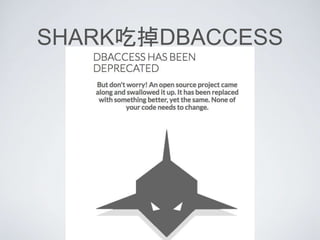
SHARK吃掉DBACCESS
參考文件轉移
• http://www.db-access.org/
• http://sharkorm.com/
• Fast, Fluid, Effective
an open source iOS ORM, designed from the
start to be low maintenance and natural to use,
developers choose shark for its power and
simplicity.
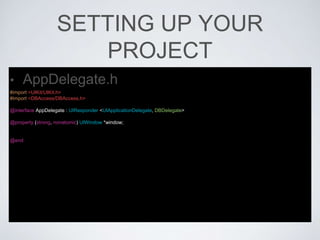
SETTING UP YOUR
PROJECT
• AppDelegate.h
#import <UIKit/UIKit.h>
#import <DBAccess/DBAccess.h>
@interface AppDelegate : UIResponder <UIApplicationDelegate, DBDelegate>
@property (strong, nonatomic) UIWindow *window;
@end
SETTING UP YOUR
PROJECT
• AppDelegate.m
#import "AppDelegate.h"
@interface AppDelegate ()
@end
@implementation AppDelegate
- (BOOL)application:(UIApplication *)application didFinishLaunchingWithOptions:(NSDictionary *)launchOptions {
[DBAccess setDelegate:self];
[DBAccess openDatabaseNamed:@"happyDatabase"];
return YES;
}
@end
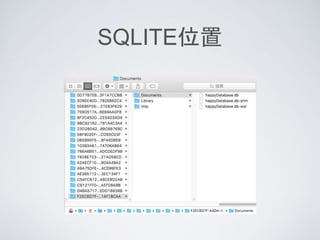
SQLITE位置
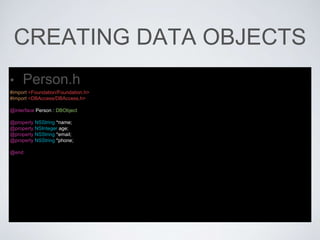
CREATING DATA OBJECTS
• Person.h
#import <Foundation/Foundation.h>
#import <DBAccess/DBAccess.h>
@interface Person : DBObject
@property NSString *name;
@property NSInteger age;
@property NSString *email;
@property NSString *phone;
@end
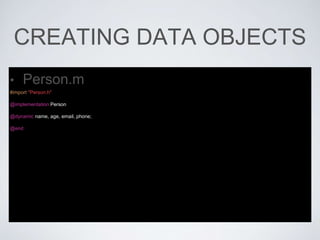
CREATING DATA OBJECTS
• Person.m
#import "Person.h"
@implementation Person
@dynamic name, age, email, phone;
@end
CREATING OBJECTS,
SETTING VALUES &
PERSISTANCE-(void)createData
{
// Create a new object
Person *thisPerson = [Person new];
// Set some properties
thisPerson.age = 27;
thisPerson.email = @"happyboy@gmail.com";
thisPerson.name = @"HappyBoy";
thisPerson.phone = @"0987654321";
// Persist the object into the datastore
[thisPerson commit];
// Create a new object
Person *thatPerson = [Person new];
// Set some properties
thatPerson.age = 11;
thatPerson.email = @"happygirl@gmail.com";
thatPerson.name = @"HappyGirl";
thatPerson.phone = @"0912345678";
// Persist the object into the datastore
[thatPerson commit];
}
QUERYING OBJECTS
-(void)fetchData
{
DBResultSet *results = [[[[[Person query]
where:@"age <= 40"]
limit:99]
orderBy:@"name"]
fetch];
for (Person *person in results) {
NSString *result = [NSString stringWithFormat:@"name: %@, age: %li, email: %@", person.name, (long)person.age,
person.email];
NSLog(@"%@", result);
}
displayTV.text = [[results description] stringByReplacingOccurrencesOfString:@"n" withString:@"n"];
}
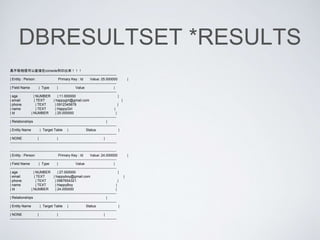
DBRESULTSET *RESULTS
真不敢相信可以直接在console列印出來!!!
-------------------------------------------------------------------------------------------
| Entity : Person Primary Key : Id Value: 25.000000 |
-------------------------------------------------------------------------------------------
| Field Name | Type | Value |
-------------------------------------------------------------------------------------------
| age | NUMBER | 11.000000 |
| email | TEXT | happygirl@gmail.com |
| phone | TEXT | 0912345678 |
| name | TEXT | HappyGirl |
| Id | NUMBER | 25.000000 |
-------------------------------------------------------------------------------------------
| Relationships |
-------------------------------------------------------------------------------------------
| Entity Name | Target Table | Status |
-------------------------------------------------------------------------------------------
| NONE | | |
-------------------------------------------------------------------------------------------
-------------------------------------------------------------------------------------------
| Entity : Person Primary Key : Id Value: 24.000000 |
-------------------------------------------------------------------------------------------
| Field Name | Type | Value |
-------------------------------------------------------------------------------------------
| age | NUMBER | 27.000000 |
| email | TEXT | happyboy@gmail.com |
| phone | TEXT | 0987654321 |
| name | TEXT | HappyBoy |
| Id | NUMBER | 24.000000 |
-------------------------------------------------------------------------------------------
| Relationships |
-------------------------------------------------------------------------------------------
| Entity Name | Target Table | Status |
-------------------------------------------------------------------------------------------
| NONE | | |
-------------------------------------------------------------------------------------------
REMOVING OBJECTS
-(void)removeData
{
for (Person* person in [[Person query] fetch]) {
[person remove];
}
// or the shorthand is to use the removeAll method on the DBResultSet object
[[[Person query] fetch] removeAll];
}
OTHER TYPES OF QUERY
-(void)queryData
{
/* count the rows within the Person table */
int count = [[Person query] count];
/* add all of the ages together */
double total = [[Person query] sumOf:@"age"];
/* group all the people together by the surname property */
NSDictionary *peopleBySurname = [[Person query] groupBy:@"name"];
/* get just the primary keys for a query, useful to save memory */
NSArray *ids = [[Person query] ids];
}
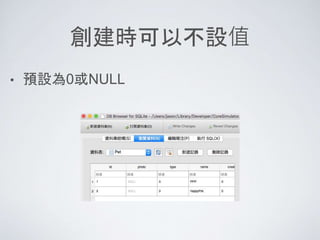
創建時可以不設值
• 預設為0或NULL
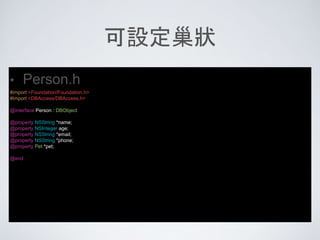
可設定巢狀
• Person.h
#import <Foundation/Foundation.h>
#import <DBAccess/DBAccess.h>
@interface Person : DBObject
@property NSString *name;
@property NSInteger age;
@property NSString *email;
@property NSString *phone;
@property Pet *pet;
@end
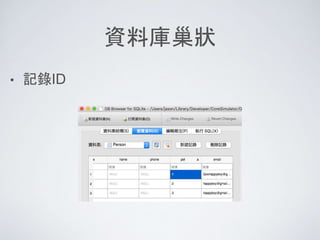
資料庫巢狀
• 記錄ID
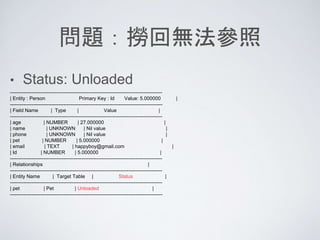
問題:撈回無法參照
• Status: Unloaded
-------------------------------------------------------------------------------------------
| Entity : Person Primary Key : Id Value: 5.000000 |
-------------------------------------------------------------------------------------------
| Field Name | Type | Value |
-------------------------------------------------------------------------------------------
| age | NUMBER | 27.000000 |
| name | UNKNOWN | Nil value |
| phone | UNKNOWN | Nil value |
| pet | NUMBER | 5.000000 |
| email | TEXT | happyboy@gmail.com |
| Id | NUMBER | 5.000000 |
-------------------------------------------------------------------------------------------
| Relationships |
-------------------------------------------------------------------------------------------
| Entity Name | Target Table | Status |
-------------------------------------------------------------------------------------------
| pet | Pet | Unloaded |
-------------------------------------------------------------------------------------------
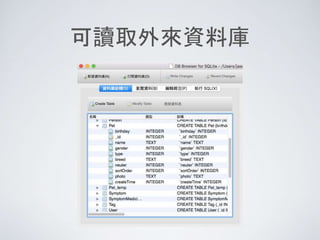
可讀取外來資料庫
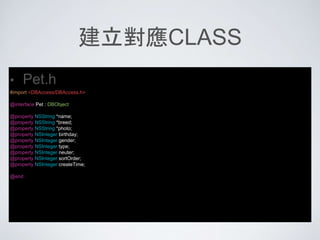
建立對應CLASS
• Pet.h
#import <DBAccess/DBAccess.h>
@interface Pet : DBObject
@property NSString *name;
@property NSString *breed;
@property NSString *photo;
@property NSInteger birthday;
@property NSInteger gender;
@property NSInteger type;
@property NSInteger neuter;
@property NSInteger sortOrder;
@property NSInteger createTime;
@end
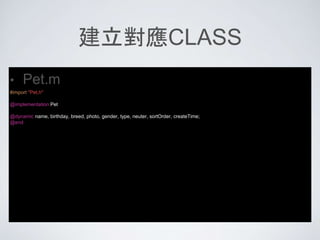
建立對應CLASS
• Pet.m
#import "Pet.h"
@implementation Pet
@dynamic name, birthday, breed, photo, gender, type, neuter, sortOrder, createTime;
@end
取得顯示
for (Pet *pet in [[Pet query] fetch]) {
NSString *result = [NSString stringWithFormat:@"name: %@, birthday: %li, photo: %@", pet.name, (long)pet.birthday, pet.photo];
NSLog(@"%@", result);
}
• name: happyPet, birthday: 0, photo: (null)
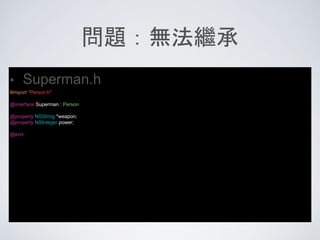
問題:無法繼承
• Superman.h
#import "Person.h"
@interface Superman : Person
@property NSString *weapon;
@property NSInteger power;
@end
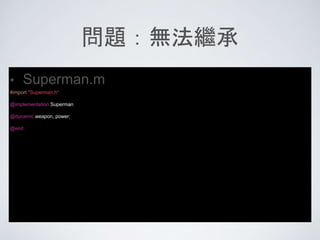
問題:無法繼承
• Superman.m
#import "Superman.h"
@implementation Superman
@dynamic weapon, power;
@end
問題:無法繼承
• 編譯時沒事,執行時掛掉
• Terminating app due to uncaught exception
'NSInvalidArgumentException', reason: '***
setObjectForKey: key cannot be nil’
Superman *thisSuperman = [Superman new];
// Set some properties
thisSuperman.age = 27;
thisSuperman.email = @"QQQhappyboy@gmail.com";
thisSuperman.pet = thisPet;
thisSuperman.power = 99;
[thisSuperman commit];
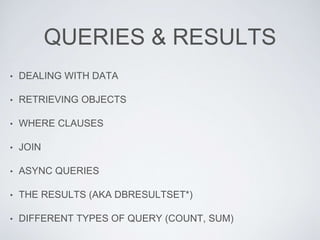
QUERIES & RESULTS
• DEALING WITH DATA
• RETRIEVING OBJECTS
• WHERE CLAUSES
• JOIN
• ASYNC QUERIES
• THE RESULTS (AKA DBRESULTSET*)
• DIFFERENT TYPES OF QUERY (COUNT, SUM)
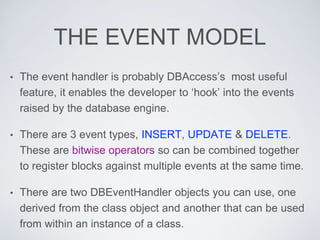
THE EVENT MODEL
• The event handler is probably DBAccess’s most useful
feature, it enables the developer to ‘hook’ into the events
raised by the database engine.
• There are 3 event types, INSERT, UPDATE & DELETE.
These are bitwise operators so can be combined together
to register blocks against multiple events at the same time.
• There are two DBEventHandler objects you can use, one
derived from the class object and another that can be used
from within an instance of a class.
RELATIONSHIPS
• UNDERSTANDING HOW RELATIONSHIPS
WORK
• NESTED OBJECTS
• ONE TO MANY RELATIONSHIPS
TRANSACTIONS
• Transactions in DBAccess are handled using
a class method on DBTransaction,
transactions can be started from anywhere
at anytime, are entirely thread-safe. Any
modifications to records that are due to
event triggers being raised are also included
within the transaction and rolled back on
failure.
REFERENCE
• Cocoapods - DBAccess
https://cocoapods.org/pods/DBAccess
• Github - DBAccess
https://github.com/editfmah/DBAccess
• [DBAccess]
http://www.db-access.org/

DBAccess 研究

  • 1.
  • 2.
    DBACCESS IOS ORM •[DBAccess] is a fully featured and FREE to use ORM for iOS. • Replace CoreData whilst keeping your existing managed objects, but dump the predicates and long-winded syntax. • Instead use a simple and clean object syntax, with fast and concise inline queries. • DBAccess even has a conversion method to migrate your existing CoreData tables across. • Regularly updated and in constant use within many public applications it thrives on feedback from other developers and is supported by the authors via StackOverflow or directly via email. • It's mantra is simple, to be fast, simple to implement and the first choice for any
  • 3.
    WHY SHOULD IUSE [DBACCESS] ? • An ORM should not be a chore to work with, or require you to change your way of working to compensate for its shortcomings. With [DBAccess] you simply add it to your project and start using it straight away.
  • 4.
    WHY SHOULD IUSE [DBACCESS] ? • The developer has full control over how the ORM operates, deciding where it puts its files, how queries are performed and on which thread. Objects can be managed or unmanaged, whilst being members of domains which may share changes or be isolated from them.
  • 5.
    WHY SHOULD IUSE [DBACCESS] ? • If memory is a concern, you can mix and match lightweight objects to preserve system resources when you are expecting large result sets, or retrieve only the properties you need with the remainder being lazily loaded when accessed.
  • 6.
    HEADLINE FEATURES • Automaticmodeling and upgrading from your class structures. • Amazingly simple FLUENT interface for dealing with the ORM • KILLER event model, for individual objects or tables. Makes coding apps a breeze • Inline or Async queries • Transaction support • Managed and unmanaged objects supported to be used however you want • Relationships mirror your class structures automatically, and all relationships are automatically indexed • Property level encryption so databases remain human readable whilst securing individual columns.
  • 7.
  • 8.
    參考文件轉移 • http://www.db-access.org/ • http://sharkorm.com/ •Fast, Fluid, Effective an open source iOS ORM, designed from the start to be low maintenance and natural to use, developers choose shark for its power and simplicity.
  • 9.
    SETTING UP YOUR PROJECT •AppDelegate.h #import <UIKit/UIKit.h> #import <DBAccess/DBAccess.h> @interface AppDelegate : UIResponder <UIApplicationDelegate, DBDelegate> @property (strong, nonatomic) UIWindow *window; @end
  • 10.
    SETTING UP YOUR PROJECT •AppDelegate.m #import "AppDelegate.h" @interface AppDelegate () @end @implementation AppDelegate - (BOOL)application:(UIApplication *)application didFinishLaunchingWithOptions:(NSDictionary *)launchOptions { [DBAccess setDelegate:self]; [DBAccess openDatabaseNamed:@"happyDatabase"]; return YES; } @end
  • 11.
  • 12.
    CREATING DATA OBJECTS •Person.h #import <Foundation/Foundation.h> #import <DBAccess/DBAccess.h> @interface Person : DBObject @property NSString *name; @property NSInteger age; @property NSString *email; @property NSString *phone; @end
  • 13.
    CREATING DATA OBJECTS •Person.m #import "Person.h" @implementation Person @dynamic name, age, email, phone; @end
  • 14.
    CREATING OBJECTS, SETTING VALUES& PERSISTANCE-(void)createData { // Create a new object Person *thisPerson = [Person new]; // Set some properties thisPerson.age = 27; thisPerson.email = @"happyboy@gmail.com"; thisPerson.name = @"HappyBoy"; thisPerson.phone = @"0987654321"; // Persist the object into the datastore [thisPerson commit]; // Create a new object Person *thatPerson = [Person new]; // Set some properties thatPerson.age = 11; thatPerson.email = @"happygirl@gmail.com"; thatPerson.name = @"HappyGirl"; thatPerson.phone = @"0912345678"; // Persist the object into the datastore [thatPerson commit]; }
  • 15.
    QUERYING OBJECTS -(void)fetchData { DBResultSet *results= [[[[[Person query] where:@"age <= 40"] limit:99] orderBy:@"name"] fetch]; for (Person *person in results) { NSString *result = [NSString stringWithFormat:@"name: %@, age: %li, email: %@", person.name, (long)person.age, person.email]; NSLog(@"%@", result); } displayTV.text = [[results description] stringByReplacingOccurrencesOfString:@"n" withString:@"n"]; }
  • 16.
    DBRESULTSET *RESULTS 真不敢相信可以直接在console列印出來!!! ------------------------------------------------------------------------------------------- | Entity: Person Primary Key : Id Value: 25.000000 | ------------------------------------------------------------------------------------------- | Field Name | Type | Value | ------------------------------------------------------------------------------------------- | age | NUMBER | 11.000000 | | email | TEXT | happygirl@gmail.com | | phone | TEXT | 0912345678 | | name | TEXT | HappyGirl | | Id | NUMBER | 25.000000 | ------------------------------------------------------------------------------------------- | Relationships | ------------------------------------------------------------------------------------------- | Entity Name | Target Table | Status | ------------------------------------------------------------------------------------------- | NONE | | | ------------------------------------------------------------------------------------------- ------------------------------------------------------------------------------------------- | Entity : Person Primary Key : Id Value: 24.000000 | ------------------------------------------------------------------------------------------- | Field Name | Type | Value | ------------------------------------------------------------------------------------------- | age | NUMBER | 27.000000 | | email | TEXT | happyboy@gmail.com | | phone | TEXT | 0987654321 | | name | TEXT | HappyBoy | | Id | NUMBER | 24.000000 | ------------------------------------------------------------------------------------------- | Relationships | ------------------------------------------------------------------------------------------- | Entity Name | Target Table | Status | ------------------------------------------------------------------------------------------- | NONE | | | -------------------------------------------------------------------------------------------
  • 17.
    REMOVING OBJECTS -(void)removeData { for (Person*person in [[Person query] fetch]) { [person remove]; } // or the shorthand is to use the removeAll method on the DBResultSet object [[[Person query] fetch] removeAll]; }
  • 18.
    OTHER TYPES OFQUERY -(void)queryData { /* count the rows within the Person table */ int count = [[Person query] count]; /* add all of the ages together */ double total = [[Person query] sumOf:@"age"]; /* group all the people together by the surname property */ NSDictionary *peopleBySurname = [[Person query] groupBy:@"name"]; /* get just the primary keys for a query, useful to save memory */ NSArray *ids = [[Person query] ids]; }
  • 19.
  • 20.
    可設定巢狀 • Person.h #import <Foundation/Foundation.h> #import<DBAccess/DBAccess.h> @interface Person : DBObject @property NSString *name; @property NSInteger age; @property NSString *email; @property NSString *phone; @property Pet *pet; @end
  • 21.
  • 22.
    問題:撈回無法參照 • Status: Unloaded ------------------------------------------------------------------------------------------- |Entity : Person Primary Key : Id Value: 5.000000 | ------------------------------------------------------------------------------------------- | Field Name | Type | Value | ------------------------------------------------------------------------------------------- | age | NUMBER | 27.000000 | | name | UNKNOWN | Nil value | | phone | UNKNOWN | Nil value | | pet | NUMBER | 5.000000 | | email | TEXT | happyboy@gmail.com | | Id | NUMBER | 5.000000 | ------------------------------------------------------------------------------------------- | Relationships | ------------------------------------------------------------------------------------------- | Entity Name | Target Table | Status | ------------------------------------------------------------------------------------------- | pet | Pet | Unloaded | -------------------------------------------------------------------------------------------
  • 23.
  • 24.
    建立對應CLASS • Pet.h #import <DBAccess/DBAccess.h> @interfacePet : DBObject @property NSString *name; @property NSString *breed; @property NSString *photo; @property NSInteger birthday; @property NSInteger gender; @property NSInteger type; @property NSInteger neuter; @property NSInteger sortOrder; @property NSInteger createTime; @end
  • 25.
    建立對應CLASS • Pet.m #import "Pet.h" @implementationPet @dynamic name, birthday, breed, photo, gender, type, neuter, sortOrder, createTime; @end
  • 26.
    取得顯示 for (Pet *petin [[Pet query] fetch]) { NSString *result = [NSString stringWithFormat:@"name: %@, birthday: %li, photo: %@", pet.name, (long)pet.birthday, pet.photo]; NSLog(@"%@", result); } • name: happyPet, birthday: 0, photo: (null)
  • 27.
    問題:無法繼承 • Superman.h #import "Person.h" @interfaceSuperman : Person @property NSString *weapon; @property NSInteger power; @end
  • 28.
  • 29.
    問題:無法繼承 • 編譯時沒事,執行時掛掉 • Terminatingapp due to uncaught exception 'NSInvalidArgumentException', reason: '*** setObjectForKey: key cannot be nil’ Superman *thisSuperman = [Superman new]; // Set some properties thisSuperman.age = 27; thisSuperman.email = @"QQQhappyboy@gmail.com"; thisSuperman.pet = thisPet; thisSuperman.power = 99; [thisSuperman commit];
  • 30.
    QUERIES & RESULTS •DEALING WITH DATA • RETRIEVING OBJECTS • WHERE CLAUSES • JOIN • ASYNC QUERIES • THE RESULTS (AKA DBRESULTSET*) • DIFFERENT TYPES OF QUERY (COUNT, SUM)
  • 31.
    THE EVENT MODEL •The event handler is probably DBAccess’s most useful feature, it enables the developer to ‘hook’ into the events raised by the database engine. • There are 3 event types, INSERT, UPDATE & DELETE. These are bitwise operators so can be combined together to register blocks against multiple events at the same time. • There are two DBEventHandler objects you can use, one derived from the class object and another that can be used from within an instance of a class.
  • 32.
    RELATIONSHIPS • UNDERSTANDING HOWRELATIONSHIPS WORK • NESTED OBJECTS • ONE TO MANY RELATIONSHIPS
  • 33.
    TRANSACTIONS • Transactions inDBAccess are handled using a class method on DBTransaction, transactions can be started from anywhere at anytime, are entirely thread-safe. Any modifications to records that are due to event triggers being raised are also included within the transaction and rolled back on failure.
  • 34.
    REFERENCE • Cocoapods -DBAccess https://cocoapods.org/pods/DBAccess • Github - DBAccess https://github.com/editfmah/DBAccess • [DBAccess] http://www.db-access.org/